Published: April 10, 2026 | Updated: April 10, 2026
Seedance 2.0 Review: the best AI video generator of 2026 — or is it overhyped? After running dozens of generations, hitting content filters, and comparing it head-to-head against Sora 2, Google Veo 3.1, and Kling 3.0, here’s our honest verdict.
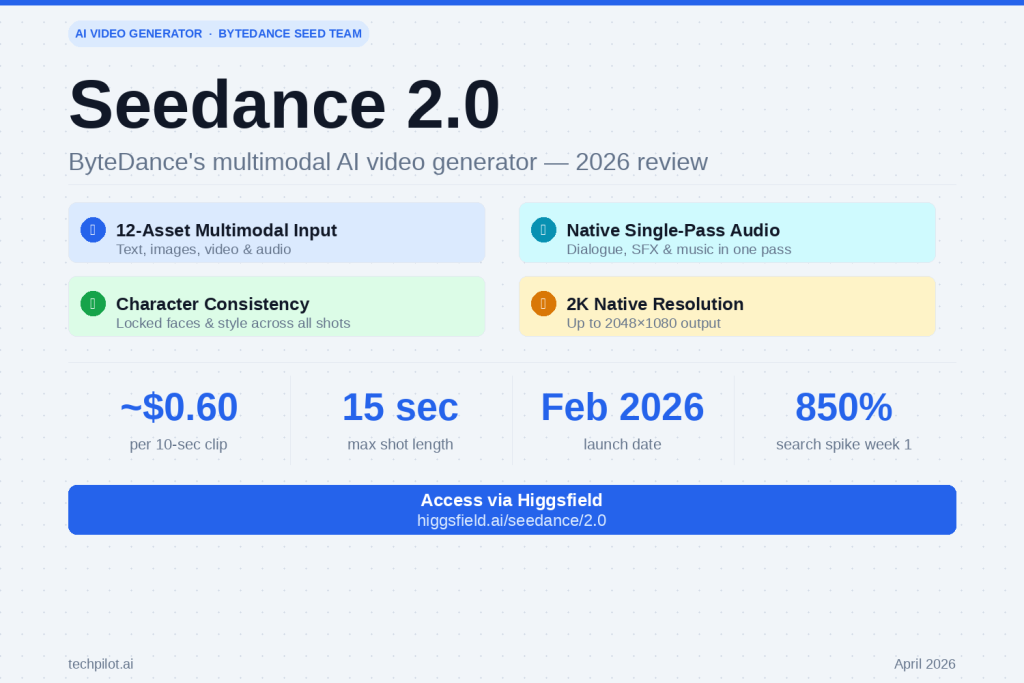
Seedance 2.0 launched on February 10, 2026 and immediately triggered an 850% spike in Google searches within the first week. ByteDance’s Seed research team built something genuinely different: a model that accepts up to 12 files simultaneously across text, images, video, and audio inputs. That’s not a feature tweak — it’s a different philosophy of how video generation should work.
But “different” doesn’t automatically mean “better for you.” Let’s break down exactly what Seedance 2.0 does well, where it falls short, and whether it’s worth your time in 2026.
What Is Seedance 2.0? The Key Idea in Plain English
Most AI video generators work the same way: you type a prompt, and the model invents a scene from scratch. Seedance 2.0 flips this. Instead of describing everything in words, you hand the model up to 12 reference assets — photos of your character, a clip of the background you want, an audio track, a style image — and it synthesizes them into a cohesive video that matches what you’ve given it.
ByteDance calls this “multimodal reference control.” In practice, it means the AI follows what you show it, not just what you describe. The difference in output quality is significant, especially for anyone who has struggled with getting consistent characters across multiple shots.
Core Specs
Feature
Detail
Input types
Text, image, video, audio (up to 12 files per generation)
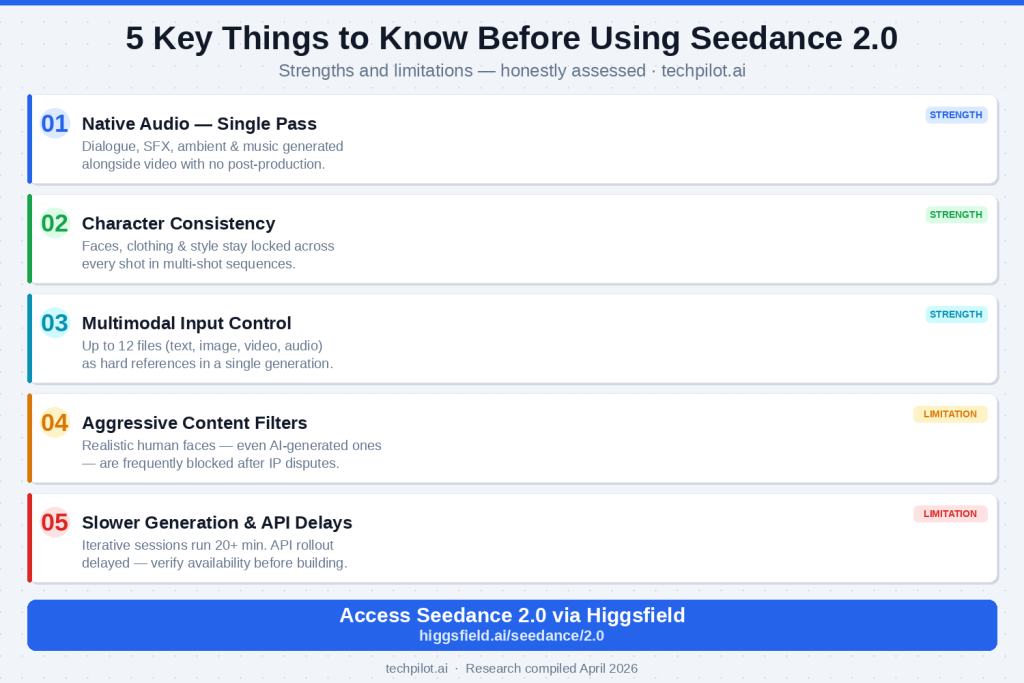
This is Seedance 2.0’s standout capability. Audio — synchronized dialogue with lip-sync, ambient soundscapes, and music — is generated alongside the video in a single pass. No stitching, no post-production patching.
Other 2026 models like Veo 3.1 and Kling 3.0 also offer audio generation, but Seedance 2.0’s single-pass approach produces notably more cohesive results: the music follows the narrative rhythm of the scene, sound effects feel spatially accurate, and dialogue timing syncs at a level that would have seemed impossible a year ago.
For consumers creating YouTube content, reels, or short films, this cuts an entire step out of the workflow.
2. Character Consistency Across Multiple Shots
Maintaining a consistent character appearance across cuts has been one of AI video’s hardest unsolved problems. Seedance 2.0 handles this better than any other model we tested at a comparable price point. Upload a reference image once; your character’s face, clothing, and visual style stay locked through every scene.
Practical tip: Use a clean, well-lit reference photo with a neutral background for the most consistent results across shots.
3. The Multimodal Reference System Is Genuinely Powerful
Pro Tip: You can use an @filename syntax in your prompts to reference specific uploaded files directly. For example: @character.jpg runs toward @background.mp4 while @theme.mp3 plays. The model interprets these not as stylistic suggestions but as hard references it actively tries to match.
This makes Seedance 2.0 particularly effective for:
Short films: Build multi-shot narratives with the same cast through every scene
Product ads: Generate dynamic video from a single product photo with locked brand consistency
Music videos: Sync visuals to an existing audio reference with native audio generation on top
Branded social content: Maintain consistent logos, colors, and characters across multiple ad variations
4. Competitive Pricing vs. Comparable Quality
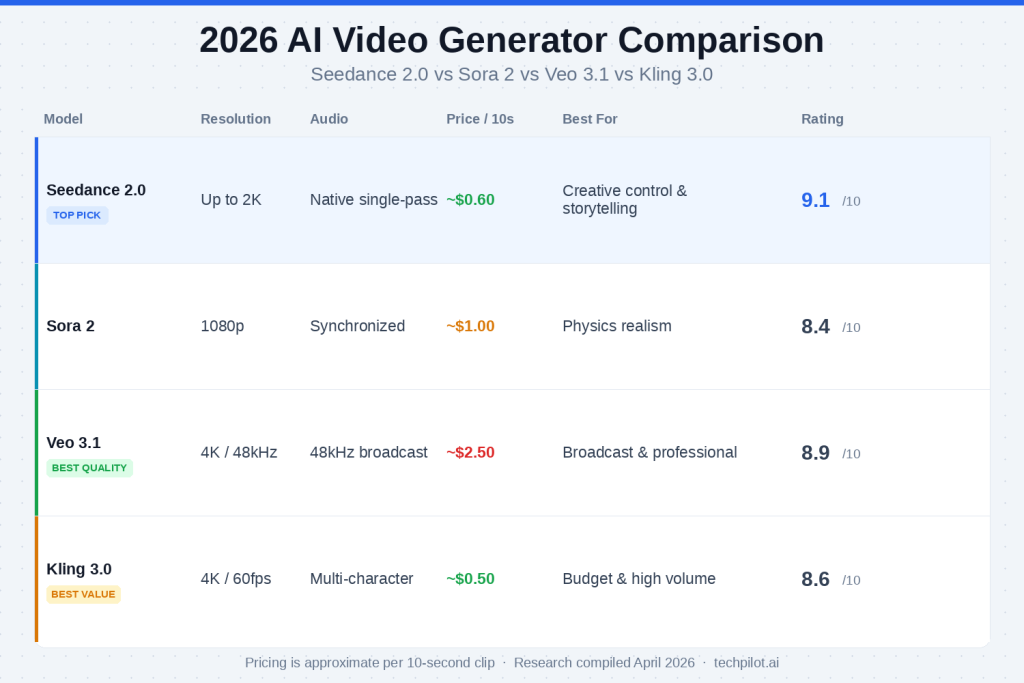
At approximately $0.60 per 10-second clip, Seedance 2.0 delivers output quality that would cost you $2.50 on Veo 3.1 or $1.00 on Sora 2. It’s not the cheapest model available (Kling 3.0 is ~$0.50), but the multimodal capabilities justify the slight premium over Kling for most creative workflows.
Seedance 2.0 Review: the honest limitations & what it gets wrong
This is the section other reviews either skip or overdramatize. Here’s the balanced picture.
❶ Content Censorship Is Aggressive — and It Will Block Legitimate Work
This is the biggest real-world friction point. Following IP disputes involving major Hollywood studios in early 2026, ByteDance deployed strict content filters on Seedance 2.0. Realistic human faces — including fully AI-generated characters that have no real-world equivalent — are frequently blocked as reference images.
This matters for creative work. If your project involves photorealistic human characters (even fictional ones), you will hit filter walls. The workarounds are imperfect and inconsistent. This is not a minor UX annoyance — it meaningfully limits the model’s usefulness for character-driven narratives.
❷ Generation Times Are Slower Than Alternatives
Seedance 2.0 is not fast. A single 10-second generation can take 3–5 minutes depending on platform load. If you’re iterating on creative work — trying different prompts, adjusting camera angles, tweaking motion — those wait times stack up quickly. A 10-iteration session can cost you 20+ minutes of waiting versus 7–8 minutes on faster alternatives like WAN 2.7.
❸ Resolution Is 2K Maximum — Not Always What You Get
Seedance 2.0 supports 2K native resolution, but real-world output resolution depends on your plan tier and platform. Many generations default to 1080p or lower. If you need consistently 4K output, Kling 3.0 or Veo 3.1 are stronger choices. Don’t assume you’ll always get the top-tier output.
❹ Complex Motion in Crowded Scenes Has Inconsistencies
Character motion is generally convincing in controlled, well-referenced scenarios. In complex multi-character interactions — fight scenes, crowd scenes, overlapping movement — you’ll see occasional unnatural motion artifacts. Transition frames between shots can also warp slightly. These are improving with each version, but they exist.
❺ The API Rollout Is Still Catching Up
The developer API for Seedance 2.0 had a delayed rollout following early 2026’s IP disputes with Hollywood studios. If you’re a developer planning to integrate Seedance 2.0 into a product, verify current API availability and throughput limits before building around it. The consumer-facing platforms (detailed below) are more stable for now.
Seedance 2.0 vs. The Competition: Full 2026 Comparison
vs. Sora 2
Sora 2 leads on physics simulation — water, fabric, light, and gravity behave with a realism Seedance 2.0 doesn’t match. It’s the right choice for architectural visualization, scientific animation, or any use case where physical accuracy is non-negotiable. But at ~$1.00/clip with less multimodal flexibility, and with OpenAI having announced the Sora web/app experience will shut down by September 2026, it’s harder to recommend for general creative use.
Pick Sora 2 if: Physics accuracy is your primary requirement. Pick Seedance 2.0 if: You need character consistency and multimodal control at a better price.
vs. Google Veo 3.1
Veo 3.1 is the best AI video model money can buy right now — 4K native output, 48kHz audio, cinema-standard quality. If you’re producing broadcast content or have a production budget, it earns its $2.50/clip. For everyone else, the price difference is hard to justify when Seedance 2.0 closes much of the quality gap for less than a quarter of the cost.
Pick Veo 3.1 if: Budget is not a constraint and broadcast quality is required. Pick Seedance 2.0 if: You want the best quality-to-price ratio for independent or small-team production.
vs. Kling 3.0
Kling 3.0 is the value champion of 2026: native 4K/60fps with a free tier, multi-character audio, and the lowest cost per clip. For high-volume social media production where you’re generating dozens of clips per day, Kling 3.0 is extremely efficient.
Seedance 2.0 wins on multimodal reference control and the coherence of its single-pass audio generation. If creative fidelity to your references matters — if you have a specific character, style, or audio track you need to match — Seedance 2.0 is the stronger tool.
Pick Kling 3.0 if: Volume, cost efficiency, and 4K output are your priorities. Pick Seedance 2.0 if: You need precise reference control and better character consistency.
How to Access Seedance 2.0 in 2026
Option 1: Higgsfield (Recommended for Creators)
Higgsfield is the most polished consumer interface for Seedance 2.0. The platform wraps the model’s full multimodal capabilities in a creator-focused workflow — you get the 12-file reference system, multi-shot sequencing, character upload, and native audio generation, all without touching an API.
Important: Seedance 2.0 on Higgsfield is currently on the Business Plan, which requires a business domain email for verification. Gmail and most generic consumer email providers are not accepted in the majority of regions (US and Japan are exceptions). If you’re accessing for personal use, check higgsfield.ai for the latest plan availability — tiers and access rules are actively evolving.
Option 2: fal.ai API (For Developers)
The Seedance 2.0 API is live on fal.ai as of April 2026. This is a pay-per-use model and accepts all email types for signup. If you’re building a product or workflow integration, this is the most flexible entry point. Verify current throughput limits and regional availability before committing to a build.
Option 3: ByteDance Dreamina (First-Party)
ByteDance’s Dreamina platform provides first-party access directly from the Seed team. Open access in most regions. The interface is more spartan than Higgsfield but gives you a direct line to the model without third-party intermediaries.
Practical Tips for Getting the Best Results
1. Use clean reference images. Well-lit, neutral-background reference photos produce dramatically more consistent character outputs than busy or low-contrast images.
2. Be specific with the @filename syntax. Reference each file explicitly in your prompt rather than relying on the model to infer which files to prioritize.
3. Start with shorter shots. 5–8 second shots give you more iterative control than jumping straight to the 15-second maximum. Build longer sequences by chaining shots once you’ve confirmed character and style consistency.
4. Expect content filter friction on human faces. If your project requires photorealistic characters, build in extra time for iteration and potentially consider stylized art directions that trigger filters less aggressively.
5. Use the audio reference input strategically. Seeding a generation with an existing audio track (even a rough guide track) dramatically improves how well the model’s native audio output matches your intended tone and pacing.
Who Should Use Seedance 2.0?
Great fit:
Independent content creators and YouTubers building video series with recurring characters
Small marketing teams producing branded short-form video without a production budget
Social media creators who want audio-synchronized clips without manual audio editing
Hobbyist filmmakers experimenting with AI-assisted short film production
Projects centered on photorealistic human characters (content filters will create significant friction)
High-volume pipelines where generation speed is critical (consider WAN 2.7 or Kling 3.0)
Developers needing stable, high-throughput API access (verify availability before building)
Verdict: Is Seedance 2.0 Worth It in 2026?
Yes — with clear eyes about the limitations.
Seedance 2.0 is the most well-rounded AI video generator for independent creators in 2026. It doesn’t win any single benchmark outright: Veo 3.1 is higher quality, Kling 3.0 is cheaper, Sora 2 has better physics. But Seedance 2.0 is the only model that combines competitive output quality, genuine multimodal reference control, single-pass native audio, character consistency, and a price point that doesn’t require a production budget.
The content censorship friction is real and worth knowing about before you commit. The generation times are genuinely slow for iterative workflows. And the API situation requires a careful look if you’re building something on top of it.
But for the creator who wants to make a short film, a branded video series, or a polished ad without a production team — Seedance 2.0 is the place to start. And Higgsfield is the easiest door in.
Frequently Asked Questions
Is Seedance 2.0 free? No free tier is currently available for Seedance 2.0 on the major platforms. Pricing starts at approximately $0.60 per 10-second clip on most platforms.
Does Seedance 2.0 generate audio automatically? Yes. Audio — including synchronized dialogue, sound effects, ambient sound, and music — is generated alongside video in a single pass. No separate audio generation step is required.
Why is Seedance 2.0 blocking my reference images? Seedance 2.0 has aggressive content filters that may block realistic human face references, including AI-generated characters. This is a result of IP protection measures implemented in early 2026.
Is Seedance 2.0 available without a business email on Higgsfield? Currently, Higgsfield requires a business domain email for Seedance 2.0 access in most regions. US and Japan users may have access under different conditions. Check higgsfield.ai for the most current plan details.
What’s the difference between Seedance 2.0 and Seedance 2.0 Omni? Seedance 2.0 Omni is an extended version of the model with additional capabilities for more complex scene generation. It’s available on select platforms as a premium tier above the base Seedance 2.0 model.
Mihai (Mike) Bizz: More than just a tech enthusiast, Mike's a seasoned entrepreneur with over 10 years of navigating the dynamic world of business across diverse industries and locations. His passion for technology, particularly the transformative power of Artificial Intelligence (AI) and automation, ignited his pioneering spirit.
Fueling Business Growth with AI: Through his blog, Tech Pilot, Mike invites you to join him on a captivating exploration of how AI can revolutionize the way we operate. He unlocks the secrets of this game-changing technology, drawing on his rich business experience to translate complex concepts into practical applications for companies of all sizes.
Share This Article
JOIN OUR COMMUNITY
Receive the latest AI insights directly to your inbox.