Natural-looking videos with AI are now within reach. See how Dreamina's Seedance 2.5 creates realistic motion, lighting, and lifelike scenes.
Alexi Carmichael
Business, Mentorship, and AI Verified By Expert
Published: July 23, 2026 | Updated: July 24, 2026
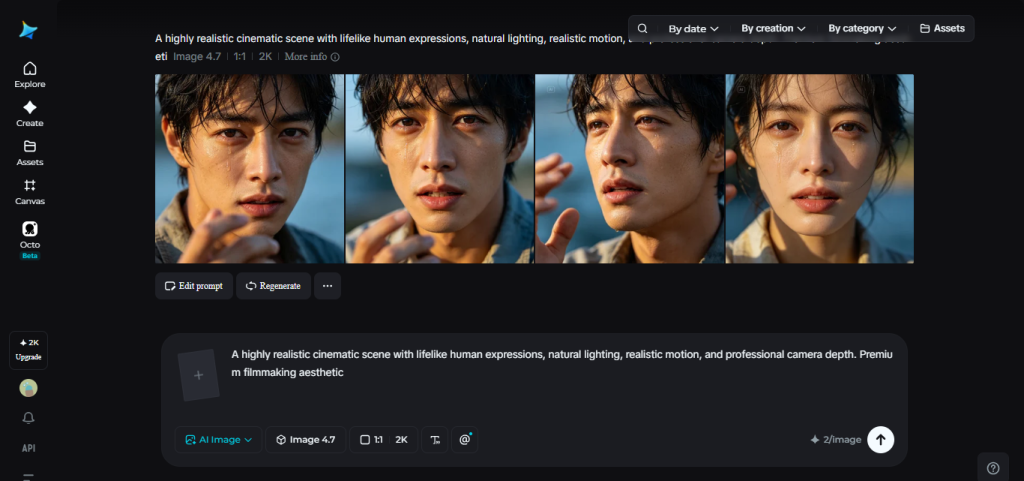
There’s a specific feeling that comes from watching AI-generated video that hasn’t quite crossed the line into believable — skin that looks slightly too smooth, movement that’s a touch too fluid, lighting that doesn’t behave the way light actually does. It’s rarely one obvious flaw. It’s usually a combination of small details that, together, tell a viewer’s brain something isn’t quite right, even before they consciously notice why.
Dreamina and its Seedance 2.5 model are built to close that gap, aiming for footage that reads as genuinely filmed rather than something assembled by a machine, the true natural-looking videos with AI.
Why “almost real” is harder than it sounds
Getting a single frame to look photorealistic is a solved problem in a lot of AI image tools. Video is a different challenge entirely, because realism isn’t just about how one frame looks — it’s about how believably that frame changes into the next one. Real movement has weight, hesitation, and imperfection. A person doesn’t glide perfectly through a room; they shift their balance, their clothes react to gravity, their expression changes unevenly.
Earlier AI video tools often smoothed over exactly these imperfections, which paradoxically made the output feel less real. Motion could look too clean, transitions too seamless, and physical interactions — a hand actually making contact with an object, a foot landing on the ground — often looked slightly disconnected from the world around them.
What actually makes Seedance 2.5 look more real
Seedance 2.5 tackles this on multiple fronts rather than relying on a single fix. The flat, synthetic quality that made earlier AI video easy to spot at a glance has been noticeably reduced, replaced with physical texture and detail that behaves more like something captured on camera than something generated from scratch.
Complex, natural movement is no longer the weak point it used to be
A large number of long-tail actions — the kind of specific, less common movements that used to break down or look stiff — now render smoothly and convincingly. Motion that involves genuine physical interaction, like a hand brushing against a face or an object being picked up, holds together with far more believable weight and contact than before.
Reference footage grounds the model in reality
Green screen references let creators supply real, live-action footage for complex physical interactions between people, giving the model something concrete to match rather than something to approximate from a text description alone. This is particularly effective for the kind of nuanced human movement that’s genuinely difficult to describe in words but easy to demonstrate on camera.
Cleaner base footage removes the small tells
Random subtitles and mismatched background music, which used to appear unprompted and immediately break the illusion of realism, no longer show up by default. That leaves cleaner footage that feels more intentional and less like it came from an automated process.
A few other upgrades support this directly:
Motion transfer consistency has improved from roughly 70% to over 90%, so movement patterns carry through more reliably
Spatial and temporal consistency has been reworked, reducing the subtle drift that used to make longer clips feel less grounded over time
Multi-person scenes handle physical proximity and interaction far more naturally, with far fewer of the duplication issues that used to give away artificial generation
Together, these changes push the output closer to something that feels observed rather than constructed — footage that behaves the way the real world actually does, down to the small, easy-to-miss details.
Bring a natural scene to life in three steps
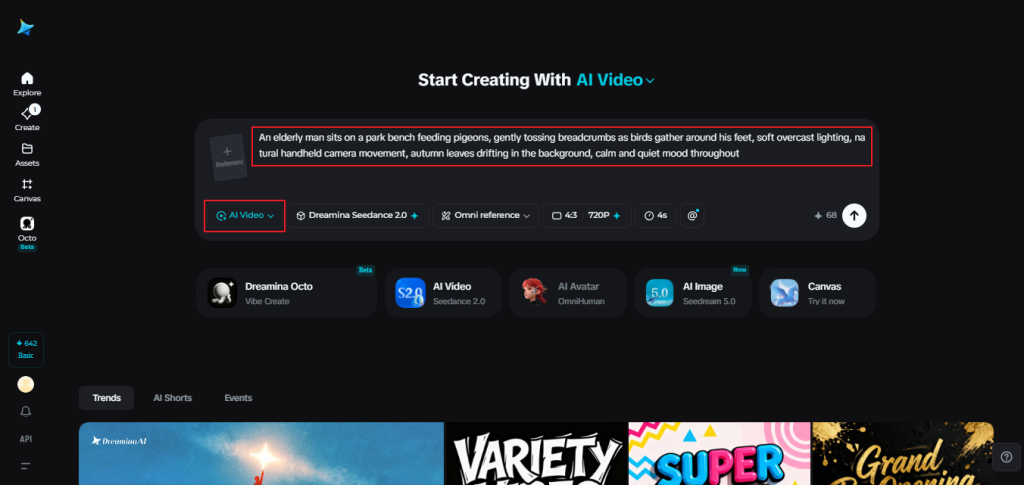
Step 1: Set the scene with a prompt and a reference
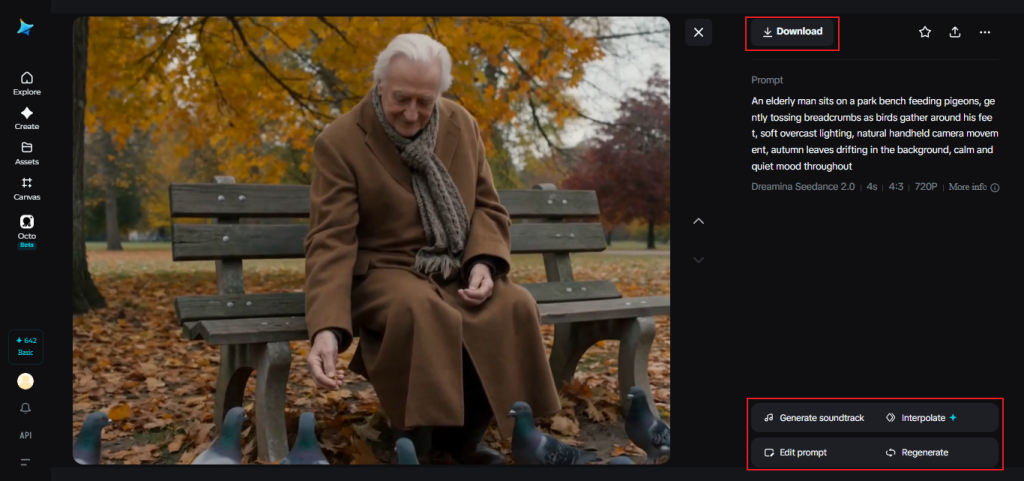
Visit Dreamina, sign in, and head to the “AI Video” section. If your video is built around a specific person or setting, click “Add reference image” and upload a photo to anchor the generation. For a text-to-video creation, skip that step and describe the scene fully in your prompt instead. A detailed prompt for a 30-second sequence might read: An elderly man sits on a park bench feeding pigeons, gently tossing breadcrumbs as birds gather around his feet, soft overcast lighting, natural handheld camera movement, autumn leaves drifting in the background, calm and quiet mood throughout.
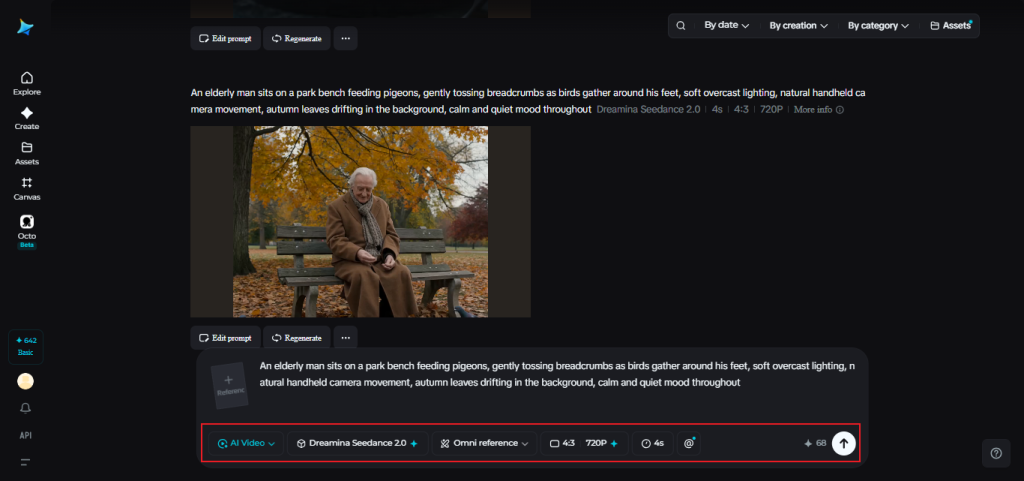
Step 2: Let Seedance 2.5 handle the realism
With your prompt set, select the Seedance 2.5 model for generation. Choose your video length, then pick an aspect ratio suited to where it’s headed — 16:9 for YouTube, or 9:16 for TikTok. Click Dreamina’s generation icon and let it turn your prompt into footage that holds up to a closer look.
Step 3: Give it a final polish and share it
Before saving, use Dreamina’s AI editing tools to refine the result. Upscale sharpens resolution for a crisper, more detailed finish, while Generate Soundtrack adds audio that matches the tone of the scene. Once it looks right, export the video and share it wherever your audience is waiting.
Small prompt choices that support realism
The way a scene is described has a real effect on how natural the final output feels. A few habits tend to help:
Describing texture and physical detail, not just the subject and action
Mentioning natural, imperfect lighting conditions rather than something overly polished
Grounding movement in something ordinary and specific, rather than dramatic or stylized
None of this requires technical expertise — it’s closer to describing a scene the way you’d remember it, rather than the way you’d stage it.
Final thoughts
The gap between “clearly AI-generated” and “genuinely believable” has narrowed considerably, and it keeps closing with each update. With Dreamina and its Seedance 2.5 model, that narrowing shows up in the details that matter most — the way light falls, the way movement carries weight, the way a scene simply feels lived-in rather than manufactured.
For creators, that means spending less time explaining away what looks artificial, and more time trusting that what they generate will hold up to a second look.
Alexi Carmichael
Business, Mentorship, and AI Verified By Expert
Alexi Carmichael is a tech writer with a special interest in AI's burgeoning role in enhancing the efficiency of American SMEs. With her know-how and experiences, she has since taken on the role of mentor for fellow entrepreneurs striving for digital optimization and transformation. With Tech Pilot, she shares her insights on navigating the complexities of AI and how to leverage its capabilities for business success.
Share This Article
JOIN OUR COMMUNITY
Receive the latest AI insights directly to your inbox.