AI Chatbots vs Repertory Software: How to Verify a Rubric’s Source with Similia
AI chatbots can misquote homeopathic rubrics. Learn a four-part source check and how repertory software like Similia shows the book, path and remedy grades
 Eimantas Kazėnas Marketing & Tech
- Published
- 6 min read
On this page Why a fluent answer still needs a source check
Independent and reader-supported. Some links may earn us a commission; it never changes our rankings. Editorial policy
Ask a chatbot for the Kent rubric on fear of heights and it may return a fluent answer with a book name and a few remedies attached. The next step is to check that answer against the entry itself: the exact path, the remedy abbreviations as printed and the grades.
Even when a chatbot cites a book, browses the web or works from a document you supply, check the cited passage for the exact wording, remedy abbreviations and grades.
That makes the division of labour simple. Use a general AI chatbot to explain, summarise or rephrase. Use repertory software to confirm what the reference actually says. Similia’s repertory software starts from the other end: it keeps the named repertory, the rubric’s full path, the remedy abbreviations and their grades together on one screen, so a homeopath or student can inspect the entry itself before relying on it.
This article sets out a four-part source check (book, full path, abbreviations, grades), compares chatbots and repertory software task by task, and traces one rubric from search to record.
Why a fluent answer still needs a source check
The Generative AI Profile published by the National Institute of Standards and Technology (NIST AI 600-1, 2024) lists confabulation among the risks of generative AI. A system can state false content with confidence, including reasoning or citations that seem to support its answer, and readers can be misled by it. The risk comes with the technology rather than with any one product, so it applies to AI features inside specialist software too, Similia’s included.
The practical response is a habit, not a ban: treat generated text as a lead, then confirm the entry it points to. Retrieved reference material and a generated explanation can look alike on screen. The useful difference is that a rubric record existed before you asked your question, while an explanation is composed in reply to it.
What to check before you rely on a rubric
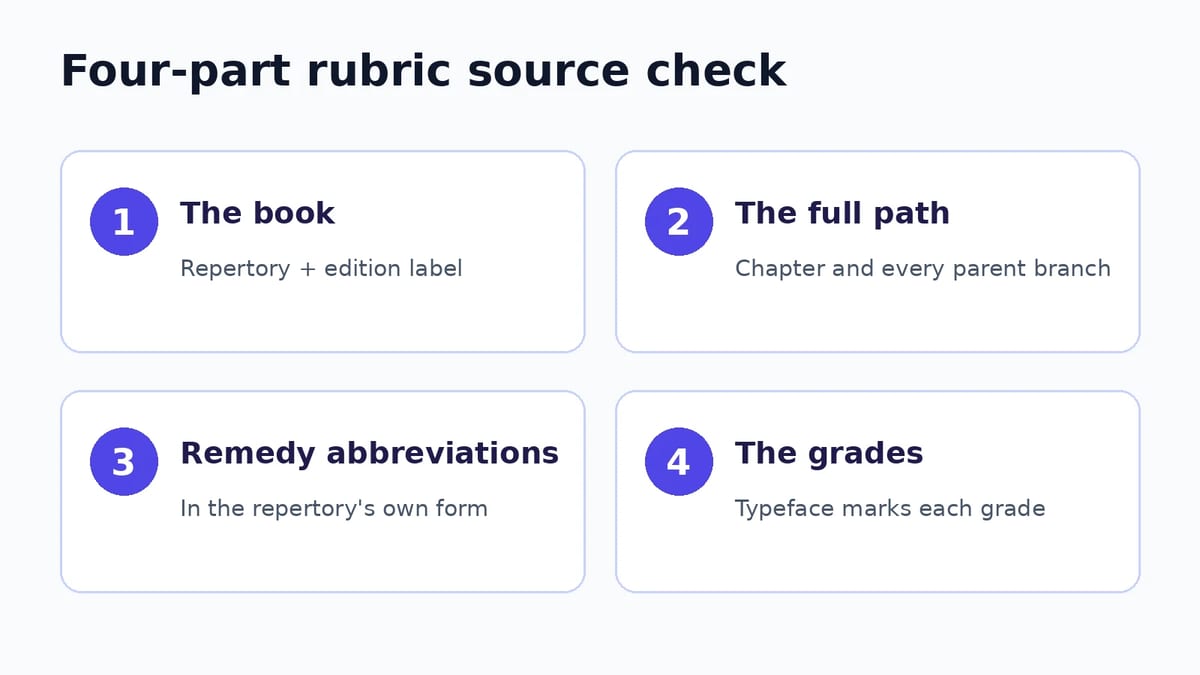
A repertory source check has four parts, and each can be settled only by looking at the entry itself.
- The book. Note which repertory this is and what edition label the software shows. Similar wording can appear in more than one repertory, so the source matters as much as the words.
- The full path. Read the chapter and every parent branch, not just the final words. “High places” under MIND – FEAR is a different entry from “HIGH places” under VERTIGO.
- The remedy abbreviations. Read the remedies in the repertory’s own abbreviated form before anyone expands or summarises them. Abbreviations that differ by a letter or two can name different remedies.
- The grades. Kent marks each remedy’s grade within a rubric by typeface. A grade is the repertory author’s notation; it is not a modern evidence rating or a measure of how likely a remedy is to help.
Chatbot or repertory software: which suits each verification task?
Both can earn a place in the same study session. The difference lies in what each one hands you to check.
| Verification task | General AI chatbot | Repertory software (Similia) |
|---|---|---|
| Name the book | Can name a repertory and, when browsing or working from a supplied document, may link to it. The attribution is part of the generated reply, so open the source to confirm it. | The source selector shows the repertory’s title and edition label, and every result row carries a source tag such as Kent. |
| Show the rubric’s full path | May quote a rubric in shortened or reworded form, so check the chapter and parent branches yourself. | Displays the complete path, from chapter to final subrubric. |
| List remedies and grades | May expand abbreviations, summarise the list or describe grades in words; any grade it states needs checking. | Lists remedy abbreviations in grade styling; selecting a remedy shows its grade for that rubric. |
| Separate explanation from reference | Explanation and attribution arrive in the same generated reply, even when links are attached. | Semantic search ranks candidate rubrics, but opening one shows the reference entry: path, remedies, grades and available source information. Filters hide results without altering rubric text. |
| Move from index to materia medica | Can summarise a remedy; check which author and book the summary rests on. | A remedy’s details include a link to read its materia medica, where the reader names the author and book. |
| Best used for | Explaining terms, drafting study questions and rewording a symptom in plain language. | Confirming the book, path, remedies and grades before a rubric goes into your notes or an analysis. |
A sensible division of labour follows. Ask a chatbot what an unfamiliar abbreviation such as agg. means, or for plainer ways to phrase a symptom before you search. Then let the repertory settle every detail you intend to write down.
Worked example: tracing “fear of heights” to a Kent rubric
Here is the check applied to a fictional study query in Similia’s repertory. It is a reference-reading exercise; no patient case was involved.
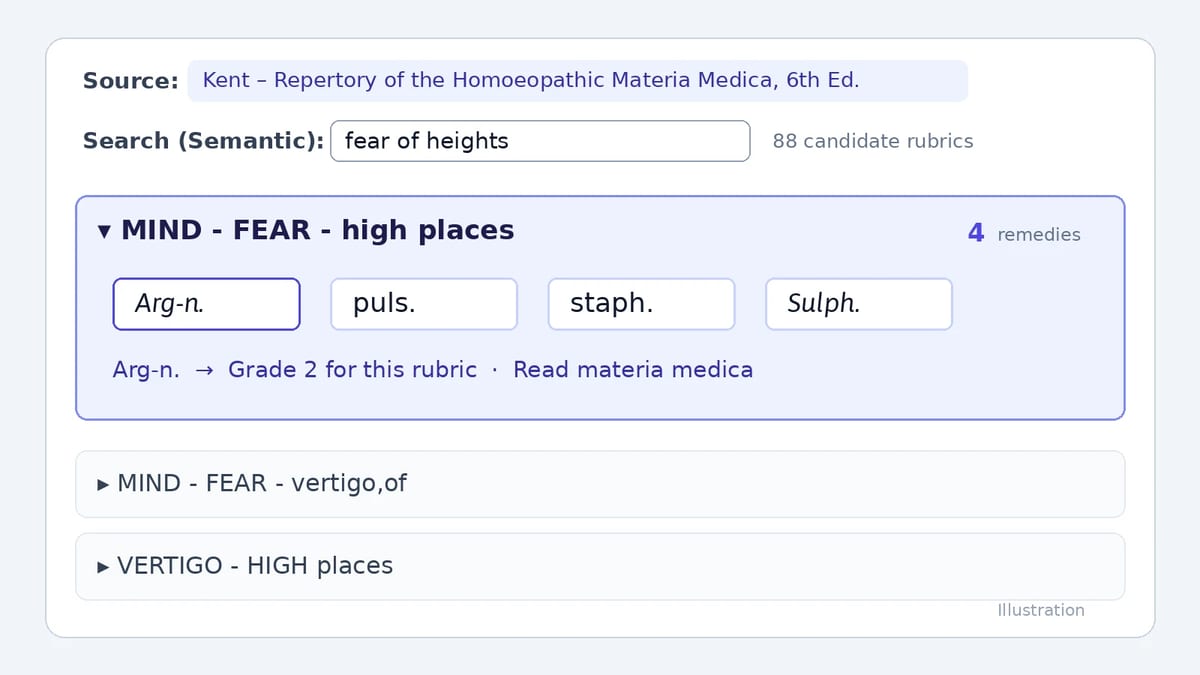
- Choose one source. Kent was selected on its own, and the source selector read Repertory of the Homoeopathic Materia Medica, 6th Edition.
- Search in plain language. With the search type set to Semantic, the query was fear of heights. Similia returned 88 candidate rubrics to inspect.
- Read beyond the first result. The first displayed result was MIND – FEAR – high places. Others included MIND – FEAR – vertigo,of and VERTIGO – HIGH places; the second sits in a different chapter and describes vertigo rather than fear.
- Open the entry. Expanding MIND – FEAR – high places showed four remedy abbreviations: Arg-n., puls., staph. and Sulph. Two appear in italic styling and two in plain type. The 4 beside the rubric is the remedy count, not a grade.
- Check a grade. Selecting Arg-n. displayed Grade 2 for this rubric, together with a link to read its materia medica.
Nothing in this check depends on trusting the ranking. Semantic search proposed Kent’s wording for an everyday phrase. Everything worth writing down afterwards came from the record itself: the book, the chapter, the path, the remedies and a grade. Whether MIND – FEAR – high places or VERTIGO – HIGH places fits what someone actually described remains the practitioner’s call. The full paths put that decision in plain view instead of burying it inside a paragraph.
Where Similia’s AI features fit, plan by plan
Whatever proposes a rubric, whether a chatbot, Similia’s semantic search or one of its Pro tools, the check ends at the same rubric record. Similia’s AI features are divided between plans in a way worth knowing before you rely on them:
- Free: semantic search across eight classical repertories, Kent among them, plus 21 classic materia medica books to read.
- Eligible paid access: semantic search across the materia medica, for finding remedy descriptions by meaning rather than exact wording.
- Pro: an AI toolkit of Notes-to-Rubric, AI case analysis, live audio transcription and photo analysis. Toolkit operations use credits, so Pro’s unlimited cases do not mean unlimited AI.
Similia brings the workflow together: find candidate rubrics, inspect their source records and continue into named-author reference material in the same application.
Try the check on your own study query
Take a symptom phrase from your study notes or a textbook exercise and run it against Kent on the Free plan. Before you note any rubric, record five things: the repertory and its edition label, the full path, the remedy abbreviations, the grade of any remedy you mention, and the author whose materia medica you read next. If a chatbot helped you find the phrase, set its wording beside the record you have just inspected. Where the two differ, cite the record.
Found this useful? Share it with someone comparing AI tools.