From Product Idea to Supplier Conversation with AI Sourcing
Use an AI sourcing assistant to clarify an early product idea, connect with suppliers, and identify which details need a seller’s direct confirmation.
 Eimantas Kazėnas Marketing & Tech
- Published
- 6 min read
On this page Start with what you have: a photo, a link or a description
- Start with what you have: a photo, a link or a description
- Check the AI summary before it shapes the search
- Use three labels to keep sourcing requirements clear
- Let the seller’s answer decide the next question
- Plan the next message from the answer you got
- A quick checklist for your first AI sourcing conversation
- FAQ
Independent and reader-supported. Some links may earn us a commission; it never changes our rankings. Editorial policy
Most sourcing projects don’t start with a spec sheet. They start with a product name, a photo saved from a marketplace, a competitor’s link or a rough description typed on a phone. That’s enough to begin with an AI sourcing assistant. The assistant can organize those scraps into a usable request, match buyer and seller requirements, and help put you in touch with the right suppliers.
The work doesn’t end when the first message goes out. A good supplier conversation builds in layers. You share what you know, the seller tells you what it can offer, and each answer shapes the next question. This guide walks through that process with one simple example, from the first message to a sample request.
Start with what you have: a photo, a link or a description
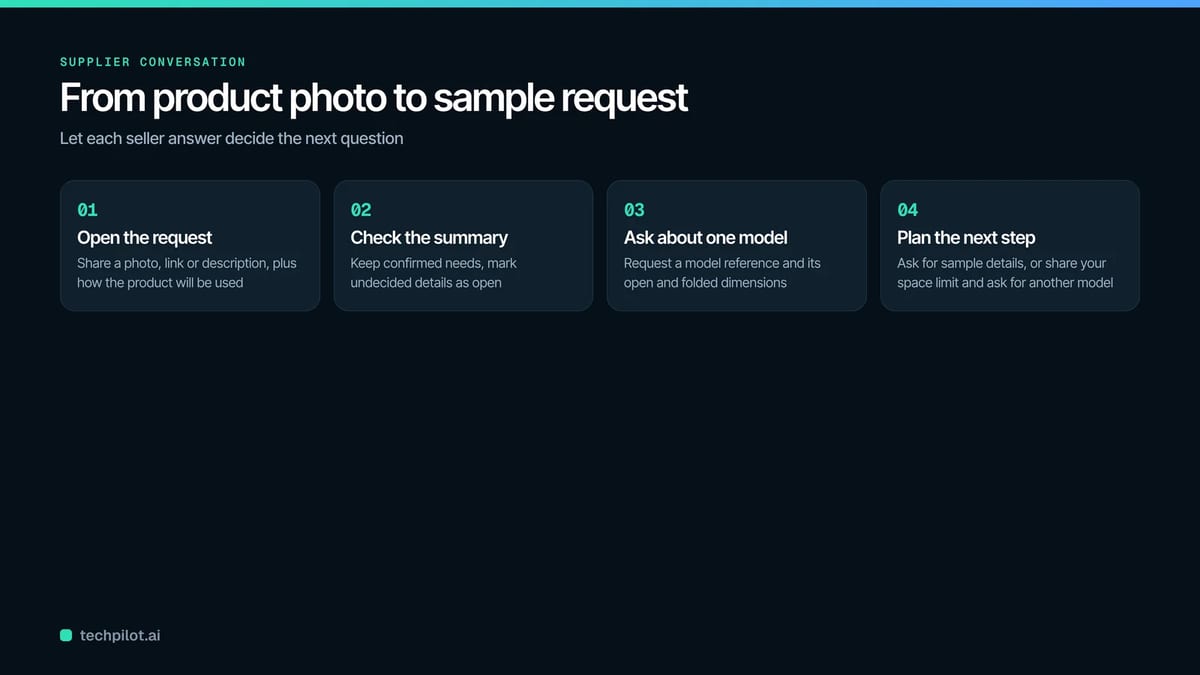
You don’t need finished dimensions or a technical drawing to open a sourcing conversation. A clear reference and a sentence about how the product will be used are often enough for a first round of AI supplier sourcing, whether you’re running a China supplier search or looking further afield.
Take an illustrative example. A buyer needs folding storage crates for a small stockroom. They have a reference photo that shows the general shape and the handles. The one firm requirement is that the empty crates fold flat, because floor space is tight.
An opening request could read:
“I am looking for a folding storage crate like the one in this photo. We need it for a small stockroom. Please help me find suppliers with an existing model and ask which sizes they offer.”
That short message does three jobs. It names a product category (folding storage crates), an application (a small stockroom) and a feature to discuss (folding flat). The buyer doesn’t have to commit to dimensions yet. They can add them after seeing which models already exist. If they later want a custom change, the supplier can explain which measurements or drawings it needs to assess it.
Say what matters in the reference image
A photo carries more detail than you may intend. Without guidance, a supplier or an AI assistant may treat every visible feature as a requirement. Add one sentence that explains what the image is meant to show.
In the crate example, the buyer cares about the folding format. The color and handle design are still open. Saying so gives the supplier room to suggest a suitable existing product instead of hunting for an exact copy, which is usually faster and cheaper for everyone.
Check the AI summary before it shapes the search
As the conversation develops, an AI assistant may turn your request into a structured summary: product type, intended use and desired features. That summary becomes the basis for buyer-supplier matching, so read it before you rely on it.
For the crates, check three things:
- The summary still says the crates must fold flat. This is the one confirmed requirement, and it shouldn’t be lost.
- Load capacity is marked as undecided. The buyer hasn’t yet thought through what the crates will hold, so no number should appear as if it were agreed.
- Any size the assistant suggests stays a suggestion. Keep it visible for review, but don’t move it into the confirmed requirements.
Small slips matter here. A suggested size that quietly becomes a requirement can filter out good suppliers or lead to quotes for the wrong product.
Use three labels to keep sourcing requirements clear
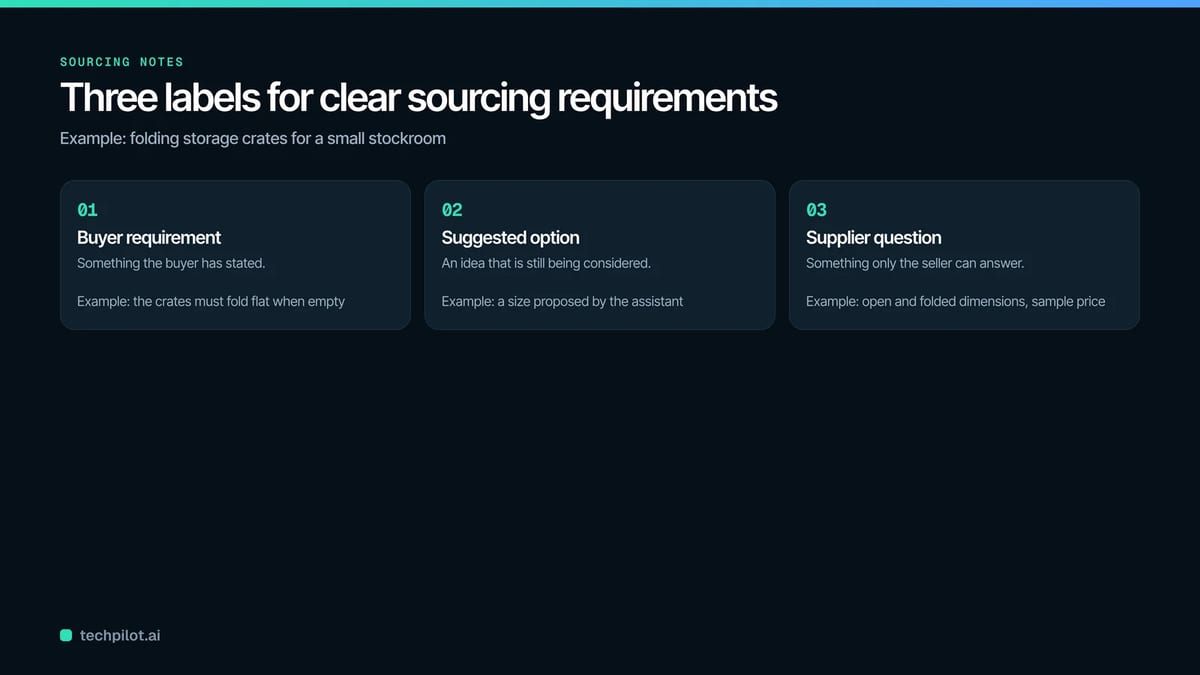
In your own sourcing notes, three labels make it obvious how much has been settled:
| Label | What it covers | Crate example |
|---|---|---|
| Buyer requirement | Something the buyer has stated | Must fold flat when empty |
| Suggested option | An idea that is still being considered | A size proposed by the assistant |
| Supplier question | Something only a seller can answer | Open and folded dimensions, sample price |
These labels help the next person in the conversation, whether that’s a colleague, the assistant or the seller, understand what is fixed and what is open. They also give the buyer an easy moment to correct an assumption before it shapes the search.
Let the seller’s answer decide the next question
ChinaSource’s AI-assisted supplier sourcing helps organize and match buyer and seller needs and makes it easier to contact suppliers. Once a seller replies, the useful work shifts to supplier communication: using each answer to narrow the practical choices.
Ask about one specific model
For the crates, ask the seller for a model reference and its open and folded dimensions. A company profile can tell you what product range a supplier works in, but only the seller’s reply can confirm the details of the particular model you’re discussing. Keep that reply attached to the model reference in your notes, so nobody mixes up two similar products later.
It also helps to ask the seller who handles product questions and where to send further details, such as measurements or reference images. That keeps follow-ups from getting lost in a general inbox.
Match the question to your next decision
Then ask only about the conditions that affect your next step:
- If you are considering a sample, ask about sample availability, price and delivery arrangements.
- If you need a dimensional change, ask what information the seller needs to evaluate it.
Keep price and availability open until the seller confirms
Treat price and availability as supplier questions until the seller has answered them directly. An organized request helps the discussion move, but it is the seller’s specific reply that gives you something concrete to assess. Don’t let an assistant’s estimate, or a figure from a different listing, stand in for that answer.
Plan the next message from the answer you got
Each reply should point to an obvious next step. In the crate example:
- If the folded size suits the stockroom, the next message can ask for sample details.
- If it is too large, tell the seller how much storage space is available and ask which alternative model could fit.
This is where an organized process pays off. Because the buyer kept requirements, suggestions and open questions apart, the follow-up is short and specific, and the seller can answer it without starting over.
A quick checklist for your first AI sourcing conversation
- Open with a product name, photo, link or description, plus the intended use.
- Say which features in the reference image matter and which are open.
- Read the AI summary and keep undecided details marked as undecided.
- Label each point as a buyer requirement, a suggested option or a supplier question.
- Ask the seller for a model reference and the dimensions that matter to you.
- Confirm a contact for product questions and where to send files.
- Ask about samples or changes only when they affect your next decision.
- Wait for the seller’s direct answer on price and availability.
FAQ
Do I need exact specifications before I contact suppliers?
No. A photo, link or description plus the intended use is enough to start. You can add dimensions after reviewing existing models, and a supplier can tell you what it needs to assess a custom change.
Can I rely on the AI summary of my request?
Use it as a working draft. Check that it keeps your confirmed requirements, leaves undecided details open and doesn’t turn a suggestion into a requirement.
When should I ask about price?
Ask when price affects your next decision, such as ordering a sample. Keep the question open until the seller answers it directly for the specific model.
Found this useful? Share it with someone comparing AI tools.