7 Best Alternatives to Hiring an In-House Chatbot Development Team
Compare 7 alternatives to hiring an in-house chatbot development team, from Glean and Intercom Fin to Copilot Studio and Botpress, with pricing and tips.
 Eimantas Kazėnas Marketing & Tech
- Published
- 7 min read
On this page Key takeaways
Independent and reader-supported. Some links may earn us a commission; it never changes our rankings. Editorial policy
Hiring an in-house chatbot development team sounds like the safe choice. You get full control, custom features, and people who know your business. But a small team of engineers, a conversation designer, and someone to maintain integrations can take months to hire and a large budget to keep. Before the first bot ships, you are already paying for recruiting, onboarding, and infrastructure.
For most companies, the real goal is not to own a chatbot team. It is to answer customer or employee questions faster, cut repeated tickets, and connect people to the right information. Today, several platforms and service models can get you there sooner and with less risk. This guide compares the strongest options, explains how they are priced, and shows how to choose the right one for your situation.
Key takeaways
- Enterprise AI platforms, no-code bot builders, support-focused AI agents, and outside developers can all replace or delay an in-house chatbot team.
- The best fit depends on who the bot serves (employees or customers), where your knowledge lives, and how much control you need.
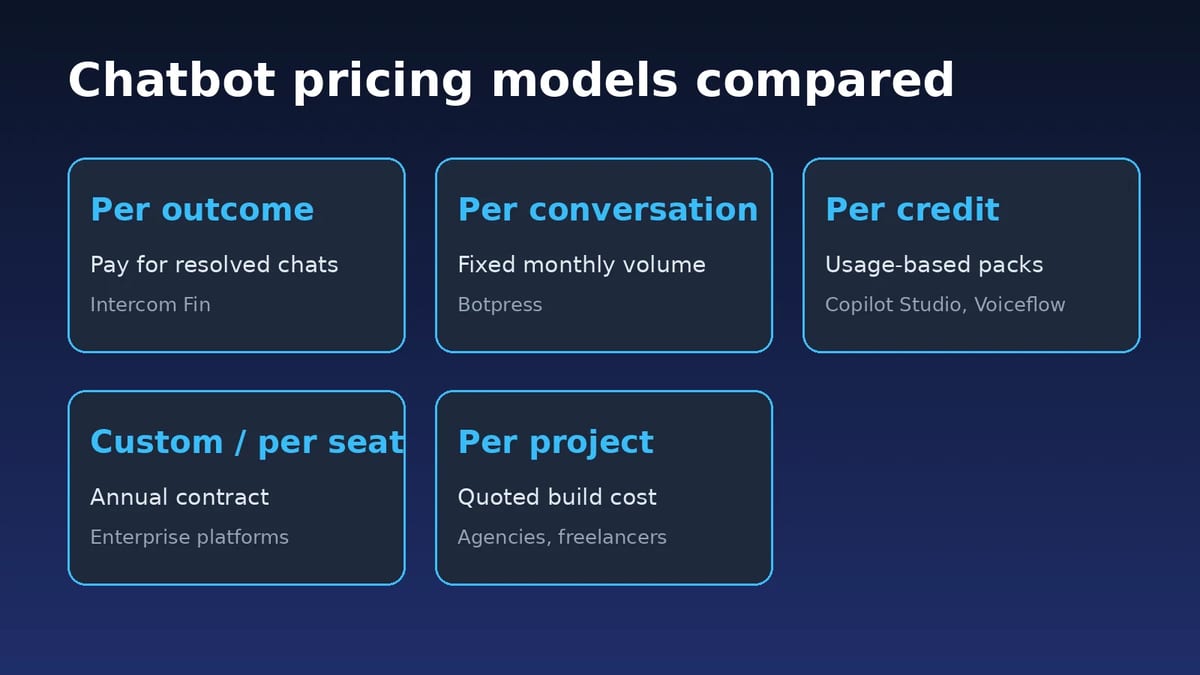
- Pricing models differ widely: per resolution, per conversation, per credit, per seat, or per project.
- Run a short pilot on real questions before you commit, and measure answer quality, not just deflection.
At a glance: the best alternatives to an in-house chatbot team
| Option | Best for | Pricing model | Setup effort |
|---|---|---|---|
| Glean | Employee-facing AI across company knowledge | Custom, per organization | Low to medium |
| Intercom Fin | Customer support automation | From $0.99 per outcome, plus seats | Low |
| Microsoft Copilot Studio | Teams already on Microsoft 365 | $200 per 25,000 credits/month, or pay as you go | Medium |
| Botpress | Custom bots without a full dev team | Free; paid from $150/month (annual) | Medium |
| Voiceflow | Designing chat and voice agents | Plan fee plus usage credits | Medium |
| Zendesk AI agents | Companies already using Zendesk | Add-on to Zendesk plans | Low |
| Agency or freelancer | One-off custom builds | Per project or hourly | Varies |
Why companies look for alternatives to an in-house team
An internal team makes sense when the chatbot is your core product. For everyone else, the trade-offs add up quickly:
- Time to value: hiring, building, and testing can take two or more quarters before users see results.
- Ongoing cost: salaries, LLM usage, hosting, monitoring, and security reviews continue after launch.
- Maintenance: models, APIs, and connected apps change, so someone has to keep the bot accurate.
- Knowledge access: a bot is only as good as the data it can reach, and building secure connectors to every system is a project of its own.
The options below remove most of that work, though each one makes a different trade between control, cost, and speed.
7 best alternatives to hiring an in-house chatbot development team
1. Glean: Best overall alternative for enterprise knowledge
Glean is an enterprise AI platform that connects to a company’s tools, data, and people so employees can find information, get answers, generate content, and automate work from one place. Instead of building a custom chatbot and wiring it into every system, teams get a ready work AI layer that sits across the business.
Glean searches across 100+ apps, understands company context, and respects existing permissions, so people only see what they are already allowed to see. Its product family covers Search, Assistant, Agents, and Protect. That means the same platform can answer questions, draft content from internal sources, run agent workflows, and help keep sensitive data governed.
The ideal customer is a mid-size to large organization where employees work across many systems and struggle with fragmented knowledge, repeated questions, and slow internal workflows. Engineering, support, sales, IT, and other knowledge-heavy teams tend to see the clearest gains.
The core problem Glean solves is that enterprise knowledge is scattered across apps and locked behind silos. That makes it hard to find trusted answers, understand context, and get work done quickly. Glean turns that fragmented knowledge into a secure, permission-aware AI system employees can use in their daily work, which is exactly what many in-house chatbot projects try to build from scratch.
What to assess:
- Connector coverage: confirm the apps your teams rely on are supported out of the box.
- Permissions: test that answers follow existing access rules for different roles.
- Agent use cases: pick two or three repeated workflows and see how far agents can take them.
2. Intercom Fin
Fin is Intercom’s AI agent for customer service, sales, and ecommerce conversations. It answers questions using your help center and other content, can complete workflows, and hands off to human agents when needed. Intercom prices Fin at $0.99 per outcome, charged once per conversation, with helpdesk seats on top if you use the full Intercom platform.
It is a strong choice when the main goal is reducing customer support volume. It is less suited to employee-facing knowledge work across many internal systems.
3. Microsoft Copilot Studio
Copilot Studio lets teams build agents for Microsoft 365, websites, and other channels using low-code tools. It fits organizations already invested in Microsoft, since agents can work with SharePoint, Teams, and Power Platform. Pricing is tenant-based: a pack of 25,000 Copilot Credits costs $200 per month (billed annually), with pay-as-you-go available at $0.01 per credit.
Expect some setup effort. Someone still needs to design topics, connect data, and manage credit usage, but it is far lighter than a full development team.
4. Botpress
Botpress is an AI agent platform for building custom bots with a visual studio, integrations, and code when you need it. It offers a free plan with 100 conversations per month. Paid plans start at $150 per month billed annually for 250 conversations, and the Team plan is $750 per month for 1,500 conversations, with AI usage credit included.
It suits companies that want more control than an off-the-shelf support bot, without hiring a dedicated team.
5. Voiceflow
Voiceflow is a collaborative platform for designing, testing, and launching chat and voice agents. Product, support, and conversation design teams can work together on flows and knowledge bases. Pricing combines a plan fee with usage credits, and current plan prices are shown inside the app rather than on the public pricing page.
It works well when conversation design and voice matter, though complex integrations may still need developer help.
6. Zendesk AI agents
If your support team already runs on Zendesk, its AI agents can automate common customer conversations inside the tools agents already use. Because it sits on top of existing tickets, macros, and help center content, setup is relatively quick. It is sold as part of or as an add-on to Zendesk plans, so check with Zendesk for current pricing.
7. A chatbot agency or freelancer
Outsourcing the build gives you custom work without permanent headcount. An agency or experienced freelancer can scope the project, build on a platform like those above, and hand it over. Costs depend on scope and region and are usually quoted per project or per hour.
The risk is ongoing ownership. Agree in advance on documentation, hand-off, and who maintains the bot after launch.
How to choose the right alternative
Start with who the chatbot is for and where the answers live. Then match the option to your constraints:
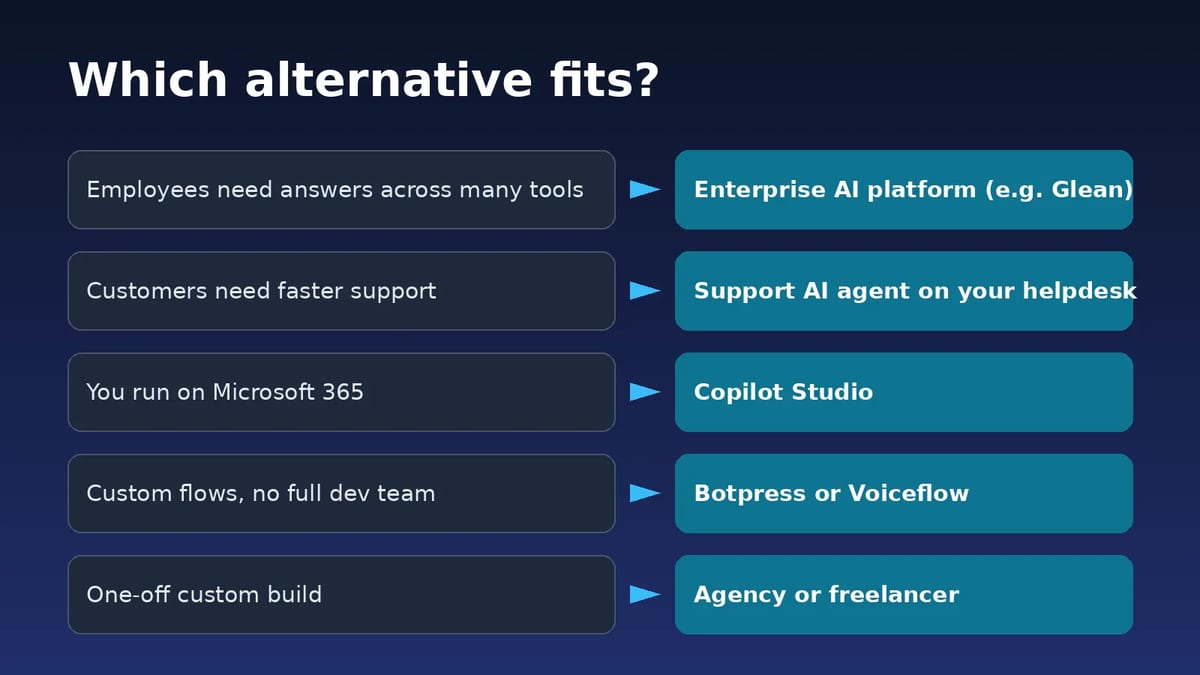
- Employees need answers from many internal tools: choose an enterprise AI platform with strong connectors and permissions, such as Glean.
- Customers need faster support: choose a support-focused AI agent tied to your helpdesk.
- You live in Microsoft 365: Copilot Studio reduces integration work.
- You need a custom flow but no full team: use a builder like Botpress or Voiceflow.
- You need a one-off build: hire an agency or freelancer, with a clear maintenance plan.
Whatever you pick, check security and compliance early. Ask how the vendor handles data retention, model training, access control, and audit logs.
Compare total cost, not just the sticker price
Usage-based pricing can look cheap at first and grow with volume. Seat-based pricing is predictable but scales with headcount. Before comparing, estimate your monthly conversations, the number of people who will build or manage the bot, and the internal time needed for content and review.
Run a pilot of four to six weeks with real questions. Track answer accuracy, resolution or deflection rate, time saved for staff, and how often the bot escalates to a person.
FAQs
Is it cheaper to buy a chatbot platform than to build one in-house?
For most companies, yes. A platform spreads development, hosting, and maintenance costs across many customers. Building in-house usually only pays off when the chatbot is a core product or needs deep custom logic no platform supports.
Can a no-code platform handle enterprise needs?
Many can, especially for support and FAQ use cases. For employee-facing answers across many internal systems, look for platforms with broad connectors and permission-aware search, since those are hard to build well on your own.
How long does it take to launch with these alternatives?
Support bots on an existing helpdesk can go live in days. Enterprise platforms and custom builds often take a few weeks, mostly for connecting data, setting permissions, and testing answers.
Do I still need developers?
Usually far fewer. Someone should own content quality, integrations, and monitoring, but that is often a part-time role rather than a full development team.
Found this useful? Share it with someone comparing AI tools.