Home / Guides / Productivity
Copilot vs ChatGPT: Which to Use
 Eimantas Kazėnas Marketing & Tech
- Published
- 4 min read
On this page What we mean by Copilot
Independent and reader-supported. Some links may earn us a commission; it never changes our rankings. Editorial policy
Copilot vs ChatGPT in 2026: Copilot is free and built into Word, Excel and Outlook, while ChatGPT is the stronger standalone app from $8 Go or $20 Plus.
Quick answer: use Microsoft Copilot if your day runs on Word, Excel, PowerPoint, Outlook and Teams, or if your company already pays for Microsoft 365. Use ChatGPT if you want one assistant that works anywhere, gets OpenAI’s newest features first, and adds deep research, Codex and custom GPTs. Plenty of people use both: free Copilot for Office files and ChatGPT for everything else.
What we mean by Copilot
“Copilot” is a family name at Microsoft. This page compares two things against ChatGPT:
- Microsoft Copilot app (copilot.com, Windows, Mac and mobile): Microsoft’s free AI chat, image creation and search assistant. Microsoft says it is free with a signed-in Microsoft account.
- Copilot in Microsoft 365: Copilot inside Word, Excel, PowerPoint, Outlook and OneNote, bundled with Microsoft 365 Personal, Family, Premium and Pro, or added to work plans.
For prompts and workflows inside Microsoft 365 at work, see our guide to advanced Copilot techniques.
GitHub Copilot is a different product
GitHub Copilot is GitHub’s AI coding assistant for editors like VS Code and JetBrains. It has its own plans and is not the same as Microsoft Copilot or Copilot in Microsoft 365. If you searched “Copilot vs ChatGPT” for coding, the closer matchup is GitHub Copilot vs OpenAI’s Codex, which comes with ChatGPT plans. The rest of this page is about the everyday assistants.
Pricing side by side
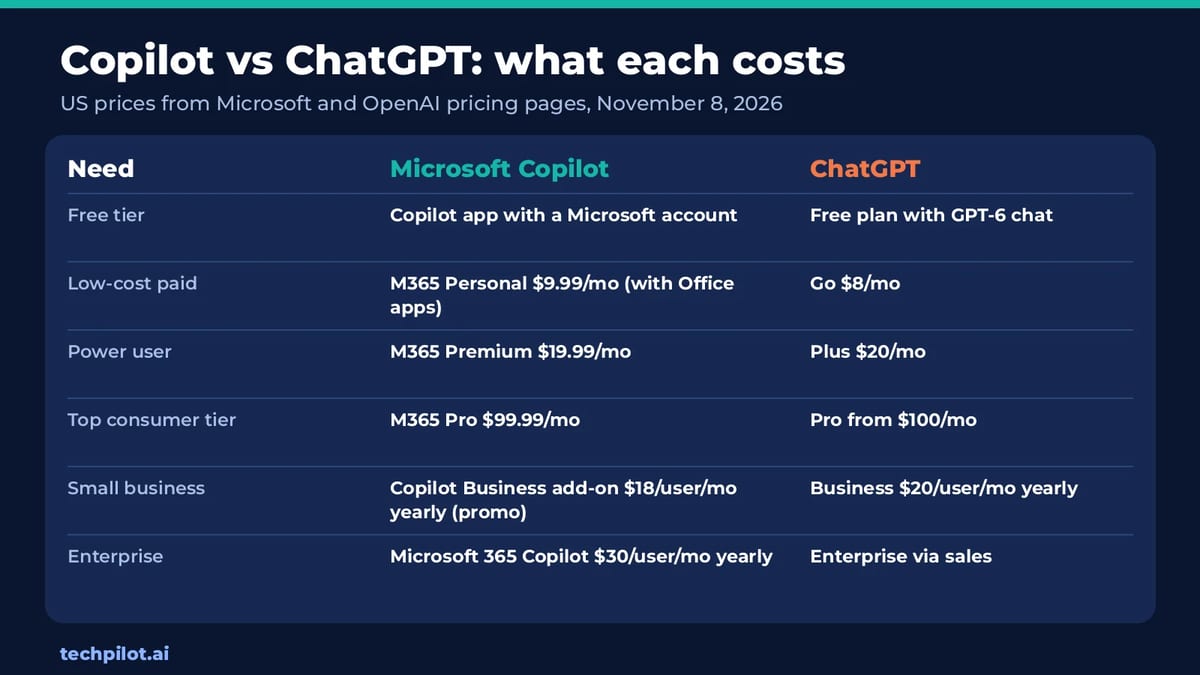
| Tier | Microsoft Copilot | ChatGPT |
|---|---|---|
| Free | Copilot app, free with a Microsoft account | Free plan with unlimited GPT-6 text chats |
| Entry paid | Microsoft 365 Personal $9.99 / mo or $99.99 / yr | Go $8 / mo |
| Family | Microsoft 365 Family $12.99 / mo (AI for the owner only) | No family plan |
| Power user | Microsoft 365 Premium $19.99 / mo or $199.99 / yr | Plus $20 / mo |
| Top consumer | Microsoft 365 Pro $99.99 / mo | Pro from $100 / mo |
| Small business | Copilot Business add-on $18 / user / mo yearly (promo, usually $21) | Business $25 / user / mo monthly, $20 yearly |
| Enterprise | Microsoft 365 Copilot add-on $30 / user / mo yearly | Enterprise via sales |
Prices are US list prices from Microsoft’s Copilot plans for individuals and business pricing pages, and from ChatGPT pricing, checked November 8, 2026. The key difference: Microsoft’s paid tiers are Microsoft 365 bundles, so $9.99 also buys the desktop Office apps, 1 TB of OneDrive storage and Microsoft Defender. ChatGPT’s $8 and $20 plans buy only the AI.
Where Copilot wins
- Inside your Office files: Copilot drafts in Word, analyzes in Excel, builds decks in PowerPoint and summarizes your Outlook inbox without copy-paste.
- Bundle value: if you already pay for Microsoft 365 Personal or Family, Copilot is included. Microsoft 365 Premium adds agents like Researcher and Analyst plus Cowork for multi-step tasks.
- Work data: business Copilot plans ground answers in your organization’s data with enterprise data protection, and Copilot Chat comes at no extra cost for eligible Microsoft 365 work accounts.
- Free and signed in: the Copilot app costs nothing with a Microsoft account, which most Windows users already have.
Where ChatGPT wins
- Newest OpenAI features first: ChatGPT Free already runs GPT-6 for everyday chats, while Microsoft’s business pricing grid lists “latest OpenAI models: GPT-5.X” with a choice of models.
- A broader toolset: deep research, Codex for coding, ChatGPT Work, custom GPTs, projects and plugins, all in one app.
- Works with Office too: ChatGPT lists Excel, Word, PowerPoint and Google Sheets extensions, full on Plus and limited on Free and Go.
- Cheapest paid entry: Go at $8 a month is the lowest paid tier of the two, if you do not need Office apps.
Choosing between assistants more broadly? Compare Claude vs ChatGPT, or start with our how to use ChatGPT guide.
Which should you use?
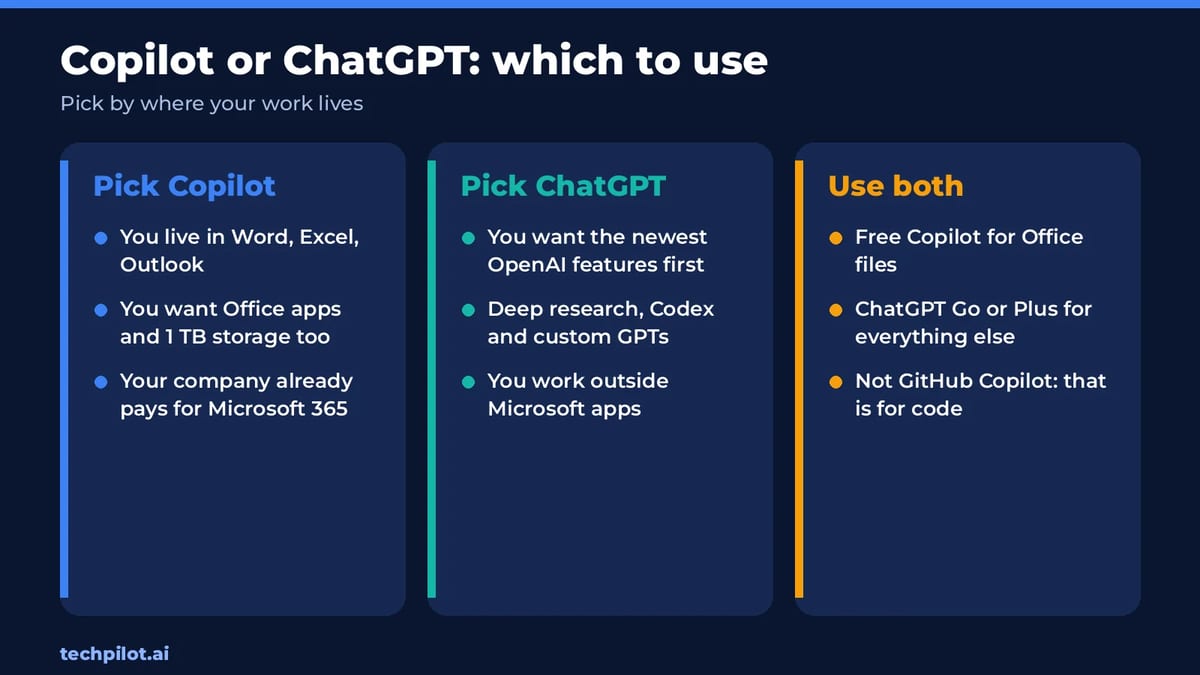
- Office-heavy worker with Microsoft 365 at work: Copilot. It sits where your files already are.
- Home user who needs Office anyway: Microsoft 365 Personal or Family, then add ChatGPT Go only if you miss its features.
- Writer, researcher or student: ChatGPT. Deep research, projects and custom GPTs are stronger outside Office.
- Developer: ChatGPT Plus for Codex, or look at GitHub Copilot, the separate coding tool.
- Budget of $0: use both free tiers. They cover different jobs.
Our verdict
Copilot is the better pick when the job is inside a Microsoft 365 document, and its paid tiers make sense when you also want the Office apps and storage. ChatGPT is the better general assistant and the place OpenAI ships new features first. If you only pay for one, ask where your work lives: in Office files, choose Copilot; everywhere else, choose ChatGPT.
Frequently asked questions
Is Copilot better than ChatGPT?
Copilot is better inside Word, Excel, PowerPoint and Outlook. ChatGPT is the better standalone assistant, with deep research, Codex and custom GPTs in one app.
Is Microsoft Copilot free?
Yes. Microsoft says the Copilot app is free with a signed-in Microsoft account. Copilot inside the Office desktop apps comes with Microsoft 365 Personal, Family, Premium or Pro.
Does Copilot use ChatGPT?
Copilot runs on OpenAI models among others. Microsoft’s business pricing lists the latest OpenAI GPT-5.X models with model choice, but Copilot is a separate Microsoft product.
How much is Copilot vs ChatGPT Plus?
Microsoft 365 Premium with extensive Copilot use is $19.99 a month. ChatGPT Plus is $20 a month. Microsoft 365 Personal at $9.99 includes Copilot with lower usage.
Is GitHub Copilot the same as Microsoft Copilot?
No. GitHub Copilot is a separate AI coding assistant for code editors with its own plans. Microsoft Copilot is the general assistant for chat and Microsoft 365.
Found this useful? Share it with someone comparing AI tools.
How to Upload Video to ChatGPT
How to upload video to ChatGPT: attach via + → Add photos & files on supported surfaces, note audio is paid-only, and fall back to transcripts plus…
 Eimantas Kazėnas · 3 min read
DeepSeek vs ChatGPT: 2026 Comparison
DeepSeek vs ChatGPT in 2026: DeepSeek keeps chat free and Flash API cheap, while ChatGPT Plus at $20 adds voice, images, agents and a fuller product…
Eimantas Kazėnas · 3 min read