How Google’s AI Overviews Choose Their Sources, and How to Test Whether Yours Get Picked
How Google’s AI Overviews pick the pages they cite, what it takes to be eligible, and a four-step test to see whether your site gets picked.
 Mihai (Mike) Bizz Business, entrepreneurship, tech & AI
 - Published
- 5 min read
On this page How AI Overviews Build an Answer
Independent and reader-supported. Some links may earn us a commission; it never changes our rankings. Editorial policy
Since May 2025, Google AI Overviews have appeared in more than 200 countries and territories and over 40 languages. They sit above the classic results, answer the question in a few paragraphs, and link a handful of pages as supporting sources. Ranking still matters, but you now also need to know whether the overview above the results cites you, and if it doesn’t, whom it cites.
How AI Overviews Build an Answer
Google describes the mechanics in its guide to AI features and your website. Three points matter for anyone trying to get cited.

One query becomes several searches. Both AI Overviews and AI Mode may use a “query fan-out” technique: the system issues several related searches across subtopics, then identifies supporting pages while the response is generated. A page can be cited because it answers one of those sub-questions well, even if it does not rank first for the original query.
Many searches show no overview. Google says AI Overviews are shown only when its systems decide they add something beyond classic results, and that they often do not trigger. In Pew Research Center’s March 2025 sample of US browsing data, 18% of Google searches produced an AI summary. So part of the test is recording which searches show an overview at all.
AI Overviews and AI Mode are different systems. Google notes they may use different models and techniques, so the answers and links they show will vary. Being cited in one does not mean being cited in the other.
What It Takes to Be Eligible
According to Google, to be shown as a supporting link a page must be indexed and eligible to appear in Google Search with a snippet. There are no additional requirements.
That has a few practical consequences:
- No special files or markup. Google states you do not need new machine-readable files, AI text files or special schema.org structured data to appear in AI features.
- Snippet controls apply. nosnippet, data-nosnippet, max-snippet and noindex limit what Google can show from a page, in AI features as well as classic results. A forgotten max-snippet rule can quietly keep a page out of the overviews.
- Crawl access matters. Robots.txt rules, CDN bot protection and content that only renders after a login all stand between Googlebot and your text.
What Tends to Get a Page Picked
Google does not publish a ranking formula for AI Overview sources, but these patterns come up often across the overviews we track.
- Answer-shaped passages. Pages that answer a question directly at the start of a section, with a definition, a short list of options or a clear comparison, are easier for the model to quote than pages that circle the topic.
- Coverage of the sub-questions. Because of query fan-out, a page that covers the related questions a buyer would ask (pricing, alternatives, use cases, limitations) has more chances to match one of the generated searches.
- Third-party sources for buying questions. For “best” and “vs” queries, overviews lean on review sites, comparison articles and forums. What those pages say about you can matter as much as your own site.
- Current information. Overviews favor pages with specific, up-to-date facts. Stale prices or last year’s statistics are an easy reason to lose a citation.
A Practical Test in Four Steps
Testing this has two traps: the answers change between runs, and testing your own brand name tells you nothing about how buyers find you.
Step 1: Write the questions your buyers ask
List 10 to 20 searches a potential customer would type before they know your brand: “best payroll software for small business”, “payroll software vs accountant”, “how to run payroll for contractors”. Leave your brand name out. Mix best-of lists, comparisons and how-to questions, since each tends to draw different sources.
Step 2: Run them and read the overviews
You can do this by hand in a private browser window, noting for each search whether an overview appears, which brands it names and which pages it links. Expect a few minutes per search, and expect the results to differ slightly by location and day.
A faster route is an AI Overview checker. AskWatch’s free version takes your domain, reads your site to understand what you sell, writes ten buyer-style searches for your category, runs them on Google and reads every AI Overview that comes back. The report shows which searches name your brand, which of your pages are cited, and which competitors are named instead.
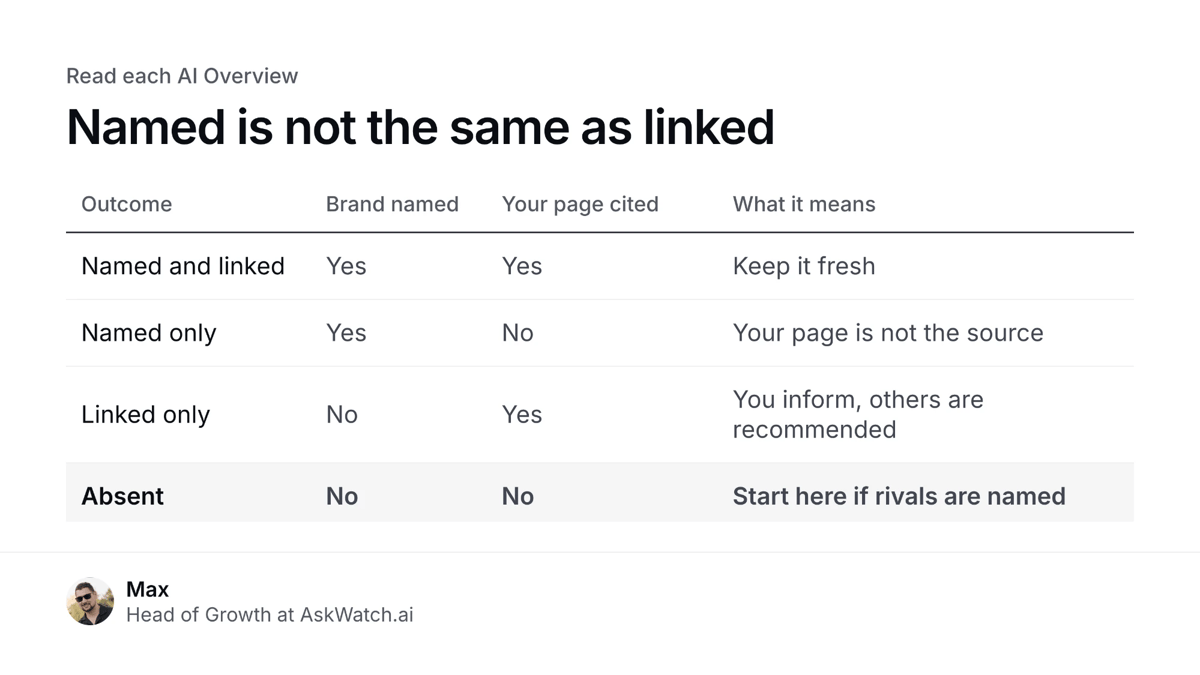
Step 3: Separate “named” from “linked”
An overview can name your brand without linking your site, or link your page without recommending you. Track both. For each search, note one of four outcomes: named and linked, named only, linked only, or absent. “Absent while a competitor is named” is the outcome to work on first.
Step 4: Fix, then retest on a schedule
For the searches you lose, open the pages Google cites and compare them with yours. Rewrite the relevant section so it answers the question in its first lines, add the missing sub-topics, update stale facts, and work on getting covered by the third-party pages that keep appearing as sources. Then run the same searches again after two to four weeks. Check each search several times before deciding a change worked, because overviews vary between runs.
Mistakes to Avoid
- Testing branded queries. A search for your own brand name will usually cite your own site. It says nothing about discovery.
- Treating rank as citation. Ranking third in the classic results does not mean a link in the overview above them.
- Ignoring how you are described. Being named next to a caveat (“cheaper, but limited support”) is not the same as being recommended.
Where to Start
Start with ten buyer questions, record who each overview names and links, and run the same searches again in a few weeks.
Found this useful? Share it with someone comparing AI tools.