Home / Guides / Productivity
Free Open Source Finder Alternatives for Mac
 Mihai (Mike) Bizz Business, entrepreneurship, tech & AI
- Published
- 4 min read
On this page Why look for a Finder alternative?
Independent and reader-supported. Some links may earn us a commission; it never changes our rankings. Editorial policy
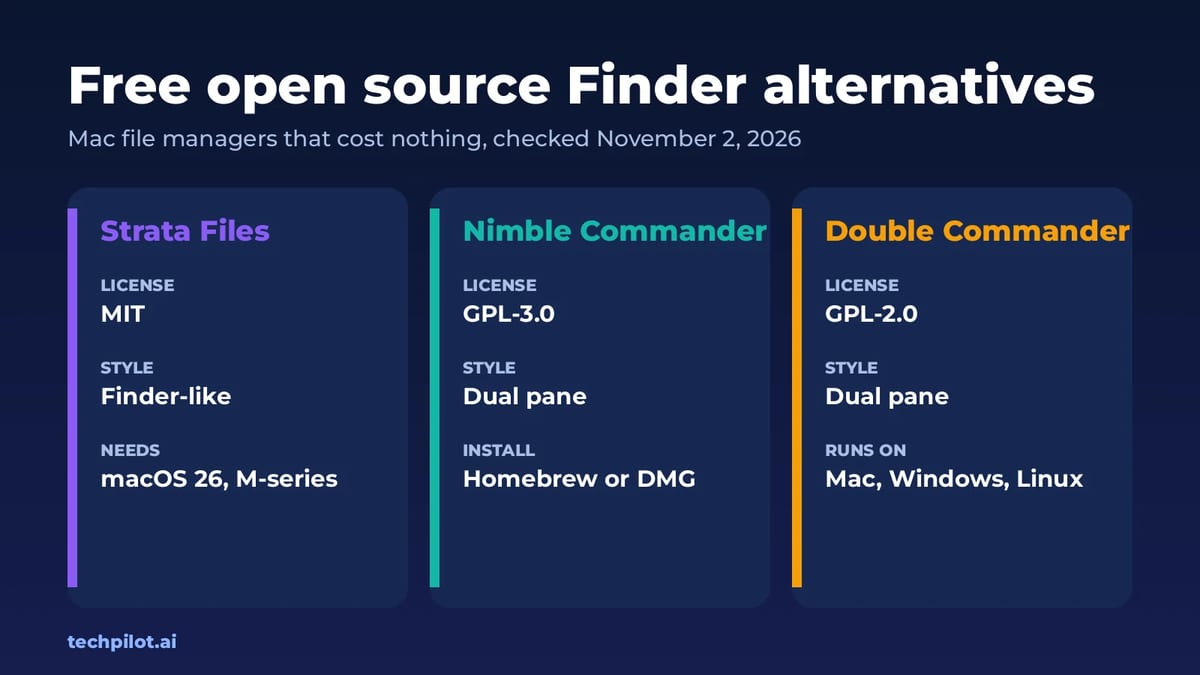
Want a free, open source Finder alternative for Mac? Strata Files, Nimble Commander and Double Commander cost nothing and publish their full source code.
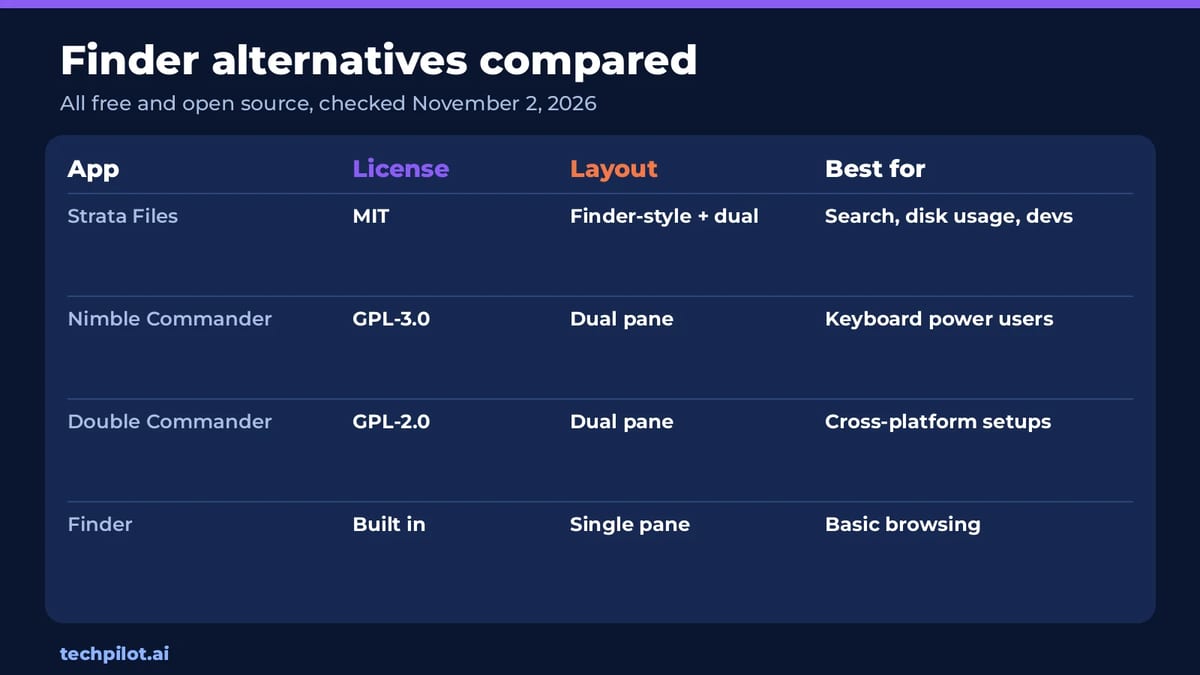
Quick answer: If you like how Finder looks but wish it searched faster and showed real folder sizes, start with Strata Files. If you prefer the classic two-panel style of Total Commander, try Nimble Commander or Double Commander. All three are free to use, and we checked each app’s license, download page and latest release on November 2, 2026.
Why look for a Finder alternative?
Finder handles basic browsing well, but it hasn’t changed much in years. Folder sizes often say “Calculating…” or nothing at all, search through Spotlight can be slow or miss files, and there’s no built-in dual-pane view for moving files between two folders. Big copies can’t be paused, and finding the files that fill your disk means installing yet another app.
Paid file managers fix most of this, but you don’t have to pay. The open source apps below are free, and anyone can read their code to see exactly what they do with your files.
1. Strata Files: the closest thing to a better Finder
Strata Files is a native Mac file manager built in Swift and AppKit, with no Electron or web views. It keeps what you already know from Finder, including the look, the shortcuts, drag and drop, Quick Look and tabs, then adds the features Finder is missing. It’s released under the MIT license, so it’s free and open source, and the code is on GitHub.
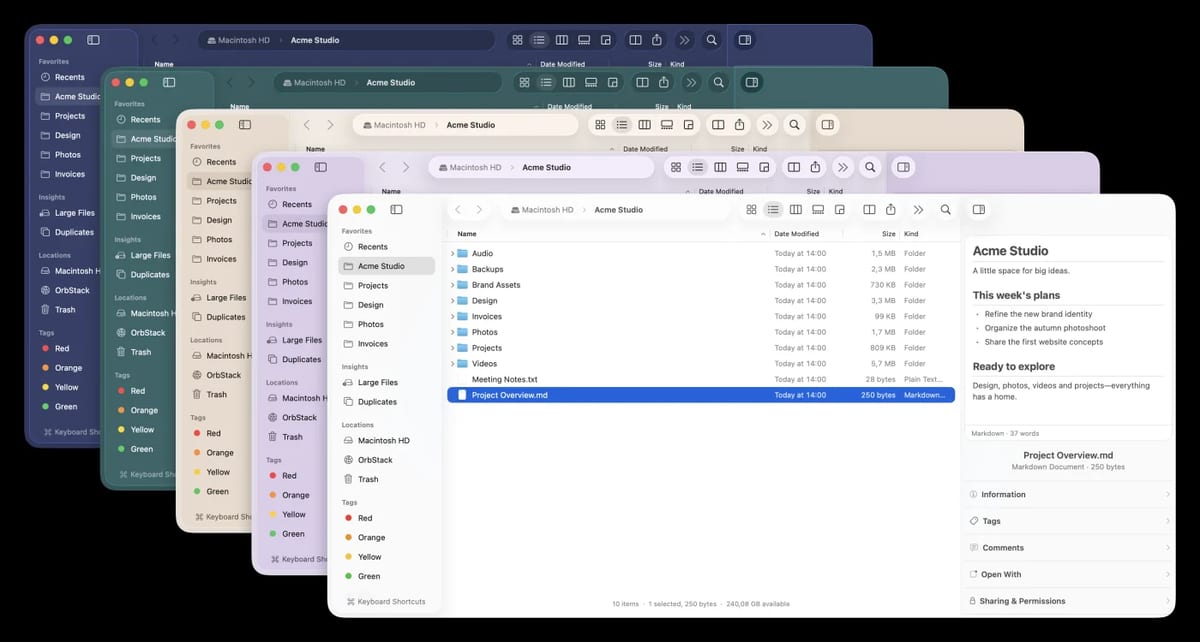
What stands out:
- Instant search: it indexes your home folder and Applications, then returns results as you type. You can use filters like
size:>1gbormodified:<7d, or plain English such as “pdfs from last month”. - Real folder sizes: folders show their true size when you open them and stay current as files change.
- Disk usage map: switch any folder to a map view, and use the Large Files and Duplicates sections to free up space.
- Keyboard first: ⌘K opens a command palette, and ⌘1 to ⌘5 switch between Icons, List, Columns, Gallery and Disk Usage views.
- Safer file operations: pause and resume big copies, compare conflicting files side by side, and undo past operations even after quitting.
- Dual pane: turn it on for two folders side by side, with compare and sync.
- Developer tools: Git status on each file, project scripts, SFTP and S3 connections, and read-only browsing of Docker and other containers.
Strata has no accounts, tracking or cloud servers. The catch is that it needs macOS 26 Tahoe on an Apple silicon Mac, so older Intel Macs are out. It’s also a young project (version 0.7.5 came out in late October 2026), so expect frequent updates. You can download it from the site or install it with Homebrew: brew install --cask cristipufu/tap/strata.
2. Nimble Commander: fast dual-pane power
Nimble Commander is a free dual-pane file manager for macOS, built for speed and keyboard navigation. Its developer describes it as a blend of classic ’80s and ’90s file managers with a modern Mac look. The source code is under the GPL-3.0 license, and version 1.9.0 was released on November 1, 2026.
It’s a good fit if you came from Total Commander or Midnight Commander and want two panels and keyboard shortcuts for everything. It doesn’t try to look like Finder, so there’s a learning curve if you’ve only used Apple’s app. Install it with brew install nimble-commander or a direct DMG download.
3. Double Commander: free on Mac, Windows and Linux
Double Commander is a free, open source file manager with two panels side by side, licensed under GPL-2.0. Its biggest plus is that it runs on macOS, Windows and Linux, so you can use the same tool and shortcuts on every computer. The latest version, 1.2.10, ships separate Mac builds for Apple silicon and Intel.
The trade-off is the interface. Double Commander feels more like a Windows app than a Mac one, and it doesn’t fit in with macOS as smoothly as Strata or Nimble Commander. If you switch between operating systems a lot, that’s a fair price for consistency.
Which free Finder alternative should you pick?
- You want Finder, only better: Strata Files, if your Mac runs macOS 26 on Apple silicon.
- You live on the keyboard and love two panels: Nimble Commander.
- You also use Windows or Linux: Double Commander.
- You have an older Intel Mac: Nimble Commander or Double Commander, since Strata needs Apple silicon.
None of these apps replace Finder at the system level. Finder keeps running, and you open the new app alongside it. Because they’re all free, the easiest way to choose is to install two and use each for a day of normal work.
Frequently asked questions
What is the best free Finder alternative for Mac?
Strata Files is the closest to Finder, with fast search and real folder sizes. Nimble Commander and Double Commander are free dual-pane options.
Is Strata Files open source?
Yes. Strata Files is free and released under the MIT license, with its code on GitHub.
Does Strata Files work on Intel Macs?
No. Strata Files needs macOS 26 Tahoe on an Apple silicon Mac. Intel Mac owners can try Nimble Commander or Double Commander.
Can a Finder alternative replace Finder completely?
Not fully. Finder still runs in the background, and the alternative app opens alongside it for everyday file work.
Found this useful? Share it with someone comparing AI tools.
Is Notion AI Free? Free vs Paid Limits 2026
Is Notion AI free? Only as a trial. Free and Plus plans get a few trial AI responses, then full Notion AI needs Business, $20 a seat a month billed…
 Eimantas Kazėnas · 4 min read
Is Perplexity AI Free? Free vs Pro in 2026
Is Perplexity AI free? Yes. The free plan gives unlimited basic searches with cited answers, but only a few advanced ones a day. Pro is $17 a month…
Eimantas Kazėnas · 4 min read