How to Evaluate AI Video Tools Beyond the Demo Reel
Here’s how to evaluate AI video tools beyond the demo reel: run a real brief, test shots, check revisions, and measure the cost per accepted deliverable.
 Eimantas Kazėnas Marketing & Tech
- Published
- 8 min read
On this page Begin with an assignment you already understand
- Begin with an assignment you already understand
- Separate visual generation from video assembly
- Build a small set of revealing shots
- Evaluate movement frame by frame
- Try a reference asset where fidelity matters
- Give the first draft ordinary revision notes
- Measure cost per accepted deliverable
- Check the parts viewers actually read and hear
- Decide how much control your team needs
- Keep the evaluation honest
- Make the final decision in the editor
Independent and reader-supported. Some links may earn us a commission; it never changes our rankings. Editorial policy
A beautiful sample clip can tell you that an AI video tool is capable of producing a beautiful sample clip. It tells you much less about the work involved in creating your next product launch, customer explainer, or weekly social campaign.
The difficult questions appear after the first generation. Can you correct a product detail without rebuilding the sequence? Does a camera move help explain the offer? How many attempts produce footage you can actually use?
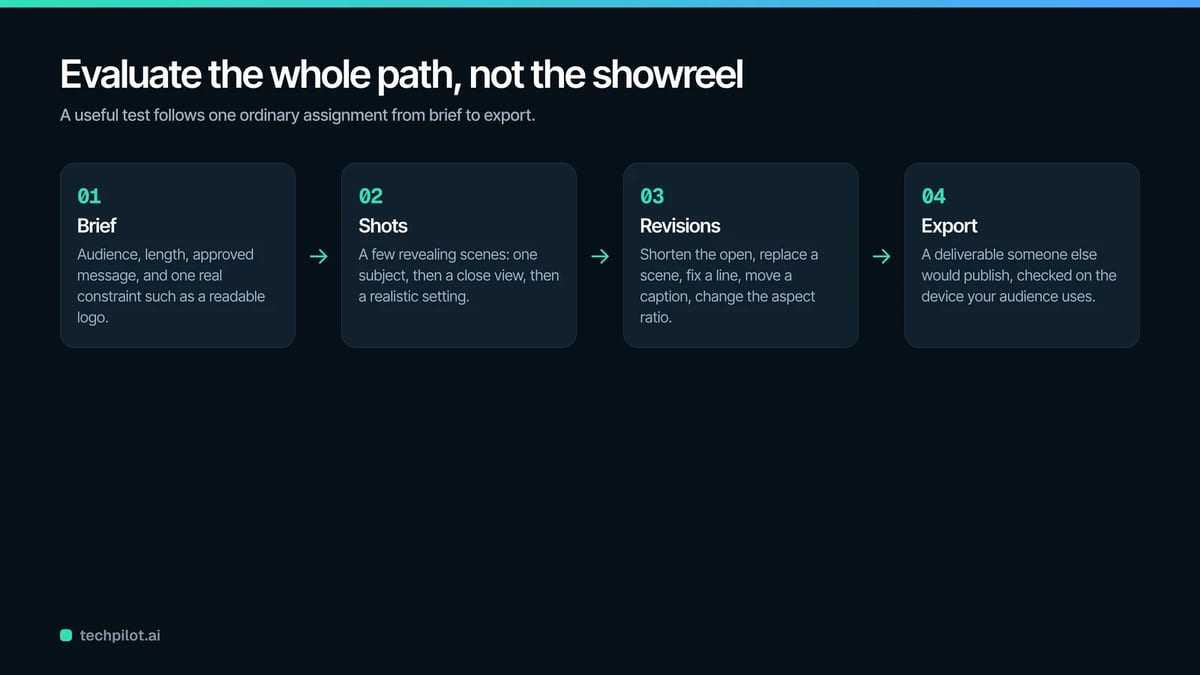
For a business choosing video software, those questions deserve more attention than a gallery of spectacular results. A useful evaluation follows an ordinary assignment from brief to export. It measures how the tool behaves when the deadline, brand requirements, and revision notes resemble real work.
Begin with an assignment you already understand
Choose a modest project with a clear purpose. A short explainer for an existing product is usually more revealing than an ambitious cinematic concept. You know what the product looks like, which claims are accurate, and what viewers should understand.
Imagine a small homeware company promoting a ceramic travel mug. The video needs an opening scene, a close view of the lid, an explanation of the grip, and a final invitation to browse the collection. That gives the evaluator several different visual problems to solve.
Write down the audience, format, intended length, approved message, and required assets before opening a tool. Include one realistic constraint, such as a logo that must remain readable.
Keep that brief unchanged across candidates. If every service receives a different assignment, you will compare your own prompting decisions as much as the software.
Separate visual generation from video assembly
An AI video model and a finished video workflow solve related problems, but they do not perform identical jobs. One may create an impressive moving shot while leaving narration, sequencing, captions, and export to other tools.
Decide which part of production you need help with. A team with experienced editors may primarily want fresh footage. A solo marketer may need a complete workspace that connects the script to the final deliverable.
For example, VideoGen makes the Runway Gen 3 model available for generating cinematic shots, which can then be combined with narration, music, and captions inside the same project. That distinction matters when evaluating the whole production process.
Judge the generated shot on its visual merits, then judge the workspace on how easily you can turn that shot into a useful sequence. A strong result in one category does not automatically settle the other.
Build a small set of revealing shots
The evaluation does not need dozens of prompts. It needs a few shots that expose different limitations.
For the travel mug example, begin with a simple tabletop scene. Ask for one subject, one action, and one camera movement. Then try a closer view with the mug turned toward the camera. Finish with a scene that places it in a plausible everyday setting.
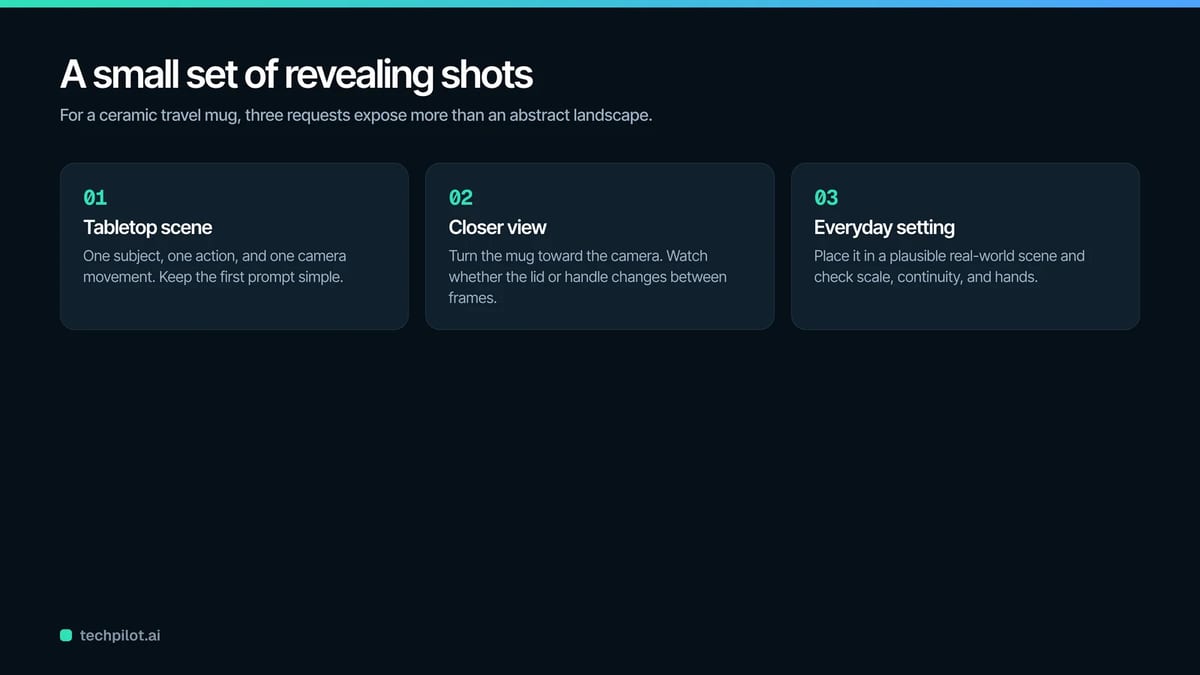
These requests reveal more than an abstract landscape because product shape, scale, and continuity matter. Watch whether the lid changes between frames, the handle becomes distorted, or the object interacts strangely with a hand.
Avoid making the first prompt unnecessarily complicated. If a scene contains several moving people, changing weather, reflective surfaces, and a rotating product, you will struggle to identify why it failed.
Add complexity gradually. A useful test isolates the difficulty instead of hiding it inside an elaborate description.
Evaluate movement frame by frame
Playback at normal speed is the first check, not the last. A clip can feel convincing until a pause reveals an impossible edge or an object that briefly disappears.
Review the beginning, middle, and end of each candidate shot. Look at the product outline, hands, reflections, shadows, and background objects. Then play the clip again while watching only the camera movement.
Ask whether the motion supports the message. A slow approach might draw attention to the mug’s lid. A dramatic spin could make the same detail harder to see. Movement is useful when it guides attention toward something the viewer needs to understand.
Note the difference between a cosmetic flaw and a misleading representation. A slightly uneven background may be tolerable in a mood shot. A lid that appears to close differently from the real product creates a more serious problem.
Set rejection criteria before enthusiasm for an attractive scene makes those decisions harder.
Try a reference asset where fidelity matters
Generated imagery is not always the right source for a product demonstration. If the audience needs to see an exact connector, label, interface, or mechanism, begin with an approved photograph or recording.
Test whether the workflow lets you bring that material into the sequence without awkward workarounds. Replace a generated close-up with a real product shot and check whether the pacing still works.
This is also a useful point to examine cropping. A photograph that looks excellent on a desktop may lose the important detail when adapted to a vertical frame. Preview the intended format early.
The evaluation should reward a tool that makes the right material easy to use. There is little value in forcing every scene through generation when a simple photograph communicates more accurately.
Keep a record of which scenes required real assets. That information will help estimate future production effort and show what your team still needs to capture.
Give the first draft ordinary revision notes
A tool becomes much easier to assess when you ask it to handle the kind of changes colleagues actually request.
Shorten the opening. Replace one scene. Change the final line. Correct a pronunciation. Move a caption away from the product. Adapt the sequence to another aspect ratio.
These are reasonable editing tasks, and they reveal whether the project remains manageable after generation. Notice whether a small correction affects unrelated parts of the video or forces you to regenerate an acceptable shot.
Record the number of steps and the time involved, but also write down any uncertainty. If you cannot tell which version is current, that is a production concern even if the interface looks polished.
Ask a second person to review the draft using written notes. Their feedback will show whether the workflow supports clear collaboration or depends on the original operator remembering every decision.
Measure cost per accepted deliverable
A low generation price can be attractive while disguising the actual cost of producing usable work. Failed attempts, manual repairs, and repeated reviews all consume resources.
Use a simple calculation: add the generation spend, asset costs, and the value of production time, then divide by the number of approved videos.
Consider a hypothetical comparison. One workflow costs $10 in generation and takes two hours of editing. Another costs $25 and takes half an hour. At an internal labor rate of $30 an hour, their production costs are $70 and $40 respectively.
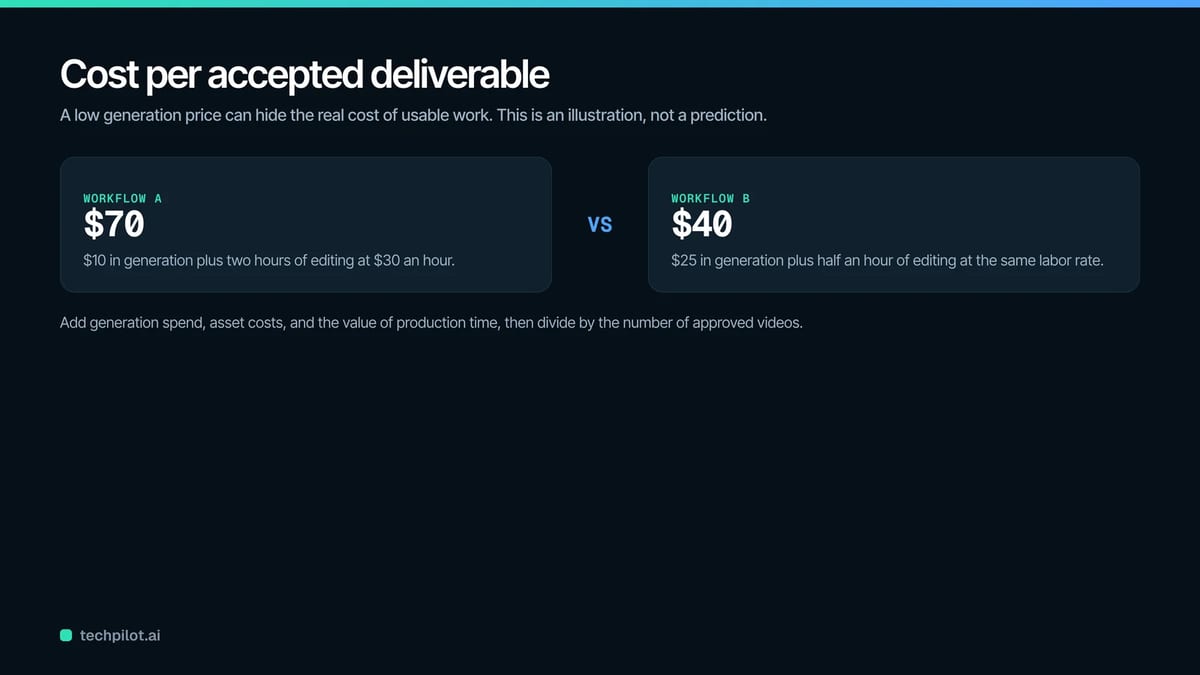
Those figures are an illustration, not a prediction of any platform’s performance. Their purpose is to make hidden effort visible.
Keep setup time separate from recurring work. Creating a reusable template may take an afternoon but reduce later production time. A fair evaluation should recognize both the initial investment and the routine workload.
Check the parts viewers actually read and hear
Visual quality attracts attention, but narration and captions carry much of an explainer’s meaning. Treat them as part of the evaluation.
Listen for product names, abbreviations, numbers, and words that could be pronounced in more than one way. A smooth voice can still deliver the wrong meaning if a pause falls in an unfortunate place.
Read captions without listening to the audio. Check that punctuation, timing, and line breaks make the message understandable. Avoid rewarding decorative text that becomes difficult to follow on a phone.
Then play the video with sound and picture together. The narration should refer to the thing currently on screen. If the voice explains the grip while the video shows the lid, the sequence needs another edit.
Use headphones for the detailed audio review and an ordinary phone speaker for a practical listening check. Each exposes different problems.
Decide how much control your team needs
More controls are not automatically better. They are useful when someone has the skill and time to use them.
A production team may value detailed scene timing, reusable assets, and a handoff to another editor. A small business owner may care more about understanding the interface and correcting a draft without assistance.
Write two short lists: controls that prevent unacceptable mistakes and controls that would merely be convenient. Keep those categories distinct during the evaluation.
For example, replacing a misleading product image may be essential. Fine control over an elaborate transition may have little effect on the final message.
Also consider who will own the project in three months. If another colleague needs to make an update, they should be able to find the script, identify the approved assets, and understand the sequence. A repeatable process has value beyond its first operator.
Keep the evaluation honest
It is tempting to keep trying until a favorite service produces a winning example. That makes the result harder to trust.
Give each candidate the same attempt budget, revision tasks, and acceptance criteria. Save unsuccessful outputs alongside successful ones. Record the prompts and note when a result depended on a reference asset.
You can still explore creatively after the comparison. The purpose of the controlled exercise is to establish a useful baseline.
Avoid claiming that a few samples prove one model is universally superior. Performance can vary with the subject, prompt, and production requirements. A tool that suits atmospheric B-roll may be less useful for a precise software demonstration.
Finish the evaluation with a specific recommendation: suitable for this kind of assignment, under these conditions, with these review steps. That is a more useful conclusion than a broad ranking unsupported by your own work.
Make the final decision in the editor
Before subscribing for a longer period or moving a team’s workflow, complete one deliverable that someone else would be willing to publish.
Watch the exported file all the way through. Confirm that the branding is correct, the product is represented accurately, and the call to action matches the brief. Check the video on the device your audience is likely to use.
Keep the finished file, editable project, approved script, and production notes together. They become a practical reference for the next assignment.
The best choice is the tool that helps your team repeat an acceptable result with a manageable amount of effort. A striking demo may earn a place on the shortlist. A clear, accurate video that survives revision earns a place in the workflow.
Found this useful? Share it with someone comparing AI tools.