Five Things AI Video Still Gets Wrong: We Stress-Tested Kling 4.0, Clip by Clip
We stress-tested Kling 4.0 clip by clip on hands, chalk text, liquids, counting, speech and keyframes. Prompts, costs, frame strips and what still fails.
 Eimantas Kazėnas Marketing & Tech
- Published
- 17 min read
On this page How we ran the test
- How we ran the test
- Test 1: hands and a deck of cards
- Test 2: legible text on a chalkboard
- Test 3: liquid, bubbles and ice
- Test 4: counting, and touching the right object
- Test 5: speech and lip movement
- Test 6: fast motion in vertical format
- Test 7: first and last frame
- Test 8: the soundtrack
- Test 9: speed, cost and file details
- What it cost
- Where Kling 4.0 is ready, and where it is not
- The walkthrough video
- Checklist before you publish a Kling 4.0 clip
- Limitations
- The bottom line
Independent and reader-supported. Some links may earn us a commission; it never changes our rankings. Editorial policy
Every new video model arrives with a showreel, and every showreel is chosen to hide the same weaknesses. Hands that grow a sixth finger, signs that dissolve into pseudo-letters, water that behaves like jelly, objects that multiply when the camera looks away. Those failure modes have followed generative video since the first public models, and they are the first thing an experienced viewer checks.
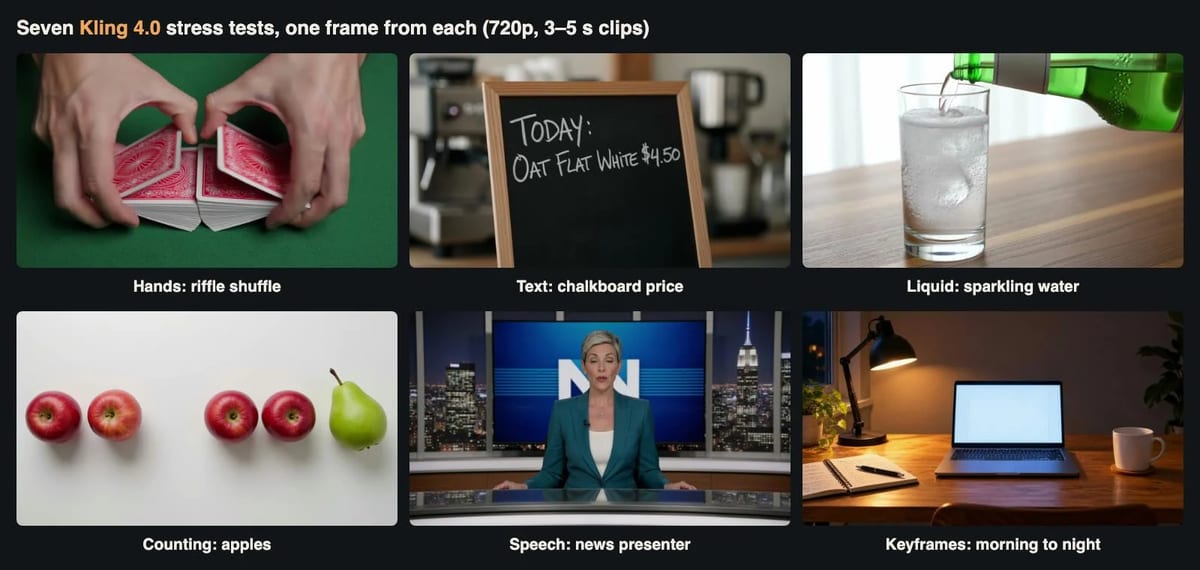
So instead of asking Kling 4.0 for a beautiful landscape, we asked it for the shots that usually go wrong. We wrote seven short prompts, each aimed at one known weakness, and generated eight clips. Then we stepped through every clip frame by frame, ran the speech through a transcription model, measured the audio, and compared the keyframe test against its input images pixel by pixel. Total spend: $3.28 for 26 seconds of video.
The short version: Kling 4.0 is much better than the models of a year ago at hands, chalk lettering and speech, and it handled a first-and-last-frame transition almost perfectly. It still struggles with following precise instructions about which object to touch, how many things are in a glass, and where an action should happen. The details are below, along with the prompts, timings and costs, so you can repeat any test yourself.
How we ran the test
Kling 4.0 is the current top model in Kuaishou’s Kling family. It covers text-to-video, image-to-video with first and last frames, reference images, video editing and video extension, and it always returns a stereo soundtrack. Clips can be 3 to 30 seconds long at 720p or 1080p.
We kept the cost down in two ways. First, every clip was rendered at 720p, the lowest resolution the model offers, because none of our failure modes depend on pixel count. Second, we used the shortest durations that made sense: three seconds for most tests and five seconds for the speech test, where the line needs time to be spoken. Three seconds sounds short, but most of these failures appear in the first second or two if they appear at all, and short clips let us run more tests on the same budget.
For each clip we recorded the exact prompt, the parameters, the server processing time and the billed cost. We then extracted frames at fixed points (0.1, 0.75, 1.5, 2.25 and 2.9 seconds for the three-second clips, and denser strips where the action was fast), transcribed speech with Whisper, measured loudness with the EBU R128 standard, and compared images numerically where a comparison was possible. Nothing was cherry-picked: every clip we paid for appears in this article, including a second take that we generated on purpose to check consistency.
The API pattern is the same for every test. You submit a job, get a task ID, and poll until the video is ready. The host below is a placeholder; use whichever provider you call Kling through.
import os, time, requests


BASE = os.environ["VIDEO_API_BASE"]          # e.g. https://your-provider.example/v1
H = {"Authorization": f"Bearer {os.environ['VIDEO_API_KEY']}"}


def kling(prompt, seconds=3, aspect="16:9", images=None):
    body = {"model": "kling-v4", "prompt": prompt,
            "resolution": "720p", "duration": seconds}
    if images:
        body["image_urls"] = images            # first frame, optional last frame
    else:
        body["aspect_ratio"] = aspect
    task_id = requests.post(f"{BASE}/videos/generations", headers=H,
                            json=body, timeout=60).json()["data"][0]["task_id"]
    print("submitted", task_id)                # log it before polling
    while True:
        try:
            d = requests.get(f"{BASE}/tasks/{task_id}", headers=H, timeout=30).json()["data"]
        except requests.RequestException:
            time.sleep(10); continue           # retry the poll, never resubmit
        if d["status"] in ("completed", "failed"):
            return d
        time.sleep(8)
Two habits in that snippet saved us money during this test. We write the task ID to a log before polling starts, and we retry failed polls instead of resubmitting the job. Our connection dropped more than once while clips were rendering. Because the IDs were logged, we simply resumed polling, and no clip was paid for twice.
Test 1: hands and a deck of cards
Hands are the classic test because they combine fine anatomy with fast, overlapping motion. A riffle shuffle is especially hard: two half-decks, ten fingers, cards interleaving at speed.
Close-up overhead shot of two hands doing a riffle shuffle with a deck of red-backed playing cards on a green felt card table, then bridging the cards back together. Soft overhead light, realistic skin texture and fingernails, the crisp sound of the cards riffling.
model: kling-v4 | resolution: 720p | duration: 3 | aspect_ratio: 16:9
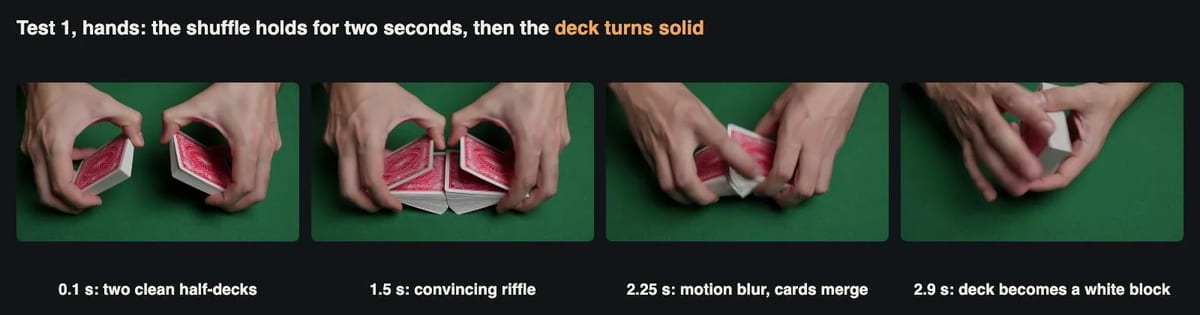
The first half of this clip is the best hand animation we have seen from a text-to-video model at this price. At 0.1 seconds the two half-decks sit cleanly in each hand, with five fingers on each and correct thumb placement. At 1.5 seconds the cards are visibly interleaving, the knuckles flex the way they do when you bend a deck, and the card backs keep their printed pattern. Skin texture, veins and nails all look natural.
The problems start in the last second. At 2.25 seconds the motion blur becomes heavy and the two halves merge into one shape. By 2.9 seconds the deck has turned into a smooth white block with no visible card edges, and the fingers of the left hand are hard to count. The model also skipped the “bridge” we asked for and simply squared the deck. For a social clip where the shuffle is the hook, you would cut at about two seconds. The clip took 116 seconds to generate and cost $0.378.
Test 2: legible text on a chalkboard
Text inside video is harder than text inside images, because every letter has to survive every frame. We chose a realistic small-business shot, a chalkboard with a price, and generated it twice with the same prompt to see whether a correct result was luck.
Static close-up of a small black chalkboard standing on a cafe counter. A hand in a grey sleeve finishes writing with white chalk; the board reads exactly: TODAY: OAT FLAT WHITE $4.50. Shallow depth of field, warm morning light, the scratching sound of chalk.
model: kling-v4 | resolution: 720p | duration: 3 | aspect_ratio: 16:9 (two takes)
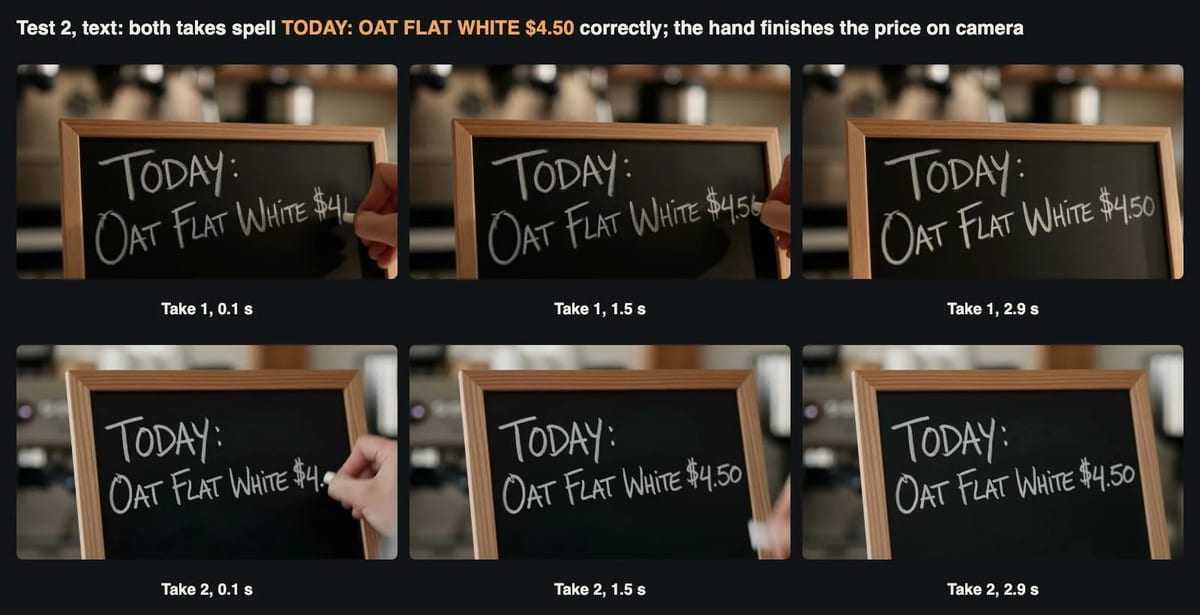
Both takes got it right. The final frames read “TODAY: OAT FLAT WHITE $4.50” with every letter, the colon and the dollar sign in place. The model interpreted “finishes writing” literally: in both takes the board starts with “TODAY: OAT FLAT WHITE 4.56”), so if you take a still from the clip, take it from the end.

The lettering style is chalkboard small caps, with a larger first letter on each word. It is consistent between takes, which suggests the model has a strong default for “chalk menu”. Framing was the main difference: take 1 placed the board against the left edge, take 2 centred it. If you need a particular layout, describe it, because the model will not infer it from “close-up”. Each take cost $0.378 and took 156 to 176 seconds.
Test 3: liquid, bubbles and ice
Liquids test whether a model understands physics or only appearances. A pour should fill the glass at a believable speed, bubbles should rise, ice should float and move, and the level should stop where you asked.
Side view of a tall clear drinking glass holding three ice cubes on a wooden table. Sparkling water is poured from a green glass bottle until the glass is three quarters full; bubbles rise, the ice cubes shift and clink. Natural window light, steady camera.
model: kling-v4 | resolution: 720p | duration: 3 | aspect_ratio: 16:9
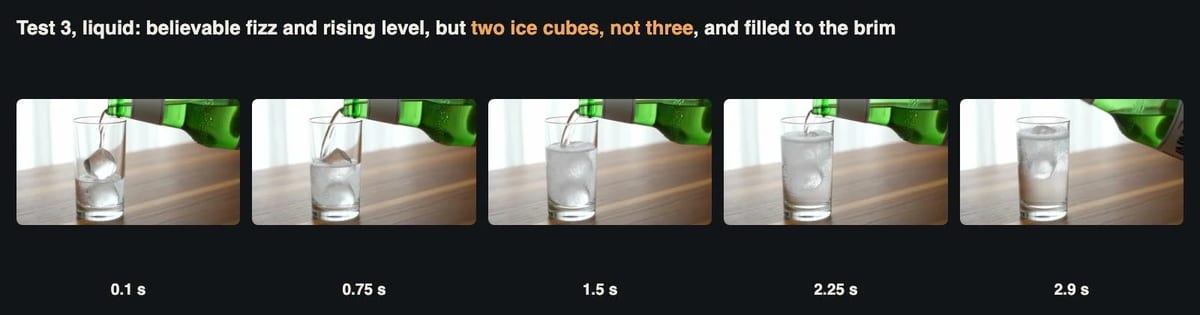
The look is excellent. The stream from the bottle is thin and clear, the water turns white with fine bubbles as it lands, a layer of foam forms on top, and the light from the window refracts through the glass properly. As a stock-style shot of a drink being poured, it would pass.
The instructions fared worse. We could count two ice cubes, not three, at the start. The water rose past three quarters and stopped just below the rim, and the ice ended up as one cube floating at the surface and one blurred shape lower down. The bottle then moved up and out of the frame. None of these would matter for a mood shot, but they show that numbers and quantities in a video prompt are suggestions, not constraints. This clip had the longest render time in the batch, 207 seconds, at the same $0.378.
Test 4: counting, and touching the right object
Object permanence and counting are where video models often fail in subtle ways: an extra apple appears, or the hand picks up something that was not there. We made the instruction precise on purpose.
Top-down shot of a plain white table with exactly five red apples in a straight row and one green pear to the right of them. A hand enters from the bottom of the frame, picks up the second apple from the left and lifts it out of the frame. Bright even light, fixed camera.
model: kling-v4 | resolution: 720p | duration: 3 | aspect_ratio: 16:9
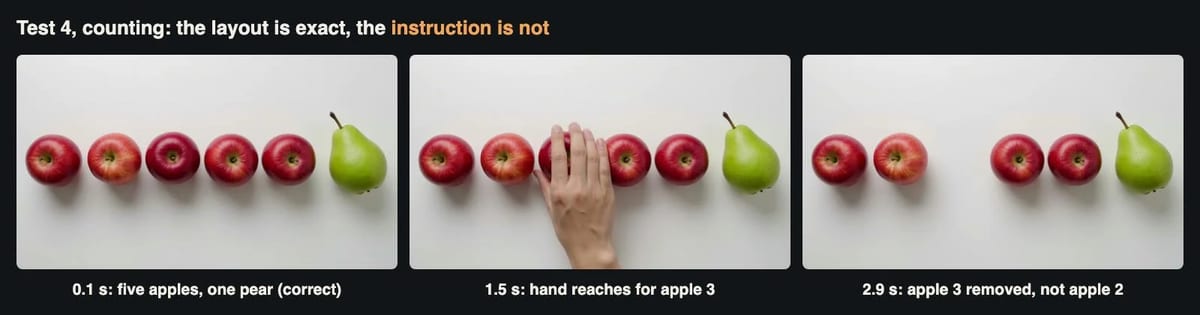
The opening frame is perfect: five red apples in a straight row, one green pear on the right, a clean white surface and even light. The count stayed correct throughout; no apple appeared or vanished except the one that was picked up. Object permanence, in other words, was solid.
The instruction was not. The hand entered from the bottom as asked, but it reached for the middle apple, the third from the left, and lifted it away. The final frame shows two apples, a gap, two apples and the pear. This is the most useful failure in the test, because it is the kind that a quick viewer would miss. If your video has to show a specific action on a specific object, for example a product demo where one item is picked from a shelf, check it frame by frame or generate a first frame and a last frame that show the exact state you need (see Test 7). Cost $0.378, 126 seconds.
Test 5: speech and lip movement
Kling 4.0 generates audio with every clip, including speech when the prompt contains a quoted line. We wrote a ten-word news intro with a pause, a number and a two-word noun phrase, then asked Whisper to transcribe the result without hints.
Medium shot of a television news presenter in her forties with short grey hair and a teal blazer sitting at a modern news desk, looking straight into the camera. She says clearly in English: “Good evening. Tonight: three new chips and one product recall.” Studio lighting, steady camera.
model: kling-v4 | resolution: 720p | duration: 5 | aspect_ratio: 16:9
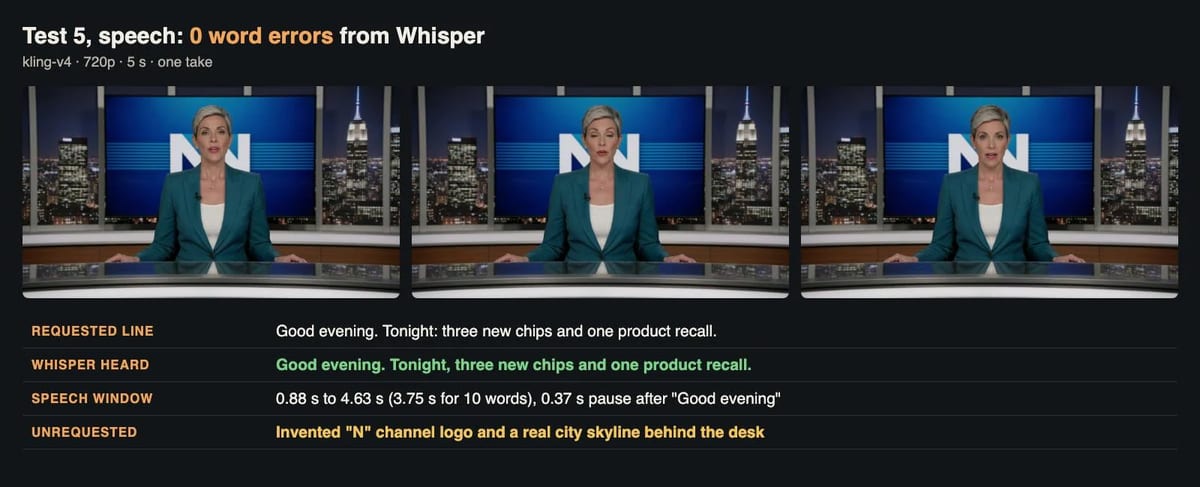
Whisper returned “Good evening. Tonight, three new chips and one product recall.” That is every word, in order, with only a colon turned into a comma. The speech starts at 0.88 seconds and ends at 4.63 seconds, with a natural 0.37-second pause after “Good evening”, which is how a presenter would actually read it. The presenter matches the description, short grey hair and teal blazer, and her mouth movement starts with the audio. Stepping through the frames, we did not see the jaw moving during silence or freezing during words, which were common problems in earlier models.
The model also added things we did not ask for. The screen behind the presenter shows a large invented “N” logo, and the window behind her shows a recognisable real city skyline. For a news-style explainer that might be acceptable; for anything that could be mistaken for a real broadcaster, it is not. Describe the background explicitly, or ask for a plain set. This five-second clip cost $0.63 and took 157 seconds.
If you want to add Kling-generated presenters, product shots or keyframe transitions to your own tools, you can access Kling 4.0 via API and reuse the prompts in this article as they are. Everything we describe here, from the shuffle to the keyframe test, used a single model ID and the request format shown above.
Test 6: fast motion in vertical format
Fast, athletic motion is where limbs bend the wrong way and boards pass through feet. A kickflip happens in well under a second, which makes it a demanding test, and we asked for it in 9:16 because that is where short sports clips usually end up.
Vertical video. Tracking shot of a teenage skateboarder in a yellow hoodie performing a kickflip over a small concrete step in an empty skatepark at sunset, landing cleanly and rolling away from the camera. Sound of the wheels on concrete and the board snapping.
model: kling-v4 | resolution: 720p | duration: 3 | aspect_ratio: 9:16
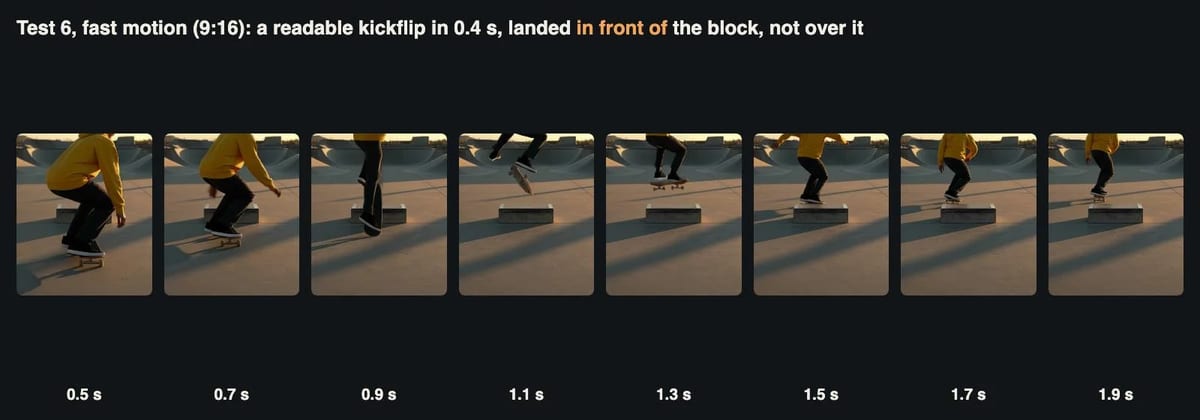
We extracted frames every 0.2 seconds between 0.5 and 1.9 seconds. The sequence reads as a real trick: the skater crouches, pops the tail at 0.7 seconds, the board is vertical at 0.9 seconds, still rotating at 1.1 seconds, and back under both feet at 1.3 seconds. The landing is clean, the knees bend to absorb it, and he rolls away into the sunset as asked. We did not see a board passing through a foot or a leg bending backwards, which is a real improvement.
The placement is wrong, though. The concrete step stays in front of the skater for the whole trick, and he lands before it and then rolls past it rather than jumping over it. The camera also behaves more like a fixed shot than a tracking shot once he lands. The vertical output is a true 720 by 1280 frame, not a crop. Cost $0.378, 156 seconds.
Test 7: first and last frame
When a prompt cannot pin down an outcome, keyframes can. We made two still images of the same desk, morning and night, with a separate image model (the second was an edit of the first, so the objects stay in place), and asked Kling 4.0 to animate the change between them. The two stills cost 0.6 cents in total.
Fixed camera time-lapse of the same desk from morning to night: the daylight on the wall fades, the laptop lid opens and its screen lights up, the desk lamp switches on, the notebook opens. Quiet room tone with a soft click of the lamp.
model: kling-v4 | resolution: 720p | duration: 3 | image_urls: [morning still, night still]
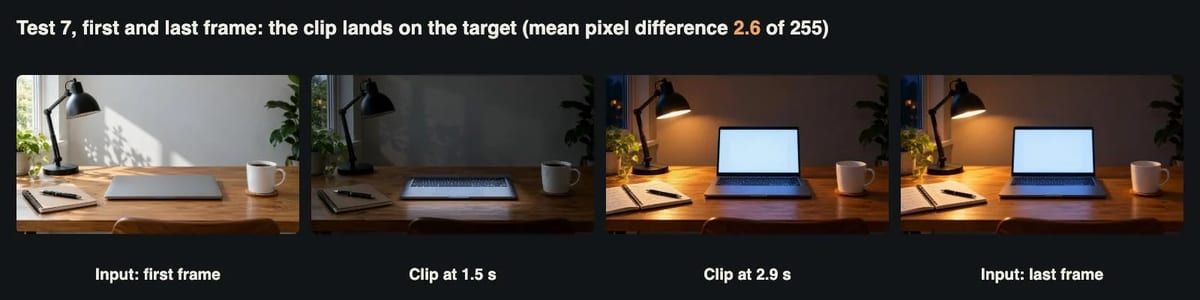
This was the most reliable result in the test. We compared the clip’s first and last frames with the two input images after scaling both to the same size. The mean pixel difference was 3.3 out of 255 for the first frame and 2.6 for the last. For context, the two inputs differ from each other by 74.7, so the clip lands almost exactly on both targets. In between, the light on the wall fades, the laptop lid rises, the screen lights up, the lamp switches on and the notebook pages turn, in a believable order, in three seconds.
Two small quirks: the output was 1284 by 724 pixels instead of 1280 by 720, which some editors will rescale without complaint and some upload tools will reject, and the notebook flips its pages in a slightly rubbery way. The lesson from Tests 4 and 7 together is simple. If the end state matters, give the model the end state. Cost $0.378, 197 seconds.
Test 8: the soundtrack
Every Kling 4.0 clip comes with audio, whether you ask for it or not, so it is worth checking what you get. All eight clips had a stereo AAC track at 44.1 kHz. We measured each one with EBU R128, the loudness standard used in broadcast and by most streaming platforms.
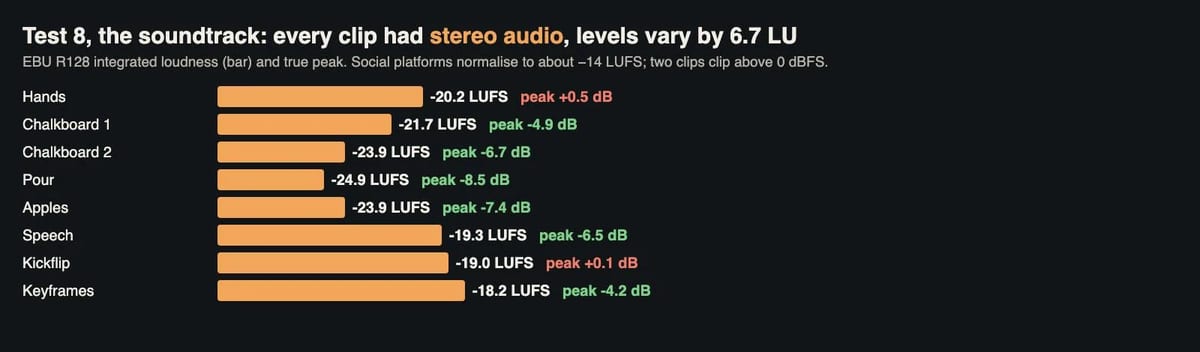
Integrated loudness ranged from −18.2 LUFS for the keyframe clip to −24.9 LUFS for the pour, a spread of 6.7 LU. That matters if you cut several clips together: without normalising, the volume will jump between shots. The speech clip was the most even, with a loudness range of only 0.7 LU, which is what you want for dialogue. Two clips, the card shuffle and the kickflip, had peaks above 0 dBFS (+0.5 and +0.1 dB), which means they can distort on playback. Social platforms normalise to roughly −14 LUFS, so all eight clips will be turned up, which makes peak limiting even more important.
The practical fix is a two-line step in your pipeline: normalise each clip to a common target and apply a true-peak limit at −1 dB. We did exactly that for the walkthrough video below. Whether each sound matches its action, the riffle of the cards, the fizz of the water, the snap of the board, is a judgment we leave to your ears: the clips play with their original audio in the video.
Test 9: speed, cost and file details
Finally, the numbers that matter for anyone building Kling into a product or a content workflow.
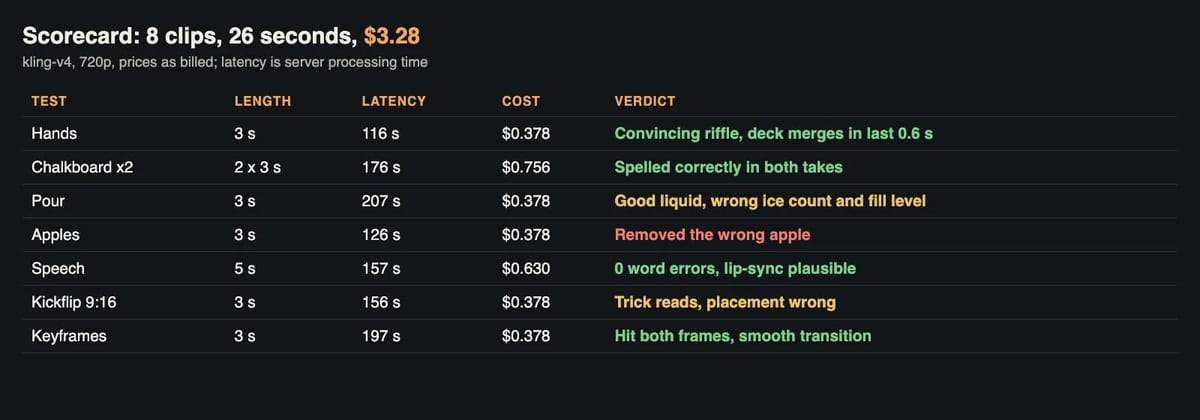
Billing was exactly linear: $0.126 per second at 720p, so $0.378 for three seconds and $0.63 for five. Server processing time ranged from 116 to 207 seconds, with an average of about 161 seconds, and did not depend on clip length in our small sample: the five-second speech clip finished faster than three of the three-second clips. Plan for two to four minutes per clip, and run jobs in parallel. We submitted seven at once, and all seven finished between two and three and a half minutes later.
The files are H.264 at 24 frames per second, 73 frames for a three-second clip and 121 for five seconds, so the real durations are 3.04 and 5.04 seconds. Bitrates are generous, up to about 8.7 Mbit/s for the detailed card shuffle, which is more than most platforms will keep after re-encoding. Download results promptly; result links are temporary, and storing them yourself is part of any serious pipeline.
What it cost
| Item | Clips | Seconds | Cost |
|---|---|---|---|
| Three-second tests (hands, chalkboard x2, pour, apples, kickflip, keyframes) | 7 | 21 | $2.646 |
| Five-second speech test | 1 | 5 | $0.630 |
| Two keyframe stills (separate image model) | 2 images | $0.006 | |
| Total | 8 clips | 26 | $3.28 |
The whole stress test cost less than a single stock-footage clip. More usefully, the per-second price makes it easy to budget: a 30-second ad assembled from ten three-second shots, with one retake each, costs about $7.56 at 720p before editing. The transcription and loudness measurements are not included, because they are part of our testing, not of production.
Where Kling 4.0 is ready, and where it is not
Looking at the eight clips together, a clear pattern emerges. Kling 4.0 is strong at anything that is mostly about appearance and familiar motion: skin, cards, chalk, water, light, a presenter speaking to camera. It is also strong at anything you can pin down with an image, as the keyframe test showed. It is weaker at anything that requires it to follow a precise instruction about quantity, position or which object to act on. Three ice cubes became two, three quarters became nearly full, the second apple became the third, and “over the step” became “in front of the step”.
This is not a reason to avoid the model. It is a reason to design your workflow around its strengths. Use text prompts for mood and motion, use keyframes for outcomes, and always step through a clip before publishing it. A five-second check of the last frame would have caught every failure in this test.
We also think the speech result deserves attention. A year ago, generated speech inside video was usually close but not quite right, with a mispronounced word or a garbled number. A clean ten-word transcript on the first take, with natural pacing, changes what the model is useful for. Short explainer intros, social hooks and product announcements become realistic, provided you control the background and disclose that the presenter is generated.
The walkthrough video
The video below plays every clip from the test with its original sound, alongside the frame strips and measurements.
Walkthrough: a Kling 4.0 stress test in eight clips (about 3 minutes).
Checklist before you publish a Kling 4.0 clip
- Check the last second. The card shuffle was excellent until 2.25 seconds. Trim, or generate a slightly longer clip and cut it.
- Do not trust numbers in the prompt. Counts and fill levels were treated as suggestions. Verify them, or show them in a keyframe.
- Verify the action, not just the scene. The apple test looked right at a glance and was wrong on inspection.
- Use first and last frames when the outcome matters. Our keyframe clip landed within 2.6 of 255 on its target.
- Take stills from the end of text clips. Writing is animated, and mid-stroke frames can show wrong characters.
- Describe the background. The presenter test added an invented logo and a real skyline.
- Normalise and limit the audio. Loudness varied by 6.7 LU and two clips peaked above 0 dBFS.
- Log task IDs and retry polls, not jobs. It is the simplest way to avoid paying twice when a connection drops.
Limitations
This is a small test: one take per prompt, except the chalkboard, which we ran twice. A second take of the apple or ice test might have followed the instruction, and a different take of the shuffle might have held together longer. We chose short clips and 720p to keep costs low, so we cannot say how the model behaves at 1080p or over 10 to 30 seconds, where consistency problems usually grow. Whisper is a good but imperfect judge of speech, and pixel differences are a rough measure of how closely a frame matches an image. We did not test editing or extending an existing video, which Kling 4.0 also supports.
The bottom line
For $3.28, Kling 4.0 produced eight clips that answer most of the questions people ask about AI video in 2026. Hands, chalk lettering, liquids and speech are now good enough for real use, often on the first take. Keyframe control is precise. What remains hard is obedience: when a prompt specifies a number, a position or a particular object, the model often does something plausible but different. Treat it like a talented camera operator who sometimes misses a detail in the brief. Give it clear references, check the frames that matter, and it will do most of the work.
Found this useful? Share it with someone comparing AI tools.