Our team used Plnty to generate multi-angle product views of an eyewear concept that became a physical prototype. It is pretty cool, and it works well: those views were good enough to guide the prototype.
Education · Tool review
Plnty Review: Pricing & Plans 2026
 TechPilot.ai review team Hands-on testing, one published method
- Last updated
- How we test
The AI news that actually mattered this week.
One short email every Friday: the biggest AI stories, what they mean for you, and the tools worth trying. A 3-minute read, no hype.
Free. Unsubscribe anytime.
You're in. Watch for the brief on Friday. Free. Unsubscribe anytime.
Summary
Pros and cons
What we like
- One canvas for image, video, 3D, vector and audio.
- Purpose-built tools instead of raw model sliders.
- Worked well for our eyewear multi-angle test.
- Real-time team boards and shareable links.
- Figma and Cinema 4D plugins on Creator and up.
What could be better
- Access is request-only, not instant signup.
- Desktop browser only; no mobile app.
- Free plan is 250 credits once, with no top-ups.
- Starter credits do not roll over.
- Premium video and 3D spend credits quickly.
Key features
- Canvas: Image, video, 3D, vector, audio.
- Tools: 150+ purpose-built AI cards.
- Teams: Live cursors, shared boards.
- Plugins: Figma and Cinema 4D on Creator+.
- Credits: Pay for what you generate.
- Pricing: Free 250 credits; Starter from $15/mo yearly.
Screenshots
Full review
Independent and reader-supported. Some links may earn us a commission; it never changes our scores. Editorial policy
Plnty is a shared AI canvas for images, video, 3D, vectors and audio. We used it to generate multi-angle views of an eyewear concept, and it works well.
Quick answer: Plnty is a desktop-browser canvas where image, video, 3D, vector and audio tools live on one shared board. A free plan gives you 250 credits once. Paid plans start at $18 a month, or $15 a month billed yearly, on Starter. We used it to generate multi-angle product views of an eyewear concept that was later turned into a physical prototype, and it works well. Prices checked on plnty.app/pricing on November 10, 2026. You can open Plnty with our invite link.
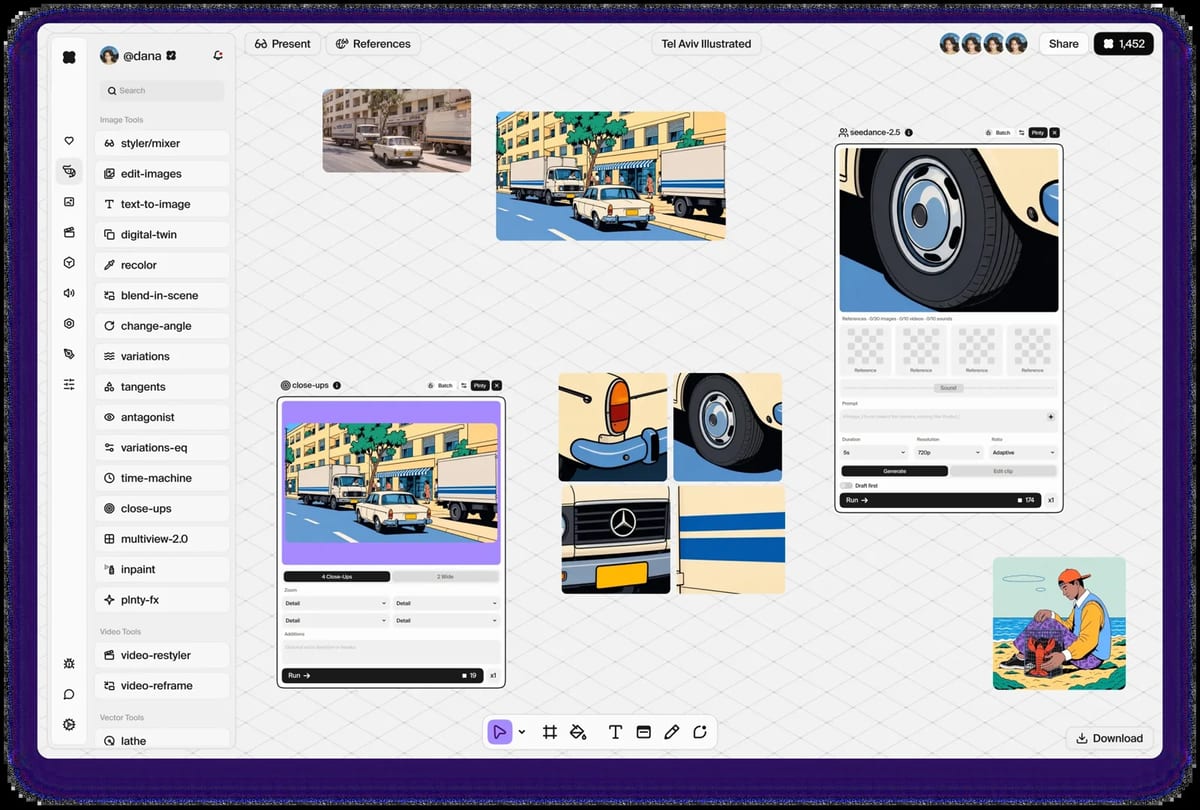
What Plnty does
- One shared canvas: images, video, 3D meshes, vectors, audio, notes and references sit on the same infinite board, and teammates see each other’s cursors as they work.
- Purpose-built tools: each card wraps a model with settings already chosen, so you pick an outcome rather than assembling a pipeline. Many cards let you swap the model and run the same input again.
- Product visualization: tools such as Change Angle, multiview, Turntable, Blend in Scene and pathtraced 3D rendering are built for seeing a design from more than one side.
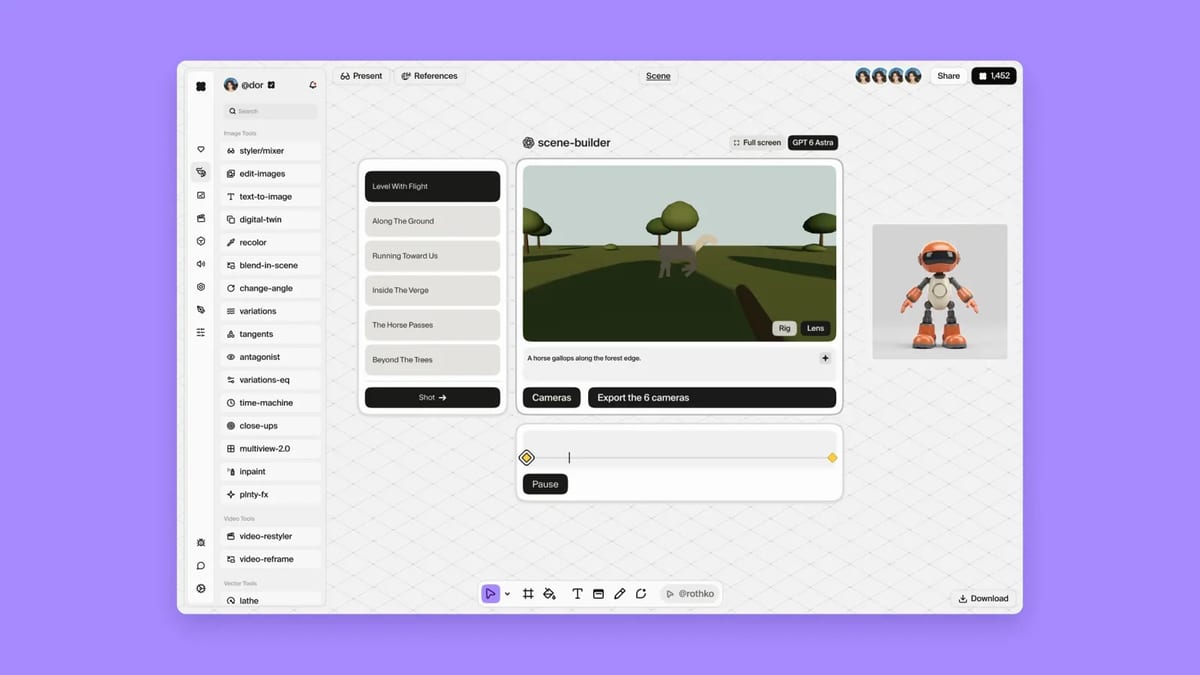
- Rothko, on the board: ask in plain words which tool fits; it opens the card with the prompt and inputs filled in. Nothing Rothko does spends credits, because nothing it does runs until you do.
- In and out: Creator and higher add Cinema 4D and Figma plugins, plus Looks. There is also a Plnty MCP connector (in beta) for Claude or Cursor. Browser-side tools such as remesh, sculpt, paint and vector tracing are free to run.
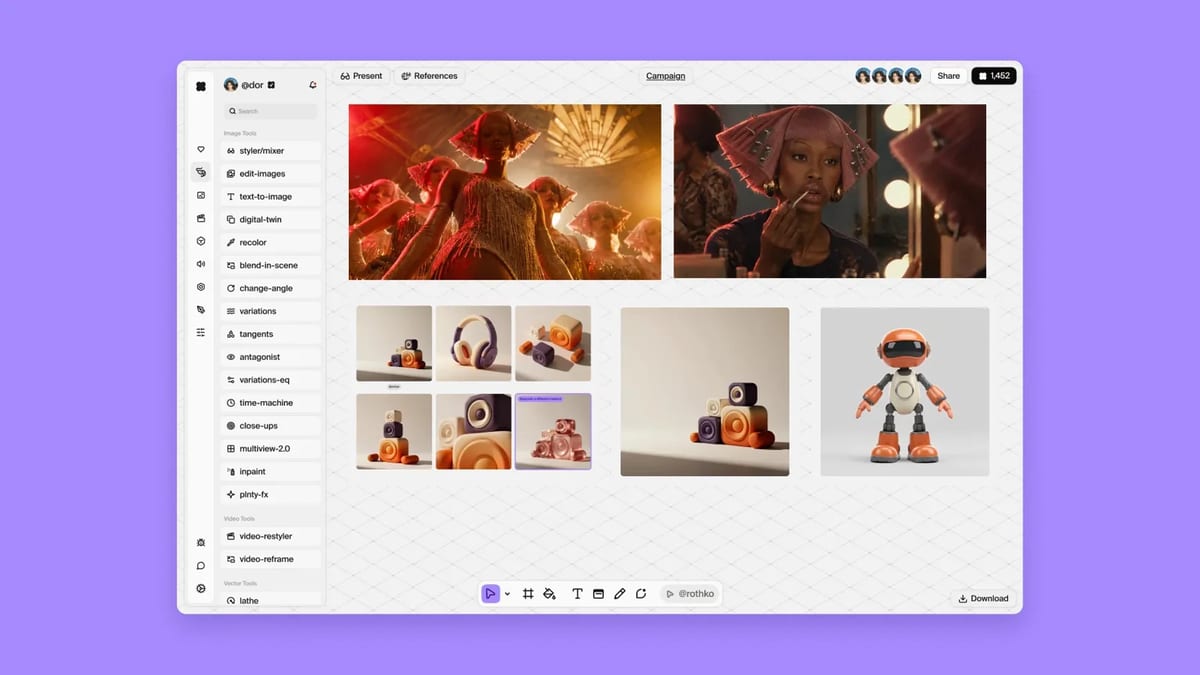
Hands-on: an eyewear prototype
Our team used Plnty to generate multi-angle product views of an eyewear concept that was then turned into a physical prototype. The short version is that it is pretty cool, and it works well: those generated views were good enough to guide the prototype. That is the extent of what we will claim from this test; we are not adding details we did not observe.
If you want to try the same kind of product-visualization workflow, start from our Plnty invite link.
Plnty Pricing (2026)
| Plan | Monthly | Yearly, billed once | Credits and notes |
|---|---|---|---|
| Free | $0 | $0 | 250 credits once, 3 boards, 250 MB, every browser tool |
| Starter | $18 / month | $15 / month ($180 a year) | 1,500 credits a month, 10 boards, 50 GB, top-ups, no rollover |
| Creator | $35 / month | $29 / month ($348 a year) | 3,500 credits, unlimited boards, 250 GB, Looks, Cinema 4D and Figma plugins; credits roll over 1 month, or 3 months on yearly |
| Pro, from | $70 / month | $63 / month ($756 a year) | From 7,800 credits, 1 TB, rollover for 3 months, best top-up rate. Larger sizes: 12,500 credits at $110 / $100, 17,500 at $150 / $140, 24,000 at $200 / $193 |
| Team, from | $149 / month | $124 / month ($1,488 a year) | From 15,000 shared credits, unlimited seats, 1 TB shared, rollover for 3 months. Larger sizes: 30,000 at $279 / $240, 60,000 at $529 / $480, 120,000 at $999 / $960 |
| Enterprise | Custom | Custom | SSO and SAML, custom legal terms, no training on your data, unlimited shared storage |
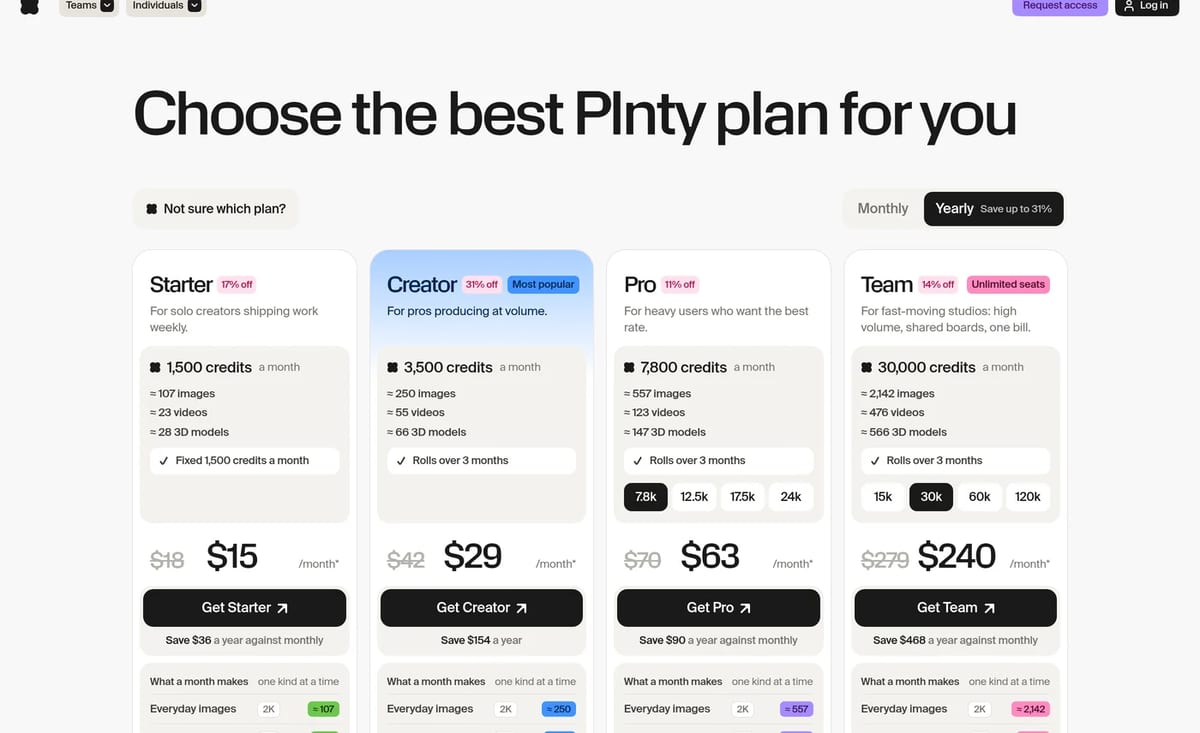
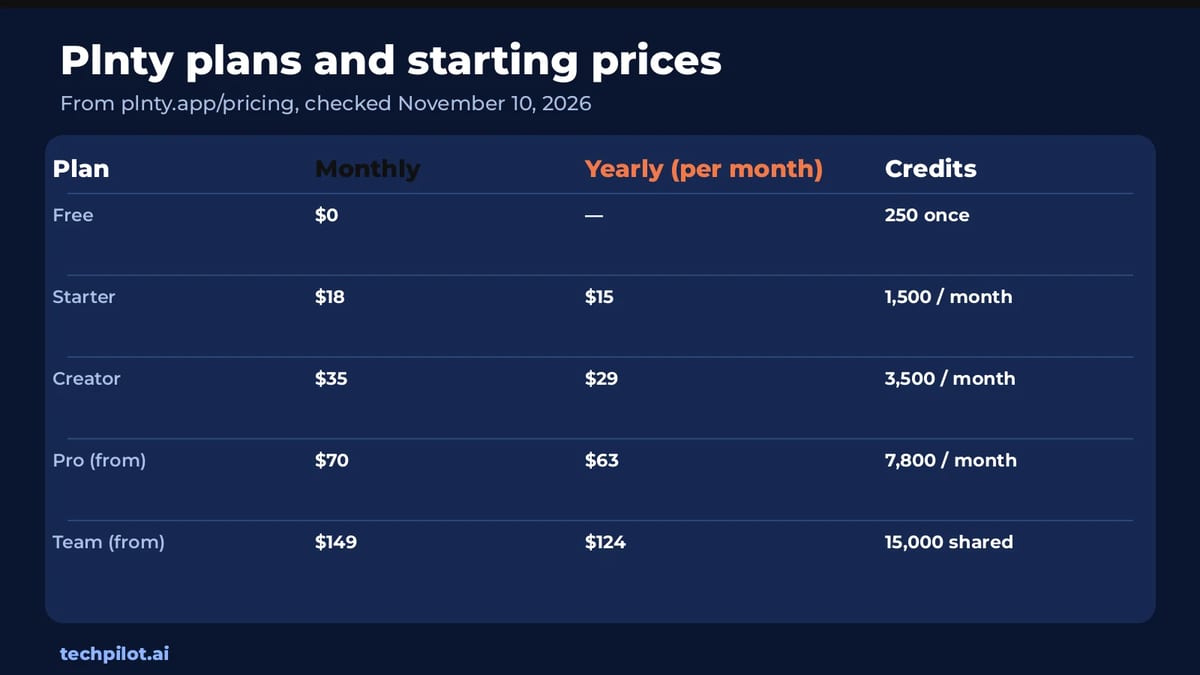
Credits are the unit for generations. The cost depends on the model, the resolution, and, for video, the clip length. Failed runs are not charged. One-time top-up packs never expire: on Starter and Creator, 1,000 credits are $15; on Pro, 1,000 credits are $12. Free accounts cannot buy top-ups. In-browser tools stay free on every plan.
For a simpler image-only generator, see PromeAI. For 3D meshes on their own, compare Meshy. If you mainly need AI video clips, we also reviewed Kling 4.0.
Who Plnty is for
Creative teams and solo designers who want image, video and 3D work to live in one place, especially product visualization, campaign stills, previz and shared concept boards. The free 250 credits are enough to see how a board feels. Starter suits light weekly use. Creator is the first plan with rollover, unlimited boards, Looks and the Figma and Cinema 4D plugins. Studios that need a shared credit pool should look at Team.
Limitations
- Access is not instant: Plnty asks you to request access, so you may wait before a board is available.
- Desktop browser only: it runs in a browser on a Mac or PC, and you can install it as a desktop app. There is no iPhone or Android app, and we could not verify a listing on the App Store or Google Play.
- The free plan is a one-time credit grant: 250 credits once, three boards and 250 MB, with no top-ups.
- Starter credits reset: unused Starter credits do not roll over. Premium video and 3D models also spend credits quickly.
- It likes a real GPU: Plnty says much of the heavy work runs on your machine, and a thin laptop will be slower.
Try Plnty with our invite link if you want to request access and see a board for yourself.
TechPilot.ai’s Verdict on Plnty
Our team used Plnty to generate multi-angle product views of an eyewear concept that became a physical prototype. It is pretty cool, and it works well: those views were good enough to guide the prototype.
The main caveats are practical, not creative. You have to request access, it is desktop-only, and the free plan is a small one-time credit grant. If you get in, Creator is the first plan that feels like a full studio tool.
Plnty FAQ
Is Plnty free?
Yes. The Free plan gives you 250 credits once, up to 3 boards, 250 MB of storage, view-only sharing and every in-browser tool at no cost. You cannot buy top-ups on Free.
•
How much does Plnty cost?
Starter is $18 a month or $15 a month billed yearly. Creator is $35 or $29. Pro starts at $70 or $63. Team starts at $149 or $124. Enterprise is custom. Prices checked on November 10, 2026.
•
How do Plnty credits work?
Each generation spends credits based on the model, resolution and, for video, clip length. The Run button shows the price first. Failed runs cost nothing. Browser tools are free. Creator credits roll over for one month, or three months on yearly; Pro and Team roll over for three months. Starter credits reset each cycle. Top-up credits never expire.
•
Does Plnty work on iPhone or Android?
No. Plnty runs in a web browser on a desktop Mac or PC, and you can install it as a desktop app. There is no iPhone or Android app.
•
Can I use Plnty with Figma or Cinema 4D?
Yes, on Creator and higher. Those plans include Plnty for Figma and Plnty Connect for Cinema 4D, which move frames and scenes in both directions.

Speechma
Education
Speechma is one of the strongest no-account free voice studios we reviewed in 2026.

Icons8
Education
Icons8 is still one of the best places to get icons that actually match across a product, and the MCP makes it useful for AI-built apps too.

MagicSchool
Education
MagicSchool is one of the clearer freemium bets for teachers who want school-shaped tools instead of a generic chat box.