Home / Guides / Web development & Coding
How to Get an AI-Built App Approved on the App Store and Google Play
Why AI-built apps get rejected by Apple and Google Play, the AI consent and reporting rules, store requirements for 2026, and a pre-submission checklist.
 Eimantas Kazėnas Marketing & Tech
 - Published
- 7 min read
On this page Why app store approval is harder than building the app
Independent and reader-supported. Some links may earn us a commission; it never changes our rankings. Editorial policy
AI app builders have made the first 80% of a mobile app feel easy. Describe the idea, let a tool like Rork, Bolt, or FlutterFlow generate the screens, and you can have a working build on your phone in an afternoon.
The last 20% is where many projects stall. Apple and Google each run their own review process, and an app that sails through one can sit in the other’s queue for weeks. This guide covers what each store checks, the rules that trip up AI-built apps most often, and a checklist to run before you hit submit.
Quick answer: Most AI-built apps get rejected for a short list of reasons: crashes or placeholder content, thin functionality, missing privacy disclosures, and AI features without guardrails. Test on real devices, disclose any data you send to an AI model, add a way for users to report bad AI output, and plan for the requirements that differ between Apple and Google.
Why app store approval is harder than building the app
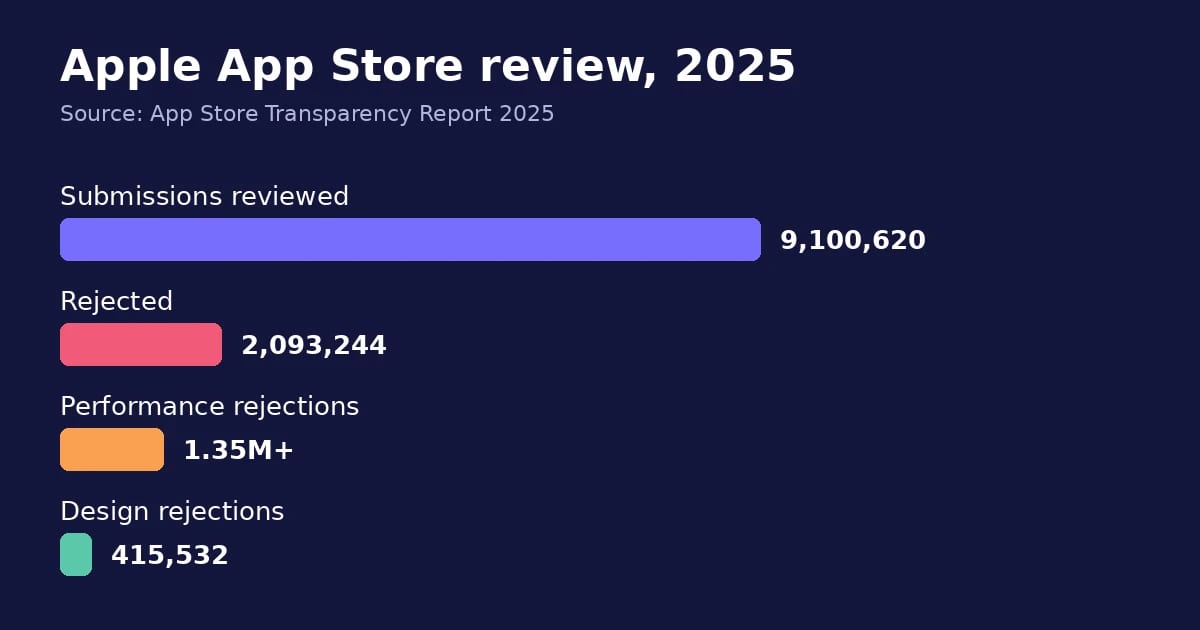
Apple’s own numbers show how often submissions bounce. According to the App Store Transparency Report for 2025, Apple reviewed 9,100,620 app submissions and rejected 2,093,244 of them, roughly 1 in 4. The biggest category by far was performance, with more than 1.35 million rejections. That bucket covers crashes, broken features, and apps that feel unfinished.
AI tools make this risk worse in a specific way. They generate code that runs fine in a simulator or browser preview, but they rarely test on a five-year-old Android phone with a weak signal. They also don’t read store policy. A generated app can look polished and still break a rule a reviewer checks in the first two minutes.
Common rejection reasons for AI-built apps
These issues show up again and again with apps assembled by AI builders and coding agents:
- Crashes and dead ends. A button that leads nowhere, or a login screen with no test account, fails Apple’s app completeness rule (Guideline 2.1). Always give reviewers a working demo account in the review notes.
- Placeholder content. Lorem ipsum text, “Your Company” labels, and sample images left behind by a template.
- Minimum functionality. Apple’s Design category, which includes copycat apps, thin apps, and spam, accounted for 415,532 rejections in 2025. A chatbot wrapper with one text box and nothing else is a likely target. So is a website wrapped in an app shell.
- Template lookalikes. Publishing several near-identical apps from the same AI template can trigger Apple’s spam rule (Guideline 4.3).
- Wrong payment setup. Selling digital content or subscriptions through Stripe instead of Apple’s in-app purchase or Google Play Billing gets flagged on both stores.
- No account deletion. If users can create an account in your app, both Apple and Google expect them to be able to delete it from inside the app too.
The AI-specific rules each store enforces
If your app calls an AI model, two newer rules deserve extra attention.
Apple: disclose and ask before sharing data with AI. In November 2025, Apple updated Guideline 5.1.2(i). Apps must now clearly disclose when personal data is shared with third parties, “including with third-party AI,” and get explicit permission first. If your app sends user photos, messages, or voice recordings to an outside model API, you need a clear consent screen before the first request goes out. A line buried in the privacy policy won’t pass.
Google Play: let users report AI output. Google’s AI-generated content policy covers chatbots and apps that create images or video from prompts. These apps must include in-app reporting or flagging, so users can report offensive content without leaving the app. Google also expects developers to block restricted content and use those reports to tune their filters.
Neither rule is hard to meet. The catch is that most AI app builders don’t add a consent screen or a report button by default, so you’ll need to add them yourself.
The technical requirements that differ between stores
Even a cross-platform app built from one codebase has to clear two different sets of gates. Here’s where they split in 2026:
| Requirement | Apple App Store | Google Play |
|---|---|---|
| Build tools | Uploads must use Xcode 26 and a 26-series SDK (since April 28, 2026) | New apps and updates must target Android 16, API level 36 (since August 31, 2026) |
| Testing before launch | TestFlight beta is optional | New personal developer accounts need a closed test with at least 12 testers opted in for 14 straight days |
| Privacy disclosure | Privacy “nutrition label” in App Store Connect | Data safety section in Play Console |
| Payments for digital goods | In-app purchase | Google Play Billing |
The closed test catches a lot of solo builders off guard. If your personal Google Play developer account was created after November 13, 2023, you can’t publish to production until 12 people have stayed opted in to your test for 14 consecutive days (Google Play Console Help, 2026). If a tester drops out and rejoins, their count starts over. Build that two-week window into your launch plan.
A pre-submission checklist
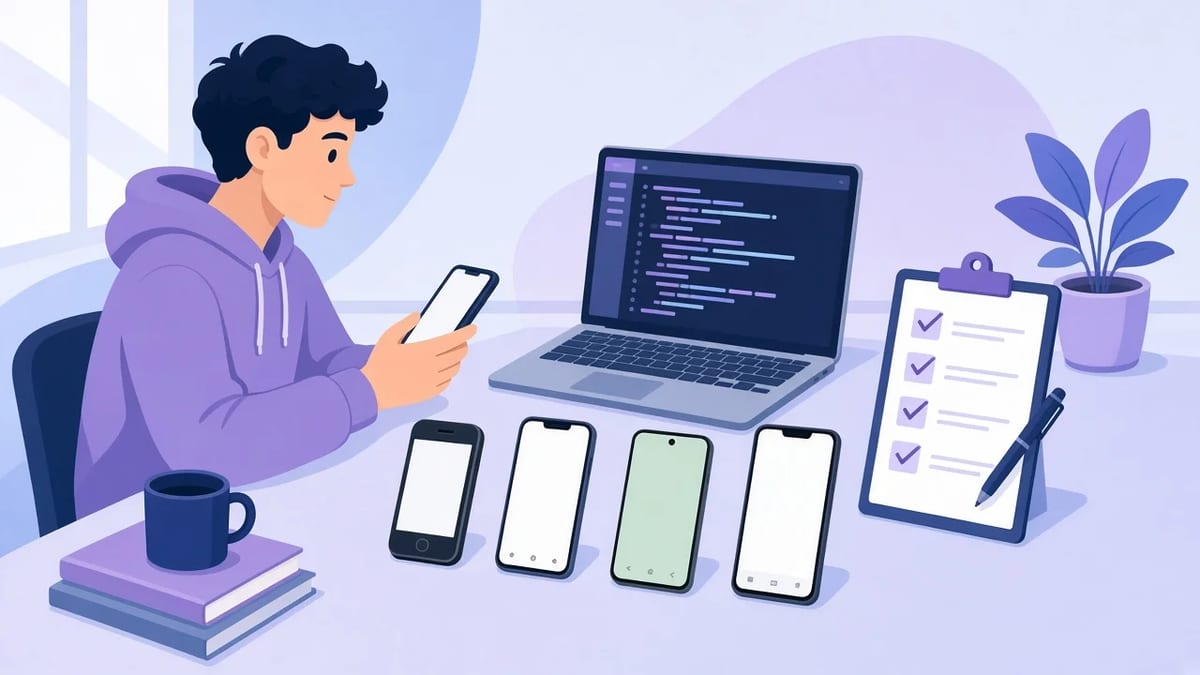
Run through this list before you submit to either store:
- Test on real devices. Use at least one older iPhone and one budget Android phone, not just the simulator. AI testing tools can help you cover more user flows in less time.
- Remove every placeholder. Search the codebase for “lorem,” “example,” and “TODO.”
- Add a demo account and write review notes that explain what the app does and how to reach key features.
- Add an AI consent screen that names the outside AI provider and asks permission before any personal data is sent.
- Add a report button wherever the app shows AI-generated text, images, or video.
- Fill in the privacy label and data safety form so they match what your app and its AI provider actually collect.
- Check the payment flow uses each store’s own billing for digital goods.
- Confirm the build targets the current Xcode SDK and Android API level.
If you used an AI coding agent to build the app, you can also ask it to audit the codebase against this list. Agents are good at finding hardcoded strings and missing permission prompts. They’re less reliable on the latest store policy, so check the rules yourself.
When to bring in experienced mobile developers
AI builders work well for prototypes and simple apps. They start to struggle when a rejection points to a deeper problem: a crash that only happens on certain Android devices, a native feature the builder doesn’t support, or a release process that breaks every time the stores raise their SDK requirements.
At that stage, another tool rarely solves it. Teams that keep hitting rejections on one platform often bring in app developers who ship to both stores to handle release engineering, native modules, and the yearly SDK upgrades. Companies like Full Scale provide dedicated mobile engineers who work in Swift, Kotlin, Flutter, and React Native, which gives a small team that experience without a full in-house hire. The AI-generated codebase usually doesn’t have to be thrown away, since an experienced developer can clean it up and keep it moving.
The bottom line
AI tools have made building a mobile app faster than ever, but app store review hasn’t gotten any easier. Apple still rejects about a quarter of submissions, and Google layers its own testing and targeting rules on top. Plan for review from day one. Test on real devices, be upfront about AI data sharing, give users a way to report AI output, and leave two weeks for Google’s closed test if you’re a new developer. Do that, and your AI-built app has a much better chance of clearing both stores on the first try.
FAQ
Does Apple reject apps because they were built with AI tools?
No. Apple reviews the finished app, and it doesn’t penalize the tool used to make it. AI-built apps get rejected for the same reasons as any other app, mostly crashes, thin features, and missing privacy disclosures.
Do I need to tell users my app uses AI?
On iOS, yes, if personal data goes to a third-party AI service. Guideline 5.1.2(i) requires a clear disclosure and explicit permission before sharing. On Android, clear AI disclosure is good practice and fits Google’s data safety requirements.
How long does Google Play’s closed testing take?
At least 14 days for personal developer accounts created after November 13, 2023. You need 12 or more testers who stay opted in the whole time.
Can I publish to both stores from one codebase?
Yes. Frameworks like Flutter and React Native build for iOS and Android from a single codebase. You still need separate store listings, separate privacy forms, and builds that meet each platform’s current requirements.
Found this useful? Share it with someone comparing AI tools.
Building vs. Buying In-App Chat: Architecture, Hidden Costs, and When to Use a Chat API
Build vs buy chat: what production in-app messaging really requires, the hidden costs of a custom build, 3-year TCO, and when a chat API makes more…
 Eimantas Kazėnas · 7 min read

Google Cloud GPU Alternatives: Best Platforms for Deep Learning & AI
As businesses increasingly rely on deep learning and AI, they are investing in cloud GPU infrastructure. Explore the best Google Cloud GPU…
 John Daniel · 6 min read