Home / Guides / Web development & Coding
Cursor vs Windsurf: 2026 Plans Compared
 Eimantas Kazėnas Marketing & Tech
- Published
- 4 min read
On this page What changed with Windsurf
Independent and reader-supported. Some links may earn us a commission; it never changes our rankings. Editorial policy
Cursor vs Windsurf in 2026 is really Cursor vs Devin Desktop: Windsurf was renamed on June 2, 2026. Here is how the plans, models and agents now compare.
Quick answer: pick Devin Desktop (the old Windsurf) if you want Claude, GPT and Gemini inside a flat $20 plan. Pick Cursor if you want cloud agents, code review and hosting in one subscription and are happy with Grok models in the allowance, paying API list prices for other models. Both have free plans that are fine for trying the editor but too small for daily agent work. Every price below was checked on the official pricing pages on November 17, 2026.
What changed with Windsurf
Cognition, the company behind the Devin agent, bought Windsurf’s product and team in July 2025. On June 2, 2026 it renamed Windsurf to Devin Desktop as an over-the-air update, with the same plans and pricing for existing users. Two things matter for a comparison. First, the old Cascade agent was replaced by Devin Local, rewritten in Rust; Cognition says it is up to 30% more token efficient and supports subagents. Second, the app now opens on an Agent Command Center, a Kanban view of every local and cloud agent, and supports the Agent Client Protocol, so agents such as Codex, Claude Agent and OpenCode can run inside it. The editor stays compatible with VS Code and Windsurf extensions.
Cursor has changed too. Its individual plans are now one subscription shared with Grok and X, so the same allowance covers coding in Cursor and chatting with Grok.
Cursor vs Windsurf pricing (2026)
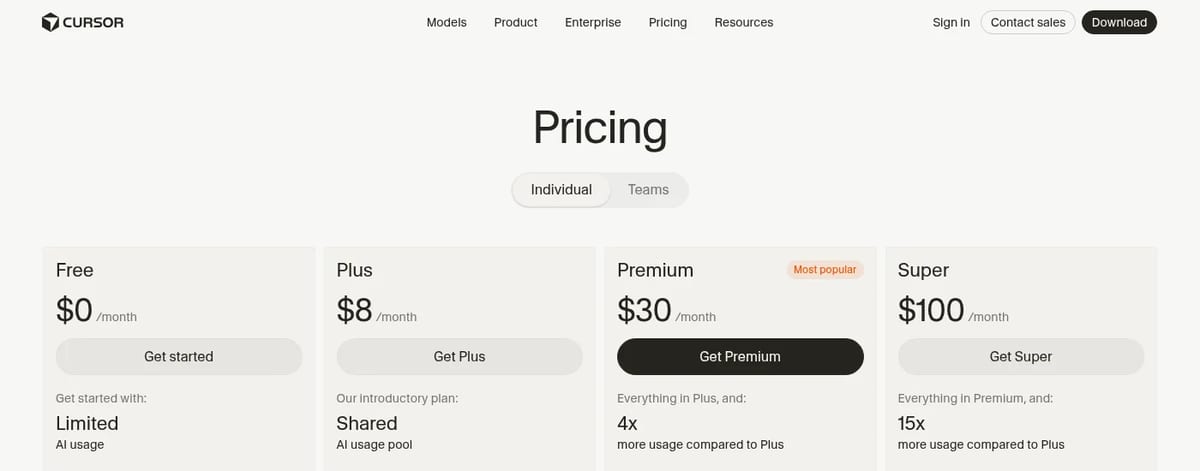
| Plan | Cursor | Devin Desktop (Windsurf) |
|---|---|---|
| Free | $0: limited agent and chat requests | $0: light agent quota, limited models, unlimited Tab and inline edits |
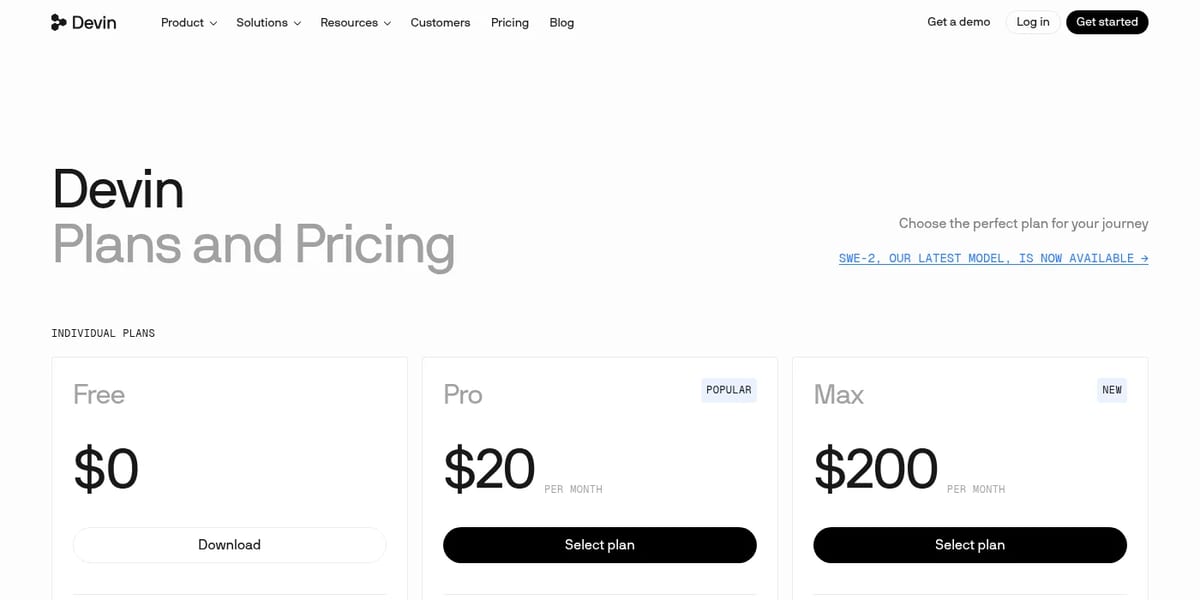
| Entry paid | Plus, $8 a month: Cursor with Grok models only, shared usage pool | Pro, $20 a month: frontier models from OpenAI, Anthropic, Google and SpaceXAI, free SWE-2, Devin Cloud |
| Main plan | Premium, $30 a month: 4x Plus usage, cloud agents and automations, Bugbot reviews, code hosting | Pro covers this tier |
| Heavy use | Super, $100 (15x Plus); Ultra, $200 (50x Plus) | Max, $200: much higher quotas |
| Teams | From $30 per user a month | $80 a month plus $40 per full developer seat, up to 100 users |
The real difference: which models your plan pays for
This is where most comparisons go wrong. On Cursor’s pricing page, Plus is marked “only Grok models are available on this plan”, and on Premium and above third-party models are “billed separately by usage” at API list prices. So if you want to code all day with a Claude or GPT model in Cursor, the $30 Premium plan is the starting point, and the model usage comes on top.
Devin Desktop Pro takes the opposite approach. For $20 a month the quota already includes frontier models from OpenAI, Anthropic, Google and SpaceXAI, plus Cognition’s own SWE-2 for free, and you can buy extra usage at API pricing. It even lets you use an existing ChatGPT plan.
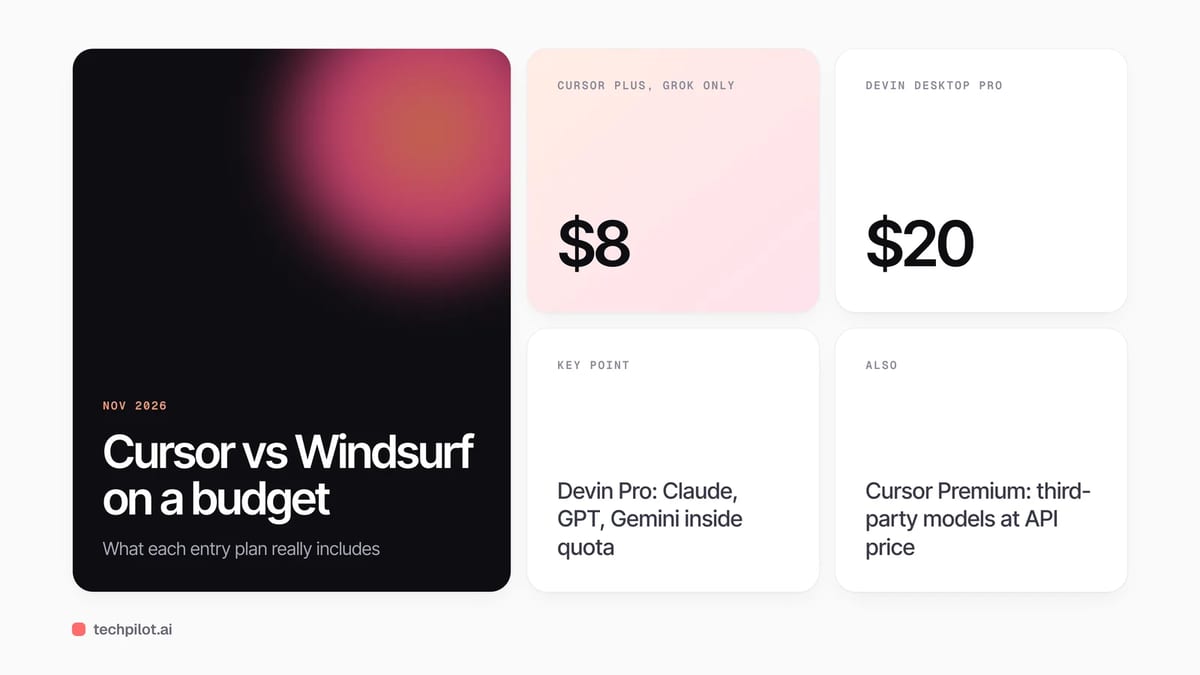
Our take: for a solo developer who mainly wants a strong third-party model in the editor, Devin Desktop Pro is the cheaper way in. For someone who also wants cloud agents running tasks in the background, AI code review on every pull request and Grok for chat, Cursor Premium bundles more in one bill. If you only want a cheap paid editor and like Grok models, Cursor Plus at $8 is the lowest paid price of the two.
Agents and workflow
Cursor centres on its Agent in the editor, with cloud agents and automations on Premium and above, code hosting through Origin and AI code reviews through Bugbot. Teams get a shared marketplace for internal rules, skills and plugins.
Devin Desktop centres on the Agent Command Center. You run Devin Local on your machine, hand longer jobs to Devin Cloud, and use Devin CLI and Devin Review on the same account. Its ACP support is the stand-out feature if your team already uses another coding agent and wants to keep it.
Which one should you choose?
- Choose Devin Desktop (Windsurf) if you want Claude, GPT or Gemini included in a $20 plan, already like the Windsurf editor, or want to run other ACP agents inside one app.
- Choose Cursor if you want cloud agents, code review and hosting in one subscription, use Grok anyway, or want the cheapest paid tier at $8.
- Try both free plans first on the same small task. Both are enough to judge the editor, not enough to judge heavy agent use.
For free options beyond these two, see our list of the best free AI for coding and our guide to the best AI agents for coding. If you prefer to stay in VS Code, read how to use Claude Code in VS Code.
Frequently asked questions
Is Windsurf the same as Devin Desktop?
Yes. Cognition renamed Windsurf to Devin Desktop on June 2, 2026. It is the same editor, and existing plans and pricing stayed the same.
Is Cursor or Windsurf cheaper?
Cursor Plus is cheaper at $8 a month but only includes Grok models. Devin Desktop Pro costs $20 and includes OpenAI, Anthropic and Google models in its quota.
Can I use Claude in Cursor?
Yes. On Premium and higher plans, third-party models such as Claude are available in Cursor and billed separately at API list prices.
Do Cursor and Windsurf have free plans?
Yes. Both have $0 plans with limited agent use. Devin Desktop Free also includes unlimited Tab completions and inline edits.
What replaced Cascade in Windsurf?
Devin Local replaced Cascade as the main local agent. Cognition kept the legacy Cascade agent available through July 1, 2026.
Found this useful? Share it with someone comparing AI tools.

How to Use Claude Code in VS Code (2026)
How to use Claude Code in VS Code: install the official extension, sign in with a paid Claude plan or Console account, then open it from the Spark…
 Eimantas Kazėnas · 5 min read
Alternatives to Next.js: 5 Best for 2026
Alternatives to Next.js in 2026: React Router, Astro, SvelteKit, Nuxt and TanStack Start, matched to what you build and to how much framework you…
Eimantas Kazėnas · 4 min read