Home / Guides / Productivity
How to Change ChatGPT Password (2026)
 Eimantas Kazėnas Marketing & Tech
- Published
- 5 min read
On this page First, check how you sign in
Independent and reader-supported. Some links may earn us a commission; it never changes our rankings. Editorial policy
How to change ChatGPT password: go to Settings, Account, or use Forgot password? at login. Google, Apple and Microsoft sign-ins have no ChatGPT password.
Quick answer: there are two routes, and which one you need depends on how you signed up. If you can sign in, go to Settings → Account and add or update your password. If you forgot it, log out, click Log in, enter your email and choose Forgot password?. If you always click Continue with Google, Apple or Microsoft, there is no ChatGPT password to change, so you change it with that provider instead. These steps match OpenAI’s help article as of November 25, 2026.
First, check how you sign in
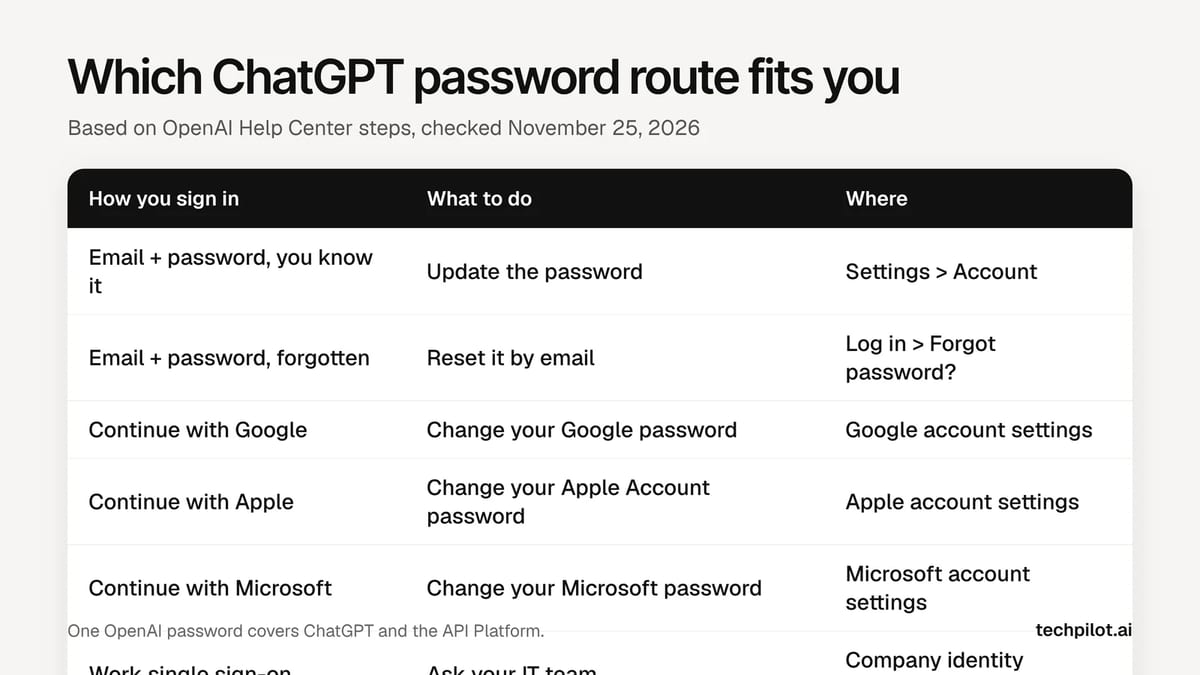
Most “I can’t find the password option” problems come from this. Look at the button you use on the ChatGPT login screen. If you type an email and then a password, you have an OpenAI password. If you click a Google, Apple or Microsoft button, OpenAI never stored a password for you, and a reset email will not help.
Change your password in Settings (you know it)
- Sign in to ChatGPT on the web or in the app.
- Open your profile menu and choose Settings.
- Go to Account.
- Add or update your password and save.
- Store the new password in your password manager, then sign in again on your other devices when asked.
Settings menus move around between app versions. If you do not see a password field under Account, you are probably signed in with Google, Apple or Microsoft, or with a work account managed by your company.
Reset a forgotten ChatGPT password
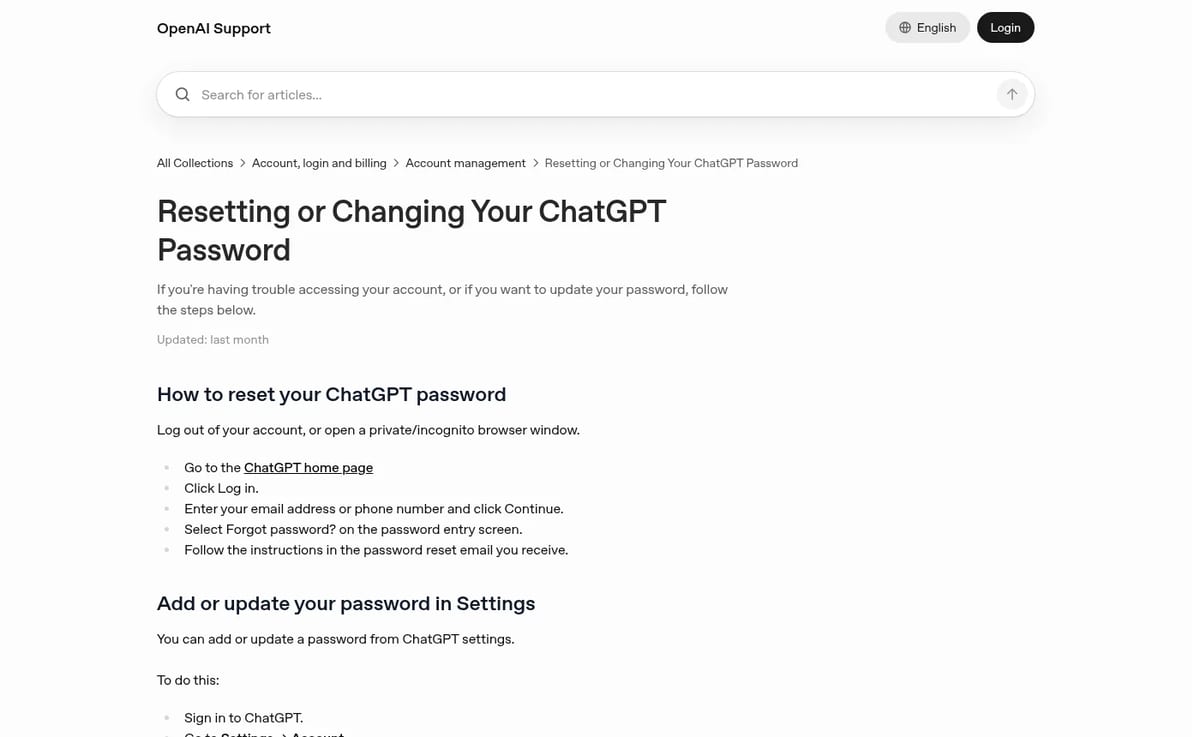
- Log out, or open a private or incognito browser window.
- Go to the ChatGPT home page and click Log in.
- Enter your email address or phone number and click Continue.
- On the password screen, select Forgot password?.
- Open the reset email from OpenAI and follow the link to set a new password.
The reset email never arrived
Check spam and junk folders first, then make sure you are checking the inbox you used to sign up and that the address has no typo. If none of that works, the most likely reason is that the account was created with Google, Apple or Microsoft, which means there is no password to reset. Log in with that button instead.
Signed up with Google, Apple or Microsoft?
Your ChatGPT login is only as safe as that account, so change the password at Google, Apple or Microsoft. OpenAI’s help page also says you can add a password from Settings → Account, and once a password is set you can change the email address on your account from the same page. That is the one good reason for a social-login user to add a password. If you sign in through your employer’s single sign-on, your company’s IT team controls the password.
What changing your password actually does
This is the part most guides skip. Your ChatGPT password is the password for your whole OpenAI account, so the new one also applies to the API Platform and anywhere else you sign in with that account. Update any team tools or password manager entries that use it.
OpenAI’s guide for hacked accounts also says that after a password change, all current sessions are logged out within 30 minutes. That makes the password change your fastest fix if someone else is using your account, but expect to sign in again on your phone and desktop app.
Lock the account down afterwards
A new password does not help much if the old one leaked from a reused login. Turn on multi-factor authentication under Settings → Security and login. OpenAI supports authenticator apps, push notifications, text or WhatsApp codes and passkeys, depending on your country and device, according to its MFA help page. The same menu has Log out of all devices, which can take up to 30 minutes to finish.
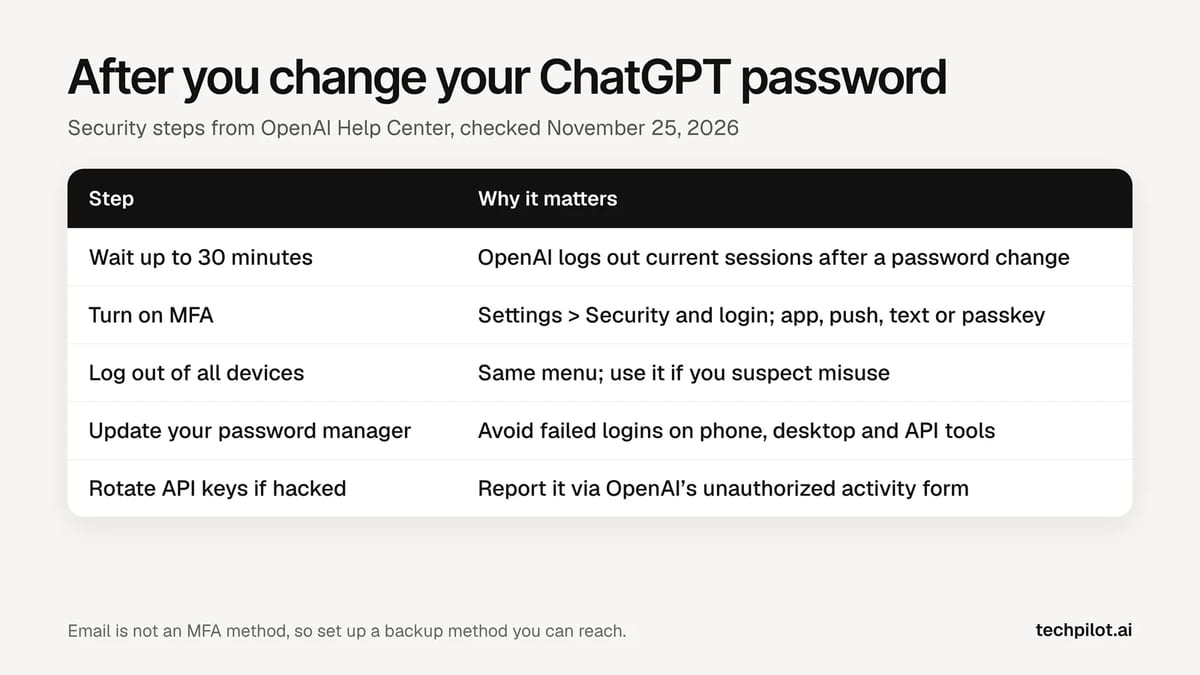
Set up a backup MFA method you can always reach. Email is not an MFA option, and if you lose every method, OpenAI support has to verify you, which can take a few days and only gives you a one-time recovery login. If you think your account was misused, rotate any API keys and report it through OpenAI’s unauthorized activity form. Our guide to whether ChatGPT is safe covers the privacy settings worth changing at the same time.
When a new password is not the fix
If you want to stop using ChatGPT, changing the password only locks the door. Follow our steps on how to delete a ChatGPT account instead. And if a shared login is the reason you are changing it, compare ChatGPT’s free and paid plans before you decide who pays for what.
Frequently asked questions
How do I change my ChatGPT password?
Sign in, open Settings, go to Account and add or update your password. If you forgot it, use Forgot password? on the login screen.
Why can’t I find the password option in ChatGPT?
You probably sign in with Google, Apple or Microsoft, so there is no ChatGPT password. Change it with that provider, or add a password under Settings, Account.
Does changing my ChatGPT password log me out?
Yes. OpenAI says current sessions are logged out within 30 minutes of a password change, so you will sign in again on other devices.
Does my ChatGPT password also change the OpenAI API login?
Yes. It is one password for your whole OpenAI account, including the API Platform.
What if the ChatGPT reset email does not arrive?
Check spam, confirm the sign-up email and spelling, and try the Google, Apple or Microsoft button if you signed up that way.
Found this useful? Share it with someone comparing AI tools.
Gemini vs Grok AI Comparison 2026
Gemini vs Grok AI comparison 2026: Google AI Pro costs $19.99 with 5 TB storage and Gemini in Gmail; Grok Premium at $30 bundles X perks, Cursor and…
 Eimantas Kazėnas · 5 min read
Claude vs Grok AI Comparison 2026
Claude vs Grok AI comparison 2026: Claude Pro costs $20 for writing, code and long documents; Grok Premium at $30 bundles live X search, video and…
Eimantas Kazėnas · 5 min read