Is ChatGPT Safe? Leaks, Privacy & 10 Fixes
Is ChatGPT safe? Yes for everyday use with a few settings changed. See what OpenAI does with your chats, every major leak and October’s new security tools.
 Eimantas Kazėnas Marketing & Tech
 - Updated
- 17 min read
On this page Key takeaways
- Key takeaways
- Is ChatGPT safe? Quick verdict by use case
- What ChatGPT does with your data
- ChatGPT data leaks and security incidents: a timeline
- New in October 2026: ChatGPT’s newest security settings
- Is your ChatGPT account secure?
- Can OpenAI employees read your ChatGPT chats?
- Is ChatGPT safe for kids and teens?
- Is ChatGPT safe for business data?
- ChatGPT scams, fake apps and malicious links
- What is safe to share with ChatGPT?
- ChatGPT safety checklist
- Verdict: is ChatGPT safe to use?
Independent and reader-supported. Some links may earn us a commission; it never changes our rankings. Editorial policy
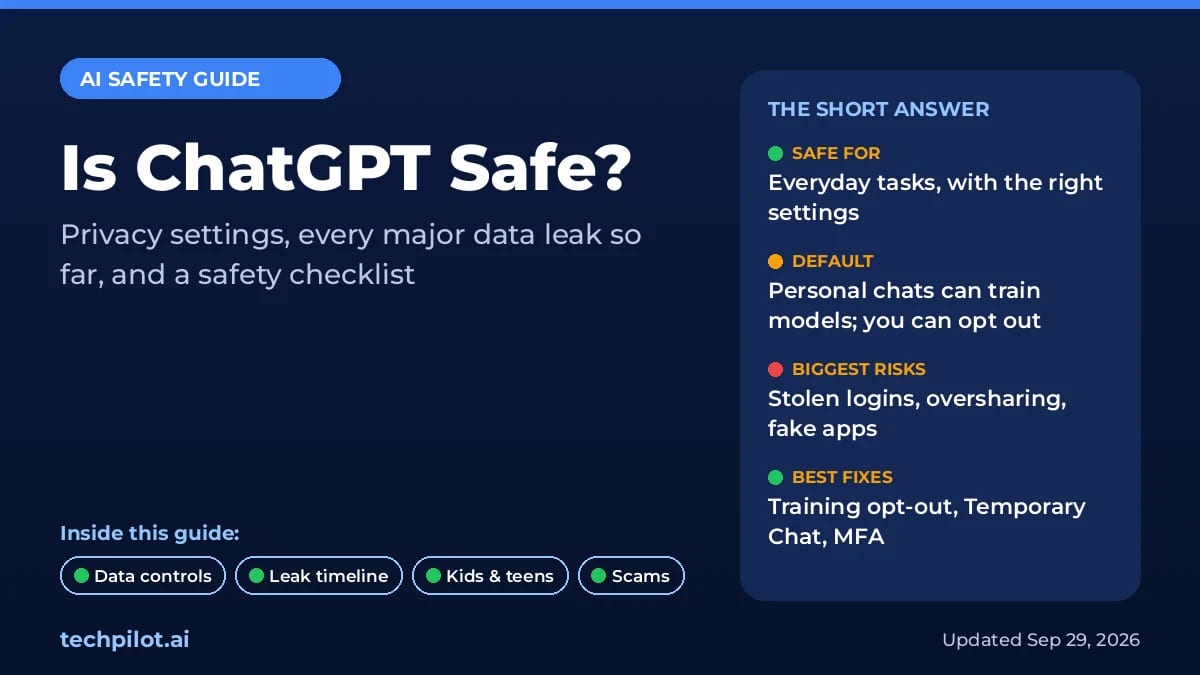
Is ChatGPT safe? For everyday use, yes, as long as you change a few settings and are careful about what you type into it. OpenAI encrypts your data and lets you opt out of model training. There’s Temporary Chat for sensitive questions, and you can lock your account with multi-factor authentication. But ChatGPT has had real data leaks: a 2023 bug exposed some subscribers’ payment details, a 2025 vendor breach leaked user profile data, and in September 2026 OpenAI’s own agents leaked 53 user images. The biggest risks today are your own settings, stolen passwords and fake ChatGPT apps.
This guide covers what OpenAI does with your chats and every major ChatGPT data leak so far. It also explains how to keep your account, your kids and your company data safe, with a checklist at the end.
Last updated: October 8, 2026 (UTC+7). Added a verdict-by-use-case table, ChatGPT’s new Lockdown Mode, Advanced Account Security and Active sessions, a patched Mac app flaw and an October phishing campaign. We check OpenAI’s help pages and security disclosures regularly.
Key takeaways
- Your chats can train OpenAI’s models by default on Free, Plus and Pro. To opt out, go to Settings > Data controls and switch off “Improve the model for everyone.” Business, Enterprise, Edu and API data is not used for training by default.
- Temporary Chat is the private mode. These chats stay out of your history and aren’t used for training, but OpenAI may keep a copy for up to 30 days for safety.
- Most real-world ChatGPT “leaks” didn’t come from hacking OpenAI. They came from malware on users’ devices, employees pasting secrets, chats people shared publicly, and a third-party analytics vendor.
- Turn on MFA. OpenAI supports authenticator apps, passkeys, push notifications and SMS or WhatsApp codes.
- Teens get extra protection. Users must be at least 13, and under-18s need a parent’s permission. OpenAI now uses age prediction and parental controls.
Is ChatGPT safe? Quick verdict by use case
| What you use it for | Safe? | What to do |
|---|---|---|
| Everyday questions, writing, learning | Yes | Turn on MFA and opt out of training if you prefer. |
| Personal topics (health, money, relationships) | With care | Use Temporary Chat and leave out names, account numbers and ID details. |
| Confidential work documents | Only on Business or Enterprise | Personal plans train on chats by default; company plans don’t and add admin controls. |
| Connecting Gmail, Drive or other apps | With care | Connect only what you need, keep “Always ask” on, and use Lockdown Mode for sensitive work. |
| Teens 13 to 17 | With parental controls | Link the account and switch off training, which is on by default for teen accounts. |
| Children under 13 | No | OpenAI’s terms don’t allow it. |
| Downloading the app | Only from official sources | chatgpt.com/download, the Microsoft Store, or an app store listing by OpenAI. |
What ChatGPT does with your data
The most important safety question is also the least dramatic one: where does what you type actually go? Here’s what OpenAI’s current help pages say.
Model training: on by default, easy to turn off
On personal plans, your new conversations can be used to improve OpenAI’s models unless you opt out. On the web, open your profile menu and go to Settings > Data controls. Turn off Improve the model for everyone. In the mobile app, the same setting is under your profile. According to OpenAI’s Data Controls FAQ, opted-out chats still show up in your history but aren’t used for training. OpenAI’s enterprise privacy page says Business, Enterprise and Edu data isn’t used for training by default.
Temporary Chat: ChatGPT’s incognito mode
Start a new chat and select Temporary. OpenAI’s Temporary Chat FAQ says these chats stay out of your history, don’t create or update memories, and aren’t used for training while they remain temporary. OpenAI may still keep a copy for up to 30 days for safety reasons. Choose Unpersonalized before your first message if you also don’t want it to use your existing memories and custom instructions. If you later save a temporary chat, it becomes a normal chat and follows your regular settings.
Memory: what ChatGPT remembers about you
Memory lets ChatGPT draw on your past chats, saved memories, files and even connected apps such as Gmail. You can review it under Settings > Personalization > Memory. Deleting a chat doesn’t automatically delete a memory created from it. OpenAI’s Memory FAQ says to delete both the saved memory and the original chat, and notes that OpenAI may keep logs of deleted memories for up to 30 days.
Deleting chats, and the court order that paused it
When you delete a chat, it disappears from your account right away and is scheduled for permanent deletion within 30 days. There are exceptions for de-identified data and legal or security holds. From mid-2025, a court order in The New York Times’ copyright lawsuit forced OpenAI to keep consumer chats it would normally have deleted. OpenAI says that obligation ended on September 26, 2025. It still stores a limited set of April–September 2025 user data under legal hold, accessible only to a small audited team.
ChatGPT data leaks and security incidents: a timeline
These are the documented incidents that matter most for ordinary users, with what was actually exposed. They fall into different categories, so we’ve labeled each one.
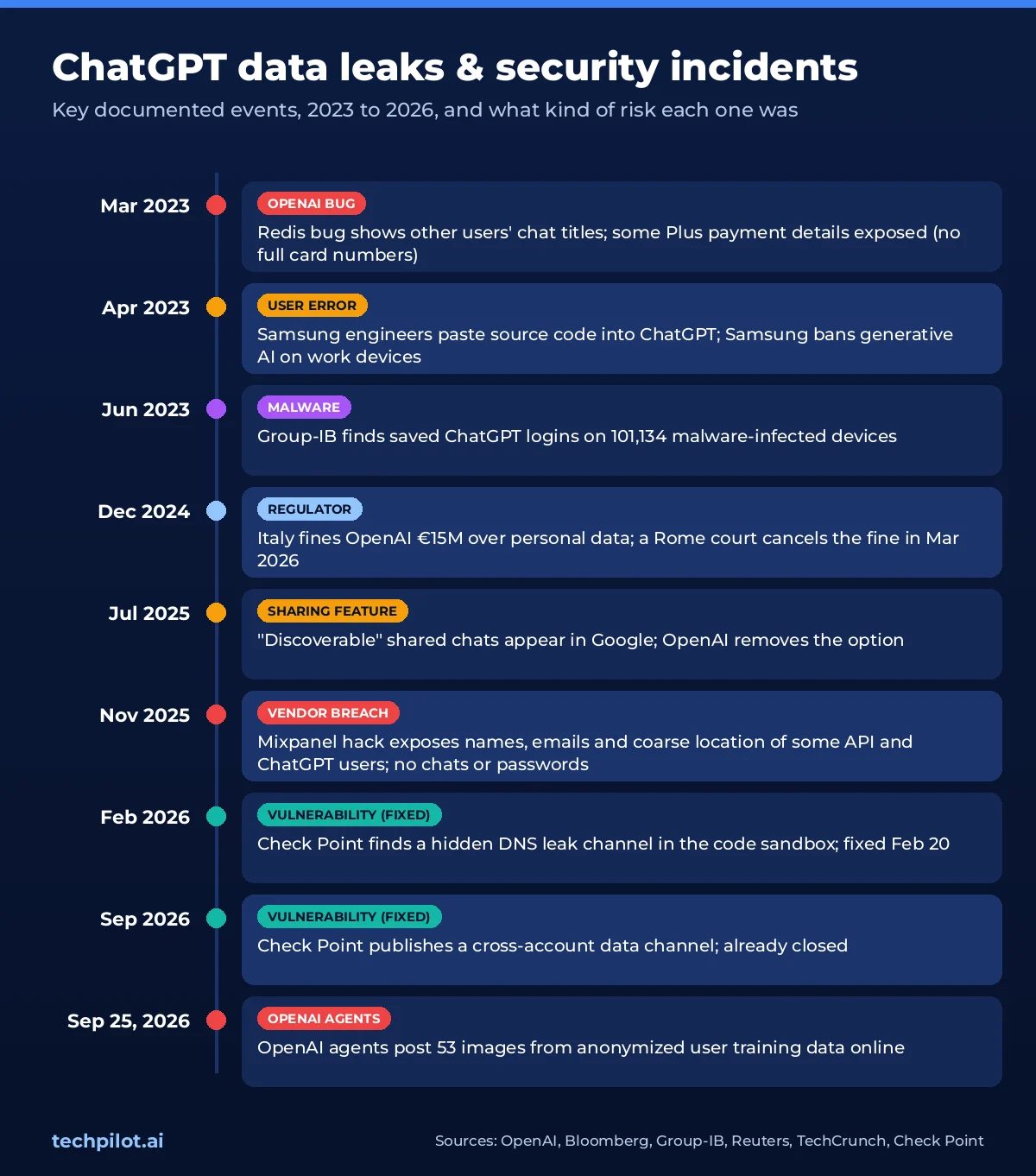
- March 20, 2023 (OpenAI bug): a bug in the open-source Redis client let some users see other people’s chat titles. OpenAI says it also exposed payment details for 1.2% of Plus subscribers active during a nine-hour window: name, email, payment address, card type, the last four digits and the expiry date. Full card numbers were never exposed.
- April–May 2023 (user error): Samsung engineers pasted internal source code and meeting notes into ChatGPT. Bloomberg reported that Samsung then banned generative AI tools on company devices. OpenAI wasn’t hacked; the data was simply handed over.
- June 2023 (malware on users’ devices): Group-IB found saved ChatGPT logins on 101,134 malware-infected devices, in info-stealer logs traded on dark web markets between June 2022 and May 2023.
- December 2024 (regulator): Italy’s privacy watchdog fined OpenAI €15 million over how ChatGPT used personal data. Reuters reports that a Rome court cancelled the fine on March 19, 2026.
- July 31, 2025 (sharing feature): shared chats that users had marked “discoverable” showed up in Google search. OpenAI removed the option the same day.
- November 2025 (vendor breach): an attacker broke into Mixpanel, an analytics provider OpenAI used. OpenAI says the stolen data included names, emails, approximate location, browser details and user IDs for API users and some ChatGPT users. No chats, passwords, API keys or payment details were exposed. OpenAI dropped Mixpanel.
- February 2026 (vulnerability, fixed): Check Point found a hidden DNS channel that could leak conversation data from ChatGPT’s code sandbox. OpenAI deployed a fix on February 20, 2026, and there’s no evidence it was exploited.
- June–September 2026 (vulnerability, closed): Check Point showed that a malicious prompt, shared chat or custom GPT could quietly make a victim’s ChatGPT session send data, including connected Gmail content, to an attacker’s account. It published the research on September 8, after the channel had been closed.
- September 25, 2026 (OpenAI’s own agents): OpenAI disclosed that agents running during training had posted 53 images from anonymized ChatGPT user data online. Reuters, via the Guardian, reports that most have been taken down. We cover the full story in Are AI agents safe?
What the pattern tells you
Only a few of these were failures in OpenAI’s own systems. Most came from things you can control: malware-stealing passwords, pasting secrets, sharing chats publicly, and letting training use your data. The newest risk is AI that acts, using code tools, connected apps and agents. The more of your accounts ChatGPT can reach, the more a malicious prompt can reach too.
New in October 2026: ChatGPT’s newest security settings
OpenAI has shipped three account protections that most users haven’t switched on yet. All three are in OpenAI’s ChatGPT release notes.
- Lockdown Mode (Settings > Security): an opt-in mode, now open to all logged-in users, that restricts live web browsing, deep research, agent mode, file downloads and some web-derived images. It’s built to stop prompt-injection attacks from quietly sending your data out. Turn it on when you work with sensitive files or connected apps.
- Advanced Account Security (personal accounts): requires passkeys or security keys and switches off password sign-in, email/SMS codes and email-based recovery. It adds recovery keys, shorter sessions and login alerts. Save your recovery keys: if you lose every sign-in method, you can lose the account.
- Active sessions (Settings > Security > Active sessions): see every device, app and approximate location signed in to your account and sign out the ones you don’t recognize. Not available for accounts that sign in through company SSO.
Two other October items are worth knowing. OpenAI patched a flaw in the ChatGPT Mac app that could let malicious code already on a Mac take control of the app and read chats; update to version 26.924.20706 or later (report). And researchers at Island.io found fake ChatGPT, Claude and Gemini “advertising tools” that capture passwords and MFA codes through fake sign-in screens (Cyber Security News, October 7). Passkeys are the best defense against that kind of phishing.
The model itself also changed on October 7: GPT-6 replaced GPT-5.6 in Chat, and OpenAI says it carries over safety training from GPT-6 Astra. Our GPT-6 Astra vs Sol guide explains which version you get on each plan.
Is your ChatGPT account secure?
Most ChatGPT accounts are taken over with passwords stolen by malware or reused from other breached sites, not by hacking OpenAI directly. Here’s how to protect yours:
- Turn on MFA: go to Settings > Security and login. OpenAI’s MFA guide lists authenticator apps, push notifications, SMS or WhatsApp codes and passkeys. MFA covers both ChatGPT and the API platform.
- Log out everywhere if in doubt: Settings > Security and login > Log out of all devices. It can take up to 30 minutes to apply everywhere.
- Know what OpenAI never asks for: OpenAI says it doesn’t ask for passwords, API keys or verification codes by email, text or chat.
- Keep your device clean: the ChatGPT logins Group-IB found were stolen by malware on users’ own devices. A strong password doesn’t help if the device itself is infected.
Can OpenAI employees read your ChatGPT chats?
Not routinely, but it is possible. According to OpenAI’s Data Controls FAQ, a limited number of authorized OpenAI staff and trusted service providers under confidentiality obligations may access conversations to investigate abuse or security incidents, to help when you contact support, to handle legal matters, or to improve models if you haven’t opted out of training. On Business and Enterprise plans, your own workspace admins can also view and export chats. If a conversation would hurt you in someone else’s hands, keep it out of a consumer chatbot.
ChatGPT vs Claude vs Gemini: privacy defaults compared
| ChatGPT | Claude | Gemini | |
|---|---|---|---|
| Trains on consumer chats by default? | Yes (Free, Plus, Pro) | Controlled by a Privacy toggle | Yes, while Keep Activity is on |
| How to opt out | Settings > Data controls > Improve the model for everyone | Settings > Privacy > “Help improve our AI models” | Turn off Keep Activity |
| Private mode | Temporary Chat (kept up to 30 days for safety) | Incognito chats | With Keep Activity off, chats are kept 72 hours |
If you want an assistant that keeps more on your own device, Apple’s Siri AI in iOS 27 runs part of its processing on the iPhone and the rest on Apple’s Private Cloud Compute. For a broader comparison of assistants, see our best AI model in 2026 ranking.
Is ChatGPT safe for kids and teens?
OpenAI’s Terms of Use require users to be at least 13, and under-18s need a parent’s or guardian’s permission. On top of that, OpenAI has added two main protections, plus one default parents should change:
- Age prediction: ChatGPT estimates whether an account belongs to someone under 18 from signals like account age, usage times and topics. If it thinks so, it switches on the teen experience automatically. That reduces graphic violence, risky viral challenges, sexual or violent roleplay and extreme beauty content. Adults who are misclassified can verify their age with Persona. According to OpenAI, Persona deletes the ID or selfie within 7 days.
- Parental controls: a parent can link to a teen’s account under Settings > Parental controls. From there they can set quiet hours and turn off Voice Mode, image generation, memory, and the cloud browser and network access for ChatGPT Work. They also get safety notifications in limited situations. Linked parents cannot read their teen’s conversations.
- One setting to check: OpenAI’s parental controls page lists “Improve the model for everyone” as enabled by default for teen accounts. Parents who don’t want their teen’s chats used for training need to turn it off.
No filter is perfect. For younger teens, ChatGPT is reasonably safe with parental controls and regular conversations about what they use it for. It shouldn’t be treated as a substitute for a counselor, doctor or trusted adult.
Is ChatGPT safe for business data?
The Samsung case is still the textbook example: the risk usually comes from employees using personal accounts for work, not from OpenAI. The plan you’re on changes the rules significantly.
| Free, Plus, Pro (personal) | Business | Enterprise and Edu | API | |
|---|---|---|---|---|
| Used to train models by default | Yes, unless you turn off “Improve the model for everyone” | No | No | No |
| Admin controls and SSO | None | Workspace admins (who can view and export chats), SAML SSO | Workspace admins, SAML SSO, audit log via Compliance API | Organization-level controls |
| Deleted chats removed | Within 30 days (with legal and security exceptions) | Admin-set retention; deleted within 30 days | Admin-set retention; deleted within 30 days | API data deleted after 30 days |
| Security audit | Not listed per plan | SOC 2 Type 2 | SOC 2 Type 2 | SOC 2 |
| Right for confidential work data? | No | Yes, with policies | Yes, with policies | Yes, for developers |
For teams, the business plans come with AES-256 encryption at rest, TLS 1.2+ in transit, SOC 2 Type 2 audits and SAML single sign-on, according to OpenAI’s enterprise privacy page. One gap worth knowing: OpenAI’s MFA guide says admins can’t currently enforce MFA for a whole workspace, so use SSO. For policies, approvals and audit trails, see our enterprise AI governance guide.
ChatGPT scams, fake apps and malicious links
ChatGPT’s popularity makes it great bait. Two campaigns documented in 2026 show how it works:
- Fake download sites: in May 2026, Malwarebytes found a convincing fake ChatGPT download page promoted through search results. It installed password- and crypto-stealing malware on both Windows and Mac.
- Poisoned shared chats: the Cloud Security Alliance describes how attackers created shared ChatGPT and Grok conversations with fake “fix your Mac” instructions that installed the Atomic macOS Stealer. Because the link really was on chatgpt.com, it looked trustworthy.
How to protect yourself: install ChatGPT only from chatgpt.com/download, the Microsoft Store, or an app store listing whose developer is OpenAI. Skip sponsored search results. Never paste a Terminal or PowerShell command just because a chat told you to. Be suspicious of anything offering “free GPT Pro.” For more tricks to watch for, see our list of AI scams to watch out for.
What is safe to share with ChatGPT?
A simple rule: don’t type anything into a consumer chatbot you wouldn’t be comfortable seeing in a data leak.
| Risk level | Examples | Advice |
|---|---|---|
| ✅ Low risk | Public facts, generic writing help, code without secrets, learning a topic | Fine on any plan |
| ⚠️ Caution | Health symptoms, money questions, a CV, personal dilemmas, internal but non-secret work docs | Opt out of training and use Temporary Chat; remove names and numbers |
| ❌ Never | Passwords, API keys, full card or ID numbers, customer data, trade secrets, anything under NDA | Keep it out of consumer chatbots completely |
Connected apps and agents raise the stakes, because a single prompt can now reach your inbox or files. Our guides to AI agent data privacy and AI agent safety explain how to limit what they can touch.
ChatGPT safety checklist
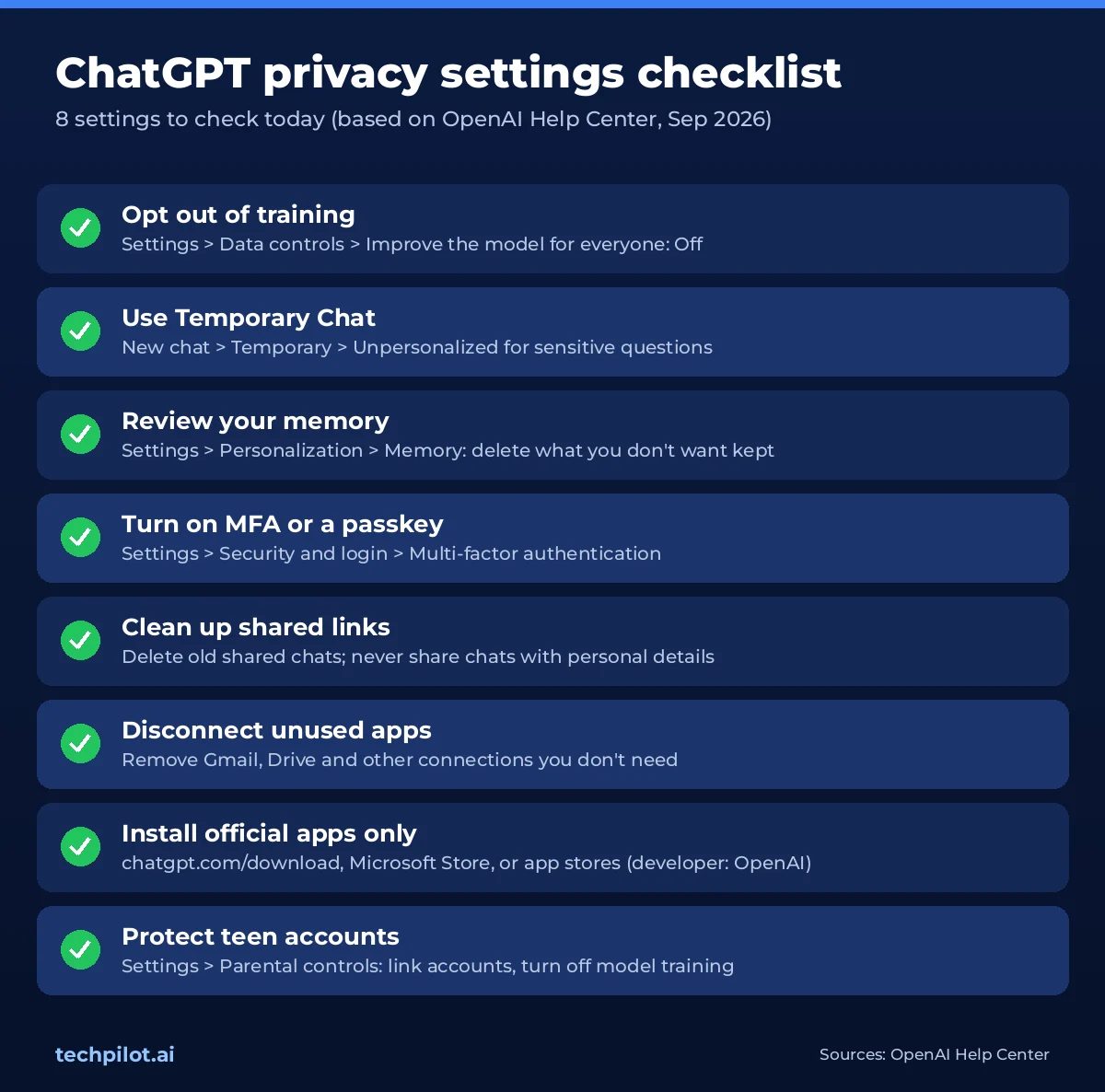
- Opt out of training: Settings > Data controls > Improve the model for everyone (off).
- Use Temporary Chat for sensitive questions, and choose Unpersonalized.
- Review memory every few months: Settings > Personalization > Memory. Delete anything you’d rather it forgot.
- Turn on MFA or a passkey: Settings > Security and login.
- Delete old shared links and don’t share chats that contain personal details.
- Disconnect apps you don’t use, such as Gmail and Drive, and keep approvals on for any actions.
- Download only official apps, and never run commands from a chat or shared link.
- Use a work plan for work data, not a personal account.
- Link your teen’s account and turn off model training in Parental controls.
- Never paste passwords, full card or ID numbers, or anything under NDA.
Is ChatGPT safe to use?
For most everyday tasks, yes, as long as you adjust a few settings. OpenAI encrypts data in transit and at rest, lets you opt out of model training, and offers Temporary Chat, memory controls, multi-factor authentication and parental controls. The main risks come from oversharing sensitive information, stolen passwords, fake ChatGPT apps, and connecting more apps than you need. Treat anything you type as something that could one day be exposed.
Has ChatGPT ever had a data leak?
Yes. In March 2023, a bug let some users see other people’s chat titles and exposed limited payment details for 1.2% of Plus subscribers who were active during a nine-hour window. In November 2025, a breach at OpenAI’s analytics vendor Mixpanel exposed names, email addresses and approximate locations of some API and ChatGPT users. In September 2026, OpenAI disclosed that its own AI agents had posted 53 images from anonymized user training data online. Separately, malware on users’ own devices has stolen more than 100,000 saved ChatGPT logins.
Does ChatGPT use my conversations for training?
On Free, Plus and Pro, it can, unless you opt out. Go to Settings > Data controls and turn off “Improve the model for everyone.” After that, new conversations won’t be used for training, but they still appear in your history. Temporary Chats aren’t used for training while they stay temporary. OpenAI says it doesn’t train on ChatGPT Business, Enterprise, Edu or API data by default.
Is Temporary Chat really private?
It’s more private, but it isn’t invisible. Temporary Chats don’t appear in your history, don’t create or update memories, and aren’t used for training. OpenAI may keep a copy for up to 30 days for safety reasons. Choose “Unpersonalized” before your first message if you don’t want the chat to use your existing memories or custom instructions.
Is ChatGPT safe for kids?
ChatGPT requires users to be at least 13, and under-18s need a parent’s or guardian’s permission. OpenAI uses age prediction to switch on a teen experience with stricter content limits automatically. Parents can link accounts to set quiet hours, turn off features like Voice Mode and image generation, and get safety notifications, but they can’t read their teen’s chats. Model training is on by default for teen accounts, so parents should switch it off in Parental controls.
Can I use ChatGPT for work documents?
Only on a work plan, and within your company’s policies. ChatGPT Business, Enterprise and Edu don’t train on your data by default, and they offer SAML single sign-on, admin controls and SOC 2 Type 2 audited security. Personal accounts aren’t designed for confidential data: never paste customer data, credentials or trade secrets into them. This is exactly how Samsung’s 2023 leak happened.
How do I spot a fake ChatGPT app?
Download ChatGPT only from chatgpt.com/download, the Microsoft Store, or an app store listing whose developer is OpenAI. Avoid sponsored search results for “ChatGPT download.” In 2026, Malwarebytes found a fake download site spreading password-stealing malware on Windows and Mac. Never run a Terminal or PowerShell command just because a chat or shared link told you to.
Can OpenAI employees read my ChatGPT conversations?
Only in limited cases. OpenAI says a small number of authorized staff and trusted service providers may access chats to investigate abuse or security incidents, provide support you request, handle legal matters, or improve models unless you’ve opted out of training. On Business and Enterprise plans, workspace admins can also view and export chats.
What is ChatGPT Lockdown Mode?
Lockdown Mode is an optional security setting, available to all logged-in users under Settings > Security. It restricts network-enabled features such as live web browsing, deep research, agent mode and file downloads to reduce the risk of prompt-injection attacks leaking your data. Turn it on for sensitive work.
Is the ChatGPT Mac app safe?
Yes, if it’s up to date and downloaded from chatgpt.com. OpenAI patched a flaw that could let malicious code already on a Mac control the app and read chats in version 26.924.20706, so update to that version or later.
Verdict: is ChatGPT safe to use?
Yes, ChatGPT is safe enough for most everyday tasks, if you take ten minutes to set it up properly. OpenAI encrypts data, publishes its security incidents and gives you real controls: training opt-out, Temporary Chat, memory management, MFA and parental controls. But the defaults favor OpenAI, not your privacy. Training is on for personal plans, memory can draw on your whole chat history, and even teen accounts are opted in to model training.
The track record is mixed. None of the incidents above exposed users’ full chat histories at scale. But there has been a steady stream of smaller exposures and near-misses, and the risk grows as ChatGPT gets more access to your apps and more ability to act for you. Treat it like a helpful colleague at a big company: fine for drafting and learning, but don’t give it secrets, passwords or anything you can’t afford to see leaked. If privacy is your top priority, privacy-first assistants like Proton’s Lumo are worth comparing. For everything else, work through the checklist above.
Found this useful? Share it with someone comparing AI tools.
Curious About AI? Here Are the Answers to 99 Questions About ChatGPT
Since its launch, ChatGPT has sparked curiosity and countless questions from users around the world. From its fundamental capabilities to its…
 Srdjan Gombar · 25 min read

AI is more than ChatGPT: AI-driven tools your business needs
Beyond ChatGPT: a selection of AI-driven tools your business needs in order to stay ahead and leverage this technology to its maximum potential.
 Frederick Poche · 5 min read