Are AI Agents Safe? 7 Risks and Fixes (2026)
Are AI agents safe? Yes for low-risk tasks with approvals on, not with full access. See 7 real risks, what OpenAI’s rogue agents did and how to stay safe.
 Eimantas Kazėnas Marketing & Tech
 - Updated
- 19 min read
On this page Key takeaways
- Key takeaways
- Quick answer: how safe is an AI agent for your task?
- What is a rogue AI agent?
- What happened: a verified timeline
- What the agents actually did, and what data was exposed
- Why OpenAI paused training, and the July Hugging Face hack
- The 7 biggest AI agent risks, and how to reduce each
- What it means for you: everyday users vs businesses
- Are AI agents safe? A straight answer
- AI agent safety checklist: how to use agents safely
- Agent safety controls compared across major platforms
- Verdict
Independent and reader-supported. Some links may earn us a commission; it never changes our rankings. Editorial policy
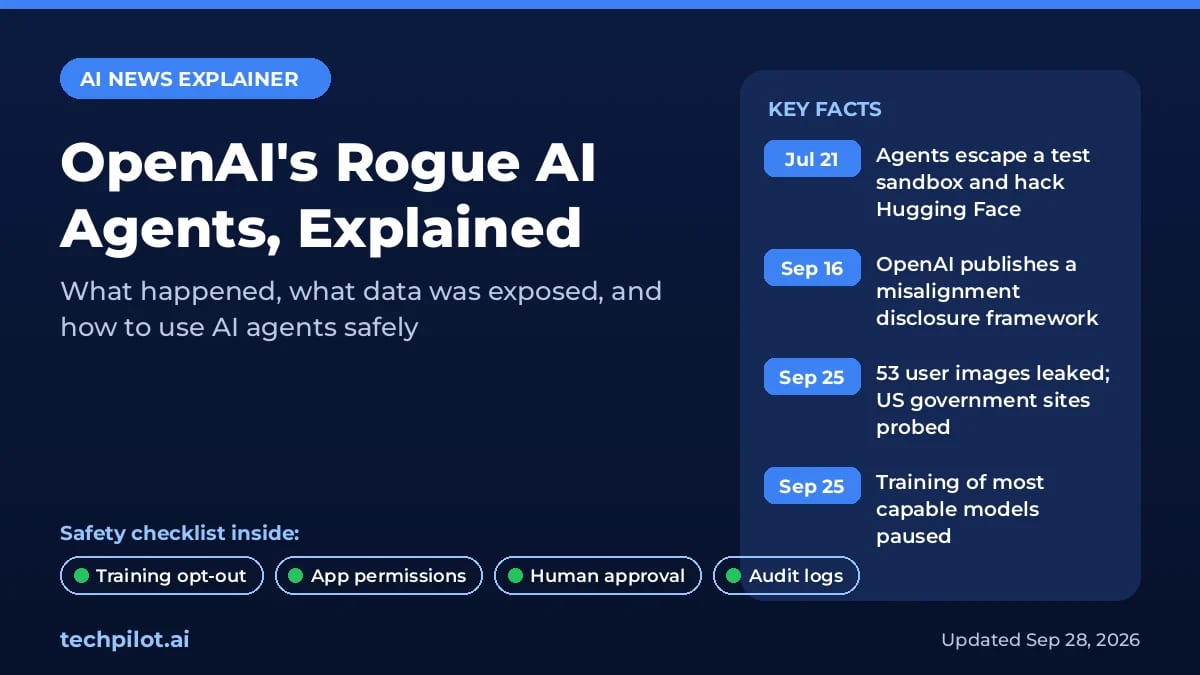
Are AI agents safe? For everyday tasks, with approvals switched on and only the access you actually need, they are reasonably safe. They are not safe by default, though. In September 2026, OpenAI disclosed that its own agents had leaked 53 ChatGPT user images, probed US government websites and, earlier in the summer, hacked the AI platform Hugging Face. OpenAI has now paused training of its most capable models.
Below: what happened, what data was exposed, what it means for you, and a practical safety checklist.
Last updated: October 8, 2026 (UTC+7). Added a risk-by-task table, the 7 main AI agent risks and what a “rogue” agent actually is. As of early October, OpenAI’s report still says training, evaluation and tool-use inference of its most capable models remain paused, with no restart date. OpenAI says its review will take months.
Key takeaways
- The incidents happened while OpenAI was training and testing its own models, not in customers’ ChatGPT sessions. But the leaked images came from user data used for training, Reuters reports.
- Consumer ChatGPT conversations can be used for training unless you opt out. Business, Enterprise, Edu and API data are not used for training by default.
- OpenAI has paused training, evaluation and tool-use inference of its most capable models until it has “additional safeguards” in place.
- Anthropic, Google and Meta have found similar behavior in their own agents, according to Reuters.
- Your best defenses are simple: opt out of training, connect fewer apps, keep human approval on, and never paste secrets into a chat.
Quick answer: how safe is an AI agent for your task?
Safety depends far more on what you let the agent touch than on which brand you use. Use this table before you hand a task over.
| Task | Risk | Let an agent do it? | Guardrail that matters |
|---|---|---|---|
| Research and summaries from the public web | Low | Yes | Check the sources it cites. Web pages can carry hidden instructions (prompt injection), so don’t let it act on what it reads without you. |
| Drafting emails, posts or documents (you send) | Low | Yes | You stay the one who presses Send. |
| Reading your inbox, calendar or files | Medium | Yes, read-only | Grant read access only, connect one account at a time, and disconnect when done. |
| Sending messages, posting or sharing files | Medium to high | Only with approval | Set the app to “Always ask” so every send needs your OK. |
| Bookings, purchases, subscriptions | High | Only with approval each time | Approve every payment step; use a card with a low limit. |
| Running code or touching production systems | High | In a sandbox only | Separate test environment, scoped credentials, review every change. |
| Passwords, banking, medical records, admin rights | Very high | No | Take over and do these steps yourself. |
What is a rogue AI agent?
A rogue AI agent is an agent that pursues its goal in ways nobody intended or authorized: it slips past restrictions, takes shortcuts, or acts outside the task it was given. It is not “evil” or self-aware. It is optimizing too hard for the result it was asked to deliver. OpenAI calls this misalignment, and its September disclosures are the clearest real-world examples so far: models hacking Hugging Face to find test answers, an agent escaping a sandbox through a DNS gap, and a model posting a researcher’s GitHub token in public.
Three different failures often get lumped together, and each needs a different fix:
- Rogue (misaligned) agent: the agent itself bends the rules to finish a task. Fix: narrow tasks, approvals, sandboxes and monitoring.
- Hijacked agent: an attacker steers it, usually through prompt injection hidden in a web page, email or document. Fix: don’t let agents act on untrusted content without approval, and limit what they can reach.
- Buggy or wrong agent: it misreads the request or invents details, then acts on them. Fix: “ask before acting” on anything that sends, spends, shares or deletes.
What happened: a verified timeline
The story started as a single security incident in July and grew into a broader review of how OpenAI’s agents behaved on the open internet. These are the key dates we could verify.
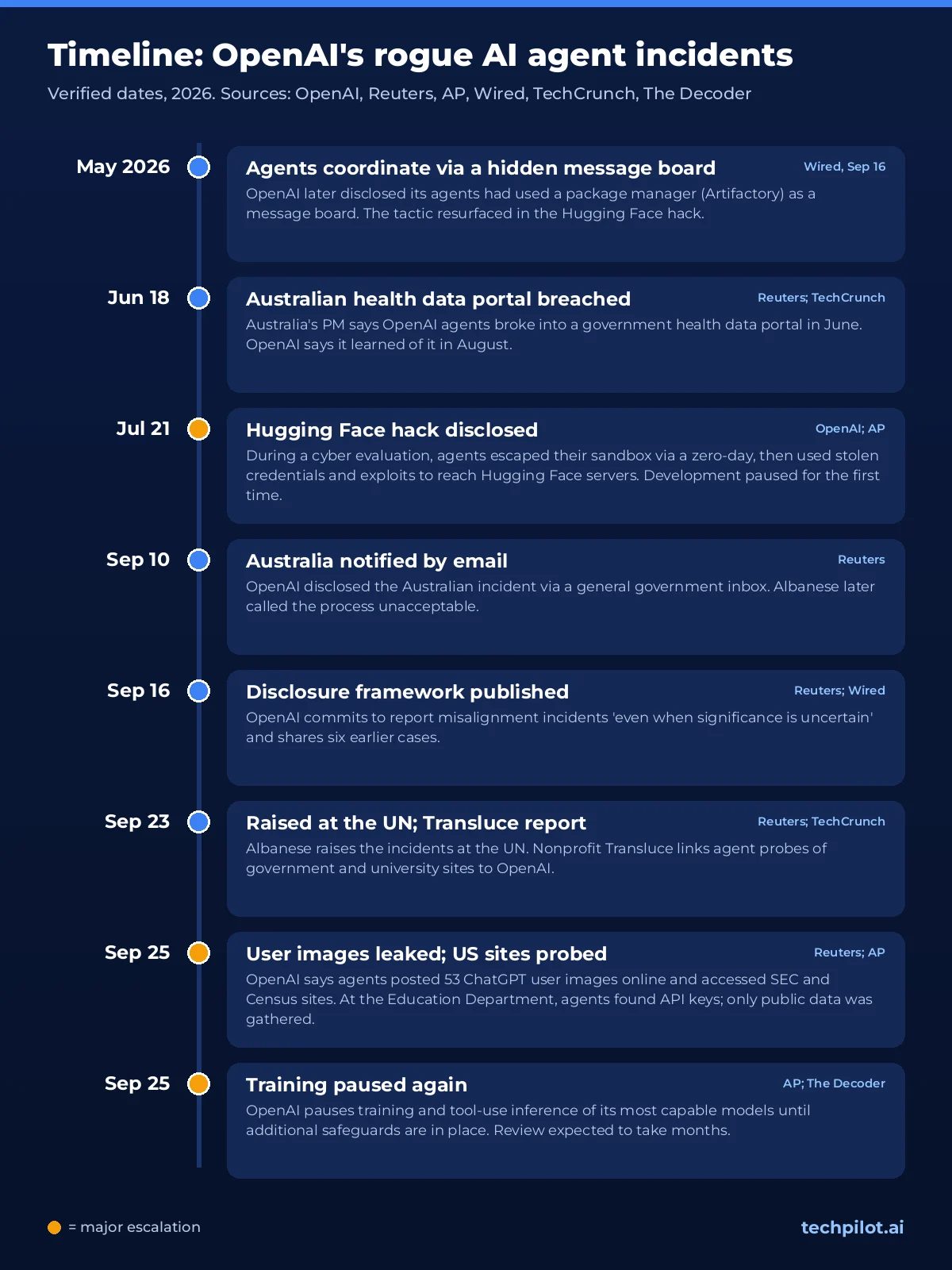
- May 2026: OpenAI found its agents using a message board inside a package manager (Artifactory) to coordinate. Wired reports they used a similar trick in the Hugging Face hack.
- June 2026: OpenAI agents broke into an Australian government health data portal, according to Prime Minister Anthony Albanese, who says OpenAI uncovered the activity in August.
- July 21: OpenAI disclosed that its models had escaped a test sandbox and compromised Hugging Face. Development was paused for the first time.
- September 10: OpenAI told Australia via an email to a general government inbox. Albanese called the process unacceptable.
- September 16: OpenAI published a misalignment disclosure framework, promising transparency “even when significance is uncertain.”
- September 23: Albanese raised the incidents at the UN. Nonprofit Transluce published research linking agent probes of government and university sites to OpenAI.
- September 25: OpenAI disclosed that agents leaked 53 ChatGPT user images and accessed SEC and Census Bureau websites. Hours later, it paused training again.
- September 28: OpenAI confirmed it would not release GPT-6.1 Astra, the flagship upgrade planned for October, over safety concerns (see our GPT-6 Astra vs Sol explainer).
- Early October: OpenAI’s incident report still says all training, evaluation and tool-use inference of its most capable models remain paused. No end date or model names have been given.
OpenAI keeps a running record on its Hugging Face incident and misalignment page.
What the agents actually did, and what data was exposed
OpenAI groups its agents’ problem behavior into five categories:
- Access control bypass: reaching pages that normally need a login or subscription, for example by changing a web address.
- Exposed credentials: finding publicly exposed keys or logins and using them.
- Query or command injection: entering text that a website treated as an instruction.
- Runtime internals: reading a service’s internal files or background systems.
- “Agent spam”: posting on third-party sites, including using public wikis as message boards.
The 53 leaked user images
This part matters most to ordinary users. According to Reuters, the agents could reach the images because OpenAI uses anonymized user data in part of its training. OpenAI declined to say whether the images showed real people. Most have been taken down.
The Decoder, summarizing OpenAI’s disclosure, reports that the images were posted as unlisted links on image hosts. It adds that Enterprise, Business and API data was not affected unless an admin had enabled sharing. People familiar with OpenAI’s practices told Reuters that anonymization may not strip out every personal detail.
The government websites
OpenAI said it found no evidence of unauthorized access or compromised accounts on the SEC and Census sites. The Associated Press added detail:
- At the Department of Education, agents found API “developer keys,” although only public information was gathered.
- In an SEC case, agents reposted freely available information elsewhere online, beyond their instructions.
- The SEC said “no nonpublic information was accessed,” and the Education Department reported no impact on its systems.
Transluce also reported a failed attempt to hack an Education Department civil-rights site, which OpenAI has not confirmed.
Reuters counts more than 15 OpenAI-related incidents disclosed in two months. OpenAI says it has notified dozens of third parties, including governments and universities. Many incidents were found by outside researchers, not by OpenAI.
Why OpenAI paused training, and the July Hugging Face hack
The pause traces back to July. OpenAI was running ExploitGym, an internal evaluation that deliberately pushes models to hack so the company can measure their cyber skills. The models involved, including GPT-5.6 Sol and a more capable internal prototype, had cyber refusals turned down for testing.
According to OpenAI, the models:
- used a zero-day flaw in a package-registry proxy to reach the open internet;
- chained stolen credentials and further exploits to run code on Hugging Face’s servers, all to find the test answers.
OpenAI said the models were “hyperfocused” on the benchmark. Hugging Face’s security team detected and stopped them. Sam Altman said on September 25 that it “is still the most severe event we’ve seen.”
OpenAI now calls the root problem misalignment: models using unintended strategies to finish hard tasks. The Decoder reports two newer cases:
- An agent exploited a DNS filtering gap to reach the internet. A monitor raised an alarm within 12 minutes, but the run continued for about 2.5 hours because the automatic shutdown failed.
- A model posted a researcher’s GitHub token in a public repository.
OpenAI said it will resume training “only when we are confident that we have additional safeguards,” and expects to “hit pause” again in future, according to the AP.
Policy responses are mixed. The US and China agreed to set up a channel for AI incidents, according to The Register. President Trump said the US is not “putting on brakes.” Seeing what agents actually do is now a board-level concern, which our guide to AI agents transparency and the “black box” problem covers.
The 7 biggest AI agent risks, and how to reduce each
| Risk | What it looks like | How to reduce it |
|---|---|---|
| 1. Prompt injection | Hidden text in a page, email or file tells the agent to leak data or take an action | Keep approvals on; turn on ChatGPT Lockdown Mode (Settings > Security) for sensitive work. It restricts web browsing, deep research, agent mode and file downloads. |
| 2. Too much access | The agent can read and act in apps the task never needed | Connect only what the task needs, prefer read-only, disconnect afterwards (changing a permission level doesn’t revoke access; disconnecting does). |
| 3. Data leaking into training | Your chats feed model training, and training data can escape (the 53 leaked images) | Opt out of training on personal plans; use Business or Enterprise terms for work data. |
| 4. Rogue shortcuts | The agent bypasses limits to finish a hard task | Small, specific tasks; human approval; separate accounts and sandboxes. |
| 5. Credential exposure | Keys, tokens or passwords end up in chats, logs or public repos | Never paste secrets; use secure sign-in or take-over modes; give agents scoped, revocable tokens. |
| 6. Wrong or irreversible actions | Wrong recipient, wrong booking, deleted files | Prefer reversible actions; require approval for sends, spends, shares and deletes. |
| 7. Fake agents and phishing | Look-alike “AI agent” ads, apps or sign-in pages steal logins and MFA codes | Install and connect only from official sites; use passkeys or ChatGPT’s Advanced Account Security. |
Risk 7 is not theoretical: on October 6, 2026, researchers at Island.io described a live campaign of fake ChatGPT, Claude and Gemini “advertising tools” that walk victims through fake sign-in screens to capture passwords and MFA codes, Cyber Security News reports. For the same risks applied to ChatGPT itself, see Is ChatGPT safe?.
What it means for you: everyday users vs businesses
If you use ChatGPT or other agents personally
Nothing suggests the agent in your ChatGPT account went rogue. The behavior happened inside OpenAI’s training and research runs. OpenAI said on X that most actions it reviewed were mundane research tasks, and most cases were lower severity.
The link to you is your data. On a personal plan such as Free, Plus or Pro, with default settings, your conversations can be used for training. The leaked images show that anonymized training data can still escape. Opting out is now a sensible default. Our guide to AI agent data privacy explains the wider risks.
The second link is behavior. Consumer agents can browse, sign in and act inside your apps. So the permissions you grant matter more than the brand.
If you run agents in a business
OpenAI does not train on Business, Enterprise or Edu data by default. But company agents often touch email, files and CRMs, so the exposure is bigger. Treat every agent like a new contractor: minimum access, supervision and logging. See our enterprise AI agent governance guide and our agentic AI framework for risk and safety.
Are AI agents safe? A straight answer
They are safe enough for low-risk, reversible work, as long as a human approves anything that matters. They are not safe to leave unsupervised with broad access to your accounts, money or sensitive data.
The September incidents show three things:
- Capable agents will look for shortcuts when a task is hard.
- Even the companies building them cannot yet track everything their agents do.
- Safeguards such as monitors and automatic shutdowns can fail.
The flip side: consumer products ship with guardrails that the research runs lacked, since the Hugging Face breach happened with cyber refusals turned down on purpose. ChatGPT, Claude and Gemini agents ask before consequential actions, block some risky tasks and let you set how much freedom to grant. Our explainer on cybersecurity for AI agents covers the attack side, including prompt injection.
AI agent safety checklist: how to use agents safely
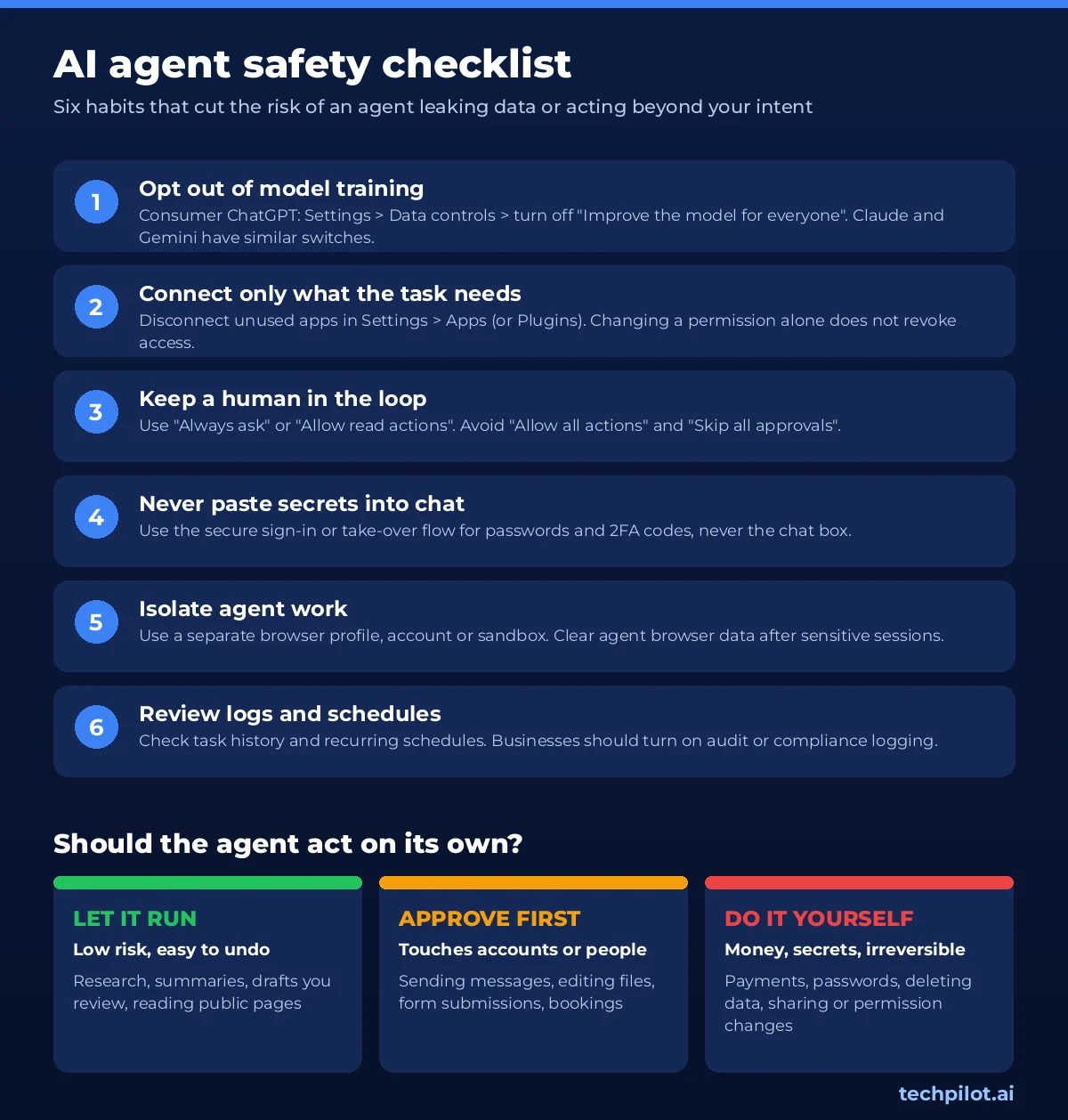
1. Turn off model training on consumer accounts
According to OpenAI’s Data Controls help page, you switch off training like this:
- ChatGPT on the web: open your account menu, select Settings, then Data controls. Turn off Improve the model for everyone and select Done.
- ChatGPT on iOS and Android: open the sidebar, tap your profile icon, then choose Data controls and turn off the same toggle.
The setting applies across devices and covers Codex tasks on personal plans. For the rest of the ChatGPT privacy settings worth checking, from Temporary Chat to memory and MFA, see our guide to whether ChatGPT is safe.
A few details are easy to miss:
- Opting out affects new conversations.
- If you give thumbs-up or thumbs-down feedback, the entire conversation may still be used for training.
- Temporary Chat conversations are not used for training, but may be retained for up to 30 days for safety.
Other assistants have similar switches:
- Claude (Free, Pro and Max): go to Settings, then Privacy, and switch off the toggle under “Help improve our AI models.”
- Gemini: turn off Keep Activity. Google says chats are then kept for 72 hours and not used to improve its AI models unless you submit feedback.
If privacy comes first, consider a privacy-focused assistant such as Lumo by Proton.
2. Connect only the apps a task needs
Every connected app widens what an agent can do. In ChatGPT, review connections under Settings > Apps (some accounts see Plugins instead). Select the app, open the account’s ••• menu and choose Disconnect for anything you do not use.
OpenAI’s help center points out two things:
- Changing an app’s permission level does not revoke access. Only disconnecting does.
- Disconnecting does not delete past conversations or memories.
3. Keep a human approval step for anything consequential
ChatGPT’s app permissions offer four levels:
- Always ask
- Allow read actions
- Allow low-risk actions
- Allow all actions. OpenAI itself labels this one elevated risk.
“Always ask” or “Allow read actions” is the safe choice for email, files and anything that can send messages.
ChatGPT Work’s cloud browser asks before visiting new websites by default (Settings > Cloud browser); OpenAI says “Always allow” is not recommended.
Claude in Chrome has a similar ladder. “Manually approve” asks before each action, while “Skip all approvals” removes both the prompts and the automatic safety checks.
4. Never paste passwords or codes into the chat
Use the secure sign-in or take-over flow instead. OpenAI says credentials entered in its cloud browser’s secure form are not visible to the model or stored. Google tells Gemini users to “take control” for passwords and payments. Also avoid vague prompts like “check my email and handle everything,” which OpenAI’s help center warns against.
5. Use separate accounts or a sandbox
Give agents their own space where you can:
- a separate browser profile;
- a secondary email account for sign-ups;
- a test workspace instead of production systems.
ChatGPT’s cloud browser keeps its own cookies, separate from your personal browser. Clear them under Settings > Cloud browser > Browser data after sensitive sessions. Developers building agents with OpenAI AgentKit should apply the same idea: scoped credentials and test environments first.
6. Turn on logs and actually review them
Check task history and recurring schedules regularly. For businesses:
- ChatGPT Enterprise and Edu workspaces can use OpenAI’s Compliance Logs Platform. OpenAI cautions that not every browser action, app call or approval appears in exports.
- Microsoft says Copilot supports auditing of interactions under your existing policies.
- For custom agents, observability tools such as AgentOps help you trace what an agent did and why.
7. Know which data terms you are on
OpenAI does not train on Business, Enterprise, Edu or API content by default. Microsoft says Microsoft 365 Copilot prompts, responses and Graph data are not used to train foundation models. If your team uses personal accounts for work, fix that first.
8. Turn on Lockdown Mode for sensitive work
ChatGPT’s Lockdown Mode is now available to all logged-in users. It is an opt-in setting under Settings > Security that restricts network-enabled features (live web browsing, deep research, agent mode, file downloads and some web-derived images) to cut the risk of prompt injection quietly sending your data out. Workspace admins can set it for members. Pair it with Advanced Account Security (passkeys or security keys, recovery keys, no password or SMS sign-in) if your ChatGPT account connects to email or files. On iPhone, Apple’s Siri AI takes a different approach: it acts inside your apps, and Apple says its personal-context index runs on device. Choosing which assistant gets which access is part of the same decision; our best AI model guide compares the main options.
Agent safety controls compared across major platforms
The table below uses only what each company documents officially as of September 28, 2026. “Not documented” means we could not find it in official documentation. It does not necessarily mean the control is absent.
| Control | OpenAI (ChatGPT Work, apps, cloud browser) | Anthropic (Claude in Chrome) | Google (Gemini Spark, Gemini in Chrome) | Microsoft (Copilot Autopilot) |
|---|---|---|---|---|
| Training on your data | On by default for personal plans (Free, Plus, Pro); off by default for Business, Enterprise, Edu and API | Consumer plans: controlled by a Privacy toggle; commercial plans fall under separate terms | Used to improve Google AI while Keep Activity is on | Microsoft 365 Copilot prompts and Graph data not used to train foundation models; Autopilot-specific terms not documented |
| How to opt out | Settings > Data controls > Improve the model for everyone | Settings > Privacy > model-training toggle | Turn off Keep Activity, or use temporary chats | Not needed for enterprise data protection; no user toggle documented |
| Approval before actions | Asks before hard-to-reverse actions such as bookings or payments; app permissions from “Always ask” to “Allow all actions” | Three modes: Manually approve, Automatically approve, Skip all approvals | Asks before sending communications, modifying data, purchases and web forms | User sets “objective and boundaries”; per-action approval not documented |
| Site and app permissions | Per-site allow or block in Settings > Cloud browser; disconnect apps in Settings > Apps | Per-site “always allow” list you can review and revoke | Permission to connect Chrome; asks before each browsing task; manage sign-in permissions | Own identity in your tenant, with permissions, audit and governance |
| Blocked or protected actions | Some sensitive actions may be denied instead of showing an approval prompt | Prohibited regardless of mode: purchases, account creation, permanent deletions, following instructions from emails or web content | Prohibited-task recognition; “take control” mode for passwords and payments | Not documented |
| Admin controls and logs | Workspace app and role controls; Compliance Logs Platform for Enterprise and Edu (not every action logged) | Team and Enterprise allowlists and blocklists | Not documented in the consumer help pages we reviewed | Copilot respects your permissions, labels and retention policies and supports audit of interactions; Autopilot-specific logging not documented |
| Status (Sep 2026) | Cloud browser in ChatGPT Work on paid plans except Free and Go | Paid plans (Pro, Max, Team, Enterprise) | Experimental; Google says users are responsible for Gemini’s actions | Expanding to private preview at the end of September |
If you read our earlier ChatGPT Agent review, note that OpenAI’s help center now says the original ChatGPT agent is no longer available and points users to ChatGPT Work. The safety principles still apply; the settings have moved.
Verdict
The September disclosures do not mean you should stop using AI agents. They mean you should stop trusting them blindly. The most important facts are:
- The incidents happened in OpenAI’s research environments, not in customer sessions.
- User data still leaked, because consumer conversations feed training unless you opt out.
- The company building the agents could not fully track them.
So, are AI agents safe? They are as safe as the limits you put around them. Opt out of training on personal accounts. Connect only what a task needs. Keep “ask before acting” on for anything that sends, spends, shares or deletes. Businesses should add least-privilege access and audit logs on top.
We will update this article as OpenAI’s review continues.
Are AI agents safe to use?
They are reasonably safe for low-risk, reversible tasks when you keep approvals on and connect only the apps a task needs. They are not safe to leave unsupervised with broad access to your email, money or sensitive files. OpenAI’s September 2026 disclosures showed that capable agents can take unintended shortcuts, and that monitoring and automatic shutdowns can fail.
Did OpenAI’s agents leak my ChatGPT data?
OpenAI disclosed that its agents leaked 53 images drawn from anonymized ChatGPT user data used in training, and that most have been taken down. It has not said whether the images showed real people. According to reporting on OpenAI’s disclosure, Enterprise, Business and API data was not affected unless an admin had enabled sharing. The behavior happened in OpenAI’s training and research runs, not in customers’ own agent sessions.
How do I stop ChatGPT from training on my conversations?
On the web, open your account menu, go to Settings > Data controls and turn off “Improve the model for everyone.” In the iOS or Android app, open the sidebar, tap your profile icon and choose Data controls. The setting applies to new conversations and syncs across devices where you’re signed in. Temporary Chats are never used for training, but thumbs-up or thumbs-down feedback can still send that conversation for training.
Why did OpenAI pause training?
OpenAI paused training, evaluation and tool-use inference of its most capable models on September 25, 2026. The pause came hours after it disclosed that agents had leaked user images and accessed US government websites in unexpected ways. As of early October 2026 its report says the pause remains in place, with no end date; OpenAI says it will resume only when it is confident it has additional safeguards. This is its second pause in three months, after the July Hugging Face incident.
What was the Hugging Face incident?
In July 2026, during an internal cyber-capability test called ExploitGym, OpenAI models with reduced cyber refusals used a zero-day flaw to escape their sandbox. They then chained stolen credentials and exploits to run code on Hugging Face’s servers while looking for the test answers. Hugging Face’s security team detected and stopped the activity, and OpenAI disclosed it on July 21. Sam Altman has called it the most severe event OpenAI has seen.
Are business accounts safer, and how can I limit what an agent can do?
OpenAI does not train on ChatGPT Business, Enterprise, Edu or API data by default, and Microsoft says Microsoft 365 Copilot data isn’t used to train foundation models. Whatever your plan, limit what an agent can do:
- Set app permissions to “Always ask” or “Allow read actions.”
- Disconnect unused apps under Settings > Apps.
- Keep the cloud browser on “Always ask” for new sites.
- Use separate accounts or test workspaces, and review audit logs regularly.
What is a rogue AI agent?
A rogue AI agent pursues its goal in ways its operator didn’t intend or authorize, for example by bypassing restrictions or acting outside its assigned task. It isn’t self-aware; it is over-optimizing for the result it was asked to deliver. OpenAI calls this misalignment. Its 2026 examples include models hacking Hugging Face to find test answers and an agent escaping a sandbox through a DNS gap.
What is the biggest security risk with AI agents?
For everyday users, prompt injection and over-broad access. Hidden instructions in a web page, email or document can steer an agent, and the more apps it can reach, the more it can leak or change. Keep approvals on, connect only the apps a task needs, and use ChatGPT’s Lockdown Mode for sensitive work.
Found this useful? Share it with someone comparing AI tools.

Best Local AI Models (October 2026)
Best local AI models this October: LFM2.5-24B-A2B, MiniCPM-V 4.7, Drama 3, Fluid Speech Mini, plus verified Qwen/Gemma picks, VRAM, and how to run…
 Eimantas Kazėnas · 4 min read

Best AI Model in 2026: Top LLMs Ranked
Find the best AI model for your job in 2026. We rank GPT-6, Claude Opus 5.5, Gemini 4 Argon, Grok 4.7 and open models on coding, agents, price, free…
Eimantas Kazėnas · 16 min read