Home / Guides / Copywriting
How to Make ChatGPT Sound More Human
 Eimantas Kazėnas Marketing & Tech
- Published
- 6 min read
On this page Why ChatGPT sounds like ChatGPT
Independent and reader-supported. Some links may earn us a commission; it never changes our rankings. Editorial policy
How to make ChatGPT sound more human: pick a warmer personality, give it a sample of your writing, ban stock phrases, then edit the five tells it leaves.
Quick answer: ChatGPT sounds robotic because its default style is built to be safe, complete and neutral for millions of people at once. You fix that in three layers. First, change the personality under Settings, then Personalization, then Base style and tone, and add custom instructions about how you write. Second, give each prompt a real audience, a point of view and a sample of your own writing to copy. Third, do a two-minute edit pass for the patterns that give AI text away: stock phrases, tidy lists of three, hedging and a summary at the end.
Why ChatGPT sounds like ChatGPT
Most advice treats this as a vocabulary problem and tells you to swap words like “delve” for plainer ones. That helps a little, but the real gap is in what the text commits to. People write with specifics, opinions and uneven rhythm. A model writing for everyone hedges, covers every angle evenly and wraps up neatly, because that is the safest answer for the average reader.
- It has no stake. Without your opinion, it balances “on the one hand” against “on the other”.
- It has no details. Without your examples, numbers and names, it falls back on generic ones.
- It has no voice to copy. Without a sample, it writes in its own house style.
So the most useful fixes add what the model is missing, rather than asking it to “sound human”, which mostly produces forced slang and exclamation marks.
Step 1: Change the personality and custom instructions
On the web, open your profile icon, choose Personalization and use the dropdown next to Base style and tone. On iOS and Android it is under Settings, then Personalization. According to OpenAI’s help page on personalities, the options are Default, Professional, Friendly, Candid, Quirky, Efficient and Cynical, and the change applies to all chats, including existing ones.
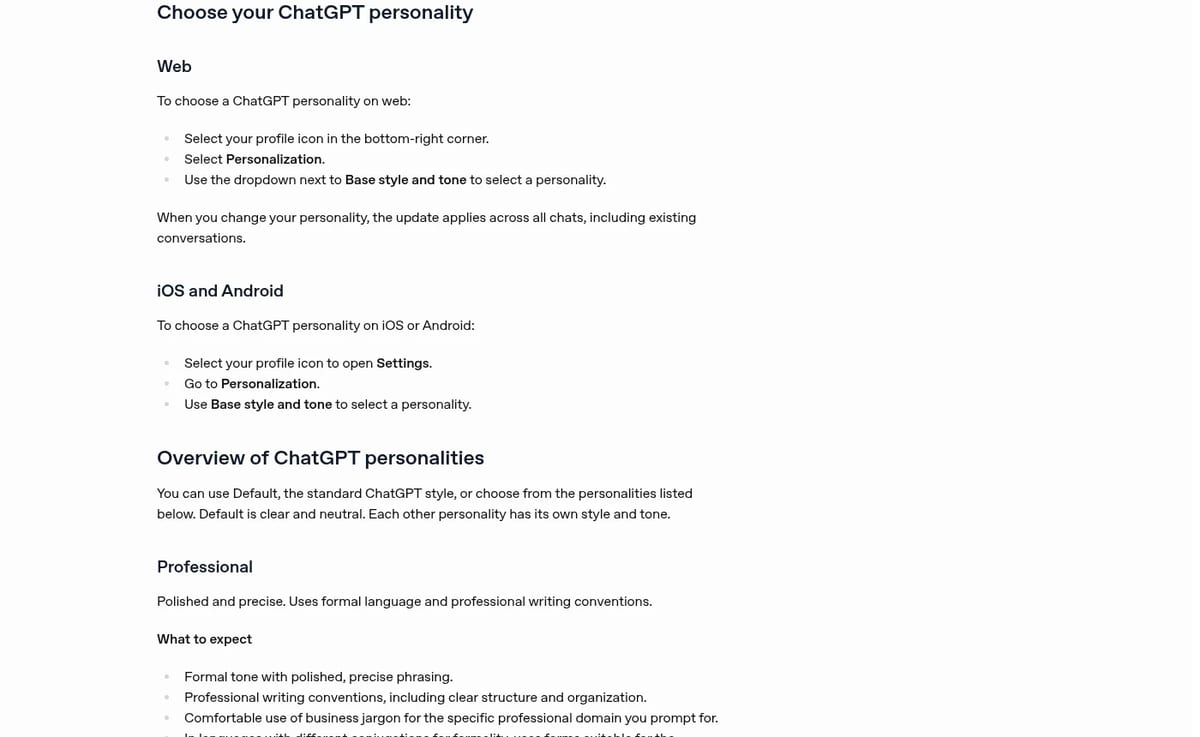
Friendly and Candid are the most natural-sounding for everyday chat. Efficient strips padding, which often reads as more human than the chatty default. One catch from the same help page: the personality shapes how ChatGPT talks to you, but when you ask for an email, a post or a résumé, it follows your instructions and the context instead. That is why custom instructions matter more for writing.
Custom instructions sit in the same Personalization menu and apply to every chat. Free and Go users get up to 1,500 characters and paid plans up to 5,000, per OpenAI’s custom instructions guide. A short block like this works well:
- Write the way I talk: short sentences mixed with longer ones, plain words, contractions.
- Lead with the answer. No intros, no “great question”, no summary at the end.
- Take a position when I ask for advice, and say what you would do.
- Use bullet points only for real lists or steps, never for everything.
- Never use: delve, tapestry, landscape, game-changer, “it’s important to note”, “in today’s fast-paced world”, “I hope this finds you well”.
- Use em dashes rarely. Use commas, full stops or brackets instead.
Step 2: Prompt with context, not with “sound human”
The biggest single improvement is pasting 150 to 300 words of something you actually wrote, such as an old email, a post or a message, and asking ChatGPT to match its sentence length, vocabulary and level of formality. Then give it the three things a human writer always has:
- A reader: “a busy client who skims on their phone”, not “an audience”.
- A point of view: “I think we should delay the launch by two weeks, and here is why”.
- Real details: the actual numbers, names, dates and one specific example only you know.
A prompt that combines these beats any “make it sound natural” request: “Here is an email I wrote last month [paste]. In the same voice, write a 120-word note to my client Sara explaining the launch moves from 3 to 17 March because testing found a payment bug. Be direct, apologise once, and offer a call on Thursday.”
Step 3: Edit the five tells
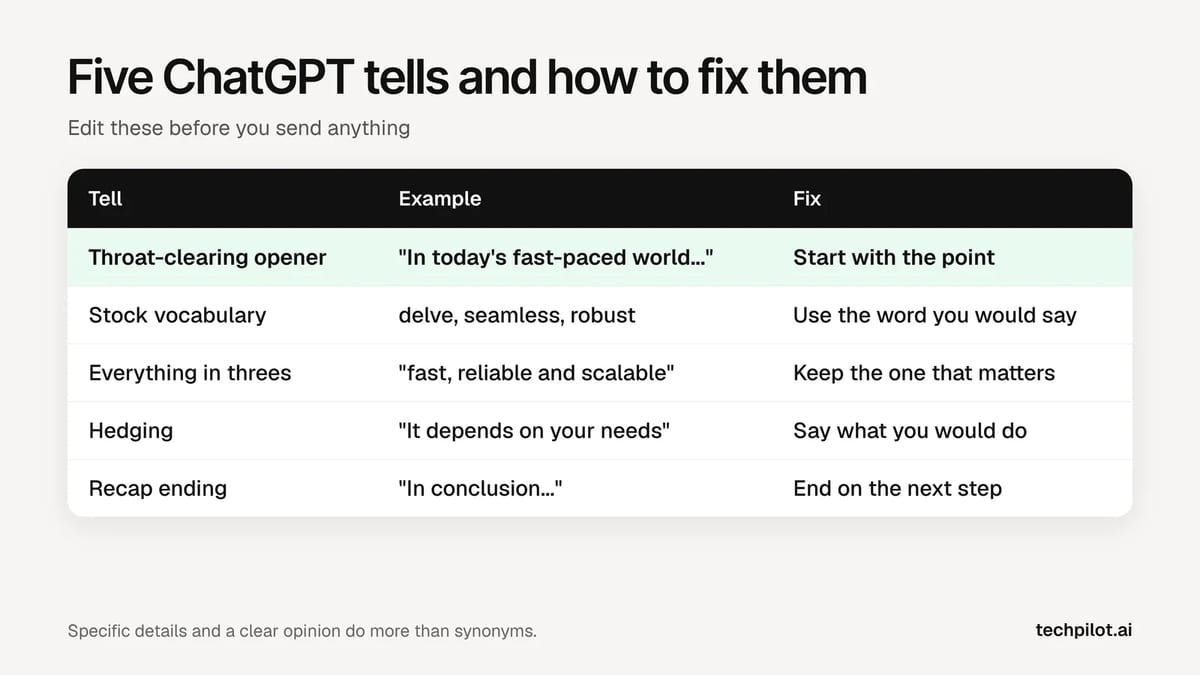
Even with good settings, a quick edit pass catches what slips through. These are the patterns readers notice most, and what to do about each.
| Tell | Example | Fix |
|---|---|---|
| Throat-clearing opener | “In today’s fast-paced digital world…” | Delete the first sentence; start with the point. |
| Stock vocabulary | delve, seamless, robust, game-changer | Use the plain word you would say out loud. |
| Everything in threes | “fast, reliable and scalable” | Keep the one item that matters, or add a fourth real one. |
| Hedging and balance | “It depends on your needs” | Say what you would do and for whom. |
| Recap ending | “In conclusion…” or “Overall…” | End on the next step or the strongest detail. |
You can ask ChatGPT to do the first pass itself: “Rewrite this to remove any sentence that would be true of any company, cut the intro and outro, and vary the sentence length.” Then read it aloud once. Anything you would not say to a colleague gets rewritten by you.
Before and after
Default output: “Thank you for reaching out! I hope this message finds you well. I wanted to let you know that, due to some unforeseen technical challenges, the launch timeline has been adjusted. We remain committed to delivering a seamless experience.”
With a writing sample and real details: “Hi Sara, quick heads-up: we are moving the launch from 3 to 17 March. Testing caught a bug in checkout that could double-charge some cards, and I would rather lose two weeks than your customers’ trust. Free for a 15-minute call on Thursday?”
The second version is not more casual for the sake of it. It is more specific, takes responsibility and asks for something, which is what makes it read like a person wrote it.
Humanizer tools and AI detectors
Humanizer tools rewrite AI text to change its patterns, and some are useful for a quick rewording pass. We compared them in our test of the most accurate AI humanizers, and for single sentences a free sentence rewriter is often enough. But none of them adds your opinion or your details, so the steps above still do most of the work. If your school or employer requires you to disclose AI use, sounding human does not change that rule.
New to the basics? Our guide on how to use ChatGPT covers prompts, memory and projects.
Frequently asked questions
How do I make ChatGPT sound more human?
Pick a personality such as Friendly or Candid, add custom instructions about your style, paste a sample of your own writing, give real details, then edit out stock phrases and recap endings.
Where is the ChatGPT personality setting?
On the web, open your profile icon, choose Personalization and use the dropdown next to Base style and tone. On mobile it is under Settings, then Personalization.
What custom instructions make ChatGPT sound natural?
Ask for short and long sentences mixed, plain words, contractions, the answer first, no intro or summary, fewer bullet points, and list the phrases it must never use.
Why does ChatGPT use so many em dashes and lists?
Its default style favors tidy structure. Tell it in custom instructions to use em dashes rarely and to use lists only for real steps or items.
Will making ChatGPT sound human stop AI detectors?
Not reliably, and detectors themselves make mistakes. Write for your reader instead, and follow your school’s or employer’s rules on disclosing AI use.
Found this useful? Share it with someone comparing AI tools.

Natural Language Processing (NLP): Power of Human Language in Technology
Explore the power of natural language processing: discover how NLP transforms industries, enhances AI, and creates new career opportunities in tech.
 Mike Paul · 5 min read
ChatGPT Canvas: Powerful Interface for Writing and Coding Projects
ChatGPT Canvas might be one of the most important AI Updates of the year – Check our review on the latest features to find out why!
 John Daniel · 6 min read