Home / Guides / Web development & Coding
Run Muse Spark Open Locally: Setup Guide
 Eimantas Kazėnas Marketing & Tech
 - Published
- 9 min read
On this page Hardware requirements
- Hardware requirements
- Step 1: Get the weights
- Option A: Two Mac Studios with MLX (Meta’s setup)
- Option B: llama.cpp with a GGUF (one big machine)
- Option C: One Mac with an MLX quant
- Option D: Unsloth Desktop (easiest app)
- What about Ollama and LM Studio?
- Recommended settings
- Common errors and fixes
- Is running it locally worth it?
- Frequently asked questions
Independent and reader-supported. Some links may earn us a commission; it never changes our rankings. Editorial policy
Run Muse Spark Open locally with 256 GB+ of memory for a 2-bit GGUF, or two Mac Studios with MLX for NVFP4. Hardware needs, commands and fixes for errors.
Meta released the weights on October 15, 2026, and pitched it as the first model in its class you can run on a desktop. That’s true, with a big asterisk: the “desktop” is two Mac Studios with M5 Ultra and 512 GB of memory each. Muse Spark Open has 816B parameters (42B active per token), and the original BF16 weights are about 1.6 TB. This guide covers what hardware actually works, where to download, the exact commands from Meta, llama.cpp and Unsloth, and the errors people hit.
Quick answer:
- Minimum realistic setup: about 256 GB of combined RAM and VRAM (or unified memory) for Unsloth’s 2-bit GGUF, a 226 GB download.
- Meta’s official desktop setup: two Mac Studios with M5 Ultra and 512 GB each (or four with 256 GB), linked by Thunderbolt 5, running the NVFP4 checkpoint with MLX.
- GPU servers: at least 700 GB of VRAM for NVFP4 and 2 TB for BF16, per the model card.
- Won’t work: a laptop, a single gaming GPU or a 128 GB workstation.
- Ollama and LM Studio: their official Muse Spark Open listings are cloud-hosted, not local downloads.
Hardware requirements
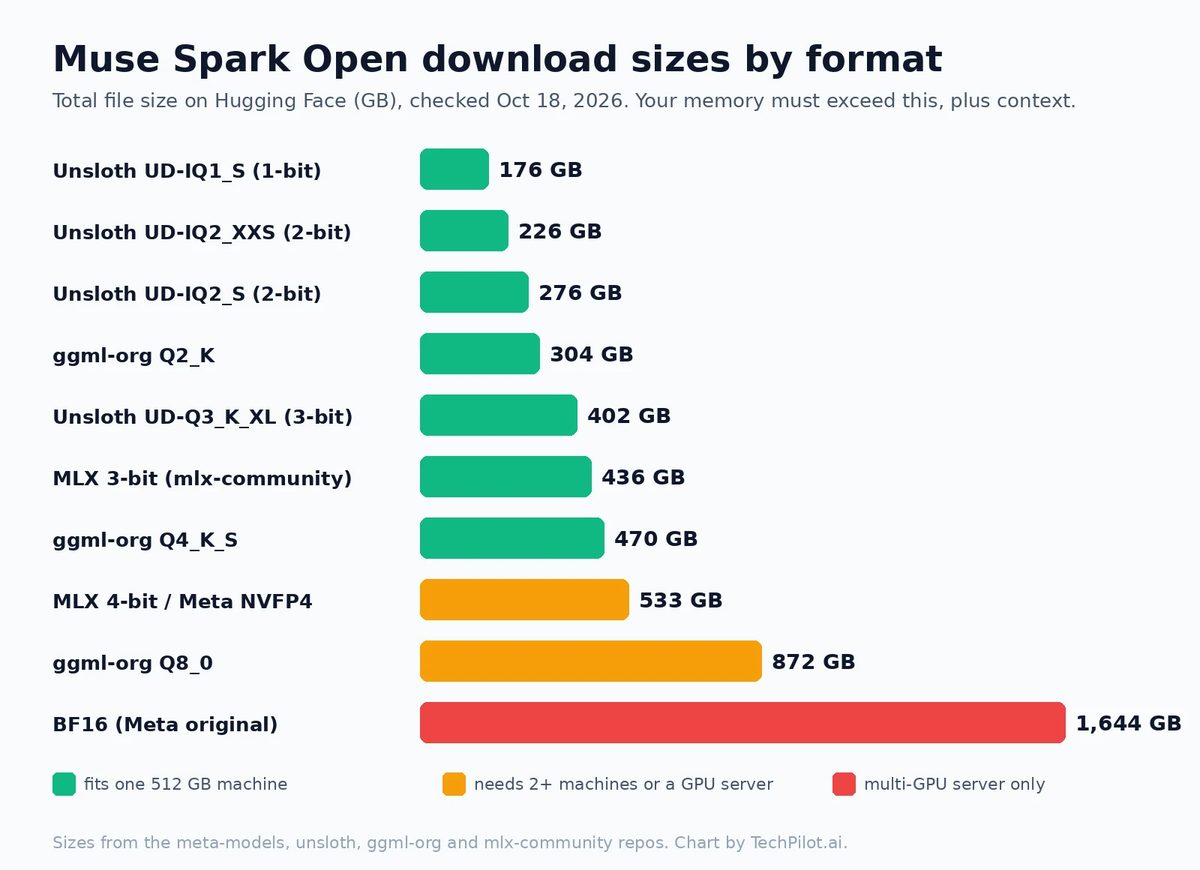
The rule from Unsloth’s guide is simple: your total memory should be larger than the file you download, plus room for context. llama.cpp can spill over to system RAM or disk, but generation gets much slower. Here are the real download sizes from Hugging Face:
| Setup | What it can run | Notes |
|---|---|---|
| 2 Mac Studios, M5 Ultra, 512 GB each (or 4 with 256 GB) | Meta’s NVFP4 checkpoint (about 533 GB) with MLX | Meta’s official path. Needs macOS 26.2+, Thunderbolt 5 between every pair, and disk space for the full checkpoint on each Mac. |
| 1 Mac Studio, M5 Ultra, 512 GB | GGUF up to Q2_K (304 GB) or Unsloth 3-bit (402 GB); MLX 3-bit (436 GB) on paper | ggml-org says its Q2_K fits in 512 GB of unified memory. The MLX 4-bit (533 GB) does not fit one machine. On Apple’s spec sheet, 512 GB only comes with the 36-core CPU, 80-core GPU M5 Ultra. |
| Workstation with 256 GB+ RAM plus GPU | Unsloth UD-IQ2_XXS (226 GB) or UD-IQ1 builds | llama.cpp splits layers between GPU and RAM. Works, but expect slow generation on CPU-heavy setups. |
| GPU server | NVFP4 on 4 Blackwell Ultra GPUs or 8 H200s; BF16 needs about 2 TB VRAM | Use SGLang, vLLM or TensorRT-LLM. This is the production route. |
Unsloth’s own memory guide gives these totals by precision: 180 to 212 GB for 1-bit, 250 to 316 GB for 2-bit, 346 to 410 GB for 3-bit, 512 GB for 4-bit, 640 GB for 6-bit and 870 to 950 GB for 8-bit. It also notes that quants below UD-IQ2_S lose accuracy on general tasks, so it recommends UD-IQ2_S (276 GB) as the minimum for agent work. The tiny 1-bit builds are fine for chat, less so for coding.
Step 1: Get the weights
Meta’s official checkpoints live in the Muse Spark Open collection on Hugging Face, in BF16 and NVFP4. Both repos are gated: you fill in a form with your full legal name, date of birth and organization, and Meta approves it manually. Once approved, log in from the terminal:
pip install -U "huggingface_hub[cli]"
hf auth login
For llama.cpp and MLX you’ll usually download a community quantization instead. The main ones are unsloth/Muse-Spark-Open-816B-A42B-GGUF, ggml-org/Muse-Spark-Open-816B-A42B-GGUF and the mlx-community 3-bit and 4-bit builds. When we checked on October 18 they were not gated, but the Muse Model License and its usage policy still apply to them.
Option A: Two Mac Studios with MLX (Meta’s setup)
This is the route Meta demos. MLX tensor parallelism splits every layer across the machines, so each Mac holds half of the model and the Macs exchange small intermediate results over RDMA on Thunderbolt 5. Meta’s Mac cookbook estimates about four hours to complete.
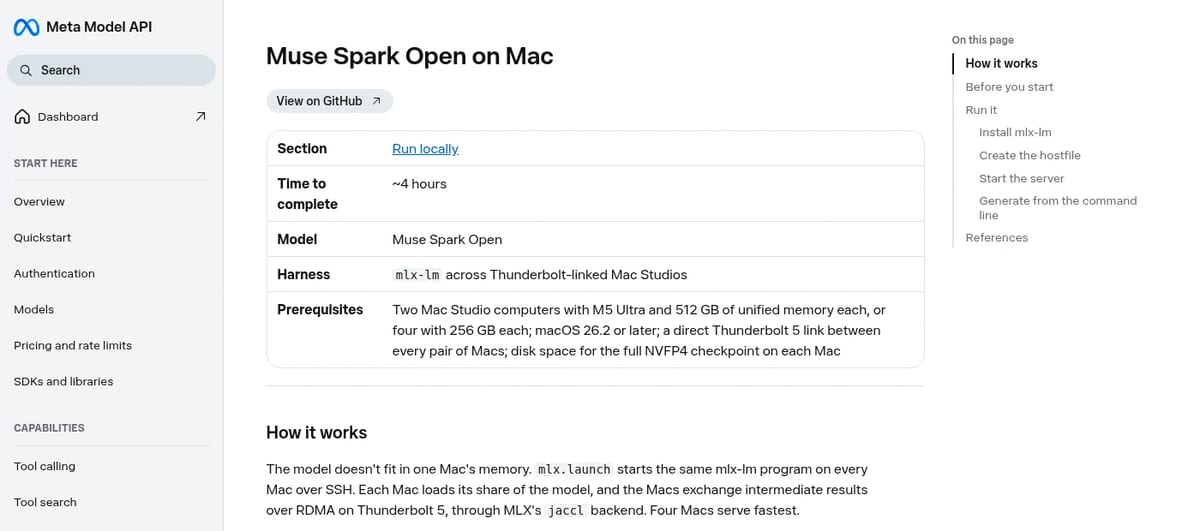
Before you start, per the cookbook:
- macOS 26.2 or later on every Mac (it adds the RDMA-over-Thunderbolt driver), with RDMA turned on as described in the MLX distributed docs.
- MLX 0.30.1 or later.
- A direct Thunderbolt 5 link between every pair of Macs. Two cables per pair doubles the bandwidth.
- Passwordless SSH from the primary Mac to the others.
Then install mlx-lm on every Mac, create a hostfile.json listing each Mac (mlx.distributed_config can generate it), and start an OpenAI-compatible server on port 8080 from the primary:
pip install -U mlx-lm
mlx.launch --hostfile hostfile.json --backend jaccl --env MLX_METAL_FAST_SYNCH=1 -- \
  mlx_lm.server --model meta-models/Muse-Spark-Open-816B-A42B-NVFP4 --port 8080
To test without a server, run a one-off prompt through the same launcher. Meta notes the chat template defaults to xhigh reasoning, so give it plenty of tokens:
mlx.launch --hostfile hostfile.json --backend jaccl --env MLX_METAL_FAST_SYNCH=1 -- \
  mlx_lm.generate --model meta-models/Muse-Spark-Open-816B-A42B-NVFP4 \
  --prompt "Give me a one-sentence summary of what you can do." \
  --max-tokens 4096 --temp 1.0 --top-p 1.0
Meta says four Macs serve fastest. It hasn’t published tokens-per-second figures for either setup, so we won’t quote any.
Option B: llama.cpp with a GGUF (one big machine)
llama.cpp runs GGUF quants on CPU, GPU or a mix, including Apple Metal. Support for the Muse Spark Open architecture was merged into llama.cpp’s main branch on October 15 (UTC), so build from a current checkout. Unsloth’s build steps (set -DGGML_CUDA=OFF for Mac or CPU-only):
git clone https://github.com/ggml-org/llama.cpp
cmake llama.cpp -B llama.cpp/build -DBUILD_SHARED_LIBS=OFF -DGGML_CUDA=ON
cmake --build llama.cpp/build --config Release -j --clean-first --target llama-cli llama-mtmd-cli llama-server llama-gguf-split
cp llama.cpp/build/bin/llama-* llama.cpp
Download only the quant you need (here the 226 GB 2-bit) and run it with Unsloth’s settings:
hf download unsloth/Muse-Spark-Open-816B-A42B-GGUF \
  --local-dir unsloth/Muse-Spark-Open-816B-A42B-GGUF \
  --include "*UD-IQ2_XXS*"
./llama.cpp/llama-cli \
  --model unsloth/Muse-Spark-Open-816B-A42B-GGUF/UD-IQ2_XXS/Muse-Spark-Open-816B-A42B-UD-IQ2_XXS-00001-of-00006.gguf \
  --temp 1.0 --top-p 1.0 --top-k 64
The shortcut from ggml-org and Meta’s developer guide downloads and serves in one step. Swap Q2_K for Q4_K_S (470 GB) if you have the memory:
llama serve -hf ggml-org/Muse-Spark-Open-816B-A42B-GGUF:Q2_KFor image and audio input you also need an mmproj file (2.2 GB at Q8_0), which both GGUF repos include.
Option C: One Mac with an MLX quant
The mlx-community builds need mlx-lm 0.32.2 or newer, the version they were re-uploaded with on October 16. The standard 3-bit build is 436 GB, the only standard MLX quant smaller than a 512 GB Mac’s memory. The 4-bit build is 533 GB, and its model card says that’s more than a single 512 GB Mac holds. We haven’t confirmed the 3-bit runs well on one machine with useful context, so leave headroom.
pip install -U "mlx-lm>=0.32.2"
python -c 'from mlx_lm import load, generate; m, t = load("mlx-community/Muse-Spark-Open-816B-A42B-3bit"); print(generate(m, t, prompt="hello", verbose=True))'
Option D: Unsloth Desktop (easiest app)
Unsloth Desktop is a free app for macOS, Windows and Linux that downloads GGUFs and runs them on llama.cpp, with OpenAI and Anthropic-compatible endpoints for coding agents. Search “Muse Spark Open” in its Model hub tab, or use the command Meta lists:
unsloth run --model unsloth/Muse-Spark-Open-816B-A42B-GGUF:UD-Q2_K_XLUD-Q2_K_XL is a 311 GB download, so it needs more memory than the UD-IQ2_XXS build above.
What about Ollama and LM Studio?
As of October 18, Ollama’s library page for muse-spark-open has a single muse-spark-open:cloud tag, which runs on Ollama’s servers at $1.25 per million input tokens and $4.25 output. LM Studio’s model page says it lists the cloud model only and doesn’t include local downloads. So if a tutorial tells you to ollama pull a local build, check the tag first. For a truly local run, use llama.cpp, MLX or Unsloth.
Recommended settings
- Sampling: Meta recommends temperature 1.0, top_p 1.0 and top_k disabled. The ggml-org GGUFs store top_k 64 in their metadata, and Unsloth’s example uses 64, so set it explicitly if you want Meta’s setting.
- Reasoning effort: low, medium, high or xhigh (the default). Use high or xhigh for coding and agents, low or medium for quick replies, especially on slow local hardware.
- Context: up to 1,048,576 tokens, but every extra token of context needs memory. Start small locally.
Common errors and fixes
- 401 or “access restricted” when downloading from meta-models: the official repos are gated. Request access, wait for approval, then run
hf auth login. Or use a community quant. - llama.cpp says the model architecture is unknown: your build predates the October 15 merge. Pull the latest llama.cpp and rebuild.
- mlx-lm can’t load the model: upgrade to mlx-lm 0.32.2 or newer.
- Out of memory, or painfully slow output: the quant is bigger than your memory and llama.cpp is offloading to disk. Drop to a smaller quant or shorten the context.
- “Unsupported reasoning_effort”: the chat template only accepts low, medium, high and xhigh. Anything else raises this error.
- Long silence, then a cut-off answer: xhigh reasoning spends tokens thinking first. Raise the max tokens (Meta’s example uses 4096) or lower the reasoning effort.
- “I can’t view the video”: the model card says very short, low-resolution clips can fail. Use longer clips at 448 px or more on the short side.
- mlx.launch hangs or asks for a password: set up key-based SSH from the primary Mac to every other Mac and confirm
ssh mac-studio-2.local 'echo ok'works without a prompt.
Is running it locally worth it?
For most people, no. Two 512 GB Mac Studios are a serious purchase, and hosted providers charge $1.25 per million input tokens and $4.25 per million output tokens on OpenRouter. Local makes sense when data can’t leave your building, when you want to fine-tune, or when you already own the hardware. If you’re still deciding between this and Google’s closed flagship, read our Muse Spark Open vs Gemini 4 Argon comparison. For a quick spec sheet, see the Muse Spark Open tool page, and if your hardware is more modest, our list of the best local AI models has options that run on a normal PC.
Frequently asked questions
Can I run Muse Spark Open on a single Mac?
Only with a heavily quantized build on a 512 GB Mac Studio with M5 Ultra. ggml-org says its 304 GB Q2_K GGUF fits in 512 GB of unified memory. Meta’s official MLX setup uses two 512 GB Mac Studios or four 256 GB ones.
How much RAM do I need to run Muse Spark Open?
About 256 GB of combined RAM and VRAM for Unsloth’s 2-bit UD-IQ2_XXS build (226 GB download). Unsloth suggests 250 to 316 GB for 2-bit, 512 GB for 4-bit and 870 to 950 GB for 8-bit.
Does Muse Spark Open work with MLX?
Yes. Meta optimized it for MLX on M5 Ultra Mac Studios, and mlx-lm 0.32.2 or newer supports it. Meta’s cookbook serves the NVFP4 checkpoint across two or four Thunderbolt-linked Macs with mlx.launch.
Can I run Muse Spark Open in Ollama or LM Studio?
Not locally through their official listings. Ollama’s library only has a muse-spark-open:cloud tag, and LM Studio’s model page lists the cloud version only. Use llama.cpp, MLX or Unsloth Desktop for a local run.
Which Muse Spark Open quant should I use?
Pick the largest one that fits your memory with room for context. Unsloth recommends UD-IQ2_S (276 GB) as the minimum for agentic and coding tasks; smaller 1-bit builds are fine for simple chat.
Is the Muse Spark Open download free?
Yes. The weights are free under the Muse Model License. Meta’s own repos on Hugging Face require an approved access request; community quants from Unsloth, ggml-org and mlx-community were not gated when we checked.
Found this useful? Share it with someone comparing AI tools.

DeepSeek V3 – the first reasoning Open-source AI, the model that broke the internet
A Deep dive into the unknown – Full review on DeepSeek v3, the first reasoning open-source AI model.
 John Daniel · 5 min read

AI and Open EdX – A Guide to Artificial Intelligence-powered Ed Tech
EdTech is attracting large investments from VCs and Investment Funds faster than ever. AI and Open EdX are two of the most powerful technologies…
John Daniel · 7 min read