Home / Guides / Web development & Coding
Run Reflection Beam Locally or Free
 Eimantas Kazėnas Marketing & Tech
 - Published
- 9 min read
On this page Option 1: Use Beam free in OpenCode (fastest)
- Option 1: Use Beam free in OpenCode (fastest)
- Option 2: Ollama Cloud (free for a limited time)
- Hardware requirements for a real local run
- Option 3: llama.cpp with a GGUF
- Option 4: vLLM or SGLang on a GPU server
- Recommended settings
- Common errors and fixes
- Is running it locally worth it?
- Frequently asked questions
Independent and reader-supported. Some links may earn us a commission; it never changes our rankings. Editorial policy
Run Reflection Beam locally with a 103 GB+ GGUF and 128 GB+ of RAM, or use it free in OpenCode and Ollama Cloud. Hardware needs, commands, costs and fixes.
Reflection released Beam’s weights on Hugging Face on October 16, 2026 under Apache 2.0. It’s a 501B-parameter mixture-of-experts model with 23B active per token, a 1M-token context window and text-only input, built for coding agents and long tool-using tasks. “Open weights” makes it sound like a download-and-go model. It isn’t: the original BF16 checkpoint is about 1 TB. So the real question is which of three routes fits you: free hosted access, a big desktop with a quantized GGUF, or a GPU server.
Quick answer:
- Free, no hardware: OpenCode’s
beam-freemodel. We ran it on October 19 with no account and no API key. Ollama Cloud also servesbeam:cloudfree “for a limited time” after you sign in. - Smallest local build: Unsloth’s 1-bit UD-IQ1_S GGUF, 103 GB. Plan on roughly 128 GB of RAM plus a 24 GB GPU, or more.
- Realistic local quality: the 4-bit UD-Q4_K_XL at 306.5 GB, which needs a 512 GB Mac Studio or a workstation with about 384 GB+ of memory.
- Production: Reflection’s NVFP4 checkpoint (294 GB) on 4 B200/B300 GPUs or 8 H100s with vLLM or SGLang.
- Won’t work: a laptop, a single gaming GPU, or a 64 GB machine. And
ollama run beamis a cloud model, not a local download.
Option 1: Use Beam free in OpenCode (fastest)
OpenCode lists Beam Free in its Zen model docs at $0 for input, output and cached reads, “free on OpenCode for a limited time”. No end date is published. We installed OpenCode 1.19.3 on a clean Linux box on October 19, didn’t connect any provider, and Beam answered a coding prompt in about 10 seconds:
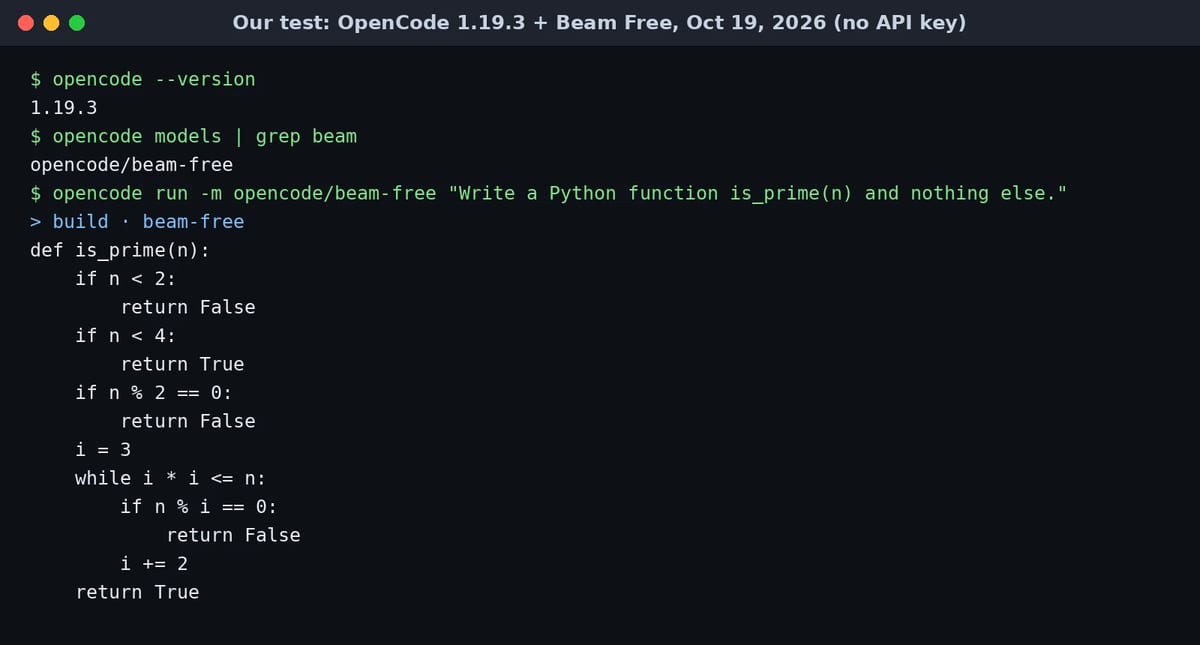
- Install OpenCode:
curl -fsSL https://opencode.ai/install | bashornpm install -g opencode-ai. - Open your project:
cdinto the repo and runopencode. - Pick the model: type
/modelsand choose Beam Free, or run a one-off task from the terminal:
opencode run -m opencode/beam-free "Explain what this repo does and list the riskiest files"Three catches before you point it at real code. OpenCode says Beam Free’s provider doesn’t train on your data but keeps it for 30 days for safety reasons, so it isn’t zero-retention. It’s not available in some countries, including China (with Hong Kong and Macau), Russia, Iran and Nigeria. And it only works inside the OpenCode app: when we called the same endpoint with curl, it returned FreeTierError: OpenCode's free tier can only be used from within OpenCode.
Option 2: Ollama Cloud (free for a limited time)
Ollama was a day-zero partner, and its launch post says Beam is free on Ollama Cloud for a limited time, with full zero data retention on its endpoint. That ZDR detail makes it the better free option for private code. You need the Ollama app and an Ollama account (run ollama signin), then:
ollama run beam:cloud
# or plug it into a coding agent
ollama launch claude --model beam:cloud
ollama launch opencode --model beam:cloud
ollama launch codex --model beam:cloud
Be clear on what this is: Ollama’s Beam library page has a single beam:cloud tag. The model runs on Ollama’s servers, not your machine, so there’s nothing to download and your hardware doesn’t matter. Ollama hasn’t listed a local Beam tag yet.
Hardware requirements for a real local run
Beam only computes with 23.4B parameters per token, but all 256 experts have to sit in memory. As Hugging Face’s Beam guide puts it, you need the memory of a 501B model and get roughly the speed of a 23B one. The rule: your RAM plus VRAM (or Mac unified memory) must exceed the file size, with headroom for context. Here are the real file sizes on Hugging Face:
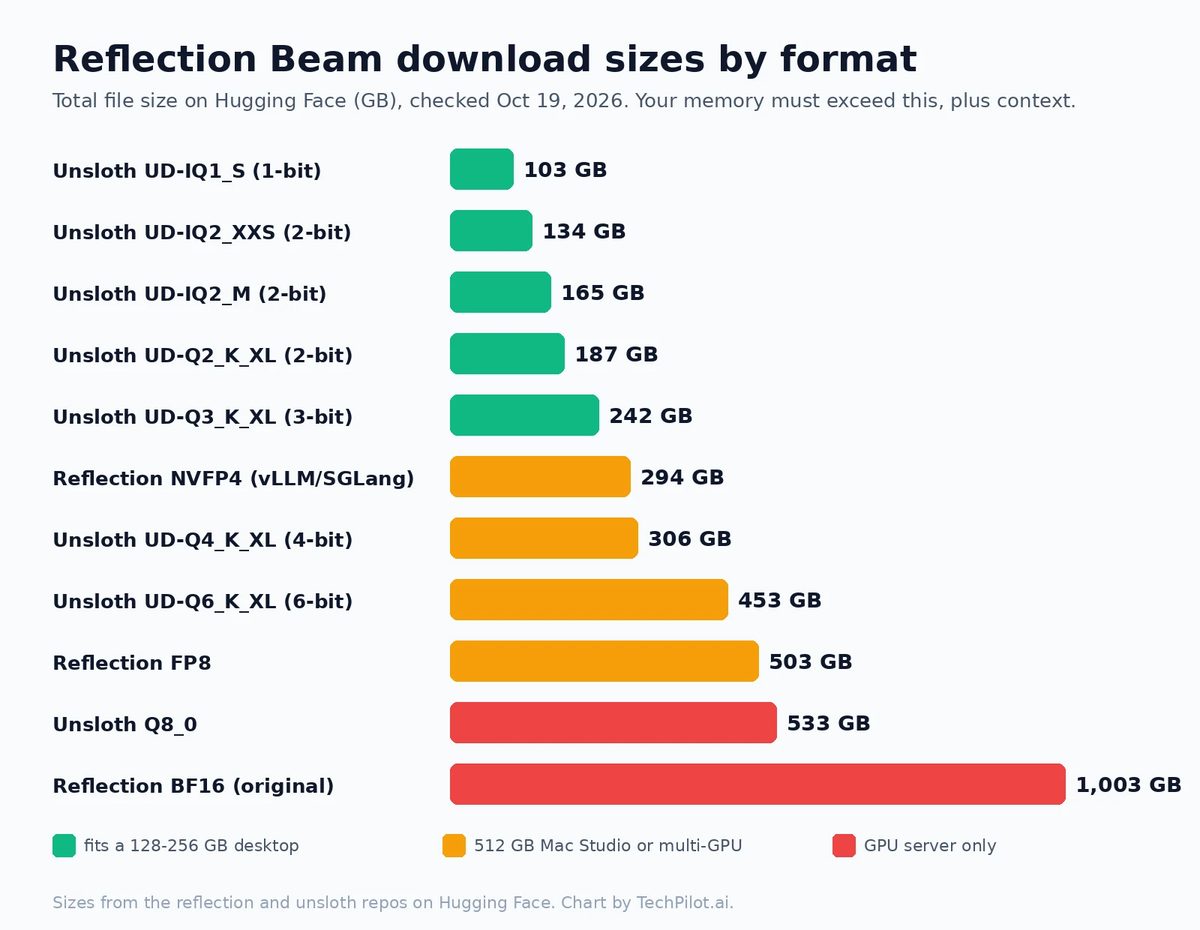
| Your machine | Largest build that fits | What to expect |
|---|---|---|
| 128 GB RAM + 24 GB GPU | UD-IQ1_S (103 GB) | Runs, but 1-bit loses the most quality. Fine for testing, weak for serious coding. |
| 192 GB RAM + GPU | UD-IQ2_XXS (134 GB) or UD-IQ2_M (165 GB) | The first tier we’d use for real tasks. Still slow on desktop RAM. |
| 256 GB RAM + GPU | UD-Q2_K_XL (187 GB) or UD-IQ3_XXS (197 GB) | UD-Q3_K_XL (242 GB) is tight once you add context. |
| Mac Studio with 512 GB | UD-Q4_K_XL (306.5 GB) up to UD-Q6_K_XL (453 GB) | The most comfortable desk setup. Real Beam weights have only been tested on CUDA so far (see below). |
| 4x B200/B300 or 8x H100 | Reflection NVFP4 (294 GB) | The official serving route with vLLM or SGLang. 8x H200 for FP8 (503 GB). |
The machine tiers are our math from the file sizes, not vendor guarantees. On speed, nobody has published measured local numbers yet, but you can estimate a ceiling: each token reads about 23.4/501.3 of the file. For the 306.5 GB 4-bit build that’s about 14.3 GB per token, so dual-channel DDR5-5600 RAM (about 90 GB/s) tops out near 6 tokens per second, and real speed lands below that. Faster memory raises the ceiling proportionally, which is why big Macs and GPU servers feel so different.
Option 3: llama.cpp with a GGUF
Support for Beam’s architecture was merged into llama.cpp on October 16 (UTC) and shipped in build b11701, which was still marked pre-release when we checked. Use b11701 or newer; older builds won’t recognize the model. Download a prebuilt release for your OS (CUDA, Vulkan, Metal or CPU), then serve straight from Unsloth’s repo:
llama-server -hf unsloth/Beam-1.0-501B-A23B-GGUF:UD-IQ2_XXS \
  --jinja --temp 0.7 --top-p 0.99 \
  --repeat-penalty 1.0 --presence-penalty 0 --frequency-penalty 0 --dry-multiplier 0 \
  --cpu-moe -ngl 99 -c 32768 --port 8080
What the flags do: --jinja applies Beam’s modified Harmony chat template, which tool calls depend on. The sampling values match the temperature 0.7 and top-p 0.99 Reflection used for its benchmarks, and the penalty flags come straight from Unsloth’s advice in its model discussion. --cpu-moe keeps the experts in system RAM and puts the shared layers on the GPU, which is how a desktop with one GPU runs a model this size. -c 32768 keeps the context small. Raise it only if you have memory to spare.
To download first and run later, fetch only the folder you need. The full repo is several terabytes:
pip install -U "huggingface_hub[cli]"
hf download unsloth/Beam-1.0-501B-A23B-GGUF --include "UD-IQ2_XXS/*" --local-dir beam-gguf
On a Mac, use the Metal build of llama.cpp with a 512 GB Mac Studio and the UD-Q4_K_XL folder. The llama.cpp change passed architecture tests on CPU, CUDA and Metal with a small test checkpoint, but its author ran the real 501B weights on CUDA only. So a Mac run should work, but it’s the least-proven route. There’s no MLX build of Beam on Hugging Face yet.
Option 4: vLLM or SGLang on a GPU server
This is the route Reflection documents for production. The vLLM recipe lists the minimum GPU memory (weights plus 20% headroom) for each checkpoint:
| Checkpoint | On disk | Min. GPU memory | Recommended hardware |
|---|---|---|---|
| NVFP4 (default) | 294 GB | 353 GB | 4x B200/B300, one GB200/GB300 tray, or 8x H100 (Marlin) |
| FP8 | 503 GB | 604 GB | 8x H200 |
| BF16 | 1,003 GB | 1,204 GB | 8x B200/B300 |
Beam support isn’t in a regular vLLM release yet, so you use a dedicated Docker image. NVIDIA GPUs only, because Beam’s kernels are CUDA-only:
docker pull vllm/vllm-openai:reflection-beam
vllm serve reflection/Beam-1.0-501B-A23B-NVFP4 \
  --tensor-parallel-size 4 \
  --kv-cache-dtype fp8 \
  --enable-auto-tool-choice \
  --tool-call-parser beam \
  --reasoning-parser beam
On Hopper GPUs, run the same checkpoint with --tensor-parallel-size 8 --moe-backend marlin. Expect the first start to take about 10 minutes while FlashInfer tunes its kernels, and set VLLM_ENGINE_READY_TIMEOUT_S=3600 so vLLM doesn’t give up first. SGLang ships its own lmsysorg/sglang:beam image. Its NVFP4 recipe needs B300 or GB300, and it also has recipes for H200. Reflection’s weights repos weren’t gated when we checked, so no access request is needed.
Recommended settings
- Sampling: temperature 0.7, top-p 0.99, the values behind Reflection’s published benchmarks. Turn off repetition, presence and frequency penalties and DRY.
- Reasoning effort: Beam always reasons. Through vLLM, it defaults to the maximum effort unless the request sets
reasoning_effort. Set"reasoning_effort": "low"for quick replies, which matters a lot on slow local hardware. - Context: 1M tokens is the model limit, not a local target. Every extra token of KV cache costs memory, so start at 32K.
Common errors and fixes
- “unknown model architecture” in llama.cpp: your build predates b11701. Update llama.cpp, or any app that bundles it, such as LM Studio or Ollama, once they ship the newer engine.
- Reply stuck in the thinking block, or raw tags like
<|channel|>in the output: repetition-style samplers push the model away from the special tags it repeats every turn. Use--jinjaand turn off all penalties and DRY. One user still saw it in Open WebUI with those settings, and it’s open as llama.cpp issue #30735. - FreeTierError when calling beam-free from your own script: OpenCode’s free tier only works inside OpenCode. Use Ollama Cloud, OpenRouter or Reflection’s API for scripts.
- “ollama run beam” doesn’t download anything: it’s the cloud tag. For a local run, use llama.cpp with a GGUF.
- vLLM times out on first start: raise
VLLM_ENGINE_READY_TIMEOUT_S. Kernel autotuning takes about 10 minutes. - Out of memory or a few words per minute: the file plus context doesn’t fit, so it’s spilling to disk. Drop one quant size or cut
-c.
Is running it locally worth it?
For most people, not yet. The free OpenCode and Ollama Cloud windows cost nothing, and when they end, hosted Beam is cheap: on OpenRouter on October 19, providers ranged from $0.25 per million input tokens and $1.00 output (Nebius, FP8) to $1.30 and $4.30 (Baseten). Reflection’s own platform is in a free-to-start public beta and hasn’t published API prices. Local makes sense when code can’t leave your network, when you want to fine-tune (Apache 2.0 allows it), or when you already own a 512 GB Mac or a GPU node.
For specs, benchmarks and pricing in one place, see our Reflection Beam tool page. If your hardware is closer to a normal PC, our list of the best local AI models covers models that run on a single GPU. For another huge open model with a similar local story, see our guide to running Muse Spark Open locally.
Frequently asked questions
Can I run Reflection Beam on my PC?
Only with a lot of memory. The smallest GGUF, Unsloth’s 1-bit UD-IQ1_S, is 103 GB, so you need roughly 128 GB of RAM plus a 24 GB GPU. A 4-bit build (306.5 GB) needs a 512 GB Mac Studio or a workstation with about 384 GB or more.
Is Reflection Beam free?
The weights are free under Apache 2.0. Hosted use is free for a limited time in OpenCode (beam-free) and on Ollama Cloud (beam:cloud). Neither has published an end date. After that, OpenRouter providers charged from $0.25 per million input tokens on October 19.
Does ollama run beam run the model locally?
No. Ollama’s Beam page only has a beam:cloud tag, so ollama run beam:cloud sends your prompts to Ollama’s servers. It needs an Ollama account but no local hardware. For a true local run, use llama.cpp b11701 or newer with a GGUF.
How much VRAM does Reflection Beam need?
For Reflection’s NVFP4 checkpoint, vLLM lists 353 GB of total GPU memory, for example 4 B200 or B300 GPUs or 8 H100s. FP8 needs 604 GB (8 H200s) and BF16 needs 1,204 GB. With llama.cpp you can keep experts in system RAM instead.
Can I use Beam free in OpenCode without an API key?
Yes. In our October 19 test, OpenCode 1.19.3 ran opencode/beam-free with no account and no key. It only works inside the OpenCode app, data is kept for 30 days, and it isn’t available in some countries.
Does Reflection Beam work on a Mac?
Through llama.cpp’s Metal build, yes in principle. A 512 GB Mac Studio fits the 4-bit UD-Q4_K_XL GGUF. llama.cpp’s Beam support passed Metal tests on a small checkpoint, but the full weights were only tested on NVIDIA CUDA. There’s no MLX build yet.
Found this useful? Share it with someone comparing AI tools.