I’ve spent a great deal of time exploring Suno, testing its limits to see if this ai music generator is a true creative partner or just a novelty. My goal was to assess its practical value for different users, from a marketer needing a quick jingle to a musician battling writer’s block.
AI Agents · Tool review
Suno AI Free Plan, Pricing & Credits (2026)
 TechPilot.ai review team Hands-on testing, one published method
- Last updated
- How we test
The AI news that actually mattered this week.
One short email every Friday: the biggest AI stories, what they mean for you, and the tools worth trying. A 3-minute read, no hype.
Free. Unsubscribe anytime.
You're in. Watch for the brief on Friday. Free. Unsubscribe anytime.
Summary
Pros and cons
What we like
- Highly Intuitive Interface The platform is exceptionally user-friendly. You can go from a simple text idea to a full song in under a minute with almost no learning curve.
- High-Quality Vocal Generation Suno's ability to produce realistic and emotive human-like vocals is a standout feature that sets it apart from many instrumental-focused AI music tools.
- Wide Genre Versatility From pop and rock to orchestral and electronic, the AI demonstrates a notable ability to generate convincing music across a vast spectrum of styles.
- Generous Free Plan The availability of Suno as an ai song generator free of charge, with 50 daily credits and the v6-mini model, allows for plenty of experimentation without commitment.
- Commercial Rights on Paid Plans Paid plans are affordable and grant users ownership and commercial rights to their creations, making Suno a viable tool for professional projects.
- Rapid Idea Prototyping For professional musicians, Suno is an excellent tool for quickly generating and testing new musical or lyrical ideas before committing to full production.
What could be better
- Potential for Generic Output While impressive, the generated songs can sometimes lack a truly unique or memorable hook, occasionally sounding like polished but standard stock music.
- Limited Fine-Tuning Control The editing capabilities are basic. Users cannot easily tweak individual notes, change instrumentation, or make precise mixing adjustments within the platform.
- Inconsistent Results The AI can sometimes misinterpret prompts or produce results that don't fully align with the user's vision, requiring multiple generations to get it right.
- Download Caps and Licensing Terms Free users can’t download songs each month and paid plans cap downloads (20 on Pro, 60 on Premier). v6 was built with Warner Music Group, BMG and Believe, but commercial users should still check Suno’s terms on commercial use.
Key features
- Text-to-Music Generation: The core function that turns descriptive text prompts into complete songs with vocals and instruments.
- Instrumental Mode: Allows users to create music without vocals, ideal for background tracks or scores.
- Custom Mode: Provides more control by allowing users to input their own lyrics, specify a genre, and set a title.
- Song Structure Control: Users can define the structure of their song (e.g., [Verse], [Chorus]) within the lyrics to guide the AI’s composition.
- Continue From This Song: This feature lets you extend a track you like, generating a new segment that builds upon the existing audio.
- Diverse Genre Library: An extensive internal library of styles the AI can replicate, from mainstream genres to niche ones.
- Remixing: Users can remix existing songs to create new variations with different styles or moods.
- Public Feed: A community stream showcasing popular creations, providing inspiration and demonstrating the tool’s capabilities.
- Stem Separation: A Pro feature that enables the export of individual instrumental and vocal tracks for use in external Digital Audio Workstations (DAWs).
- v6 Model Family: Three models (v6, v6-wild and v6-mini) with songs up to 8 minutes per generation; v6 and v6-wild are on paid plans.
- Plain-Language Editing: Change one section, swap a single lyric or build a mashup from several songs by describing the change.
- Speech (beta): Generates a spoken voice and an original soundtrack together in one track, from a prompt, poem or script.
- Suno Studio: A browser-based DAW with MIDI, effects, automation, time-stretching and plugins, included with Premier.
- Voices and Custom Models: Sing on your own creations and train a custom model on your own tracks (Pro and Premier).
Screenshots
Full review
Independent and reader-supported. Some links may earn us a commission; it never changes our scores. Editorial policy
Suno AI free plan gives you 50 credits a day, about 10 songs, on the v6-mini model, but no downloads or commercial rights. Pro is $10 a month or $8 yearly.
Suno is an AI music generator that creates complete songs from simple text prompts. This tool produces original music, including vocals and instrumentation, across a wide variety of genres. Suno was developed by a team of former Kensho AI experts—Mikey Shulman, Georg Kucsko, Martin Camacho, and Keenan Freyberg—and launched to the public in December 2023.
Suno is designed for a broad audience, from amateur music enthusiasts to professional artists, content creators, and marketers. Its primary purpose is to make music creation accessible to everyone. It removes traditional barriers like the need for musical training, expensive equipment, or studio access. This AI music generator alters conventional music production by enabling anyone to generate a unique song in minutes, turning creative ideas into audible reality with great speed and ease.
What’s new in Suno (Oct 2026)
Updated October 11, 2026. Suno has changed a lot since we first reviewed it. On September 9 it launched v6, a family of three music models built with Warner Music Group, BMG and Believe: v6 (the flagship), v6-wild (looser, more experimental results) and v6-mini (faster, and the only one on the free plan). All three generate up to 8 minutes per song. v6 also lets you edit a song in plain language, so you can change one section or a single lyric and keep the rest, build a mashup from several of your tracks, or start from an image, voice memo or video. Suno says it will retire its older models as v6 rolls out.
Speech (beta), October 1. Suno’s first non-music model generates a spoken voice and an original soundtrack together in one track: type a story, poem, pep talk or script, describe the voice and the music, and Suno returns a narrated piece with a score under it. It is open to everyone on web and mobile, and Suno openly says it is still a beta (accents and pauses can drift). Since then Suno has added Albums (Oct 5), so you can publish a body of work and notify followers, and an Oct 8 Studio update with better downbeat detection, shift-drag time-stretching and curved fades.
What it means for you: Suno is no longer just a “type a prompt, get a song” toy. The best models (v6 and v6-wild), commercial rights and downloads all sit behind a paid plan, while the free tier is now best for trying ideas with v6-mini.
Is Suno free?
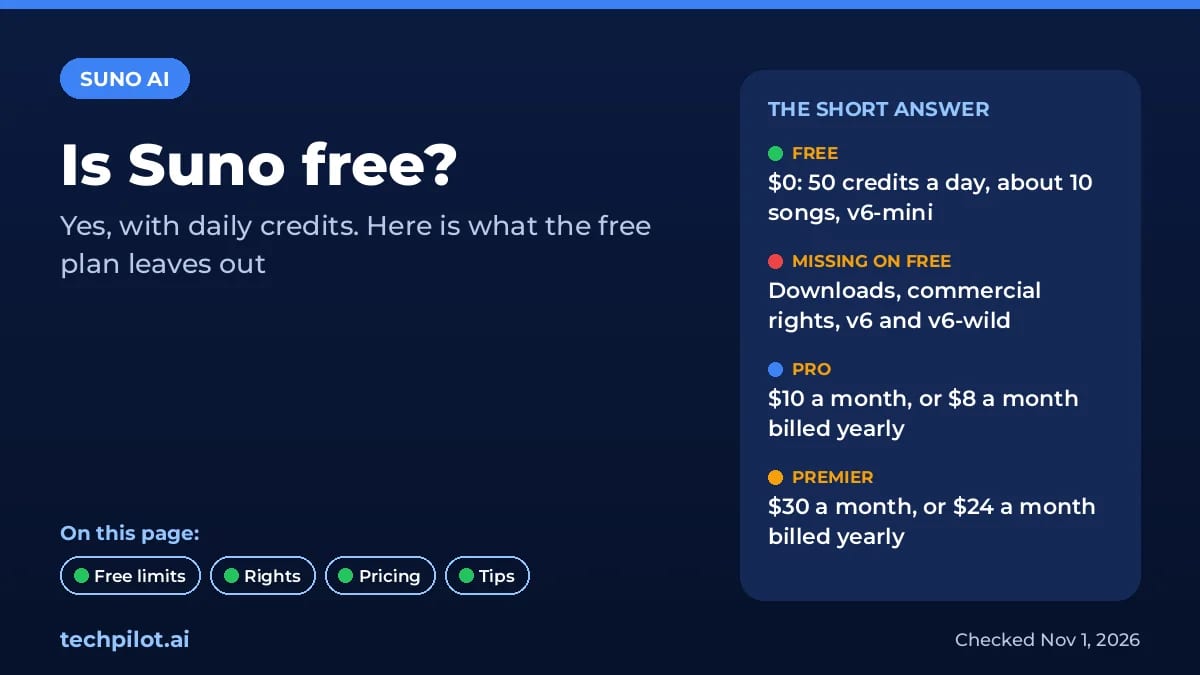
Yes, Suno AI is free to use, and you don’t need a card. The Free plan gives you 50 credits that refill once a day, on UTC time. Each generation costs 10 credits and returns two songs, so 50 credits works out to about 10 songs a day. We checked Suno’s pricing page and help center on November 1, 2026.
Here’s what the free plan includes and what it leaves out:
- Included: the v6-mini model, standard features, audio uploads up to 8 minutes, and a shared queue with up to 4 songs generating at once.
- Not included: the better v6 and v6-wild models, monthly song downloads, commercial rights, add-on credit purchases and stem separation.
- Personal use only: Suno says free-plan songs are for personal, non-commercial use. You can publish them to your Suno page and share the link, but you can’t monetize them.
When the free plan is enough
It’s fine for trying prompts, writing birthday songs, testing lyrics or sketching ideas you’ll finish elsewhere. It’s not enough if you want to post music on YouTube or Spotify, use a track in an ad, or download songs to edit in another app. For that you need Pro or Premier, which add commercial rights and downloads.
How to get the most out of Suno free
- Plan your 10 songs: write and refine lyrics before you generate, so you don’t spend credits on drafts.
- Use the daily reset: unused free credits don’t carry over, so use them each day.
- Check paid-plan credits: if you’re on Pro or Premier and run out of monthly credits, you drop back to the 50-a-day free allowance until your plan renews.
Looking for other free options? Our guide to free AI singing voice generators and our AI music generator comparison cover alternatives.
Best Use Cases for Suno
- Content Creators & YouTubers: For creators who need unique, royalty-free background music for their videos, podcasts, or social media content. Suno addresses the problem of finding affordable, high-quality audio tracks while avoiding copyright strikes. For example, a travel vlogger can generate an upbeat, tropical-themed track for a montage, or a podcast host can create a custom intro jingle. The key benefit is on-demand access to a nearly infinite library of custom music.
- Musicians & Songwriters: For artists looking to overcome creative blocks or quickly prototype new ideas. A songwriter can use this AI music generator to experiment with different genres for a set of lyrics or generate instrumental tracks to serve as inspiration for a new composition. Suno acts as a creative partner, offering endless melodic and harmonic starting points, which significantly speeds up the initial stages of songwriting.
- Marketers & Advertisers: For marketing teams that require original music for advertising campaigns, promotional videos, or brand content. Instead of licensing expensive stock music, a marketing manager can use Suno to create a song that perfectly matches the mood and message of a campaign. This allows for highly tailored audio branding and the ability to produce multiple variations for testing ad performance.
- Indie Game Developers: For developers working on a limited budget who need an original soundtrack for their games. The tool can generate ambient background music, character themes, or intense action scores that fit the game’s atmosphere. This provides a cost-effective method for creating an immersive audio experience without hiring a composer.
Suno Pricing (2026)
Suno’s plans as listed on suno.com/pricing on November 1, 2026 (USD, before tax). Prices are unchanged since our October check. Annual billing saves 20%:
- Free: $0. 50 credits a day (about 10 songs), the v6-mini model, a shared queue and audio uploads up to 8 minutes. No commercial rights, no monthly song downloads, no add-on credits and no stem separation.
- Pro: $10/month, or $8/month billed yearly. 2,500 credits a month, v6 and v6-wild, 20 song downloads a month, commercial use rights, 2 stem separation types, your own voice, custom models and a priority queue (up to 10 songs at once).
- Premier: $30/month, or $24/month billed yearly. 10,000 credits a month, 60 song downloads a month, Suno Studio (MIDI, effects, automation and design-your-own plugins), 3 stem separation types, uploads up to 30 minutes and adding vocals or instrumentals to existing songs.
- Extras: paid plans can buy more credits and downloads. Plan credits don’t roll over; purchased top-up credits don’t expire but need an active subscription.
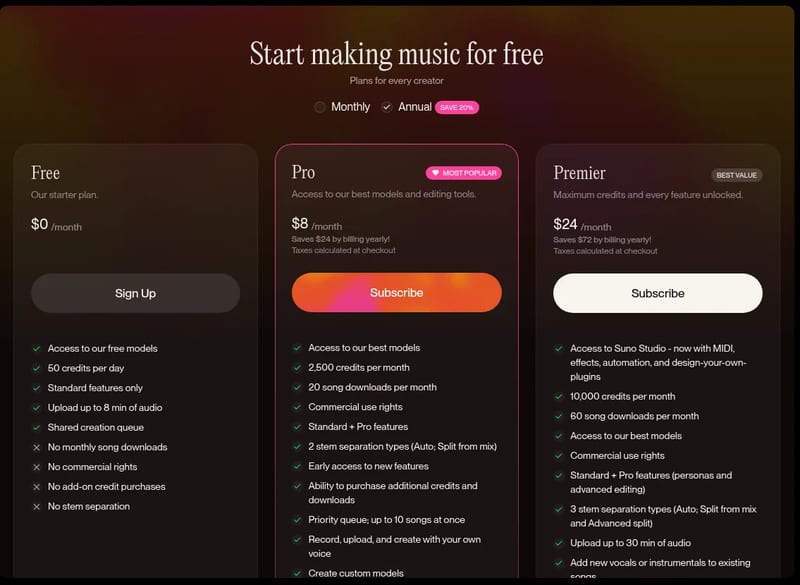
The headline price is unchanged from our original review, but what you get has shifted: downloads are now capped per month, and only paid plans get the v6 and v6-wild models.
TechPilot.ai’s Verdict on Suno
I’ve spent a great deal of time exploring Suno, testing its limits to see if this ai music generator is a true creative partner or just a novelty. My goal was to assess its practical value for different users, from a marketer needing a quick jingle to a musician battling writer’s block.
First, I tested its core text-to-song functionality with a simple prompt: “A soulful acoustic pop song about a rainy day in a coffee shop, with female vocals.” In less than a minute, the tool produced two distinct clips. The first was impressively coherent. The vocals were warm, the acoustic guitar was well-rendered, and the lyrics, while simple, captured the requested vibe perfectly. It wasn’t a chart-topper, but as a piece of background music for a video, it was more than effective. The speed from idea to execution is genuinely significant.
Next, I pushed the ai song generator further using Custom Mode. I input the lyrics to a well-known public domain poem and prompted a “cinematic orchestral” style. Here, the results were more mixed. The AI did a good job of setting the words to a sweeping score, but the vocal phrasing felt unnatural at times. This test highlighted a key limitation: while Suno is a master of creating standard pop structures, it is less adept at handling unconventional lyrical or rhythmic inputs.
From a value perspective, the pricing is highly competitive. For those looking for an ai song generator free to start, the introductory tier is incredibly generous. The Pro plan, at $10 a month ($8 billed yearly), is still a bargain for content creators and professionals: it includes commercial rights, 2,500 credits and the v6 models. Just note the new cap of 20 song downloads a month (60 on Premier). This pricing model puts powerful music creation tools within reach of almost any budget. The learning curve is practically non-existent; if you can type a sentence, you can make a song with Suno.
Top Alternatives to Suno
-
Udio: Udio is Suno’s most direct competitor, also excelling at creating full songs with high-quality vocals from text prompts. While both platforms are very similar, some users find Udio can produce slightly more polished outputs, though it may require more prompt refinement. Udio’s pricing is comparable to Suno’s, making it a great alternative for those who want to compare the nuances of AI vocal and musical generation.
-
Boomy: Boomy is another ai music generator that focuses on simplicity and distribution. Its core differentiator is the ability to easily publish your creations to major streaming platforms. Compared to Suno, Boomy’s output is often simpler and more loop-based. Boomy is a better choice for beginners whose primary goal is to quickly create and share their music online without needing much customization.
-
Aiva: Aiva specializes in generating instrumental and classical music. It offers more control over musical elements like harmony and orchestration than Suno but lacks vocal generation entirely. Aiva is not a direct alternative for creating pop songs but is a superior choice for filmmakers, game developers, or composers who need high-quality instrumental music.
Final Verdict
In summary, Suno is a remarkable and immensely fun tool that lowers the barrier to music creation to almost zero. It is an indispensable resource for content creators and marketers. For serious musicians, it’s a powerful brainstorming partner, though it won’t be replacing human artistry for nuanced compositions. This platform is an excellent ai music generator for rapid idea generation and royalty-free content.
Suno FAQ
Is Suno free?
Yes. The Free plan gives 50 credits a day, enough for about 10 songs, on the v6-mini model. It has no downloads, no commercial rights and no access to v6 or v6-wild.
•
How much does Suno cost?
Pro is $10 a month, or $8 a month billed yearly, with 2,500 credits. Premier is $30 a month, or $24 a month billed yearly, with 10,000 credits and Suno Studio.
•
Can I use free Suno songs commercially?
No. Songs made on the Free plan are for personal, non-commercial use. You can share them with a Suno link but can’t monetize them.
•
How many credits does a Suno song cost?
Each generation costs 10 credits and makes two songs. Adding many images or videos to a prompt can raise the cost.
•
When do Suno free credits reset?
Once a day, based on UTC time. Unused free credits don’t roll over.
Simular AI
AI Agents
Simular’s Sai is one of the most capable computer-use agents you can try for free, and the research behind it is unusually open.
Kimi K3.1 Pro
AI Agents
Kimi K3.1 Pro gives you a 1M-token frontier model at $2 in and $10 out per 1M tokens, a third less than Kimi K3, with limited free use in…

Tile.dev
AI Agents
I’ve closely examined Tile.dev’s capabilities based on its official documentation, user case studies, and the broader market landscape of…
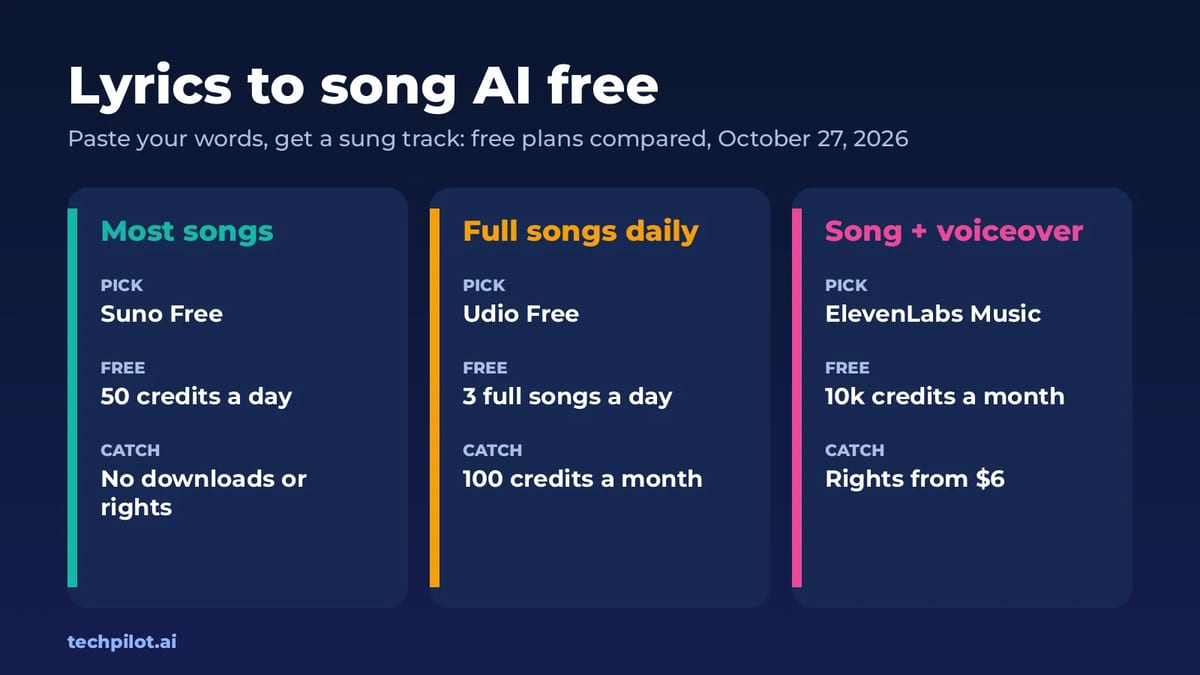
Audio / Voice  Eimantas Kazėnas · 6 min read
Lyrics to Song AI Free: 4 Best Tools (2026)
Lyrics to song AI free tools turn your words into a sung track in minutes. We compare Suno, Udio, ElevenLabs Music and Producer.ai free plans and…
Eimantas Kazėnas · 6 min read
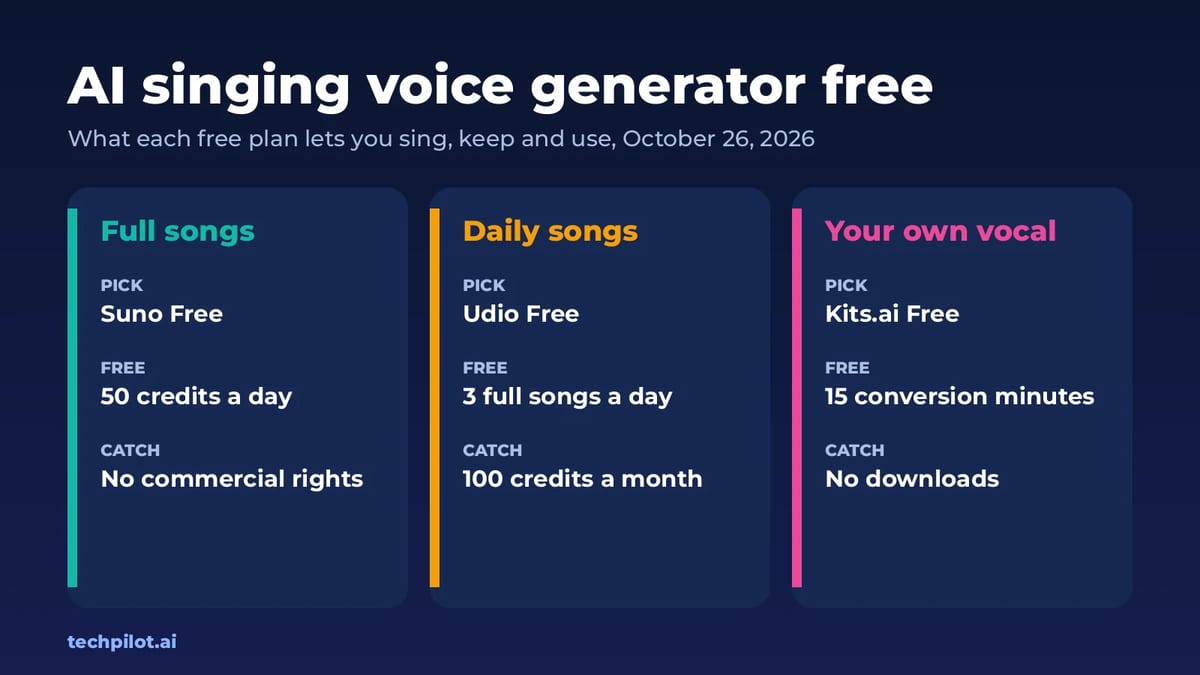
Audio / Voice  Mihai (Mike) Bizz · 6 min read
AI Singing Voice Generator Free: 5 Picks
AI singing voice generator free picks for 2026: Suno, Udio, ElevenLabs Music and Kits.ai. See their daily limits, download rules and commercial…
Mihai (Mike) Bizz · 6 min read