Home / Guides / Graphics & Design
AI Image Merge Online Free: 6 Best Tools
 Eimantas Kazėnas Marketing & Tech
- Published
- 6 min read
On this page First decide: layout merge or AI blend?
Independent and reader-supported. Some links may earn us a commission; it never changes our rankings. Editorial policy
AI image merge online free: Gemini blends photos at no cost, AIMerger makes unlimited collages, and 4 more tools compared on free limits and watermarks.
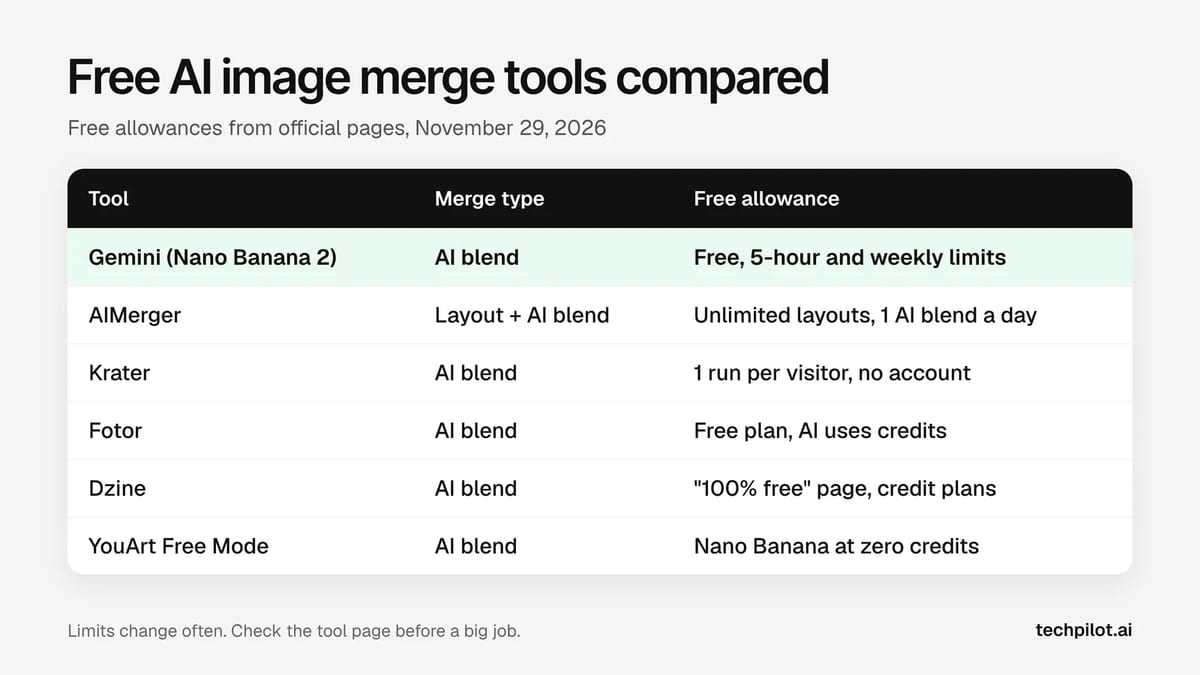
Quick answer: If you want two photos blended into one believable new picture, use Nano Banana 2 in the Gemini app, which Google lists as free and able to combine photos. If you only need pictures side by side, stacked or in a grid, use AIMerger’s layout merger, which is unlimited, has no watermark and runs in your browser without uploading anything. For a one-off test with no account, Krater gives every visitor one free two-image merge. All limits below were checked on each tool’s official page on November 29, 2026.
First decide: layout merge or AI blend?
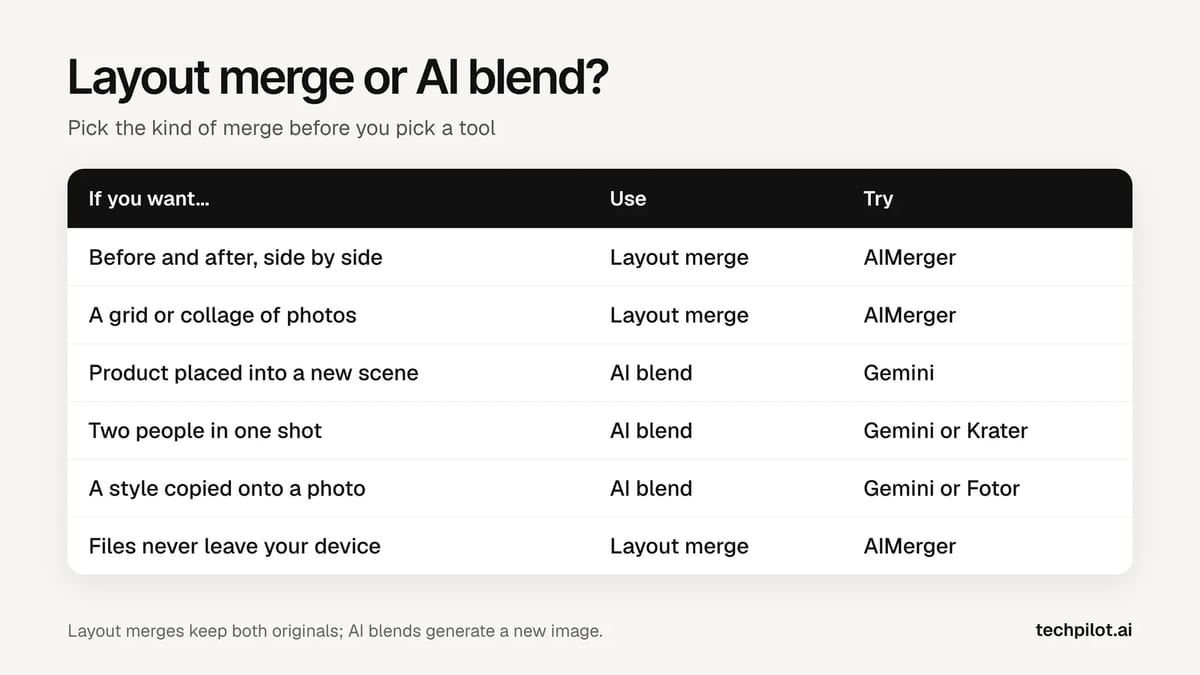
“Merge” means two different jobs, and picking the wrong kind of tool is the most common reason people get a bad result or hit a paywall.
- Layout merge (collage): both original images stay intact and are placed next to each other, stacked or in a grid. Nothing is invented, so it is right for before-and-after shots, product comparisons and side-by-side screenshots. This needs no AI at all, which is why it can be free and unlimited.
- AI blend (composite): a model reads both images and generates one new photo, for example a product from image A placed on the table in image B, or a style from one picture applied to another. This costs real compute, so free tiers are capped by runs, credits or time windows.
The 6 best free AI image merge tools
| Tool | Merge type | Free allowance | Account needed | Best for |
|---|---|---|---|---|
| Gemini (Nano Banana 2) | AI blend | Free, within usage limits that refresh every 5 hours up to a weekly cap | Google account | Most people |
| AIMerger | Layout and AI blend | Unlimited layouts of 2 to 8 images; 1 AI blend a day at 1K | No | Collages and comparisons |
| Krater | AI blend | 1 free two-image run per visitor (Flux 2) | No | A quick test |
| Fotor | AI blend | Free Basic plan; AI features use credits | Yes | Up to 4 photos with presets |
| Dzine | AI blend | Tool page says 100% free; site sells credit plans | Yes | Style options |
| YouArt Free Mode | AI blend | Nano Banana and Nano Banana Pro at zero credits | Yes | Creators who also make video |
1. Gemini with Nano Banana 2: best free AI blend
Google’s image generation page lists Nano Banana 2 as free and names “Combine photos: seamlessly blend multiple images” as one of its abilities. Upload two or more images in the Gemini app, then describe what goes where. Free use falls under Gemini’s standard limits, which Google says refresh every 5 hours until you reach a weekly limit; paid Google AI plans add Nano Banana 2.1 and higher limits. It is the strongest free option for realistic composites, and our Nano Banana review covers what the model does well.
2. AIMerger: best for free collages and side-by-side merges
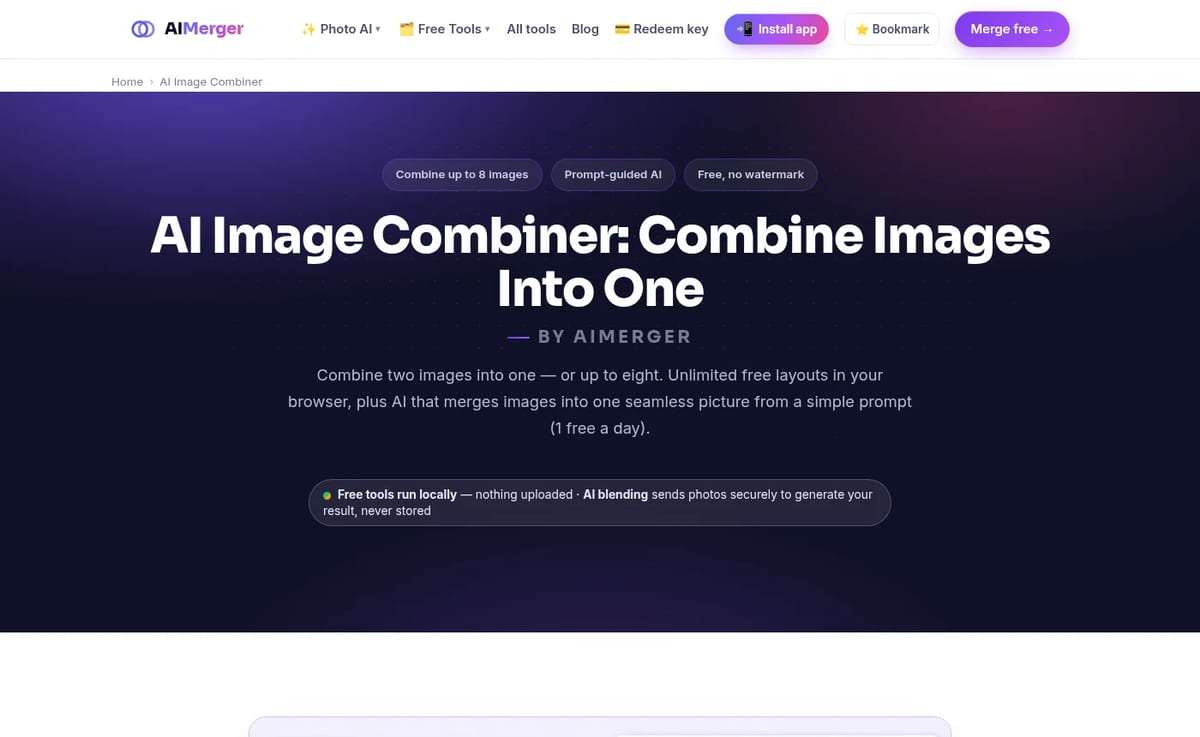
AIMerger does both kinds of merge on one page. The layout merger joins 2 to 8 photos side by side, stacked or in a grid, and AIMerger says it is unlimited, free forever, watermark-free and processed locally, so the photos never leave your browser. Its AI blend creates one new picture from a prompt, with 1 free blend a day at 1K resolution and paid packs from $4.99 for 2K and 4K output. If you only need a comparison image, this is the fastest and most private choice on the list.
3. Krater: best one-off test with no sign-up
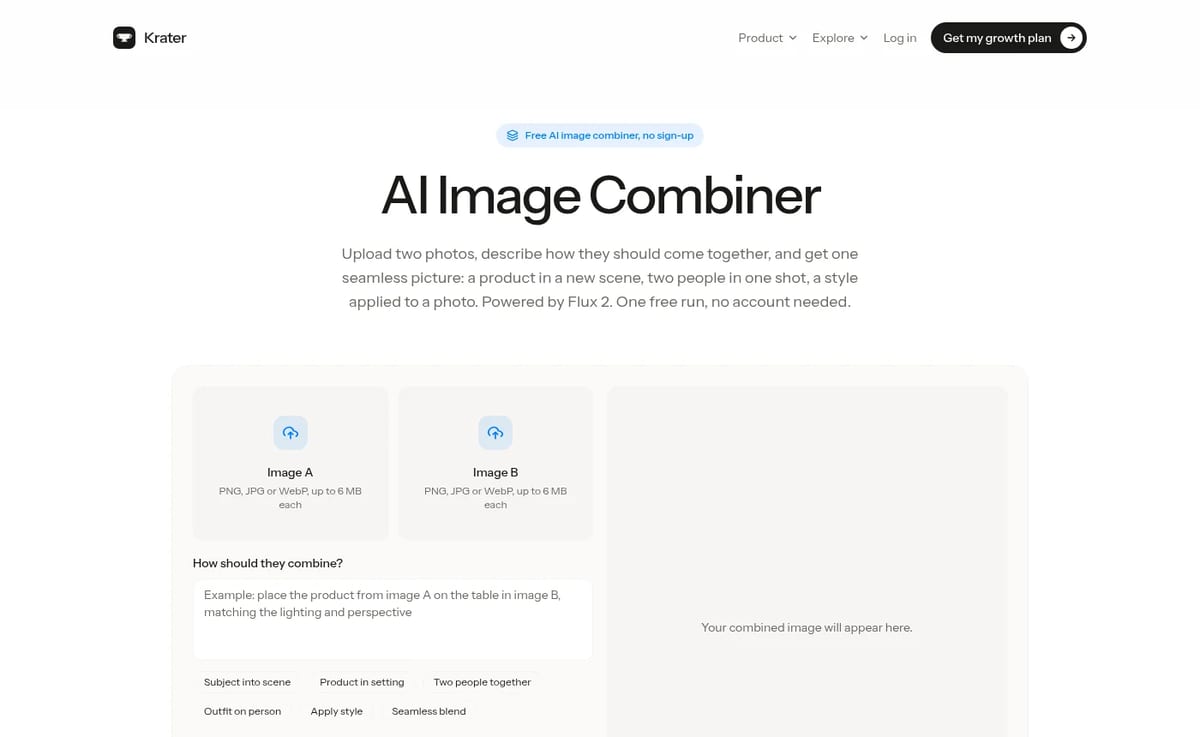
Krater’s image combiner takes exactly two images (PNG, JPG or WebP, up to 6 MB each), a one-line instruction and one of five aspect ratios (1:1, 4:3, 3:4, 16:9 or 9:16), then merges them with Flux 2. You get one free run per visitor with no account. The page is a clean way to see whether AI blending works for your photos before you commit to anything; more runs, more reference images and other models need a Krater account.
4. Fotor: best for merging up to 4 photos
Fotor’s AI image combiner accepts up to 4 photos plus a prompt or a preset template, and Fotor says outputs go up to 2K without intrusive logos and include commercial-use rights. Fotor has a free Basic plan, but its paid plans are built on monthly AI credits starting at 300 a month, so expect to run into credit limits if you merge a lot.
5. Dzine: generous claims, read the fine print
Dzine’s combiner page promises 100% free use, unlimited merges, no watermarks and 4K output, with models such as Nano Banana Pro and Seedream to choose from. Its own pricing page, though, sells credit plans starting at $8.99 a month for 1,000 credits. Treat “unlimited” as marketing until you see your credit balance after a few runs.
6. YouArt Free Mode: best if you also make video
YouArt is an AI image and video studio, and its Free Mode runs Nano Banana and Nano Banana Pro at zero credits, so you can upload two images and blend them without spending anything. The reason to choose it over Gemini is what comes next: the same workspace can turn the merged image into a video with credit-based models.
How to write a merge prompt that works
Most failed blends come from vague prompts. Name each image’s role, say what must not change, and describe the light. This template works in Gemini, Krater, Fotor and YouArt:
- Role: “Image 1 is the subject. Image 2 is the background.”
- Action: “Place the mug from image 1 on the wooden table in image 2, slightly left of center.”
- Keep: “Keep the logo, colors and shape of the mug exactly the same.”
- Match: “Match the warm window light and add a soft shadow under the mug.”
If the result changes your product or face, repeat the “keep” line and ask for a smaller edit rather than starting over. For more wording ideas, see our ChatGPT photo editing prompts, which mostly carry over to other image models.
Privacy and rights: what to check before you upload
A layout merge in AIMerger never uploads your files, but every AI blend sends your photos to a server to generate the result, so avoid uploading IDs, documents or private photos. Only merge photos of people who have agreed to it, and do not use blends to make someone appear somewhere they were not. If the image is for a client or an ad, use a tool whose page states commercial-use rights, such as Fotor, and keep your source files.
Which free tool should you use?
For one realistic composite, start with Gemini. For collages, comparisons and anything you would rather keep on your own device, use AIMerger’s layout merger. Use Krater for a single no-account test, and move to Fotor, Dzine or YouArt only if you need their presets or a path to video. If you want to generate new images rather than merge existing ones, our guide to the best free AI image generators is the better starting point.
Frequently asked questions
How can I merge two images with AI for free?
Upload both images to the Gemini app and describe how to combine them; Google lists Nano Banana 2 as free with a combine-photos ability. Krater also gives one free two-image merge with no account.
Which image merger has no watermark?
AIMerger’s layout merger is unlimited and watermark-free, and its daily free AI blend has no watermark either. Fotor says its merged images have no intrusive logos.
Can I merge photos without uploading them?
Yes, for layout merges. AIMerger’s side-by-side, stacked and grid merges run locally in your browser. AI blends always need to upload images to generate the result.
How many images can I merge at once?
AIMerger’s layout merger takes 2 to 8 images, Fotor’s AI combiner takes up to 4, and Krater’s free combiner takes exactly 2.
Why does the AI change my face or product when merging?
The model regenerates the whole scene. Say clearly which details must stay the same, such as the logo, colors or face, and ask for small edits one at a time.
Found this useful? Share it with someone comparing AI tools.
AI Kitchen Design Free: What You Really Get
AI kitchen design free options compared: how many free designs HomeGPT, ReimagineHome, Paintit.ai and Planner 5D give, and when a free 3D planner…
 Eimantas Kazėnas · 5 min read
AI Home Exterior Design Free: What You Get
AI home exterior design free tools compared by how many free designs you get, watermarks and usage rights: HomeGPT, ReimagineHome, Remodel AI and…
Eimantas Kazėnas · 5 min read