Home / Guides / Productivity
Best Free AI Image Generator: 7 Picks (2026)
 Eimantas Kazėnas Marketing & Tech
 - Published
- 5 min read
On this page Free AI image generators compared
- Free AI image generators compared
- 1. Google Gemini: best overall
- 2. ChatGPT Free: best if you already use ChatGPT
- 3. Bing Image Creator: most free images
- 4. Leonardo: best for game and concept art
- 5. Ideogram: best for text in images
- 6. Krea: best for trying many models
- 7. Bria Fibo 2.0: best for developers
- Which free AI image generator should you use?
- Frequently asked questions
Independent and reader-supported. Some links may earn us a commission; it never changes our rankings. Editorial policy
Best free AI image generator picks for 2026: Gemini, ChatGPT, Bing, Leonardo, Ideogram, Krea and Fibo. See real free limits, rights and when to upgrade.
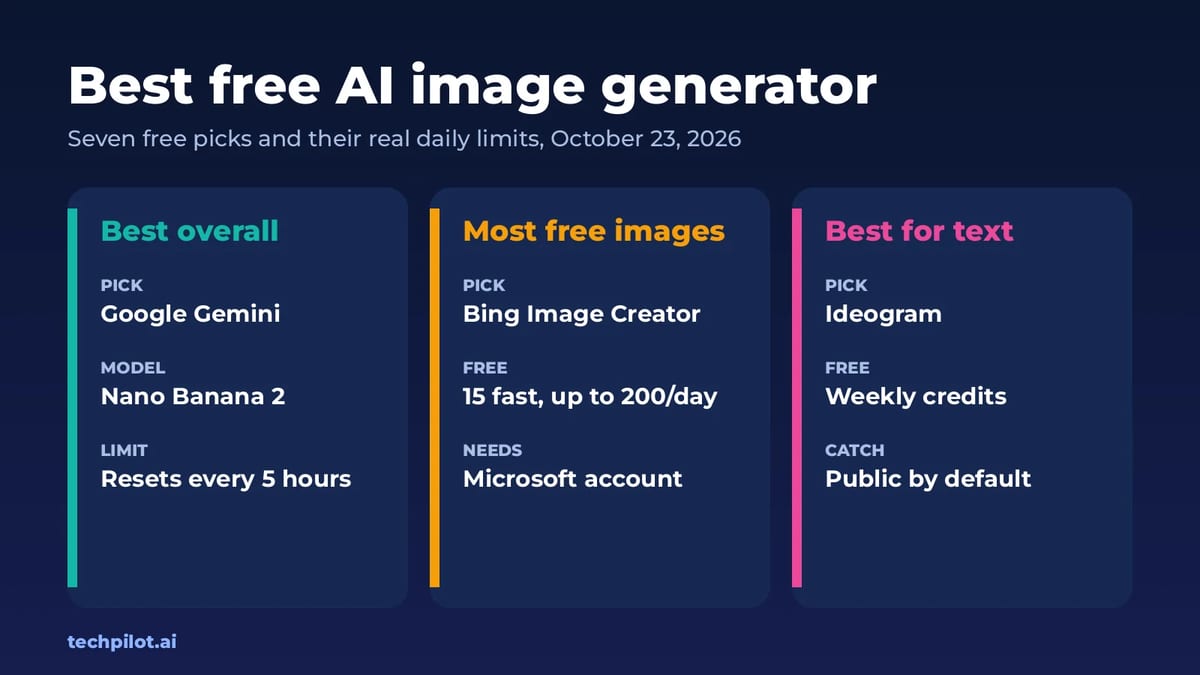
Quick answer: the best free AI image generator for most people is Google Gemini, which runs Nano Banana 2 on the free plan with limits that refresh every few hours. If you want the most free images per day, use Bing Image Creator: 15 fast creations, then up to 200 prompts a day at standard speed. For images with readable text, such as posters and logos, try Ideogram. We checked every free plan on October 23, 2026.
Free AI image generators compared
| Tool | Free limit | The catch | Paid from |
|---|---|---|---|
| Google Gemini | Nano Banana 2, limits refresh every 5 hours | Weekly cap on top | AI Plus, $4.99/mo |
| ChatGPT Free | Image creation in chat | Tight caps | Plus, $20/mo |
| Bing Image Creator | 15 fast creations, then up to 200 prompts a day | Creations kept for 90 days | Free |
| Leonardo | 150 fast tokens a day, Auto model only | Public images; Leonardo holds rights | $12/mo |
| Ideogram | Weekly free credits | Public by default | $15/mo yearly |
| Krea | 100 units a day (about 5 Krea 3 or 50 Krea 2 Turbo images) | No commercial licence | $5/mo yearly |
| Bria Fibo 2.0 | 100 free generations | Open weights are non-commercial | $0.032/image |
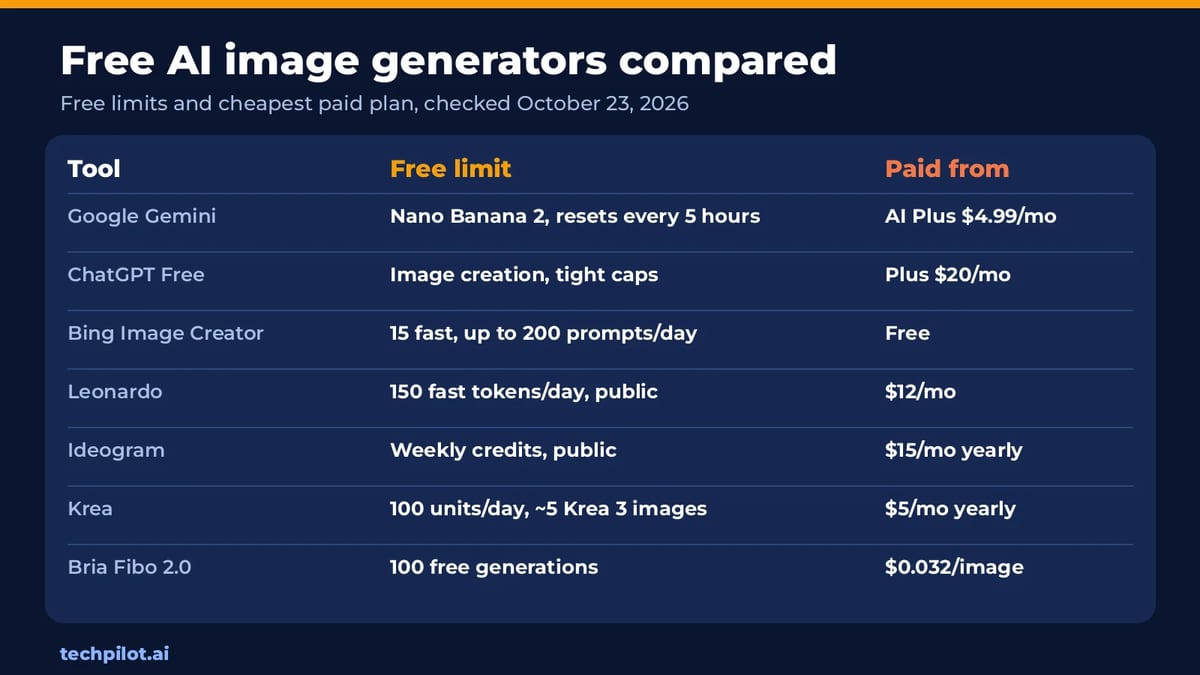
The main trade-off isn’t quality, which is good on every tool here. It’s what the free plan does with your images. Leonardo and Ideogram make free creations public, and Krea doesn’t allow commercial use on its free plan. If you’re making something for a client or a business, read that column first.
1. Google Gemini: best overall
- Free: Gemini makes images with Nano Banana 2 on the free plan, with no AI subscription. Google uses compute-based limits that refresh every 5 hours, plus a weekly cap.
- Paid: Google AI Plus ($4.99 a month) doubles the limits, and you need a paid plan to redo an image with Nano Banana Pro.
- Best for: editing your own photos with plain-English instructions and quick, realistic images.
See how it compares with a dedicated image app in our Krea 3 vs Nano Banana Pro test.
2. ChatGPT Free: best if you already use ChatGPT
- Free: ChatGPT’s free plan includes image creation, so you can describe a picture, upload a photo and ask for changes in the same chat.
- The catch: free image caps are tight, and heavier use quickly hits the limit. Plus costs $20 a month.
- Best for: photo edits and style changes. Our ChatGPT photo editing prompts give you 12 to copy.
3. Bing Image Creator: most free images
- Free: free with a Microsoft account, using Microsoft’s MAI-Image-2.5-Flash and MAI-Image-2e models. You get 15 fast creations a day, then up to 200 prompts in 24 hours at standard speed.
- The catch: there’s an optional visible watermark, and creations are stored for 90 days.
- Best for: making lots of images without paying anything.
4. Leonardo: best for game and concept art
- Free: 150 fast tokens a day with the Auto model.
- The catch: free creations are public. Free users can use images commercially, but Leonardo keeps the rights to them.
- Paid: Essential is $12 a month.
5. Ideogram: best for text in images
- Free: weekly free credits when you sign in with Google, Apple or Microsoft. The amount can vary.
- The catch: images are public by default on the free plan.
- Paid: Plus is $15 a month billed yearly ($20 monthly). Commercial use is allowed.
- Best for: posters, thumbnails and logos where the words need to be spelled right.
6. Krea: best for trying many models
- Free: 100 compute units a day, enough for about 5 Krea 3 images, around 30 Flux.1 Dev images or 50 Krea 2 Turbo images.
- The catch: no commercial licence on the free plan; that starts on Basic.
- Paid: Basic is $5 a month billed yearly ($9 monthly). See our Krea 3 review for credit costs.
7. Bria Fibo 2.0: best for developers
- Free: 100 free generations on a Bria account, and open weights on Hugging Face for non-commercial use.
- Paid: $0.032 per image through the Bria API, for generation or editing.
- Best for: apps that need a cheap image API. Details in our Fibo 2.0 review.
Which free AI image generator should you use?
- Everyday images and photo edits: Gemini, then ChatGPT Free.
- Volume: Bing Image Creator.
- Text, logos and posters: Ideogram.
- Business use on a free plan: Ideogram, which allows commercial use, or a cheap paid plan like Krea Basic.
- Building an app: Bria Fibo 2.0, or see FLUX 3 for another model with a free demo.
Need a professional portrait instead? See our pick of the free AI headshot generator tools. To animate an image, try the best free AI text to video generators or, for fun clips, the AI face swap video free tools. And for a free chatbot to help write prompts, see free chat AI.
Frequently asked questions
What is the best free AI image generator?
Google Gemini is the best all-round free option, using Nano Banana 2 with limits that refresh every 5 hours. Bing Image Creator gives the most free images, up to 200 prompts a day.
Is there a free AI image generator with no limits?
No online tool is truly unlimited. Bing Image Creator comes closest with 15 fast creations and up to 200 prompts a day. Open models you run locally have no daily cap.
Which free AI image generators make my images public?
Leonardo makes free creations public, and Ideogram images are public by default on the free plan. If privacy matters, check the paid plan details before you upload or create anything sensitive.
Can I use free AI images commercially?
It depends on the tool. Ideogram allows commercial use, Leonardo allows it but keeps rights to free images, and Krea’s free plan doesn’t include a commercial licence.
Is Gemini image generation free?
Yes. Free Gemini users can create and edit images with Nano Banana 2, with limits that refresh every 5 hours and a weekly cap. Google AI Plus doubles the limits.
Found this useful? Share it with someone comparing AI tools.

5 Best VPNs for Small Business Owners Who Work from Everywhere Reviewed (2026)
Here is the list of 5 Best VPNs for small business owners that are working fully remotely.
 John Daniel · 5 min read
5 Best AI Video Generators for Business in 2026
Compare the 5 best AI video generators for business in 2026. Freepik, Higgsfield, Canva, Adobe Firefly, and LTX Studio—pricing, features, and which…
John Daniel · 9 min read