Home / Guides / Graphics & Design
Krea 3 vs Nano Banana Pro: Cost and Quality
 Mihai (Mike) Bizz Business, entrepreneurship, tech & AI
 - Published
- 8 min read
On this page Krea 3 vs Nano Banana Pro at a glance
- Krea 3 vs Nano Banana Pro at a glance
- Price: what an edit really costs
- Speed: under 8 seconds, with an asterisk
- Editing consistency: how much each model repaints
- Image quality: where Nano Banana Pro still wins
- Which should you pick?
- How to get better edits from either model
- Frequently asked questions
Independent and reader-supported. Some links may earn us a commission; it never changes our rankings. Editorial policy
Krea 3 vs Nano Banana Pro compared: real cost per edit, speed, image quality and how much each one repaints, plus which AI image editor to choose and when.
Quick answer: pick Krea 3 when you edit the same image again and again, such as product shots, catalog variants and storyboards. It’s faster and changes far less of the picture you didn’t ask it to touch. Pick Nano Banana Pro when you need 4K output, more than 8 reference images, Google Search grounding or the most lifelike people. On price, Krea’s “less than half the cost” headline only holds for small or no reference images; once you feed in a full 2K photo to edit, both cost about $0.13 per 2K edit.
Krea launched Krea 3, its own image editing model, on October 15, 2026, and aimed it straight at Google’s Nano Banana Pro (Gemini 3 Pro Image). We checked both companies’ current price lists, Krea’s speed figures and an independent 10-edit test to see where the claims hold up.
Krea 3 vs Nano Banana Pro at a glance
| Krea 3 | Nano Banana Pro | |
|---|---|---|
| Maker | Krea | Google (model ID gemini-3-pro-image) |
| Released | October 15, 2026 | Available since 2025; current Gemini 3 Pro Image |
| API price per image | $0.03 at 1K, $0.06 at 2K | $0.134 at 1K or 2K, $0.24 at 4K |
| Reference image cost | +$0.02 each up to 1024×1024, +$0.07 if larger | About $0.0011 per input image |
| Max output | Native 2K | 4K |
| Reference images | Up to 8 (API) | Up to 14 |
| Speed | Under 8 s per edit (Krea’s claim) | 33 s median on Krea (Krea’s data) |
| Extras | Fast or High thinking (+$0.02), regional edits | Thinking always on, Google Search grounding, SynthID watermark |
| Where to use it | krea.ai, Krea API, fal, Replicate, OpenRouter, Together AI, Hedra | Gemini app, Gemini API, Google AI Studio, OpenRouter, Krea |
Prices are from Krea’s API pricing page and Google’s Gemini API pricing page, both checked October 20, 2026. For the full feature list, see our Krea 3 review and our Nano Banana review.
Price: what an edit really costs
Krea’s launch post puts Krea 3 at $0.06 per 2K image against $0.135 for Nano Banana Pro and $0.22 for GPT Image 2, and says 100,000 edits a month would cost $6,000 on Krea 3 versus $13,500 on Nano Banana Pro. Google’s own page lists Nano Banana Pro at $0.134 per 1K or 2K image, so Krea’s number is fair. The fine print matters, though: Krea’s table compares list prices “without image references”.
An edit always has at least one reference: the photo you’re editing. Krea charges $0.02 for each reference up to 1024×1024 pixels and $0.07 for anything bigger. Google charges about $0.0011 per input image. Here’s what that does to a single 2K edit:
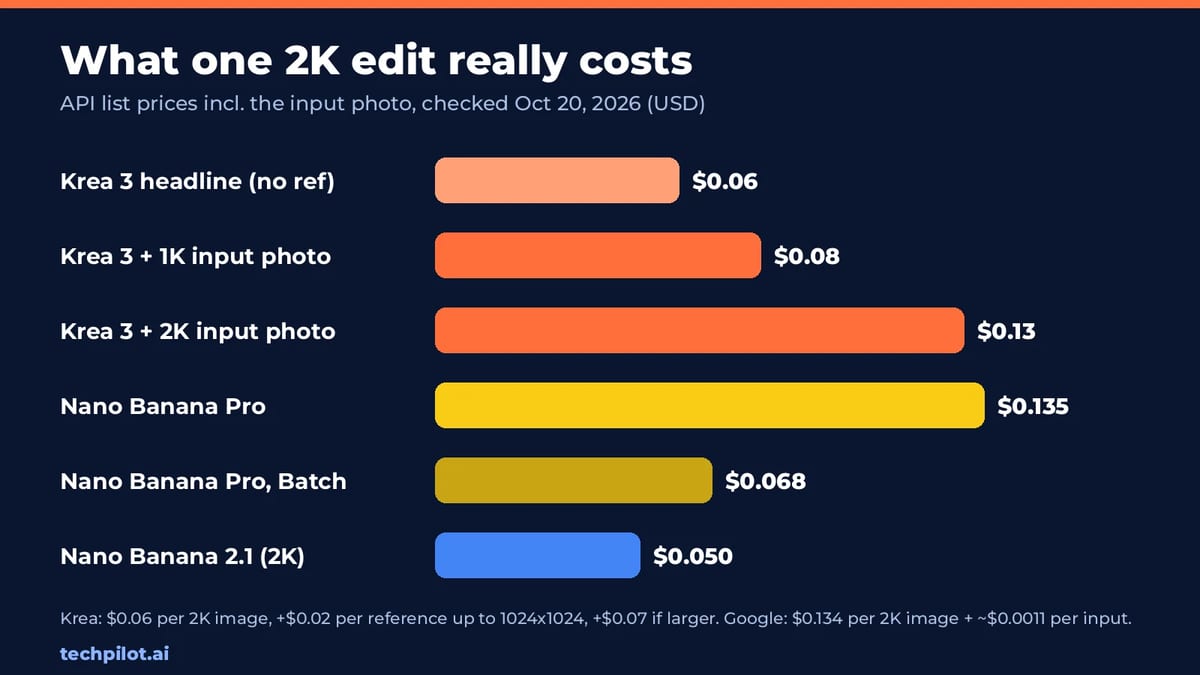
- Krea 3, 2K edit of a 2K photo: $0.06 + $0.07 = $0.13
- Krea 3, 2K edit of a photo resized to 1K first: $0.06 + $0.02 = $0.08
- Nano Banana Pro, 2K edit: $0.134 + $0.0011 = about $0.135
- Nano Banana Pro on Google’s Batch API: $0.067 per image plus input, about $0.068, if you can wait for results
So at 100,000 real 2K edits a month, Krea 3 costs about $13,000 with full-size inputs and $8,000 with inputs scaled to 1K, against about $13,500 for Nano Banana Pro and about $6,800 on its Batch API. Add $0.02 per image if you turn on Krea’s High thinking. An independent test by The Hype backs this up: its 10-edit run cost about $1.30 on Krea 3 and $1.38 on Nano Banana Pro.
The takeaway: Krea 3 is cheaper per generated image, but for edits of full-size photos the price gap almost disappears. The cheapest Google option isn’t Pro at all. Google’s newer Nano Banana 2.1 lists at $0.0504 per 2K image, below Krea 3’s headline price, if its quality is enough for the job.
Speed: under 8 seconds, with an asterisk
Krea says most Krea 3 edits come back in under 8 seconds at native 2K, end to end, and that its fastest setup finishes in 4 to 5 seconds. For comparison it published median times for edit jobs run on Krea from September 24 to October 1, 2026, queue included: 27 seconds for Nano Banana 2, 33 seconds for Nano Banana Pro and 90 seconds for GPT Image 2. That is the source of the “4× faster than Nano Banana Pro” line on Krea’s product page.
Outside Krea’s own setup the gap is smaller. In The Hype’s test, Krea 3 edits took 20 to 36 seconds each through Krea’s API once uploads and queueing were included, and the full 10-edit run took 3 minutes 56 seconds against 4 minutes 59 seconds for Nano Banana Pro through OpenRouter. Krea 3 was still faster, by about a fifth rather than four times. Expect launch-week queues to play a part, and test with your own images before you plan a workflow around 8-second edits.
Editing consistency: how much each model repaints
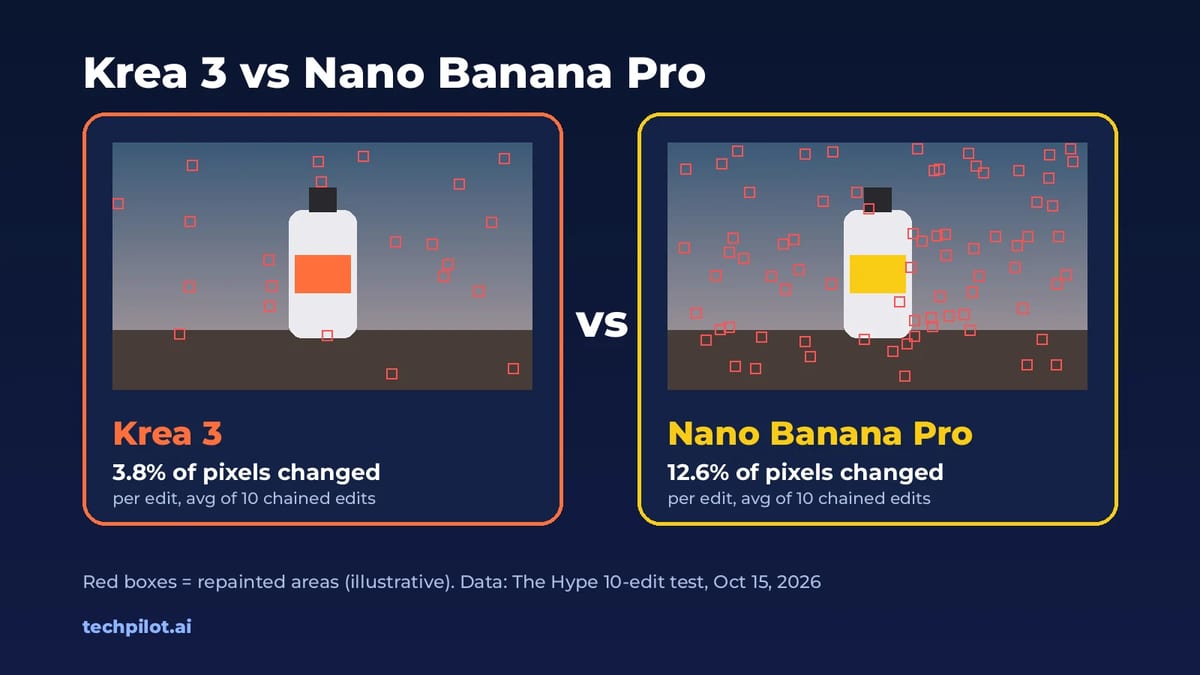
This is where Krea 3 earns its place. The Hype’s October 15 test gave both models the same 2048×2048 forest photo and the same 10 edit prompts in a row (add a person, recolor a dress, remove a boulder, hang a sign and so on), each step editing that model’s previous result with no masks. A pixel counted as changed if it shifted by more than 24 out of 255.
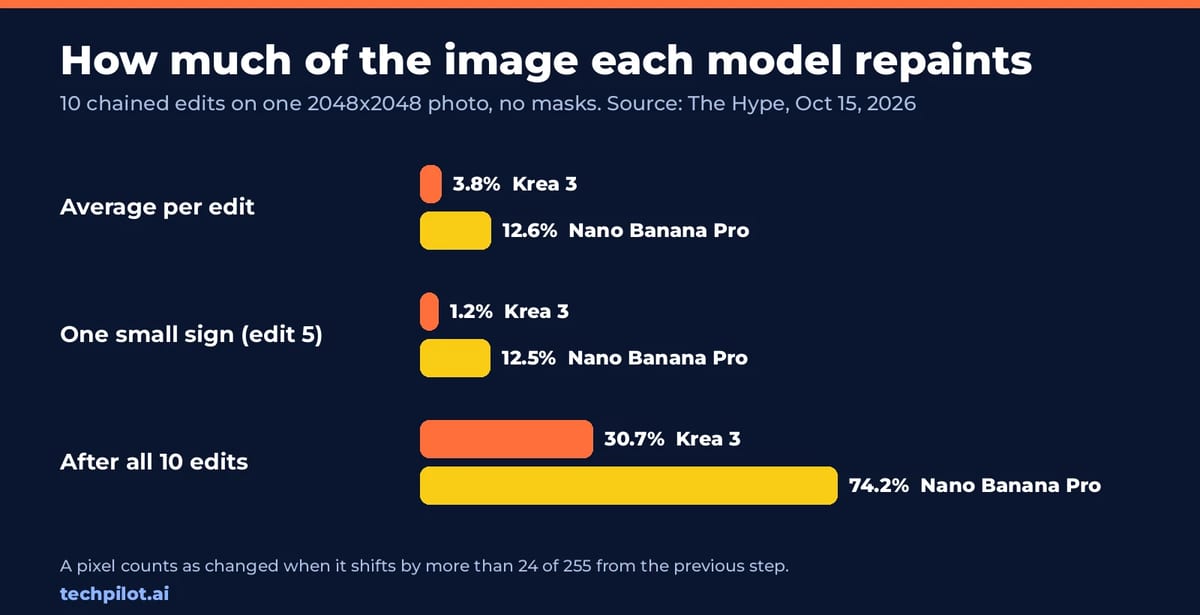
- Changed per edit, on average: 3.8% for Krea 3, 12.6% for Nano Banana Pro
- Changed after all 10 edits: 30.7% for Krea 3, 74.2% for Nano Banana Pro
- Adding one small sign: Krea 3 changed 1.2% of the frame, Nano Banana Pro 12.5%
In plain terms, Krea 3 repaints only the part you asked about, while Nano Banana Pro redraws a little of everything each time. After 10 rounds, Nano Banana Pro’s fog had turned purple and the moss had broken into a mosaic, while Krea’s untouched corners still matched the original. That drift matters most for work that goes through many rounds of feedback: product photos, thumbnails, storyboards and approved campaign images where only one element may change.
It’s one test on one image, so read it as a strong signal rather than a final score. It does match what Krea promises: “change one thing and it changes one thing”.
Image quality: where Nano Banana Pro still wins
Less repainting isn’t the same as better pictures. In the same test, the people added by Nano Banana Pro looked like people, while Krea 3’s pale courtiers came out looking like stone statues, and one Krea edit placed a sign overlapping a seated figure. Nano Banana Pro also has strengths Krea 3 doesn’t try to match:
- 4K output for print and large displays (Krea 3 stops at native 2K)
- Up to 14 reference images, against 8 on Krea 3’s API
- Google Search grounding, useful for infographics, maps and anything that needs current real-world facts
- Text rendering and reasoning for complex layouts, with thinking always on
Krea 3’s edge is precision: keeping labels, logos and faces intact while it builds a new scene around them, following exact hex colors and working from sketches, line drawings and mood boards. If you shoot products for an online store, that’s the quality that counts. If you create posters, people-heavy scenes or 4K art, Nano Banana Pro is still the safer pick.
Which should you pick?
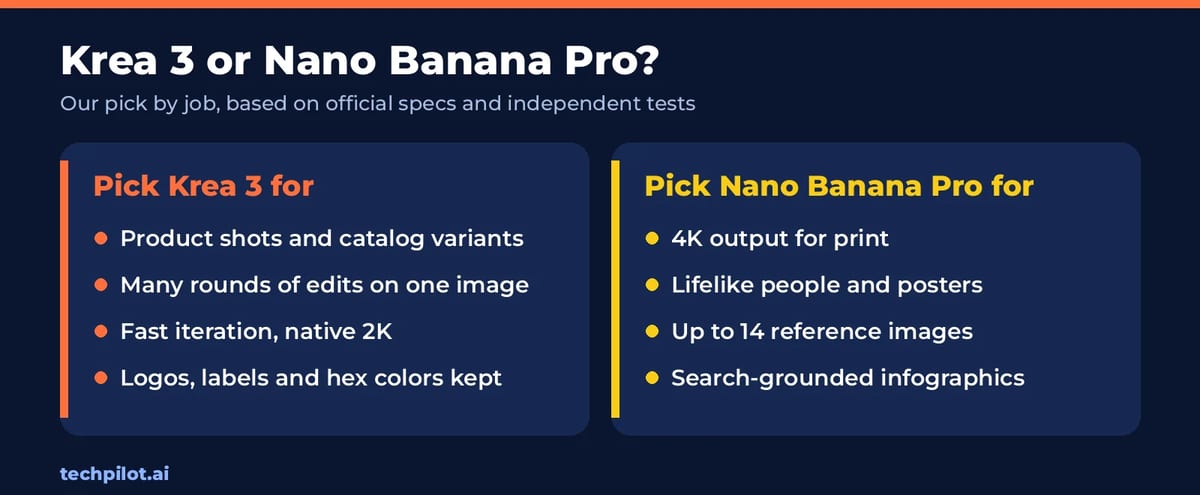
- E-commerce and product teams: Krea 3. Products stay on-model across variants, and at 1K references it’s the cheaper of the two.
- Iterative client work: Krea 3, because ten rounds of feedback won’t slowly repaint the whole image.
- Portraits, lifestyle scenes and posters: Nano Banana Pro for more natural people and stronger text.
- Print and 4K: Nano Banana Pro; Krea 3 tops out at 2K.
- Huge batches that can wait: Nano Banana Pro on Google’s Batch API at about half price, or Nano Banana 2.1 if it’s good enough.
- Not sure: try both inside the Krea app. Krea’s Free plan gives 100 compute units a day, and its model menu includes Nano Banana Pro alongside Krea 3.
How to get better edits from either model
Both models reward the same prompt habits. Start with what must stay (“keep the bottle, label and logo exactly as they are”), then describe the change like a photographer would: the scene, the light, the lens. With several images, say what each one is for (“image 1 is the room, image 2 is the sofa”), and use “only” when one element should change. Our ChatGPT photo editing prompts use the same keep-list structure and work as starting points for Krea 3 and Nano Banana Pro too.
Frequently asked questions
Is Krea 3 better than Nano Banana Pro?
For repeated edits of one image, yes: in an independent 10-edit test Krea 3 changed 3.8% of the image per edit against 12.6% for Nano Banana Pro, and it was faster. Nano Banana Pro is better for 4K output, lifelike people, text and jobs with more than 8 reference images.
How much does Krea 3 cost?
On the Krea API, Krea 3 costs $0.03 per 1K image and $0.06 per 2K image. Each reference image adds $0.02 up to 1024×1024 pixels or $0.07 if larger, and High thinking adds $0.02. In the Krea app, the Free plan gives 100 compute units a day.
How much does Nano Banana Pro cost?
Google lists Nano Banana Pro (Gemini 3 Pro Image) at $0.134 per 1K or 2K image and $0.24 per 4K image on the Gemini API, plus about $0.0011 per input image. The Batch API halves the output price to $0.067 per 1K or 2K image.
Is Krea 3 really a quarter of the price?
No. Krea’s own table shows $0.06 against $0.135, which is under half the price of Nano Banana Pro, and about a quarter of GPT Image 2’s $0.22. Once you add the $0.07 charge for a full-size 2K input photo, a Krea 3 edit costs about $0.13, close to Nano Banana Pro.
Is Krea 3 faster than Nano Banana Pro?
Krea says most Krea 3 edits finish in under 8 seconds, against a 33-second median for Nano Banana Pro on its platform. An independent test measured 20 to 36 seconds per Krea 3 edit with uploads and queueing, and a 10-edit run about 20% faster than Nano Banana Pro.
Can I use Krea 3 and Nano Banana Pro for free?
You can try both in the Krea app on its Free plan, which gives 100 compute units a day. Nano Banana Pro is also available in Google’s Gemini app. Neither model has free API access.
Found this useful? Share it with someone comparing AI tools.