I tested Krea AI to evaluate its video creation process. My objective was to create a short, animated clip for a fictional brand, starting from a blank slate. I focused on the workflow between the real-time image canvas and the AI video generation tools to see how well they worked together.
AI Agents · Tool review
Krea AI: Real-Time Creativity and AI Generation
 TechPilot.ai review team Hands-on testing, one published method
 - Last updated
- How we test
Summary
Pros and cons
What we like
- Animate Still Images Directly Krea AI's core video features, Motion Transfer and Video Lipsync, allow users to animate static images without needing prior animation experience.
- Integrated Image-to-Video Process The platform connects its image creation canvas with its video tools, allowing for a continuous workflow from concept to animated clip.
- High Accessibility The direct interface reduces the learning time often associated with animation software, making video creation available to a wider audience.
- Fast Motion Prototyping The tool allows for quick tests of animation ideas that would take significantly longer to mock up using conventional software.
- Useful Creative Suite Beyond video, it offers functions for enhancing and upscaling both the source images and the final video files.
- Functional Free Tier The free plan includes 100 compute units a day and Krea Agent, enough to test the main image functions before committing to a paid plan.
- Works in Your Tools Plugins for Photoshop, After Effects, Premiere Pro, DaVinci Resolve and Blender.
What could be better
- Video Generation is Not Instantaneous While the name suggests "real-time generation," the process requires rendering. Video creation is queued and can take several minutes, which interrupts an iterative workflow.
- Variable Video Output Quality The AI can have difficulty maintaining visual consistency in a video, sometimes producing clips with distorted or illogical motion artifacts.
- Noticeable Rendering Times The processing time for AI video generation can be considerable, particularly for higher-resolution outputs, which can slow down production.
- Few Fine-Tuning Controls Krea AI does not have a timeline, keyframes, or other detailed controls found in dedicated video editing programs, offering little ability to edit a clip after it's generated.
Key features
- AI Video Generation: Creates short video clips from text prompts or a source image.
- Motion Transfer: Applies the movement from a source video file to a static target image to animate it.
- Video Lipsync: Animates a character’s mouth in an image to match the speech in an uploaded audio file.
- Real-Time Generation (for Images): An interactive canvas that acts as the starting point for creating the visual assets for animation.
- Enhancer & Upscaler: A tool to increase the resolution and detail of both images and final video files.
- AI Training: Allows users to build a custom AI model based on their own images to maintain a specific style in their video assets.
- Image Generation: Creates high-resolution still images from descriptive text prompts.
- Patterns & Logo Illustration: Tools for creating supporting visual graphics for video projects.
Screenshots
Full review
Independent and reader-supported. Some links may earn us a commission; it never changes our scores. Editorial policy
Krea AI is a creative AI platform with 150+ image, video and 3D models, its own Krea 2 model and Krea Agent. See what’s new in October 2026 and prices.
Krea AI was founded in 2022 by Victor Perez and Diego Rodriguez and started as a real-time image canvas. It is used by graphic designers, marketers and digital artists to make images and short animated video.
Krea AI’s main function is to connect its instant image creation capabilities with its video animation tools. This setup offers a different approach compared to traditional video production methods that often require more time and separate software. By integrating these functions, this tool assists in the quick production of short video clips and animations directly from static images.
What’s new in Krea AI (Oct 2026)
Updated October 12, 2026. Krea has grown well beyond the real-time canvas we first reviewed. The biggest change is Krea Agent, which opened to every plan, including Free, on September 10, 2026. You write a brief, and the agent plans the job, picks the models, generates and edits images, video and audio, and files the results in a shared context library. Agent generations cost the same compute units as the Image or Video tools, so there is no separate agent balance. You can use it on the web, in Slack or through Krea for ChatGPT. Source: Krea changelog.
Krea inside your editing apps. On October 5, 2026, Krea announced Krea in After Effects on X: Krea Agent can now create motion graphics, resize videos and handle sound and images inside an After Effects composition. Krea’s plugins page now also lists Krea for Photoshop, Premiere Pro, DaVinci Resolve and Blender, plus a ChatGPT app and an MCP server for other agents.
Krea 2 and Realtime Director. Krea now trains its own image model, Krea 2, built for creative range from film photography to illustration, and released open weights for its Raw and Turbo versions on June 23, 2026. Realtime Director, soft-launched on September 7, lets you steer a live AI video stream with prompts instead of waiting for renders.
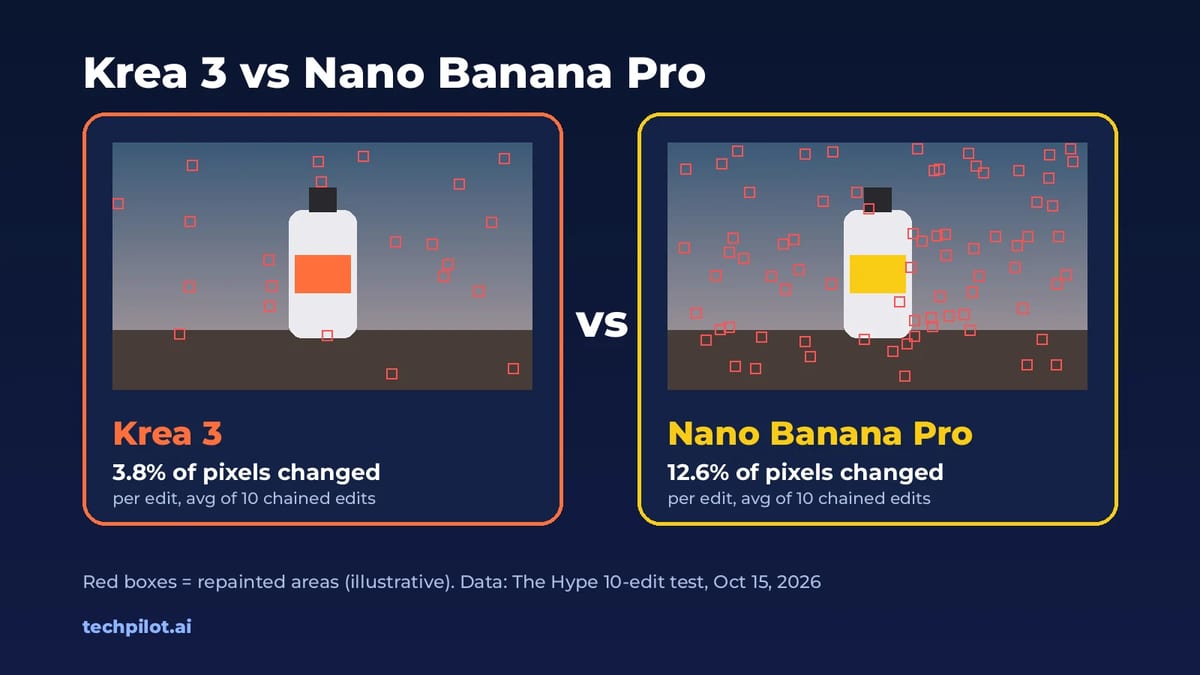
Krea 3 (October 2026). On October 15, 2026, Krea launched Krea 3, a fast image editing model that keeps products, labels and faces intact, and it became the default image model in the app on October 16. It’s included on the Free plan, and the API costs $0.03 per 1K image or $0.06 per 2K image. See our Krea 3 page for pricing and how to use it.
Our take: the plugins matter more than the agent for working designers. Generating inside After Effects or Premiere removes the export and import loop, which is where most AI video time is lost. The agent is useful for quick campaign drafts, but watch your compute units, because every model it calls bills the same as a manual job.
Best Use Cases for Krea AI
- Social Media Marketers: For producing a high volume of content, the platform helps accelerate the workflow. A marketer can design a product image on the real-time canvas and then use the AI generation to animate it for a social media post. This method is effective for creating short video ads, animated announcements, or looping visuals that can improve audience attention.
- Animators and Indie Game Developers: The AI agent functions as a useful tool for rapid motion prototyping. An animator can use the Motion Transfer feature to apply a reference video’s movement to a new character design. This allows for quick evaluation of how a character looks in motion, which is useful for pre-visualization and making simple character animations without complex rigging.
- Digital Artists and NFT Creators: Artists can add motion to their static digital artwork. Krea AI allows them to take a still portrait and make the character blink or breathe, or to create a landscape where clouds move. This capability is useful for producing more dynamic art pieces for digital galleries or NFT collections.
- Educators and Corporate Trainers: Krea AI helps in the creation of instructional content. A trainer can generate an avatar and use the Video Lipsync tool to have it narrate a presentation. This provides a more visual way to present information compared to a standard voice-over-slideshow format, which can make training materials more effective.
Krea AI Pricing (2026)
Krea’s individual plans as listed on krea.ai/pricing on October 12, 2026 (USD). Yearly billing saves 40%:
| Plan | Monthly | Yearly | Compute units | Notable features |
|---|---|---|---|---|
| Free | $0 | $0 | 100 a day | Krea Agent, Krea 2, real-time models, no credit card; no commercial licence |
| Basic | $9/mo | $5/mo | 5,000 a month | All image models, selected video models, LoRA training, commercial licence |
| Pro | $35/mo | $21/mo | 20,000 a month | All video models (Veo, Sora, Kling and more), App Builder, Nodes Agent |
| Max | $105/mo | $63/mo | 60,000 a month (40,000 to 100,000 options) | Unlimited relaxed generations, unlimited LoRA training |
Krea estimates 5,000 units at about 64 Nano Banana 2 images or 20 Seedance 2.0 videos, so heavy video users will run out fast on Basic. Business plans for teams are sold separately, and extra compute packs are available.
Is Krea AI free? Yes. The free plan gives 100 compute units a day, Krea Agent and the real-time models without a credit card, but no commercial licence. If you are comparing image generators, see our updated Midjourney review, FLUX 3 and Higgsfield AI.
TechPilot.ai’s Verdict on Krea AI
I tested Krea AI to evaluate its video creation process. My objective was to create a short, animated clip for a fictional brand, starting from a blank slate. I focused on the workflow between the real-time image canvas and the AI video generation tools to see how well they worked together.
My project was an ad for a coffee brand. I began on the Real-Time Generation canvas. My prompt was “astronaut drinking coffee in a colorful nebula,” and I drew a basic human shape with a cup. The canvas updated my drawing into a detailed image instantly. Adjusting the scene by adding prompts like “swirling stars” was fluid. This part of the tool is highly responsive and serves as a strong foundation for any video project.
After finalizing the astronaut image, I moved it to the animation tools. I used the “Video Generation” feature with the prompt “subtle steam rising from cup, stars twinkling slowly.” I submitted the job and waited. This is where the workflow is no longer real-time; the job entered a queue and took about three minutes to deliver the four-second clip. The result was good—the steam effect was convincing, but the astronaut’s arm moved unnaturally in one of the output options. It required a second attempt to get a clip without motion artifacts.
Next, I tested Motion Transfer. I recorded a short video of myself nodding and talking, then applied that movement to my astronaut image. The head movement transferred effectively, giving the character a sense of life. The mouth movement, however, was a generalized motion rather than a precise synchronization. For that specific task, the dedicated Lipsync tool would be required.
This tool provides a real-time image workflow that feeds into a separate, queued AI video generation process. The platform’s strength is the close integration of these two steps. Creating an animated character from an idea in under 10 minutes, including rendering waits, is a significant speed-up compared to traditional methods.
Top Alternatives to Krea AI
-
Runway: For work focused primarily on video, Runway is the leading option. It is a dedicated AI video platform with more developed features, including high-quality text-to-video, video-to-video styles, and specific editing tools like inpainting and motion tracking. Krea AI is better for quickly animating a single image, while Runway is built for generating and editing more complex video scenes.
-
Pika Labs: Pika is another strong competitor focused on AI video generation. It provides image-to-video and text-to-video functions similar to those of its peers and is often noted for its cinematic results. Its interface is direct, mainly operating through a prompt-based system. Pika is a solid choice for users who want a straightforward tool for generating short, artistic video clips.
-
Leonardo AI: While mainly an image generator, Leonardo has added animation features. Its advantage is the ability to create consistent characters through its custom model training, which can then be animated. If a project requires a character to appear the same across multiple animated clips, Leonardo’s image-first, consistency-focused process may be more suitable than Krea AI’s general-purpose tools.
Final Verdict
In summary, Krea AI is an effective tool for adding motion to static images. While its AI video generation is not instantaneous, the speed and directness of the image-to-animation process are valuable. It is a well-suited tool for marketers, artists, and creators who want to produce dynamic content without using complex animation software. For intensive video production, Runway is a better fit, but for fast and functional image-to-video creation, Krea AI performs very well.
Krea AI FAQ
Is Krea AI free?
Yes. The free plan gives you 100 compute units a day, Krea Agent, the Krea 2 model and real-time generation without a credit card. It does not include a commercial licence or all image and video models.
•
How much does Krea AI cost?
As of October 2026, Basic is $9 a month, Pro $35 and Max $105 (for 60,000 units). Billed yearly they cost $5, $21 and $63 a month, a 40% saving.
•
What is Krea Agent?
Krea Agent, open to all plans since September 10, 2026, takes a written brief, plans the work, picks models and generates images, video and audio, then files results in a shared library. It uses the same compute units as manual generations.
•
Does Krea AI work inside Adobe apps?
Yes. Krea has plugins for Photoshop, After Effects and Premiere Pro, plus DaVinci Resolve and Blender. Krea in After Effects, announced on October 5, 2026, lets Krea Agent work inside your composition.
•
How does Krea AI compare to Runway for video?
Krea AI is effective at quickly animating still images within an integrated workflow and gives access to many third-party video models. Runway is a more specialized video-first platform with a wider array of its own generation and editing functions.
Grubby AI
AI Agents
I’ve analyzed the capabilities and user feedback surrounding this humanize AI to determine if it delivers on its promise of making AI text…
Veltos AI
AI Agents
Veltos AI represents a distinct direction for generative AI tools. Its premise is straightforward: turn words into playable worlds. My goal…

Mirage
AI Agents
I have spent considerable time with Mirage, concentrating on its primary function: the quality, realism, and practical use of its AI…