Home / Guides / AI Video Generator
Free AI Tools for Etsy Sellers: We Tested Creative Fabrica Studio Desktop (Here’s What It Actually Does)
Creative Fabrica Studio Desktop App provides the most-used, free AI tools for Etsy sellers – no subscriptions, no credits, no watermarks.
 John Daniel Corporate finance, Mathematics, GenAI
 - Updated
- 7 min read

On this page What is Creative Fabrica Studio Desktop?
Independent and reader-supported. Some links may earn us a commission; it never changes our rankings. Editorial policy
Running an Etsy shop means one thing above all:
Images. Endless image editing and photoshoots.
Product photos. Listing thumbnails. Mockups. Banners. Maybe a TikTok ad if you’re feeling brave.
And every “free” tool you find online wants something. Credit cards. Credits. A subscription. A watermark slapped over your work. Or worse — your product photos uploaded to a server you know nothing about.
So when we heard about a desktop app offering free AI tools for Etsy sellers that run locally on your own computer, we did the only reasonable thing.
We installed it and put it to work on a real shop.
Here’s the full breakdown — the genuinely free stuff, the surprisingly useful stuff, and the stuff that costs money.
What is Creative Fabrica Studio Desktop?
Creative Fabrica Studio Desktop it’s a free desktop app for Windows and Mac from Creative Fabrica, the Amsterdam-based design marketplace.
The pitch is simple: instead of doing everything in the cloud, the app installs AI models directly on your machine.
Once a model is downloaded, supported tools run locally. Your files stay on your computer. No uploads, no credit meter ticking for every image.
The free local lineup:
- Background Remover — one-click transparent PNGs, handles hair and fine edges, batch-processes entire folders
- Image Upscaler — up to 4x resolution while keeping edges crisp
- Image Generator — text-to-image on your own GPU, up to 1024×1024
- Voice Generator — 32 voices, 12 languages, exports WAV or MP3
But once you’re inside the app, you realize the local tools are just the front door.
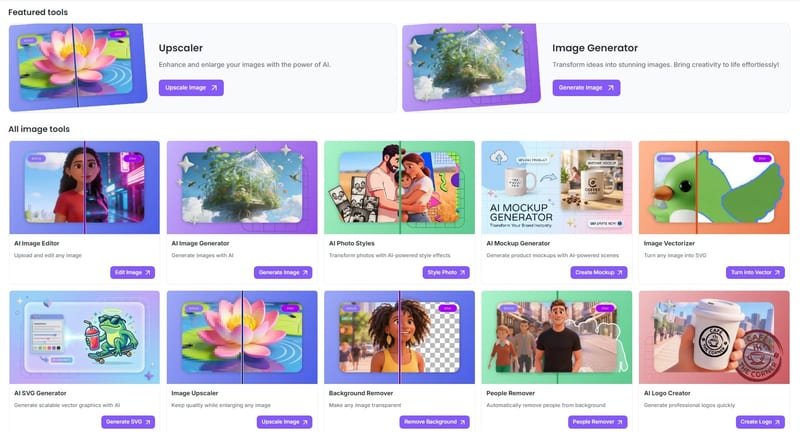
The full toolkit includes an image editor, mockup generator, vectorizer, SVG generator, logo creator, people remover, watermark remover, file converters, image resizers — and a few Etsy-specific tools that genuinely surprised us.
Let’s get into those.
The Etsy Coach: an AI audit of your entire shop
Buried in the Utilities menu is something called Etsy Coach.
You paste your shop URL. It analyzes your entire Etsy presence and hands back a scored audit.
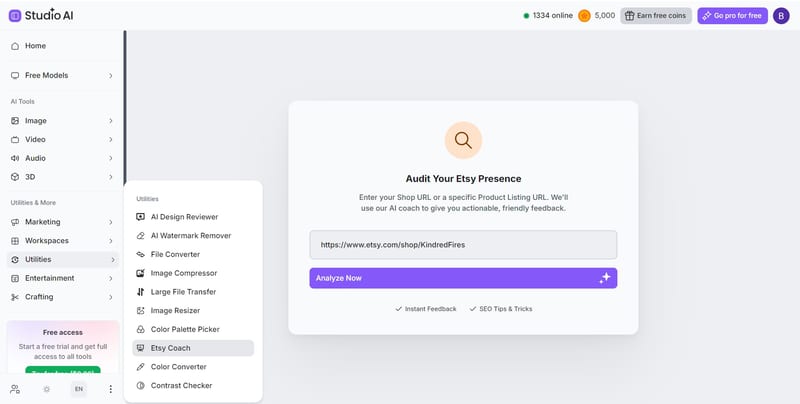
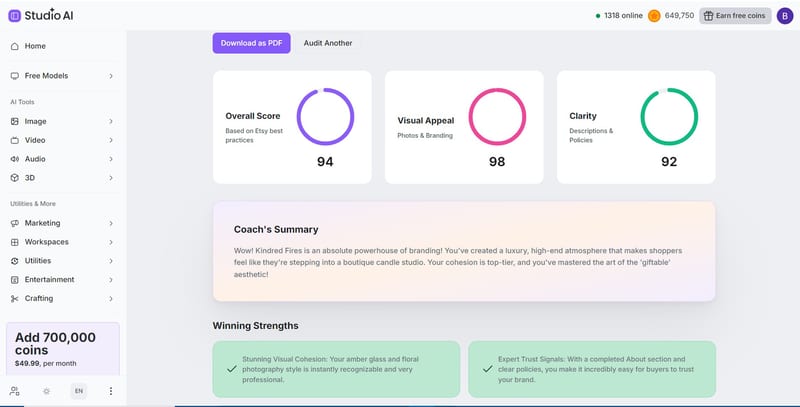
We ran it on a real candle shop. Here’s what came back:
- Overall Score: 94 (based on Etsy best practices)
- Visual Appeal: 98 (photos and branding)
- Clarity: 92 (descriptions and policies)
But scores alone are just a dopamine hit. The useful part is the Action Plan for Growth — specific, prioritized recommendations:
- Level up your shop title (High priority): change “Kindred Fires” to “Kindred Fires | Personalised Candle Gifts & Luxury Soy Wax Decor” so Google knows what you sell
- Occasion-based keywords (High): add terms like “40th Birthday Gift” or “New Home Keepsake” to capture gift-hunting traffic
- Consistent thumbnail cropping (Medium): keep label text centered so Etsy’s search grid doesn’t chop it off
- Alt text optimization (Medium): descriptive alt text on every image for Google Image ranking
- Add a shop video (Medium): behind-the-scenes wax pouring builds emotional connection
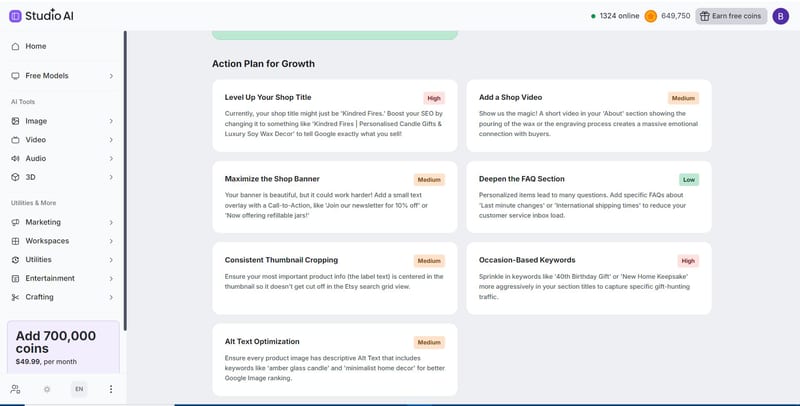
That’s not generic “post consistently!” advice. That’s the kind of feedback sellers pay Etsy consultants real money for.
Is it perfect? No. Some suggestions are obvious if you’ve been selling for years. But as a free second pair of eyes on your shop? Genuinely useful.
The Mockup Generator: product scenes without a photoshoot
Every Etsy seller knows the mockup grind.
You need your design on a t-shirt. On a tote bag. On a mug. In a lifestyle scene. And stock mockup bundles all look like… stock mockup bundles.
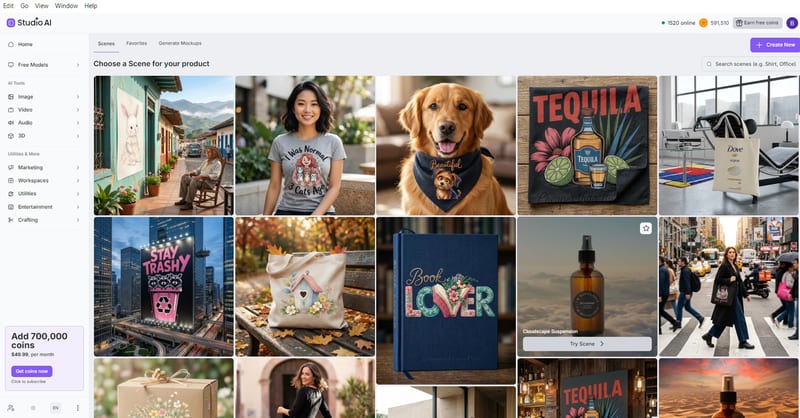
Studio’s Mockup Generator flips the process. You upload your product photo, pick a scene from a large preset library — apparel, tote bags, billboards, book covers, pet bandanas, city streets — and the AI places your product into it.
We tested it with a simple amber candle photo. Picked a desert scene. The result: the exact candle, label intact and readable, sitting in golden-hour desert lighting with realistic shadows.
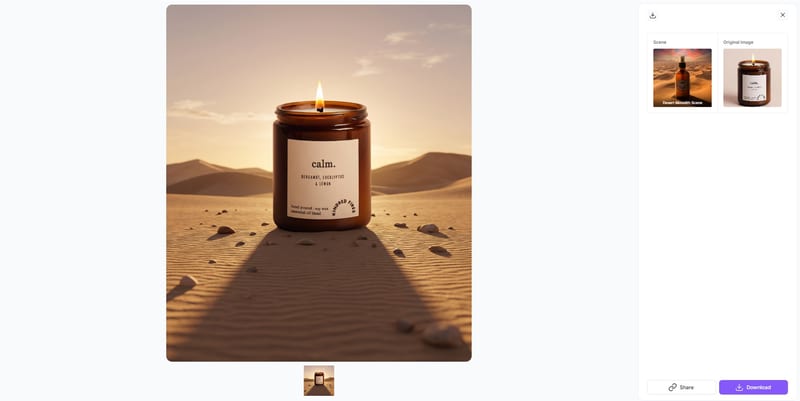
Label accuracy is the thing to watch with AI mockups — most tools mangle text. This one kept “calm. Bergamot, Eucalyptus & Lemon” perfectly legible.
Ad Campaigns: TikTok-style product videos in about a minute
This one’s in beta, but it works.
The Studio Ad Campaigns tool takes your product photos, a template style (Dynamic, Minimal, Lifestyle, Clean Promo), and a short prompt — then generates a 9:16 vertical video ad in roughly 30–90 seconds.
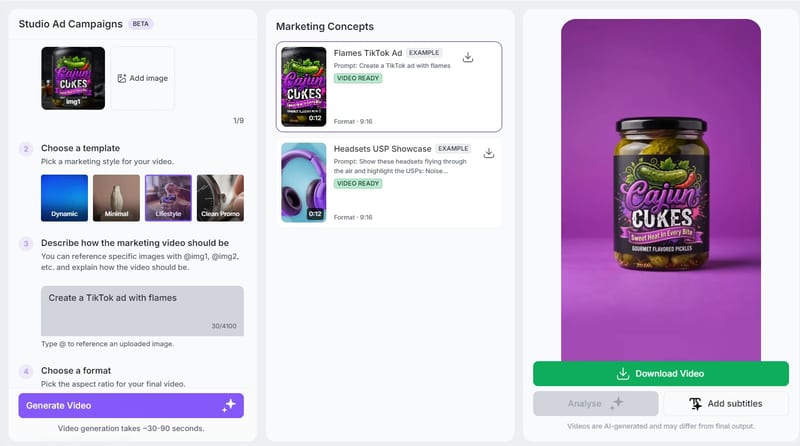
You can tag specific product images in your prompt, add subtitles, and download the finished video. For sellers who’ve been avoiding TikTok and Reels because video editing feels like a second job, this removes the excuse.
Are the results agency-level? No. Are they better than not posting video at all? Absolutely.
The honest part: what’s free and what isn’t
Time for the fine print, because “free” gets thrown around loosely in this industry.
Actually free:
- The desktop app itself (Windows and Mac)
- The local AI tools — background remover, upscaler, image generator, voice generator — run on your hardware with no usage caps
- Registration requires no credit card
Not free:
- The premium cloud features run on a coin system. Heavier tools like some mockup scenes, ad video generation, and premium image models consume coins
- Coin packs are a paid subscription if you burn through free allowances
Other limitations worth knowing:
- Local tool speed depends on your hardware. A modern machine flies; an ancient laptop will make you wait
- Models download before first use — a one-time setup step, but budget a few minutes
- Some workflows still need an internet connection and a Creative Fabrica account
The smart play: use the free local tools for the daily grind (backgrounds, upscaling), and treat the coin-based tools as optional extras when you need a mockup or ad video.
Who should install this?
- Etsy sellers — the coach audit plus free background removal covers your two biggest recurring headaches
- Print-on-demand sellers — upscale designs to print quality without per-image fees
- Cricut and sublimation creators — transparent PNGs on tap
- Anyone with 50+ old listings — batch-process your entire photo folder locally, for free
FAQ
Is Creative Fabrica Studio Desktop free?
Yes — Creative Fabrica Studio Desktop app itself is free, and the four local AI tools (background remover, upscaler image generator, voice generator) run on your own hardware with no usage caps and no credits. You register a free account, no credit card required. The premium cloud features — advanced image models from Google Nano Banana, Grok and OpenAI, ad video generation, some mockup scenes — run on a separate coin system.
Does the background remover run locally?
Yes. The first time you use it, the app downloads the AI model to your computer. That’s a one-time setup. After that, every image is processed on your own machine — including batch runs, where you can point it at an entire folder and let it chew through all your product photos at once.
Are my images uploaded anywhere?
Not when you’re using the local tools. Your files, prompts, and results stay on your computer — nothing gets sent to a server, nothing gets stored in someone’s cloud, nothing gets used for training. The optional cloud features work differently: those do process online, like any other cloud tool. The app tells you which is which.
Does it work on Windows and Mac?
Both. Same app, same free local tools on either system. One heads-up for Windows users: because the app is new, Windows may show a security warning during install. Click “More info,” then “Run anyway.” That’s Windows being cautious about new software, not a red flag.
What kind of computer do I need?
Nothing exotic — but local AI uses your hardware, so speed scales with your machine. A modern laptop handles background removal and upscaling comfortably. A newer GPU makes image generation noticeably faster. A ten-year-old laptop will get there, just slowly. If your machine runs Canva without wheezing, you’re fine for the core tools.
Can it really audit my Etsy shop?
Yes, and this was the surprise of our test. The Etsy Coach takes your shop URL and returns scores across overall performance, visual appeal, and clarity — our test shop scored 94, 98, and 92. More useful than the numbers: a prioritized action plan with specific fixes, like rewriting your shop title for SEO, adding occasion-based keywords, and fixing thumbnail cropping so Etsy’s grid doesn’t cut off your labels.
Do I need an internet connection?
For three things: installing the app, downloading the AI models, and using any cloud-based features. After setup, the supported local tools run offline. Slow hotel Wi-Fi, dead café internet, plane mode — your background remover doesn’t care.
Is this a real alternative to cloud background removers?
For most seller workflows, yes. The typical cloud tool gives you a few free credits, watermarks the result, or locks the HD export behind a subscription. Here, the local background remover has no meter running — process ten images or a thousand, the price stays zero. The trade-off: your computer does the work instead of a server, so a big batch takes as long as your hardware takes.
The bottom line
Quick math for the skeptics.
A typical cloud background remover: ~$9/month for the HD exports.
A decent mockup bundle: $20–40, and it looks like everyone else’s.
An Etsy shop consultant: $100+ for the kind of audit the coach spits out in 30 seconds.
This app: $0, and your files never leave your laptop.
Sure, the premium cloud stuff costs coins. Ignore it. The free local tools alone cover 80% of what an Etsy seller actually does with images all day.
Start with the free local AI background remover, run the coach on your shop, and pocket the subscription money.
Your product photos are your business. Stop renting the tools that make them.
Found this useful? Share it with someone comparing AI tools.
AI Person: Free Generators & How to Make One
An AI person is a realistic face or talking avatar made by AI. Compare the best free AI person generators, make your own step by step, and stay legal.
 Mihai (Mike) Bizz · 9 min read

Best AI Text to Video Generator Free (2026)
The best AI text to video generator free options that work now: Google Flow, Vids, Dreamina, Kling, PixVerse and more, with real free limits and the…
Mihai (Mike) Bizz · 10 min read