Home / Guides / Productivity
How to Use Grok AI: Free and Paid in 2026
 Eimantas Kazėnas Marketing & Tech
- Published
- 4 min read
On this page Where to use Grok
Independent and reader-supported. Some links may earn us a commission; it never changes our rankings. Editorial policy
How to use Grok AI: open grok.com, the Grok app or the Grok icon in X, then type or talk. Here are the main features, the 2026 plans and privacy settings.
Quick answer: Grok works like other AI chatbots, with two differences worth knowing. It can search the web and live posts on X in the same answer, and on paid plans the same subscription also covers Cursor, the coding editor. You can start free with limited usage. Plan details below come from the official Grok pricing page, checked on November 17, 2026.
Where to use Grok
- On the web: go to grok.com and sign in.
- On your phone: download the Grok app for iOS or Android.
- Inside X: on x.com or in the X app, tap the Grok icon in the navigation bar, then type or pick a suggestion. Grok is available in every country where X is.
How to use Grok AI, step by step
- Sign in on grok.com, in the app or in X.
- Ask a clear question with the context Grok needs: who it is for, how long the answer should be and what format you want.
- Ask for live information when timing matters, such as “what are people on X saying about today’s launch?” Grok can decide to search X posts and the web and adds citations.
- Follow up in the same thread to narrow or fix the answer instead of starting again.
- Create images or video by describing what you want; you can edit the result with follow-up prompts in the same chat.
- Talk instead of typing with voice mode for quick back-and-forth questions.
What Grok can do
| Feature | What it does | Good for |
|---|---|---|
| Chat and reasoning | Writing, research and summaries with step-by-step reasoning you can follow | Drafts, explanations, recaps |
| Search | Live web results plus real-time X posts, with citations | News, trends, breaking events |
| Imagine | Text to image and text to video, up to 15-second clips | Social images, quick concepts |
| Multi-agent | Several agents work on parts of a hard question in parallel | Deep research questions |
| Voice | Natural voice conversations | Hands-free questions |
| Code | Write, debug and explain code | Small scripts, learning |
Grok plans and pricing (2026)

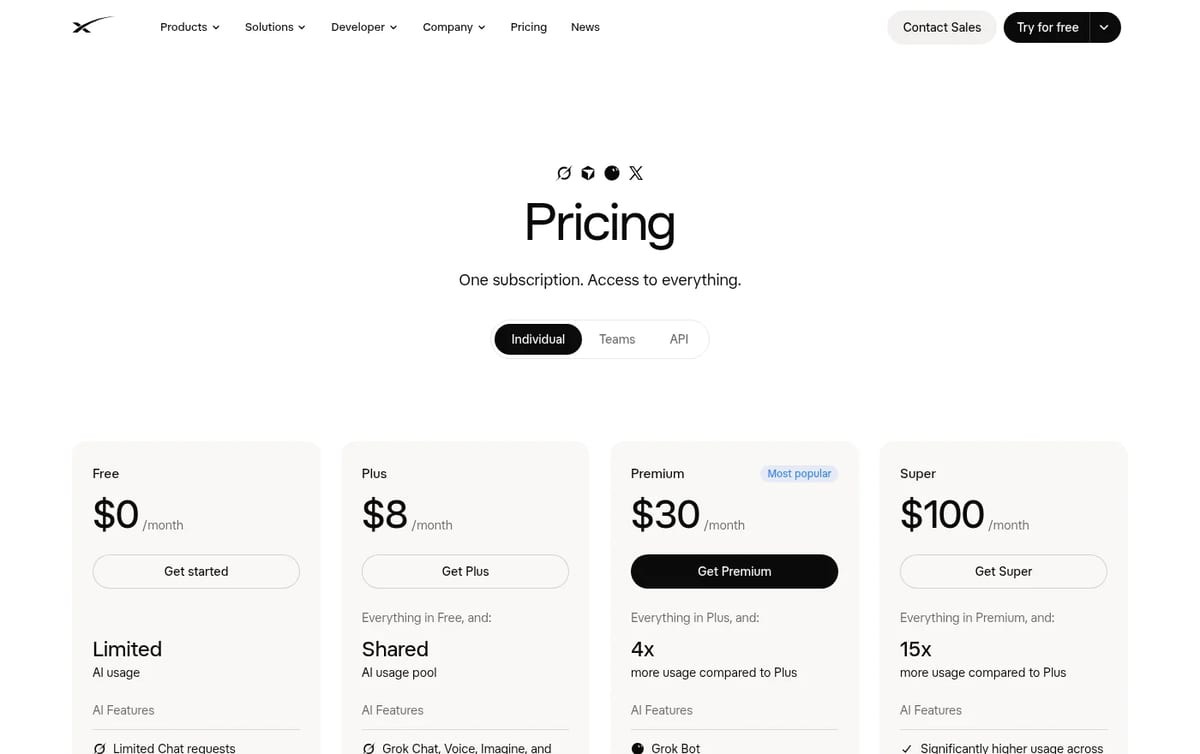
Grok now sits in one subscription with X and Cursor. Free gives limited chat and agent requests. Plus costs $8 a month and adds Grok Chat, Voice, Imagine and Build with a shared usage pool, plus X Premium features. Premium costs $30 a month with 4x the usage of Plus, the latest Grok models, faster replies, image and video creation and Grok Bot. Super is $100 a month (15x Plus) and Ultra $200 a month (50x Plus). Your allowance refreshes weekly, and you can buy top-ups if you run out.
Our take: start free and only upgrade when you hit the limit on a task you do every week. The pricing page itself recommends Premium for new AI users and Plus for social creators with limited AI use, so Plus is the better fit if you mainly want the X perks and occasional chat.
Privacy settings to check first
X’s help center says your public posts and your Grok chats on X may be used to train and personalize Grok unless you opt out. To change that on X, go to Settings, Privacy and safety, Data sharing and personalization, Grok & Third-party Collaborators, and untick data sharing for training and, if you want, Grok personalization. In the same area you can delete your whole Grok conversation history; deleted chats are removed within 30 days.
Tips for better Grok answers
- Check facts that matter. X’s own help page warns that Grok may confidently give incorrect information, so open the cited sources.
- Do not paste sensitive data such as passwords, health records or client details.
- Say when you want sources from the web rather than posts on X, or the other way round.
- Give an example of the tone or format you want; it saves several follow-ups.
For plan details, read our SuperGrok review. To see how it stacks up, compare Grok vs ChatGPT, and for images and video see our Grok Imagine review.
Frequently asked questions
Is Grok AI free?
Yes. Grok has a free plan with limited chat and agent requests. Paid plans start at $8 a month for Plus and $30 for Premium.
Where can I use Grok?
You can use Grok on grok.com, in the Grok app for iOS and Android, and inside X through the Grok icon in the navigation bar.
Can Grok search the internet?
Yes. Grok can search the web and real-time public posts on X, and it adds citations from the sources it used.
Can Grok make images and videos?
Yes. Grok Imagine creates images and videos from text prompts or reference photos, with clips of up to 15 seconds.
How do I stop Grok from using my data for training?
On X, go to Settings, Privacy and safety, Data sharing and personalization, Grok & Third-party Collaborators, and untick the training option.
Found this useful? Share it with someone comparing AI tools.
How to Find Archived Chats in ChatGPT (2026)
How to find archived chats in ChatGPT: open Settings, Data controls, Archived chats, or search a word from the chat, since archived chats stay…
 Eimantas Kazėnas · 4 min read
How to Cancel Claude Subscription (2026)
How to cancel Claude subscription: open Billing in Settings, click Cancel on web or desktop, or cancel in the App Store or Google Play if you paid…
Eimantas Kazėnas · 5 min read