Home / Guides / AI Video Generator
How to Use Pika in ChatGPT: Setup and Credits
 Mihai (Mike) Bizz Business, entrepreneurship, tech & AI
 - Published
- 7 min read
On this page What the Pika plugin can do in ChatGPT
Independent and reader-supported. Some links may earn us a commission; it never changes our rankings. Editorial policy
How to use Pika in ChatGPT: install the plugin, sign in, make video, images and audio right in chat, and get 250 bonus credits after your first generation.
Pika launched its ChatGPT plugin extension on October 16, 2026, built with OpenAI on the new Plugin Extensions framework from DevDay. It puts Pika’s creation apps inside the chat and in a side panel: video, images, music, sound effects and voiceover, with a timeline editor and your Pika library. The pitch is that you describe what you want in plain language and click through presets instead of learning a separate app. The part most guides skip is cost: the plugin is free to install, but every generation spends Pika credits, and the free Pika plan includes none each month.
Quick answer:
- Install: open Plugins in the ChatGPT sidebar, find Pika and select Install, or type “Install the Pika plugin”. Then sign in to Pika and authorize it.
- Use: mention
@Pikain a chat, describe the result, and upload photos or clips if needed. - Free credits: Pika’s plugin page says you get 250 credits after your first plugin generation. Installing alone doesn’t trigger it.
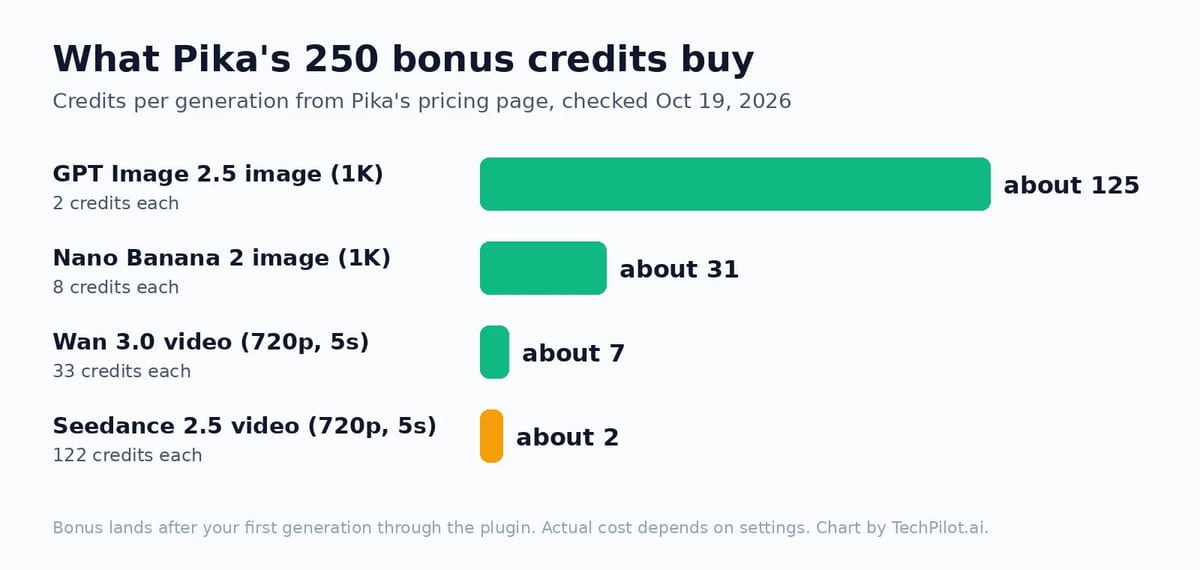
- Cost after that: Pika plans start at $10 a month for 900 credits. A 5-second Seedance 2.5 clip costs 122 credits; a GPT Image 2.5 image costs 2.
- Plans: OpenAI lists plugins on Free, Go, Plus and Pro, but says extensions for Free and Go on the web are still coming, so the full side panel is most reliable on Plus or Pro.
What the Pika plugin can do in ChatGPT
The Pika listing in ChatGPT’s plugin directory describes “product ads, studio headshots, short films, photo animation, relighting, new camera angles, outfit swaps, lip-sync, soundtracks and more.” It ships with skills for ads, audio, a camera director, characters, general creation, podcasts and remixes. On its plugin page, Pika counts 40+ tools and 55+ models (its FAQ says “over 100” models; the gallery we counted lists 57 apps and models). The models include Seedance 2.5, Google Veo 3.1, Kling 3.0, MiniMax H3, Nano Banana 2.1, GPT Image 2.5, Seedream 5 and ElevenLabs voices.
Three things make it different from just pasting a Pika prompt into ChatGPT:
- In-chat creative UI: clickable presets and options appear in the conversation, so you don’t have to spell out every setting in words.
- Timeline editing: ask ChatGPT to open a timeline, then adjust timing, regenerate single clips, and add transitions, effects and music.
- Library sync: it can use what’s already in your Pika account, and new creations save back there, so you can finish a project on pika.art.
How to install Pika in ChatGPT
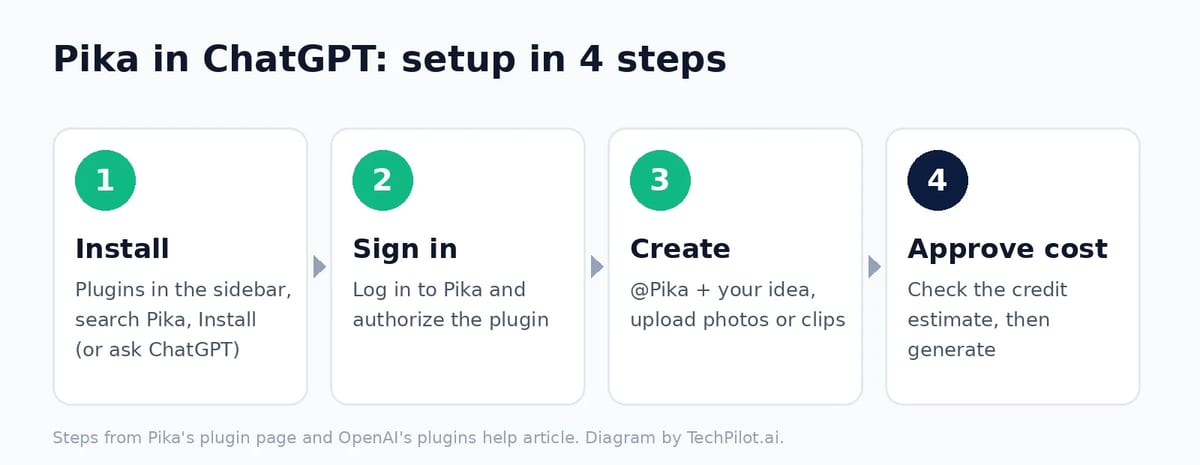
- Open the plugin directory. On ChatGPT web, desktop or mobile, select Plugins in the sidebar and search for Pika. It’s listed under Creativity, developer Pika.
- Install it. Select Install. You can also just type “Install the Pika plugin” in a chat, which Pika says works too.
- Sign in to Pika and authorize. Use your existing Pika account or create one. This links the plugin to that account’s credits and library.
- Ask what it can do. Pika suggests starting with “Show me what apps you have”. ChatGPT then shows the app gallery.
Pika’s FAQ says installing doesn’t start a generation. By default, the plugin shows an estimated cost before it generates anything, and spending follows your account’s permissions and limits. On a ChatGPT Business or Enterprise workspace, an admin has to make the plugin available first, per OpenAI’s plugins help article.
How to use it: prompts that work
ChatGPT uses an installed plugin when it’s relevant, but naming it is more reliable. Type @Pika, select + and search for Pika, or pick it from Plugins in the composer. Then describe the result, the format and anything that must stay the same. Some starting points:
- Product ad: “@Pika Make a 10-second vertical product ad from this photo of my candle. Warm evening light, slow push-in, end on the product with the text ‘Cedar & Smoke’.”
- Headshot: “@Pika Turn my selfie into a professional headshot. Plain grey backdrop, navy blazer, soft light. Keep my face, hair and glasses exactly the same.”
- Animate a photo: “@Pika Animate this beach photo into a 5-second clip with gentle waves and moving clouds. Use Wan 3.0 for a quick draft.”
- Soundtrack: “@Pika Add a calm lo-fi soundtrack and soft wave sound effects to the last clip.”
- Edit: “@Pika Open the timeline, trim the second shot to 3 seconds and add a crossfade between shots.”
Naming the model matters for cost. If you don’t, you may end up on a premium video model. Draft with a cheaper one, then rerun the shot you like on Seedance 2.5 or Veo 3.1.
How much it costs
The plugin itself is free. Generations draw from the credit balance of the Pika account you connected. Here’s what the 250 bonus credits cover, using the per-generation costs on Pika’s pricing page:
| Pika plan | Price | Credits per month | Notes |
|---|---|---|---|
| Free | $0 | 0 (credit packs only) | No watermark, but no commercial license |
| Starter | $10/mo ($8 billed yearly) | 900 | No commercial license |
| Creator | $35/mo ($28 billed yearly) | 3,150 | Cheapest plan with a commercial license |
| Fancy | From $95/mo | 8,550 and up | Unlimited parallel jobs, priority queue |
Our take: the 250 credits are enough to judge the workflow, not to finish a project. That’s about 2 Seedance 2.5 clips or 125 GPT Image 2.5 images. If you plan to post ads for a business, note that only Creator and above include a commercial license. Credit packs start at 1,500 credits for $25, and Pika says top-ups work on pika.art and its MCP connections, but not in its API, iOS app or old.pika.art.
Common problems and fixes
- Pika isn’t in the plugin directory: availability depends on your plan, region and workspace. On a work account, ask your admin. On a personal account, check that you’re on the latest app or try the web.
- No side panel, only chat replies: OpenAI’s DevDay notes say extensions for Free and Go on the web are coming soon. Some views also depend on whether you’re on web, desktop or mobile.
- The 250 credits didn’t appear: they arrive after your first generation through the plugin, not at install. Check that the plugin is signed in to the Pika account you expect.
- “Not enough credits”: the free Pika plan has no monthly credits. Buy a pack or a plan on pika.art, then retry in ChatGPT.
- Video burned through credits fast: you probably got a premium model. Ask for Wan 3.0 or another cheaper model for drafts, and always read the estimate before you approve it.
- Face or product changed: say what must stay the same (“keep my face, hair and glasses exactly the same”), and upload a clear, front-facing photo.
Is it worth using Pika inside ChatGPT?
If you already think in ChatGPT, yes. Planning a script, generating shots and editing them on a timeline in one conversation saves a lot of tab-switching, and the cost preview keeps you from overspending. If you already pay for Pika and work on pika.art, the plugin mainly moves the same tools into chat. Remember that the photos and clips you upload go to Pika’s servers too, so the same caution applies as with ChatGPT itself. Our guide to whether ChatGPT is safe covers the settings worth changing.
For Pika’s standalone features, see our Pika tool page. For the model doing the heavy lifting behind many plugin videos, see Seedance 2.5 pricing and free access. If you want video without paying for credits, our list of the best free AI text to video generators shows the free limits that actually work.
Frequently asked questions
Is the Pika plugin for ChatGPT free?
Installing it is free. Generations use Pika credits. Pika adds 250 credits after your first plugin generation, and its free plan includes no monthly credits, so after that you need a credit pack or a paid plan from $10 a month.
How do I get Pika’s 250 free credits in ChatGPT?
Install the Pika plugin, sign in to your Pika account, and complete your first generation through the plugin. Pika says the 250 credits are added after that first generation. Installing alone doesn’t qualify.
Does Pika work on the free ChatGPT plan?
OpenAI’s pricing page lists plugins on Free, Go, Plus and Pro. Its DevDay notes say plugin extensions for Free and Go on the web are coming soon, so the side panel may be missing there for now.
How do I start Pika in a ChatGPT chat?
Type @Pika followed by what you want, or select + and search for Pika. Upload a photo or clip if the task needs one. The plugin shows a credit estimate before it generates.
Which models can Pika use inside ChatGPT?
Pika lists 55+ models on its plugin page, including Seedance 2.5, Google Veo 3.1, Kling 3.0, MiniMax H3, Wan 3.0, Nano Banana 2.1, GPT Image 2.5, Seedream 5 and ElevenLabs voices.
Can I use Pika videos from ChatGPT commercially?
Only on Pika’s Creator plan ($35 a month) or higher, which include a commercial license. The Free and Starter plans don’t, even though they don’t add a watermark.
Found this useful? Share it with someone comparing AI tools.