Open-Source Alternatives to Paid Software
 Eimantas Kazėnas Marketing & Tech
- Published
- 13 min read
On this page The 12 alternatives at a glance
- The 12 alternatives at a glance
- 1. ChatGPT Plus ($20/month): Ollama + Open WebUI
- 2. Midjourney Basic ($10/month, or $8 billed annually): ComfyUI
- 3. Zapier Professional (from $19.99/month yearly): n8n
- 4. Notion Plus ($10/seat/month yearly): AppFlowy
- 5. Canva Pro ($18/month): Penpot
- 6. Grammarly Pro ($12/month billed annually): LanguageTool
- 7. Calendly Standard ($10/seat/month yearly): Cal.com
- 8. Otter Pro ($8.33/user/month yearly): whisper.cpp
- 9. Mailchimp Essentials (from $13/month): Listmonk
- 10. Loom Business ($18/user/month): Cap
- 11. 1Password Individual ($3.99/month yearly): Vaultwarden
- 12. Dropbox Plus ($9.99/month): Nextcloud
- What you could save
- Trade-offs you should expect
- Which subscription to replace first
- Frequently asked questions
Independent and reader-supported. Some links may earn us a commission; it never changes our rankings. Editorial policy
These 12 GitHub repos can replace paid tools like ChatGPT Plus, Midjourney, Notion and Zapier. We checked official prices and stars on November 19, 2026.
Quick answer: if you already pay for all 12 individual plans below, the official prices we checked today add up to $151.30 a month ($1,815.60 a year). The highest-star swaps are n8n for Zapier, Ollama plus Open WebUI for ChatGPT, and ComfyUI for Midjourney. The code is free to clone. Hosting, GPUs, model downloads and email sending are not, and n8n uses a fair-code license rather than an OSI open-source license.
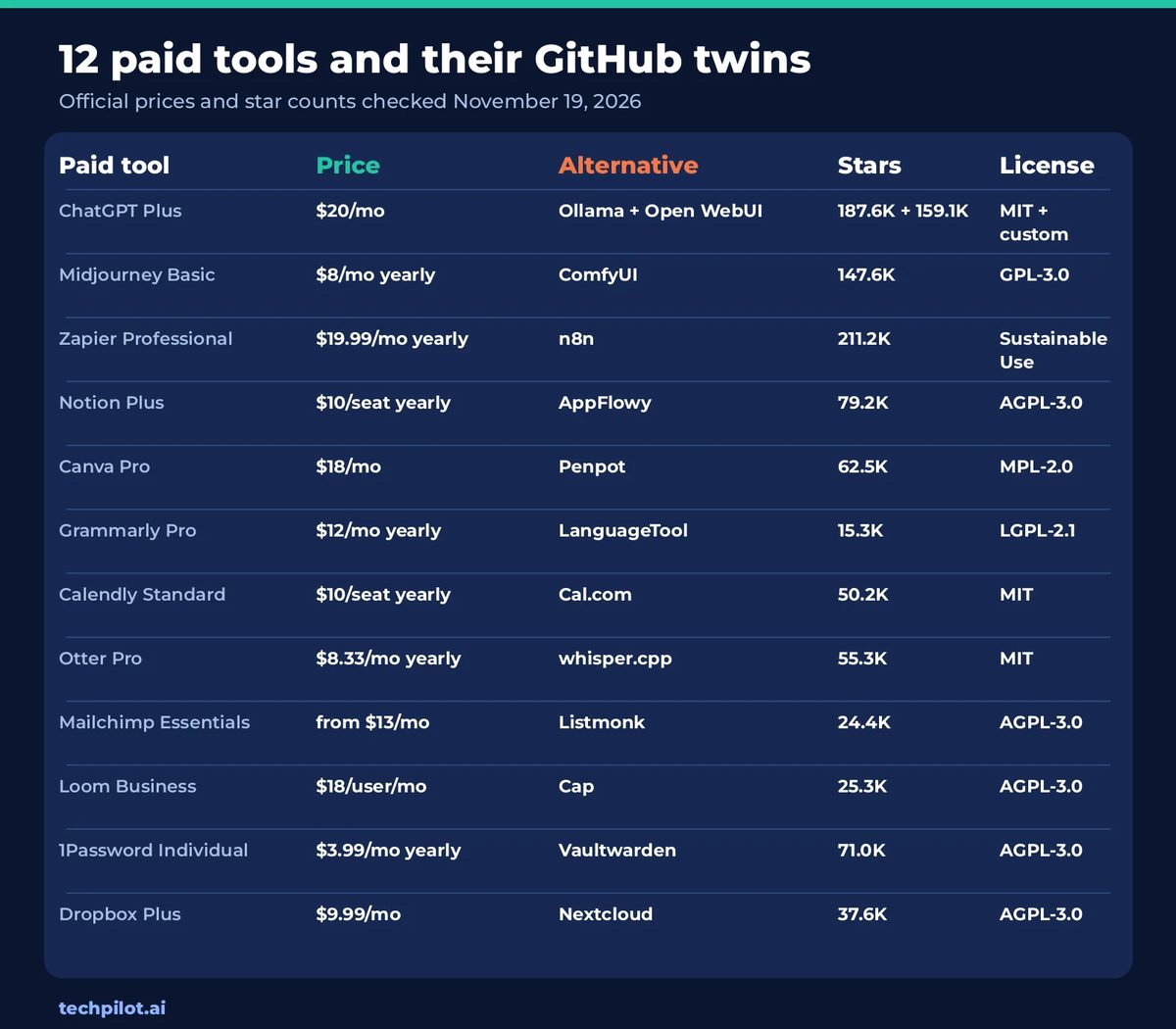
The 12 alternatives at a glance
| Paid tool | Monthly price | OSS alternative | Stars | License |
|---|---|---|---|---|
| ChatGPT Plus | $20 | Ollama + Open WebUI | 187.6K + 159.1K | MIT + custom |
| Midjourney Basic | $8* | ComfyUI | 147.6K | GPL-3.0 |
| Zapier Professional | $19.99* | n8n | 211.2K | Sustainable Use |
| Notion Plus | $10* | AppFlowy | 79.2K | AGPL-3.0 |
| Canva Pro | $18 | Penpot | 62.5K | MPL-2.0 |
| Grammarly Pro | $12* | LanguageTool | 15.3K | LGPL-2.1 |
| Calendly Standard | $10* | Cal.com | 50.2K | MIT |
| Otter Pro | $8.33* | whisper.cpp | 55.3K | MIT |
| Mailchimp Essentials | $13 | Listmonk | 24.4K | AGPL-3.0 |
| Loom Business | $18 | Cap | 25.3K | AGPL-3.0 |
| 1Password Individual | $3.99* | Vaultwarden | 71.0K | AGPL-3.0 |
| Dropbox Plus | $9.99 | Nextcloud | 37.6K | AGPL-3.0 |
Star counts and prices were checked on November 19, 2026. Figures marked with an asterisk are the yearly per-month rate published on the vendor’s pricing page (or official docs). Canva Pro is the regular US$18/month list price, not the current 50% first-three-months promo. 1Password is the regular $3.99/month Individual rate, not the $2.99 first-year promo. Mailchimp Essentials is the published starting price (it rises with your contact list). Calendly Standard is $10/seat/month billed yearly without the optional Notetaker and Callie add-on.
1. ChatGPT Plus ($20/month): Ollama + Open WebUI
ChatGPT Plus is $20 a month in the US, with no annual plan, as listed on OpenAI’s pricing page today. That is the mid-tier individual plan above Go ($8) and below Pro (from $100). For a comparison of Plus and Pro, see our guide to ChatGPT Plus vs Pro.
Ollama (187.6K stars, MIT, last push November 18, 2026) runs open models such as Gemma, Qwen, DeepSeek and gpt-oss on your own machine. Open WebUI (159.1K stars, last push November 18, 2026) sits on top with a ChatGPT-style chat interface. Open WebUI uses a custom license: you can run it, but you generally must keep the Open WebUI branding if more than 50 people use it in a 30-day window, unless you have an enterprise license. A first install is curl -fsSL https://ollama.com/install.sh | sh, then ollama run gemma4. Add the UI with the project’s Docker one-liner, or pip install open-webui.
This is a real replacement only if your hardware can run a useful model, and it will not give you GPT-6, Codex limits or OpenAI’s hosted features. Electricity and a decent GPU (or a lot of patience on CPU) replace the $20 invoice.
2. Midjourney Basic ($10/month, or $8 billed annually): ComfyUI
Midjourney’s official plan chart lists Basic at $10 a month, or $96 a year ($8 a month). Standard, Pro and Mega are $30, $60 and $120 a month on monthly billing. There is no free plan.
ComfyUI (147.6K stars, GPL-3.0, last push November 19, 2026) is a local, node-based UI and engine for diffusion models. The repo now lives at Comfy-Org/ComfyUI; older comfyanonymous/ComfyUI links redirect there. Getting started is pip install comfy-cli, or a desktop build from comfy.org. You will spend time installing models and learning the graph. The upside is control, no per-image subscription, and the ability to run many open image models. The downside is a much steeper setup than Midjourney’s prompt box, and you need a capable GPU for a decent pace.
3. Zapier Professional (from $19.99/month yearly): n8n
Zapier’s pricing page today shows Professional starting from $19.99 a month with yearly billing (the page also offers monthly billing at a 33% higher rate). That entry tier is usage-based; the price rises with your monthly task count.
n8n (211.2K stars, last push November 19, 2026) is the usual self-hosted Zapier alternative, with a visual editor, code steps and built-in AI nodes. We also have a TechPilot.ai n8n overview. It is fair-code, not OSI open source: the Sustainable Use License lets you self-host for personal use or internal business use, and to share the code free of charge for non-commercial purposes. You may not use it to offer a competing hosted service. Enterprise files are licensed separately. A quick start is docker run -it --rm --name n8n -p 5678:5678 -v n8n_data:/home/node/.n8n docker.n8n.io/n8nio/n8n, or curl -fsSL https://get.n8n.io | sh. n8n Cloud exists if you would rather not run the server yourself.
4. Notion Plus ($10/seat/month yearly): AppFlowy
Notion’s pricing page lists Plus at $10 per seat per month with yearly billing (the page advertises up to 20% off vs monthly). Business is $20 per seat per month on the same toggle. Free remains available for individuals.
AppFlowy (79.2K stars, AGPL-3.0, last push November 15, 2026) is an open-source collaborative workspace aimed squarely at Notion: docs, wikis, projects and some AI features, with your data on your machine or server. Download a desktop build from appflowy.com, or follow the repo’s self-host docs. AFFiNE (74.8K stars, mixed MIT plus a separate backend license, last push November 18, 2026) is a close second if you want a whiteboard-plus-docs tool. Neither is a pixel-perfect Notion clone, and team permissions, templates and official integrations will feel thinner at first.
5. Canva Pro ($18/month): Penpot
On Canva’s US pricing page today, Pro is listed at US$18 a month for one person, and Business at US$25 per person per month. A 50% off promo applies only to the first three months of a monthly plan; we used the regular $18 figure, not the discounted intro rate. Yearly billing is also offered (the page says it saves from 16%), but the dollar amount on that toggle was not what loaded in our check, so it is not in the total.
Penpot (62.5K stars, MPL-2.0, last push November 18, 2026) is an open-source design platform for product teams: boards, components and team collaboration in the browser. Self-host with the official Docker Compose setup from penpot.app, or use Penpot Cloud. Be honest about the fit: Penpot is closer to Figma than to Canva’s template-and-stock marketplace. If you mainly need social templates and Magic Studio, you will feel the gap. For a wider set of Canva substitutes, see our Canva alternatives guide.
6. Grammarly Pro ($12/month billed annually): LanguageTool
Grammarly’s official pricing article lists Pro at $144 per member per year ($12 a month on average), $60 per quarter, or $30 per member per month. The plans page shows the $12 Pro figure as the one to try.
LanguageTool (15.3K stars, LGPL-2.1, last push November 19, 2026) checks grammar and style in 25+ languages. The fastest path is the official extension or languagetool.org; you can also self-host the server if you do not want text leaving your network. It is strong on grammar and multilingual rules. It is not a full stand-in for Grammarly’s tone rewrites, plagiarism checks and document-level AI editor.
7. Calendly Standard ($10/seat/month yearly): Cal.com
Calendly’s pricing page lists Standard at $10 per seat per month on yearly billing, or Teams at $16. Those prices are for the scheduler itself. Turning on the optional Notetaker and Callie add-on raises the Standard yearly rate (it showed $18 per seat per month in that configuration). We used Standard at $10, without the add-on. A free plan still exists, with one event type.
Cal.com (50.2K stars, MIT, last push November 13, 2026) is the open-source scheduling stack. The GitHub repo was renamed from calcom/cal.com to calcom/cal.diy; the product site is still cal.com, and they also offer a hosted cloud. Self-hosting is documented in the repo (Docker Compose is the usual path). You get booking pages, calendars and team scheduling. Calendar-sync edge cases and some of Calendly’s sales routing tools are the usual trade-offs, plus the time to keep the app updated.
8. Otter Pro ($8.33/user/month yearly): whisper.cpp
Otter’s pricing page lists Pro at $16.99 per user per month, or $8.33 per user per month when billed annually (the page shows a 51% yearly saving). Business is higher. A student discount exists on a separate FAQ, with older figures; we used the current plan cards.
whisper.cpp (55.3K stars, MIT, last push November 18, 2026) is the practical way to run OpenAI’s Whisper models locally. The original openai/whisper repo still has 113.0K stars, but its last push was August 31, 2026, so we are recommending the actively maintained C/C++ port. Start with git clone https://github.com/ggml-org/whisper.cpp.git and follow the README’s build and model-download steps. This transcribes audio you already have. It is not Otter’s always-on meeting bot, speaker workspace or CRM integrations. You will also need disk space for the models.
9. Mailchimp Essentials (from $13/month): Listmonk
Mailchimp’s marketing pricing page lists Essentials starting at $13 a month and Standard starting at $20 a month, after a 14-day trial, with the 0–500 contact tier selected. Prices go up as your list grows, and a Free plan remains for under 250 contacts.
Listmonk (24.4K stars, AGPL-3.0, last push November 15, 2026) is a self-hosted newsletter and mailing-list manager: a single binary (or a short Docker Compose setup, docker compose up -d) with campaigns, lists and a modern dashboard. You still pay an SMTP provider such as Amazon SES or Postmark to actually send mail, and you have to stay inside anti-spam and consent rules yourself. You do not get Mailchimp’s full marketing CRM, template marketplace or built-in support desk.
10. Loom Business ($18/user/month): Cap
Loom’s pricing page loaded with monthly billing selected and listed Business at $18 per user per month, or Business + AI at $24. Annual billing is offered at up to 17% off; we used the $18 monthly figure that the page showed by default. Starter remains free, with a 25-video and 5-minute cap.
Cap (25.3K stars, AGPL-3.0 for most of the project, last push November 19, 2026) is an open-source Loom-style recorder for shareable screen videos, with a hosted option at cap.so. Install a desktop build from the site, or build from the repo. It is newer than Loom, so team admin, player features and integrations may be slimmer. Some crates in the repo are MIT-licensed; the application itself is AGPL-3.0.
11. 1Password Individual ($3.99/month yearly): Vaultwarden
1Password’s personal pricing page lists Individual at $3.99 per month with annual billing, and Families at $5.99. A first-year promo ($2.99 and $4.49) is on the same page; we used the regular $3.99 rate, not the intro price.
Vaultwarden (71.0K stars, AGPL-3.0, last push November 18, 2026) is an unofficial, lightweight Bitwarden-compatible server you can run yourself, typically with the official Docker image. The official Bitwarden server (20.7K stars, AGPL-3.0 core plus a separate Bitwarden License for enterprise files, last push November 19, 2026) is the vendor-supported path, and Bitwarden’s own cloud also has a free tier and a cheap Premium plan (listed at $1.65 a month billed annually on Bitwarden’s pricing page today). You do not have to self-host to leave 1Password. Self-hosting is for control and avoiding another vault vendor; it also means you are responsible for backups, updates and locking the box down.
12. Dropbox Plus ($9.99/month): Nextcloud
Dropbox’s plans page lists Plus at $9.99 a month for one person and 2 TB, with Standard at $15 per user per month and Advanced at $24. The page has monthly and yearly billing toggles; $9.99 is the Plus price shown when the page loaded.
Nextcloud (37.6K stars, AGPL-3.0, last push November 19, 2026) is a full self-hosted files, photos, Talk and office stack. The usual production path is Nextcloud All-in-One or a documented Docker install, plus your own storage and HTTPS. You can match a lot of Dropbox’s file sync, and then some (calendar, contacts, only-office style editing). You also take on server maintenance, backups and the occasional upgrade headache, which is the real cost after you cancel Plus.
What you could save
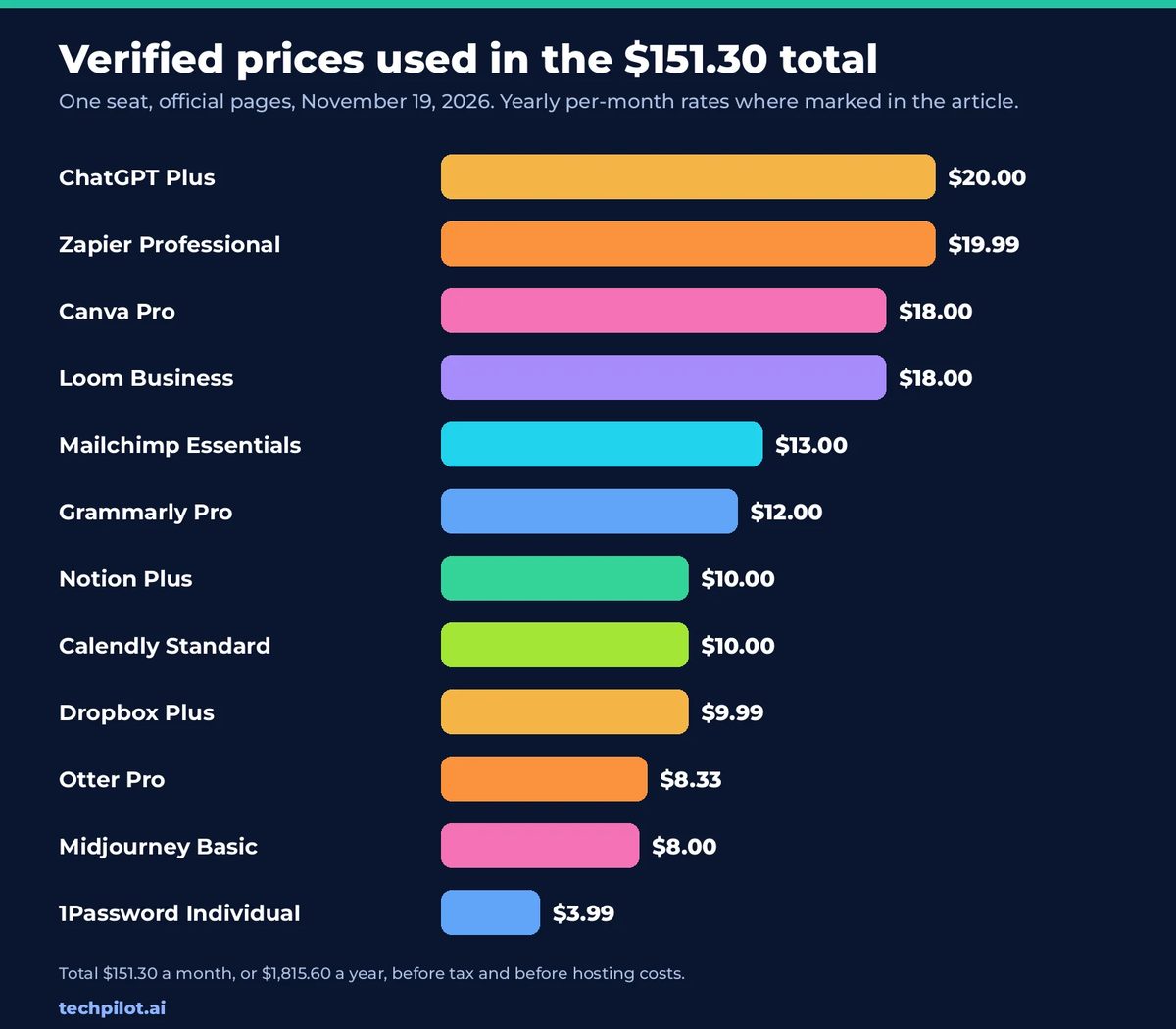
Add the 12 verified figures above and you get $151.30 a month, or $1,815.60 a year, before tax. That is the most you should put on a “cancel everything” slide, and only if you actually pay for all 12 plans at those rates. If you pay month-to-month where a cheaper yearly rate exists (Grammarly at $30, Otter at $16.99, Midjourney Basic at $10), the invoice is higher. If you only subscribe to two or three of these, scale the table to what you really pay.
Open source does not zero the bill. A small VPS for Listmonk, Vaultwarden or n8n might be $5 to $20 a month. ComfyUI and Ollama want a GPU if you care about speed. Listmonk needs an SMTP vendor. Nextcloud wants disk and snapshot backups. Count those before you celebrate the $151.30.
We left analytics out of the total on purpose. Google Analytics 4 is already free for ordinary sites, so inventing a savings line for it would be dishonest. If you want a privacy-first, self-hosted alternative anyway, Umami (40.2K stars, MIT, last push November 18, 2026) and Plausible (29.9K stars, AGPL-3.0, last push November 19, 2026) are the usual picks.
Trade-offs you should expect
Setup time is the first cost. Browser extensions (LanguageTool) and desktop downloads (AppFlowy, Cap, Ollama) can be running the same day. ComfyUI, Nextcloud, Penpot and a hardened Vaultwarden or Bitwarden server take longer, plus occasional upgrades. If you hate maintaining software, pay for a vendor cloud — including the official clouds for n8n, Cal.com, Penpot, AppFlowy, Bitwarden and Listmonk’s sending partner — or keep the paid app.
Licenses are not all the same. MIT, MPL-2.0, LGPL-2.1, GPL-3.0 and AGPL-3.0 are open-source licenses, with AGPL in particular expecting you to share changes if you offer a modified version as a network service. n8n’s Sustainable Use License and Open WebUI’s custom license are more restrictive; read them before you build a product on top. Several repos (Bitwarden, n8n, AFFiNE, Cap) also split out enterprise or backend files under a different license.
Feature gaps are real. Midjourney’s taste and ease, Notion’s template ecosystem, Canva’s stock library, Otter’s meeting bot and Mailchimp’s deliverability tooling do not appear the moment you clone a repo. For some teams, replacing two expensive tools and leaving the cheap, well-fitting ones (1Password at $3.99, Dropbox Plus at $9.99) is the rational move.
Which subscription to replace first
Start with the tools that are expensive, a good functional match, and realistic to run on a laptop or a small server: n8n instead of Zapier, Ollama instead of ChatGPT Plus if you already have a GPU, and LanguageTool instead of Grammarly if grammar checking is all you use. Leave design, meetings and file sync until you have tried the self-hosted option for a week.
If you are not just cancelling subscriptions, but assembling a product, the open-source business stack in our 10 GitHub repos to build an AI business post is the better next read. That list is about billing, CRM, RAG and marketing, not about replacing a personal software bill.
Frequently asked questions
Are these GitHub repos really free?
The code is free to clone. MIT, MPL-2.0, LGPL-2.1, GPL-3.0 and AGPL-3.0 repos are open source, with AGPL generally requiring you to share changes if you offer a modified version as a network service. n8n uses the Sustainable Use License, which allows personal and internal business use but is not an OSI open-source license. Open WebUI has a custom license that usually requires you to keep its branding above 50 users.
Will I actually save $151.30 a month?
Only if you currently pay for all 12 of the named plans at the rates in the table. That total uses official prices we checked on November 19, 2026, with yearly per-month rates where the vendor published them, and it excludes short promos such as 1Password’s first-year discount and Canva’s 50% off for three months. You should still budget for a server, a GPU for Ollama or ComfyUI, SMTP for Listmonk, and the time to maintain what you host.
Which paid subscription should I replace first?
Start with an expensive tool that has a close open-source match you can run quickly: n8n instead of Zapier, Ollama instead of ChatGPT Plus if you have a capable machine, or LanguageTool instead of Grammarly if you only need grammar checking. Leave design, meeting transcription and file sync until you have tried the self-hosted option for a week.
Do I have to self-host to drop these subscriptions?
No. Bitwarden, Cal.com, n8n, Penpot, AppFlowy and Cap all offer official clouds, and LanguageTool works as a browser extension. Self-hosting is worth it when you want the data on your own hardware and you are willing to handle updates and backups. If you do not want to be the sysadmin, use the project’s official cloud or keep the paid app.
Found this useful? Share it with someone comparing AI tools.

4 Best AI knowledge base software: Compared and reviewed
We have rounded up the popular AI knowledge base software for organizations. We compared features, pricing, and overall user ratings.
 Alexi Carmichael · 5 min read

Building smarter solutions through the role of AI in custom software development
The role of AI in custom software development it’s revolutionary and offers unparalleled efficiency, innovation, and competitiveness.
 John Daniel · 6 min read