Eraser is one of the best AI tools for architecture diagrams, because the output stays editable and can be grounded in your own code and systems.
Home / Tools / Graphics & Design
Graphics & Design · Tool review
Eraser Review: AI Diagram Pricing and Plans
 TechPilot.ai review team Hands-on testing, one published method
- Last updated
- How we test
The AI news that actually mattered this week.
One short email every Friday: the biggest AI stories, what they mean for you, and the tools worth trying. A 3-minute read, no hype.
Free. Unsubscribe anytime.
You're in. Watch for the brief on Friday. Free. Unsubscribe anytime.
Summary
Pros and cons
What we like
- Clean diagrams from prompts, code and files.
- Editable canvas plus AI chat.
- Git repos and data sources on paid plans.
- Unlimited free guests.
- API and MCP support.
What could be better
- Free plan is very small.
- Per-member price adds up.
- Monthly billing costs a third more.
- Focused on technical diagrams only.
Key features
- AI diagrams: From text, code or files.
- Canvas: Edit by hand or in chat.
- Templates: Team rules and styles.
- Eraserbot: Self-updating code diagrams.
- Integrations: GitHub, Notion, Confluence, VS Code.
- Pricing: Free; Business $45 a member.
Screenshots
Full review
Independent and reader-supported. Some links may earn us a commission; it never changes our scores. Editorial policy
Eraser is an AI diagram tool that turns prompts, code and cloud data into architecture diagrams. The Free plan has 3 files, and Business is $45 a member.
Quick answer: Eraser (eraser.io) is a diagramming tool for engineers and architects. You type a prompt, paste Terraform or upload a design doc, and its AI lays out a clean diagram you can keep editing by hand or in chat. Paid plans connect Git repos and data sources, so diagrams can be built from your real systems instead of from memory. Pricing is per member, and guests are free on every plan. Prices below are from Eraser’s pricing page on November 18, 2026.
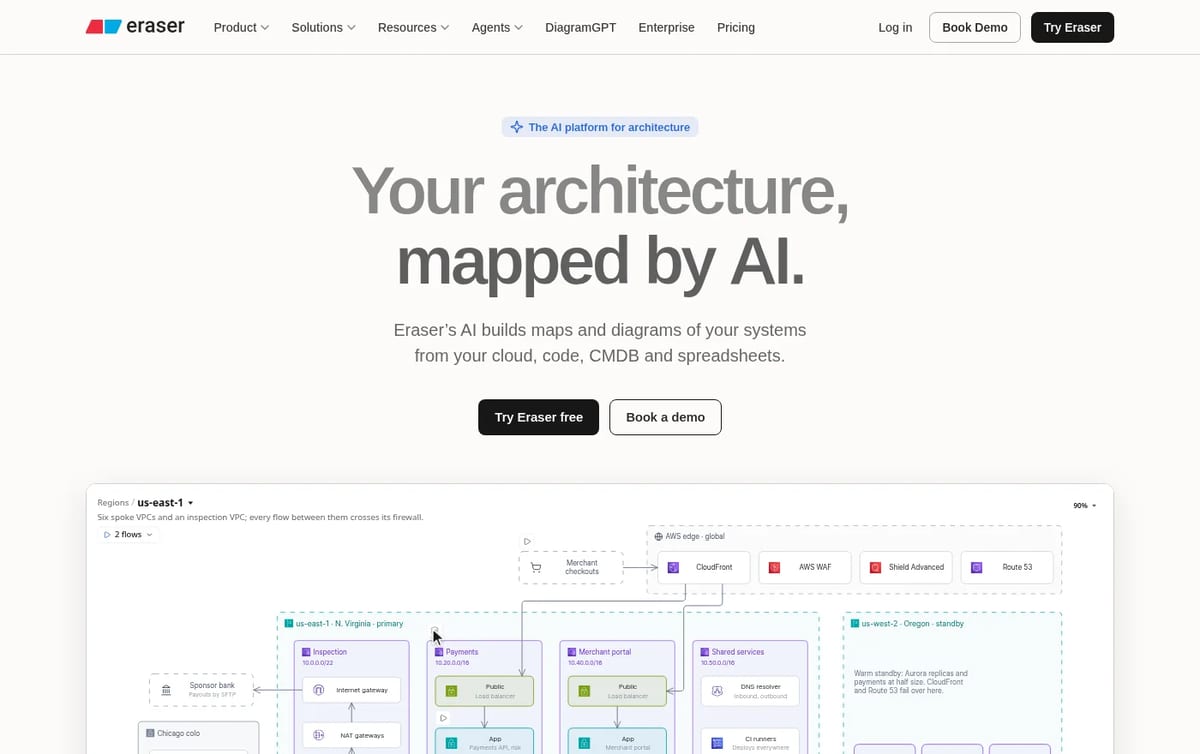
What Eraser does
- AI diagrams: turn text, code or files (PDF, Word, Excel, PowerPoint, draw.io, Visio) into architecture, sequence, data flow, ERD and BPMN diagrams.
- Visual editor plus chat: every AI result lands on a full canvas, so you can drag things around or keep refining with prompts.
- Team rules and templates: lock in naming, notation, colors and reference patterns so diagrams look the same across a team.
- Eraserbot and maps: codebase diagrams that update themselves and interactive maps built from your live systems.
- Integrations and API: Confluence, Notion, VS Code and GitHub, a diagramming API and MCP support for AI agents.
Eraser Pricing (2026)
| Plan | Price per member | AI credits | Key limits |
|---|---|---|---|
| Free | $0 | 3 | 3 files, 7-day version history, unlimited guests |
| Business | $45 a month billed yearly, or $60 monthly | 100 a month | Unlimited files, 1 Git repo + 1 data source, private files |
| Business Plus | $42 a month billed yearly, 10 seats minimum | 250 a month | 3 Git repos + 3 data sources, SAML SSO |
| Enterprise | Custom | Unlimited | Custom hosting, SCIM, SIEM logging, dedicated CSM |
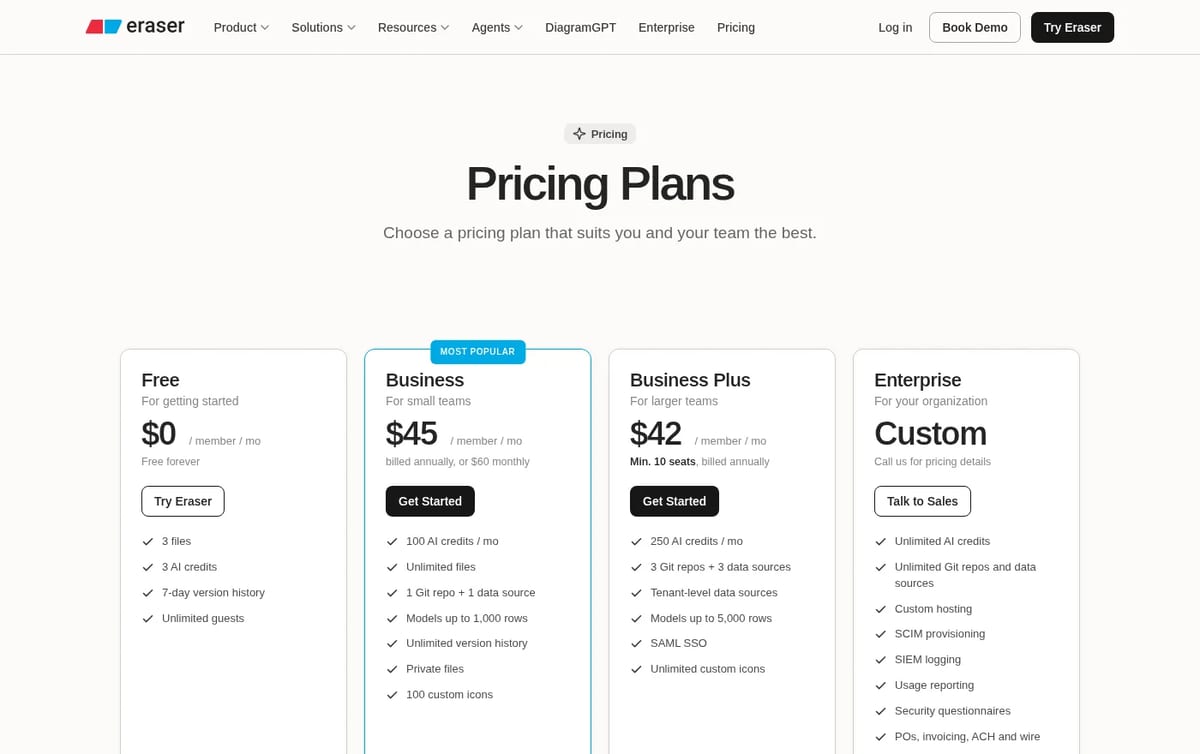
How to think about the cost: the Free plan is a real trial, not a workspace: 3 files and 3 AI credits run out after a handful of diagrams. Business is the plan most small teams need, and paying yearly cuts it from $60 to $45 per member. Because viewers and commenters join as free guests, you only pay for the people who actually draw. Business Plus is only cheaper per seat once you have 10 or more editors and need SSO.

For general design work, compare Eraser with our list of Figma alternatives. If you want visuals from plain text for slides, see our Napkin AI review, and for coding help, our guide to the best free AI for coding.
Who Eraser is for
Software engineers, solution architects, DevOps teams and consultants who explain systems to others and are tired of redrawing boxes when the infrastructure changes. Designers who need freeform whiteboards or UI mockups will be better served by a general design tool.
Limitations
- Tiny free plan: 3 files and 3 AI credits in total.
- Pricey per seat: $45 to $60 per editor a month adds up for larger teams.
- Git and data sources cost extra tiers: the Free plan can’t connect repos at all.
- Built for technical diagrams: not a replacement for a design or whiteboard tool.
TechPilot.ai’s Verdict on Eraser
Eraser is one of the best AI tools for architecture diagrams, because the output stays editable and can be grounded in your own code and systems.
Try the Free plan on one real diagram, then move editors to yearly Business and keep everyone else as free guests.
Eraser FAQ
Is Eraser free?
Yes. The Free plan costs $0 and includes 3 files, 3 AI credits, 7-day version history and unlimited guests. It is enough to test the AI, not to run a team workspace.
•
How much does Eraser cost?
Business is $45 per member a month billed yearly or $60 monthly, Business Plus is $42 per member a month with a 10-seat minimum, and Enterprise is custom, checked November 18, 2026.
•
What is an Eraser AI credit?
A credit is used each time the AI generates a diagram or outline. Free includes 3 credits, Business 100 a month, Business Plus 250 a month and Enterprise unlimited.
•
Can Eraser make diagrams from code?
Yes. You can paste code such as Terraform, and paid plans can reference Git repositories, so Eraser builds diagrams from your real code and data sources.
•
Do guests pay for Eraser?
No. Every plan includes unlimited free guests, so only the members who create and edit diagrams need a paid seat.

Clipdrop
Graphics & Design
Clipdrop remains one of the quickest ways to fix product and social photos, and the daily free limits are generous enough for light use.

Nano Banana
Graphics & Design
I’ve been tracking the buzz around Nano Banana for a while, and it’s one of those rare programs that feels like a genuine step-change in…

mnml AI
Graphics & Design
mnml AI is one of the most practical AI render tools for architects because it works from the views you already model, inside the software…