What Is RAG in AI? A Plain-English Guide
 Eimantas Kazėnas Marketing & Tech
 - Published
- 9 min read
On this page Why RAG exists
Independent and reader-supported. Some links may earn us a commission; it never changes our rankings. Editorial policy
What is RAG? Retrieval-augmented generation lets AI answer from your own documents. See how RAG works step by step, RAG vs fine-tuning, examples and tools.
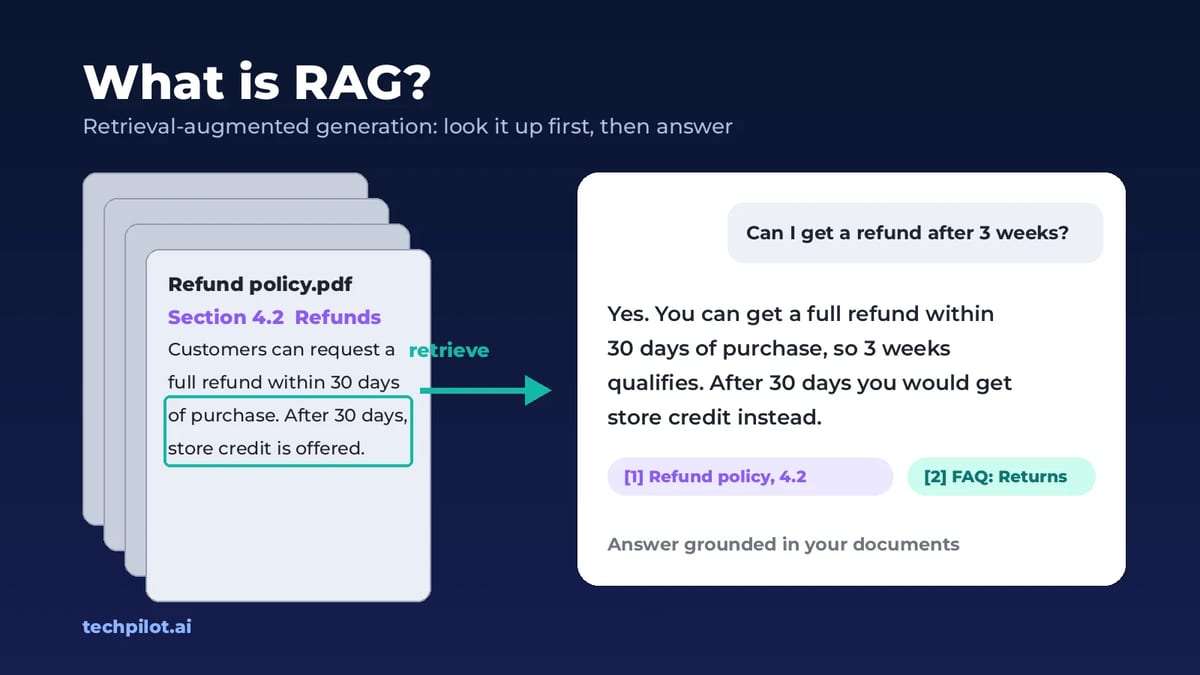
Quick answer: RAG, short for retrieval-augmented generation, is a way to make an AI model answer from a specific set of documents instead of only from what it learned in training. When you ask a question, a search step first finds the most relevant passages in your files, help center or database, pastes them into the prompt, and the model writes its answer from that text, ideally with citations. Think of it as turning a closed-book exam into an open-book one.
The term comes from a 2020 paper by Patrick Lewis and colleagues at Facebook AI Research, and it’s now the standard way companies build chatbots on their own data. Here is how RAG works, when to use it instead of fine-tuning or a long context window, where it breaks, and how to build a simple one.
Why RAG exists
A large language model only knows what was in its training data. That causes three problems for real work:
- It doesn’t know your stuff. Your contracts, product docs, tickets and wiki were never in its training set.
- Its knowledge has a cutoff. Anything that changed after training, from prices to policies, is invisible to it.
- It fills gaps with confident guesses. Ask about something it doesn’t know and it may invent an answer that sounds right.
RAG fixes all three without retraining the model. You keep your knowledge in a searchable store, update it whenever things change, and hand the model only the pieces it needs for each question. Because the answer is built from retrieved text, the system can also show which document each claim came from, so people can check it.
How RAG works, step by step
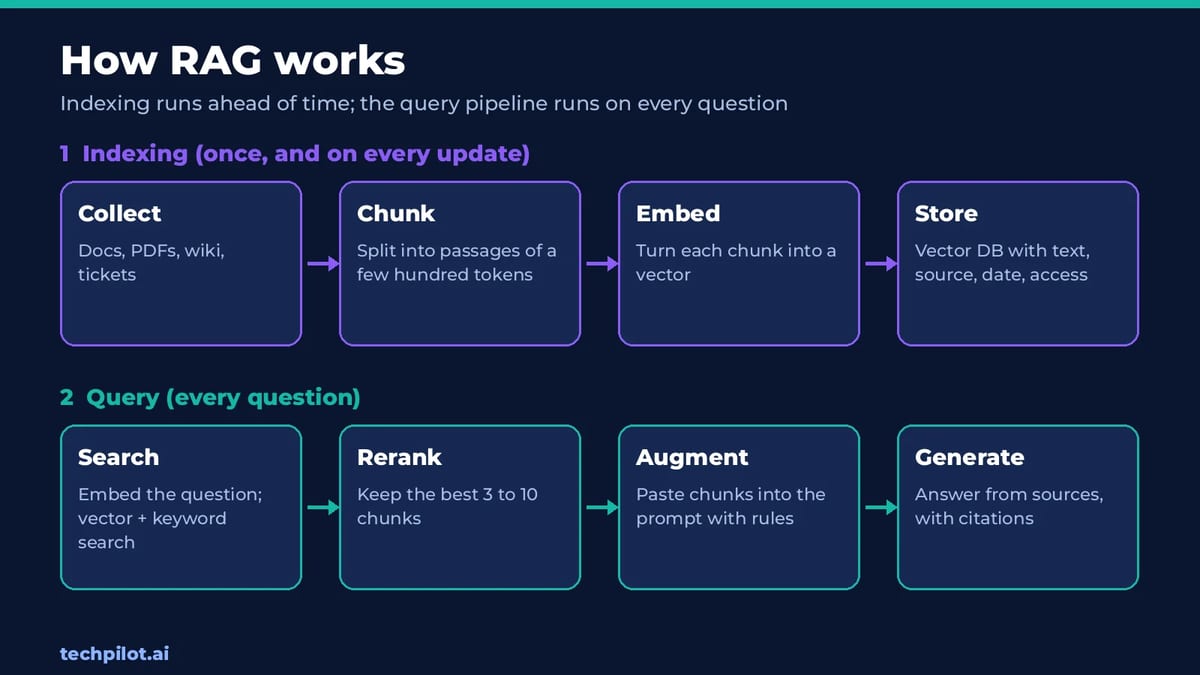
Every RAG system has two halves: an indexing pipeline that runs ahead of time, and a query pipeline that runs every time someone asks a question.
Indexing: getting your documents ready
- Collect the sources. PDFs, web pages, help articles, Notion pages, tickets, transcripts, whatever the assistant should know.
- Split them into chunks. Long documents are cut into passages of a few hundred tokens each, often with a little overlap so a sentence isn’t cut in half. Good chunks follow the document’s own structure: a heading and its section, a FAQ question and its answer.
- Turn each chunk into an embedding. An embedding model converts text into a list of numbers that captures its meaning. Passages about “refund policy” and “getting my money back” end up close together even though they share no words.
- Store the embeddings. The vectors go into a vector database (or a vector column in a normal database) along with the original text and metadata such as source, date and who is allowed to see it.
Querying: answering a question
- Embed the question. The user’s question is converted into a vector with the same embedding model.
- Retrieve. The database returns the chunks whose vectors are closest to the question. Most production systems mix this with classic keyword search (hybrid search), so exact terms like product codes and names aren’t missed.
- Rerank and filter. A reranking model or rules reorder the hits, drop weak matches and remove anything the user isn’t allowed to see. Usually the top 3 to 10 chunks survive.
- Augment the prompt. Those chunks are pasted into the prompt with instructions such as “Answer only from the sources below. If the answer isn’t there, say so. Cite the source for each claim.”
- Generate. The model writes the answer from the supplied text, and the app shows the sources next to it.
That’s the whole trick. The “R” is a search engine, the “A” is prompt building, and the “G” is the language model doing what it already does well: reading and writing.
RAG vs fine-tuning vs long context
RAG isn’t the only way to give a model new knowledge. The two alternatives people ask about most are fine-tuning and simply pasting everything into a long context window. They solve different problems.
| RAG | Fine-tuning | Long context | |
|---|---|---|---|
| What it changes | What the model reads for each question | The model’s weights and behavior | How much you paste into one prompt |
| Best for | Large or changing knowledge, citations | Tone, format, style, narrow skills | One-off work on a few documents |
| Updating knowledge | Re-index the changed files | Retrain the model | Paste the new version |
| Shows sources | Yes, by design | No | Partly, if you ask it to quote |
| Cost per question | Low: only the top chunks are sent | Low after training | High: you pay for every token, every time |
| Main risk | Retrieval misses the right passage | Outdated facts baked in, costly retraining | Model overlooks details buried mid-prompt |
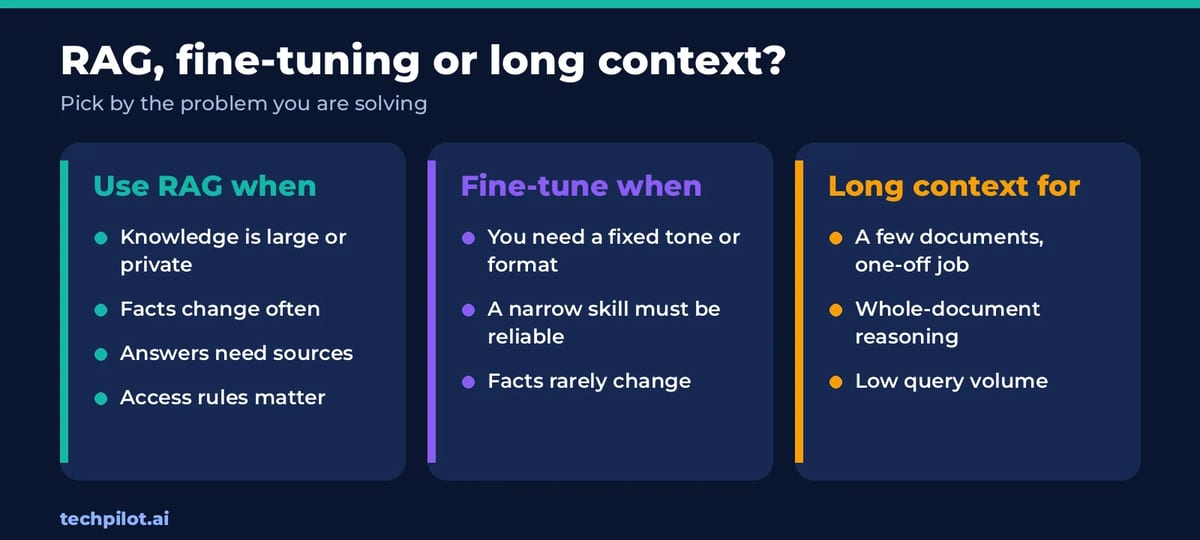
A rule of thumb that holds up well: fine-tune for behavior, use RAG for knowledge, and use long context for one-off jobs. If you want a model to write in your brand voice or always return valid JSON, fine-tuning helps. If you want it to know your 5,000 help articles and stay current as they change, use RAG. If you just need to compare three contracts this afternoon, paste them in.
Long context windows haven’t made RAG obsolete, for two reasons. Cost: a chatbot that sends a million tokens with every question pays for a million tokens every time, while RAG sends a few thousand. Accuracy: research such as the “Lost in the Middle” study from Stanford and partners found that models use information at the start and end of a long prompt far better than information buried in the middle. Many teams now combine both: RAG picks the best 20 to 50 passages, and a long-context model reads them all.
Real examples of RAG
- Customer support bots that answer from the help center and link the article they used, and hand off to a human when nothing relevant is found.
- Internal knowledge assistants that search a company’s wiki, Slack history and policies, respecting who can see what.
- Legal and compliance review, where every answer about a contract must quote the clause it came from.
- Coding assistants that retrieve the relevant files from a large codebase before suggesting a change.
- AI search engines and chatbots with web search, which retrieve fresh pages and cite them. The source is the web instead of your files, but the pattern is the same.
- “Chat with your PDF” tools and file uploads in AI assistants, which index your document and retrieve from it as you ask questions.
Common RAG failure modes (and how to fix them)
Most bad RAG answers aren’t the model’s fault. They come from the retrieval step handing it the wrong text. These are the problems we see most often:
- Bad chunking. A table split across two chunks, or an answer cut off from its heading, can’t be retrieved properly. Fix: chunk by document structure and keep headings with their sections.
- Vocabulary mismatch. Users ask about “PTO” while the policy says “annual leave”. Fix: hybrid search (vectors plus keywords) and a glossary or query rewriting step.
- Stale or duplicate sources. The index holds both the 2024 and 2026 price lists, and the model picks the old one. Fix: remove outdated versions, store dates as metadata and prefer the newest.
- Too much or too little context. Three chunks may miss the answer; thirty can bury it. Fix: retrieve broadly, then rerank and keep the best handful.
- Messy PDFs and scans. Columns, tables and images often come out as scrambled text. Fix: use a layout-aware parser and check a sample of chunks by eye.
- The model ignores the sources. It still answers from memory, or blends sources into a claim none of them make. Fix: tell it to answer only from the context, require citations, and let it say “I don’t know”.
- Permission leaks. An intern’s question retrieves a chunk from the board minutes. Fix: filter by access rights at retrieval time, not after the answer is written.
- Poisoned documents. A retrieved web page or email can contain hidden instructions aimed at the model, a form of prompt injection. This risk grows when RAG feeds an agent that can take actions; our guide to whether AI agents are safe covers the defenses.
The single most useful habit is to test retrieval on its own. Write 30 to 50 real questions with known answers, and check whether the right chunk lands in the top results before you judge the model’s writing.
RAG and AI agents
Classic RAG retrieves once, then answers. Agentic RAG lets the model decide when to search, what to search for and whether the results are good enough, then search again with a better query if they aren’t. It can also pick between tools: a vector search for policies, a SQL query for order data, a web search for news. That’s how most AI agents handle knowledge today. For numbers that live in tables and databases, querying the data directly usually beats embedding it; we explain that approach in connecting LLMs with structured data.
How to build a simple RAG system
You can start without writing much code, and move down this list as your needs grow:
- No-code: upload files to an AI assistant’s project or a custom GPT, or use a source-grounded notebook tool such as NotebookLM. Good for personal research and small teams.
- Managed retrieval APIs: OpenAI’s file search tool and Google’s File Search in the Gemini API handle chunking, embeddings and storage for you. Google, for example, charges $0.15 per 1M tokens to embed your files, and retrieved text is billed as normal input tokens.
- Frameworks: LangChain and LlamaIndex give you ready-made loaders, chunkers, retrievers and rerankers in Python or JavaScript.
- Your own stack: an embedding model, a vector store such as pgvector (inside Postgres), Chroma, Qdrant, Weaviate or Pinecone, and any LLM.
The core loop fits in a few lines of Python-style pseudocode:
chunks = split(documents, size=500, overlap=50)
index.add(embed(chunks), metadata=sources)
# at question time
def answer(question):
    hits = index.search(embed(question), top_k=20)
    best = rerank(question, hits)[:5]
    prompt = "Answer only from these sources and cite them:\n" + join(best) + "\nQuestion: " + question
    return llm(prompt)
Embedding is cheap. Google lists its Gemini Embedding 2 model at $0.20 per 1M text tokens, so a 1,000-page knowledge base of roughly 670,000 tokens costs about 13 cents to embed once. The real work is in chunking, testing retrieval and keeping the index up to date. If you want to wrap RAG in an assistant that takes actions, our step-by-step guide to creating AI agents is the next read.
Frequently asked questions
What is RAG in simple terms?
RAG, or retrieval-augmented generation, means an AI looks things up before it answers. A search step finds the most relevant passages in a set of documents, adds them to the prompt, and the model writes its answer from that text, often with citations.
What does RAG stand for in AI?
RAG stands for retrieval-augmented generation. The term was introduced in a 2020 research paper by Patrick Lewis and colleagues at Facebook AI Research, and it now describes any system that retrieves information and feeds it to a language model before it generates an answer.
Is RAG better than fine-tuning?
They do different jobs. RAG is better for giving a model knowledge that is large, private or changes often, and it can cite sources. Fine-tuning is better for changing behavior, such as tone, output format or a narrow skill. Many systems use both.
Does ChatGPT use RAG?
When ChatGPT searches the web or reads files you upload and answers from them, it is using retrieval in the same way RAG systems do. Its everyday answers without search or files come from what the model learned in training.
Do I need a vector database for RAG?
Not always. Managed tools such as OpenAI’s file search or Google’s File Search in the Gemini API store the embeddings for you, and small projects can use pgvector inside an existing Postgres database. A dedicated vector database helps at larger scale.
Why does my RAG chatbot give wrong answers?
Usually because retrieval handed the model the wrong text: chunks split badly, outdated documents in the index, keyword mismatches or too many weak results. Test retrieval on real questions first, add hybrid search and reranking, and tell the model to answer only from its sources.
Found this useful? Share it with someone comparing AI tools.