Best AI Tools for Faceless YouTube Automation in 2026 (Full Stack)
Faceless YouTube automation is a stack, not a single app — pick AI tools by stage (script, voice, visuals, edit, clips, thumbnails) so you stop paying for five overlapping subscriptions.
Published: September 23, 2026 | Updated: September 23, 2026
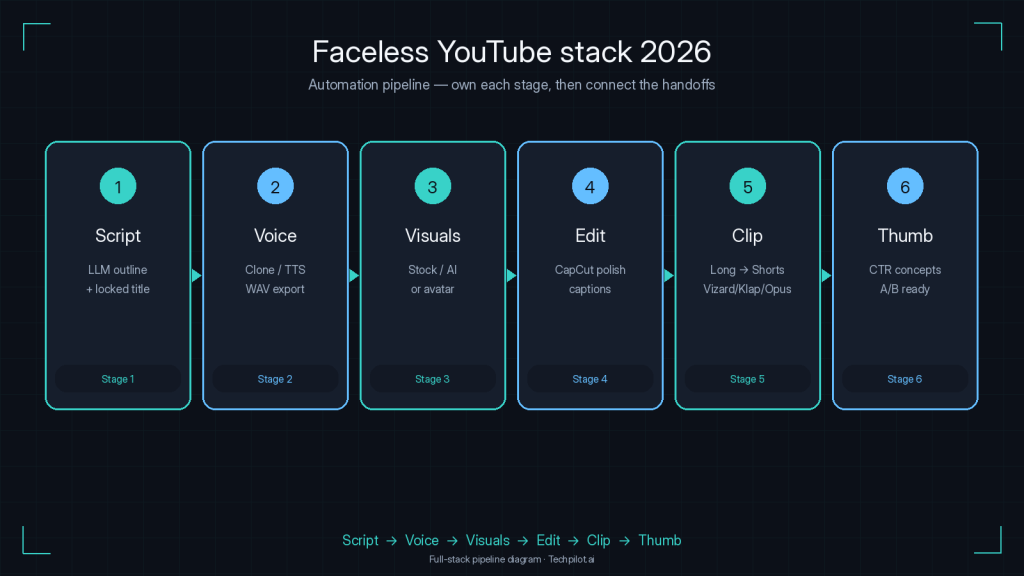
Faceless YouTube automation is not one magic button — it is a production line. The creators who ship weekly without burning out pick tools by stage: ideate and script, voiceover, visuals or avatars, edit, clip for Shorts, then thumbnails that earn the click. Buy an “all-in-one” when it truly covers your niche; otherwise assemble a lean stack and stop paying for five apps that all claim to do everything.
This Best-of maps the best AI tools for faceless YouTube by job-to-be-done, with honest tradeoffs and approx Sep 2026 — verify pricing. For the voice stage deep-dive, see Best ElevenLabs Alternatives in 2026.
How we built the stack (not a random list)
I scored tools on: stage fit, time-to-first publishable draft, cost at 8-12 long videos/month, Shorts path, learning curve, and failure mode (stock-generic look, credit blowups, robotic VO). Faceless YouTube AI works when each stage has a clear owner tool — not when one suite is half-good at five jobs.
Job: Turn a niche + keyword into a retention-aware script.
Use a general LLM (ChatGPT, Claude, Gemini) with a fixed prompt pack: title options, cold open, section beats, CTA, description tags. The win is consistency, not “AI originality.” Feed your own research notes; do not publish first-draft hallucinations on finance, health, or news.
Optional ideation UIs: If your team already lives in visual research boards, Design Arena or Flowith-style canvases can help moodboards and reference pulls — link them only when they already sit in your workflow; they are not required for a working faceless channel.
Failure mode: Interchangeable scripts that sound like every other faceless channel. Fix with niche POV, primary-source facts, and a human pass on the hook.
Stage 2 — Voice (the retention layer)
Job: A narrator people will listen to for 8-20 minutes.
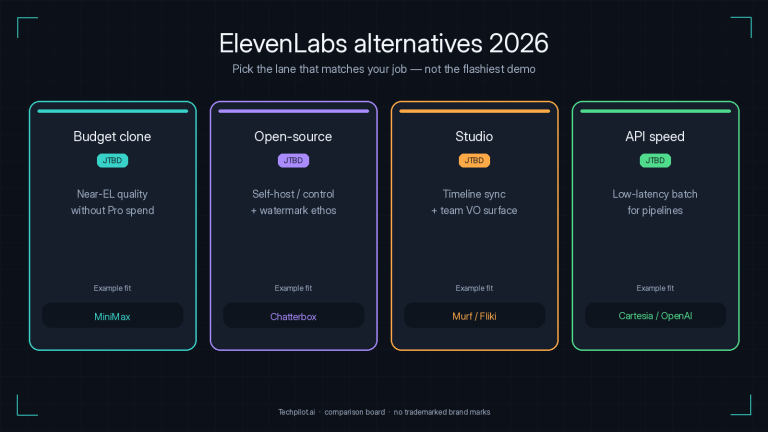
ElevenLabs remains the quality ceiling (Creative: Free 10k credits; Starter $6; Creator $22 / often $11 first month — approx Sep 2026). For cheaper cloning and multilingual identity, start with MiniMax Speech 2.5 (~$5/mo entry). Studio sync → Murf. API batch → OpenAI TTS or Cartesia. Full lane comparison: ElevenLabs alternatives 2026.
Faceless tip: Pick one voice and stick to it for 30 uploads. Audience trust is continuity, not weekly voice shopping.
Stage 3 — Visuals and avatars
Stock / script-to-video (most faceless niches)
InVideo AI is the default “type a brief, get a draft” assembler: script, stock, AI VO, templates. Paid Plus often cited ~$28/mo (sometimes lower on annual / older plan eras — verify); Max/Generative higher for volume. Fast, but stock-templated on pass one; revisions burn credits.
Crreo AI is the leaner prompt-to-video cousin (often ~$6-$9/mo entry) with VO and music in-flow — strong when you need net-new shorts without a clip library.
JetSnaps fits Shorts-native idea-to-trending vertical workflows when your channel strategy is clip-first discovery rather than 15-minute essays.
HeyGen (~$29/mo Creator; Pro from ~$49/mo — verify) wins realistic photo avatars, UGC-style ads, and translation/lip-sync. Credit math on flagship Avatar modes is tighter than the sticker price suggests — model minutes, not vibes.
Synthesia (~$18-$29/mo entry depending on billing — verify) is the polished corporate/training avatar lane: great for course-style faceless, less “YouTube entertainment chaos.”
Pick avatar only if a consistent face is part of the brand. Topiary stock + strong VO still wins history, Reddit stories, and listicle channels.
Stage 4 — Edit and polish
CapCut remains the free/cheap finish bay: captions, beat sync, 9:16, templates. Many stacks generate in InVideo/Crreo, export, then fix pacing in CapCut. CapCut Commerce Pro is the side door for product/UGC ads — different job than documentary faceless, but useful if the channel monetizes with product stories.
Failure mode: Shipping raw all-in-one exports with dead air and mismatched B-roll. Budget 20-40 minutes of human edit per long video even in “automated” stacks.
Stage 5 — Clip for Shorts and TikToks
Once the long video exists, faceless YouTube automation multiplies through clipping — not by regenerating the essay ten times.
Opus Pro — multi-source long-to-short, virality triage, scheduler. See best Opus Pro alternatives 2026 when credits or job-fit push you to switch.
Klap AI — YouTube-to-Shorts with Reframe 2, Virality Score, Pro dubbing/4K; Basic ~$14/mo annual (approx Sep 2026).
2Short AI — lean YouTube-link-to-Shorts from ~$9.90/mo.
Clipping tools do not replace generators. If you have no long footage, you are in Stage 3 — not Stage 5.
Stage 6 — Thumbnails (the CTR gate)
A perfect VO cannot save a muddy thumbnail. Use Pikzels for data-informed YouTube thumbnails and FaceSwap/persona variants, and compare the wider field in Best AI Thumbnail Makers 2026. Test 2-3 variants on new channels; track CTR before chasing another video tool subscription.
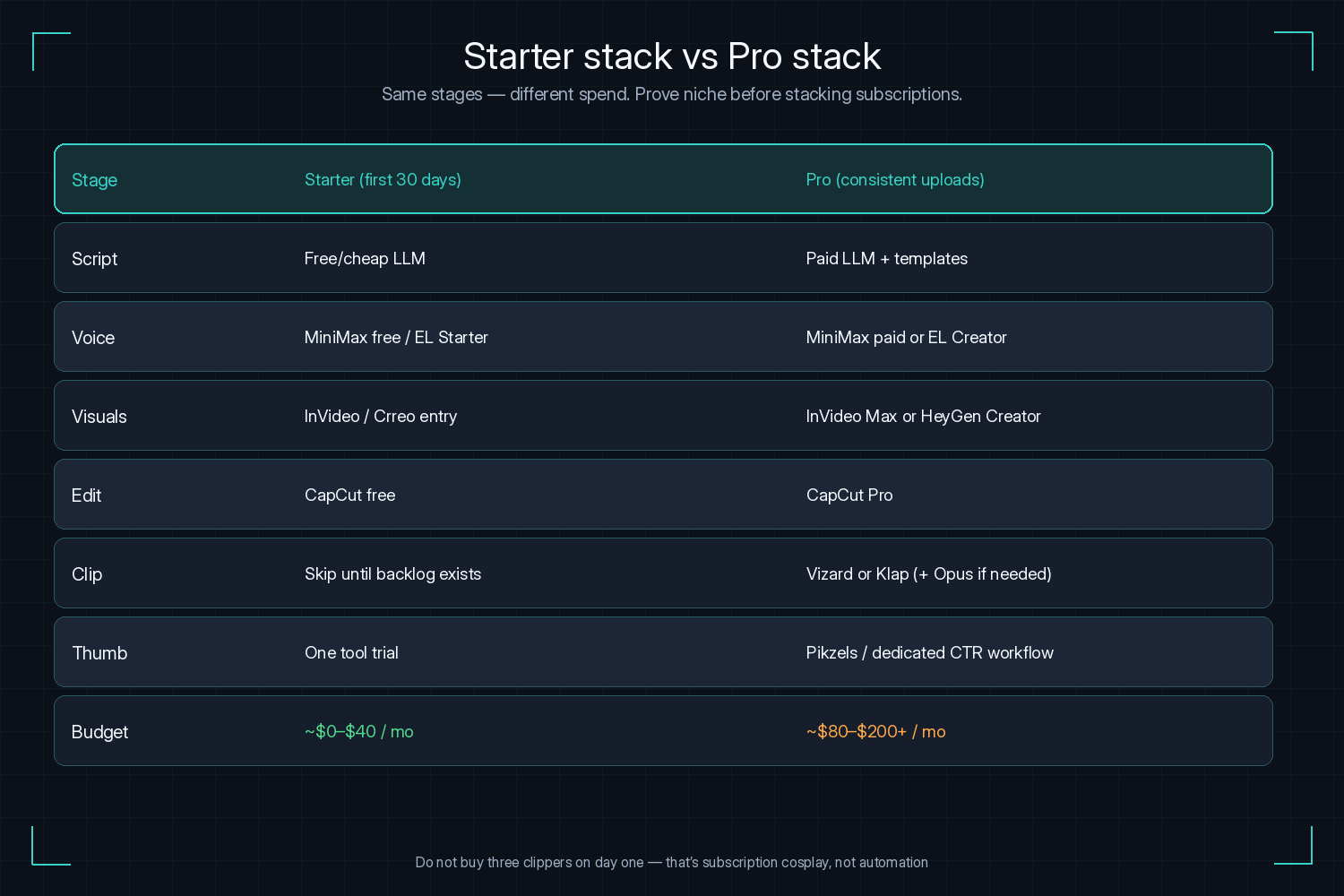
Starter (first 30 days): Free/cheap LLM + MiniMax free credits or EL Starter + InVideo/Crreo free-or-entry + CapCut free + one thumbnail tool trial. Prove niche retention before stacking clippers.
Pro (consistent uploads): Paid VO (MiniMax or EL Creator) + InVideo Max or HeyGen Creator + CapCut Pro + Vizard or Klap annual + Pikzels. Add Opus when long-form backlog justifies credit spend.
Do not buy: Three clippers and two avatar suites on day one. That is subscription cosplay, not automation.
Honest tradeoffs most “faceless AI” posts skip
Credits hide the real bill. InVideo revisions, HeyGen Avatar minutes, Opus/Vizard upload minutes, and ElevenLabs shared credits all punish exploration. Budget a “waste” buffer the first month.
Stock sameness is a retention tax. If every competitor uses the same drone-city B-roll, your hook and VO pacing have to carry the watch. Mix generative B-roll sparingly or custom motion graphics for cold opens.
Clipping without a long-form engine is backwards. Buying Opus or Klap before you can finish one 10-minute video inverts the stack. Earn the backlog, then automate distribution.
Localization is more than TTS. Translated VO without translated titles, descriptions, and thumbnails wastes the render. Pair multilingual voice work with the thumbnail workflow in our AI thumbnail makers guide.
Policy and trust. Disclose where required, avoid medical/financial guarantees from hallucinated scripts, and never clone a real person’s voice without consent. Faceless is a format — not a loophole.
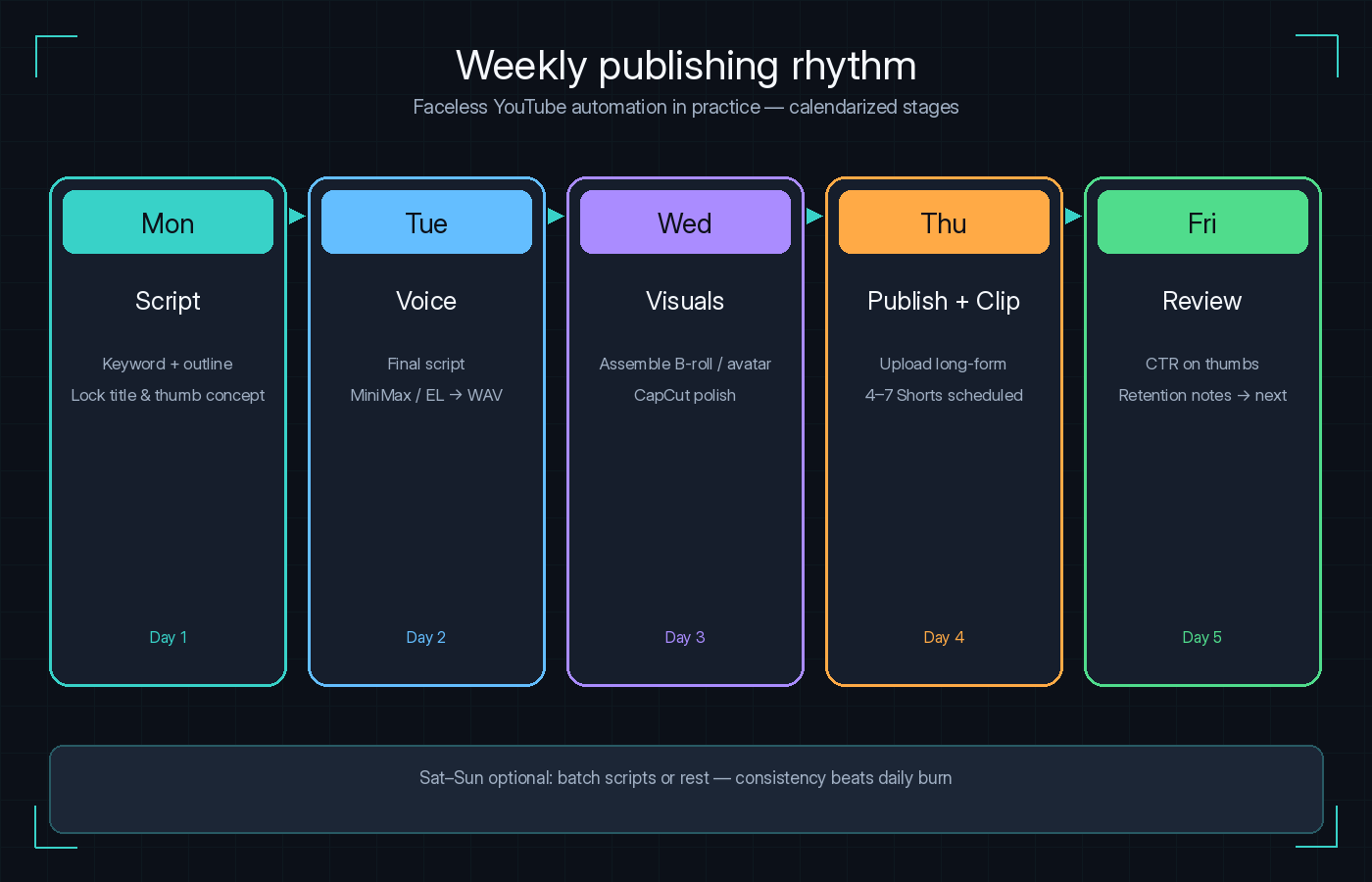
Sample weekly operating rhythm
Monday: Keyword + outline in LLM; lock title and thumbnail concept early.
Tuesday: Final script + MiniMax/EL voice render; export WAV.
Wednesday: Assemble in InVideo/Crreo or avatar tool; CapCut polish.
Thursday: Upload long-form; generate Shorts in Vizard/Klap/Opus; schedule 4-7 clips.
Friday: CTR review on thumbs; note retention graph drops for next script.
That rhythm is faceless YouTube automation in practice — calendarized stages, not a single “generate channel” myth.
Frequently asked questions
What is faceless YouTube automation?
It is a repeatable AI-assisted pipeline — script, voice, visuals, edit, clips, thumbnails — that publishes without on-camera filming. Automation means stage ownership and templates, not zero human QA.
What are the best AI tools for faceless YouTube in 2026?
By stage: LLM for scripts; MiniMax or ElevenLabs for voice; InVideo/Crreo/JetSnaps or HeyGen/Synthesia for visuals; CapCut to polish; Vizard/Klap/Opus/2Short to clip; Pikzels (and peers) for thumbnails.
Can I run a faceless channel with one tool?
Fliki or InVideo can draft end-to-end. Most growing channels still split voice and thumbnails for quality and CTR. One-tool is fine for testing; multi-tool wins at scale.
Do I need an AI avatar?
No. Avatars help brandable explainers and multilingual hosts. Storytime, lore, and listicle channels often perform better with stock, motion graphics, or generative B-roll plus a strong VO.
Will YouTube monetize AI faceless channels?
Many do — policy focuses on repetitive, mass-produced, or misleading content. Original scripting, accurate claims, and viewer value matter more than whether the voice is synthetic.
How much does a faceless stack cost per month?
Serious weekly publishers often land $40-$100/mo before heavy generative-video credits. API VO and CapCut free keep floors lower; HeyGen flagship minutes and Runway credits push ceilings higher.
Opus vs Vizard vs Klap for Shorts?
Opus for multi-source virality + ecosystem; Vizard for text edit + free floor + schedule; Klap for YouTube-centric reframe/dubbing/4K. Details in our Opus Pro alternatives guide and the Vizard/Klap tool reviews.
Tech Pilot verdict
Treat faceless YouTube automation as a factory with six stations. Script with an LLM, narrate with MiniMax or ElevenLabs (alternatives guide), assemble with InVideo / Crreo / JetSnaps or present with HeyGen / Synthesia, polish in CapCut, multiply with Vizard / Klap / Opus / 2Short, and package clicks with Pikzels plus our thumbnail Best-of.
The best AI tools for faceless YouTube are the ones that match your stage bottlenecks — not the ones with the loudest “all-in-one” landing page. Ship one clean stack for 30 days, measure retention and CTR, then upgrade the weak stage only. More reviews on the tools hub.
Mike Paul, an authoritative author, specializes in AI tools, Education and Business productivity. With comprehensive knowledge and practical insights, his blog offers credible guidance on the latest advancements. Mike's expertise is evident in his clear and concise writing style, supported by real-world examples and case studies. As a trusted industry voice, he actively engages with professionals, fostering a vibrant community. With meticulous research and fact-checking, Mike ensures accurate and up-to-date information. His blog www.mikepaul.com serves as a reliable resource for leveraging AI tools effectively.
Share This Article
JOIN OUR COMMUNITY
Receive the latest AI insights directly to your inbox.