Vizard AI is a long-video-to-Shorts clipper with a real free plan (60 credits a month) and Creator from $14.50 a month billed yearly. Prices are unchanged in October 2026, and Vizard Agent is the big new feature this year.
Home / Tools / AI Video Generator
AI Video Generator · Tool review
Vizard AI: Pricing, Free Plan & Short Clips (2026)
 TechPilot.ai review team Hands-on testing, one published method
 - Last updated
- How we test
The AI news that actually mattered this week.
One short email every Friday: the biggest AI stories, what they mean for you, and the tools worth trying. A 3-minute read, no hype.
Free. Unsubscribe anytime.
You're in. Watch for the brief on Friday. Free. Unsubscribe anytime.
Summary
Pros and cons
What we like
- Real free plan 60 credits a month lets you test a full 1-hour video before paying.
- Transcript editing delete words in the transcript to cut the clip, then fine-tune on the timeline.
- Built-in publishing schedule clips to up to 6 social accounts on Creator and 20 on Business.
- 4K exports on paid plans with no watermark and 100 GB of storage on Creator.
- API and clip model v2 automate clipping and choose fewer, more complete clips when quality matters.
What could be better
- Per-minute credits 1 credit per uploaded minute burns through allowances on long streams.
- Free plan limits 720p exports with a watermark, 10-minute exports and 3-day storage.
- Uneven AI picks strongest on talking-head video, weaker on dense tutorials and screen recordings.
- Not a generator it repurposes existing footage and doesn't create video from a prompt.
Key features
- AI highlight detection that suggests short clips from long uploads
- Auto reframe for TikTok, Reels and YouTube Shorts
- Auto subtitles with subtitle translation and caption templates
- Transcript-based editing plus timeline fine-tuning
- AI emojis, B-roll, highlight keywords and post suggestions
- Schedule and publish to up to 20 social accounts
- Brand kit, custom fonts and shared workspace on Business
- Vizard Agent for brief-to-finished-video editing
- API with clip model v2
Screenshots
Full review
Independent and reader-supported. Some links may earn us a commission; it never changes our scores. Editorial policy
Vizard AI turns long podcasts, webinars and YouTube videos into short vertical clips with captions, then schedules them to your social accounts. It has a real free plan with 60 credits a month, and Creator costs $29 a month or $14.50 a month billed yearly. It edits footage you already have; it doesn’t generate video from a prompt.
Vizard AI in 30 seconds
- What it does: finds highlight moments in a long upload, reframes them for TikTok, Reels and Shorts, adds captions and lets you trim by editing the transcript.
- Price: Free $0; Creator $29 a month or $14.50 billed yearly ($174); Business $39 a month or $19.50 billed yearly ($234).
- Free plan: 60 credits a month, 720p exports with a watermark, uploads up to 60 minutes and 3-day storage.
- Credits: 1 credit = 1 minute of uploaded video, so a 1-hour webinar uses 60 credits.
- Best for: podcasters, coaches and marketing teams with regular long recordings. Not for: text-to-video or heavy timeline editing.
Vizard AI Pricing (2026)
We re-checked vizard.ai/pricing on October 19, 2026. Prices haven’t changed since September, and yearly billing still halves the monthly price.
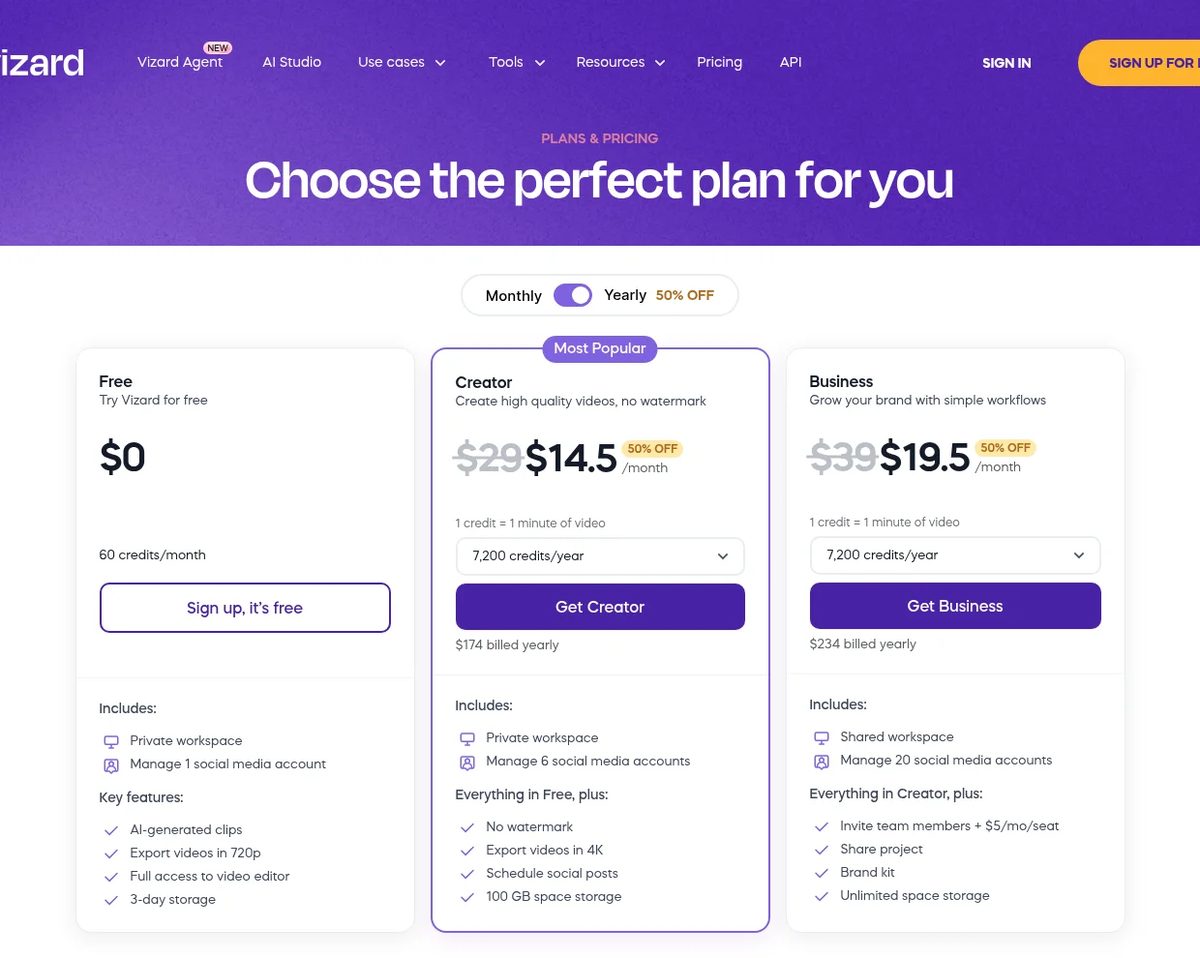
| Plan | Monthly | Yearly | Credits | Key limits |
|---|---|---|---|---|
| Free | $0 | $0 | 60 a month | 720p export with watermark, 10-minute exports, 60-minute uploads, 3-day storage, 1 social account |
| Creator | $29/mo | $14.50/mo ($174/year) | From 600 a month (7,200 a year) | No watermark, 4K export, 600-minute uploads, 100 GB storage, 6 social accounts, scheduling |
| Business | $39/mo | $19.50/mo ($234/year) | From 600 a month (7,200 a year) | Shared workspace, team seats at $5/mo each, brand kit, unlimited storage, 20 social accounts |
How Vizard credits work
Vizard charges 1 credit for every minute of video you upload, whatever length clips you export. That makes the free plan enough to test one 1-hour webinar a month, while the entry Creator tier covers about ten hours of uploads.
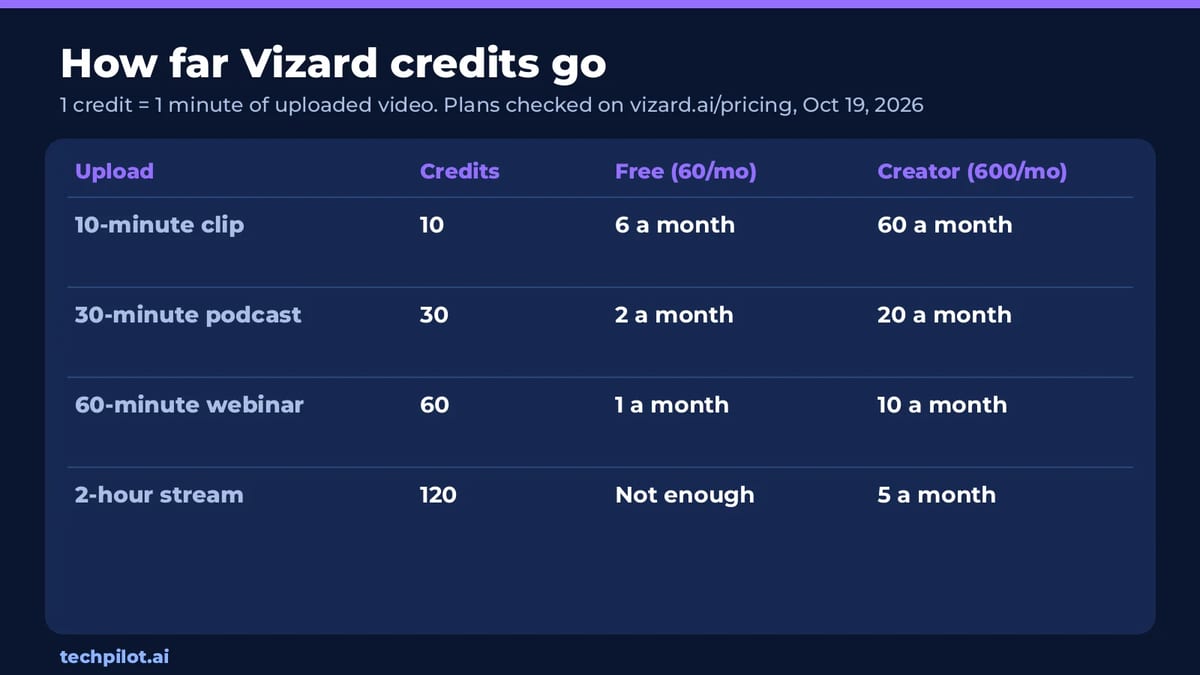
Per hour of source video, Creator billed yearly works out to about $1.45, and about $2.90 billed monthly. Clippers that charge per 20-minute block, such as Ssemble, are cheaper for long videos but have no free plan.
What’s new in Vizard in 2026
- Vizard Agent: launched in August 2026, it takes a brief plus your footage, a script, a product page or just an idea, and returns a finished edit. Vizard’s own launch post says you’ll still need to step in on long or complex jobs.
- Clip model v2 in the API: since July 2026 developers can choose
clip_v2, which returns fewer, more complete clips and costs 1.25x the standard credit rate. The original model stays the default. - Prices held: Free, Creator and Business cost the same in October 2026 as in September.
Vizard AI pros and cons
What works: the free plan is good enough for a real test, the transcript editor makes fixing a clip fast, and Creator’s 4K export, scheduling and six social accounts cover most solo creators. The API is useful for agencies that want to automate clipping.
What doesn’t: per-minute credits add up quickly on long streams, the free plan’s watermark and 720p cap make it a test only, and AI picks are weaker on dense tutorials and screen recordings than on talking-head video.
Best use cases
- Podcasters and YouTubers: turn a weekly episode into a batch of captioned Shorts and schedule the week from one calendar.
- Coaches and course creators: clip webinars and workshops into short lessons and testimonials.
- Marketing teams and agencies: Business adds a shared workspace, brand kit and 20 social accounts for several brands.
- Developers: use the API, with clip model v2 when quality matters more than volume.
Top alternatives to Vizard AI
- Opus Clip: the closest rival, with a free plan, strong viral scoring and per-minute credits.
- Ssemble: much cheaper for long videos at about $0.60 an hour on Pro yearly, but no free plan. See Opus Clip vs Ssemble for the credit math.
- Klap: bills per clip with no watermark. Our Klap AI vs Opus Clip guide compares the two models.
- Submagic: pick it for stylish captions and effects on short videos.
- Descript: a full text-based editor for podcasts and long videos, not an automatic clipper.
- More options: best AI video clippers for 2026.
TechPilot.ai’s verdict on Vizard AI
Vizard is still one of the easiest clippers to recommend: the free plan lets you test it on your own footage, and Creator billed yearly at $14.50 a month covers about ten hours of uploads with 4K exports and scheduling. Per-minute credits make it pricier than Ssemble on long streams, and the AI is best on talking-head content. Try a full episode on the free plan, then move to Creator yearly if the clip picks hold up.
Vizard AI FAQ
Is Vizard AI free?
Yes. The Free plan is $0 with 60 credits a month, 720p exports with a watermark, uploads up to 60 minutes and 3-day storage.
•
How much does Vizard AI cost in 2026?
As of October 19, 2026, Creator is $29 a month or $14.50 a month billed yearly ($174), and Business is $39 a month or $19.50 billed yearly ($234). Extra Business seats are $5 a month.
•
How do Vizard credits work?
Each minute of uploaded video costs 1 credit. A 30-minute podcast uses 30 credits, so Free covers two a month and the entry Creator tier covers twenty.
•
What is Vizard Agent?
Vizard Agent, launched in August 2026, is an AI video editor that takes a brief and your materials and returns a finished video. You can still give it feedback and ask for revisions.
•
Does Vizard have an API?
Yes. All plans include API access with rate limits that grow by plan, and developers can choose the newer clip_v2 model, billed at 1.25x the standard rate.
•
Is Vizard the same as Vidu?
No. Vizard clips and edits footage you already have. Vidu is a text-to-video generator.

Mirelo SFX
AI Video Generator
Mirelo SFX 2.0 fixes the most common audio problems in AI video by rebuilding the sound around your dialogue, synced to the picture.
Replicate
AI Video Generator
Replicate is the fastest route from “I want to use this model” to a working API call. The catalogue is huge, model pages show prices up…

Cardboard
AI Video Generator
Cardboard is one of the more complete agentic editors: it plans a first cut, handles cleanup and captions, and generates the missing…
AI Video Generator  Eimantas Kazėnas · 5 min read
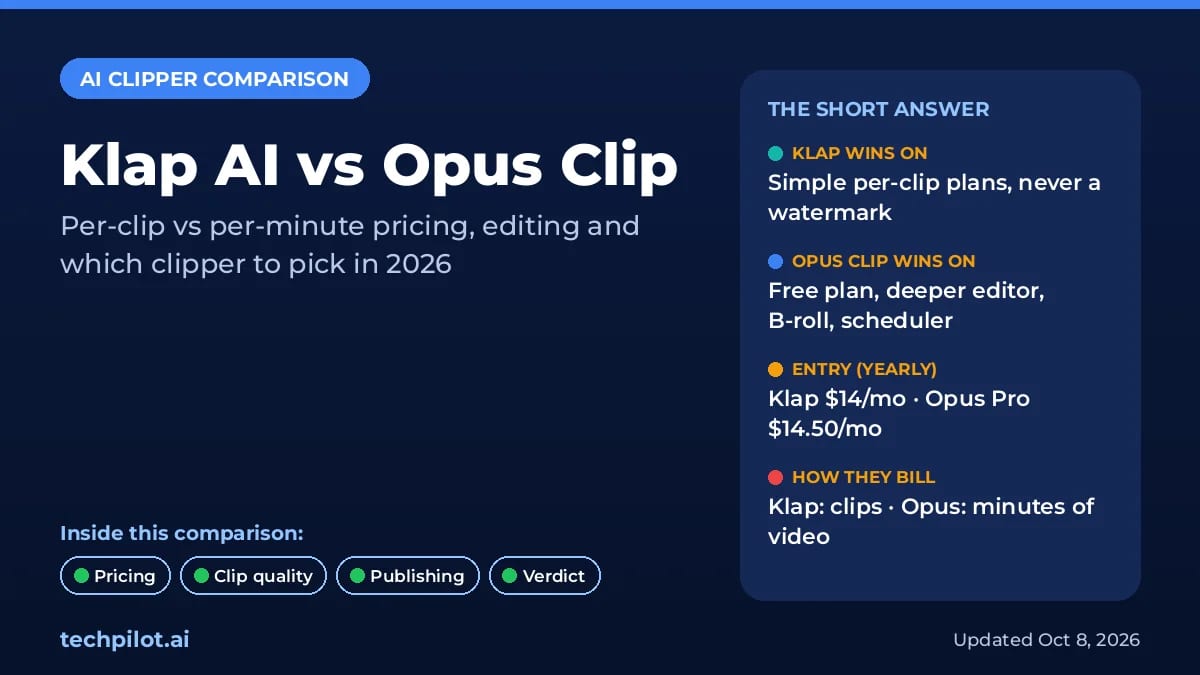
Klap AI vs Opus Clip: Which Clipper to Pick?
Klap AI vs Opus Clip: Klap bills per clip with no watermark, while Opus bills per minute of video and has a free plan. Compare 2026 prices and our…
Eimantas Kazėnas · 5 min read
AI Video Generator Eimantas Kazėnas · 18 min read
Opus Clip vs Ssemble: Which AI Clipper Wins?
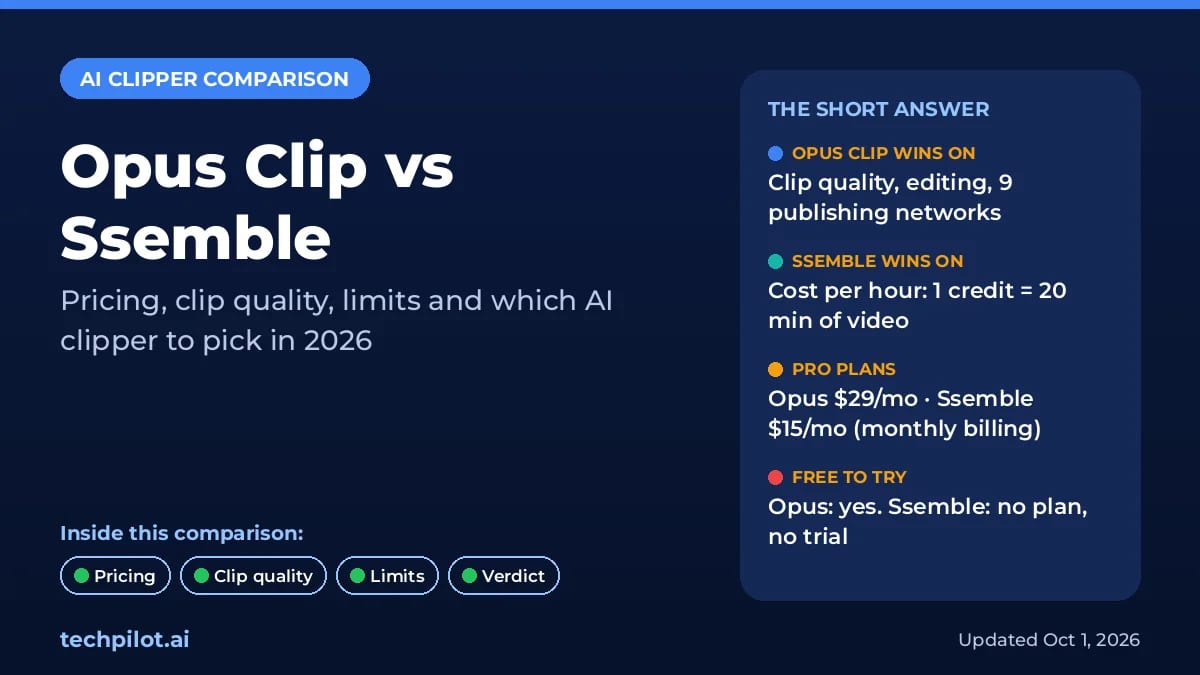
Opus Clip vs Ssemble: Opus makes better AI picks, but Ssemble clips an hour of video for $0.60, not $2.90. Compare 2026 prices, limits and our…
Eimantas Kazėnas · 18 min read