Home / Guides / AI Video Generator
Opus Clip vs Ssemble: Which AI Clipper Wins?
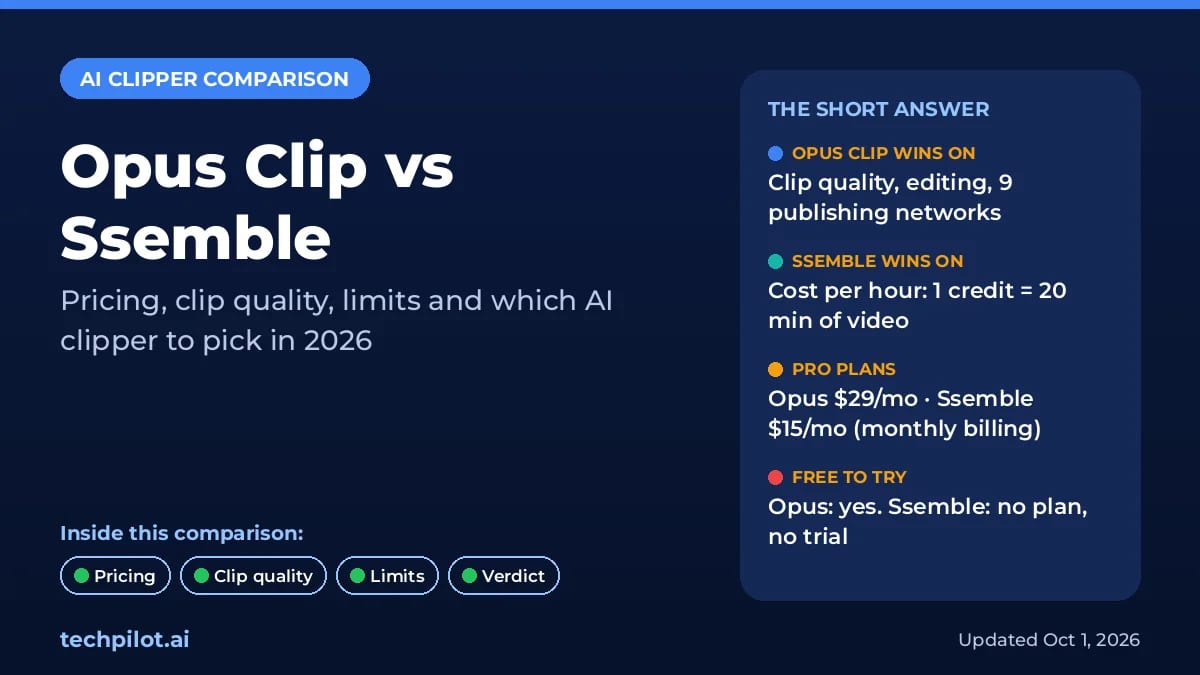
Opus Clip vs Ssemble: Opus makes better AI picks, but Ssemble clips an hour of video for $0.60, not $2.90. Compare 2026 prices, limits and our verdict.
 Eimantas Kazėnas Marketing & Tech
 - Updated
- 18 min read
On this page Key takeaways
- Key takeaways
- Opus Clip vs Ssemble at a glance
- What each tool does
- Opus Clip vs Ssemble pricing (October 2026)
- Clip quality features compared
- Limits to know before you subscribe
- Who each tool is best for
- Which one should you pick?
- How to test both before you pay
- Frequently asked questions
- Verdict: Opus Clip vs Ssemble, which AI clipper wins?
Independent and reader-supported. Some links may earn us a commission; it never changes our rankings. Editorial policy
Opus Clip vs Ssemble is a choice between better AI and cheaper hours of video. OpusClip has stronger highlight detection, a deeper editor, AI B-roll and a scheduler that reaches nine social networks. But it charges 1 credit per minute of source video. Ssemble charges 1 credit per 20 minutes, so a one-hour podcast costs 3 credits instead of 60, and every plan includes scheduling and API access. The catch: Ssemble’s help center says there is no free plan or trial, exports top out at 1080p, and it is built for talking-head videos posted to TikTok, YouTube and Instagram.
We compared both tools using their official pricing pages and help centers, plus recent hands-on reviews. This guide covers what each tool does, current prices, the clip-quality features that matter, the limits buried in the help docs, and a clear “pick Opus if / pick Ssemble if” verdict.
Last updated: October 1, 2026 (UTC+7). Prices were checked on opus.pro/pricing and ssemble.com/pricing the same day, in US dollars. Both vendors change their plans often, so confirm the price before you pay for a full year.
Key takeaways
- The pricing models differ more than the prices. OpusClip Starter is $15/month for 150 credits, and Pro is $29/month (or $14.50/month billed yearly) for 300 credits a month. Ssemble Pro is $15/month (or $6/month billed yearly) for 30 credits a month, but each of those credits covers up to 20 minutes of video.
- For long videos, Ssemble is roughly 5x cheaper. A 60-minute episode costs about $2.90 on OpusClip Pro (yearly) and about $0.60 on Ssemble Pro (yearly). On videos under 10 minutes the gap mostly disappears, because Ssemble still charges a full credit.
- Opus has the deeper toolset: multimodal ClipAnything detection, a Virality Score, AI image and video B-roll, 1:1 and 16:9 reframing, export to Premiere Pro and DaVinci Resolve, and team seats.
- Ssemble has the extras clippers like: hook titles, CTAs, meme intros, gameplay overlays, YouTube channel automation, and API access on every plan.
- Only Opus lets you test for free. Its free plan gives 60 credits a month (watermarked, with a 3-day export window). Ssemble purchases are non-refundable, so start on a monthly plan.
Opus Clip vs Ssemble at a glance
Here’s the short version. The details for each row follow below.
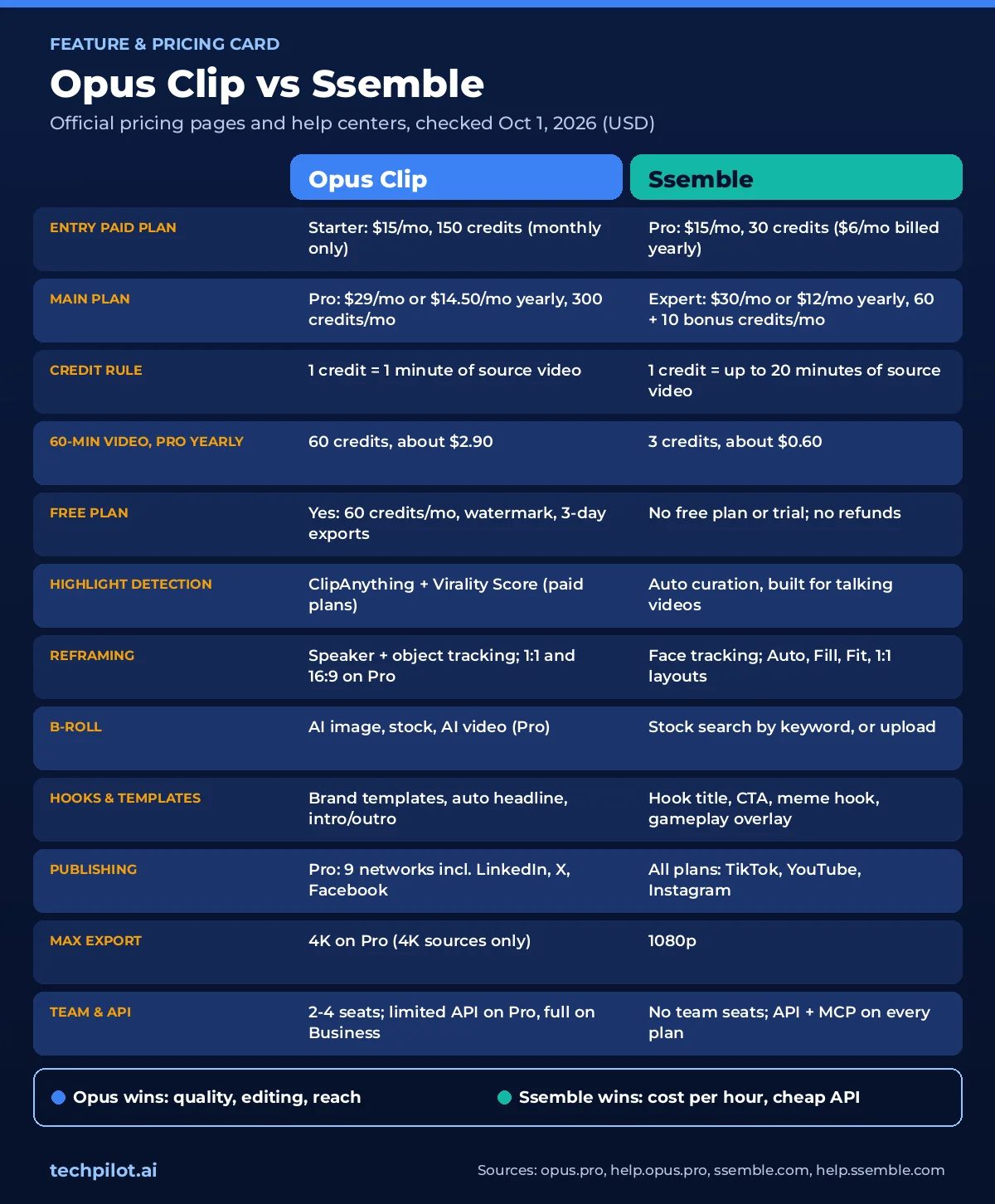
| Opus Clip | Ssemble | |
|---|---|---|
| Best for | Creators, marketers and teams who want the best AI picks and a full editor | High-volume clippers and budget creators posting talking-head clips |
| Free plan | Yes: 60 credits/month, watermark, no editing, 3-day export window | No free plan or trial (per Ssemble help center) |
| Paid plans | Starter $15/mo (monthly only); Pro $29/mo or $14.50/mo billed yearly; Business custom | Pro $15/mo or $6/mo yearly; Expert $30 or $12; Business $60 or $24; Custom $100 or $40 |
| Credit rule | 1 credit = 1 minute of source video | 1 credit = up to 20 minutes of source video |
| Cost of one 60-minute video | 60 credits (about $2.90 on Pro yearly) | 3 credits (about $0.60 on Pro yearly) |
| Video sources | About 20, incl. YouTube, Zoom, Google Drive, Vimeo, Twitch, Riverside, Dropbox and uploads (full list on Pro) | YouTube, Vimeo, Kick and Twitch VODs, plus uploads |
| Max input | Up to 10 hours; uploads up to 10GB (30GB on Pro) | 20 minutes per credit (long videos split automatically); uploads up to 30 min / 1GB |
| AI highlight detection | ClipAnything (visual, audio, sentiment); Virality Score 0-99 on paid plans; prompt-to-clip on Pro | Auto curation for talking videos; up to 12 clips per project; Sports Mode |
| Captions | Animated templates, emoji and keyword highlights, 20+ languages, brand vocabulary (Pro) | Caption templates, highlight effects, translation, 30+ languages |
| Reframing | Speaker and object tracking; 9:16 on Free/Starter, plus 1:1 and 16:9 on Pro | Face tracking with Auto, Fill, Fit and 1:1 layouts |
| B-roll | AI image and stock B-roll; AI video B-roll on Pro | Stock B-roll search by keyword, or upload your own |
| Templates and hooks | Brand templates, auto headline, custom fonts, intro/outro cards (Pro) | Hook title, CTA, meme hook, gameplay overlay, music, end card |
| Scheduling | Pro: 9 networks incl. LinkedIn, X, Facebook, Threads, Bluesky; Starter: direct posting only | All plans: TikTok, YouTube, Instagram |
| Export quality | Up to 1080p on Free; 4K download on Pro (4K sources only) | 1080p maximum |
| Team and API | Pro: 2 seats per pack (max 4), limited API and MCP; full API on Business | No team workspace; API and MCP server on every plan |
What each tool does
Opus Clip: the polished all-rounder
OpusClip (the company writes it as one word, and our review lists it as Opus Pro) is the best-known AI clipper. You paste a link from about 20 supported sources (YouTube, Zoom, Google Drive, Riverside, Twitch and more), or upload a file of up to 10 hours. Its ClipAnything model then analyzes each frame using what OpusClip calls “visual, audio, and sentiment cues” to find clip-worthy moments, including in videos with little dialogue. Each clip gets a Virality Score, animated captions and a vertical reframe, and you can fix anything in a combined text and timeline editor. Around that core, Opus adds AI B-roll, filler-word removal, dubbing, a social media scheduler, XML export to Premiere Pro and DaVinci Resolve, and an API and MCP connector for AI agents.
Ssemble: the budget clipping machine
Ssemble AI is aimed squarely at “shorts clippers”: people who turn long YouTube videos, podcasts and Twitch or Kick streams into Shorts, Reels and TikToks, often to earn money from the views. Paste a link and Ssemble finds the key moments, adds captions and tracks faces. It can also add hook titles, CTAs, meme intros, or gameplay footage under the speaker. You can then schedule clips to TikTok, YouTube and Instagram, or let Channel Automation watch a YouTube channel and clip each new upload. Ssemble also runs a Clip Rewards marketplace that, it says, pays $1 per 1,000 verified views for clips of campaign videos. Our Ssemble review covers the editor in more depth.
Opus Clip vs Ssemble pricing (October 2026)
Both tools sell credits, but they count them very differently, and that matters more than the price on the plan card.
OpusClip plans
| Plan | Price | Credits | What you get |
|---|---|---|---|
| Free | $0 | 60/month | AI clipping, captions with emoji and keyword highlights, auto reframe (9:16), 1 brand template. Watermark, no editing, exports expire after 3 days |
| Starter | $15/month (monthly billing only) | 150/month | Virality Score, no watermark, editor, filler and silence removal, direct posting to YouTube Shorts, TikTok and Instagram Reels |
| Pro | $29/month, or $174/year ($14.50/month) | 300/month per pack (3,600/year) | Everything in Starter plus 2 seats, 6 social accounts, scheduler, AI B-roll, 1:1 and 16:9, Premiere Pro and DaVinci Resolve export, dubbing, limited API |
| Business | Custom | Custom | Priority processing, custom seats and credits, SSO, full API, dedicated Slack support |
OpusClip’s credits guide says processing costs 1 credit per minute of the original video. Clips under a minute round up to 1 credit, and partial minutes round down. Credits on monthly plans expire after 60 days, so unused credits roll over for one extra month. Yearly plans deliver all 3,600 credits upfront, valid for 12 months. Pro buyers can add packs: each one adds 300 credits a month and 2 seats, up to a maximum of 4 seats. Starter and Pro both offer a free trial with no credit card required. Trial exports are watermarked, though, and trial users can’t post, schedule or download in 4K.
Ssemble plans
| Plan | Monthly billing | Yearly billing | Credits | Social accounts |
|---|---|---|---|---|
| Pro | $15/month | $72/year ($6/month) | 30/month, or 360/year | 1 |
| Expert | $30/month | $144/year ($12/month) | 60 + 10 bonus/month, or 720 + 120 bonus/year | 3 |
| Business | $60/month | $288/year ($24/month) | 120 + 30 bonus/month, or 1,440 + 360 bonus/year | Unlimited |
| Custom | $100/month | $480/year ($40/month) | 2,000 + 600 bonus/year; extra top-ups at $60 per 100 credits | Unlimited |
Ssemble’s credits guide says one credit covers up to 20 minutes of input video. For anything longer, the “Clip Entire Video” option splits the video into 20-minute segments at 1 credit each, so a 1-hour video costs 3 credits and a 5-hour stream 15. Alternatively, pick a 20-minute window for a single credit. Monthly credits expire after 30 days and don’t roll over. Yearly credits arrive upfront and last 12 months. All purchases are final under Ssemble’s no-refund policy.
What a real workload costs
This is where the Ssemble vs Opus Clip gap is biggest. Here’s what the same work costs on each tool’s Pro plan, based on the official per-credit prices.
| Workload | OpusClip Pro | Ssemble Pro |
|---|---|---|
| One 5-minute video | 5 credits: $0.24 yearly / $0.48 monthly | 1 credit: $0.20 yearly / $0.50 monthly |
| One 15-minute video | 15 credits: $0.72 yearly / $1.45 monthly | 1 credit: $0.20 yearly / $0.50 monthly |
| One 60-minute podcast | 60 credits: $2.90 yearly / $5.80 monthly | 3 credits: $0.60 yearly / $1.50 monthly |
| One 3-hour stream | 180 credits: $8.70 yearly / $17.40 monthly | 9 credits: $1.80 yearly / $4.50 monthly |
| Source video included per month | 5 hours (300 credits) | Up to 10 hours (30 credits x 20 minutes) |
| A weekly 60-minute podcast | 240-300 credits a month: fits Pro, not Starter | 12-15 credits a month: fits Pro with room to spare |
Two caveats keep this from being a clean win for Ssemble. First, the math assumes you use the full 20-minute window: a 3-minute video still costs a whole credit. Second, Ssemble processes each 20-minute segment as its own project, so a clip can’t combine a moment from minute 5 with one from minute 50. OpusClip analyzes the whole video at once. In one July 2026 test, AI Miracle found Opus stitching three separate moments of a discussion into a single clip.
Clip quality features compared
AI highlight detection
OpusClip: ClipAnything rates every scene for viral potential. The Virality Score runs from 0 to 99, is based on hook, flow, value and trend, and is only shown on paid plans. Pro adds topic search and prompt-to-clip, so you can ask for “every goal in this match” or “the part about pricing.” You can set clip length from under a minute up to 15 minutes. Opus says a 30–60 minute video typically yields 23–32 clips.
Ssemble: its help center says the AI analyzes “content, audio, and visuals,” detects scene changes, and returns clips of 30–60 seconds by default, with a slider to cap the count at up to 12 per project. The same page says Ssemble “works only for TALKING videos.” It recommends podcasts, educational videos, commentary, product reviews and speeches, and advises against videos without faces, noisy recordings, gaming, music videos and live videos. A newer Sports Mode tracks the ball or fighters instead of faces.
What testers found: no tool picks every clip right. In a 30-day test, ScaleReach (which sells a competing clipper) got 76 clips from six videos: 47 were ready to publish, 19 needed light edits, and 10 were unusable. Most reviewers say to expect to discard or fix 20–40% of Opus clips. For Ssemble, independent tests are thinner. In a week-long test in May 2025, Elle Review found it picked strong moments from a 45-minute interview, with captions about 95% accurate. Ssemble’s own March 2026 comparison concedes that Opus Clip “leads” on AI clipping quality. Edge: Opus Clip.
Captions
OpusClip offers animated caption templates, AI emoji and keyword highlights (even on the free plan), subtitle translation, and SRT upload. Pro adds custom fonts, a curse-word censor, and brand vocabulary so product and guest names are spelled right. The pricing page promises 20+ languages. The help center lists 25, including Japanese, Korean and Vietnamese, though most are still in beta.
Ssemble has a growing set of caption templates, editable captions, animated “highlight caption” effects, caption translation, and full-transcript download. Its pricing FAQ says it supports 30+ languages. The help center’s list of 37 video languages is mostly European, plus Hindi, with no Japanese, Korean or Chinese. Edge: Opus Clip, especially for Asian languages and branded captions.
Reframing
OpusClip tracks the active speaker automatically. On Pro, it also lets you click any object (a product, a pet, a car) and follow it through the scene. It has split-screen, picture-in-picture and screen-share/gameplay layouts. Free and Starter export in 9:16 only, and Pro adds 1:1 and 16:9. ScaleReach reported that only 4 of its 76 clips needed a manual crop fix.
Ssemble has four layouts: Auto (follows the speaking face, and switches to Fit when no face is detected), Fill (center crop), Fit (the whole frame with a blurred or colored background), and 1:1. Sports Mode follows the action in matches and fights. That covers talking heads well, but there’s no landscape output and no manual object tracking. Edge: Opus Clip.
B-roll
OpusClip can insert AI-generated images or Pexels stock footage automatically. Pro allows 50 AI image B-roll clips a day and unlimited stock, while Starter gets a small allowance and the free plan gets none. Pro also adds AI video B-roll, generated by Agent Opus, with 5 free regenerations per user (lifetime) and 5 credits for each one after that.
Ssemble lets you add B-roll at the start of any caption. You can search stock footage by keyword or upload your own clips. Its editing guide also lets you search “by movie title, actor, or scene” for film footage. That’s a copyright risk on monetized accounts, so check the rights before you use it. Edge: Opus Clip.
Templates, hooks and branding
OpusClip is built for brands. Brand templates save your aspect ratio, layouts, caption style, logo, fonts and the “auto headline” shown in the first seconds of each clip. You get 1 template on Free and Starter and more on Pro. Pro also adds intro and outro cards and a custom asset library.
Ssemble is built for retention tricks. You can add an AI hook title, a CTA, a meme video before the clip, gameplay footage under the speaker, background music, transitions, sound effects, zoom effects, and a “please subscribe” end card. There’s no documented brand kit or team workspace. Edge: Opus Clip for brands, Ssemble for clipper-style formats.
Scheduling and publishing
OpusClip Starter can post directly to YouTube Shorts, TikTok and Instagram Reels. Pro adds the scheduler, a calendar and a bulk scheduler. It publishes to YouTube, Instagram, TikTok, LinkedIn, Facebook, X, Pinterest, Threads and Bluesky, with up to 6 connected accounts. Each X post costs 3 credits per account.
Ssemble includes post-now and scheduling on every plan, with a calendar and auto-written titles, descriptions and hashtags. It only publishes to TikTok, YouTube and Instagram, though. You get 1, 3 or unlimited connected accounts depending on the plan, and uploads are capped at 3 per minute and 10 per day. Edge: Opus Clip for reach, Ssemble for price.
Limits to know before you subscribe
OpusClip limits
- Long videos use up credits fast: a 2-hour livestream costs 120 credits, which is 40% of a Pro month. Use the processing-timeframe slider to clip only the part you need.
- Starter is monthly only, exports in 9:16 only, and has no scheduler.
- The free plan adds a watermark, has no editing or Virality Score, and lets you export clips for only 3 days.
- Cancelling has a short grace period: OpusClip’s plans page warns that projects become inaccessible 3 days after you cancel, so download your clips first.
- Size caps: videos can be up to 10 hours long. Uploads can be up to 10GB (30GB on Pro), and non-integer frame rates aren’t supported.
- API: Pro includes limited API and MCP access, and its Zapier integration is capped at 300 credits a month. The full API, SSO and custom seats require the custom-priced Business plan.
Ssemble limits
- No free plan, no trial, no refunds, according to its help center. The pricing page FAQ still mentions “our free plan,” but the help center is explicit that none exists.
- 20 minutes per credit, every time: short videos still cost 1 credit each. Uploaded files must be 1–30 minutes long, up to 1GB, and no higher than 1080p.
- Exports are capped at 1080p, even from 4K sources.
- Talking videos only: by its own guidance, music, noisy and faceless content won’t clip well.
- Import gaps: no YouTube Shorts, private or password-protected Vimeo videos, Twitch clips, live streams, or subscriber-only VODs. Zoom, Google Drive and Dropbox links aren’t supported either, so upload the file instead.
- Use it or lose it: monthly credits expire after 30 days. Projects are deleted after 2 months without edits, with a warning 2 weeks before.
- Three platforms: no LinkedIn, X or Facebook publishing.
Who each tool is best for
Opus Clip is best for
- Podcasters and interview shows who want the best automatic picks and less time reviewing clips.
- Marketers and agencies that need brand templates, 2–4 team seats, and publishing to LinkedIn, X and Facebook.
- Editors who finish in Premiere Pro or DaVinci Resolve, thanks to XML export.
- Non-talking content such as sports, vlogs, gameplay and product demos, where ClipAnything prompts and object tracking help.
- Creators with 4K footage, or with videos in Japanese, Korean or Vietnamese (supported in beta).
Ssemble is best for
- High-volume clippers who process many hours of podcasts or streams each month on a small budget.
- Twitch and Kick streamers clipping talk-heavy VODs (just chatting, interviews, reactions) into TikToks and Shorts.
- Creators who use retention formats like gameplay split-screens, meme hooks and hook titles.
- Developers and automation fans who want an API, an MCP server and n8n, Zapier or Make workflows on a $6/month plan.
- Hands-off YouTube channels that want every new upload clipped and posted automatically.
Which one should you pick?
Start with your source material and where the clips need to go. The chart below maps the most common jobs to a pick.
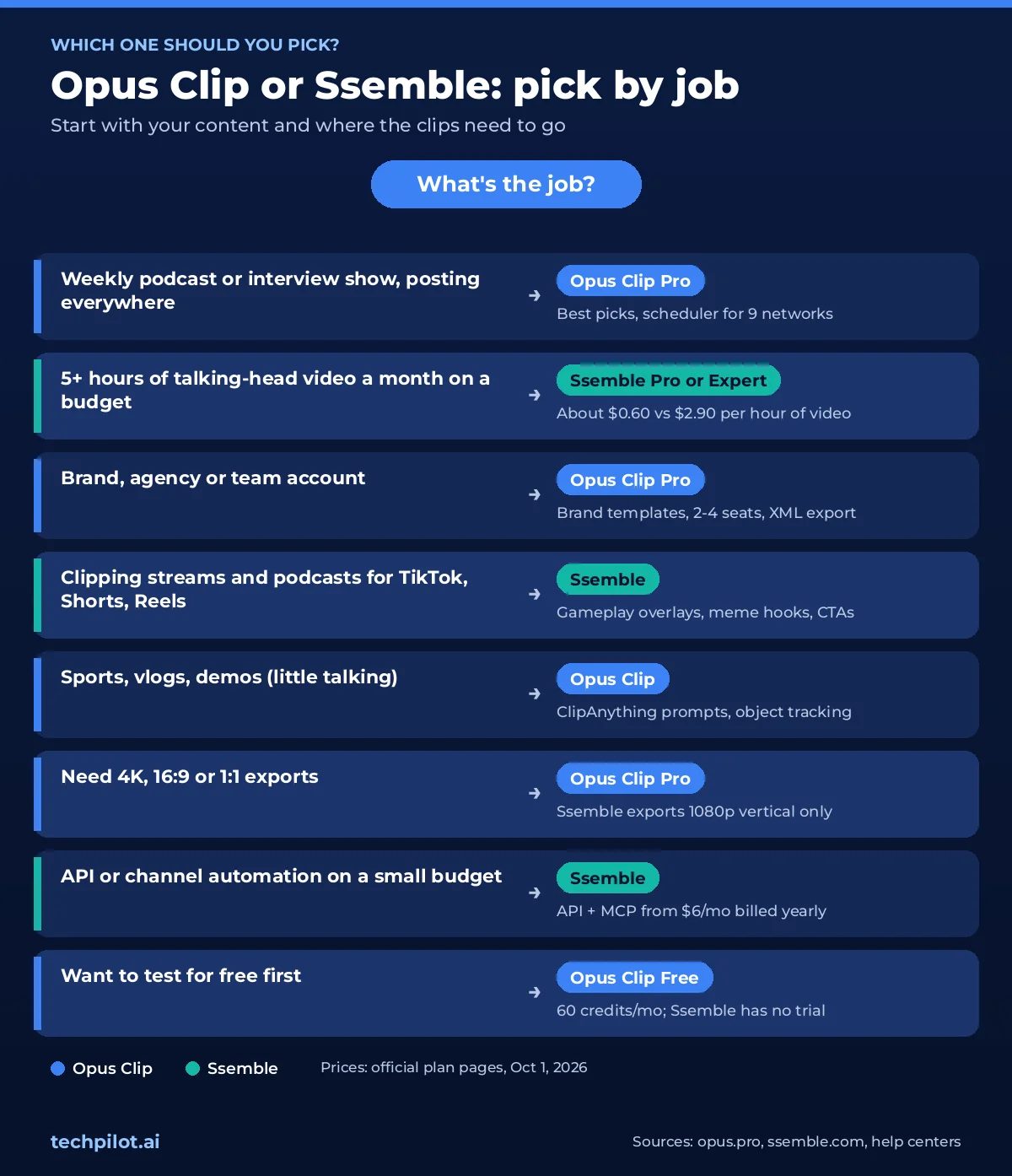
Pick Opus Clip if…
- Clip quality matters more than cost per hour, and you want fewer clips to fix or throw away.
- You publish to LinkedIn, X, Facebook, Threads, Pinterest or Bluesky, not only TikTok, YouTube and Instagram.
- You need 1:1 or 16:9 versions, 4K exports, or an XML handoff to a pro editor.
- Your videos aren’t just talking heads: sports, vlogs, demos or screen recordings.
- A team shares the account and needs consistent brand templates.
- You want to try the tool for free before paying.
Pick Ssemble if…
- You process more than 5 hours of video a month and cost per hour matters most.
- Your content is mostly talking heads: podcasts, interviews, commentary, education.
- TikTok, YouTube Shorts and Instagram Reels are the only places you post.
- You want gameplay overlays, meme hooks and CTAs without opening another editor.
- You want API access or YouTube channel automation without paying for an enterprise plan.
- 1080p output is fine for your channels.
Neither one a perfect fit? Klap is strong on reframing and dubbing, and Vizard suits teams that edit by transcript. You can compare more options in our best Opus Pro alternatives guide and our roundup of the best AI video clippers in 2026. If all your footage lives on YouTube, see our guide to YouTube to Shorts AI tools.
How to test both before you pay
- Choose one real 20-minute segment that’s typical of your content, not your best episode.
- Run it through OpusClip’s free plan. It costs 20 of your 60 free credits. Start a Starter or Pro trial if you want to see the Virality Score.
- Buy one month of Ssemble Pro ($15), not a year, since purchases are non-refundable. The same segment costs 1 of your 30 credits.
- Compare the top five clips from each tool: the hook in the first three seconds, cuts that land mid-sentence, misspelled names in captions, and framing when the speaker changes.
- Count how many clips you’d post without edits. Then multiply by your monthly hours of video using the cost table above.
Frequently asked questions
Is Ssemble cheaper than Opus Clip?
Yes, for long videos. OpusClip charges 1 credit per minute of source video, while Ssemble charges 1 credit per video of up to 20 minutes. A 60-minute episode costs about $2.90 on OpusClip Pro billed yearly ($174 for 3,600 credits) and about $0.60 on Ssemble Pro billed yearly ($72 for 360 credits). For videos under about 10 minutes the costs are close, because Ssemble still charges a full credit per video.
Which has better clip quality, Opus Clip or Ssemble?
Opus Clip. Its ClipAnything model analyzes visuals, audio and sentiment across the whole video, ranks clips with a Virality Score, and offers more reframing and B-roll options. Even Ssemble’s own March 2026 comparison says Opus Clip leads on AI clipping quality. Ssemble works well on talking-head videos, but its help center says it isn’t designed for faceless, music or noisy footage. With either tool, expect to fix or discard some clips: testers report 20-40% for OpusClip.
Does Ssemble have a free plan or free trial?
No. Ssemble’s help center says it doesn’t currently offer a free trial or a free plan, and all purchases are non-refundable. The cheapest way to try it is one month of Pro for $15, which includes 30 credits. OpusClip has a free-forever plan with 60 credits a month and a no-credit-card trial of Starter and Pro, though free and trial exports carry a watermark.
Is Ssemble a good Opus Clip alternative?
For cheap, high-volume clipping of talking-head content posted to TikTok, YouTube and Instagram, yes. It costs far less per hour and includes scheduling and API access on every plan. It’s a weaker Opus Clip alternative if you need 4K, landscape or square exports, team seats, brand templates, or publishing to LinkedIn, X or Facebook. For other options, see our best Opus Pro alternatives.
What is Ssemble AI used for?
Ssemble AI turns long videos from YouTube, Vimeo, Kick, Twitch or uploaded files into short vertical clips with captions, face tracking, hook titles and optional gameplay or meme overlays. It then schedules them to TikTok, YouTube Shorts and Instagram Reels. It also offers YouTube Channel Automation, an API and MCP server for automated workflows, and a Clip Rewards marketplace that pays clippers per verified view.
Can I schedule posts with Opus Clip and Ssemble?
Yes. Ssemble includes scheduling on every plan for TikTok, YouTube and Instagram, with 1, 3 or unlimited connected accounts depending on the plan. OpusClip Starter can post directly to YouTube, TikTok and Instagram, but the scheduler requires Pro. Pro publishes to nine networks, including LinkedIn, Facebook, X, Pinterest, Threads and Bluesky.
Do unused credits roll over on Opus Clip and Ssemble?
On OpusClip monthly plans, credits expire after 60 days, so they roll over for one extra month. On Ssemble monthly plans, credits expire after 30 days and don’t roll over. On both tools, yearly plans give you the full year’s credits upfront, valid for 12 months. Credit top-ups bought on Ssemble’s Custom plan never expire.
Verdict: Opus Clip vs Ssemble, which AI clipper wins?
On clip quality and versatility, Opus Clip wins. It has better highlight detection (even Ssemble admits it), more reframing options, AI B-roll, brand templates, team seats, 4K, and publishing to nine networks. If you clip your own podcast or brand videos and post beyond TikTok, YouTube and Instagram, Pro at $14.50/month billed yearly is the safer buy. Budget for reviewing every clip, because testers still discard 20–40% of what it suggests.
On cost per hour, Ssemble wins by a wide margin. A 60-minute episode costs about $0.60 instead of $2.90, and every plan includes scheduling and an API. For talking-head content posted to the big three short-video platforms, that’s hard to beat, especially at clipper volumes. Just accept the trade-offs: 1080p output, no free trial, no refunds, and an AI that doesn’t handle non-talking footage.
So, for most creators making their own content, pick Opus Clip. For high-volume clipping on a budget, pick Ssemble. If you’re still unsure, run the 20-minute test above. It costs $15 and about an hour of your time.
Found this useful? Share it with someone comparing AI tools.
Best Opus Pro Alternatives for AI Short Clips (2026)
Compare the best Opus Pro alternatives for 2026 by job. See when 2Short or CapCut beats Opus, when Vidu or Runway fits better, and when to stay put.
 Eimantas Kazėnas · 10 min read

Deep Dream Generator vs Midjourney: Which AI Art Tool Fits Your Workflow?
An honest comparison of Deep Dream Generator and Midjourney. Features, pricing, model variety, and ease of use compared to help you choose the right…
 John Daniel · 3 min read