Home / Guides / AI Video Generator
Best AI Video Clippers in 2026 (Long to Short)
Which AI video clipper fits your content in 2026? Compare Opus Pro, Vizard, Klap, 2Short, Ssemble and CapCut by source type, pricing and best use case.
 Eimantas Kazėnas Marketing & Tech
 - Updated
- 9 min read
On this page What an AI video clipper actually does
- What an AI video clipper actually does
- How we scored the field
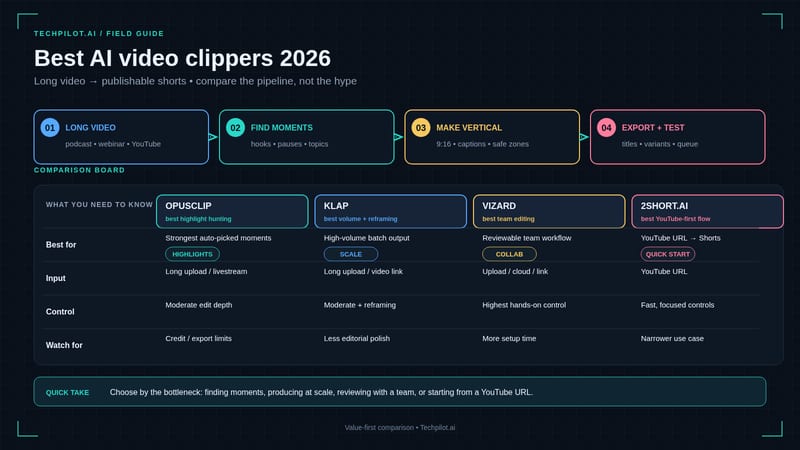
- Quick comparison: best AI video clippers 2026
- 1. Opus Clip / Opus Pro — the category default
- 2. Vizard AI — text-based clipping for teams
- 3. Klap AI — reframe polish, dubbing, 4K
- 4. 2Short AI — lean YouTube → Shorts
- 5. Ssemble — simple AI Shorts from long-form
- 6. CapCut — free finish bay (and assisted clipping)
- Pick-by-use-case table
- Workflow: long video to short clips without chaos
- Pricing honesty (approx Sep 2026 — verify)
- Common mistakes when buying an AI video clipper
- Frequently asked question
- TechPilot.ai verdict
Independent and reader-supported. Some links may earn us a commission; it never changes our rankings. Editorial policy
An AI video clipper is the tool you open when the hard part is already done — the podcast is recorded, the webinar is live, the YouTube essay is uploaded — and you still need a week of Shorts, Reels, and TikToks. The job is long video to short clips: find hooks, reframe to 9:16, burn captions, and ship without living in a timeline.
This Best-of ranks true clippers for that job in 2026 — Opus Clip / Opus Pro, Vizard, Klap, 2Short, Ssemble, and CapCut — with pick-by-use-case guidance and approx Sep 2026 — verify pricing. If you are only shopping “what replaces Opus,” use our Opus Pro alternatives guide. For YouTube-link-first workflows, see YouTube to Shorts AI.
What an AI video clipper actually does
A serious AI video clipper does five things well:
- Ingest — YouTube link, file upload, Zoom/Drive, or multi-source.
- Detect — speech, faces, emotion, scene changes, and “clip-worthy” moments.
- Reframe — horizontal → vertical (9:16) without chopping heads mid-sentence.
- Caption — auto transcripts, animated styles, emoji/emphasis where useful.
- Export / publish — download packs or schedule to Shorts, TikTok, Reels, LinkedIn, X.
It is not a prompt-to-video generator. Tools like Crreo, Vidu, InVideo, or Runway invent footage; they do not mine a 45-minute episode. Mixing those jobs is how creators buy the wrong subscription twice.
How we scored the field
I weighed: source flexibility, hook hit-rate on real episodes, reframe quality, caption polish, time-to-first usable Short, pricing honesty (credits vs clip quotas), edit depth after the AI draft, and failure modes (generic hooks, credit blowups, YouTube-only locks). Faceless channels that already generate long-form should treat clipping as Stage 5 in our faceless YouTube stack — not as a replacement for scripting and voice.
Quick comparison: best AI video clippers 2026
| Tool | Best for | Sources | Standout | Approx entry (Sep 2026) | Tradeoff |
|---|---|---|---|---|---|
| Opus Clip / Opus Pro | Multi-platform long-to-short at scale | Multi-source + ClipAnything | Virality triage + scheduler + Agent Opus | Free ~60 credits; paid from ~$15/mo | Credit math on long episodes |
| Vizard AI | Text edit + teams + schedule | Uploads, links, meetings | Transcript editing, templates, free floor | Free ~60 credits/mo; Creator ~$14.50/mo annual | Less “virality brand” than Opus |
| Klap AI | YouTube-centric polish + dubbing | Strong YouTube / long upload | Reframe 2, Virality Score, Pro dubbing/4K | Basic ~$14/mo annual | Clip-count plans need forecasting |
| 2Short AI | Lean YouTube to Shorts | YouTube links only | Fast transcripts, low entry | From ~$9.90/mo | No multi-source backlog |
| Ssemble | Simple long-to-Shorts pipeline | Long-form uploads | Easy AI Shorts + light manual edit | From ~$9/mo | Shallower feature depth vs peers |
| CapCut | Free polish + assisted clipping | Local files / mobile | Templates, captions, hands-on control | Free / Pro regional | More manual than pure clippers |
1. Opus Clip / Opus Pro — the category default
Job: Multi-platform long to short at volume.
Opus remains the reference AI video clipper for creators drowning in podcasts, webinars, and mixed uploads. It analyzes speech, visuals, and emotion; scores clips; auto-reframes; burns captions; and can push to major social destinations. Agent Opus (2025+) also stretches the product toward text/URL/audio to video — useful ecosystem, but the core JTBD here is still repurposing.
Who it is for: Agencies, podcast networks, and multi-platform creators who need one dashboard — not a YouTube-only lane.
Pros: Strong virality triage; multi-source; mature publish/schedule path; real free credit floor to stress-test.
Cons: Credits (often ~1 credit ≈ 1 minute of source) punish long episodes; deep timeline craft still lands in CapCut/Premiere.
Pricing (approx Sep 2026 — verify): Free ~60 credits; paid often from ~$15/mo. Model minutes, not vibes.
When to pick: Default when sources are mixed and volume is high. Switchers to Opus Pro alternatives.
2. Vizard AI — text-based clipping for teams
Job: Upload once, ship many clips with transcript-first editing.
Vizard AI leans into text-based clip editing, caption translation, templates, brand kits, and in-app schedule/publish. For teams that think in transcripts more than timelines, it is one of the cleanest browser workflows in 2026.
Who it is for: Marketing teams, educators, and podcast shows that need repeatable brand captions and a social calendar — not just solo “viral roulette.”
Pros: Usable free credit floor (~60/mo); Creator around $14.50/mo annual (verify); strong text edit + templates; broader sources than YouTube-only tools.
Cons: Virality scoring culture is quieter than Opus; solo creators who only paste YouTube links may overpay for team features.
When to pick: Prefer Vizard when editing-by-text and schedule/publish matter more than Opus brand gravity. Full review: Vizard AI.
3. Klap AI — reframe polish, dubbing, 4K
Job: YouTube / long upload to Shorts with aesthetic reframe and localization options.
Klap AI wins when scene-aware reframing (Reframe 2), Virality Score, multilingual dubbing, and 4K export are the deciding features. It sits beside Opus — not below it by default — for creators who care about how the vertical frame looks.
Who it is for: YouTube-first creators shipping TikTok/Reels/Shorts who want layout polish and optional Pro dubbing.
Pros: Reframe aesthetics; clip-count forecasting clarity on many plans; Pro dubbing/4K path.
Cons: You still need a real episode to trial hit-rate; annual Basic often ~$14/mo (approx Sep 2026 — verify).
When to pick: Prefer Klap for reframe/dubbing/4K; prefer Opus for multi-source breadth + free credit stress tests. Review: Klap AI.
4. 2Short AI — lean YouTube → Shorts
Job: Paste a YouTube link, get Shorts-ready clips fast.
2Short AI is the cheapest serious YouTube-native clipper in this roundup. AI finds pivotal snippets, builds transcripts, and outputs vertical clips without a timeline grind. Head-to-head with Opus: Opus Clip vs 2Short.
Who it is for: YouTubers whose library lives on the channel and whose goal is Shorts (+ TikTok-style exports).
Pros: Real long to short automation; competitive entry from ~$9.90/mo; fast transcripts.
Cons: YouTube links only — no Zoom dump mining; editing depth is basic vs CapCut.
When to pick: YouTube is the only serious source. Deeper workflow: YouTube to Shorts AI.
5. Ssemble — simple AI Shorts from long-form
Job: Effortless long-form to Shorts with light manual cleanup.
Ssemble targets creators who want AI to extract key moments and still keep a simple manual edit pass. Pricing often starts around ~$9/mo (verify) with a free trial path — approachable for educators and brand channels testing Shorts leverage.
Who it is for: Solo creators who want “good enough” Shorts without learning Opus credit math on day one.
Pros: Low friction; AI Short generation + customizable cleanup; friendly entry price.
Cons: Feature depth and platform breadth trail Opus/Vizard/Klap; expect AI misses that need human trims.
When to pick: Budget simplicity. Graduate to Opus/Vizard/Klap when backlog volume or multi-platform publish becomes the bottleneck.
6. CapCut — free finish bay (and assisted clipping)
Job: Hands-on polish; assisted AI helpers — not a pure “upload and walk away” clipper.
CapCut remains the free/cheap finish layer after any AI video clipper draft: captions, beat sync, templates, 9:16 craft. Many stacks run Opus/Vizard/Klap for detection, then CapCut for the last 20%. CapCut Commerce Pro is a different job (product/UGC ads) — useful for DTC, not podcast mining.
Who it is for: Creators who refuse to ship raw AI drafts; mobile-first editors; anyone optimizing free tooling.
Pros: Genuinely usable free tier; best template culture on TikTok-style content; control.
Cons: More manual than dedicated clippers for clearing a 10-hour backlog.
When to pick: Always keep CapCut in the stack for polish — even if Opus or Vizard owns detection.
Pick-by-use-case table
| Use case | Best first pick | Strong runner-up | Skip if… |
|---|---|---|---|
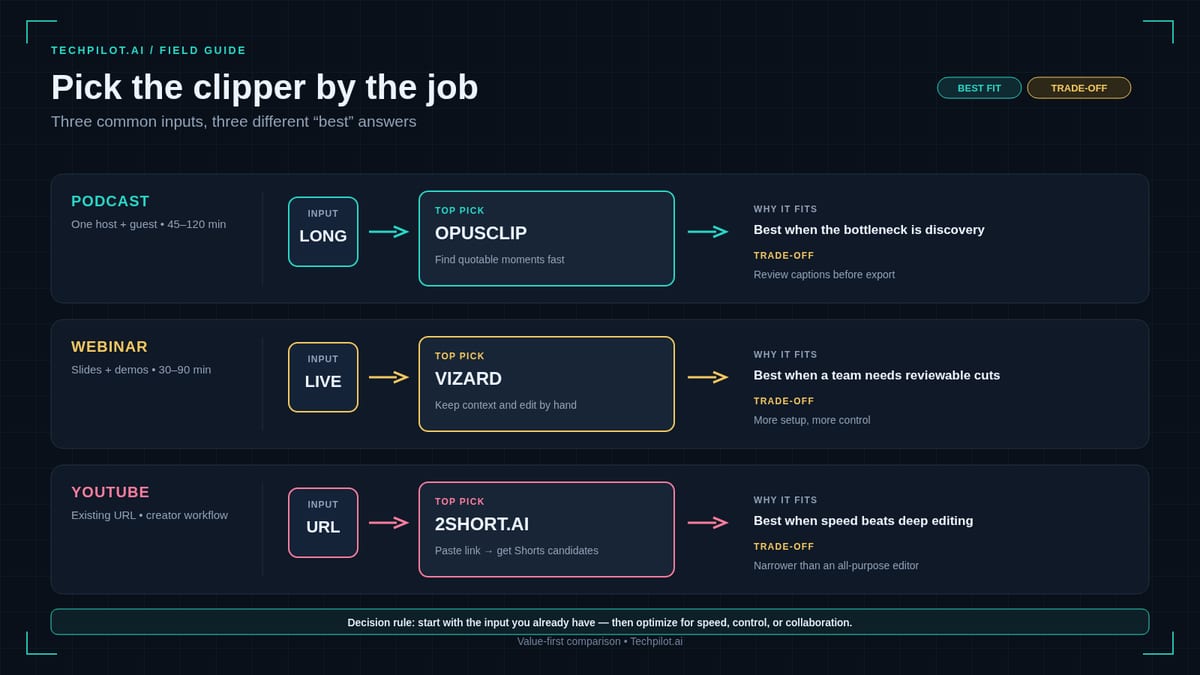
| Podcast / webinar multi-platform | Opus Pro | Vizard | You only post on YouTube Shorts |
| YouTube channel to Shorts volume | 2Short AI | Klap | Sources are Zoom/Drive files |
| Team brand kit + schedule | Vizard | Opus Pro | Solo creator, one channel |
| Multilingual Shorts / dubbing | Klap (Pro) | Vizard (caption translate) | English-only marketing |
| Aesthetic reframe / 4K export | Klap | Opus | Watermarked drafts are fine |
| Lowest entry YouTube clipper | 2Short (~$9.90) | Ssemble (~$9) | You need multi-source |
| Free polish after AI draft | CapCut | – | Export from clipper is already perfect |
| Faceless long-form to clips | Opus / Vizard / Klap | 2Short (YT-only) | You have no long video yet |
Workflow: long video to short clips without chaos
- Ship the long video first. Clipping without a finished episode is backwards — generators belong earlier in the faceless stack.
- Run one real episode through two clippers (e.g., Opus vs Vizard, or 2Short vs Klap). Compare hook quality, not landing-page screenshots.
- Human-pass the top 5–7 clips. Kill soft opens, fix false cuts, tighten CTAs.
- Polish captions in CapCut when brand fonts or pacing need a second pass.
- Schedule a week of Shorts, then review retention graphs before buying a second clipper seat.
Pricing honesty (approx Sep 2026 — verify)
Credit and quota models hide the bill:
- Opus / Vizard: upload minutes / credits — long podcasts burn fast; free floors (~60 credits) are for trials, not agencies.
- Klap: clip-count / plan tiers — forecast how many Shorts you actually publish weekly.
- 2Short / Ssemble: lower entry (~$9–$10/mo) — great floors; watch feature ceilings.
- CapCut: free core; Pro/Commerce are separate decisions.
Always label budgets approx Sep 2026 — verify on the vendor site before annual lock-in.
Common mistakes when buying an AI video clipper
Buying three clippers on day one. One detector + CapCut polish beats a subscription pile.
Confusing generators with clippers. Prompt-to-video will not salvage a silent Zoom recording that never happened.
Ignoring source lock-in. 2Short’s YouTube-only lane is a feature for channel owners and a trap for webinar teams.
Shipping raw AI hooks. Virality scores are priors, not guarantees — audience niche still wins.
Skipping thumbnails and titles on Shorts. Packaging still matters; see the wider creator stack in faceless YouTube automation.
Frequently asked question
What is the best AI video clipper in 2026?
For multi-source, multi-platform volume: Opus Pro. For text edit + teams: Vizard. For YouTube reframe/dubbing: Klap. For lean YouTube to Shorts: 2Short. There is no single winner — match the job.
What is an AI video clipper vs an AI video generator?
A clipper mines existing long footage into short clips. A generator creates new footage from prompts, scripts, or images. Different jobs, different tools.
Can CapCut replace Opus or Vizard?
For polish and free assisted editing, yes as a finish bay. For automated highlight detection across hours of talk, dedicated clippers still win time-to-first Short.
Is there a free AI video clipper?
Opus and Vizard offer meaningful free credit floors; CapCut is free for hands-on work. Free tiers are for proving hit-rate — not for agency volume.
How do I turn long video into short clips for TikTok and Reels?
Upload or link the long file into Opus, Vizard, Klap, 2Short, or Ssemble to review AI picks to reframe/captions to CapCut polish if needed to export 9:16 to schedule.
Should I switch off Opus Pro?
Only if credits, source mix, or edit style fight your workflow. Compare peers in Opus Pro alternatives 2026 without abandoning the long to short category this page covers.
TechPilot.ai verdict
The best AI video clipper in 2026 is the one that matches your source, publish surface, and credit tolerance:
- Opus Pro — multi-platform default and virality triage.
- Vizard — transcript-first teams and schedule/publish.
- Klap — reframe polish, dubbing, 4K.
- 2Short — cheapest serious YouTube→Shorts lane (workflow guide).
- Ssemble — simple entry Shorts pipeline.
- CapCut — free polish after any AI draft.
Treat long to short as a category job, not a brand loyalty test. Run one real episode through your shortlist, keep CapCut for finishing, and only then lock an annual plan. To polish clips with animated captions and B-roll, Submagic is a strong finishing tool; for transcript-based editing of the full episode first, use Descript. More tool reviews on the tools hub.
Found this useful? Share it with someone comparing AI tools.
How to Make Jean Phil AI Video
How to make Jean Phil AI video: build a blond bob, mustache and houndstooth reference, animate it with Seedance 2.5 in CapCut and edit a deadpan 9:16…
 Eimantas Kazėnas · 7 min read

How to Choose an AI Video Generator for Real Creative Work
Knowing how to choose an AI video generator matters more every month, because adoption keeps climbing. This is a quick, hands-on guide on how to make…
 Alexi Carmichael · 4 min read