Home / Guides / AI Video Generator
Best AI Video Generator Free (No Watermark)
 Eimantas Kazėnas Marketing & Tech
 - Published
- 6 min read
On this page Free AI video generators compared
- Free AI video generators compared
- How much free video do you really get?
- 1. Google Flow: best free AI video generator overall
- 2. Wan 2.2: best free AI video generator with no watermark
- 3. PixVerse: best for daily social clips
- 4. Kling AI: best for realistic motion
- 5. Runway: best for trying a pro editor
- Free tools we left out, and why
- Which free AI video generator should you use?
- Frequently asked questions
Independent and reader-supported. Some links may earn us a commission; it never changes our rankings. Editorial policy
Best AI video generator free picks for 2026: Google Flow, Wan 2.2, PixVerse, Kling and Runway. See real free limits, watermarks and how many clips you get.
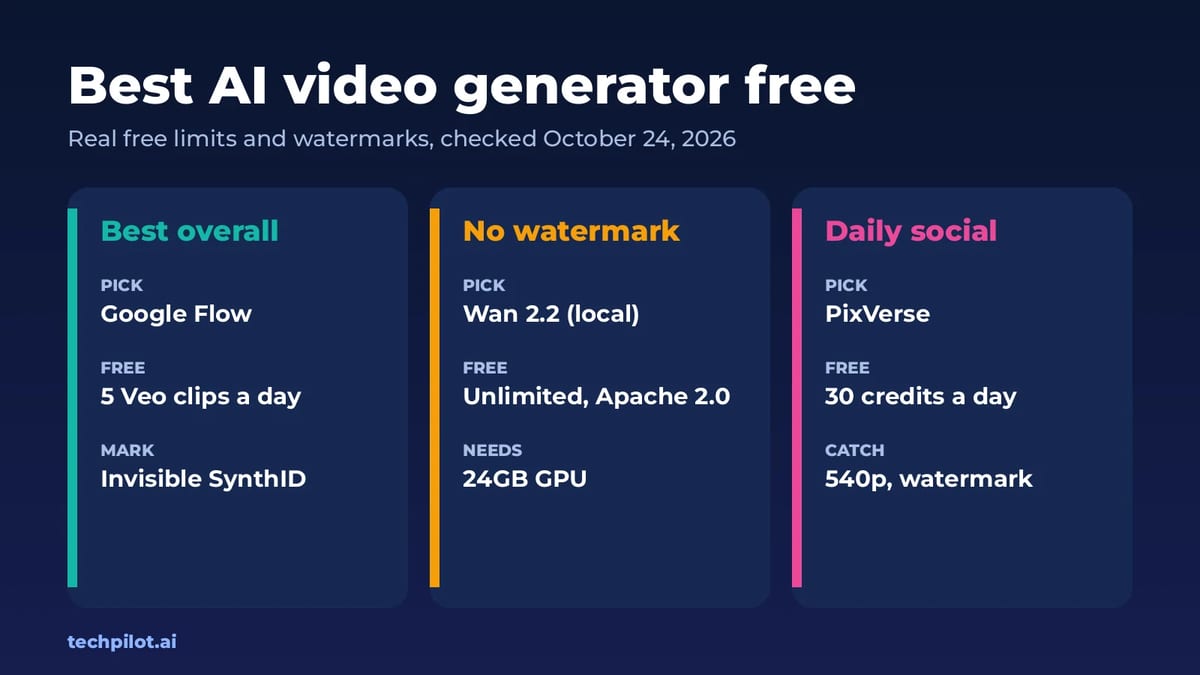
Quick answer: the best free AI video generator for most people is Google Flow. Everyone gets 50 credits a day, enough for five 8-second Veo 3.1 Lite clips, and outside India, South Korea and Vietnam you can switch the visible watermark off. If you need a free AI video generator with no watermark at all and full commercial rights, run Wan 2.2 on your own GPU. We checked every free plan on the vendors’ own pages on October 24, 2026.
This guide ranks the tools by what you can actually publish for free: how many seconds of video you get, and whether there’s a logo on it. If you only care about typing a prompt, our free AI text to video generator list goes deeper on prompt-only tools like Dreamina, Vidu and Hailuo.
Free AI video generators compared
| Tool | Free allowance | Watermark on free | Paid from |
|---|---|---|---|
| Google Flow | 50 credits a day (5 Veo 3.1 Lite clips) | Invisible SynthID; visible mark can be turned off in most countries | Google AI Plus |
| Wan 2.2 (local) | Unlimited on your own GPU, 720p | None | Free (Apache 2.0) |
| PixVerse | 60 credits at sign-up, then 30 a day, up to 540p | Yes | $8/mo yearly, $10 monthly |
| Kling AI | Small free allowance, standard quality | Yes | $6.99 first month, then $8.80/mo |
| Runway | 125 credits once (about 10 s of Gen-4.5) | Yes | $12/mo yearly, $15 monthly |
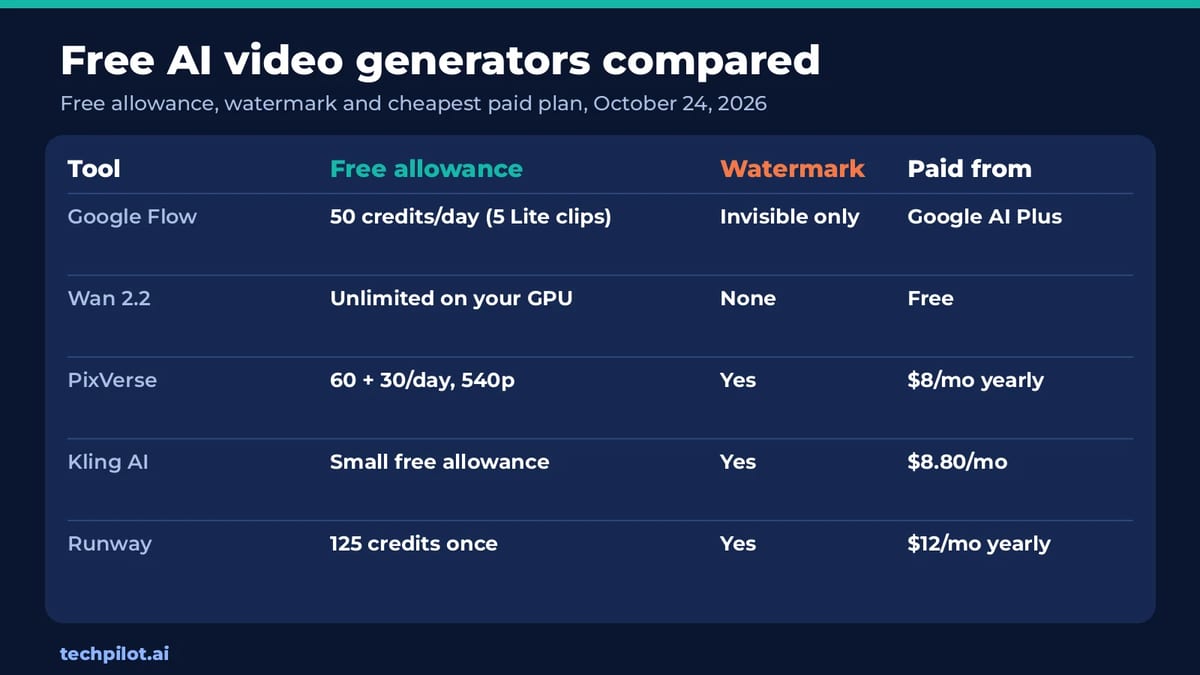
The pattern is clear once you line them up. Almost every hosted tool keeps watermark-free downloads for paying users: PixVerse, Kling and Runway all list it as a paid perk. Only two options give you clean files for nothing, Google Flow (with its invisible SynthID mark) and Wan 2.2 on your own hardware.
How much free video do you really get?
“Free credits” means little until you turn it into seconds of video. Here’s the maths with each vendor’s own numbers:
- Google Flow: 50 daily credits buy five 8-second Veo 3.1 Lite clips, or 40 seconds a day. Use it every day and that’s about 20 minutes of video a month. Gemini Omni Flash at 360p is cheaper again, at 7 credits for a 10-second clip.
- Runway: 125 credits, once. Runway says 625 credits buy 52 seconds of Gen-4.5, so the free pack is about 10 seconds. It’s a trial, not a plan.
- Wan 2.2: no credit limit. Alibaba says the 5B model makes a 5-second 720p clip in under 9 minutes on one consumer GPU, so expect roughly six clips an hour.
- PixVerse and Kling: the cost per clip changes with model, length and resolution, so check the number on the generate button before you run a job.
Our take: Google Flow gives away far more usable video than anyone else, and it isn’t close. The others are better thought of as trials for deciding where to pay.
1. Google Flow: best free AI video generator overall
- Free: 50 Flow credits a day, with or without a subscription. Veo 3.1 Lite costs 10 credits per 4, 6 or 8-second clip, Veo 3.1 Fast costs 20, and Gemini Omni Flash at 360p costs 4 to 7 credits.
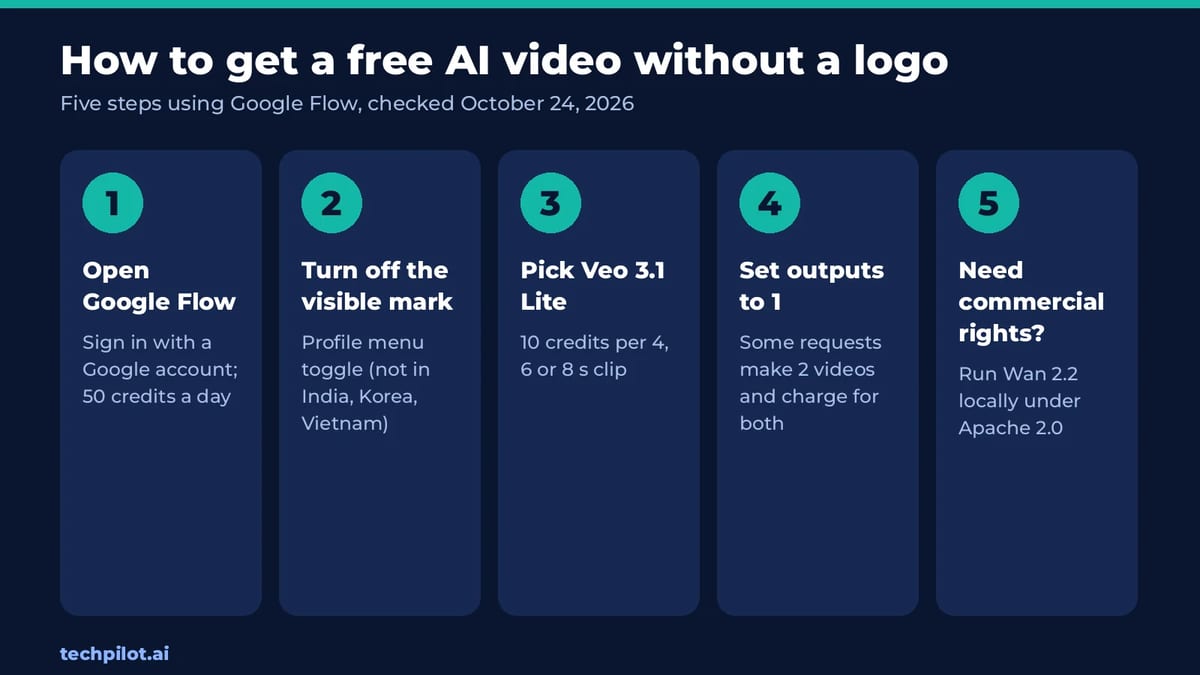
- Watermark: every video carries Google’s invisible SynthID mark. A visible watermark has a toggle in your profile menu, but it’s added automatically in India, South Korea and Vietnam unless you’re on the top Ultra plan.
- The catch: unused credits don’t roll over, your next 50 arrive the day after your first generation, and free users may be blocked from video at peak times, roughly 2 PM to 5 PM UTC. Veo 3.1 Quality costs 100 credits, so it’s out of reach on free.
- Best for: the best-looking free clips you can get today.
Tip: some requests make two videos and charge for both, so set the output count to one.
2. Wan 2.2: best free AI video generator with no watermark
- Free: Alibaba’s Wan 2.2 is open source under Apache 2.0, and Alibaba says it claims no rights over what you generate. The TI2V-5B model does text to video and image to video at 720p and 24 fps.
- Watermark: none, and no credits or queues.
- The catch: you need a GPU with at least 24GB of VRAM, such as an RTX 4090, plus some setup in Python or ComfyUI. The larger 14B models need even more memory.
- Best for: agencies and creators who need clean commercial footage in volume.
See our Wan AI page for the model family, and our best local AI models guide for what your hardware can run.
3. PixVerse: best for daily social clips
- Free: the Basic plan gives 60 credits when you join and 30 credits a day, for text to video and image to video.
- Watermark: yes. Free output tops out at 540p, and watermark-free export starts on a paid plan.
- Paid: Standard is $10 a month, or $8 a month billed yearly ($96), with 720p, no watermark and 60 daily plus 1,200 monthly credits.
- Best for: short effect and template videos for Reels and Shorts, where 540p is fine.
More in our PixVerse review.
4. Kling AI: best for realistic motion
- Free: a free account gets a small allowance for standard generation, so you can test Kling’s motion quality.
- Watermark: yes. Kling lists brand watermark removal, 1080p and 4K video and commercial use as subscriber benefits.
- Paid: Standard is $6.99 for the first month, then $8.80 a month, with 660 credits.
- Best for: people, dancing and sports, where bodies have to move convincingly.
Read our Kling 4.0 page for current plans and the new model.
5. Runway: best for trying a pro editor
- Free: 125 one-time credits on a selection of Runway’s models, plus 5GB of storage.
- Watermark: yes on free. “No watermarks” is listed on Standard.
- Paid: Standard is $12 a month billed yearly, or $15 monthly, for 625 credits a month.
- Best for: testing Runway’s editing tools before a client job.
More in our Runway review.
Free tools we left out, and why
Pika lists 0 monthly credits on its free plan and Luma has no free plan, so neither is really free. Dreamina, Vidu and Hailuo do have free credits, but they all watermark free downloads; we cover them in the text to video list. If you want to swap a face into an existing clip rather than generate one, see our free AI face swap video guide.
Which free AI video generator should you use?
- You want the most free video: Google Flow, every day.
- You need no watermark and commercial rights: Wan 2.2 on a 24GB GPU.
- You’re on a phone and post to Shorts: PixVerse.
- Your clip has people moving: test Kling.
- You start from a still image: make the image first with a free AI image generator, then animate it in Flow or PixVerse.
Still weighing paid options? Our guide on how to choose an AI video generator covers quality, control and licensing.
Frequently asked questions
What is the best free AI video generator?
Google Flow is the best free option for most people. Everyone gets 50 credits a day, enough for five 8-second Veo 3.1 Lite clips, with only an invisible SynthID mark in most countries.
Is there a free AI video generator with no watermark?
Yes. Wan 2.2 runs on your own GPU with no watermark and Apache 2.0 rights. Google Flow adds only invisible SynthID outside India, South Korea and Vietnam if you turn the visible mark off.
How many free videos can I make in Google Flow?
With 50 daily credits you can make five Veo 3.1 Lite clips of up to 8 seconds, or two Veo 3.1 Fast clips. Unused credits don’t roll over to the next day.
Can I use free AI videos commercially?
It depends on the tool. Wan 2.2 is Apache 2.0, so yes. Kling lists commercial use as a subscriber benefit, so free Kling clips aren’t cleared for commercial work.
Which free AI video generators add a watermark?
PixVerse, Kling and Runway watermark free videos and remove it on paid plans. PixVerse Standard costs $10 a month, Kling Standard $8.80 and Runway Standard $15 monthly.
Found this useful? Share it with someone comparing AI tools.
Kling 4 vs Seedance 2.5: Which AI Video Wins?
Kling 4 vs Seedance 2.5 compared: access, pricing from $8.80 vs $15 a month, 30 s vs 180 s clips, 4K, audio and best uses, with a verdict for…
 Mihai (Mike) Bizz · 7 min read
AI Person: Free Generators & How to Make One
An AI person is a realistic face or talking avatar made by AI. Compare the best free AI person generators, make your own step by step, and stay legal.
Mihai (Mike) Bizz · 9 min read