Home / Guides / AI Video Generator
Klap AI vs Opus Clip: Which Clipper to Pick?
Klap AI vs Opus Clip: Klap bills per clip with no watermark, while Opus bills per minute of video and has a free plan. Compare 2026 prices and our verdict.
 Eimantas Kazėnas Marketing & Tech
 - Published
- 5 min read
On this page The short answer
Independent and reader-supported. Some links may earn us a commission; it never changes our rankings. Editorial policy
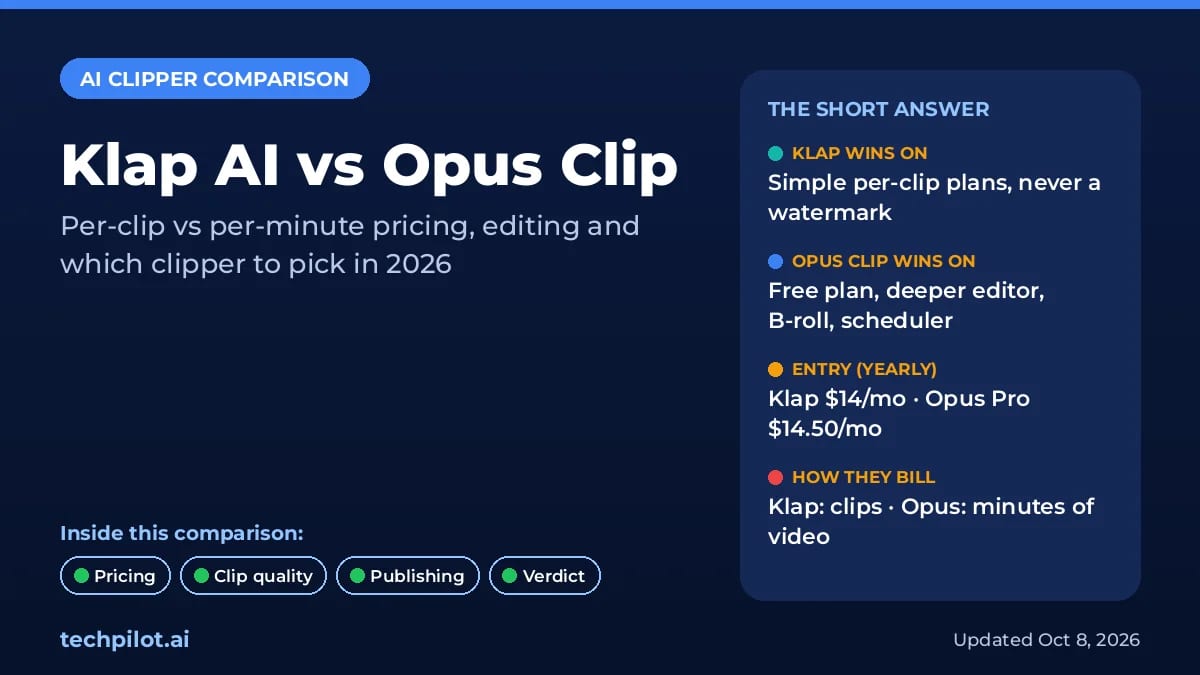
Klap AI vs Opus Clip comes down to how you want to pay and how much editing you do. Both turn long videos into vertical clips for TikTok, Reels and Shorts, score them for viral potential and add captions. But Klap charges by the number of clips you generate, while OpusClip charges by the minutes of video you feed it. That one difference decides which is cheaper for your channel.
We compared both tools on their official pricing pages, klap.app/pricing and opus.pro/pricing, and OpusClip’s help center on October 8, 2026, in US dollars. Here’s who should pick which.
The short answer
- Pick Klap if you clip long podcasts or interviews, want watermark-free clips with minimal editing and post a few clips per episode.
- Pick Opus Clip if you want a recurring free plan, a full editor with AI B-roll, a social scheduler, team seats and export to Premiere Pro or DaVinci Resolve.
- On a budget, both entry tiers cost about the same billed yearly: Klap Basic $14 a month and OpusClip Pro $14.50 a month. Monthly, OpusClip Starter at $15 is the cheapest paid plan of the two.
Klap AI vs Opus Clip at a glance
| Klap | Opus Clip | |
|---|---|---|
| How you pay | Per clip: 100, 300 or 1,000 clips a month | Per minute of source video: 1 credit = 1 minute |
| Free option | 1 free video, no card, no watermark | Free plan: 60 credits/mo, watermark, 3-day export window |
| Cheapest paid plan | Basic: $29/mo or $14/mo billed yearly | Starter: $15/mo (monthly only) |
| Main plan | Pro: $79/mo or $39/mo yearly, 300 clips | Pro: $29/mo or $14.50/mo yearly, 300 credits |
| Editing | Transcript editor, captions, AI reframe | Text and timeline editor, AI B-roll, filler removal, dubbing (Pro) |
| Publishing | Post to TikTok, YouTube, Instagram, LinkedIn; unlimited social accounts | Auto post on all paid plans; scheduler and Premiere/DaVinci export on Pro |
| Languages | 52 languages | Captions in 20+ languages |
Pricing: per clip vs per minute
This is where the tools really differ. OpusClip’s help center says processing costs 1 credit per minute of the original video, so a 60-minute podcast uses 60 credits no matter how many clips you keep. Klap meters its plans by clips and says you “only pay for clips you generate.”
| Plan | Klap | Opus Clip |
|---|---|---|
| Free | 1 video, no credit card | $0: 60 credits/mo, watermarked, exports expire after 3 days |
| Entry | Basic: $29/mo or $14/mo yearly, 100 clips/mo | Starter: $15/mo, 150 credits/mo (monthly only) |
| Mid | Pro: $79/mo or $39/mo yearly, 300 clips/mo | Pro: $29/mo or $14.50/mo yearly ($174/yr), 300 credits/mo, 2 seats |
| Top | Pro+: $189/mo or $94/mo yearly, 1,000 clips/mo, for teams | Business: custom pricing, API and integrations |
A worked example. Say you publish one 60-minute podcast a week and keep about 15 clips from each episode. On OpusClip that’s 240 credits a month, which fits the Pro plan at $29 a month or $14.50 billed yearly. On Klap it’s about 60 clips a month, which fits Basic at $29 a month or $14 billed yearly. The cost is almost identical.
Change the mix and the winner changes. Ten short 10-minute videos a month cost only 100 OpusClip credits, so Starter at $15 a month covers it. But two-hour episodes push OpusClip past 300 credits quickly, while Klap only counts the clips. Klap’s pricing page doesn’t spell out whether every generated clip counts or only the ones you keep, so watch your clip counter during the first week.
Clip quality and editing
Both tools find highlights, reframe to vertical, add animated captions and rank clips with a virality score. Klap says it works best on videos with speech, like podcasts, interviews, tutorials and reviews, and supports 52 languages. It also tracks speakers in multi-person layouts and offers split-screen, screencast and gaming layouts through its AI Reframe 2.
OpusClip goes further on editing. Paid plans add a text and timeline editor, filler and silence removal and AI image B-roll, and Pro adds AI video B-roll, transitions, music, video dubbing, speech enhancement and export to Adobe Premiere Pro and DaVinci Resolve. If you want to finish clips without opening another editor, that matters. Our Opus Clip review and Klap review cover each tool in more depth.
Publishing and teams
Klap includes unlimited social accounts and analytics on every plan and can post directly to TikTok, YouTube, Instagram and LinkedIn. Pro+ is built for teams. OpusClip auto-posts on paid plans, adds a social media scheduler, 6 social account connections and a team workspace with 2 seats on Pro, and offers limited API access on Pro and full API access on Business.
Which should you choose?
Choose Klap if
- You clip long-form talking videos and only need a handful of clips from each.
- You want clean, watermark-free clips with little editing.
- You post to many social accounts, since every plan includes unlimited accounts.
Choose Opus Clip if
- You want to test for free every month before paying.
- You edit clips heavily and want B-roll, dubbing and Premiere or DaVinci export.
- You publish lots of short videos, where per-minute credits stay cheap.
Our verdict
For most solo podcasters and interviewers, Klap is the simpler buy: clear per-clip plans, no watermark and less to learn. For creators and small teams who want one tool to clip, edit and schedule, Opus Clip is the stronger platform and the only one of the two with a recurring free plan. Not sold on either? See our best AI video clippers, the best Opus Clip alternatives and our Opus Clip vs Ssemble comparison, or try Vizard.
Frequently asked questions
Is Klap better than Opus Clip?
It depends on your videos. Klap is simpler, never adds a watermark and bills by clips, which suits long podcasts where you only need a handful of clips. Opus Clip has a recurring free plan, a deeper editor, AI B-roll, a social scheduler and Premiere Pro export, which suits creators who edit and publish a lot.
Is Klap free?
Klap lets you create 1 video for free with no credit card, and free clips have no watermark. After that you need a paid plan: Basic at $29 a month (or $14 a month billed yearly) for 100 clips, Pro at $79 ($39 yearly) for 300 clips or Pro+ at $189 ($94 yearly) for 1,000 clips.
How much does Opus Clip cost?
OpusClip has a free plan with 60 credits a month, watermarked clips and a 3-day export window. Starter is $15 a month for 150 credits (monthly only), and Pro is $29 a month or $14.50 a month billed yearly ($174) for 300 credits a month. Business plans are custom.
How do Opus Clip credits work?
OpusClip charges 1 credit per minute of the original video you process. A 30-minute video uses 30 credits. You can lower the cost by processing only part of a video with the processing timeframe slider.
Does Klap add a watermark?
No. Klap says it never adds watermarks, including on clips made with the free trial video. OpusClip’s free plan adds a watermark; paid OpusClip plans remove it.
Sources: Klap pricing page and homepage FAQ; OpusClip pricing page and help center. All checked October 8, 2026.
Found this useful? Share it with someone comparing AI tools.
Kling 4 vs Seedance 2.5: Which AI Video Wins?
Kling 4 vs Seedance 2.5 compared: access, pricing from $8.80 vs $15 a month, 30 s vs 180 s clips, 4K, audio and best uses, with a verdict for…
 Mihai (Mike) Bizz · 7 min read
Best Opus Pro Alternatives for AI Short Clips (2026)
Compare the best Opus Pro alternatives for 2026 by job. See when 2Short or CapCut beats Opus, when Vidu or Runway fits better, and when to stay put.
 Eimantas Kazėnas · 10 min read