Home / Guides / AI Video Generator
Kling 4 vs Seedance 2.5: Which AI Video Wins?
Kling 4 vs Seedance 2.5 compared: access, pricing from $8.80 vs $15 a month, 30 s vs 180 s clips, 4K, audio and best uses, with a verdict for creators.
 Mihai (Mike) Bizz Business, entrepreneurship, tech & AI
 - Published
- 7 min read
On this page Kling 4 vs Seedance 2.5: side-by-side comparison
Independent and reader-supported. Some links may earn us a commission; it never changes our rankings. Editorial policy
Quick answer: Kling 4 is the better pick for most creators. It is cheaper to start (paid plans from $8.80 a month), it has been open to every Kling account since October 15, 2026, and its 10 keyframes give you tight shot-by-shot control over clips of up to 30 seconds. Seedance 2.5 wins when you need long stories (up to 180 seconds in its beta long-video mode), up to 50 reference inputs, or a token-billed API for production work.
Both are flagship AI video models launched this autumn, one from Kuaishou and one from ByteDance, and both generate video with sound. Here is how Kling 4 vs Seedance 2.5 compares on access, pricing, clip length, resolution, audio and the jobs each one suits.
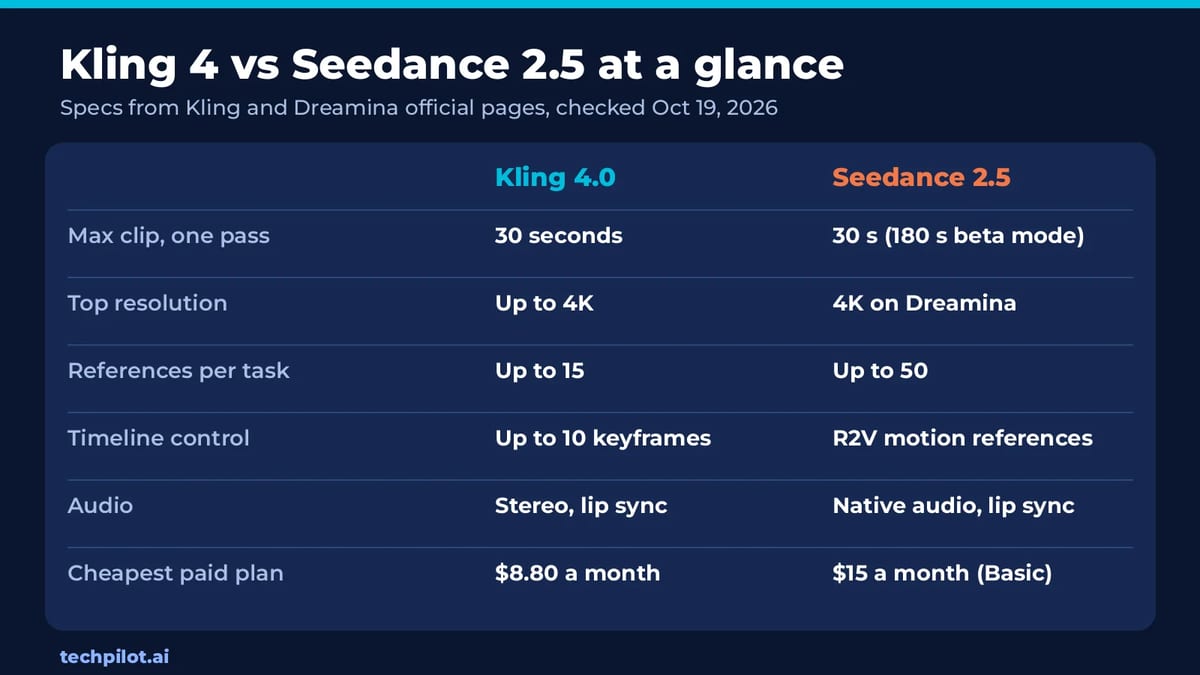
Kling 4 vs Seedance 2.5: side-by-side comparison
| Kling 4.0 | Seedance 2.5 | |
|---|---|---|
| Maker | Kuaishou (Kling AI) | ByteDance (via Dreamina and BytePlus) |
| Status | Available to all Kling accounts since Oct 15, 2026 | Live worldwide on Dreamina; API on BytePlus ModelArk |
| Cheapest paid option | $8.80/month (Standard, 660 credits) | $15/month (Dreamina Basic) |
| Free use | Basic plan with daily log-in credits | Free daily Dreamina credits (amount not published) |
| API | MCP server and CLI | BytePlus ModelArk, $10.70–$11.70 per 1M video tokens |
| Max clip per pass | 30 s (Flash: 20 s) | 30 s; up to 180 s in beta long-video mode |
| Resolution | 720p, 1080p, 4K | Up to 4K on Dreamina; 480p–1080p on the API |
| References | Up to 15 (images, videos, voice, elements) | Up to 50 multimodal inputs |
| Control | Up to 10 keyframes, video re-editing | R2V motion references, region editing |
| Audio | Stereo audio, lip sync, 9+ languages | Native audio, lip sync, 11 languages |
| Best for | Short, directed social clips and ads | Long stories and reference-heavy brand video |
Access: where you can use each model
Kling 4.0 lives on Kling AI’s own site and apps. After a limited Kling 4.0 Flash preview from September 28, Kling says the full model became available to everyone on October 15, 2026. Every account can select it in the Video Generation workspace, but generations still cost credits. There is also a faster Kling 4.0 Flash for everyday clips (up to 20 seconds at 720p, no keyframes). Developers and agents can drive Kling 4.0 through Kling’s MCP server and CLI. Our Kling 4.0 review covers the full feature list.
Seedance 2.5 is ByteDance’s model, and you don’t use it on a standalone Seedance app. Creators reach it through Dreamina, CapCut’s AI creation platform, where it is live worldwide. Developers call it through BytePlus ModelArk under the model ID dreamina-seedance-2-5-260628, and it is also resold by API hosts such as OpenRouter and Replicate. Our Seedance review tracks every route.
Pricing: Kling 4 vs Seedance 2.5
Kling 4 pricing
- Free: the Basic plan costs nothing and gives daily log-in credits, but Kling hasn’t announced free Kling 4.0 generations, and free videos carry a watermark.
- Standard: $8.80 a month for 660 credits, after a $6.99 first month. Yearly billing works out to $6.60 a month.
- Higher plans: Pro, Premier and Ultra+ add more credits, plus a limited-time 10% Kling 4.0 discount for those tiers.
- Catch: Kling hasn’t published how many credits a Kling 4.0 clip uses, so you can’t yet turn the plan price into a price per video.
Seedance 2.5 pricing
- Free: Dreamina says it gives free daily credits to try Seedance 2.5, but it doesn’t publish the amount.
- Dreamina Basic: $15 a month. Dreamina is running plan and credit discounts from October 10 to 23, so first-month prices you see this week are lower than the renewal price.
- API on BytePlus ModelArk: billed by video tokens at $10.70 per 1M tokens for 480p and 720p and $11.70 for 1080p, when the input has no video. BytePlus’s own examples work out to about $0.23 per second at 720p and $0.57 per second at 1080p in 16:9.
Bottom line on price: Kling 4 has the cheaper entry point, and both use credits on their consumer apps, so compare credit packs before a big batch. If you need a clear per-second cost for a client budget, Seedance 2.5’s API is easier to plan around.
Clip length and resolution
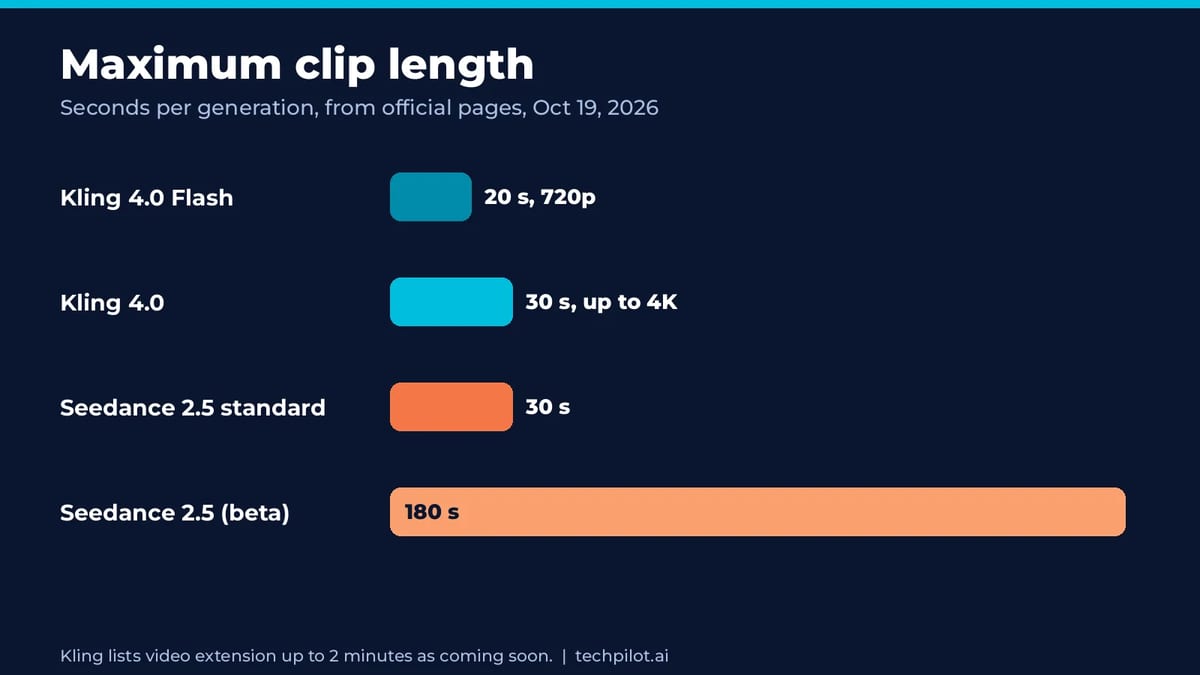
Kling 4.0 makes clips of 3 to 30 seconds in a single pass, at 720p, 1080p or 4K, in 21:9, 16:9, 1:1 or 9:16. Kling lists 10-bit HDR at 1080p and 4K, and video extension up to 2 minutes, as coming soon. Kling 4.0 Flash stops at 20 seconds and 720p.
Seedance 2.5 also makes 30-second clips in standard mode, and its beta long-video mode extends them up to 180 seconds while keeping characters, lighting and scenes consistent. Dreamina advertises clean 4K output. On the BytePlus API, the published rates cover 480p, 720p and 1080p.
For a single short clip, the two are level. For anything longer than 30 seconds, Seedance 2.5 is the only one of the two that can do it today.
Control and quality
We haven’t run a blind side-by-side test of the two yet, so this section compares the controls each model gives you rather than declaring a quality winner. Both are top-tier models, and results depend heavily on your prompt and references.
- Kling 4.0 is built for directing. You can place up to 10 keyframes anywhere on the timeline to steer camera moves, shot changes and reveals, mix up to 15 references (10 images, 5 videos, voice references and 7 saved “elements”), and re-edit a clip’s expression, camera angle, background or dialogue. Kling says it also renders readable on-screen text in 9 languages.
- Seedance 2.5 is built for big, consistent scenes. It accepts up to 50 multimodal references in one job, including scripts, photos, videos, music and style guides. Its R2V mode follows green-screen or untextured 3D “white model” footage for precise movement in multi-character scenes, and you can regenerate one region of a video without redoing the whole shot.
If you want to plan every beat of a 15-second ad, Kling’s keyframes are more direct. If you have a pile of brand assets and a storyboard, Seedance’s reference capacity and region editing fit better. For the previous generation, our Seedance 2.0 review shows how ByteDance’s models handle motion and consistency.
Audio
Both models generate sound with the video. Kling 4.0 adds two-channel stereo audio, better lip sync and dialogue in languages including English, Chinese, Japanese, Korean, Spanish, Portuguese, German, French and Hindi. Seedance 2.5 has native audio and lip sync, supports 11 major languages, and Dreamina says it now avoids random subtitles and unwanted background music, so clips are cleaner to edit.
Neither is perfect. If either model bakes in music or effects you don’t want, Mirelo SFX can strip them and rebuild synced sound effects while keeping the dialogue.
Best use cases
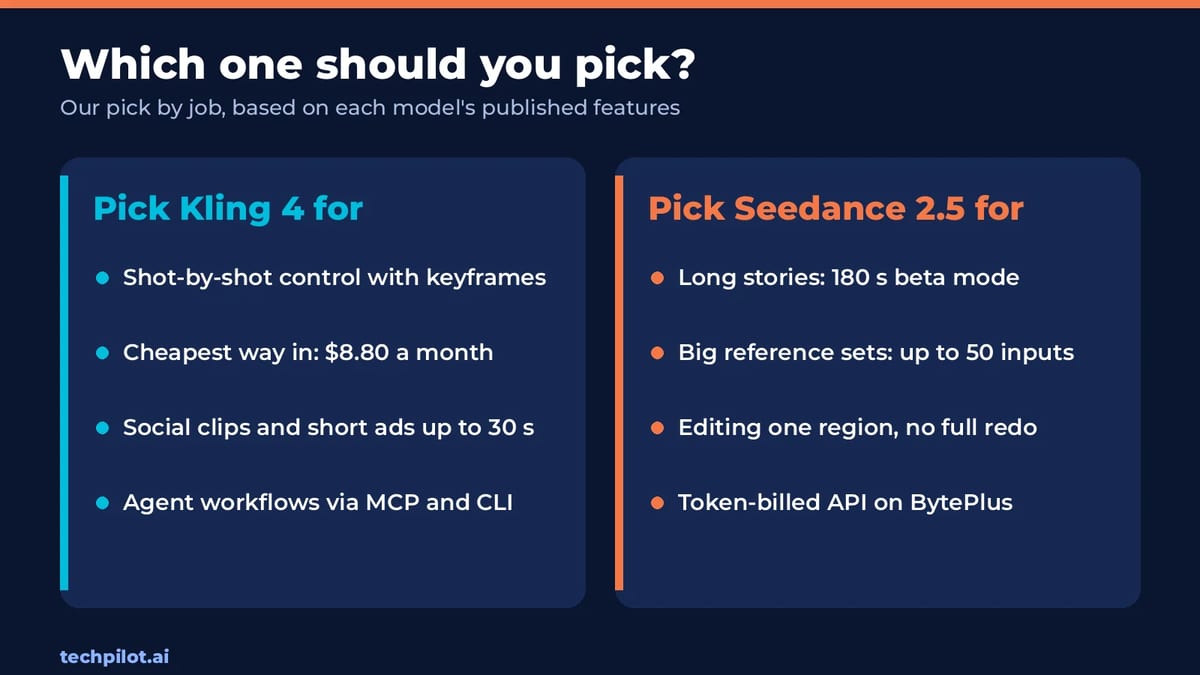
- Social clips and short ads: Kling 4. It’s cheaper to start, and keyframes make it easy to hit the beats of a 15–30 second spot.
- Long stories and short dramas: Seedance 2.5, thanks to the 180-second beta mode and stable multi-character scenes.
- Product and e-commerce videos with many brand assets: Seedance 2.5, because it takes up to 50 references and can fix one region without a full redo.
- Fast, frequent drafts: Kling 4.0 Flash, for quick 720p clips up to 20 seconds.
- Developers and automation: both work. Seedance 2.5 has a documented token-priced API on BytePlus, and Kling 4.0 plugs into AI agents through its MCP server and CLI.
Verdict: Kling 4 or Seedance 2.5?
Choose Kling 4 if you’re a solo creator or marketer making clips of 30 seconds or less. It is open to every account, costs $8.80 a month to start, and gives you the most direct control over each shot. Choose Seedance 2.5 if you make longer narrative pieces, work from large sets of brand references, or need a production API with published per-token rates. Many teams will end up using both: Kling for quick, directed social clips and Seedance for longer, reference-heavy work.
Frequently asked questions
Is Kling 4 better than Seedance 2.5?
For most short clips, Kling 4 is the easier pick: it’s cheaper to start at $8.80 a month and its 10 keyframes give precise shot control. Seedance 2.5 is better for videos longer than 30 seconds and for jobs with many reference assets.
Is Kling 4 free?
Kling 4.0 is available to every Kling account, including the free Basic plan, but each generation uses credits and Kling hasn’t announced free Kling 4.0 generations. Paid plans start at $8.80 a month.
How much does Seedance 2.5 cost?
On Dreamina, paid plans start at $15 a month (Basic), with free daily credits to try it. On the BytePlus ModelArk API it costs $10.70 per 1M video tokens at 480p and 720p and $11.70 at 1080p, about $0.23 per second at 720p in BytePlus’s own example.
How long can Kling 4 and Seedance 2.5 videos be?
Kling 4.0 makes clips of 3 to 30 seconds per pass (Kling 4.0 Flash up to 20 seconds). Seedance 2.5 makes 30-second clips in standard mode and up to 180 seconds in its beta long-video mode on Dreamina.
Do Kling 4 and Seedance 2.5 generate audio?
Yes. Kling 4.0 generates stereo audio with lip sync and dialogue in languages including English, Spanish and Hindi. Seedance 2.5 generates native audio with lip sync and supports 11 major languages.
Can I use Kling 4 or Seedance 2.5 through an API?
Yes. Seedance 2.5 is available on BytePlus ModelArk and API hosts such as OpenRouter and Replicate. Kling 4.0 can be automated through Kling’s MCP server and CLI.
Found this useful? Share it with someone comparing AI tools.

Best AI Text to Video Generator Free (2026)
The best AI text to video generator free options that work now: Google Flow, Vids, Dreamina, Kling, PixVerse and more, with real free limits and the…
 Mihai (Mike) Bizz · 10 min read
How to Make Jean Phil AI Video
How to make Jean Phil AI video: build a blond bob, mustache and houndstooth reference, animate it with Seedance 2.5 in CapCut and edit a deadpan 9:16…
 Eimantas Kazėnas · 7 min read