Replicate is the fastest route from “I want to use this model” to a working API call. The catalogue is huge, model pages show prices up front, and you only pay for what you run.
Home / Tools / AI Video Generator
AI Video Generator · Tool review
Replicate AI: Pricing, API & How It Works
 TechPilot.ai review team Hands-on testing, one published method
 - Last updated
- How we test
The AI news that actually mattered this week.
One short email every Friday: the biggest AI stories, what they mean for you, and the tools worth trying. A 3-minute read, no hype.
Free. Unsubscribe anytime.
You're in. Watch for the brief on Friday. Free. Unsubscribe anytime.
Summary
Pros and cons
What we like
- Huge model catalogue Thousands of open models plus official FLUX, Wan, GPT Image and more behind one API.
- Pay per use Per output or per active second, with no idle cost on public models.
- Clear model pages Price, licence notes, playground and code in one place.
- Custom models Package and deploy your own model with Cog.
- Fine-tuning Train FLUX LoRAs on your own images.
What could be better
- No real free tier A few free runs, then prepaid credit.
- Cold starts Less popular models can take time to boot.
- Costs at scale Steady high-volume traffic can be cheaper elsewhere.
- Private models bill idle time Deployments cost money while online.
Key features
- One-line API: Run any public model from Python, Node.js or HTTP with a single call.
- Model playground: Test prompts in the browser and see the price before you code.
- Per-output pricing: Fixed prices per image, video second or token on many official models.
- Fine-tuning: Train image models such as FLUX on your own data.
- Cog and deployments: Ship custom models with autoscaling and your own hardware.
- Webhooks and streaming: Get results asynchronously or stream LLM output.
Screenshots
Full review
Independent and reader-supported. Some links may earn us a commission; it never changes our scores. Editorial policy
Replicate AI runs FLUX, Wan video, LLMs and thousands of open models through one API. See real Replicate pricing per second or output, free runs and setup.
If you want to use an AI model in your own app without renting GPUs or setting up servers, Replicate is one of the quickest ways to do it. You pick a model, send it a request with one line of code, and pay only for what that run uses. This page explains what Replicate is, what people use it for, exactly how its pricing works (with real numbers we checked on October 17, 2026), how to make your first API call, and when another platform is a better fit.
What is Replicate AI?
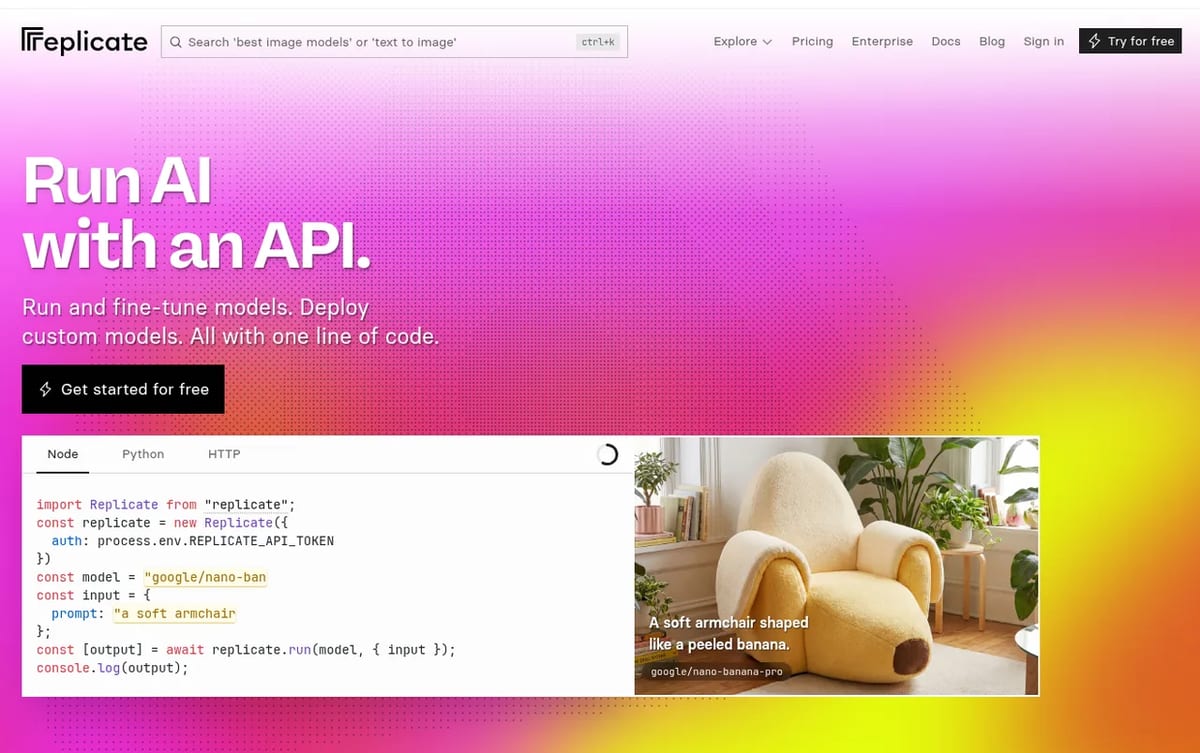
Replicate is a cloud platform for running machine learning models through an API. Its homepage pitch is “Run AI with an API”: run and fine-tune models and deploy custom models, “all with one line of code.” Thousands of community-contributed open-source models live on it, next to official hosted versions of big proprietary models such as Google’s Nano Banana and Imagen, OpenAI’s GPT Image and ByteDance’s Seedream.
Replicate was founded in 2019 by Ben Firshman and Andreas Jansson. Cloudflare bought the company, and Replicate officially became part of Cloudflare on December 1, 2025. Replicate still runs as its own site and API at replicate.com, with the same pricing pages and docs.
What people use Replicate for
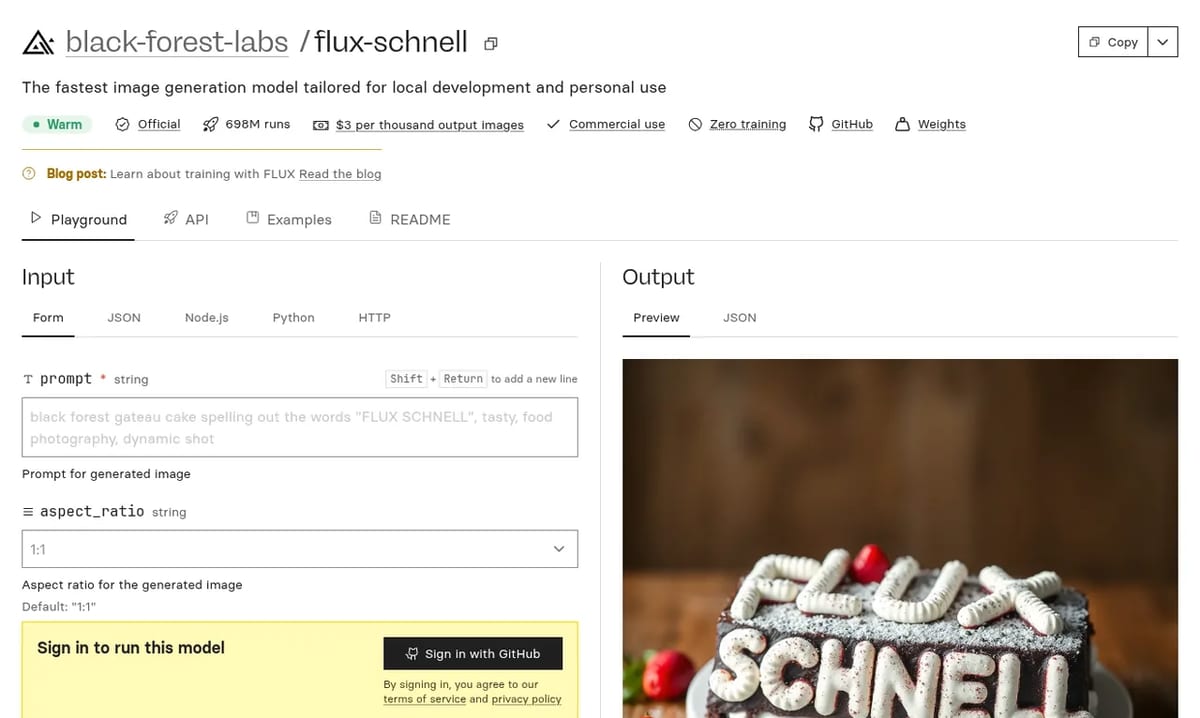
- Image generation: the biggest use. Black Forest Labs’ FLUX family is the classic example. FLUX Schnell alone shows about 698 million runs, and newer models like FLUX.2 Pro, Seedream and GPT Image sit next to it. See our FLUX 3 page for the latest FLUX release.
- Video generation: text-to-video and image-to-video models such as Alibaba’s Wan 3.0, which outputs 480p, 720p or 1080p clips up to 30 seconds, billed per second of video.
- Large language models: open models like DeepSeek R1 and Llama, plus hosted proprietary LLMs, billed per token.
- Audio and editing: speech generation, music, image restoration, upscaling, background removal and captioning.
- Fine-tuning: train a FLUX LoRA on your own photos or product shots and run it like any other model.
- Custom models: package your own model with Cog, Replicate’s open-source tool, push it, and get a scalable API endpoint.
In short, Replicate suits developers, indie hackers and product teams who want to add AI features to an app fast. It’s less of a fit if you want a ready-made creative app with a polished editor; tools like Krea AI do that, and some of them call models on platforms like Replicate under the hood.
Replicate Pricing (2026)
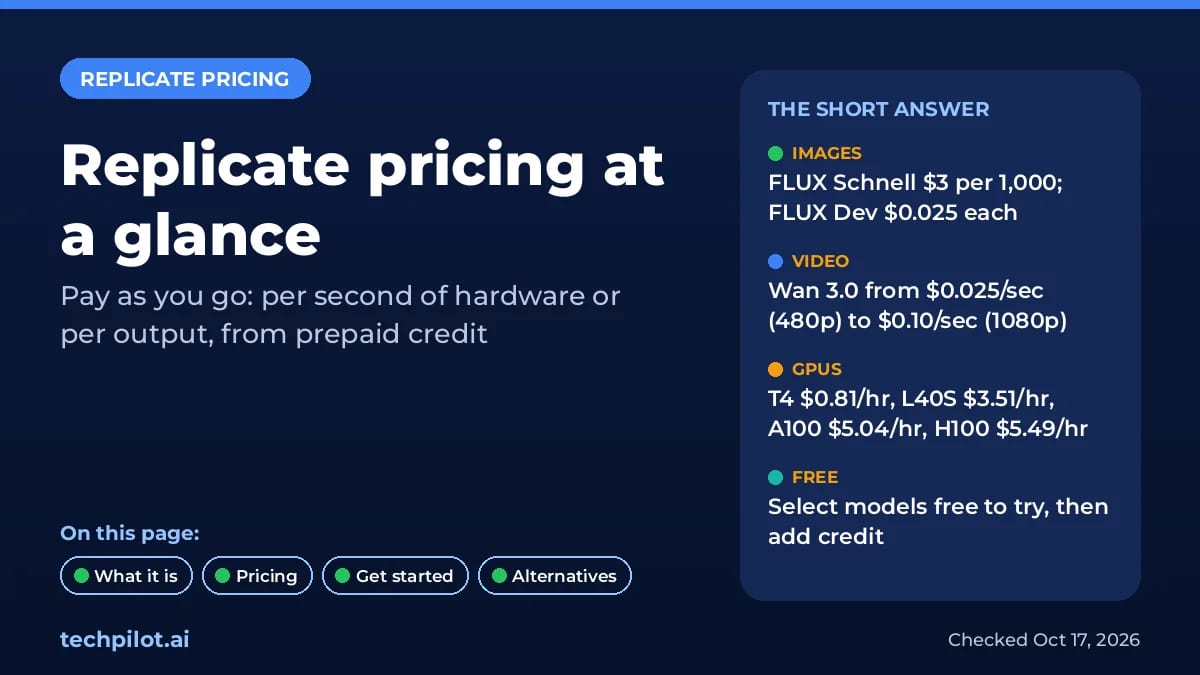
Replicate has no monthly plans. You only pay for what you use, from prepaid credit. According to the Replicate pricing page, which we checked on October 17, 2026, models are billed in one of two ways:
- By output: many popular official models charge a fixed price per image, per second of video or per token. This is the easiest way to estimate costs.
- By hardware time: most other models charge per second the model spends on a GPU or CPU, so the price depends on the hardware and on how long your request runs.
Every model page shows its own price or a cost estimate, so check it before you build. Here are real per-output prices listed on Replicate today:
| Model | What it does | Price on Replicate |
|---|---|---|
| FLUX Schnell | Fast text-to-image | $3 per 1,000 images (about 333 for $1) |
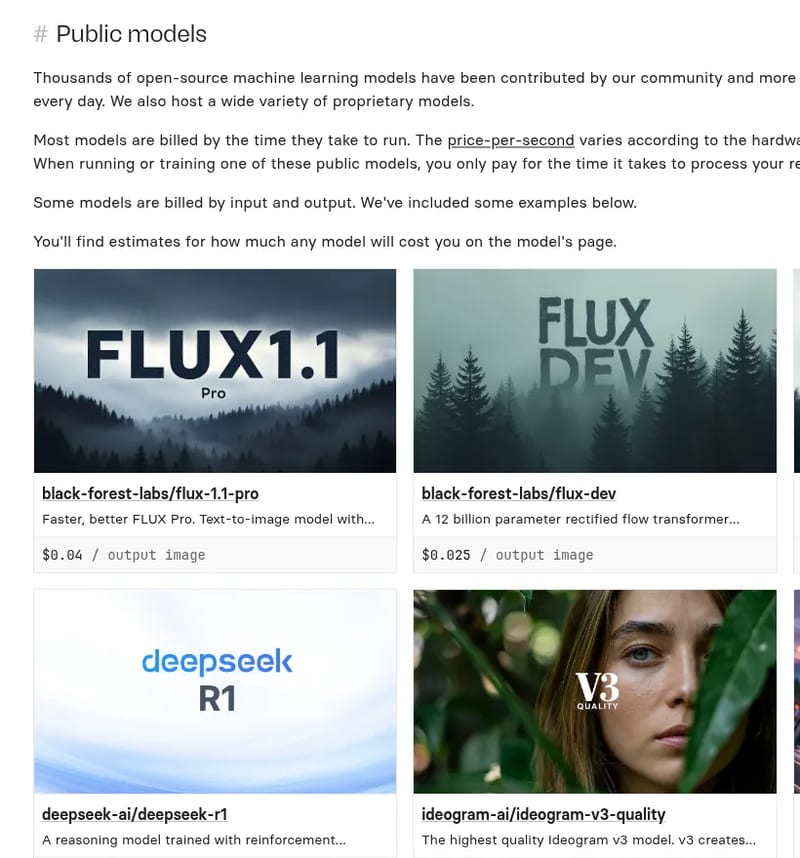
| FLUX Dev | Text-to-image, higher quality | $0.025 per image |
| FLUX 1.1 Pro | Text-to-image, pro quality | $0.04 per image |
| FLUX.2 Pro | Image generation and editing | $0.015 per run + $0.015 per output megapixel (+ $0.015 per input megapixel when editing) |
| Ideogram v3 Quality | Images with accurate text | $0.09 per image |
| Recraft V3 | Images and long text in many styles | $0.04 per image |
| Wan 3.0 | Text/image to video | $0.025/sec at 480p, $0.05/sec at 720p, $0.10/sec at 1080p |
| DeepSeek R1 | Reasoning LLM | $3.75 per 1M input tokens, $0.01 per 1,000 output tokens |
Hardware prices (per second)
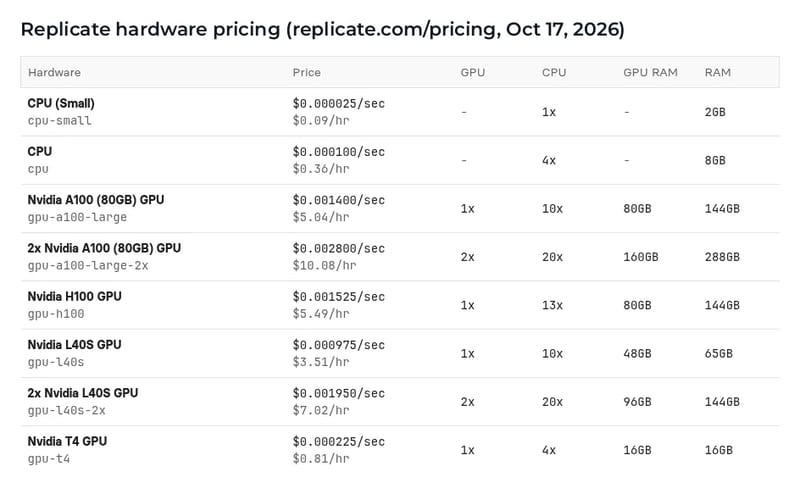
For models billed by time, and for your own private models and deployments, Replicate charges these rates:
| Hardware | Per second | Per hour | GPU memory |
|---|---|---|---|
| CPU (Small) | $0.000025 | $0.09 | – |
| CPU | $0.000100 | $0.36 | – |
| Nvidia T4 | $0.000225 | $0.81 | 16GB |
| Nvidia L40S | $0.000975 | $3.51 | 48GB |
| Nvidia A100 (80GB) | $0.001400 | $5.04 | 80GB |
| Nvidia H100 | $0.001525 | $5.49 | 80GB |
| 2x A100 / 2x H100 | $0.002800 / $0.003050 | $10.08 / $10.98 | 160GB |
What real jobs cost
- 1,000 FLUX Schnell images: $3. The same with FLUX Dev is $25, and with FLUX 1.1 Pro $40.
- One 10-second Wan 3.0 clip: $0.25 at 480p, $0.50 at 720p or $1.00 at 1080p.
- A chat reply from DeepSeek R1 with 2,000 input and 1,000 output tokens: about $0.0175, so roughly 57 replies per $1 (our math from the listed rates).
- A time-billed model on an L40S that takes 6 seconds: about $0.006 per run.
- A private model kept online on an A100 for a full day: about $121, because private models bill for setup and idle time as well as active time.
Billing rules worth knowing
- Prepaid credit: per the prepaid credit docs, you add a card and buy credit up front. Purchased credit is valid for 1 year and is not refundable. Optional auto-reload has a $5 minimum threshold and a $15 minimum reload balance.
- When credit hits zero: new work stops and any infrastructure Replicate runs for you shuts down.
- Public vs private: on public models you pay only for active time; setup and idle time are free. Private models and deployments bill for all the time instances are online, per the billing docs. Fast-booting fine-tunes are the exception and only bill active time.
- Failed runs: if a run fails, you’re not charged (private models and deployments still bill instance time). Canceled runs can still cost money.
- Volume discounts: available on large spend through Replicate’s enterprise team, along with higher GPU limits and SLAs.
Is there a free trial?
Sort of. Replicate’s billing docs say: “You can run select models on Replicate for free, but after a bit you’ll be asked to set up billing.” There’s no fixed number of free credits published, and some features need billing set up. The rate limits page adds that accounts granted credit without a payment method are limited to 1 request per second (6 per minute). In practice, treat the free part as a way to try a few models in the browser. For real use, plan to add $10 to $20 of credit.
How to get started with the Replicate API
- Sign in at replicate.com. Sign-in on model pages uses a GitHub account.
- Try a model in the browser. Every model page has a Playground with a form, so you can test prompts and see the output and price before writing code.
- Create an API token at replicate.com/account/api-tokens. Tokens start with r8_. Keep it secret, store it in an environment variable, and never put it in front-end code.
- Add credit in billing settings once the free runs run out.
- Install a client:
pip install replicatefor Python ornpm install replicatefor Node.js, or call the HTTP API directly. - Run the model with the code below.
This Python example follows Replicate’s Python quickstart. It generates one image with FLUX Schnell, which costs $0.003:
export REPLICATE_API_TOKEN=r8_your_token_hereimport replicate
# Needs: pip install replicate, and REPLICATE_API_TOKEN set in your shell
output = replicate.run(
"black-forest-labs/flux-schnell",
input={"prompt": "a red bicycle leaning on a yellow wall, film photo",
"aspect_ratio": "16:9"},
)
with open("bike.webp", "wb") as f:
f.write(output[0].read()) # FLUX Schnell returns a list of image files
print("Saved bike.webp")To use a different model, swap the model name and its inputs. Each model page has an API tab with ready-to-copy code for Python, Node.js and HTTP. For apps in production, use webhooks or the predictions API instead of waiting on each call, and move to a deployment if you need your own hardware and no cold starts.
Replicate pros and cons
- Pro: huge model catalogue. Thousands of open-source models plus official versions of top proprietary image, video and LLM models, all behind one API and one bill.
- Pro: no idle costs on public models. You pay per output or per active second, which is great for spiky or low-volume apps.
- Pro: clear model pages. Price, licence notes (such as commercial use), examples and code are all on one page.
- Pro: custom models. Cog and deployments let you ship your own model without managing Kubernetes.
- Con: no real free tier. You get a few free runs, then you need prepaid credit.
- Con: cold starts. Less popular public models may need to boot before your first request, which can add seconds or more.
- Con: costs at scale. For steady, high-volume traffic, a dedicated GPU provider or a cheaper per-token LLM API can cost less.
- Con: private models bill idle time. Leaving a deployment running can get expensive fast.
Replicate alternatives
- fal: the closest rival for fast image and video generation APIs, with many of the same models. See our page on fal Recast for one of its own tools.
- Hugging Face: the biggest open model hub. Its Inference Providers and Inference Endpoints run models through an API, and it’s the place to download weights to run yourself.
- Together AI, Fireworks and OpenRouter: better picks if you mostly need cheap, fast LLM tokens rather than image or video models.
- Cloudflare Workers AI: Replicate’s new parent company’s own serverless inference, useful if your app already runs on Cloudflare.
- RunPod, Modal or Lambda: rent GPUs directly when you want full control or steady 24/7 workloads.
- Run it yourself: many open models run locally for free. See our best local AI models guide, or see Comfy Agent if you build image and video workflows in ComfyUI.
If you’re choosing a video model rather than a platform, our free AI text to video generators list compares what each one gives you for free.
Verdict
Replicate is the easiest way for a developer to try and ship almost any AI model: one API, pay-per-use pricing and no servers. It’s at its best for image and video generation and for apps with uneven traffic. Start with a few dollars of credit and a per-output model like FLUX Schnell, then compare costs against fal or a dedicated GPU host once your volume grows.
TechPilot.ai’s Verdict on Replicate
Replicate is the fastest route from “I want to use this model” to a working API call. The catalogue is huge, model pages show prices up front, and you only pay for what you run.
Use it for image and video features and for apps with uneven traffic. Once your volume is steady and high, compare it with fal, Hugging Face or a dedicated GPU host.
Replicate FAQ
Is Replicate free?
Not really. Replicate lets you run select models for free for a while, then asks you to set up billing. There is no free monthly plan or published free credit amount. After that you buy prepaid credit and pay per output or per second of hardware.
•
How much does Replicate cost?
It depends on the model. As of October 17, 2026, FLUX Schnell costs $3 per 1,000 images, FLUX Dev $0.025 per image and Wan 3.0 video $0.025 to $0.10 per second. Time-billed models run from $0.81/hour on a T4 GPU to $5.49/hour on an H100.
•
What is Replicate AI used for?
Developers use Replicate to run AI models through an API: image generation with FLUX and other models, text-to-video, LLMs, speech, upscaling and fine-tuning. You can also deploy your own model with Cog.
•
How do I get a Replicate API token?
Sign in at replicate.com, open replicate.com/account/api-tokens and create a token. It starts with r8_. Save it as the REPLICATE_API_TOKEN environment variable and keep it out of front-end code.
•
Who owns Replicate?
Cloudflare. It announced the deal on November 17, 2025, and Replicate officially became part of Cloudflare on December 1, 2025. Replicate still runs its own site, API and pricing at replicate.com.

Mirelo SFX
AI Video Generator
Mirelo SFX 2.0 fixes the most common audio problems in AI video by rebuilding the sound around your dialogue, synced to the picture.

Vizard AI
AI Video Generator
Vizard AI is a long-video-to-Shorts clipper with a real free plan (60 credits a month) and Creator from $14.50 a month billed yearly.…

Cardboard
AI Video Generator
Cardboard is one of the more complete agentic editors: it plans a first cut, handles cleanup and captions, and generates the missing…
Graphics & Design  Mihai (Mike) Bizz · 8 min read
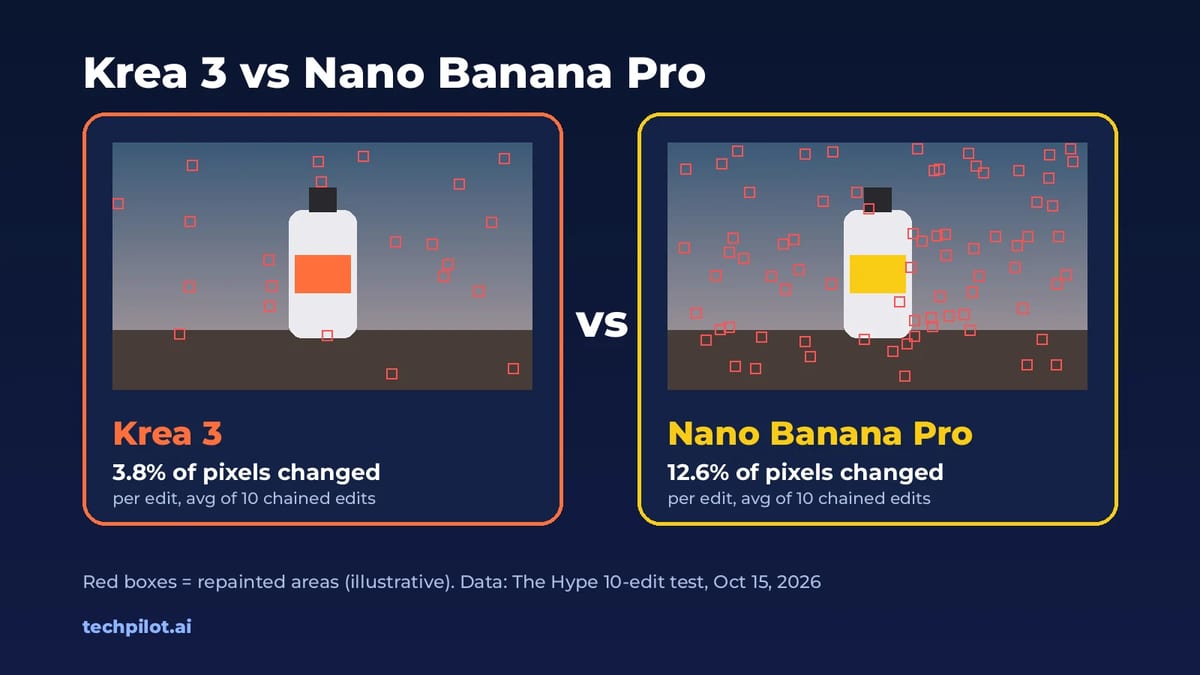
Krea 3 vs Nano Banana Pro: Cost and Quality
Krea 3 vs Nano Banana Pro compared: real cost per edit, speed, image quality and how much each one repaints, plus which AI image editor to choose and…
Mihai (Mike) Bizz · 8 min read
AI Video Generator Mihai (Mike) Bizz · 7 min read
Kling 4 vs Seedance 2.5: Which AI Video Wins?
Kling 4 vs Seedance 2.5 compared: access, pricing from $8.80 vs $15 a month, 30 s vs 180 s clips, 4K, audio and best uses, with a verdict for…
Mihai (Mike) Bizz · 7 min read