Home / Guides / Graphics & Design
Free AI Upscaler: 4 Best Picks Compared
 Mihai (Mike) Bizz Business, entrepreneurship, tech & AI
 - Published
- 5 min read
On this page Free AI upscalers compared
Independent and reader-supported. Some links may earn us a commission; it never changes our rankings. Editorial policy
Free AI upscaler picks for 2026: Upscayl, Bigjpg, Let’s Enhance and Real-ESRGAN. See which are truly free, size limits, watermarks and when to pay up.
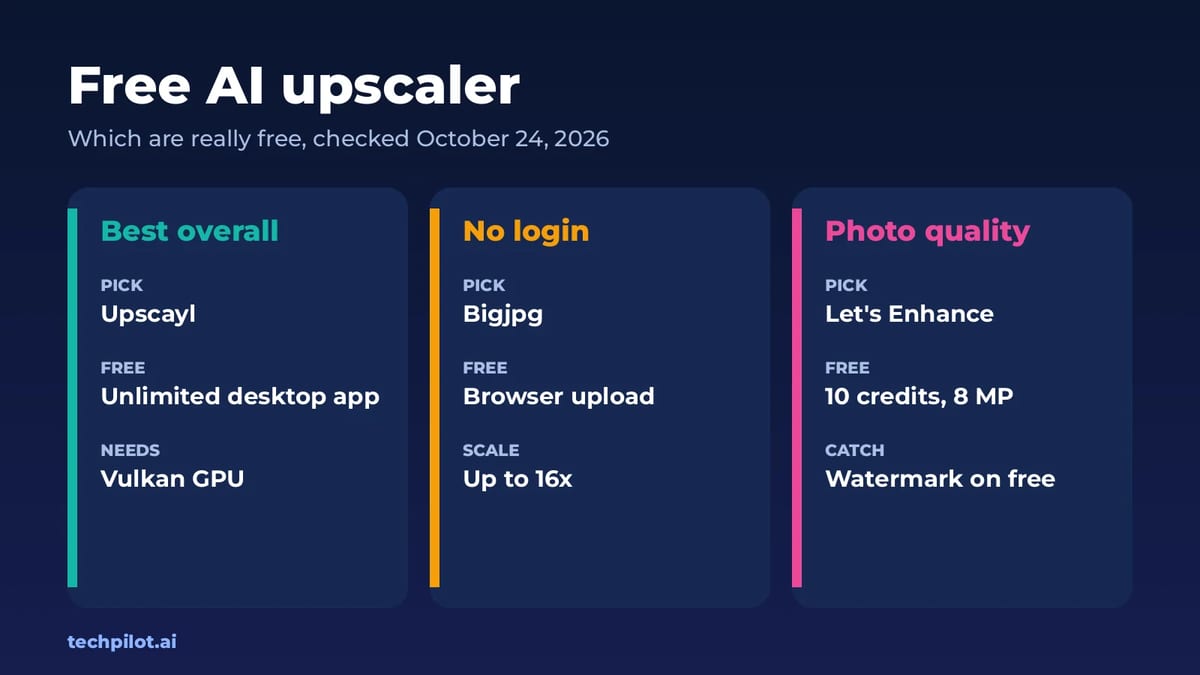
Quick answer: the best free AI upscaler is Upscayl, a free, open-source desktop app for Windows, macOS and Linux with no credits and no account. If you can’t install software, Bigjpg lets you upload an image in your browser without logging in and enlarge it up to 16x. Let’s Enhance gives the best web results for photos, but its 10 free credits come with a watermark. We checked each tool’s own site on October 24, 2026.
One thing to know before you start: an AI image upscaler free or paid doesn’t recover real detail. It guesses what the missing pixels should look like. That’s great for a blurry product photo or an old JPEG, and risky for faces, text and logos, where a wrong guess is easy to spot.
Free AI upscalers compared
| Tool | What’s free | Watermark | Paid from |
|---|---|---|---|
| Upscayl (desktop) | Unlimited on your computer | None | Free; Cloud Pro $24.99/mo |
| Bigjpg | Browser upload with no login, up to 16x | Not stated | Paid plans after login |
| Let’s Enhance | 10 credits at sign-up, output up to 8 MP | Yes on free | $9/mo yearly, $12 monthly |
| Real-ESRGAN | Unlimited, open source (BSD-3-Clause) | None | Free |
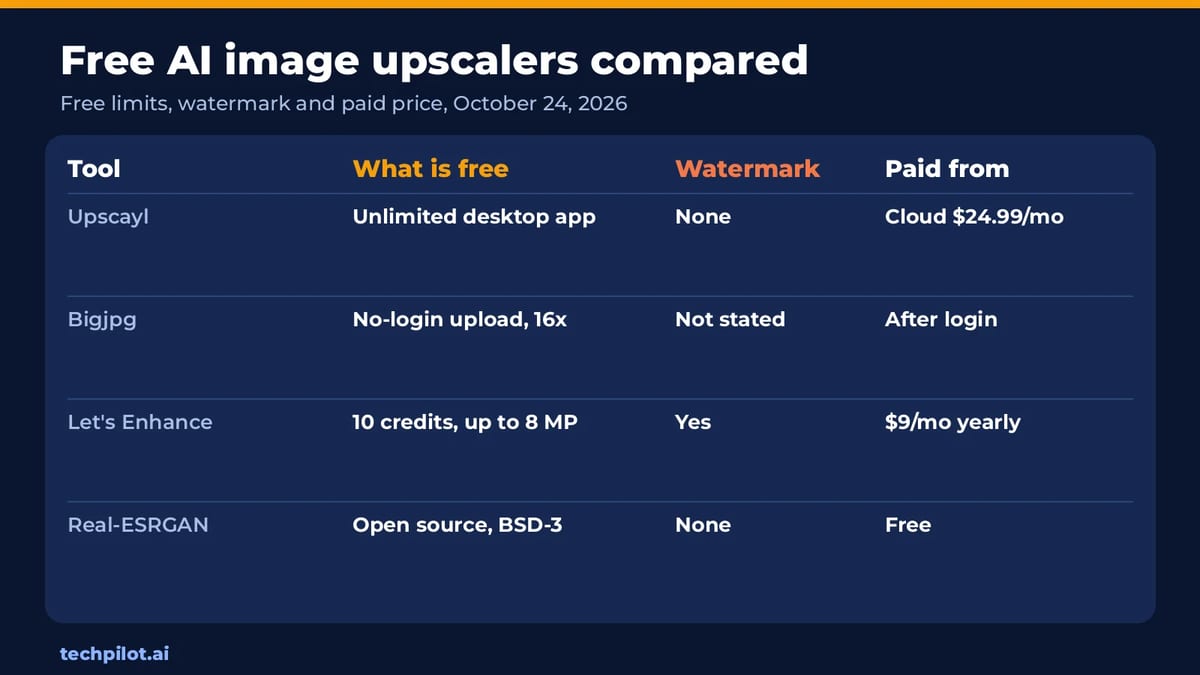
The real choice is between running it yourself and using a website. The two local options, Upscayl and Real-ESRGAN, are free with no limits because your own graphics card does the work. The web tools are easier, but they either cap you with credits or keep their limits vague until you log in.
1. Upscayl: best free AI upscaler overall
- Free: the desktop app is free and open source, with its backend under the AGPLv3 licence. It runs on Linux, macOS and Windows, with no account and no credits.
- How it works: Upscayl uses Real-ESRGAN models and Vulkan, so it runs on your graphics card. You can pick different models for photos or digital art.
- The catch: you need a Vulkan-compatible GPU. Upscayl warns that many integrated graphics chips don’t work, though it’s worth trying.
- Cloud option: Upscayl Cloud has a free trial with 10 credits, and the Pro plan costs $24.99 a month for 300 credits and images up to 256 MP.
- Best for: batches of photos, or anything private you’d rather not upload.
2. Bigjpg: best free web upscaler for art and anime
- Free: you can select images and enlarge them on the homepage without logging in. Bigjpg says logging in makes enlarging faster and more stable.
- Scale: up to 16x, with a focus on sharper lines and less noise in artwork and photos.
- The catch: the homepage doesn’t print the free limits or watermark rules, so check your result before you rely on it for client work.
- Best for: anime art, illustrations and wallpapers. It also has an API for batch jobs.
3. Let’s Enhance: best web results for photos
- Free: 10 credits when you sign up, with no credit card. One image costs one credit. Free uploads can be up to 24 MP or 50MB, and free output goes up to 8 MP.
- The catch: free downloads carry a watermark, which paid plans remove.
- Paid: Starter is $9 a month billed yearly, or $12 monthly, for 100 credits a month, output up to 256 MP, and up to 600 unused credits rolling over.
- Best for: testing how a product or property photo would look upscaled before you pay.
4. Real-ESRGAN: best for developers
- Free: the open-source model behind many upscalers, under the BSD-3-Clause licence. It includes models for general photos and a smaller RealESRGAN_x4plus_anime_6B model for anime images.
- How to use it: there are portable Windows, Linux and macOS executables for Intel, AMD and Nvidia GPUs, plus an online Colab demo.
- Best for: scripting batch upscales or building upscaling into your own app.
How much can you upscale before it looks fake?
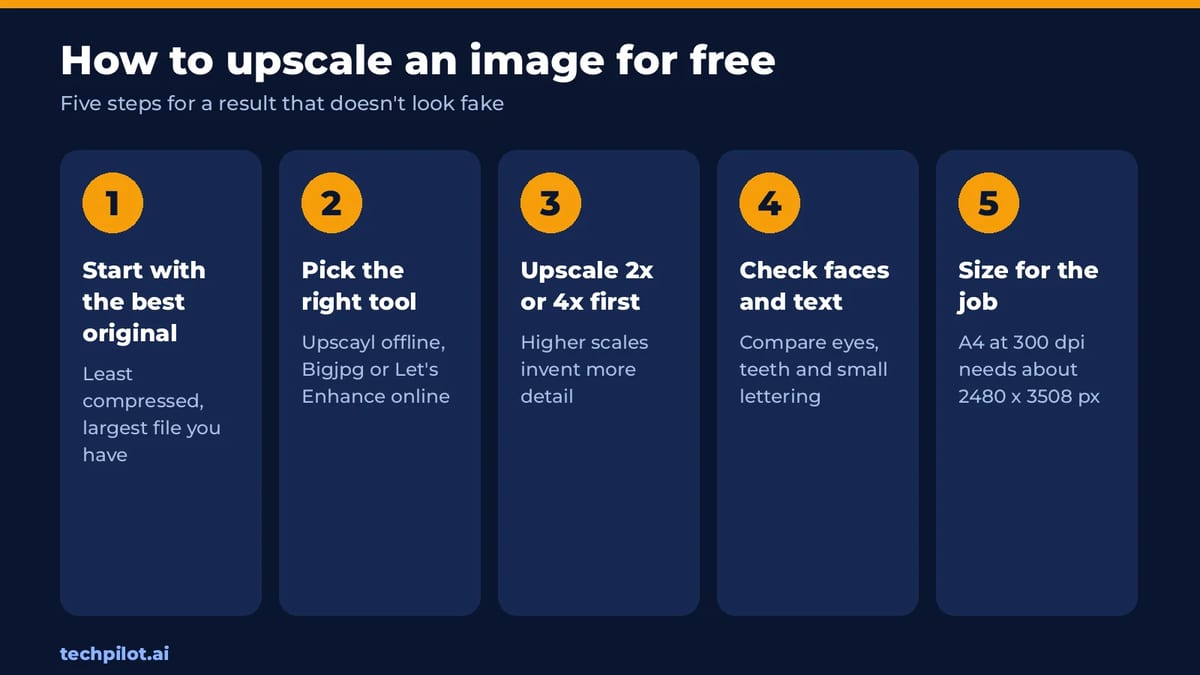
In our experience, 2x is safe for almost any photo, and 4x works well when the original is reasonably sharp. Beyond that, the AI invents more than it keeps. Even when a tool offers 16x, start at 2x or 4x and only go higher for illustrations with clean lines.
- For print: A4 at 300 dpi needs about 2480 x 3508 pixels. Work out the scale you need from that instead of picking the biggest number.
- For faces: compare the result with the original. Upscalers can change eyes and teeth in subtle ways.
- For text and logos: redraw them instead. Upscaling turns small text into convincing nonsense.
If your image is AI-generated in the first place, it’s often better to regenerate it at a higher resolution. Our best free AI image generator list shows which free tools output larger images. For portraits, our free AI headshot generator guide is a better starting point than upscaling an old photo. Need to upscale video instead? See our AI video enhancer guide.
Our verdict
If you have a decent graphics card, Upscayl is the free AI upscaler to install: unlimited, private and without watermarks. On a phone or a work laptop, Bigjpg is the easiest free web option, and Let’s Enhance is the one to test if you’ll pay for top-quality photo upscales.
Frequently asked questions
What is the best free AI upscaler?
Upscayl is the best free AI upscaler if you have a compatible graphics card. It’s a free, open-source desktop app for Windows, macOS and Linux with no credits, account or watermark.
Is there a free AI image upscaler online with no sign-up?
Yes. Bigjpg lets you upload and enlarge images on its homepage without logging in, up to 16x. Logging in makes it faster and more stable.
Does Let’s Enhance have a free plan?
Yes. You get 10 free credits at sign-up with no credit card, and one image costs one credit. Free output goes up to 8 MP and carries a watermark.
Can AI upscaling add real detail?
No. AI upscalers guess what missing pixels should look like. Results look sharp, but faces, small text and logos can come out subtly wrong, so always compare with the original.
How much should I upscale an image?
Start at 2x or 4x. Higher scales invent more detail than they keep. For print, work out the pixels you need, such as about 2480 x 3508 for A4 at 300 dpi.
Found this useful? Share it with someone comparing AI tools.