


Submagic Review 2026: AI Captions & Shorts Editor Worth It?

This Submagic review is for creators and marketers who already film short videos and want them to look like a pro editor touched them: animated captions, zooms, B-roll, sound effects, and silence cuts, done in minutes instead of an hour in CapCut. Submagic (submagic.co) is a browser-based AI editor built around one job: turning raw talking-head footage into scroll-stopping TikToks, Instagram Reels, and YouTube Shorts. Its caption templates are the reason most people find it, and in 2026 it has grown into a fuller short-form suite with Magic Clips (long-to-short repurposing), AI Actors, social publishing, and an API.
The important framing: Submagic is a finisher first and a clipper second. Tools like Opus Pro, Klap AI, and Vizard AI are built to digest an hour-long podcast and rank dozens of candidate clips. Submagic can do that through Magic Clips, but where it really earns its subscription is the polish pass on a clip you already chose: word-by-word animated captions in dozens of styles, auto-zooms on emphasis, emoji and GIF inserts, background music, and one-click removal of silences and bad takes. If you are comparing it against the clippers in our best AI video clippers 2026 roundup, think of Submagic as the layer that goes on top of them, or instead of them if your raw footage is already short.
How it works in practice: upload a video (or paste a YouTube link), pick a language and a caption template, and Submagic transcribes, styles, and auto-edits. You then fix words in the transcript, swap B-roll, adjust zoom points, and export watermark-free, or schedule straight to social on Pro and above. Pricing is per video, not per minute: each plan includes a monthly video allowance (15, 40, or 100) and a hard maximum length per video (2, 5, or 30 minutes). That structure is cheap for short clips and awkward for anything long, which shapes almost every buying decision below.
Best Use Cases for Submagic
- Talking-head creators and coaches: Record a 60 to 90 second tip on your phone, drop it in, and get a captioned, zoomed, B-rolled Reel without touching a timeline. This is the workflow Submagic was designed around, and the Starter plan’s 2-minute cap fits it.
- Finishing clips from a dedicated clipper: Let Opus, Klap, or Vizard find the moments in a long podcast, then run the best 5 to 10 through Submagic for caption styling and hooks. Our YouTube to Shorts AI workflow guide shows where this finishing step slots in.
- Multilingual short-form: Submagic says it transcribes captions in 123 languages, and AI caption translation is available. That makes it practical for brands posting the same clip for several markets.
- Agencies producing client Shorts: The Business plan adds a 30-minute cap per video, 4K/60fps export, custom templates, brand assets, a custom words dictionary (useful for client product names), and publishing from multiple social accounts.
- Real estate, e-commerce, and local business video: Short walkthroughs and product demos benefit from auto-zoom, sound effects, and B-roll inserts that a solo operator would never add by hand.
- Automated pipelines: Zapier, Make, n8n, and Google Drive integrations plus a public API let teams auto-caption everything dropped into a folder. API minutes are metered separately from plan videos.
Who Submagic is not for
- Podcasters whose main job is clipping hour-long episodes. A per-minute clipper with virality scoring is the more natural fit. Start with the picks in our AI video clipper comparison, then add Submagic only if caption polish is the bottleneck.
- Long-form YouTube editors. Even the Business plan caps edited videos at 30 minutes. For full episodes, a text-based editor or a traditional NLE is a better home.
- Anyone who wants a real free plan. The trial lets you upload a few short videos and see the result, but clean downloads need a paid subscription.
- Buyers who hate annual commitments. The best prices are yearly, and several third-party reviews report frustration with refunds and renewals. Set a reminder before the renewal date.
Which Submagic plan fits your workflow?
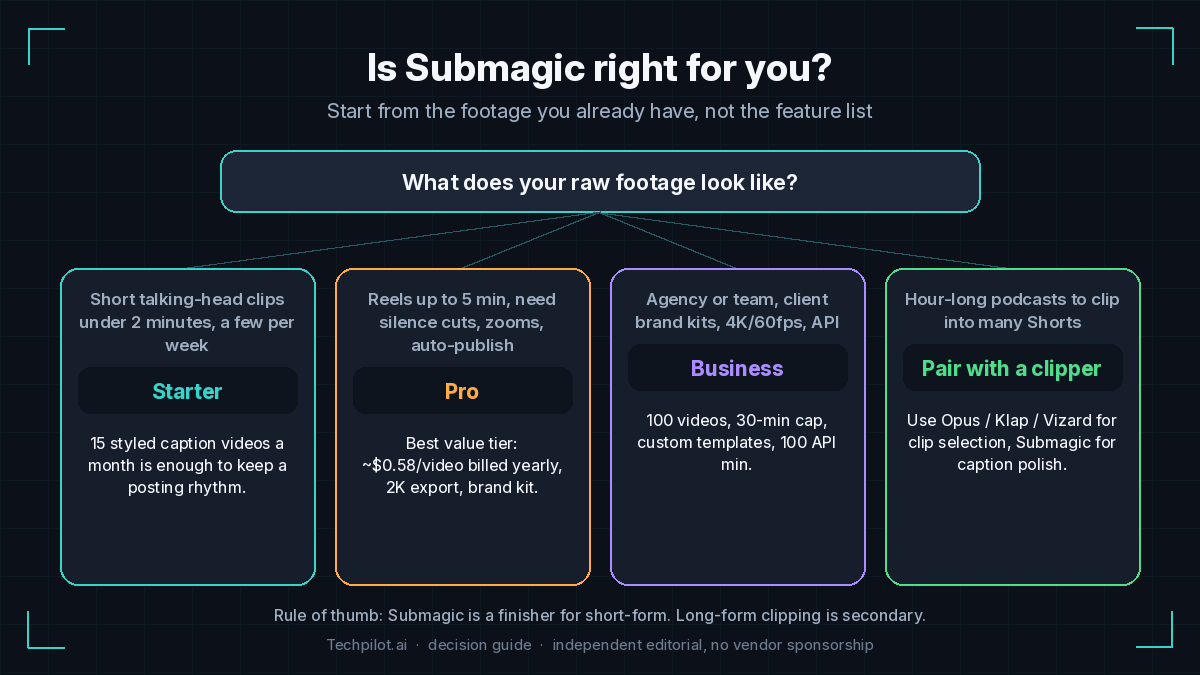
The plan decision comes down to two numbers: how many videos you post per month and how long each source video is. The table below maps common workflows to tiers, using the prices on Submagic’s pricing page on September 25, 2026 (per member, billed yearly vs month-to-month).
| Your workflow | Plan | Price (yearly / monthly) | Why this tier |
|---|---|---|---|
| 3 to 4 short talking-head clips a week, each under 2 minutes | Starter | $12 / $19 per month | 15 videos a month and 1080p export. About $0.80 per video on yearly billing. |
| Daily Reels up to 5 minutes, want silence cuts, auto-zooms, and scheduled posting | Pro | $23 / $39 per month | 40 videos, bad-take and silence removal, clean audio, brand kit, publishing and analytics. About $0.58 per video yearly. |
| Agency or in-house team, client brand kits, 4K deliverables, automation | Business | $41 / $69 per month | 100 videos, 30-minute cap, 4K/60fps, 10 custom templates, 100 API minutes. About $0.41 per video yearly. |
| Hour-long podcasts you want to clip into many Shorts | Clipper + Submagic | Varies | Use a per-minute clipper to select moments, then Submagic Pro to finish the best clips. Confirm Magic Clips billing in-app first. |
One billing caveat to check before you commit: Submagic’s own help center (updated June 2026) describes Magic Clips as a $19/month add-on with 10 uploads, while an independent hands-on test in 2026 reported Magic Clips jobs drawing a flat 8 credits from the normal plan balance with no add-on offered. We could not confirm which applies to new accounts today, so check the in-app prompt before relying on Magic Clips for volume.
Tech Pilot’s Verdict on Submagic
Is Submagic worth it in 2026? For short-form creators whose footage is already short, yes. It is one of the fastest routes from raw phone video to a post that looks professionally edited. The caption styling is the product’s strongest asset, the auto-edit stack (zooms, B-roll, sound effects, silence and bad-take removal) removes the tedious 80% of short-form editing, and the jump from Starter to Pro buys the features that actually change output quality. Per-video pricing is refreshingly easy to forecast if you know your posting cadence.
Bottom line: Buy Pro on yearly billing if you post talking-head Reels, TikToks, or Shorts several times a week and captions matter to your retention. Skip it, or pair it with a clipper, if your raw material is hour-long podcasts or webinars. Before paying, run the trial on your real footage, check caption accuracy on your accent and niche vocabulary, and note the renewal date. For the long-form side of the workflow, read our long-form to short-form playbook and the step-by-step guide on editing a podcast recording into social clips.
Top Alternatives to Submagic
- Opus Pro: Choose Opus when you start from long videos and need virality-scored clip selection with a real free credit floor. Prefer Submagic when caption styling and short-form polish are the priority.
- Klap AI: Choose Klap for YouTube-link clipping with scene-aware reframing, AI dubbing, and 4K on Pro. Prefer Submagic for richer caption templates, B-roll, and sound design on clips you already picked.
- Vizard AI: Choose Vizard for text-based clipping of long uploads, team workspaces, and a usable free plan. Prefer Submagic for short, caption-heavy social edits.
- 2Short AI: Choose 2Short for a lean, low-cost YouTube to Shorts pipeline. Prefer Submagic when you need a full auto-edit and caption styling pass.
- Ssemble and VEED: Browser editors with AI captions and more manual timeline control. Better if you want to tweak everything yourself; Submagic is faster when you want AI to do the first 80%.
- Descript: Choose Descript when you edit full-length podcasts or YouTube videos by editing the transcript, then export clips. Prefer Submagic for fast caption-heavy short-form finishing.
- CapCut
- Also browse: best AI video clippers 2026, YouTube to Shorts AI tools, best Opus Pro alternatives, and the Tech Pilot tools hub.
Our Expert Rating
Pricing
Starts at: $12/month
Model: Subscription
Best-in-class animated captions: dozens of word-by-word caption styles in 123 languages (vendor figure), editable like a document.
Real auto-edit, not just subtitles: auto-zooms, B-roll, sound effects, music, emojis/GIFs and silence and bad-take removal in one pass.
Predictable per-video pricing: 15, 40 or 100 videos a month makes costs easy to forecast; Pro works out to about $0.58 per video on yearly billing.
Watermark-free exports on every paid plan, with 2K on Pro and 4K/60fps on Business.
Built-in publishing and analytics on Pro and up, so finished Shorts can be scheduled without another tool.
Automation-ready: Zapier, Make, n8n and Google Drive integrations plus a documented API for agencies and pipelines.
Hard length caps per video: 2 minutes on Starter and 5 on Pro; only Business (30 minutes) handles longer edits.
Not a true free plan: the trial lets you test a few short uploads, but clean downloads require a subscription.
Magic Clips billing is unclear: Submagic's help center lists a $19/mo add-on while independent 2026 testing found a flat 8-credit charge; check in-app.
Long-form clipping is secondary: per-minute clippers such as Opus or Vizard rank podcast highlights more thoroughly.
Per-member pricing adds up fast for teams, and API minutes beyond the small monthly allowance are sold as separate packs.
Billing complaints recur in third-party reviews (annual renewals, refunds); set a reminder before renewal.
– Animated AI captions with dozens of templates; 123 transcription languages (vendor figure)
– AI caption translation for multilingual versions of the same clip
– Magic Clips: long video or YouTube link to multiple captioned shorts
– AI Auto Edit: auto-zooms, transitions, B-roll, sound effects and background music
– Remove silences, bad takes and filler words (Pro and up)
– AI Clean audio and AI eye contact correction
– Text-based trimming: cut the video by editing the transcript
– AI hook titles and auto descriptions/hashtags for social posts
– AI Actors Studio for avatar-led shorts without filming
– Schedule, publish and analytics for TikTok, Reels and Shorts (Pro and up)
– Brand kit, custom templates and custom words dictionary (Business)
– Export up to 4K/60fps on Business; watermark-free on all paid plans
– Video editing API plus Zapier, Make, n8n and Google Drive integrations
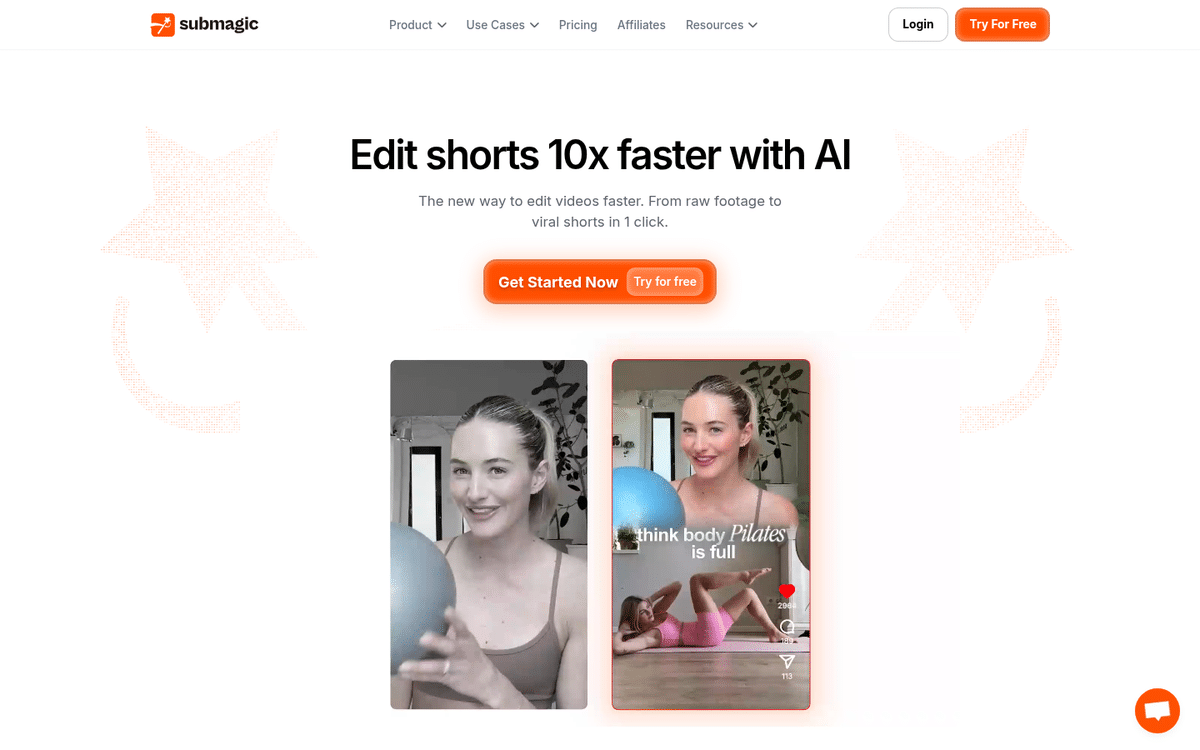 Submagic homepage: "Edit shorts 10x faster with AI", upload a video or YouTube link and let AI add captions, cut silences and insert B-roll.
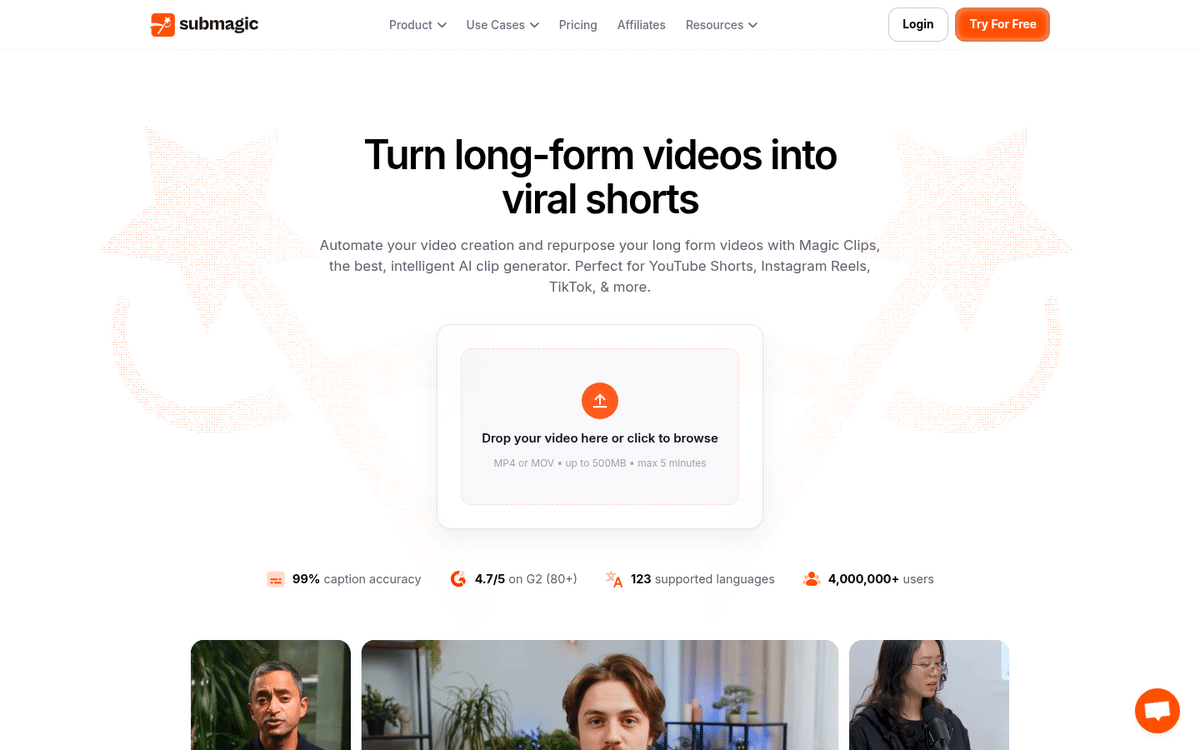 Magic Clips page: long-form upload box that turns one video into multiple captioned shorts for YouTube Shorts, Reels and TikTok.
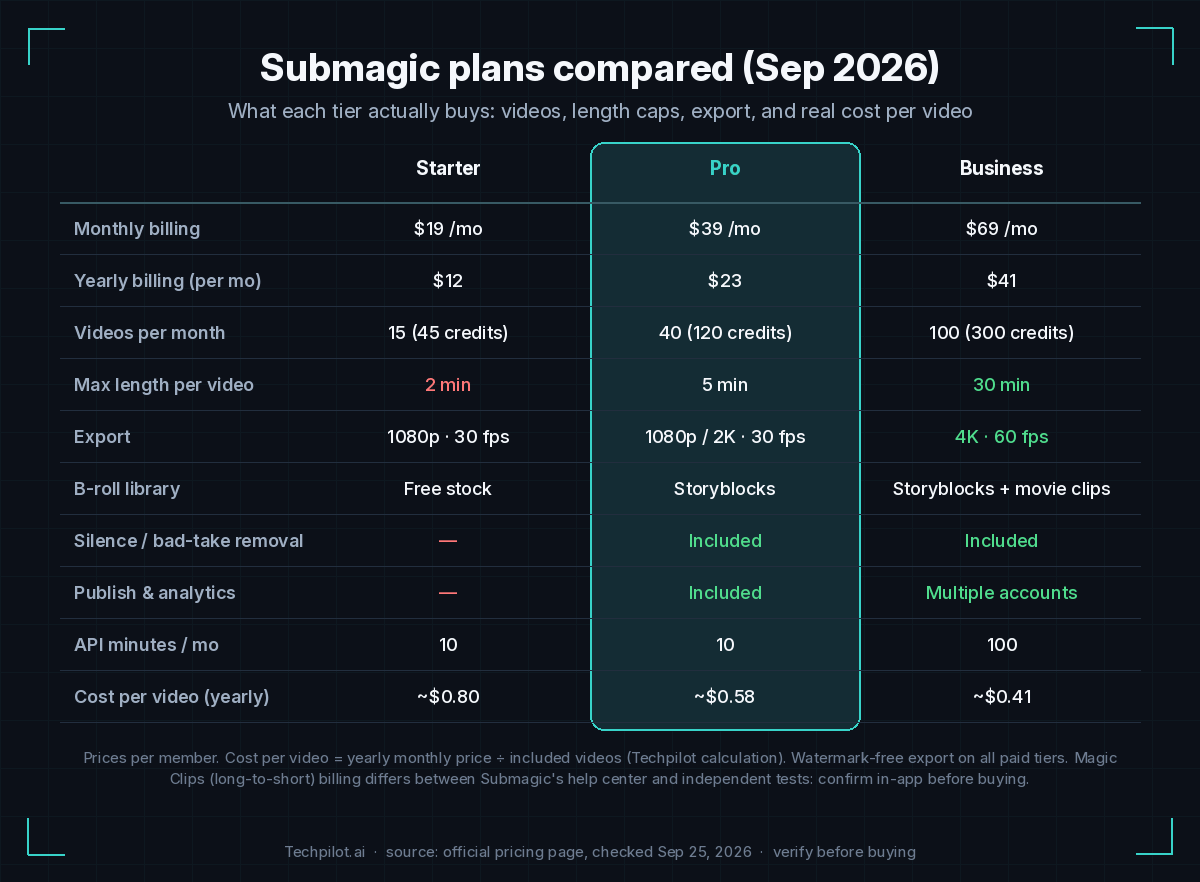 Submagic plans compared (Sep 2026): Starter, Pro and Business with yearly vs monthly price, videos per month, length caps, export and cost per video.
Frequently Asked Questions
What is Submagic?
Submagic is a browser-based AI video editor for short-form content. It auto-generates animated captions, adds zooms, B-roll, sound effects and music, removes silences and bad takes, and can publish finished clips to TikTok, Instagram Reels and YouTube Shorts. Magic Clips also turns long videos into multiple shorts.
How much does Submagic cost in 2026?
On the official pricing page (checked September 2026), Starter is $12 per member per month billed yearly or $19 monthly for 15 videos; Pro is $23 yearly or $39 monthly for 40 videos; Business is $41 yearly or $69 monthly for 100 videos. A custom plan is available for larger teams. Verify current prices on submagic.co/pricing.
Is there a free version of Submagic?
There is a free trial rather than a free plan. Submagic’s help center says you can upload a few short videos and edit them; downloading without a watermark requires a paid subscription. Use the trial to check caption accuracy on your own voice and vocabulary.
What are the video length limits on each plan?
Each plan caps the length of a single video: 2 minutes on Starter, 5 minutes on Pro and 30 minutes on Business. If your source files are longer, trim them first or use a dedicated clipper for long-form sources.
How does Submagic Magic Clips work and what does it cost?
Magic Clips analyzes a long video (upload or YouTube link), picks key moments and generates multiple captioned shorts. Billing is inconsistent across sources: Submagic’s help center (June 2026) describes a $19/month add-on with 10 uploads, while an independent 2026 test found jobs charged at a flat 8 credits from the plan balance. Confirm the in-app price before relying on it.
Is Submagic worth it compared with Opus Clip?
They solve different parts of the job. Opus Pro is stronger at finding and scoring clips inside long videos and has a free credit tier. Submagic is stronger at caption styling and short-form polish. Many creators clip in Opus and finish in Submagic. See our best AI video clippers 2026 comparison.
Submagic vs Klap AI: which is better for YouTube Shorts?
Klap is built around pasting a YouTube link and getting a batch of reframed clips, with AI dubbing and 4K on higher tiers. Submagic is better when you already have short clips and want richer captions, B-roll and sound design. For a YouTube-link workflow, read our YouTube to Shorts AI guide.
How accurate are Submagic captions?
Submagic claims 99% caption accuracy across 123 languages. Independent tests generally find accuracy high on clear speech but lower with heavy accents, background noise or technical jargon. The Business plan’s custom words dictionary helps with brand and product names.
Does Submagic have an API and integrations?
Yes. Submagic offers a video editing API (10 API minutes a month on Starter and Pro, 100 on Business, with extra minute packs sold separately) and no-code integrations with Zapier, Make, n8n, Google Drive and Gumloop.
Can teams use Submagic?
Yes, but pricing is per member. Business adds custom templates, brand assets, a custom words dictionary, priority rendering and publishing from multiple social accounts; the Custom plan adds SSO and dedicated support.
Submagic is a short-form finisher: animated captions, auto-zooms, B-roll, sound effects and silence cuts for clips you already have, plus Magic Clips for long-to-short. Plans are priced per video with length caps (2/5/30 minutes). For clipping hour-long podcasts, compare it with Opus Pro, Klap and Vizard in our best AI video clippers 2026 guide.