


Descript Review 2026: Text-Based Video & Podcast Editing

This Descript review covers the editor that made “edit video by editing the transcript” mainstream, and what it looks like in 2026 after a year of AI expansion and a new pricing model. Descript (descript.com) transcribes everything you import or record, then lets you cut, rearrange, and clean up audio and video the way you would edit a Google Doc. Delete a sentence and it disappears from the recording; click once to remove every “um” and long pause. Around that core sit Studio Sound (one-click audio cleanup), Eye Contact, Green Screen, remote recording (Rooms), AI voice clones, translation and dubbing, clip creation, and Underlord, an AI co-editor you can instruct in plain language.
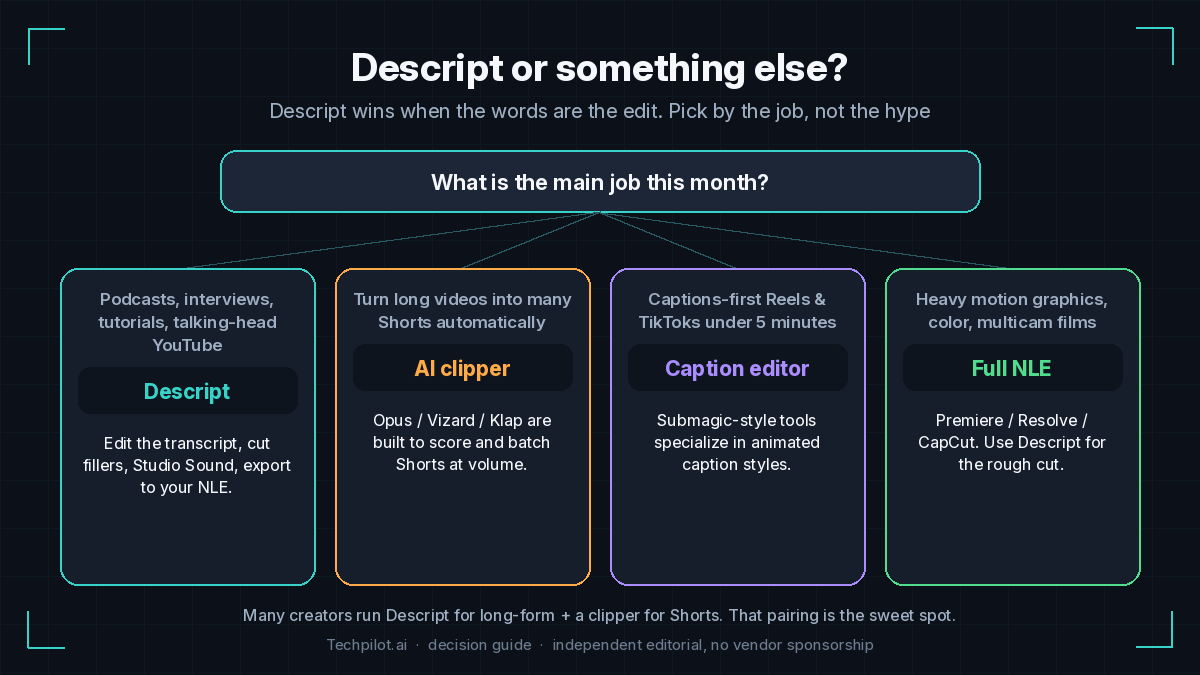
Descript sits in a different lane from the AI clippers in our best AI video clippers 2026 guide. Opus, Klap, and Vizard start from a finished long video and automatically hunt for viral moments. Descript is where you make the long video: podcast episodes, interviews, tutorials, webinars, and talking-head YouTube. It can also create clips, but its real advantage is the edit itself: fixing mistakes without re-recording, tightening pacing, and polishing audio so the finished piece sounds professionally produced.
The 2026 buying question is mostly about pricing mechanics. Since late 2025, every plan runs on two meters per editor: media hours (how much footage you upload or record each month) and AI credits (consumed by Underlord, Studio Sound, Eye Contact, AI speech, generated media, and similar tools). Legacy “unlimited AI” subscribers were moved onto metered credits, and that switch is behind most of the negative reviews you will find. The editing experience is still excellent; you just need to size the plan to how much AI you actually use.
Best Use Cases for Descript
- Podcasters (audio and video): Record remotely with Rooms or import multitrack files, get automatic speaker labels, cut by transcript, remove filler words, and apply Studio Sound. Our guide to editing a podcast recording into social clips walks through the full episode-to-clips flow.
- Talking-head and tutorial YouTubers: Fix a flubbed line by deleting it, remove retakes automatically, correct eye contact when you read from a script, and export 4K on Creator.
- Faceless YouTube channels: Assemble voiceover, stock media, and captions in one place, or use AI Speech with a custom voice clone to patch narration. It works well as the edit stage in our best AI tools for faceless YouTube stack.
- Marketing and enablement teams: Product demos, webinar recaps, and internal training where non-editors need to ship clean video. Business adds Brand Studio templates, translation and dubbing in 30+ languages with proofreading, and priority support.
- Screen-recorded tutorials: Built-in screen recording plus text editing makes it quick to trim a walkthrough and add captions and layouts.
- Editors who finish elsewhere: Use Descript for the fast rough cut, then export the timeline to Premiere Pro, Final Cut Pro, Pro Tools, Logic, Audition, or Reaper for color and final mix.
Who Descript is not for
- Creators who only need automatic Shorts from long videos. A dedicated clipper such as Opus Pro or Vizard AI is purpose-built for scoring and batching clips.
- Visual-first editors. Music videos, heavy motion graphics, cinematic color work, and B-roll-driven edits with little dialogue get less benefit from a transcript-based workflow.
- Heavy AI users on a tight budget. If you run Underlord, Studio Sound, and Eye Contact on every project, credits can run out before the month ends, and top-ups are only available on Creator and Business.
- People who need a capable free tier. Free gives you 1 media hour a month, 100 one-time AI credits, and 720p watermarked exports: fine for testing, not for publishing.
Which Descript plan fits your workflow?
Size the plan by media hours first (how much raw footage you bring in), then check whether the AI-credit allowance covers your habits. Prices below are from Descript’s pricing page on September 25, 2026, per person per month.
| Your workflow | Plan | Price (yearly / monthly) | What you get that matters |
|---|---|---|---|
| Trying text-based editing on a short project | Free | $0 | 1 media hour/month, 100 one-time AI credits, 720p export with watermark. |
| Weekly audio podcast or 2 to 4 YouTube videos a month, light AI use | Hobbyist | $16 / $24 | 10 media hours, 400 AI credits, 1080p watermark-free, voice clone. No top-ups. |
| Weekly video podcast, 4K YouTube, frequent Studio Sound and Underlord | Creator | $24 / $35 | 30 media hours, 800 AI credits, 4K export, stock library, top-ups, up to 3 seats. About $0.80 per media hour yearly. |
| Team shipping branded or multilingual video | Business | $50 / $65 | 40 media hours, 1,500 AI credits, Brand Studio, dubbing in 30+ languages, custom avatars, SLA support, up to 5 seats. |
Creator is the value tier: $8 a month more than Hobbyist on yearly billing buys three times the media hours, double the AI credits, 4K export, and access to top-ups. Business mostly buys seats, collaboration, and localization rather than much more capacity.
Tech Pilot’s Verdict on Descript
Is Descript worth it in 2026? For anyone whose content is driven by speech, yes. Nothing else makes cutting a 60-minute conversation as fast, and Studio Sound, filler-word removal, and Remove Retakes regularly save hours per episode. Underlord makes the tool more capable for people who would rather describe an edit than perform it, and timeline export means Descript fits alongside a professional finishing tool instead of replacing it.
Bottom line: Pick Descript Creator if you publish podcasts, interviews, tutorials, or talking-head YouTube every week and want one tool for recording, editing, and audio cleanup. Watch your AI-credit usage in the first month before sizing up. If your goal is simply turning existing long videos into Shorts, a clipper is cheaper and faster. Many creators run both: Descript for the episode, a clipper for distribution. For more ways to cut editing time, see how to speed up video editing.
Top Alternatives to Descript
- Podcastle: Choose Podcastle for a podcast-first studio with remote recording and AI audio cleanup. Prefer Descript when you also edit video heavily and want Underlord and NLE timeline export.
- VEED: Choose VEED for browser-based social video with templates, subtitles, and a more traditional timeline. Prefer Descript for long, dialogue-driven edits.
- Opus Pro and Vizard AI: Choose a clipper when your main job is turning finished long videos into many Shorts automatically. Prefer Descript for editing the long video itself. Compare the field in our AI video clipper roundup.
- Wondershare DemoCreator and Clueso: Choose these for screen-recorded tutorials and product walkthroughs with lower cost. Prefer Descript when tutorials include talking-head segments and audio polish.
- CapCut / Premiere Pro / DaVinci Resolve: Choose a traditional NLE for visual-first editing, effects, and color. Prefer Descript for the rough cut and transcript-driven edits, then export the timeline.
- Voice layer: If you need higher-end AI narration than Descript’s built-in AI Speech, compare ElevenLabs options in our best ElevenLabs alternatives 2026 guide or try Murf AI.
- Submagic: Choose Submagic for fast, caption-heavy Reels and Shorts under 5 minutes. Prefer Descript for editing full episodes and long-form YouTube.
- Also browse: best AI tools for faceless YouTube 2026 and the Tech Pilot tools hub.
Our Expert Rating
Pricing
Starts at: $16/month
Model: Freemium
Edit video like a document: delete words in the transcript to cut the recording, with a full timeline still available when you need it.
Speech cleanup in one click: Remove Filler Words, Shorten Word Gaps, Remove Retakes and Studio Sound save hours per podcast episode.
All-in-one workflow: remote recording (Rooms), screen recording, editing, captions, AI voice clones, translation and clips in one app.
Underlord AI co-editor: describe the edit you want in plain language and let it perform multi-step changes you can review.
Plays well with pro tools: timeline export to Premiere Pro, Final Cut Pro, Pro Tools, Logic, Audition and Reaper, plus an API and MCP connector.
Creator plan is strong value: 30 media hours, 800 AI credits and 4K export for $24/mo billed yearly.
Two meters to manage: media hours and AI credits both cap usage, and heavy Studio Sound, Eye Contact or Underlord use can drain credits early.
Credits do not roll over, and top-ups are only available on Creator and Business (not Free or Hobbyist).
Late-2025 switch from unlimited AI features to metered credits drew many negative reviews from long-time users.
Weak free tier for publishing: 1 media hour, 100 one-time AI credits and 720p watermarked exports.
Less suited to visual-first editing: motion graphics, color grading and music-driven edits are better in a traditional NLE.
Automatic clip creation is useful but less specialized than dedicated clippers like Opus Pro or Vizard for batch Shorts.
– Text-based editing: edit audio and video by editing the transcript
– Transcription in 25 languages with automatic speaker detection and multitrack support
– Underlord AI co-editor for prompt-driven, multi-step edits
– Studio Sound, Remove Filler Words, Shorten Word Gaps, Edit for Clarity and Remove Retakes
– Eye Contact, Green Screen, Automatic Multicam and Center Active Speaker
– AI Speech: custom voice clones, stock AI voices and Regenerate to smooth cuts
– Rooms remote recording (up to 10 participants) and screen recording
– Create Clips for vertical social highlights; captions and layouts
– Caption translation (61 languages) and AI dubbing (30 languages; highlighted on Business)
– Generate images and video with AI models; royalty-free stock library (Creator and up)
– Timeline export to Premiere Pro, Final Cut Pro, Pro Tools, Logic, Audition and Reaper
– Brand Studio, shared layouts and custom avatars (Business); SSO/SCIM and SOC 2 Type II (Enterprise)
– API and MCP connector to edit video from code or an AI assistant
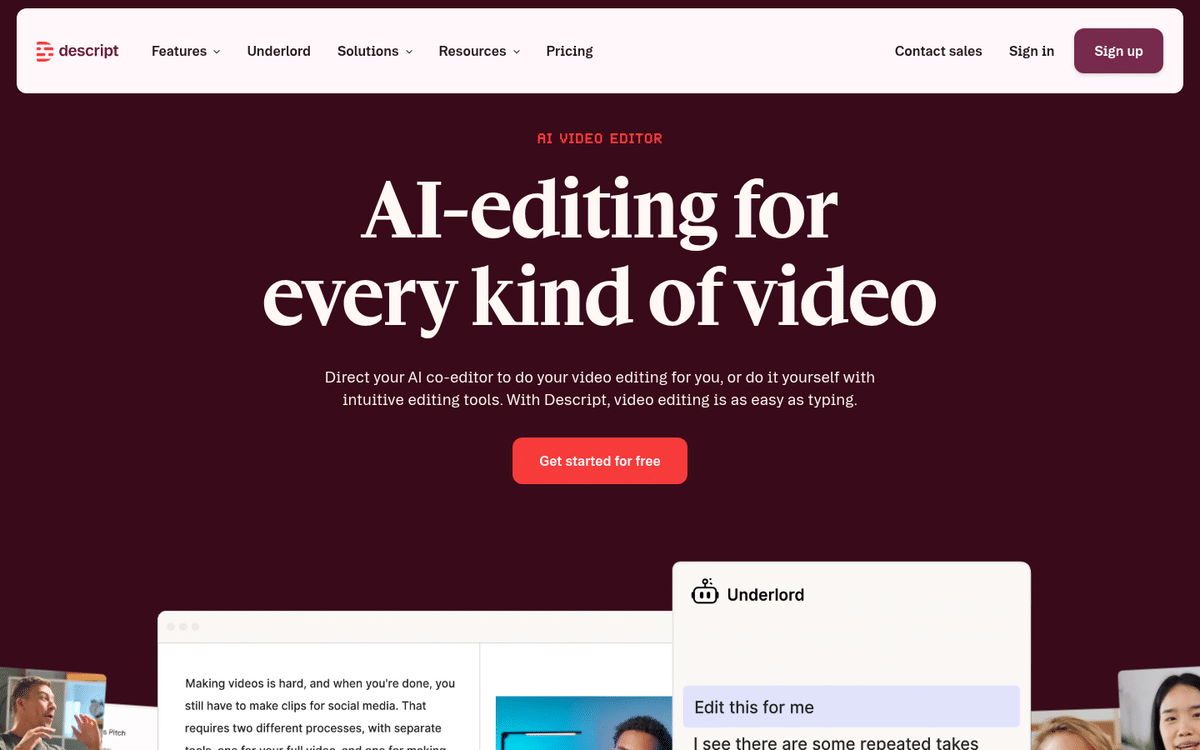 Descript homepage: "AI-editing for every kind of video", with the Underlord co-editor panel suggesting edits on a project.
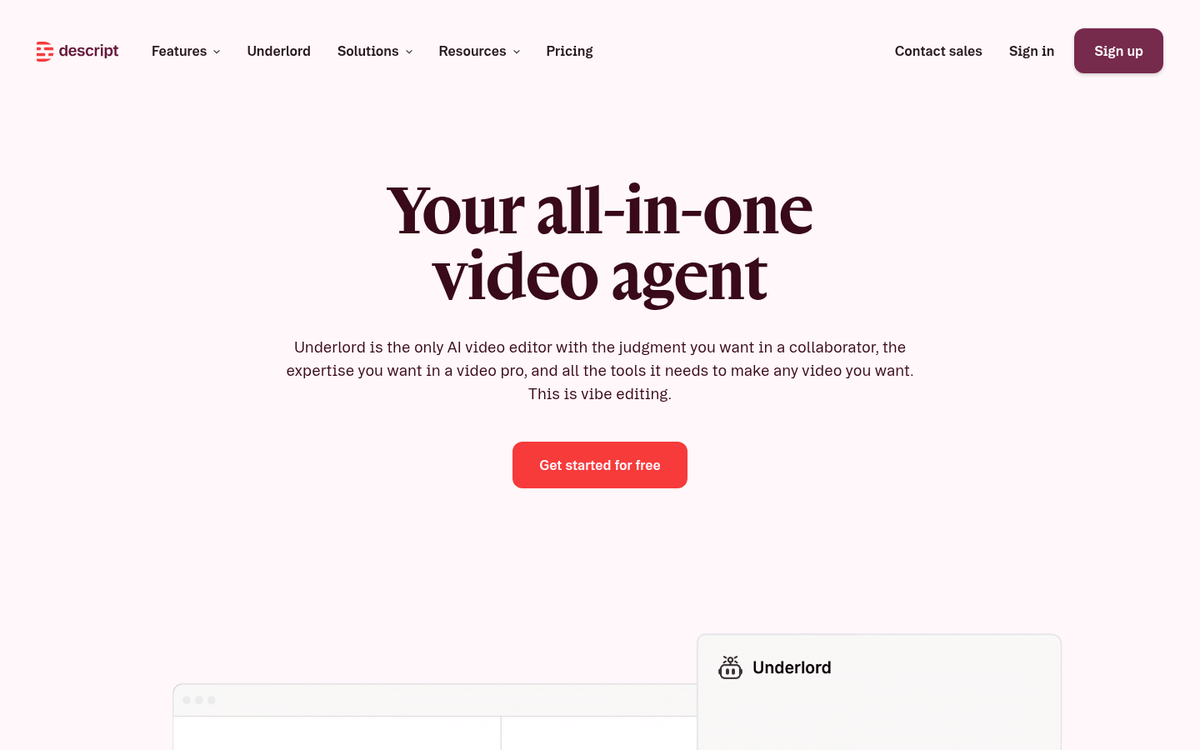 Underlord page: Descript's all-in-one AI video agent that turns a raw recording into a tight cut from plain-language instructions.
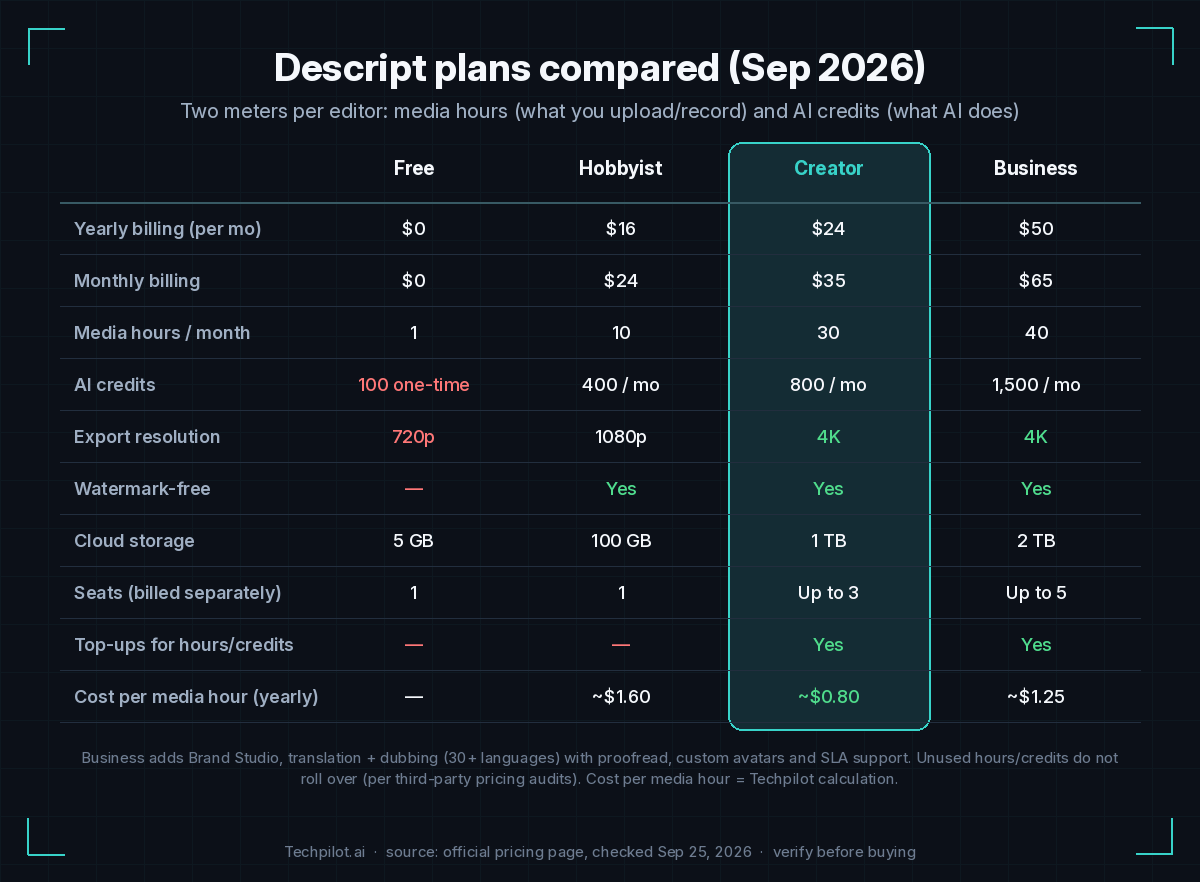 Descript plans compared (Sep 2026): Free, Hobbyist, Creator and Business with yearly/monthly price, media hours, AI credits, export resolution and seats.
Frequently Asked Questions
What is Descript?
Descript is an AI-powered audio and video editor that transcribes your recordings and lets you edit them by editing the text. It also includes remote recording (Rooms), screen recording, Studio Sound audio cleanup, filler-word removal, AI voice clones, captions, translation and dubbing, clip creation, and Underlord, an AI co-editor.
How much does Descript cost in 2026?
On Descript’s pricing page (checked September 2026): Free is $0; Hobbyist is $16 per person per month billed yearly ($24 monthly); Creator is $24 yearly ($35 monthly); Business is $50 yearly ($65 monthly); Enterprise is custom. Annual billing saves up to 35%. Verify current prices on descript.com/pricing.
What are media hours and AI credits?
Media hours count the footage you upload or record in Descript each month, whether or not you transcribe it. AI credits are spent by AI features such as Underlord, Studio Sound, Green Screen, Eye Contact, AI speech and generated media. Hobbyist includes 10 hours and 400 credits, Creator 30 hours and 800 credits, and Business 40 hours and 1,500 credits per editor.
Is Descript free?
Yes, there is a Free plan with 1 media hour per month, 100 one-time AI credits and 720p exports with a watermark. It is enough to learn text-based editing, but most creators who publish regularly need Hobbyist or Creator.
Is Descript worth it for podcasters?
For most podcasters, yes. Transcript editing, speaker detection, multitrack support, filler-word removal and Studio Sound cut editing time significantly, and Rooms handles remote recording. Creator is the best-value plan for a weekly video podcast. See our guide to turning a podcast recording into social clips.
What is Descript Underlord?
Underlord is Descript’s AI co-editor. You can ask it to perform edits such as a rough cut, removing retakes, adding layouts or creating clips, and it carries out the steps in your project for review. Underlord usage consumes AI credits, so heavy use may require the Creator or Business plan and top-ups.
Can Descript make Shorts and clips from long videos?
Yes. Create Clips suggests highlight moments and reformats them for vertical platforms. For high-volume, fully automated clipping with virality scoring, dedicated tools like Opus Pro, Vizard or Klap are more specialized; compare them in our best AI video clippers 2026 guide.
Does Descript work for faceless YouTube channels?
It works well as the edit stage: assemble narration, stock media and captions, patch lines with AI Speech and a custom voice clone, then export. For voice quality benchmarks and alternatives, see our best AI tools for faceless YouTube stack.
Which languages does Descript support?
Per Descript’s pricing page, transcription covers 25 languages, caption translation 61 languages, and audio translation (dubbing) 30 languages.
Can I export from Descript to Premiere Pro or other editors?
Yes. Descript supports timeline export to Adobe Premiere Pro, Final Cut Pro, Pro Tools, Logic, Adobe Audition, Samplitude and Reaper, so you can rough-cut in Descript and finish in your usual NLE or DAW. Check your plan for availability.
Descript is a text-based audio and video editor: record, transcribe, cut by editing words, clean up audio with Studio Sound and let Underlord handle multi-step edits. It is built for podcasts, interviews, tutorials and talking-head YouTube. For automated Shorts from finished long videos, compare dedicated clippers in our best AI video clippers 2026 guide.