Home / Guides / Graphics & Design
AI Landscape Design Free: 3 Tools We Tested
 Eimantas Kazėnas Marketing & Tech
 - Published
- 6 min read
On this page How we tested
- How we tested
- 1. HomeGPT: best free AI landscape design overall
- 2. AI Garden Design Generator: best for describing your own idea
- 3. YardRemix: free preview, but you pay with your email
- Free AI landscape design tools compared
- Can you use ChatGPT for free landscape design?
- How to get a better result from any tool
- Our verdict
- Frequently asked questions
Independent and reader-supported. Some links may earn us a commission; it never changes our rankings. Editorial policy
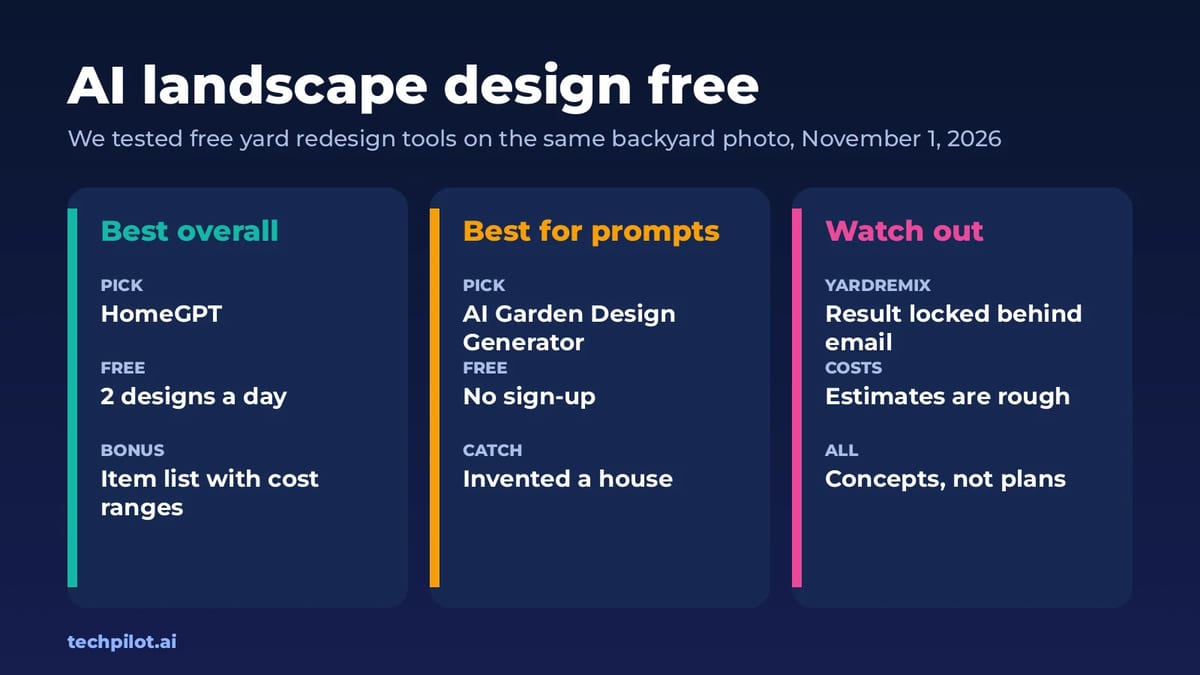
AI landscape design free tools redesign your yard from one photo. We tested three on one backyard: HomeGPT did best, and one hid its result behind sign-up.
Quick answer: for a free AI landscape design from a photo, start with HomeGPT. It needs no account, gives you 2 free designs a day with two options each, keeps your trees and furniture in place and lists what each change would take. If you’d rather describe the change in your own words, AI Garden Design Generator on aitextgenerator.io is free with no sign-up and follows prompts well, but it can invent things that aren’t there. YardRemix advertises a free preview, but in our test the result stayed blurred until we entered an email. We ran all three on November 1, 2026.
How we tested
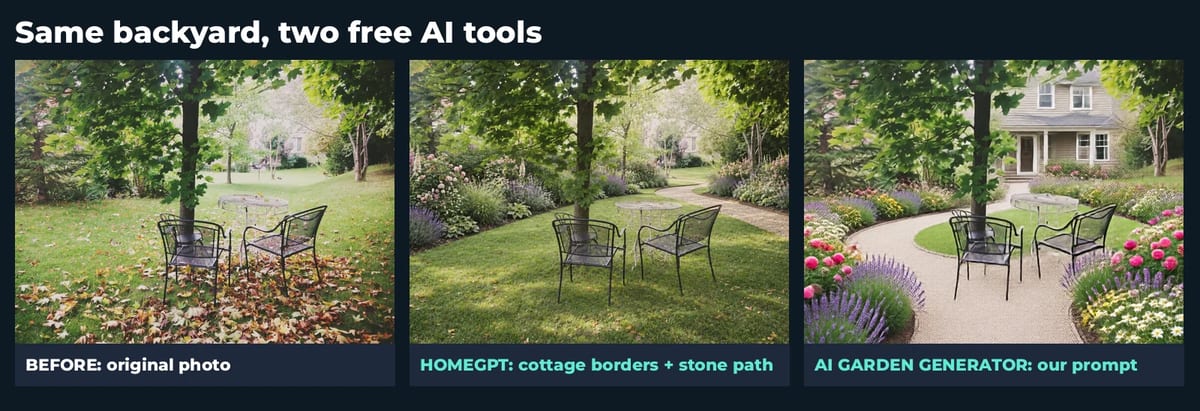
We used one real photo for every tool: a leafy autumn backyard with a maple tree, a metal table and two chairs (photo by Cinzia P., CC BY 2.0). We asked each tool for the same idea, a low-maintenance cottage garden with flower beds along the edges and a path to the seating area, and judged three things: did it keep what’s really there, does the result look buildable, and what does “free” really mean once you click generate.
1. HomeGPT: best free AI landscape design overall
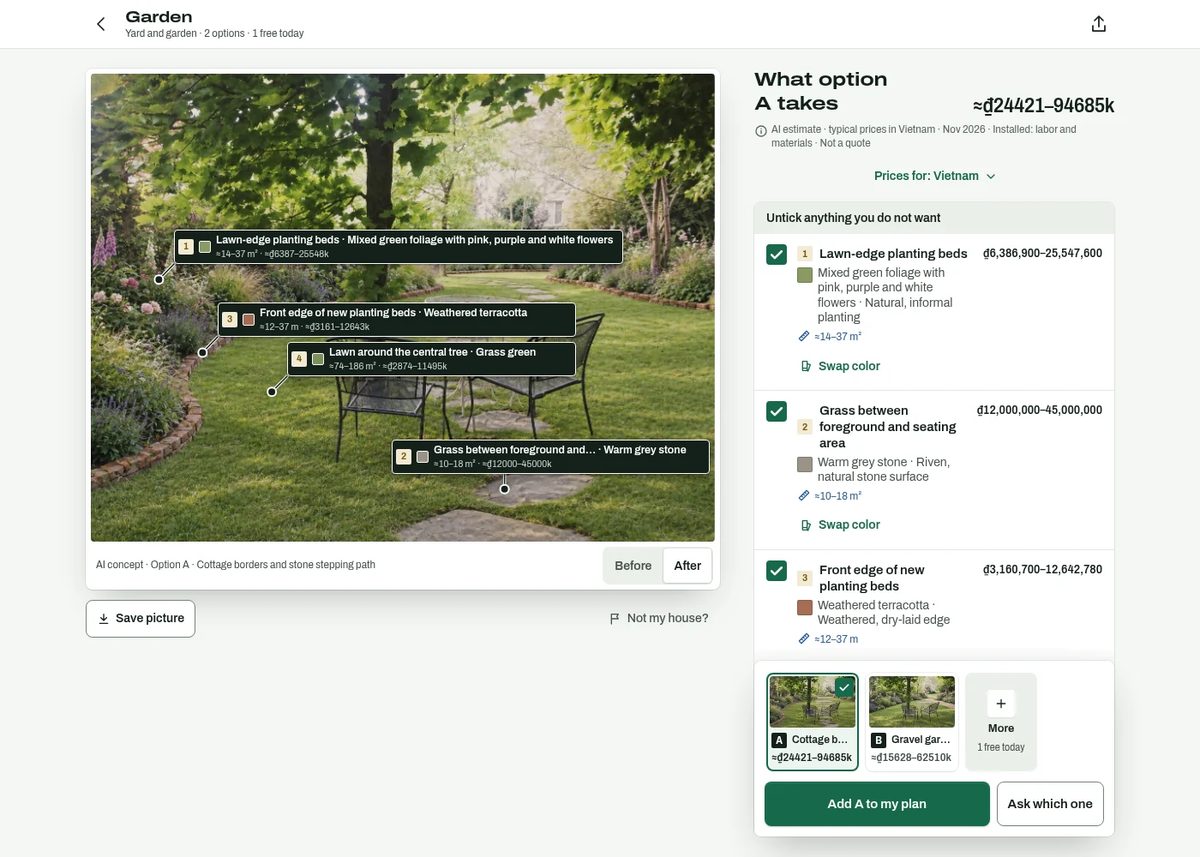
HomeGPT runs in the browser with no account and no card, and its page states the deal plainly: 2 free designs a day and no watermark. You upload a photo, it detects what the photo shows, and then you pick the job and a style. One design gives you two options side by side, and you get a before/after toggle on each.
- What it did well: both options kept the tree, table and chairs exactly where they were. Option A added cottage borders and a stone stepping path; option B went for a gravel garden. Both looked like plantings you could actually put in.
- The useful extra: it labels each change on the image (planting beds, path, edging, lawn) and lists rough areas and price ranges for each. Our estimate came back in Vietnamese dong for typical local prices, so it localizes to where you are. HomeGPT marks these as AI estimates, not quotes.
- The catch: it wants a yard-focused photo. When we first uploaded a wide shot of a house with a front lawn, it treated it as a house front and greyed out the yard and garden job. It also tidied up the autumn leaves and made the lawn greener, so the result looks more like summer.
2. AI Garden Design Generator: best for describing your own idea
This tool on aitextgenerator.io works like a chat: upload a photo, type what you want, and it edits the image. It says it’s free daily with no sign-up, and we didn’t need an account.
- What it did well: it followed our prompt closely, with curved beds of lavender and roses, a gravel path circling the seating area, and the tree and chairs kept in place. You can keep asking for changes in the same chat.
- The catch: it added a large house in the background that isn’t in our photo, and the image came back at only 768 x 576 pixels. Fine for an idea, too small to show a contractor in detail.
- Tip: add “do not add buildings, keep the background the same” to your prompt.
3. YardRemix: free preview, but you pay with your email
YardRemix’s homepage says there’s no install, no account and no card for your first preview, and it offers 40+ themes, from cottage garden to desert xeriscape, plus custom prompts. In our test, the preview generated but stayed blurred behind a box asking for an email address (“Sign up to view your result, plus get 3 free credits”). We didn’t sign up, so we can’t judge the quality.

Two more things to know: extra remixes are sold as paid credit packs, and YardRemix says finished remixes can appear anonymously in its public Remix Feed unless you unshare them. YardRemix Pro for landscapers starts at $99 a month.
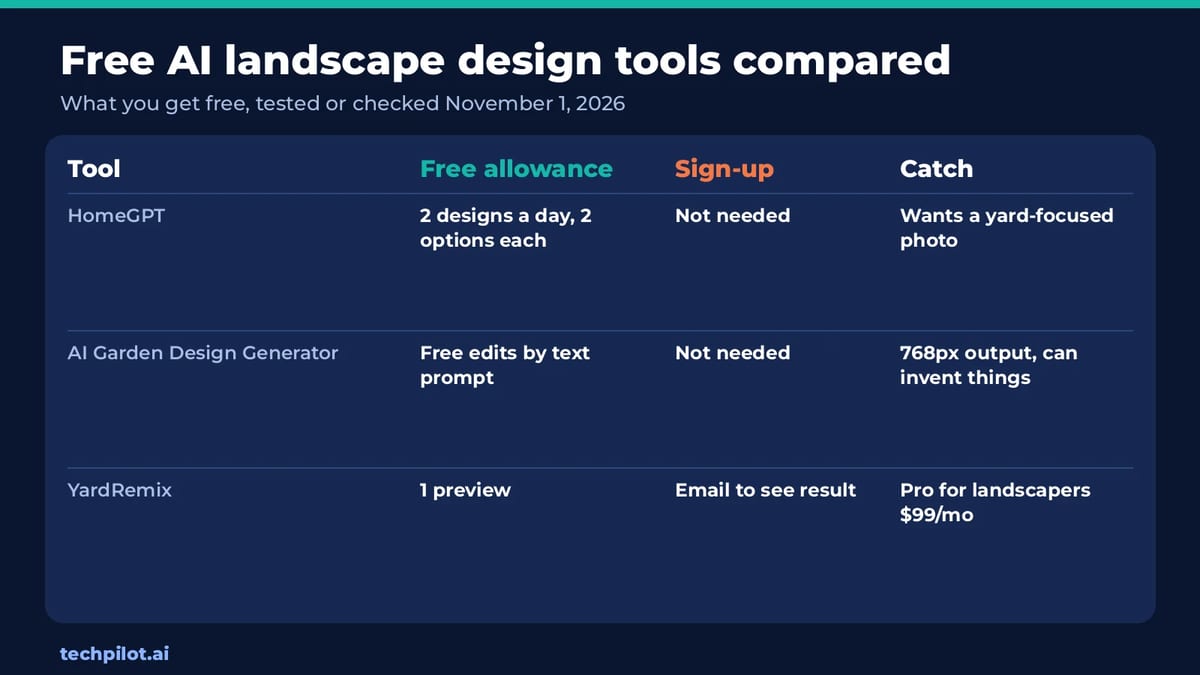
Free AI landscape design tools compared
| Tool | Free allowance | Sign-up | Main catch |
|---|---|---|---|
| HomeGPT | 2 designs a day, two options each, no watermark | Not needed | Needs a yard-focused photo |
| AI Garden Design Generator | Free edits by text prompt | Not needed | Small 768px output, can invent objects |
| YardRemix | First preview | Email needed to see the result | Extra remixes cost credits |
Can you use ChatGPT for free landscape design?
Yes, if you already use it. ChatGPT Free lets you upload a photo and includes limited image creation, so you can ask it to redesign your yard in plain language. The limits are tight, though, and general image tools are more likely to change things you wanted kept. Our ChatGPT photo editing prompts show how to word an edit so the rest of the photo stays the same, and our best free AI image generator guide covers other free options.
How to get a better result from any tool
- Shoot the yard, not the house: stand at the patio door or a corner and get the whole area in frame, in daylight, with the camera level.
- Say what must stay: name the trees, fences, patio or furniture you’re keeping.
- Ask for one change at a time: beds first, then the path, then lighting. Big all-in-one prompts drift more.
- Try two styles: a cottage look and a low-maintenance gravel look side by side help you decide fast.
- Treat it as a mood board: AI concepts don’t account for drainage, slopes, soil or which plants grow in your climate. Show them to a nursery or landscaper before you buy anything.
Our verdict
HomeGPT is the free AI landscape design tool we’d use first: no account, realistic results that respect what’s already in the yard, and a breakdown of what each change involves. Use AI Garden Design Generator when you want to type a specific idea, and skip YardRemix unless you’re happy to hand over an email. For more no-cost tools, browse our list of free AI tools.
Frequently asked questions
Is there a free AI landscape design tool?
Yes. HomeGPT gives 2 free designs a day from a photo with no account, and AI Garden Design Generator lets you edit a yard photo by text prompt for free with no sign-up.
Can AI design my yard from a photo?
Yes. Upload a daylight photo of the yard, pick a style or describe what you want, and the tool redraws beds, paths and lawn on your own photo.
Which free AI landscape tool is best?
In our November 2026 test, HomeGPT was best: it kept the tree and furniture in place, gave two options and listed rough costs for each change.
Is YardRemix free?
The first preview is free, but in our test the result stayed blurred until we entered an email. Extra remixes are sold as paid credit packs.
Can I build from an AI landscape design?
Use it as a concept only. AI designs don’t account for drainage, slopes, soil or plant hardiness, so check the plan with a nursery or landscaper.
Found this useful? Share it with someone comparing AI tools.
Free AI Logo Generator: 7 Best Picks (2026)
Free AI logo generator tools are easy to find, but many let you design for free and then charge to download. We compare 7 and show which are truly…
 Eimantas Kazėnas · 7 min read

Free AI Upscaler: 4 Best Picks Compared
Free AI upscaler picks for 2026: Upscayl, Bigjpg, Let’s Enhance and Real-ESRGAN. See which are truly free, size limits, watermarks and when to pay up.
 Mihai (Mike) Bizz · 5 min read