Home / Guides / Graphics & Design
Free AI Logo Generator: 7 Best Picks (2026)
 Eimantas Kazėnas Marketing & Tech
 - Published
- 7 min read
On this page Free AI logo generators compared
Independent and reader-supported. Some links may earn us a commission; it never changes our rankings. Editorial policy
Free AI logo generator tools are easy to find, but many let you design for free and then charge to download. We compare 7 and show which are truly free.
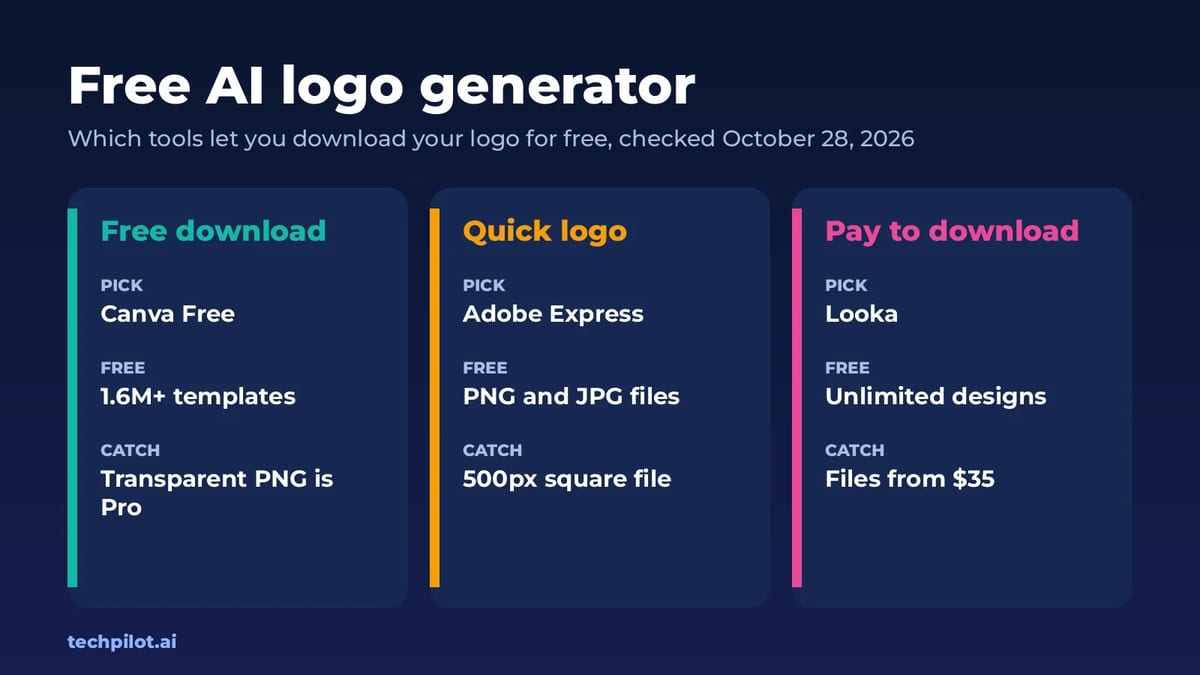
Quick answer: if you want a logo you can actually download and use without paying, start with Canva Free or Adobe Express, both of which let free users download logo files. Use ChatGPT or Gemini to brainstorm logo ideas for free, then rebuild the winner in an editor. Tools like Looka, Turbologo and Zoviz are free to design with, but you pay when you download. We checked every plan on the vendors’ own pages on October 28, 2026.
That split is the thing most “free logo maker” lists skip. Searchers want a logo they can put on a website, a shop or a business card today, so this guide sorts tools by one question first: can you keep the file without paying?
Free AI logo generators compared
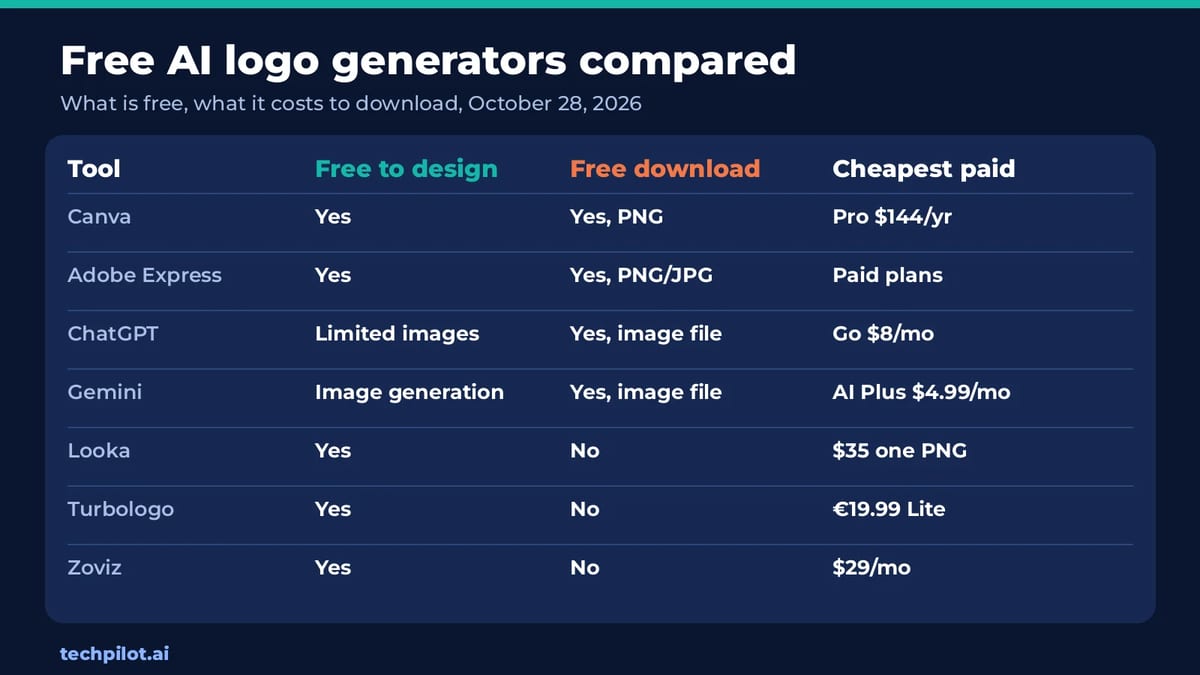
| Tool | Free to design | Free download | Cheapest paid option |
|---|---|---|---|
| Canva | Yes, 1.6M+ templates and an AI logo generator | Yes | Pro, US$144 a year |
| Adobe Express | Yes, logo maker with templates | Yes, PNG and JPG | Optional paid plans |
| ChatGPT | Limited image creation on Free | Yes, as an image | Go, $8 a month |
| Gemini | Image generation and editing on Free | Yes, as an image | Google AI Plus, $4.99 a month |
| Looka | Yes, unlimited designs | No | $35 one-time for one PNG |
| Turbologo | Yes, unlimited variations | No | Lite, €19.99 one-time |
| Zoviz | Yes, preview your brand kit | No | Starter, $29 a month |
Free to keep: the logo makers that cost nothing
1. Canva: best free AI logo generator overall
Canva’s free plan includes the logo maker, 1.6M+ templates, 4.7M+ photos and graphics, one Brand Kit with three colors and up to 20 Standard or Premium AI uses. You can start from a template or try Canva’s AI logo generator, then drag and drop to change icons, fonts and colors.
The catch: Canva lists “remove background” among the Pro AI tools, so a clean transparent logo usually means Canva Pro at US$144 a year. Free templates are also used by many other businesses, so change the layout and icon enough that your logo doesn’t look like a stock design.
Best for: small businesses that want a usable logo plus matching social posts and cards in one place.
2. Adobe Express: best for a quick free logo file
Adobe Express has a free logo maker that asks for your business name and optional slogan, then generates dozens of designs you can edit. Adobe says you can download your new logo for free as high-quality PNG and JPG files, add it to a Brand Kit, and even animate it and export an MP4 for video intros. AI tools powered by Adobe Firefly are available in some regions.
The catch: the quick logo maker downloads a 500 x 500 px square file. That’s fine for a profile picture, but open the logo in the full Adobe Express editor for larger, print-ready files such as PDF.
Best for: social profile logos and animated intros, fast.
3. ChatGPT: best free AI for logo ideas
ChatGPT Free includes limited image creation alongside unlimited text chats with GPT-6. Describe your business, audience and style, and ask for several concepts at once, such as a wordmark, a lettermark and an icon. It’s very good at exploring directions you wouldn’t have thought of.
The catch: the output is a raster image, not a vector, and small text can come out wrong. Treat it as a sketchbook and rebuild the final logo in Canva or Adobe Express. The Go plan, at $8 a month, adds more image creation.
4. Gemini: best free pick for Google users
Google’s free Gemini plan includes image generation and editing, so you can create a logo concept and then ask for changes like “make the icon simpler” or “try navy and gold.” Google AI Plus, at $4.99 a month, doubles your usage.
The catch: same as ChatGPT: you get an image file, so plan to clean it up and recreate it as a vector before printing.
Free to design, pay to download
These tools are built only for logos and branding, and their results often look more polished out of the box. They’re honest about it, too: all three say you can design free and pay when you’re ready to download.
5. Looka: best for a full brand kit
Looka says “it’s totally free to make logos. Only pay when you’re happy.” The Basic Logo Package is $35 one-time for one low-resolution PNG. The Premium Logo Package is $72 one-time with PNG, EPS, SVG and PDF files, color variations including transparent backgrounds, unlimited changes and full ownership. The Brand Kit subscription is $96 a year and adds social profiles, business cards, email signatures and 300+ branded assets.
Our advice: skip the $35 package. A single low-res PNG won’t cover print, so the $72 package is the real starting price for a business.
6. Turbologo: best one-time price
Turbologo gives unlimited logo variations for free, but its FAQ says it offers “only paid download.” On October 28, 2026 its pricing page showed us prices in euros: Lite at €19.99 one-time for one low-resolution file with no transparent version, Standard at €39.99 (marked down 50%) with PDF and SVG, transparent backgrounds and full commercial rights, and Business at €79.99 with a brand book and business documents. Read our Turbologo review for more.
7. Zoviz: best if you also need marketing designs
Zoviz lets you explore its template library, create logos and preview your brand kit at no cost, and you pay when you download. It’s a subscription, not a one-time purchase: Starter is $29 a month billed monthly, with a 43% discount on yearly billing, and includes one brand, 5,000+ templates and 300 AI marketing credits a month. Pro is $49 a month. See our Zoviz review.
One to avoid for a business logo
Recraft’s free plan is a strong image and design tool, but its pricing page says free images are public and come with no commercial use. That rules it out for a company logo unless you pay: commercial rights start on Basic at $10 a month billed annually. Ideogram, another popular pick for text in images, listed no free plan on its pricing page on October 28, 2026, with Plus at $20 a month.
How to make a free AI logo you can actually use
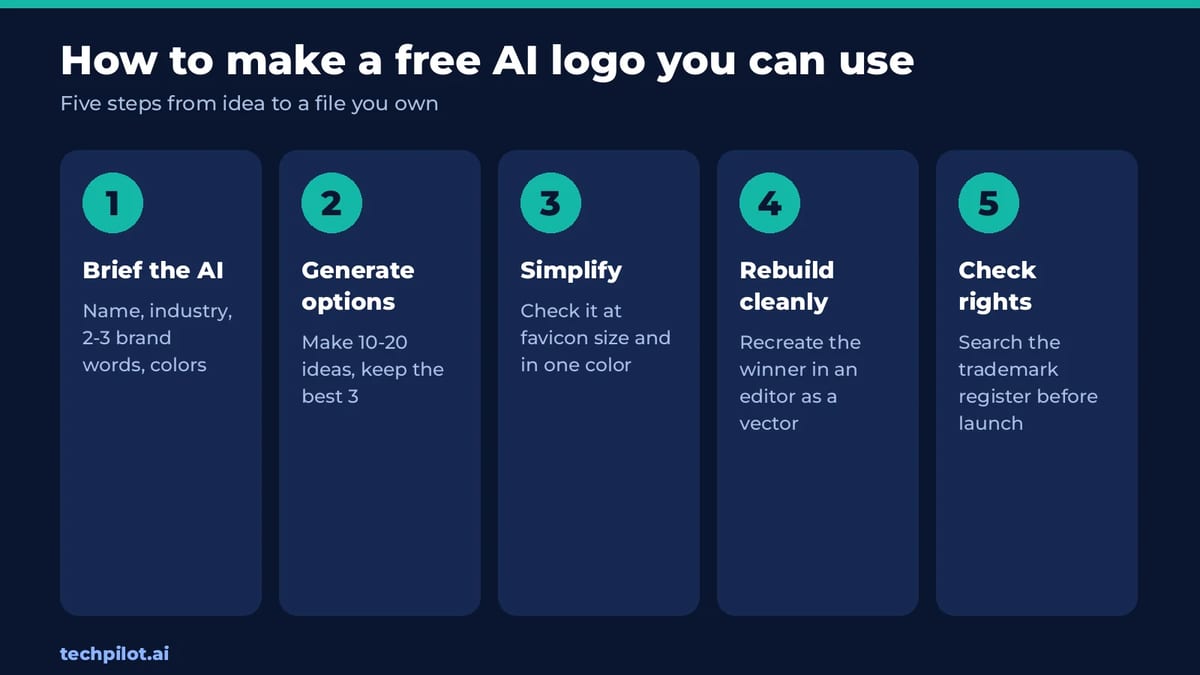
- Write a short brief. Give the AI your business name, what you do, two or three brand words (for example “calm, premium, local”) and colors you like or hate.
- Generate wide, then narrow. Make 10 to 20 options across styles, keep the best three and ask for variations of those.
- Test it small and in one color. A good logo still reads as a 32 px favicon and in black only. Detailed AI art usually fails this test.
- Rebuild the winner cleanly. Recreate the chosen concept in Canva or Adobe Express with real fonts, so the text is crisp and editable.
- Check trademarks before launch. AI tools can produce marks that look like existing brands. Search your country’s trademark register for similar names and symbols.
Which free AI logo generator should you use?
- You want a free logo today: Canva Free.
- You need a profile picture or animated intro: Adobe Express.
- You’re stuck on ideas: ChatGPT or Gemini, then rebuild the best one.
- You want vector files and a brand kit and will pay once: Looka Premium at $72 or Turbologo Standard.
- You need ongoing marketing designs too: Zoviz.
Need images for the rest of your brand? Our best free AI image generator guide compares free image tools, and the free AI tools hub lists every free AI list we’ve published.
Frequently asked questions
Is there a truly free AI logo generator?
Yes. Canva Free and Adobe Express both let free users design and download a logo. Looka, Turbologo and Zoviz are free to design with but charge to download the files.
Which free AI logo generator gives a transparent background?
Canva lists background removal as a Pro tool, and Turbologo’s cheapest Lite file has no transparent version. Adobe Express says to pick PNG or PDF when you need a transparent background.
Can I use ChatGPT to make a logo for free?
Yes. ChatGPT Free includes limited image creation, which is good for logo ideas. The result is a raster image, so rebuild the final design in an editor before you print it.
How much does Looka cost to download a logo?
Looka’s Basic Logo Package is $35 one-time for one low-res PNG. The Premium package is $72 with PNG, EPS, SVG and PDF files and transparent backgrounds.
Can I trademark an AI-generated logo?
Check before you rely on it. AI tools can produce marks that resemble existing brands, so search your trademark register and consider adding your own design changes before you file.
Found this useful? Share it with someone comparing AI tools.
Best AI Thumbnail Makers for YouTube CTR (2026)
Which AI thumbnail maker actually lifts YouTube CTR in 2026? Compare Pikzels, Pixado, Fliki and Canva, with top picks for free, scoring and A/B tests.
 Eimantas Kazėnas · 11 min read

10 Innovative Ways Marketers and Designers Are Using AI-Generated Images in 2026
Discover how AI image generators transform visual content creation. Explore 10 practical ways marketers and designers can use AI design tools to…
 Mihai (Mike) Bizz · 5 min read