Home / Guides / Digital Art
Free AI Hairstyle Male Try-On: 6 Best Tools
 Mihai (Mike) Bizz Business, entrepreneurship, tech & AI
 - Published
- 6 min read
On this page Free AI hairstyle changers for men compared
- Free AI hairstyle changers for men compared
- 1. Hair & Beard Style: best free option with no account
- 2. StyleGen: best for trying lots of cuts
- 3. Bylo: best for custom styles and colours
- 4. HairHunt: best for phone users
- 5. Google Gemini: best free option for any style
- 6. ChatGPT Free: best for quick ideas
- How to get a preview you can trust
- Our verdict
- Frequently asked questions
Independent and reader-supported. Some links may earn us a commission; it never changes our rankings. Editorial policy
Free AI hairstyle male try-on tools for 2026: StyleGen, Bylo, HairHunt, Gemini and two more free picks. See real free limits, beard options and quick tips.
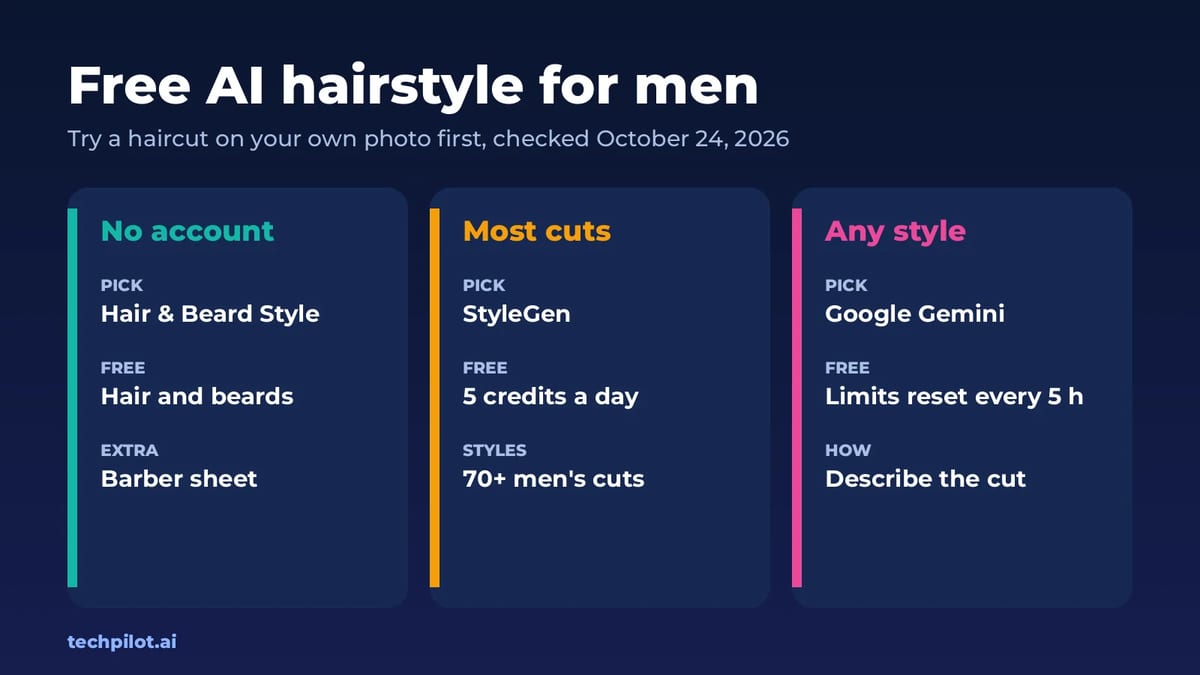
Quick answer: for a free AI hairstyle changer for men with no account, start with Hair & Beard Style, which previews cuts and beards on your selfie for free, or StyleGen, which gives a free first preview and then 5 free credits a day. If you want a specific look that isn’t on a menu, describe it to Google Gemini for free. We checked each tool’s own site on October 24, 2026.
Most men use these tools for one reason: to avoid a bad haircut. So we’ve judged them on how honest the preview looks, whether your face and beard stay the same, and whether you can show the result to your barber.
Free AI hairstyle changers for men compared
| Tool | What’s free | Sign-up | Best for |
|---|---|---|---|
| Hair & Beard Style | Free hair and beard previews | No account | A barber-ready sheet |
| StyleGen | First preview, then 5 credits a day | Free account to download | 70+ men’s cuts |
| Bylo | Free trial with your own prompt | No login | Custom styles and colours |
| HairHunt | First try-on free | App or web | Trying cuts on your phone |
| Google Gemini | Free image edits, limits refresh every 5 hours | Google account | Any style you can describe |
| ChatGPT Free | Photo edits in chat, tight caps | OpenAI account | Quick one-off ideas |
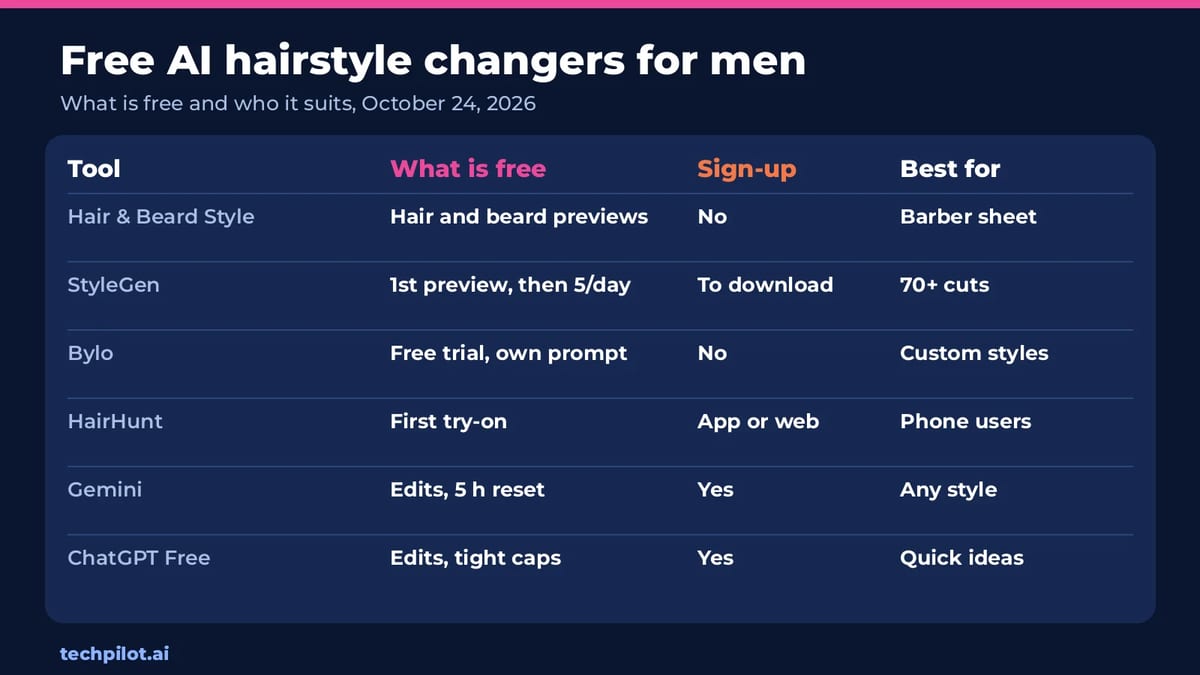
The split is simple. Menu tools like StyleGen and Hair & Beard Style are faster and keep your face intact because they only touch the hair. Chat tools like Gemini are more flexible, but you have to write a good prompt, and they sometimes change your face slightly. Use a menu tool to shortlist, then a chat tool for anything unusual.
1. Hair & Beard Style: best free option with no account
- Free: free to use with no account. Upload a JPG or PNG selfie up to 4MB, pick a style, and the preview appears in a few seconds.
- Styles: barbershop cuts such as High and Tight Fade, Classic Taper, Textured Crop, Modern Mullet, Slicked Back Undercut, Buzz Cut and Pompadour, plus beard styles from Clean Stubble to Medium Full Beard.
- Why we like it: you can print a Barber Sheet to take to your appointment. It’s built by the team behind the MUG barbershop chain, so the cut names match what barbers actually say.
2. StyleGen: best for trying lots of cuts
- Free: your first preview needs no sign-up. After that you get 5 free credits a day, and you need a free account to download and keep results.
- Styles: 70+ men’s cuts, including fades, undercuts, buzz cuts, crops, quiffs and longer styles. StyleGen says it rebuilds the hair and leaves your face and beard as they are.
- Paid: one-time credit packs, from $7.99 for 100 credits that never expire.
- Tip: StyleGen says a sharp, front-facing daylight photo beats a dark or filtered one every time.
3. Bylo: best for custom styles and colours
- Free: a free trial with no login or app download.
- How it works: instead of a fixed menu, you type the hairstyle and hair colour you want. It runs on Google’s Nano Banana image models, and there’s a separate free beard filter.
- Best for: a style you can describe but can’t find on a list, like “short textured crop with a low drop fade, dark brown”.
4. HairHunt: best for phone users
- Free: your first try-on is free, on the web or in the iOS and Android app.
- How it works: upload a selfie, pick a men’s cut and an optional colour, and the preview takes about 10 seconds.
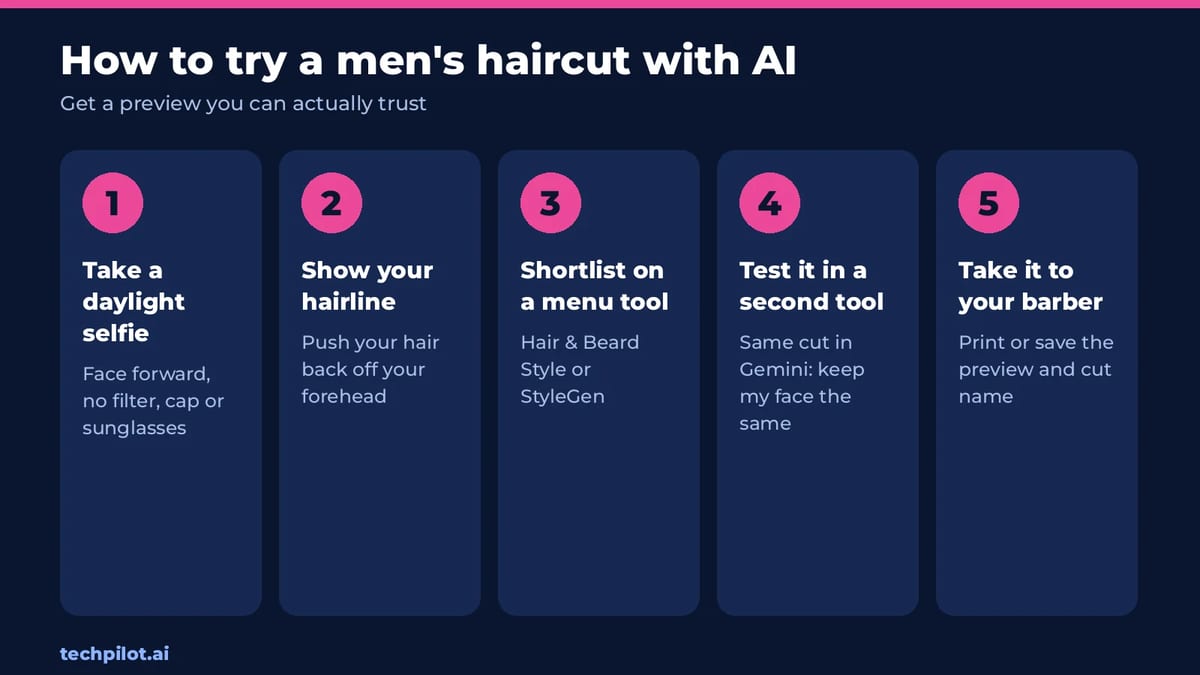
- Tip from HairHunt: face forward, use good light, take off your cap and push your hair off your forehead so it can read your hairline.
5. Google Gemini: best free option for any style
- Free: free Gemini users can edit photos with Nano Banana 2, with limits that refresh every 5 hours plus a weekly cap.
- How to use it: upload your selfie and paste the prompt below, changing the cut to the one you want.
Prompt to copy: “Change only my hairstyle to a short textured crop with a mid skin fade. Keep my face, beard, skin, expression, glasses and background exactly the same. Realistic barbershop finish, natural hairline, photo quality.”
Adding “keep my face exactly the same” matters. Without it, chat tools may smooth your skin or change your jaw, which makes the preview useless for judging the cut.
6. ChatGPT Free: best for quick ideas
- Free: ChatGPT’s free plan includes photo editing in chat, but the image caps are tight.
- Best for: asking “which haircut suits my face?” and getting a couple of previews in the same chat. Our ChatGPT photo editing prompts show how to write edit prompts that keep your face intact.
How to get a preview you can trust
- Use a recent, front-facing photo in daylight, with no filters, cap or sunglasses.
- Push your hair back so the tool can see your real hairline. A hidden receding hairline is the most common reason a preview lies.
- Try the same cut in two tools. If both previews look good, it probably suits you.
- Check from the side. Most previews only show the front, so ask your barber about how the sides and back will grow out.
- Be careful with long styles. AI can add length you don’t have. Short and medium cuts give the most realistic previews.
Want a better photo to start from? Our free AI headshot generator guide covers the same photo rules. And if you’re curious which general image tools handle edits best, see our best free AI image generator list.
Our verdict
For most men, Hair & Beard Style is the best free AI hairstyle tool: no account, real barbershop cut names and a sheet you can hand to your barber. Use StyleGen when you want to flick through dozens of cuts, and Gemini when you know exactly what you want but can’t find it on a menu.
Frequently asked questions
What is the best free AI hairstyle changer for men?
Hair & Beard Style is the best free option for most men: no account, real barbershop cuts and beard styles, and a printable sheet for your barber. StyleGen is best for trying 70+ cuts.
Is there an AI hairstyle changer that’s free with no sign-up?
Yes. Hair & Beard Style needs no account, Bylo needs no login, and StyleGen gives your first preview without sign-up. StyleGen then gives 5 free credits a day with a free account.
Can I try a beard style with AI for free?
Yes. Hair & Beard Style previews beard styles such as Clean Stubble and Medium Full Beard for free, and Bylo has a free beard filter.
Can Gemini change my hairstyle?
Yes. Upload a selfie to the free Gemini app and ask it to change only your hairstyle while keeping your face the same. Free limits refresh every 5 hours.
Are AI hairstyle previews accurate?
They’re good for short and medium cuts. Accuracy drops if your photo is dark or filtered, if your hairline is hidden, or if you try much longer hair than you have.
Found this useful? Share it with someone comparing AI tools.
AI Person: Free Generators & How to Make One
An AI person is a realistic face or talking avatar made by AI. Compare the best free AI person generators, make your own step by step, and stay legal.
 Mihai (Mike) Bizz · 9 min read

Free AI Tools for Etsy Sellers: We Tested Creative Fabrica Studio Desktop (Here’s What It Actually Does)
Creative Fabrica Studio Desktop App provides the most-used, free AI tools for Etsy sellers – no subscriptions, no credits, no watermarks.
 John Daniel · 7 min read