Adobe’s logo maker is one of the easiest free ways to get a usable logo, and the free plan does not hold back the basics: generation, editing and downloads all work without paying.
Home / Tools / Digital Art
Digital Art · Tool review
Adobe Logo Maker Review: Free Logos, Pricing
 TechPilot.ai review team Hands-on testing, one published method
- Last updated
- How we test
The AI news that actually mattered this week.
One short email every Friday: the biggest AI stories, what they mean for you, and the tools worth trying. A 3-minute read, no hype.
Free. Unsubscribe anytime.
You're in. Watch for the brief on Friday. Free. Unsubscribe anytime.
Summary
Pros and cons
What we like
- Free logo maker and downloads.
- Generates many ideas from a name.
- Full Express editor for tweaks.
- Animated MP4 logos.
- Transparent PNG on the free plan.
What could be better
- 500 px default download.
- Results can look template-based.
- Brand kits need Premium.
- Some AI tools are region-limited.
Key features
- Generator: Name, slogan, style and icon.
- Editor: Fonts, colours, own images.
- Export: PNG, JPG, PDF, transparent PNG.
- Animation: Download logos as MP4.
- Brand kit: Premium plan feature.
- Pricing: Free; Premium US$9.99 a month.
Screenshots
Full review
Independent and reader-supported. Some links may earn us a commission; it never changes our scores. Editorial policy
Adobe Logo Maker in Adobe Express is free: type a brand name, pick a style and icon, then download PNG or JPG logos. Premium is US$9.99 a month if needed.
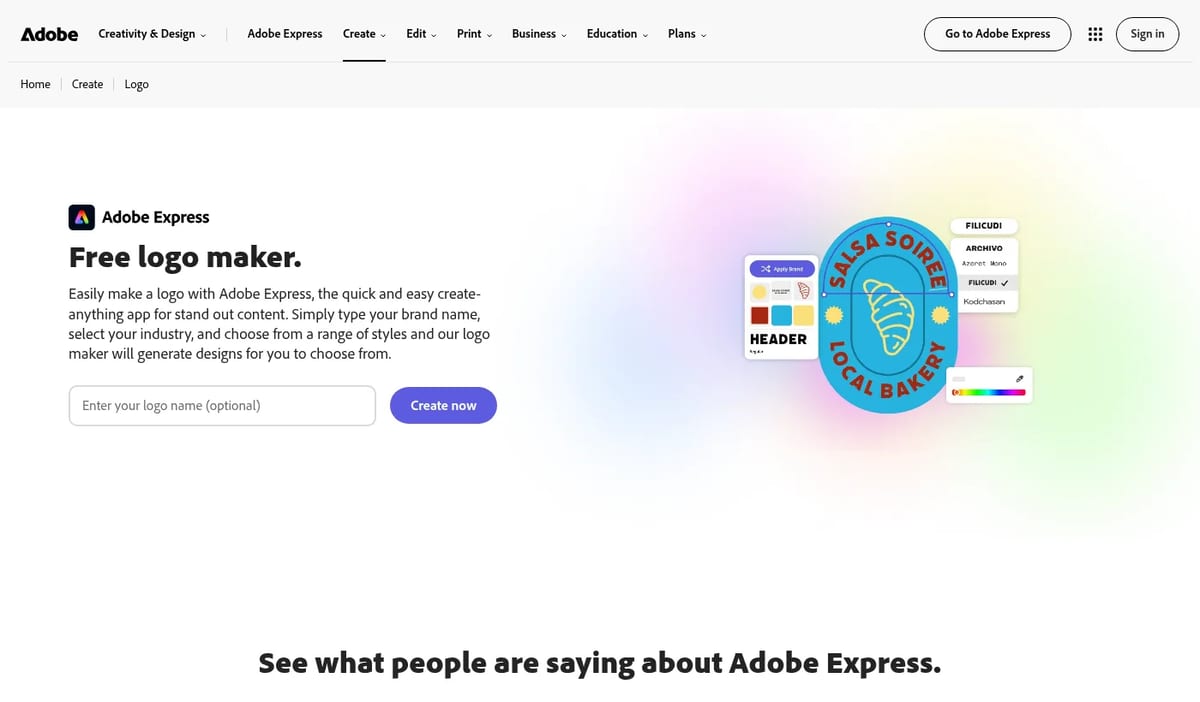
Quick answer: the Adobe logo maker is the free logo generator built into Adobe Express. You enter your business name and an optional slogan, choose a style, pick an icon, and it generates a set of logo ideas you can download for free or open in the full Express editor. You do not need a paid plan to make and download a logo. Paying only adds premium templates, fonts, stock and AI credits. Prices below are from Adobe’s Express pricing page on November 23, 2026.
How the Adobe logo maker works
- Tell it about your brand: enter the business name, add a slogan if you have one, and choose a style.
- Pick an icon: choose a free icon, and the generator returns a batch of logo designs with and without your slogan.
- Shuffle and refine: try different colour and font recommendations, or select Customize More to open the logo in the Express editor.
- Download: the quick download is a 500 x 500 px square file in PNG or JPG. From the editor you can also export PDF, a transparent PNG, or an animated MP4.
The editor is where the logo stops looking like everyone else’s. You can swap fonts, change spacing, upload your own image, add shapes or animate the text for video intros. If you skip that step, expect results that look template-based, because many people start from the same icons and styles.
Adobe Logo Maker Pricing (2026)
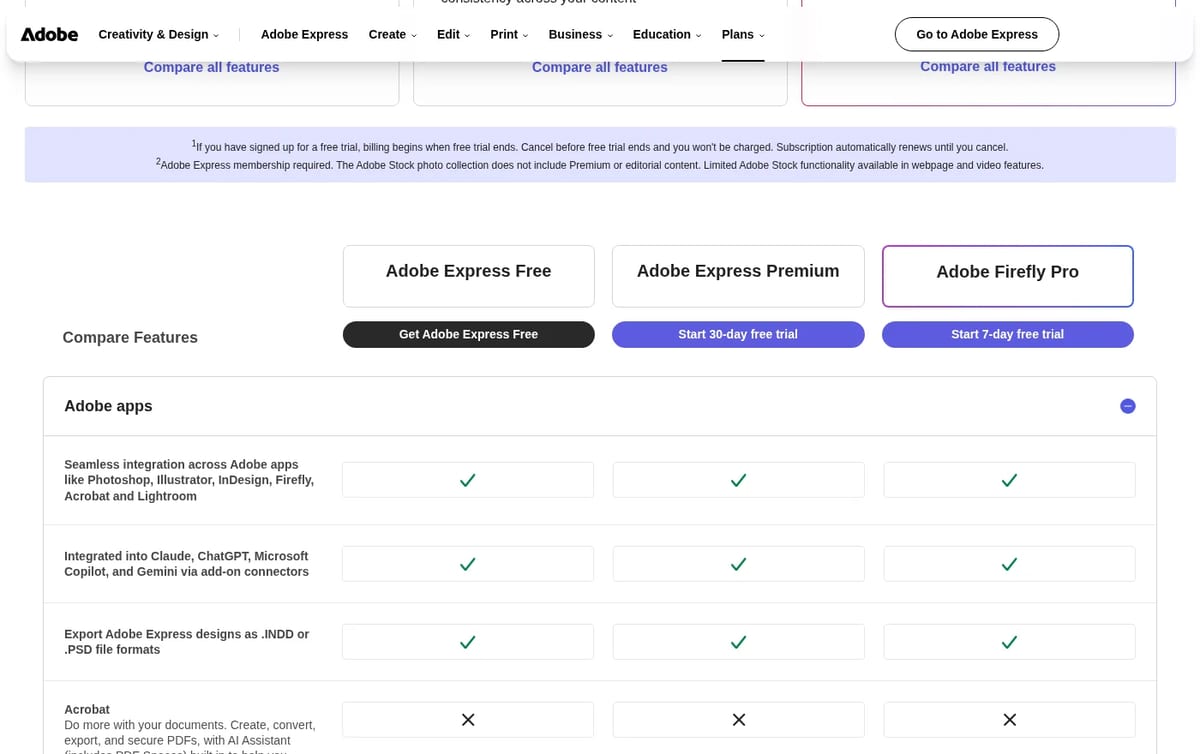
| Plan | Price | Generative AI | Key extras for logos |
|---|---|---|---|
| Adobe Express Free | US$0 | Free daily generations, no monthly credit pool | Logo maker, 345,000+ templates, 5,000+ Adobe Fonts, transparent PNG export, 5GB storage |
| Adobe Express Premium | US$9.99 a month | 250 generative credits a month | All premium templates, 30,000+ fonts, 430M+ stock assets, brand kits, one-click resize, 100GB, 30-day free trial |
| Adobe Firefly Pro | US$19.99 a month | 4,000 credits a month for video and audio; unlimited standard image features | Everything in Premium (except the 250 credits), Photoshop on web and mobile, partner AI models, 7-day free trial |
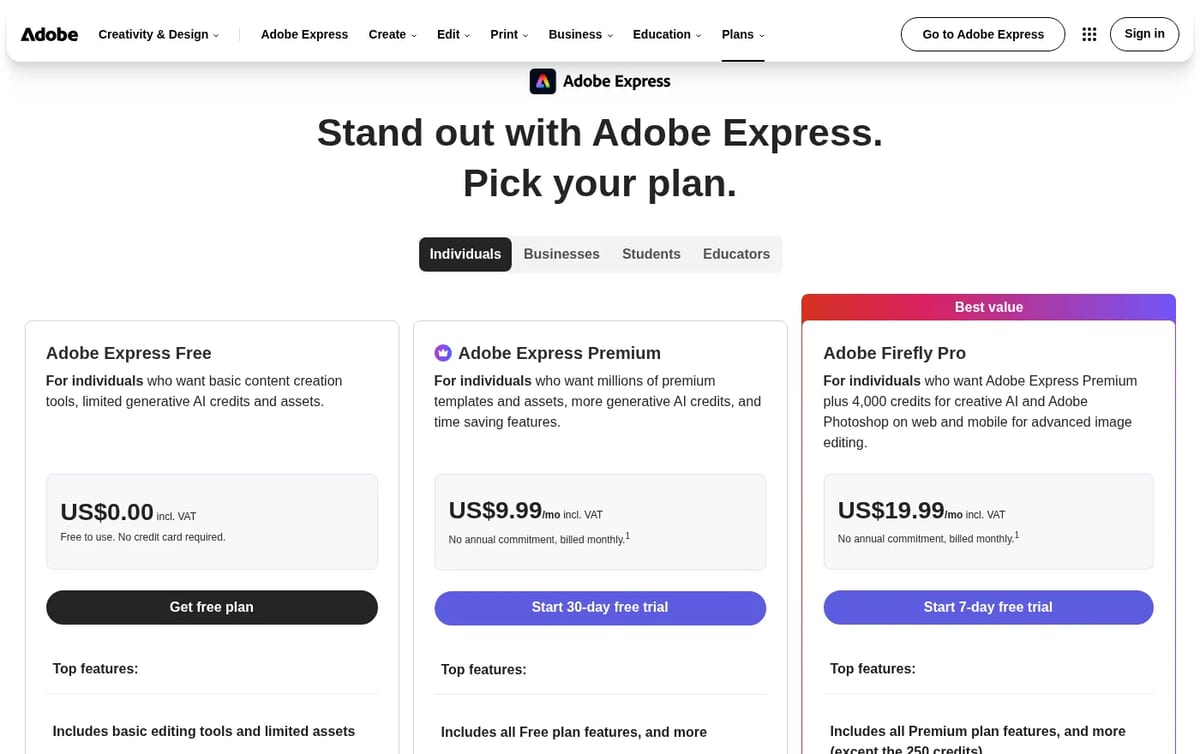
Do you need to pay? For a simple wordmark or icon logo, no. The free plan covers the logo maker, downloads and transparent PNG export. Premium starts to make sense when you want a brand kit that applies your logo, colours and fonts to every new design, or the bigger font and template library. Firefly Pro is a creative AI plan with Photoshop on web and mobile; it is more than a logo needs.
If you want to compare generators, see our list of free AI logo generators. If you are choosing a design suite rather than just a logo tool, read our Canva alternatives guide and our review of Canva’s AI design tools.
Who the Adobe logo maker is for
Small businesses, side projects, creators and student teams that need a clean logo today and will reuse it across social posts, flyers and business cards. It is less suited to a company that needs a fully original, vector mark with a style guide; that is still a job for a designer.
Limitations
- Small default size: the quick download is 500 x 500 px; open the logo in the editor to resize it for print.
- Template look: designs come from shared icons and styles, so customise fonts, colours and layout before you use one.
- Account needed for the editor: using your own images and the full editor requires signing in to Adobe Express.
- AI features vary: Adobe says its Firefly-powered logo tools are available in some regions only.
TechPilot.ai’s Verdict on Adobe Logo Maker
Adobe’s logo maker is one of the easiest free ways to get a usable logo, and the free plan does not hold back the basics: generation, editing and downloads all work without paying.
Use it for a quick, clean mark, then spend a few minutes in the editor making it your own. Upgrade to Premium only if you want a brand kit and the larger font and template library.
Adobe Logo Maker FAQ
Is Adobe Logo Maker free?
Yes. The Adobe Express logo maker is free for everyone, and you can download your logo as a PNG or JPG without a paid plan or credit card.
•
How much does Adobe Logo Maker cost?
The logo maker itself is free. Adobe Express Premium costs US$9.99 a month and Adobe Firefly Pro US$19.99 a month, checked November 23, 2026 on Adobe’s pricing page.
•
What size is an Adobe Express logo download?
The quick download is a 500 x 500 px square file. Open the logo in the Adobe Express editor to crop or resize it.
•
Can I download an Adobe Express logo with a transparent background?
Yes. Adobe’s plan comparison lists PNG export with a transparent background on the Free, Premium and Firefly Pro plans.
•
Can I animate my logo in Adobe Express?
Yes. In the Express editor you can apply animation styles to the text or images and download the logo as an MP4 for video intros and social clips.
Pixel Dojo
Digital Art
Pixel Dojo is a good way to try many image and video models without paying for each one, and the unlimited tools make cheap drafting easy.
PimEyes Face Search Engine
Digital Art
Overall, PimEyes face recognition search engine is an effective tool that offers a range of subscription options to suit different user…
Postshot
Digital Art
Postshot is one of the easiest ways to make Gaussian splatting scenes on your own hardware, and the free plan is enough to learn it…