Home / Guides / Graphics & Design
Uizard vs Figma: Which UI Design Tool Wins?
Uizard vs Figma: Uizard turns a prompt or sketch into editable screens from $12 a month, while Figma is the pro standard. Compare 2026 prices and our pick.
 Eimantas Kazėnas Marketing & Tech
 - Updated
- 6 min read
On this page The short answer
Independent and reader-supported. Some links may earn us a commission; it never changes our rankings. Editorial policy
Uizard vs Figma isn’t a fair fight on paper: Figma is the industry standard for interface design, while Uizard is a lighter, AI-first tool built so non-designers can get from idea to mockup in minutes. But that’s exactly why people compare them. If you’re a founder, product manager or marketer, Uizard may be all you need. If you design products for a living, Figma still wins.
We compared both on what you can do, how their AI works and what they cost today. Prices were checked on uizard.io/pricing and figma.com/pricing on October 8, 2026, in US dollars.
The short answer
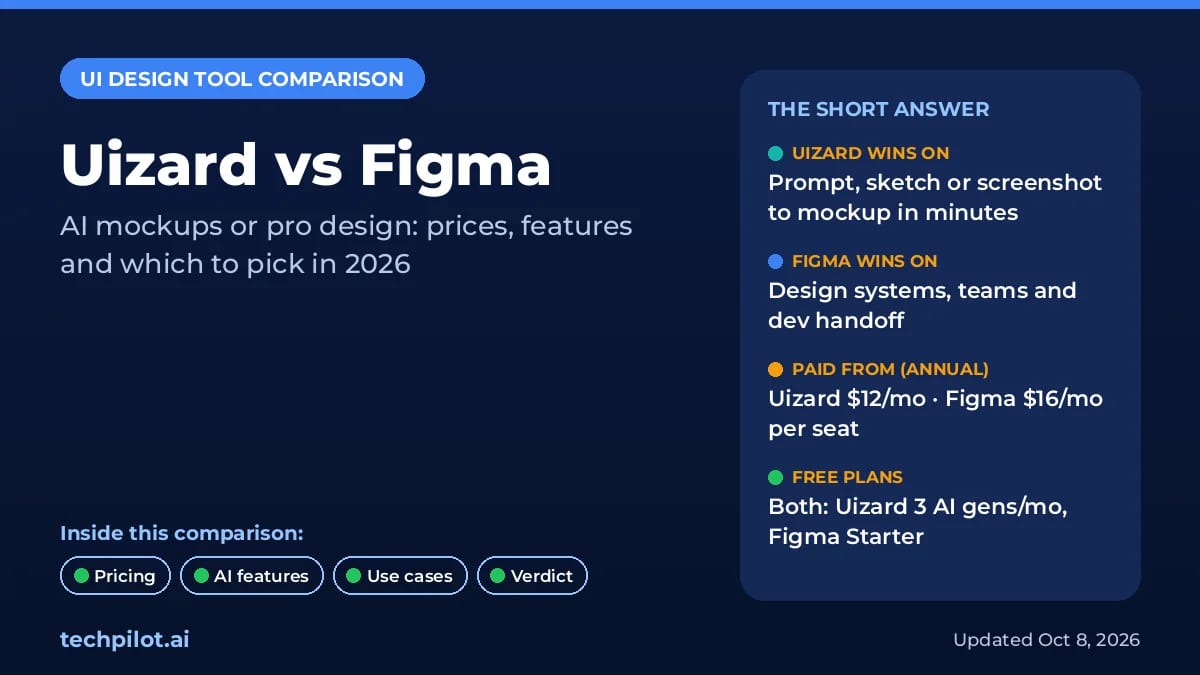
- Pick Uizard if you need quick mockups or a clickable prototype from a text prompt, a screenshot or a hand-drawn sketch, and you don’t want to learn a pro design tool.
- Pick Figma if you’re designing a real product: pixel-level control, auto layout, components, design systems, team libraries, Dev Mode and the largest plugin ecosystem.
- Use both if you want speed early on: explore ideas in Uizard, then rebuild the winning direction properly in Figma.
- On price, Uizard Pro is $12 a month billed annually and Figma Professional is $16 a month billed annually for a Full seat. Both have free plans.
Uizard vs Figma at a glance
| Uizard | Figma | |
|---|---|---|
| Best for | Non-designers, fast mockups and early prototypes | Professional UI/UX design and product teams |
| AI features | Autodesigner 2.0, screenshot and wireframe scanners, heatmaps, design reviews | Figma AI credits on every seat, Figma Make prompt-to-app, image editing |
| Learning curve | Low: drag and drop, templates, AI first | Higher: auto layout, components, variables |
| Collaboration | Real-time editing, comments, unlimited free viewers | Real-time editing, branching, team libraries, free viewers on paid plans |
| Developer handoff | CSS and React components (paid plans) | Dev Mode, Code Connect, MCP server |
| Free plan | 3 AI generations a month, 2 projects | 150 AI credits a day up to 500 a month, unlimited drafts |
| Paid from | $12/mo billed annually ($19 monthly) | $16/mo per Full seat billed annually ($20 monthly) |
What Uizard does best
Uizard is built around speed. Its Autodesigner 2.0 generates multi-screen app or web projects, single screens and themes from a text prompt. The Screenshot Scanner turns a screenshot of any app into an editable mockup, and the Wireframe Scanner digitizes hand-drawn sketches. There are also AI heatmaps that predict where users will look, and AI design reviews. Our Uizard review covers the full feature set.
The editor is simple: drag and drop components, swap themes, link screens into a clickable prototype and share it with unlimited free viewers. That makes it a good fit for pitching an idea to investors, testing a concept with users or briefing a developer before a designer is involved.
The trade-off is depth. Uizard’s free plan caps you at 2 projects with up to 5 screens each, and the AI output is a starting point, not a polished design system. Designers who need precise spacing, responsive constraints or a component library will hit its limits quickly.
What Figma does best
Figma is where most product teams design, review and hand off interfaces. Auto layout, components, variables and variable modes let you build a design system once and reuse it everywhere. Branching and merging, team libraries and organization-wide design systems keep large teams consistent, and Dev Mode with Code Connect and an MCP server turns designs into specs developers can use.
Figma has also caught up on AI. Every seat includes AI credits, and Figma Make turns prompts into working prototypes and apps. A paid Full seat also covers FigJam, Figma Slides, Figma Draw, Figma Sites and Figma Buzz. If your goal is a shipped app rather than a design file, compare it with AI builders like Bolt Forge too.
The trade-off is complexity and cost per seat. New users face a real learning curve, and costs scale with every Full seat you add.
Uizard vs Figma pricing (October 2026)
| Plan | Uizard | Figma |
|---|---|---|
| Free | $0: 3 AI generations/mo, 2 projects, 5 screens per project, 10 templates | Starter $0: unlimited drafts, UI kits, 150 AI credits/day (up to 500/mo) |
| Entry paid | Pro $19/mo, or $12/mo billed annually: 500 AI generations/mo, up to 100 projects | Professional Full seat $20/mo, or $16/mo billed annually: 3,000 AI credits/mo |
| Cheaper seats | None; unlimited free viewers on all plans | Dev seat $15 ($12 annual), Collab seat $5 ($3 annual) |
| Teams | Business $39/mo billed annually: 5,000 AI generations/mo, brand kit | Organization $55/mo per Full seat, billed annually |
| Enterprise | Custom (15+ creators), unlimited AI generations | Enterprise $90/mo per Full seat, billed annually |
For a solo user on annual billing, Uizard Pro is $144 a year and a Figma Professional Full seat is $192 a year, so the gap is small. The bigger difference is what you get: Uizard’s price buys AI generations and simplicity, while Figma’s buys a full professional design suite with AI credits on top.
Which should you choose?
Choose Uizard if
- You’re a founder, PM or marketer who needs mockups this week, not a design skill.
- You start from sketches, screenshots of competitor apps or a written brief.
- You want a clickable prototype to test or pitch, and polish isn’t the goal yet.
Choose Figma if
- You’re a designer or work with one, and the designs will ship.
- You need components, a design system, team libraries and version control.
- Developers on your team will inspect specs and code from your files.
Our verdict
Figma is the better design tool, and for anyone designing a real product it’s the default choice. Uizard is the better idea tool: it gets non-designers from a prompt or sketch to a shareable prototype faster than anything in Figma’s core editor. Start with Uizard’s free plan if you just need to visualize an idea, and move to Figma when the project is real. For more options, see our guide to the best AI design tools and our Canva AI review for marketing graphics.
Frequently asked questions
Is Uizard better than Figma?
Not overall. Uizard is better for turning a prompt, screenshot or sketch into a clickable mockup fast, especially if you aren’t a designer. Figma is better for production UI design, design systems, team libraries and developer handoff. Many teams use Uizard to explore ideas and Figma to finish them.
Is Uizard free?
Yes, Uizard has a free plan with 3 AI generations a month, 2 projects, up to 5 screens per project and 10 templates. Pro costs $19 a month, or $12 a month billed annually, and adds 500 AI generations a month and Autodesigner 2.0.
How much does Figma cost in 2026?
Figma Starter is free. Professional costs $20 a month for a Full seat billed monthly, or $16 a month billed annually, with Dev seats at $15 or $12 and Collab seats at $5 or $3. Organization Full seats are $55 a month and Enterprise $90, both billed annually.
Can Uizard export to Figma?
Uizard doesn’t list a direct Figma export on its pricing page. Paid plans export screens as JPG, PNG or PDF and offer developer handoff as CSS and React components. If your final designs must live in Figma, plan to rebuild or redesign them there.
Does Figma have AI like Uizard’s Autodesigner?
Yes. Every Figma seat includes AI credits, from 500 a month on Starter to 3,000 a month on a Professional Full seat, and Figma Make turns prompts into working prototypes and apps. Uizard’s Autodesigner is simpler and aimed at quick multi-screen mockups.
Sources: Uizard pricing and product pages; Figma pricing page. Both checked October 8, 2026.
Found this useful? Share it with someone comparing AI tools.
AI Landscape Design Free: 3 Tools We Tested
AI landscape design free tools redesign your yard from one photo. We tested three on one backyard: HomeGPT did best, and one hid its result behind…
 Eimantas Kazėnas · 6 min read

Why Startups should consider an AI design agency
Discover why startups should consider an AI design agency. Learn how AI-driven design provides cost-efficiency, scalability, and a competitive edge…
 Alexi Carmichael · 5 min read