Figma Code Layers Explained (+ Figma Specs)
 Mihai (Mike) Bizz Business, entrepreneurship, tech & AI
 - Published
- 6 min read
On this page Figma code layers at a glance
Independent and reader-supported. Some links may earn us a commission; it never changes our rankings. Editorial policy
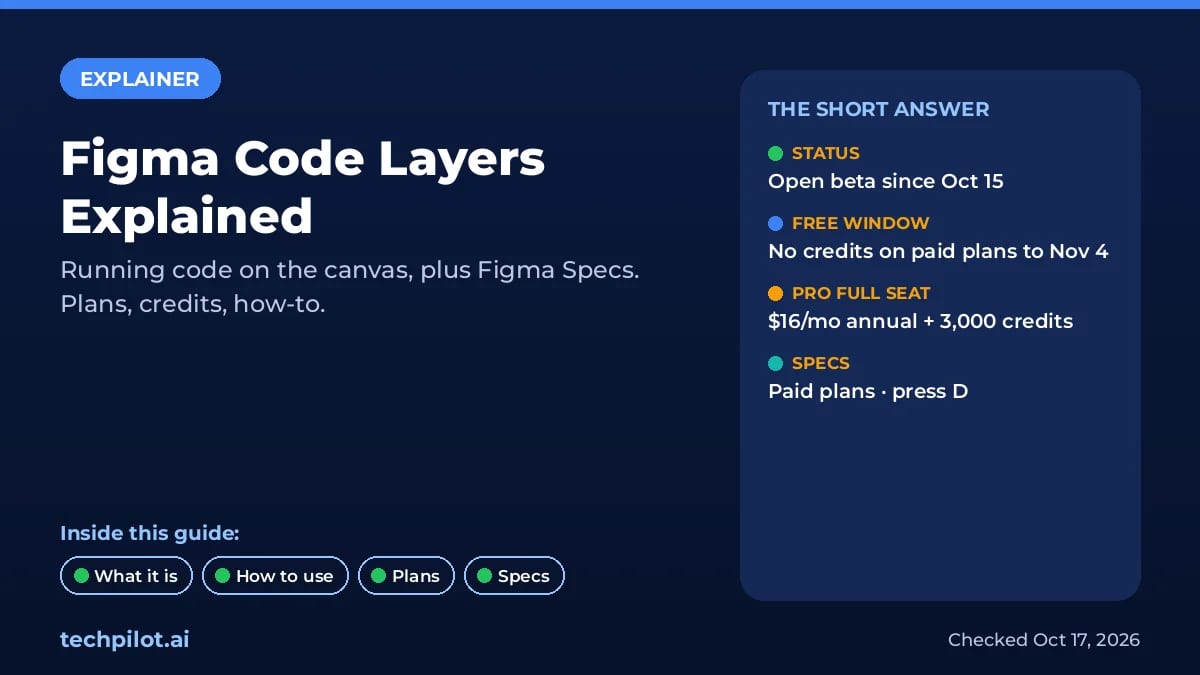
Figma code layers put running code on the canvas, in open beta since Oct 15. What they do, how to make one, which plans get them, credits, and Figma Specs.
In plain terms: a code layer is a working prototype, built from real front-end code, that sits on your Figma canvas next to your frames. You can click through it, duplicate it to try a different idea, ask the Figma agent to change it, and pull screens back out as normal design layers. Figma moved it into open beta on October 15, 2026, the same day it launched Figma Specs. Both are rolling out gradually, so don’t worry if your toolbar doesn’t show them yet.
Figma code layers at a glance
| Code layers | Figma Specs | |
|---|---|---|
| What it is | Running code prototype on the canvas | Markdown doc on the canvas or as a file |
| Status | Open beta, rolling out over weeks | Open beta, rolling out over weeks |
| Plans | Education (K-12), Starter, Professional, Organization, Enterprise | Professional, Education, Organization, Enterprise |
| Shortcut | B | D |
| AI credits | Yes, but free on paid plans to Nov 4, 2026 | Only when you use the agent |
| Needs | Edit access; a Full seat to create | Edit access to the file |
What you can do with a code layer
The Figma Help Center lists the main jobs: build realistic design and code explorations in one file, compare several running versions side by side instead of switching git branches, preview empty, loading and error states, and start from your team’s actual codebase instead of a blank prompt. When the work is ready, you can push the code to a branch and open a pull request.
Who it’s for: designers who want to test how something feels, not just how it looks, and product teams who keep losing time on handoff. It is not a replacement for production engineering. Figma’s own blog says GitHub imports should be a “supported, lightweight prototyping codebase”, and the Help Center warns that MCP imports can take 10 minutes or more and some projects need changes to run.
How to make your first code layer
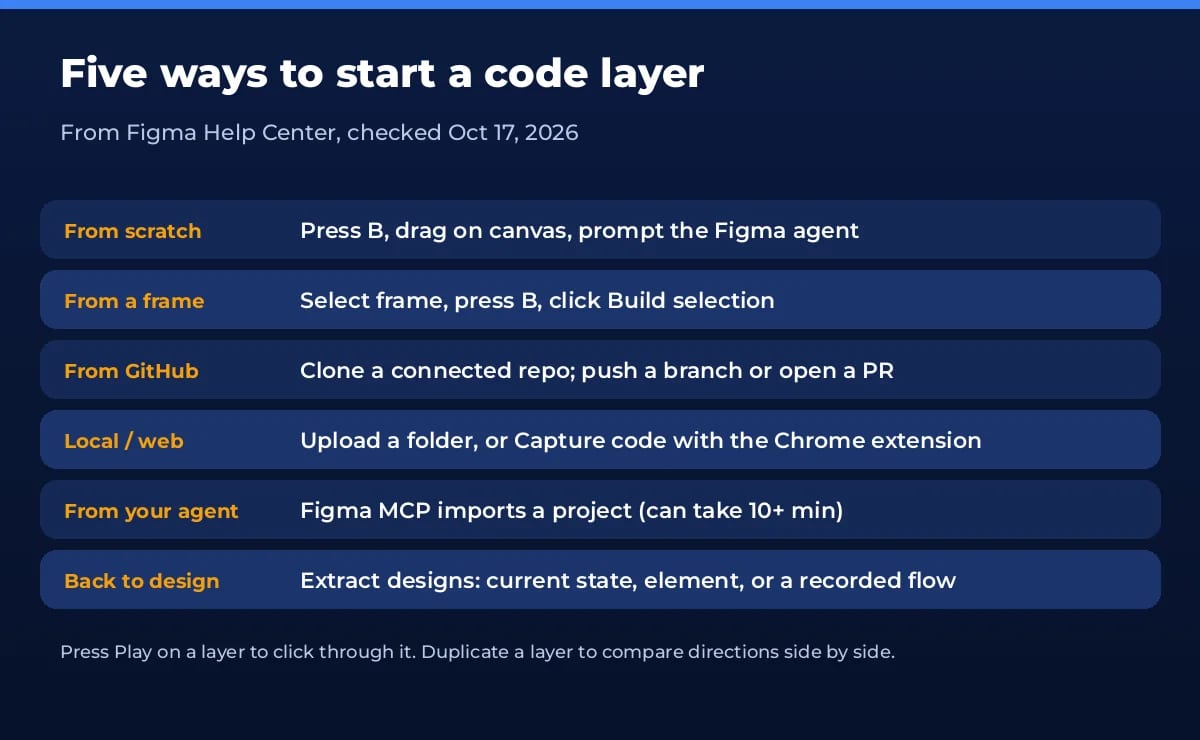
- From scratch: click Code in the toolbar or press B, drag a box on the canvas, then open the Figma agent and describe what you want.
- From a design: select a frame, press B, and click Build selection in the right sidebar. Select several frames to convert them at once.
- From GitHub: connect your GitHub account or organization, then pick a repo to clone. Figma keeps the clone, supports branches, and can open pull requests back to the original.
- From a folder or webpage: upload local files, or use the Figma Chrome extension’s Capture code button and paste the result into a Figma Design file.
- From your coding agent: with the Figma MCP server, ask your agent to import the project as a code layer. The import itself doesn’t use AI credits, but later Figma agent edits do.
Once it exists, press Play on the layer to use it. Open the code editor to read the code, leave comments, or use point and edit: click any element in the preview and change colors, padding, margins or text in a Figma-style properties panel, then hit Apply. Extract designs turns the current state, a single element, or a recorded flow into editable frames.
Plans, prices and AI credits
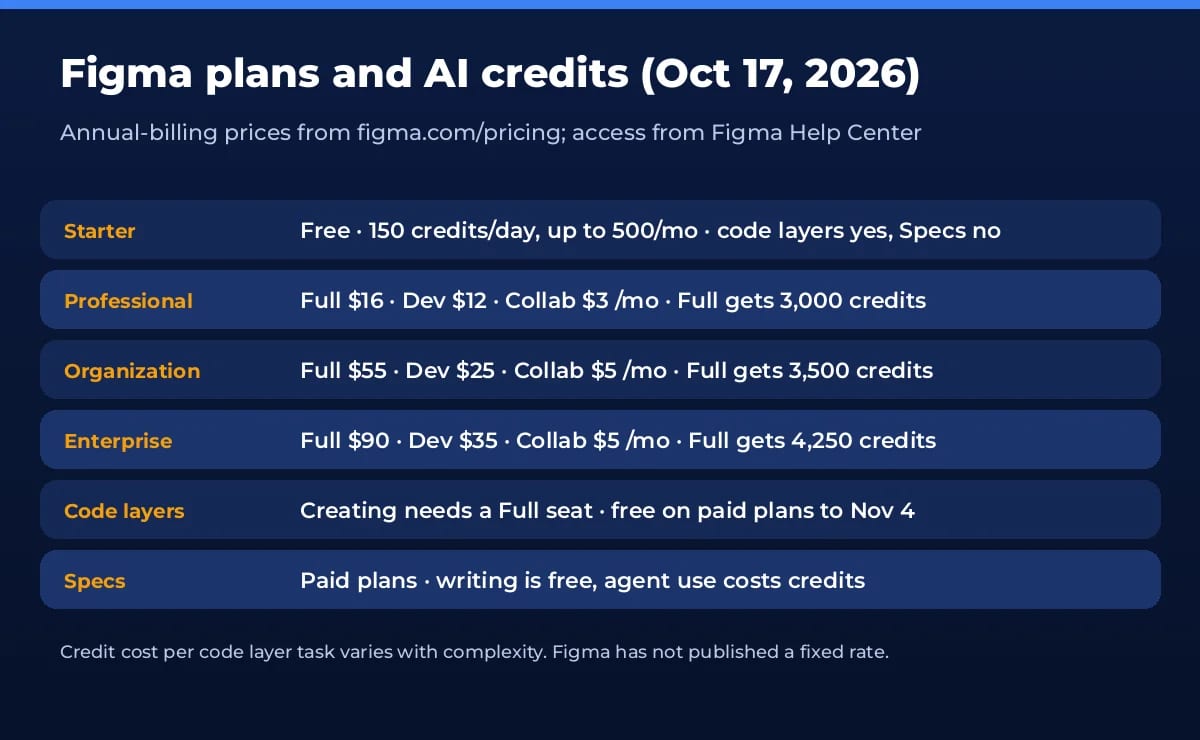
Code layers run on Figma AI credits. Figma says the cost per task depends on complexity and hasn’t published a fixed rate. The good news for early users: on paid plans, generating and editing inside a code layer uses no credits through November 4, 2026. Other agent work in the same prompt still counts. After November 4, every code layer task uses credits. Here are the seat prices from figma.com/pricing with annual billing:
- Starter: free, 150 AI credits a day up to 500 a month. Code layers are listed for Starter; Specs is not.
- Professional: Full seat $16/mo with 3,000 credits, Dev seat $12, Collab seat $3 (Dev and Collab get 500 credits each).
- Organization: Full $55/mo with 3,500 credits, Dev $25, Collab $5.
- Enterprise: Full $90/mo with 4,250 credits, Dev $35, Collab $5.
Our read: the free window is the time to test. Build two or three real prototypes before November 4 and watch the credit receipts on other agent tasks, so you know whether a Full seat’s monthly credits cover your team or you need an AI credit add-on.
Figma Specs: the doc that sits next to the design
Figma Specs is a shared Markdown document for PRDs, technical specs, critique notes and design system docs. It can live on the canvas in Figma Design or FigJam (press D) or as a standalone file at figma.com/spec/new. You can drop a .md file onto the canvas to turn it into a Spec, embed frames, FigJam boards and code layers inside it, and duplicate a Spec so each teammate can draft their own version.
The link to code layers is the useful part: you can turn a Spec into a code layer, or turn designs and code back into a technical spec. Coding agents connected to the Figma MCP server can read and edit Specs with the figma-spec skill, so you can paste a Spec link into Codex or Claude Code and the context comes with it. Per the Specs guide, writing by hand costs nothing; only agent work uses credits.
Our take
Code layers is Figma’s answer to designers drifting into AI coding tools. It won’t replace an IDE, but it makes a working prototype as easy to share and comment on as a frame, and that’s what most teams actually need. If you’re comparing options, our Uizard vs Figma guide covers a lighter design tool, Magic Patterns is a prompt-to-prototype alternative, and OpenUI vs v0 explains the app-builder side. Full feature notes are on our Figma Code Layers tool page.
Frequently asked questions
What are Figma code layers?
A code layer is an interactive prototype backed by running code that sits directly on the Figma Design canvas. You can play it, edit it by prompting the Figma agent, tweak it visually, and turn it back into regular design layers.
Are Figma code layers free?
Figma lists code layers on Education (K-12), Starter, Professional, Organization and Enterprise plans. Code layers use AI credits, but on paid plans creating and editing within code layers is free through November 4, 2026.
Why can’t I see code layers yet?
It is an open beta rolling out over a few weeks, so teammates may get it at different times. When you have it, a Code icon appears in the Figma Design toolbar. The shortcut is B.
What is Figma Specs?
Specs is a Markdown document that lives on the Figma canvas or as its own file. Teams and agents use it for PRDs, technical specs and design notes, with embedded frames and code layers. Press D to add one, or open figma.com/spec/new.
Does Figma Specs cost AI credits?
Only when you use the agent. Writing and editing a Spec yourself does not use credits. Specs is in open beta on Professional, Education, Organization and Enterprise plans.
Can I turn code layers off?
Only on Enterprise. Admins can disable it by turning off AI features, which switches off all other Figma AI features too.
Found this useful? Share it with someone comparing AI tools.