Home / Guides / Video Editing
Free AI Video Editor: 6 Best Picks (2026)
 Eimantas Kazėnas Marketing & Tech
 - Published
- 6 min read
On this page Free AI video editors compared
- Free AI video editors compared
- 1. Microsoft Clipchamp: best free AI video editor overall
- 2. DaVinci Resolve: best free editor for long, serious edits
- 3. Descript: best free editor for talking-head videos and podcasts
- 4. Kapwing: best browser editor for quick team edits
- 5. Canva: best for template-based social videos
- 6. CapCut: popular, but the AI is mostly on Pro
- Which free AI video editor should you pick?
- Our take: check the export screen before you start editing
- Frequently asked questions
Independent and reader-supported. Some links may earn us a commission; it never changes our rankings. Editorial policy
Free AI video editor picks for 2026: Clipchamp, DaVinci Resolve, Descript, Kapwing, Canva and CapCut, compared by export quality, watermarks and AI limits.
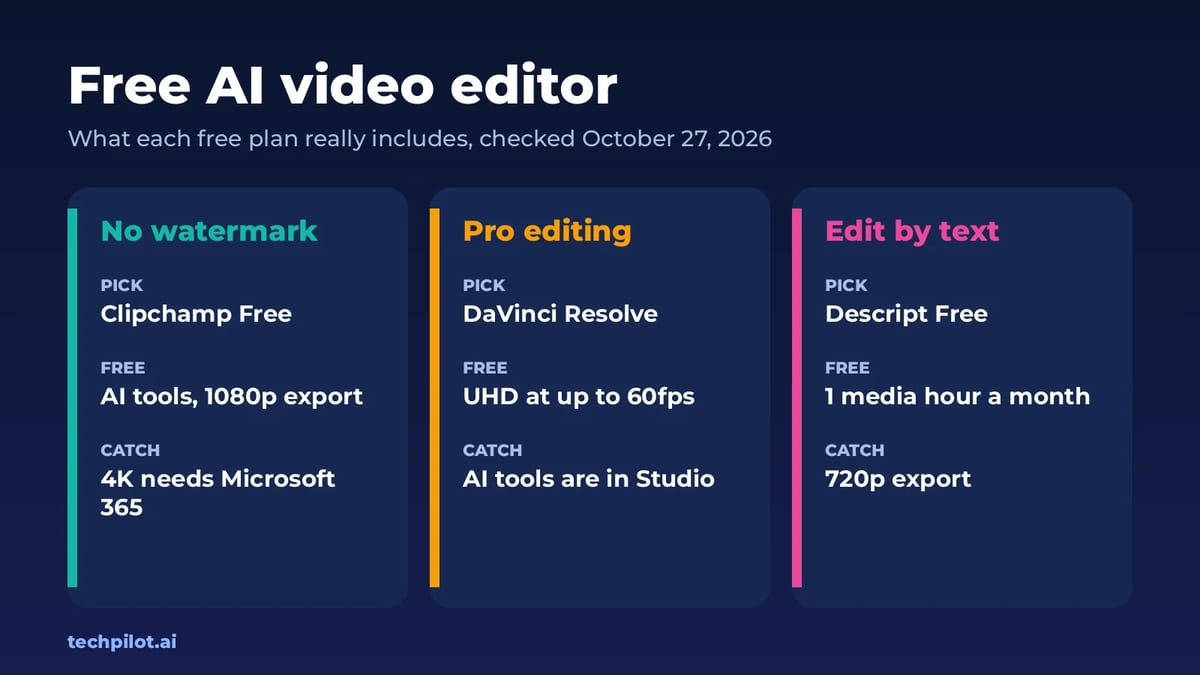
Quick answer: the best free AI video editor for most people is Microsoft Clipchamp. Its free plan includes the AI video and audio editing tools and exports watermark-free video at up to 1080p. For serious long-form editing, DaVinci Resolve is free at up to Ultra HD and 60fps, but its AI Neural Engine tools are in the paid Studio version. If you edit talking-head videos or podcasts, Descript Free lets you edit video by editing the transcript. We checked every plan on the vendors’ own pages on October 27, 2026.
“Free” means very different things in video editing. Some editors are free but stamp a watermark on every export, some cap resolution at 720p, and some are free to edit but put the AI features behind a paywall. This list is sorted by what you can actually export and publish for $0.
Free AI video editors compared
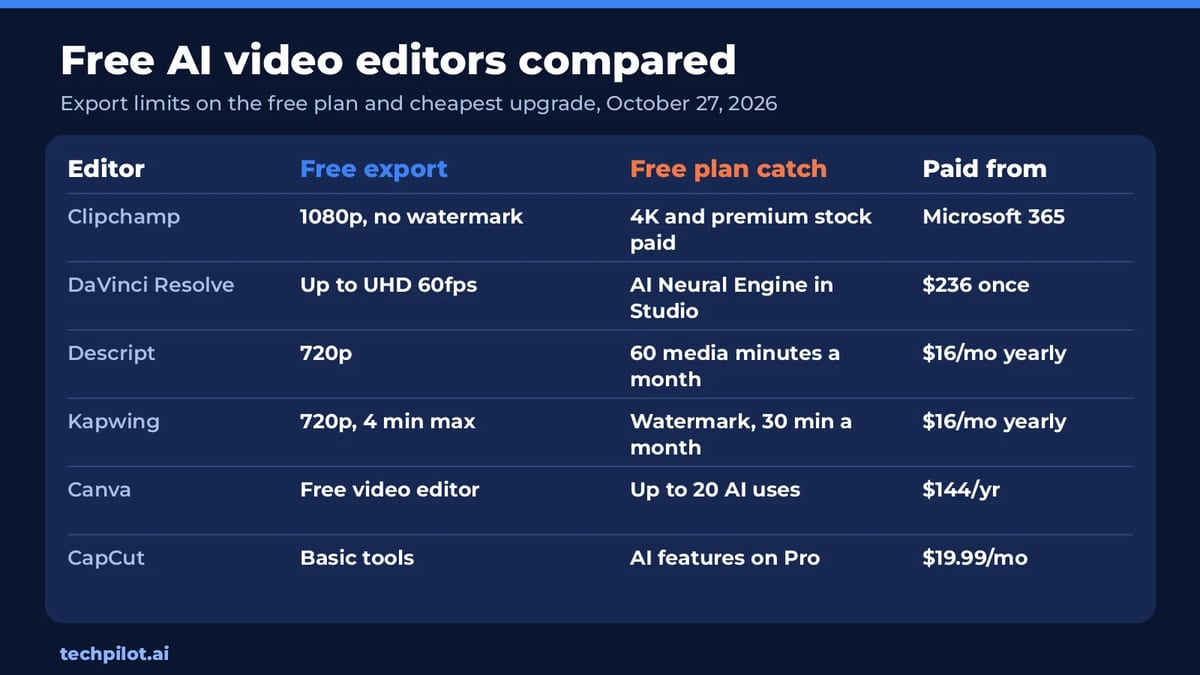
| Editor | Free export | Free plan catch | Paid from |
|---|---|---|---|
| Clipchamp | Up to 1080p, no watermark | 4K, premium stock and brand kit need Microsoft 365 | Microsoft 365 Personal or Family |
| DaVinci Resolve | Up to UHD 3840 x 2160 at 60fps | AI Neural Engine, magic mask and text-based editing are Studio only | $236 one-time (Studio) |
| Descript | 720p | 60 media minutes a month; watermark-free export is a paid feature | $16/mo billed yearly |
| Kapwing | 720p, up to 4 minutes | Kapwing watermark, 30 export minutes a month | $16/mo billed yearly |
| Canva | Free video editor and templates | Up to 20 Standard or Premium AI uses | US$144/year (Pro) |
| CapCut | Free templates and basic editing | AI features and premium templates listed on Pro | $19.99/mo |
1. Microsoft Clipchamp: best free AI video editor overall
Clipchamp runs in the browser and on Windows, and you only need a personal Microsoft account. Microsoft’s pricing page lists these as included on the free plan: AI video editing tools, AI audio editing tools, trimming, cropping and resizing, a screen, camera and voice recorder, animated titles, audio-only export and watermark-free video exports up to 1080p HD.
Premium features now come with Microsoft 365 Personal and Family rather than a separate Clipchamp plan. They add 4K UHD exports, premium stock, premium filters and effects, and a brand kit. If you post to YouTube, TikTok or Reels at 1080p, you may never need to upgrade.
2. DaVinci Resolve: best free editor for long, serious edits
DaVinci Resolve is a full Hollywood-grade suite for editing, color, visual effects, motion graphics and audio. Blackmagic Design says the free version works with virtually all 8-bit video formats at up to 60fps in resolutions as high as Ultra HD 3840 x 2160, with multi-user collaboration and HDR grading included. There’s no watermark to worry about.
The honest caveat for anyone searching “free AI video editor”: the AI is mostly in DaVinci Resolve Studio. Studio adds the DaVinci AI Neural Engine, AI spatial noise reduction, text-based editing, magic mask, 10-bit video up to 120fps and resolutions beyond 4K. Studio 21 is a one-time $236 purchase (down from $295 at the time of checking), not a subscription. Resolve also has a steeper learning curve than any other tool here.
3. Descript: best free editor for talking-head videos and podcasts
Descript turns your recording into a transcript, and you edit the video by deleting words from the text. The free plan includes 60 media minutes (1 hour) a month, transcription in 25 languages and unlimited projects, with local video export at 720p.
Descript markets watermark-free 1080p export as a paid feature. Hobbyist costs $16 a month billed yearly ($24 monthly) with 10 media hours, 400 AI credits and Underlord, its AI co-editor. Creator is $24 a month billed yearly with 30 media hours, 800 AI credits and 4K export. More in our Descript review.
4. Kapwing: best browser editor for quick team edits
Kapwing’s free plan gives you 10 credits, unlimited exports with a watermark, videos up to 4 minutes long at 720p, 30 export minutes a month and 5 GB of storage. Credits cover auto-subtitling of up to 10 minutes and text to speech of up to 1 minute.
Pro removes the Kapwing watermark and adds 4K export, 2-hour exports and 1,000 credits a month, at $16 a month billed yearly or $24 monthly. It’s a good choice for social teams that work in a shared browser workspace, less so for anyone who needs free, clean exports.
5. Canva: best for template-based social videos
Canva’s free plan includes the drag-and-drop editor, 1.6M+ templates, 4.7M+ photos, videos, graphics and audio, 5GB of storage and up to 20 Standard or Premium AI uses. That’s enough to test AI features, not to rely on them. Canva Pro is US$144 a year and gives 10 times more AI than Canva Free, plus background removal, resize and translate tools.
6. CapCut: popular, but the AI is mostly on Pro
CapCut is the default editor for many TikTok creators. On its current pricing page, the Free plan is described as free templates and basic editing tools, while “Access to AI features,” premium templates and 1,200 monthly AI credits are listed under Pro at $19.99 a month. Pro also bundles Seedance AI video generation. CapCut notes that displayed prices are for reference and the final price shows after sign-in.
Which free AI video editor should you pick?
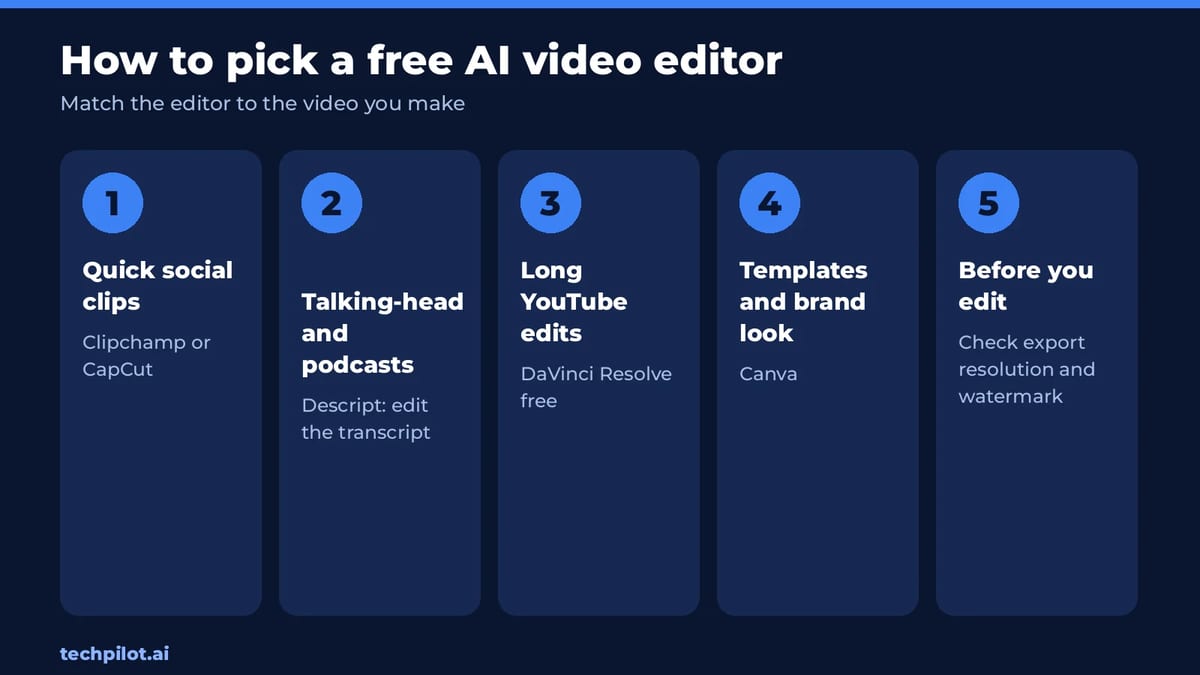
- You want clean 1080p exports and some AI for $0: Clipchamp.
- You edit long YouTube videos and want pro color and audio: DaVinci Resolve free.
- You edit interviews, tutorials or podcasts: Descript.
- You make template-driven social posts: Canva or CapCut.
- You need to generate footage, not just edit it: start with our best free AI video generators or the free AI text to video generators, then cut the clips in one of the editors above.
Our take: check the export screen before you start editing
The most common mistake with free video editors is spending an hour on an edit and discovering the limit at export: a watermark, a 720p cap or a 4-minute maximum. The table above is built around that moment. Clipchamp and DaVinci Resolve are the only two here that export clean, full-HD or better video for free, and they suit very different users: Clipchamp for quick edits with AI help, Resolve for craft.
The second thing to notice is where “AI” really sits. Across these tools, the free plans include basic AI helpers, while the heavy AI features, such as text-based editing in Resolve, Underlord in Descript and CapCut’s AI suite, sit on paid plans. If AI editing is the point, Clipchamp and Descript’s free tiers are the fairest way to try it.
Want to animate photos or swap faces before you edit? See our image to video free AI and AI face swap video free lists, or the free AI tools hub.
Frequently asked questions
What is the best free AI video editor?
Microsoft Clipchamp is the best free pick for most people: its free plan includes AI video and audio editing tools and watermark-free exports up to 1080p. DaVinci Resolve is the best free option for long, advanced edits.
Is there a free AI video editor without a watermark?
Yes. Clipchamp’s free plan exports watermark-free video up to 1080p, and DaVinci Resolve’s free version exports up to Ultra HD at 60fps without a watermark. Kapwing Free adds a watermark.
Does DaVinci Resolve free have AI features?
Only a few. The DaVinci AI Neural Engine, magic mask, AI noise reduction and text-based editing are in DaVinci Resolve Studio, a one-time $236 purchase at the time of checking.
Is CapCut free to use?
CapCut has a free plan with templates and basic editing tools. Its pricing page lists AI features, premium templates and 1,200 monthly AI credits under Pro, which starts at $19.99 a month.
Can I edit video by editing text for free?
Yes. Descript’s free plan lets you edit video by editing the transcript, with 60 media minutes a month and 720p export. Paid plans add 1080p or 4K watermark-free export.
Found this useful? Share it with someone comparing AI tools.

Turn Long-Form Video to Short-Form Content for Maximum Virality
How to go viral on social media? Turn long-form video to short-form content with smart AI tools. Speed, quality and efficiency is the name of the…
 Alexi Carmichael · 5 min read

The End of Video Editing? How the Affogato AI Video Agent is flipping the script
Drowning in video editing? 😩 The Affogato AI Video Agent is your answer. Create pro-quality videos fast with Agentic AI.
Alexi Carmichael · 6 min read