Home / Guides / AI Video Generator
idea.ai Video Generator: AI Video for Marketing Campaigns
See how marketers use the idea.ai video generator and Director Mode for ads, social clips and launch videos, plus workflow steps, pricing, pros and cons.
 Mihai (Mike) Bizz Business, entrepreneurship, tech & AI
 - Published
- 10 min read
On this page What is idea.ai?
- What is idea.ai?
- Why marketers are using AI video for campaigns
- Director Mode: the control panel inside the prompt bar
- Step-by-step: a Director Mode workflow for a campaign video
- Campaign use cases and what to set
- Which video model to pick
- idea.ai pricing and limits
- Tips for better marketing videos with Director Mode
- Pros and cons
- Is idea.ai worth it for marketing teams?
- Frequently asked questions
Independent and reader-supported. Some links may earn us a commission; it never changes our rankings. Editorial policy
Most AI video tools give marketers one text box and a lot of luck. You type a prompt, the model picks the camera, the light and the framing, and you regenerate until something looks on-brand. idea.ai, the AI creation platform from Creative Fabrica, takes a different route: one prompt bar with more than 30 video models behind it, plus a Director Mode button that lets you set the shot like a cinematographer would.
This guide is for marketers who want usable campaign video, not demos. It covers what idea.ai actually outputs, how to run a Director Mode workflow for ads, social and product launches, what it costs, and where it falls short.
What is idea.ai?
idea.ai is a browser-based AI studio owned and operated by Creative Fabrica B.V. It was previously known as Creative Fabrica Studio. It bundles image, video, audio and 3D tools under one account and one coin balance. For video work, the pieces that matter to a marketing team are:
- AI Video Generator: text-to-video and image-to-video with a choice of models, start and end frames, and Director Mode.
- Draft Mode: fast, low-cost video drafts at lower resolution, so you can upscale only the take you like to 4K.
- Ad Campaigns: generates short-form ad campaign videos for Instagram, TikTok and X.
- Product Manager: creates and stores AI-generated product images for your campaigns, which you can then tag into video prompts.
- Subtitle Generator and AI Video Upscaler (1080p or 4K) for finishing.
- AI Speech, Music and Sound Effect generators for voiceover and audio beds.
- Image Alive, which animates a still image and can add audio to create a talking video.
The practical upside is that a campaign can go from product shot to captioned vertical video without leaving one tab. idea.ai also offers an API and an MCP server, which matters if your team wants to plug generation into its own tools later.
Why marketers are using AI video for campaigns
Paid social eats creative. A single campaign can need a dozen hooks, three aspect ratios and fresh variants every week once ads start to fatigue. AI video doesn’t replace a hero shoot, but it is very good at the work around it:
- Ad creative testing: generate several openings for the same offer and let the ad platform pick the winner.
- Social content: short loops, product-in-scene clips and seasonal variants for Reels, TikTok and Shorts.
- Product launches: teaser shots before the product is photographed, or before the physical product exists.
- Localised variants: swap settings, time of day or props to fit different markets without reshooting.
- Pitch and concept work: show a client or stakeholder the look of a spot before you book a crew.
The catch has always been control. Brand teams need the same product, consistent framing and a deliberate camera move, and that is the gap Director Mode is meant to close.
Director Mode: the control panel inside the prompt bar
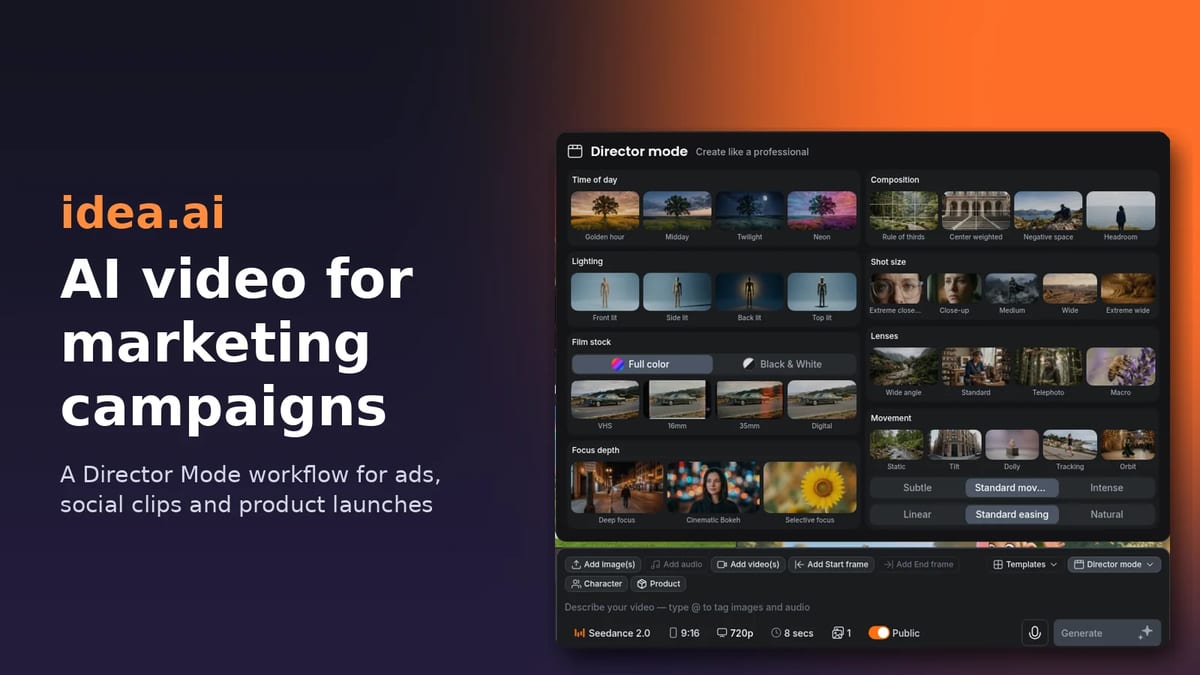
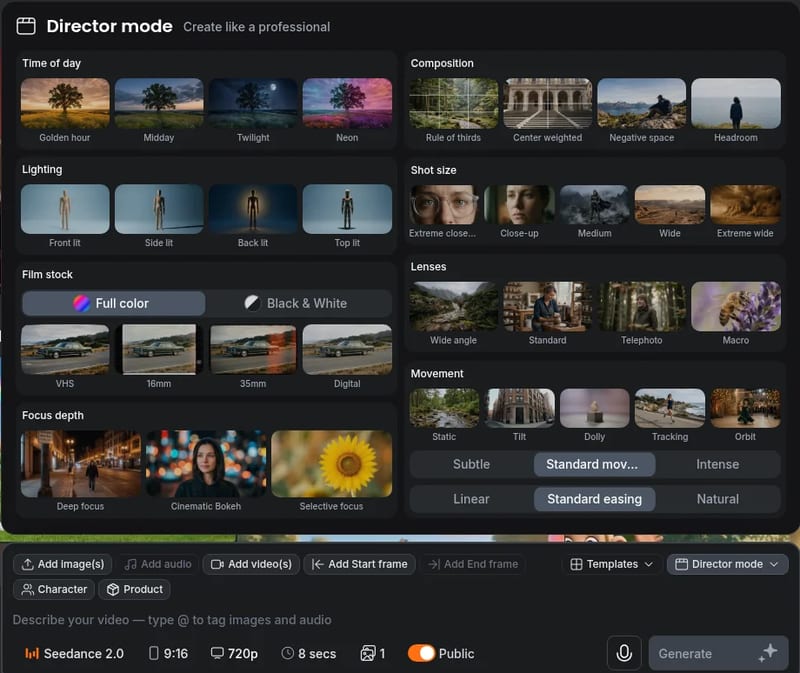
Director Mode sits as a button in the prompt bar of the idea.ai video generator, next to Templates. Click it and a panel opens titled “Create like a professional”. Instead of describing camera language in words and hoping the model understands, you pick it visually:
| Setting | Options |
|---|---|
| Time of day | Golden hour, Midday, Twilight, Neon |
| Lighting | Front lit, Side lit, Back lit, Top lit |
| Film stock | Full color or Black & White; VHS, 16mm, 35mm, Digital |
| Focus depth | Deep focus, Cinematic bokeh, Selective focus |
| Composition | Rule of thirds, Center weighted, Negative space, Headroom |
| Shot size | Extreme close-up, Close-up, Medium, Wide, Extreme wide |
| Lenses | Wide angle, Standard, Telephoto, Macro |
| Movement | Static, Tilt, Dolly, Tracking, Orbit |
| Movement intensity | Subtle, Standard, Intense |
| Easing | Linear, Standard, Natural |
For marketers this is the useful part. “Negative space” leaves room for a headline or price overlay. “Orbit” with “Subtle” intensity is the classic product turntable. “Macro” with “Cinematic bokeh” gives you the texture close-ups that sell food, cosmetics and materials. Each option is a tile with a preview, so non-video people on the team can make the call without knowing what a dolly is.
Step-by-step: a Director Mode workflow for a campaign video
Here is a repeatable process for one campaign asset, such as a 9:16 product ad. Repeat it per hook or per format.
- Write the brief in one line. Product, setting, action, mood. For example: “Matte black running shoe on wet asphalt, rain droplets, night city reflections, energetic.” Keep brand claims and text overlays out of the prompt; add them in editing.
- Add your references. Use Add image(s) for product shots, or the Product and Character buttons for assets you reuse across a campaign. Type
@in the prompt to tag a specific image or audio file so the model knows what it refers to. - Lock the first and last frame if the ending matters. Add Start frame and Add End frame let you finish on a packshot or end card instead of wherever the model drifts.
- Open Director Mode and set the shot. Pick shot size, lens, movement and intensity first, as they change the ad the most. Then set lighting, time of day and film stock for the brand look.
- Choose the model, format and length. Pick a model from the dropdown, set the aspect ratio (9:16, 3:4, 1:1, 4:3, 16:9 or 21:9), the resolution and the duration. On Seedance 2.0 the duration slider runs from 4 to 15 seconds.
- Draft cheap, then upscale. Generate at low resolution or in Draft Mode, compare takes, and only upscale the winner to 1080p or 4K.
- Finish in idea.ai. Add captions with the Subtitle Generator, a voiceover with AI Speech, and music or sound effects, then export.
Campaign use cases and what to set
Paid social ads
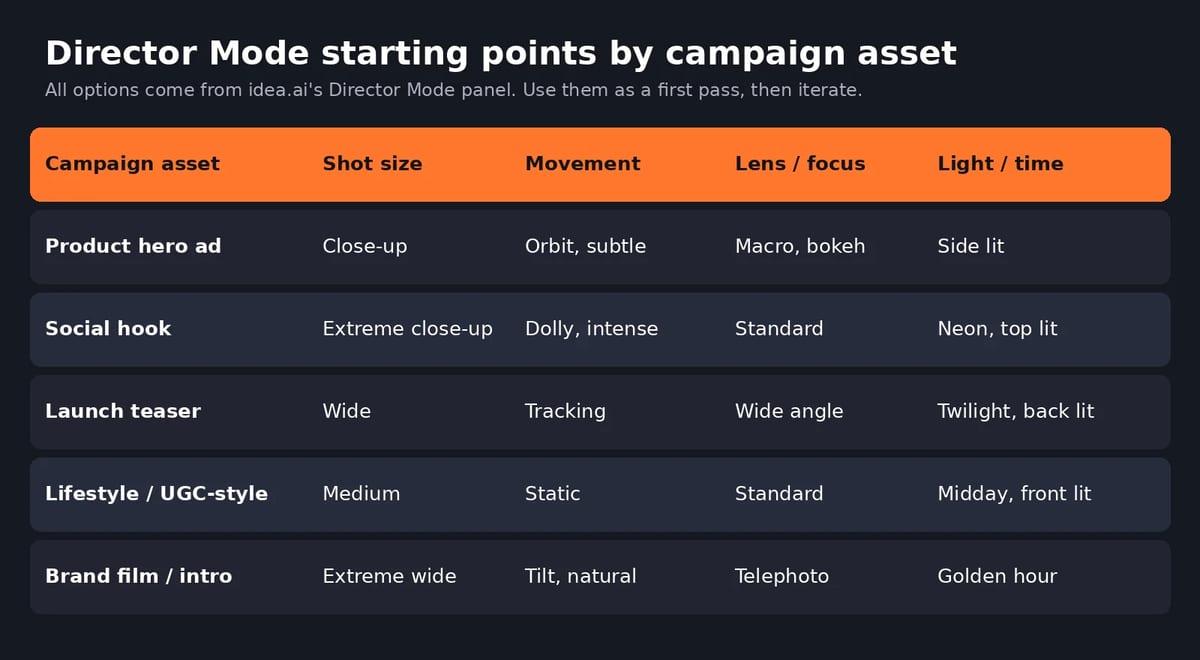
Ads live or die in the first second or two. Use extreme close-ups with an intense dolly for the hook, and generate three to five versions of the opening shot only. Work in 9:16 for Reels, TikTok and Shorts, and use 1:1 or 4:3 for feed placements. If you want a template-led route, the Ad Campaigns tool is built specifically for short-form ads on Instagram, TikTok and X.
Product launches
Use your real product photos as references and the Product button to keep the item consistent across shots. An orbit move at subtle intensity, side lighting and a macro or standard lens works well as a hero clip. For a teaser, a wide shot with a tracking move at twilight builds anticipation without showing too much.
Organic social and brand content
For lifestyle and UGC-style clips, keep it simple: medium shot, static or subtle movement, midday front light and full color. Overly cinematic settings can make social content feel like an ad, which is not always what you want in organic feeds. For brand intros and event openers, extreme wide shots at golden hour with a slow tilt give you a polished look.
Which video model to pick
idea.ai doesn’t lock you into one model. The picker in the prompt bar lists more than 30, including Seedance 2.5, Seedance 2.0 (with Fast and Mini variants), MiniMax H3 (Fast, Max and Max Turbo), Kling V3 and Kling 3.0 Omni, Veo 3.1 Fast, Runway Gen-4.5, Luma Ray 3.2, Pika 2.5, PixVerse V6, WAN 3.0, Grok Imagine Video 1.5 and HeyGen Video 1.0. Kling 4.0 is listed as coming soon. The picker also shows which models accept reference images and how many characters each can keep consistent.
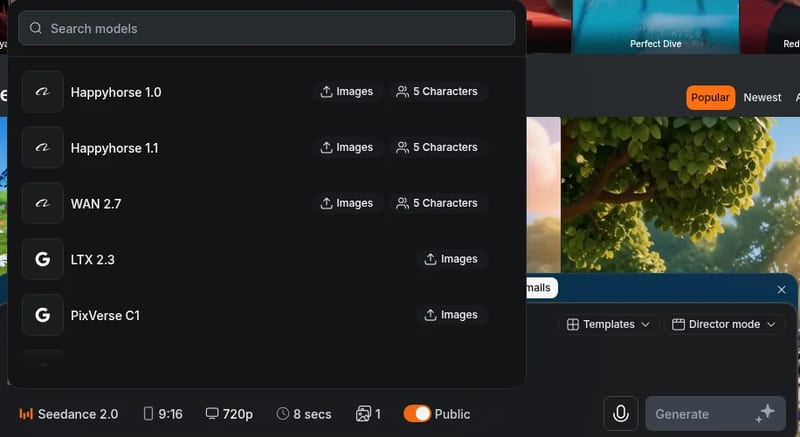
A practical rule: draft with a fast model to test the idea and the Director Mode settings, then rerun the winning setup on a higher-quality model. Seedance 2.0 runs up to 4K on idea.ai and Seedance 2.5 up to 1080p. If you are torn between the top video models, our Kling 4 vs Seedance 2.5 comparison breaks down the differences.
idea.ai pricing and limits
idea.ai runs on coins. Every plan includes the same models and features; the plans differ only in how many coins you get. There is a free trial, and you can also earn free coins.
| Plan | Annual billing | Monthly billing | Coins | Roughly equals |
|---|---|---|---|---|
| Starter | $19/mo ($228/yr) | $19/mo | 2,460,000 | ~196 Seedance 2.0 Fast videos |
| Plus | $47/mo ($564/yr) | $59/mo | 7,680,000 | ~614 Seedance 2.0 Fast videos |
| Ultra | $99/mo ($1,188/yr) | $129/mo | 17,850,000 | ~1,428 Seedance 2.0 Fast videos |
Annual plans unlock the full year’s coins at purchase, while monthly plans top up each month. Paid plans include unlimited parallel generations. Coin cost per clip depends on the model, resolution and length, so 4K and longer clips burn through a balance faster. That is why the draft-then-upscale workflow matters for budgets. Prices were checked on idea.ai in October 2026.
Two things to check before you use it for client work: the Public toggle in the prompt bar, since generations can appear in the community feed, and the licence terms for commercial use on your plan.
Tips for better marketing videos with Director Mode
- Change one setting at a time. When a take is close, change only the movement or only the lens. Otherwise you won’t know what fixed it.
- Save your winning combinations. Keep a small “shot recipe” doc per brand (shot size, lens, movement, light, film stock) so the next campaign starts on-brand.
- Leave room for copy. Use Negative space or Headroom composition when you plan to overlay a headline, price or CTA.
- End on the product. Use an end frame with your packshot so every variant closes on the same brand moment.
- Plan for mute viewing. Most social video is watched without sound, so add captions with the Subtitle Generator before export.
- Keep claims out of generated visuals. Add prices, offers and legal lines in editing, where you control the exact wording.
For a broader look at directing camera moves with AI, see our guide to the top AI tools for cinematic camera movement.
Pros and cons
Pros
- Director Mode turns camera language into clickable presets, which makes results more repeatable for non-video marketers.
- More than 30 video models in one prompt bar, so you are not tied to one vendor’s strengths and weaknesses.
- Start and end frames, Product and Character references, and @ tagging help keep products consistent across a campaign.
- Draft Mode and the upscaler make it cheaper to test many ideas.
- Captions, voiceover, music, sound effects and upscaling sit in the same platform.
- Every plan has every model and feature; you only choose the coin budget.
Cons
- Coin pricing makes cost per finished video harder to predict, especially at 4K and longer durations.
- The model list is long, so new users may need time to learn which model suits which shot.
- Clips are short (up to 15 seconds on Seedance 2.0), so longer ads still need editing together.
- Director Mode guides the model but cannot guarantee the result; you will still regenerate some shots.
- The Public toggle needs watching for unreleased campaign work.
Is idea.ai worth it for marketing teams?
If your team produces a steady flow of short social and ad video and wants more say over how each shot looks, idea.ai is worth a trial. Director Mode is the reason. It gives marketers the shot-level controls that usually need a videographer, and the multi-model setup means you can switch models when one struggles with a product or scene. Teams that need long-form edited video or strict per-video cost control should test the coin burn on a few real briefs first.
Start with one campaign asset, run it through the Director Mode workflow above, and compare it with what you are paying for stock or shoot footage today. For other options, see our roundup of AI video generators for business.
Frequently asked questions
What is idea.ai?
idea.ai is an AI creation platform owned and operated by Creative Fabrica, previously known as Creative Fabrica Studio. It combines AI video, image, audio and 3D tools, with more than 30 video models available from a single prompt bar.
What is Director Mode in idea.ai?
Director Mode is a button in the idea.ai video prompt bar that opens a panel of visual presets for time of day, lighting, film stock, focus depth, composition, shot size, lens, camera movement, movement intensity and easing. It gives you more control over how a shot looks than a text prompt alone.
Can I use idea.ai to make video ads for TikTok and Instagram?
Yes. The video generator supports 9:16, 1:1, 3:4, 4:3, 16:9 and 21:9 formats, and idea.ai has a dedicated Ad Campaigns tool for short-form ad videos for Instagram, TikTok and X.
How much does idea.ai cost?
Plans run on coins. Starter is $19 a month, Plus is $47 a month billed annually or $59 monthly, and Ultra is $99 a month billed annually or $129 monthly. All plans include the same models and features, and there is a free trial.
Which video models does idea.ai offer?
The model picker includes Seedance 2.5 and 2.0, MiniMax H3, Kling V3 and Kling 3.0 Omni, Veo 3.1 Fast, Runway Gen-4.5, Luma Ray 3.2, Pika 2.5, PixVerse V6, WAN 3.0, Grok Imagine Video and HeyGen Video, among others.
How long can idea.ai videos be?
It depends on the model. On Seedance 2.0 the duration slider runs from 4 to 15 seconds per clip, so longer ads are made by combining several clips.
Found this useful? Share it with someone comparing AI tools.
Kling 4 vs Seedance 2.5: Which AI Video Wins?
Kling 4 vs Seedance 2.5 compared: access, pricing from $8.80 vs $15 a month, 30 s vs 180 s clips, 4K, audio and best uses, with a verdict for…
 Mihai (Mike) Bizz · 7 min read
How to Make Jean Phil AI Video
How to make Jean Phil AI video: build a blond bob, mustache and houndstooth reference, animate it with Seedance 2.5 in CapCut and edit a deadpan 9:16…
 Eimantas Kazėnas · 7 min read