I’ve spent the last few days putting Luma AI’s Dream Machine through its paces, specifically focusing on the new Ray3 model. My initial review found it to be a powerful tool for marketers and creators. My goal now was to determine if the updates truly bridge the gap for filmmakers and advertisers who need professional-grade results.
AI Agents · Tool review
Luma AI: Pricing, Relight Studio & Ray3.2
 TechPilot.ai review team Hands-on testing, one published method
 - Last updated
- How we test
Summary
Pros and cons
What we like
- Professional-Grade HDR Output Ray3 is the first generative model to produce video in true HDR, supporting professional color standards for cinematic quality.
- Rapid Prototyping with Draft Mode Test ideas up to 10x faster, allowing for extensive creative exploration before committing to a final, high-quality render.
- Advanced Reasoning and Control The new multimodal reasoning system follows complex instructions and maintains character and scene consistency with greater accuracy.
- High-Quality Motion and Realism The model produces videos with excellent visual quality and logical consistency.
- Native 1080p and 4K Upscaling Delivers crisp 1080p video directly and offers a neural upscaler for clean 4K output suitable for professional use.
- Strong Industry Integration The partnership with Adobe Firefly connects the tool directly to professional creative workflows.
- Relight Studio Change the light in an existing image without regenerating it.
What could be better
- Short 5-Second Video Length While clips can be extended, the base 5-second length remains a primary operational detail for creating longer narratives.
- Learning Curve for Advanced Features While the basic interface is simple, getting the most out of the reasoning system and precise controls requires practice.
- High Demand on Resources High-quality renders, especially at 4K, can still require significant processing time and credits.
- No free plan listed Luma's pricing page starts at $30 a month for Plus.
Key features
- Multimodal Reasoning System (Ray3): An intelligent core that plans scenes, understands complex prompts (including image annotations), and refines its output for better coherence.
- Native HDR Generation (Ray3): The first generative model to output video in professional 10-, 12-, and 16-bit ACES color standards.
- Draft Mode (Ray3): A rapid-generation mode for quick iteration, with the ability to “master” a chosen draft to full quality.
- Native 1080p and 4K Neural Upscaler (Ray3): Produces sharp 1080p video and can upscale to 4K without common motion artifacts.
- Text-to-Video AI Generation: The core function that transforms written descriptions into 5-second video clips.
- Image-to-Video Generation: Animates still images, bringing them to life with generated motion.
- Video Extension: An option to continue a previously generated clip, allowing for slightly longer and more developed scenes.
- In-Video Editing: Users can modify existing generations by describing the desired changes in a text prompt.
- Camera Motion Control: Provides specific commands to control camera movements, such as panning, tilting, and zooming, for more dynamic shots.
- Consistent Characters: Maintains the appearance of a specific character across different generated videos from a single source image.
- Enhanced Prompt Function: An AI-powered feature that automatically refines and adds detail to a user’s basic prompt for more creative results.
- Pre-set Styles: Offers a range of stylistic presets to influence the look and feel of the final video output.
- Commercial Use Rights: Available on paid plans, allowing businesses to use the generated content for marketing and other commercial purposes.
- API Access: Provides developer access for integrating Dream Machine’s capabilities into other applications and workflows.
Screenshots
Full review
Independent and reader-supported. Some links may earn us a commission; it never changes our scores. Editorial policy
Luma AI is Luma Labs’ AI video and image platform, now with Relight Studio to change the light in any photo. See Luma AI pricing, plans and what’s new.
Luma AI Dream Machine is a generative AI model that creates high-quality, realistic videos from text and image prompts. Developed by San Francisco-based Luma Labs, the tool launched to the public on June 12, 2024. Luma AI’s video generator is designed for a broad audience, including creative professionals, filmmakers, artists, and marketers, aiming to democratize video creation. It is particularly useful for those who need to produce high-quality video content without the associated high costs and long production times.
The platform’s main function is its ability to quickly translate ideas into fluid, coherent video clips with noteworthy camera motion. With Ray3, this has expanded beyond simple generation. The model now incorporates a reasoning system that can plan scenes, evaluate its own work, and follow complex instructions. This technology presents a direct alternative to traditional methods of video production and storyboarding. By offering an accessible yet powerful tool, Luma AI allows users to visualize concepts, create short-form content, and iterate on creative directions with greater speed and precision than before.
New: Luma Relight Studio (October 2026)
On October 12, 2026, Luma introduced Relight Studio, a tool inside the Luma app that changes the lighting of an existing image without generating a new one. Luma’s pitch is simple: the shot works, so try it in a different light. Your subject, composition and details stay the same; only the light moves.
The Relight Studio page works like a virtual lighting rig. You drag a light around a 3D preview of your photo and adjust it with a few controls:
- Light type: Softbox, Spot or Sky.
- Light color and brightness, so you can add a blue key light or a warm studio wash.
- Shadow edge: soft or hard shadows.
- Height and azimuth: place the light precisely above or around the subject.
- More than one light: add extra lights alongside Light 1.
- Use your own photo: upload an image instead of the examples.
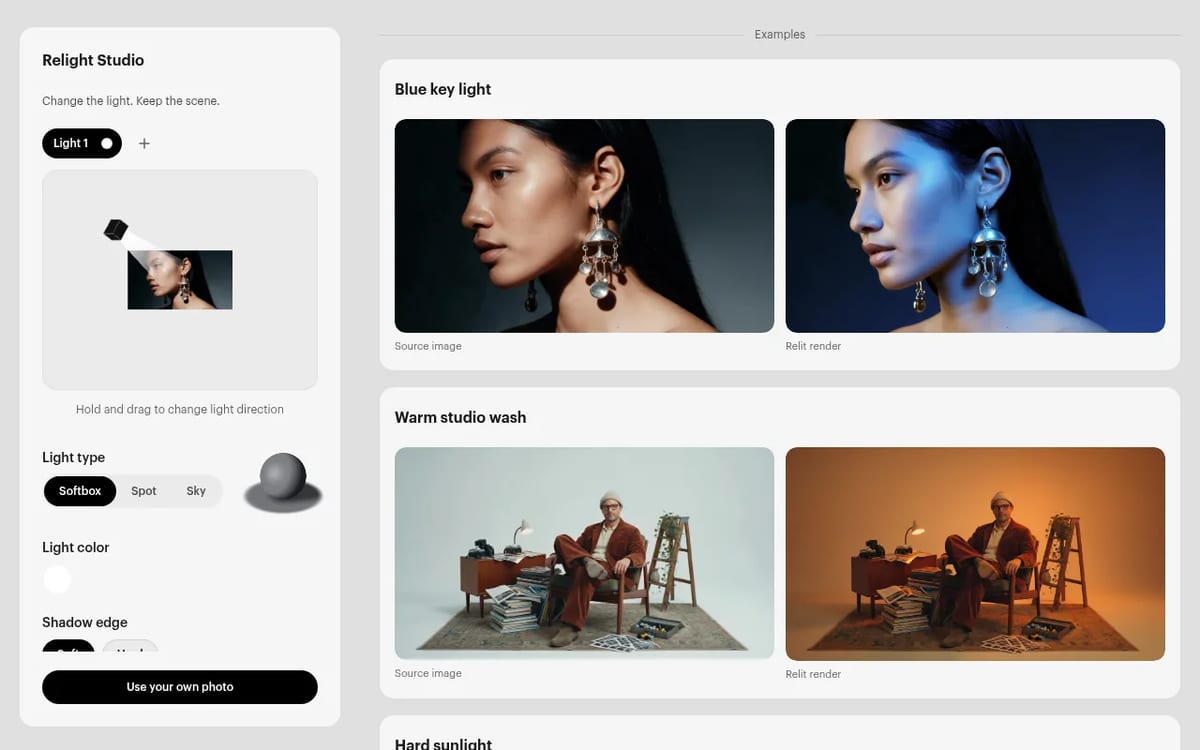
Our take: relighting is one of the most practical AI edits, because it fixes a common problem (good shot, wrong light) without re-rolling the whole image and losing what worked. It’s most useful for product photos, ad variations and matching the light across a set of shots. It sits next to Product Shots, which Luma launched on October 9 to place the same product into new settings. For full image generation and editing, compare Krea AI and FLUX 3.
Relight Studio pricing: Luma hasn’t published a separate price or credit cost for Relight Studio, and its pricing page had no Relight line when we checked on October 14, 2026. It runs inside the Luma app, whose paid plans start at $30 a month (below).
Luma AI Pricing (2026)
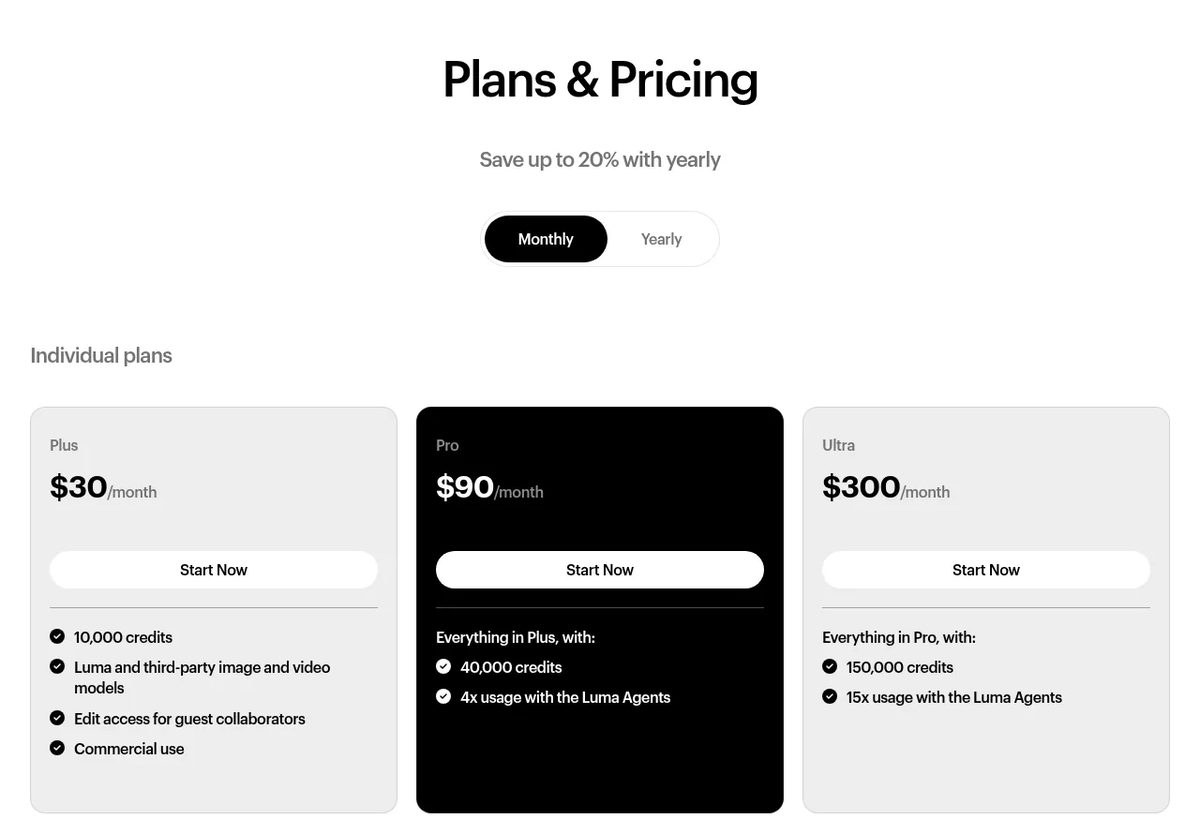
Luma now sells three individual plans plus business plans, all built on monthly credits. We checked the official pricing page on October 14, 2026 (monthly billing). Paying yearly saves up to 20%.
| Plan | Price | Credits a month | What you get |
|---|---|---|---|
| Plus | $30/month | 10,000 | Luma and third-party image and video models, edit access for guest collaborators, commercial use |
| Pro | $90/month | 40,000 | Everything in Plus, with 4x usage with the Luma Agents |
| Ultra | $300/month | 150,000 | Everything in Pro, with 15x usage with the Luma Agents |
| Team / Enterprise | Contact sales | Shared team credits | Team management, usage analytics and SSO; Enterprise adds commitments, training and custom fine-tuning |
What do the credits buy? On Luma’s own rate card, a 5-second Ray3.2 clip costs 20 credits in Draft, 100 credits at 720p and 400 credits at 1080p (HDR doubles it, HDR plus EXR triples it), and a Uni-1 image costs 30 credits. So the Plus plan’s 10,000 credits cover about 25 five-second 1080p clips, or around 500 drafts. Draft first and render only the keepers.
Best Use Cases for Luma AI
- Social Media Managers and Content Creators: For professionals managing a constant content pipeline, the tool solves the need for fresh, engaging video. It can generate eye-catching clips for platforms like TikTok and Instagram, animate static images or memes for higher engagement, and quickly produce A/B test variations for ad creatives. This drastically reduces reliance on stock footage or complex animation software.
- Filmmakers and Animators: This AI video generator serves as a useful pre-visualization and storyboarding tool. It allows directors and animators to quickly mock up scenes, experiment with camera movements, and establish a visual tone before committing to production. For example, a filmmaker can generate a dozen different camera angles for a key scene in minutes, helping to refine their creative vision efficiently.
- Marketing Professionals: Marketers can leverage Luma AI to create compelling video content for digital ad campaigns and product showcases. The tool allows for the rapid creation of short promotional videos that highlight product features or evoke a specific brand feeling. This accelerates the creative process, enabling marketing teams to be more agile and responsive to market trends.
- Artists and Designers: Digital artists can use Luma AI to bring their static creations to life. By feeding an image into the model, they can generate short animations, adding motion and narrative to their work. This opens up new avenues for digital art and allows for the creation of unique, dynamic pieces for online portfolios or digital exhibitions.
- Game Developers and VFX Artists: The ability to generate realistic physics and coherent motion makes Ray3 a useful tool for creating environmental animations, character action prototypes, and background plates for visual effects work.
TechPilot.ai’s Verdict on Luma AI
I’ve spent the last few days putting Luma AI’s Dream Machine through its paces, specifically focusing on the new Ray3 model. My initial review found it to be a powerful tool for marketers and creators. My goal now was to determine if the updates truly bridge the gap for filmmakers and advertisers who need professional-grade results.
First, I tested the new Draft Mode. I used a complex prompt for an action sequence: “A cyberpunk character sprinting across a rain-slicked rooftop, a drone pursues, dynamic low-angle tracking shot.” The draft appeared in under 20 seconds. While low-fidelity, it captured the motion and composition perfectly. I generated four variations in about a minute, picked one, and hit “master.” The final 1080p HDR clip was ready in about three minutes. This workflow is a massive improvement for creative iteration.
Next, I focused on the HDR output. I generated a simple nature scene—”sun setting over a calm lake, casting golden light on the water”—and exported it as an EXR file. Bringing it into a video editor, the color depth and exposure latitude were immediately apparent. The ability to color grade AI-generated footage just like a clip from a high-end camera is a significant development. It moves the tool from a novelty to a practical production asset. The reasoning system also feels more robust; character details and background elements remained consistent across extended clips far more reliably than in the previous version.
Top Alternatives to Luma AI Dream Machine
- OpenAI’s Sora is the most anticipated rival, promising longer, multi-shot videos with an incredible understanding of physics. While its demo clips are superior to Dream Machine’s current output, Sora is not publicly available, making it an inaccessible option for now. Sora will likely be the better choice for professional filmmakers once released, but Dream Machine wins on immediate access and usability.
- Runway ML is another major player, offering a broader suite of AI magic tools beyond just video generation. Runway’s key differentiator is its comprehensive video editing platform, including features like motion tracking and green screen removal. Its pricing is comparable to Luma AI’s. Runway is a better choice for users who need an all-in-one AI video editing solution, whereas Dream Machine is superior for pure, high-quality text-to-video generation.
- Pika Labs is a strong contender that is also very popular and easy to use. Pika offers similar text-to-video and image-to-video features, with a focus on creative flexibility and artistic styles. Its pricing is also in the same ballpark. Pika is an excellent alternative for creators focused on more stylized or surreal visuals, while Luma AI currently has a slight edge in producing realistic, coherent motion.
Final Verdict
After this review, my assessment is that Luma AI Dream Machine with Ray3 is a functional and highly capable platform. It has successfully evolved from an impressive text-to-video AI for generalists into an essential tool for serious creative professionals. For filmmakers, advertisers, and VFX artists, it provides an unprecedented ability to visualize, iterate, and even produce final-quality assets. It substantially lowers the barrier to creating high-quality moving images and is a definitive tool in the professional creative workflow.
Luma AI FAQ
What is Luma AI Dream Machine?
Luma AI Dream Machine is Luma Labs’ AI tool for generating short, high-quality videos from text prompts and still images. The Luma app now also includes image tools such as Relight Studio and Product Shots.
•
How much does Luma AI cost?
Luma’s individual plans cost $30 a month for Plus (10,000 credits), $90 for Pro (40,000 credits) and $300 for Ultra (150,000 credits), per lumalabs.ai on October 14, 2026. Yearly billing saves up to 20%.
•
Is Luma AI free?
Luma’s pricing page doesn’t list a free plan as of October 14, 2026. Paid plans start at $30 a month for Plus.
•
What is Luma Relight Studio?
Relight Studio, announced on October 12, 2026, lets you change the lighting of an existing image in the Luma app. You drag a softbox, spot or sky light and set its color, brightness, angle and shadow edge without regenerating the scene.
•
Can I use Luma AI videos for commercial purposes?
Yes on paid plans. Luma lists commercial use on the Plus plan, and Pro and Ultra include everything in Plus.
•
What is new in Ray3?
Ray3 introduced a reasoning system for better control, native HDR generation, a fast Draft Mode and 1080p output. Luma’s rate card now lists Ray3.2 and Ray3.14.

Tile.dev
AI Agents
I’ve closely examined Tile.dev’s capabilities based on its official documentation, user case studies, and the broader market landscape of…
Haimeta
AI Agents
I have spent the last few days using Haimeta to test its central claim: can it function as a single, all-in-one creative tool? In a field…

VEED Fabric 1.0
AI Agents
I’ve spent considerable time analyzing VEED’s Fabric 1.0, focusing on how its AI video generator performs within its broader editing…
News  Eimantas Kazėnas · 8 min read
Claude Dashboards and Motion: Beta Explained
Claude Dashboards turns plain-language questions into live charts from your company data, and Claude Motion turns reports into short animated…
Eimantas Kazėnas · 8 min read

AI Video Generator  Mihai (Mike) Bizz · 10 min read
Best AI Text to Video Generator Free (2026)
The best AI text to video generator free options that work now: Google Flow, Vids, Dreamina, Kling, PixVerse and more, with real free limits and the…
Mihai (Mike) Bizz · 10 min read